
Can a mobile app be created without technical skills? Let’s walk through easy methods, app builders, and platforms that help users plan, build, test, and publish apps smoothly across mobile devices.
Can anyone build a mobile app without learning to code?
Today, many tools let users build mobile apps through visual steps rather than complex code. With the rise of app builder platforms, app building feels more like assembling pieces than programming from scratch.
Mobile usage keeps growing every year. According to Statista, global mobile app downloads reached over 257 billion in 2023, showing how deeply apps are part of daily life.
With the right platform, anyone can plan, design, build, test, and publish an app for Android, iOS, and web with less stress and more flexibility.
Developing an App Idea
Every app starts with an idea, and this step sets the direction for everything that follows. A strong app idea keeps app building smooth and focused.
So, begin with a simple question.
What problem does the app solve for users? Most apps succeed because they do one thing well. That might be organizing tasks, sharing updates, managing bookings, or tracking habits on a phone.
Next, think about the target users.
Are they students, shoppers, employees, or community members? Understanding users helps shape features, screen flow, and functionality. It also helps determine whether a web app, native mobile app, or progressive web app is the best fit.
After that, research similar apps. Spend time on Google Play and the Apple App Store. Review Android and iOS apps that serve the same purpose. Read reviews carefully. Users often explain what works and what feels frustrating. Those comments help refine the idea.
A clear app idea outlines the purpose, core features, and the user journey. This clarity supports better decisions during design, development, and publishing stages.
App Building Process
Designing the App
Design plays a big role in how users feel when they open the app. A friendly user interface helps users feel comfortable right away, especially on small mobile devices.
Most app builder platforms offer ready-made templates. These designs already adapt to Android and iOS devices and to desktop screens. Buttons, menus, and layouts follow common patterns that users recognize.
Then comes layout planning. Each screen should focus on a single primary action. A single screen with too many options can confuse users. Clean spacing and clear labels guide users naturally.
Helpful design tips include:
- Keep text readable on every phone screen
- Use icons that users already recognize
- Limit features on each screen
- Match colors and fonts with the app’s purpose
Good design supports user engagement and helps apps feel trustworthy. A well-designed mobile app often performs better in the app store and gains more downloads over time.
Building the App
The idea is now turning into a real app.
Building the app means connecting screens, adding features, and setting rules for how things work.
Most app builder platforms remove the heavy coding required steps. Instead of writing code, users drag elements into place and set actions using visual controls. This makes app building feel approachable, even for beginners.
While building, several factors matter:
- Support for Android and iOS from one platform
- Tools to add logic or advanced logic later
- Built-in push notifications
- Ability to connect with third-party apps
- Options to export an APK file for Android devices
Many platforms connect easily with Google Sheets and SQL databases. This setup helps manage users, content, and data without setting up a complex development environment.
Some tools support React Native exports or allow access via Android Studio and Visual Studio later. This option helps developers add custom development when apps grow or business needs change.
Testing and Publishing
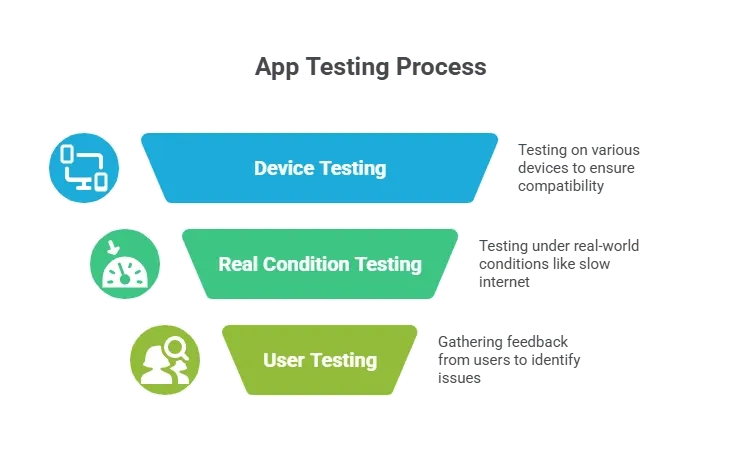
Testing the App
Testing keeps small problems from becoming big ones. Skipping this step often leads to poor reviews and lost users.
Publishing the App
Publishing is exciting, but it requires preparation. Each app store follows its own review rules.
The usual steps include:
- Creating an app store listing
- Writing a clear and friendly description
- Uploading screenshots and icons
- Uploading the APK file for Android
- Submitting builds for iOS apps
The Google Play Store and Apple App Store review apps for quality, safety, and content rules. After approval, publish your app and monitor downloads.
Once live, promotion keeps the app visible. Push notifications, updates, and reminders about upcoming events help maintain user interest and engagement.
Creating Apps without Coding
Creating apps without coding now feels natural. Visual builders handle screens, logic, and data using simple controls.
Common features found in no-code platforms include:
- Drag-and-drop builders
- Ready core features like login and forms
- Cloud storage for data
- Web and mobile publishing
- Free plans for testing ideas
Many platforms support progressive web app output. These apps run in web browsers and feel close to native apps. They work across mobile and desktop without separate builds.
Some tools also allow export to Android Studio or Visual Studio. This gives developers flexibility to add advanced logic later without rebuilding the app from scratch.
App Builder Comparison
| Feature | No-Code App Builder | Custom Development |
|---|---|---|
| Coding Required | No | Yes |
| Cost | Free to low | High |
| Time | Days or weeks | Months |
| Platform Support | Android, iOS, web | Single platform |
| Updates | Easy | Slow |
| Community Support | Strong | Limited |
This comparison explains why many users start with app builders, especially when speed, budget, and flexibility matter.
Rocket.new for Fast App Creation
Rocket.new supports fast app building through visual tools made for beginners and growing teams.
Rocket.new now brings powerful app building right to your phone with Rocket Mobile, so that users can create and edit apps on the go. This means you can work on your project from anywhere, not just at a desk.
Key features include:
- Build and edit full apps from your mobile device
- Start new ideas using natural language prompts
- Generate screens, features, and data flows in minutes
- Sync projects across web and mobile seamlessly
- Manage databases, integrate services, and track progress from your phone
Rocket Mobile brings the full workflow with you, so you can maintain momentum and respond to feedback in real time.
Build an App on Mobile with Confidence
Learning to build a mobile app now feels far more approachable than before. Clear ideas, friendly platforms, and strong community support make app building possible without great technical skills. With modern app builder tools, users can create, test, publish, and improve apps across Android, iOS, and web while staying flexible and focused on users.