
What helps developers work faster without getting buried in repetitive tasks? AI tools now support smoother coding, smarter suggestions, and quicker setup, giving teams more time to focus on logic, quality, and real progress.
What helps a team stay on top of daily work without drowning in tasks?
Recent reports indicate that companies using AI in internal processes see up to 40% faster operational output. That kind of gain speaks loudly about where organizations are heading.
This topic matters for anyone looking to keep workflows organized, balanced, and less stressful. As soon as routine work slows everyone down, teams have more space to create value.
Why AI Makes Internal Tooling Feel Smoother?
Internal tools sit at the heart of daily operations.
They guide workflows, track data, connect systems, and support business teams that need reliable apps to keep everything moving. Yet many organizations still rely on long cycles filled with custom code and delays due to developer availability. When AI-powered platforms and low-code approaches are introduced, everything feels lighter.
The shift happens because AI models understand plain language. They convert ideas into apps, automate workflows, and simplify logic that once required days of engineering time. And since these tools reduce coding required, teams can build internal tools in just a few clicks. That means users move faster while engineers focus on higher-priority production work.
The Old Weight of Traditional Software Development
Traditional software development demands a long chain of work. A group sends a request. Developers scope the logic, write code, review changes, test features, deploy updates, and fix issues. During that long journey, processes change, priorities shift, and someone usually asks, “Is this still what we need?”
That model makes sense for large-scale production systems. But it becomes heavy for the smaller apps that support admin panels, dashboards, mobile screens, password resets, or internal software tasks that business teams use daily. Those smaller pieces keep the organization functioning, yet they end up waiting behind bigger projects.
So AI tools and low-code options offer a smoother path.
How AI Reduces Friction in Internal Tool Creation?
AI models can describe features, suggest components, and organize logic with surprising clarity.
So when someone types instructions in plain English, the system helps create apps that match those ideas.
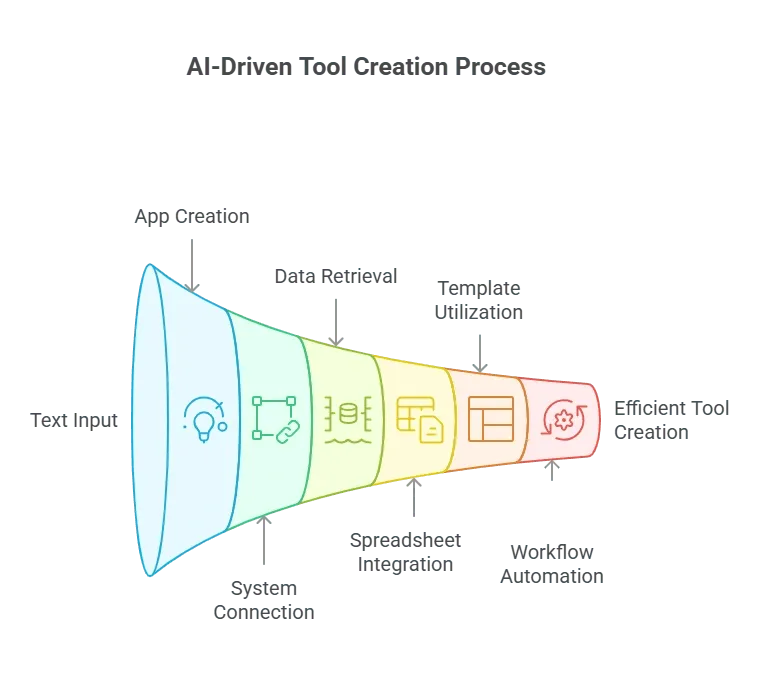 These platforms turn complex steps into clearer, friendlier ones. And since they run on a low-code platform, everyone can build apps without extensive development resources.
Internal Software Meets Modern AI Tools
Internal software often handles sensitive data. It must provide strong security without slowing work. AI-powered systems now include features such as audit logs, granular permissions, audit trails, and secure deployment paths. That means teams no longer need to write every security rule from scratch.
The new flow usually looks like this:
- Describe the workflow
- Pick the right components
- Add logic
- Test inside low code
- Deploy inside one platform
With this setup, users build tools that mirror real-world processes and maintain security from the start.
Old vs New
| Category | Traditional Approach | AI Supported Approach |
|---|---|---|
| Time to build apps | Weeks or months | Days or hours |
| Coding required | High | Low code |
| Updating logic | Slow | Fast |
| Security setup | Manual | Built-in |
| Handling data | Manual scripts | Direct connectors |
| Number of teams involved | Many | Small |
This shift provides developers with more space, gives business teams greater control, and helps the entire organization stay aligned.
Admin Panels Without the Stress
Admin panels show up everywhere. They help business teams track what is happening, manage data, and fix issues before they grow. With AI tools inside a low-code environment, creating admin panels becomes much easier. You can start building from templates, add components, connect systems, and set the logic that fits your processes.
Common use cases include:
- Viewing user data
- Handling password resets
- Managing custom development tasks
- Triggering workflows
- Adjusting system states
Instead of waiting on engineers, teams open a panel, make quick changes, and keep the work flowing smoothly.
App Building Across Business Teams
Business teams want tools that work the way they work. App building on a low-code platform helps them start faster. They can create dashboards for operations, mobile interfaces for fieldwork, and internal tools to organize projects.
Many teams begin with templates and add components that handle forms, tables, and logic. Since these tools integrate with spreadsheets, open-source services, and a database, everything fits together without starting from scratch.
The best part is that these apps stay aligned with what business users need every day.
AI Agents and Workflow Automation
Next comes AI agents. They help automate workflows by monitoring data, routing tasks, and making simple decisions based on logic rules. When teams automate workflows with AI agents, they save hours otherwise spent on repetitive tasks.
These agents can:
- Route tickets for a customer support team
- Pull data from spreadsheets
- Connect new systems
- Trigger logic when conditions change
Automation becomes a natural part of internal tools, and teams move faster without feeling rushed.
Connecting Complex Systems Without Pain
Many organizations juggle systems that don’t talk easily. They use spreadsheets, internal software, a database cluster, open source tools, and web APIs. So AI platforms help connect these systems by suggesting components, mapping data flows, and keeping logic predictable.
Then teams can:
- Pull data from a REST API
- Connect tables inside a database
- Save results in the right place
- Track actions with audit logs
- Build tools that match their processes
This keeps projects moving even as systems become increasingly interconnected.
Rocket.new: Making AI Tooling Even Simpler
Rocket.new supports teams looking to build internal AI apps. It brings together natural language interfaces, low-code features, and clean components into a single platform. So teams describe what they want, connect the right systems, and automate workflows at a pace that feels natural.
Features that make Rocket.new stand out:
- Prompt-based full-stack app generation: Describe your idea in plain English, and Rocket.new builds the frontend, backend, and integrations automatically.
- Figma to code conversion: Turn Figma designs into responsive web or mobile code.
- Built-in backend and authentication: Get database schemas, user auth, API endpoints, and security without manual setup.
- Cross-platform output: Build web apps or mobile apps for iOS and Android from one project.
- One-click deployment with hosting: Deploy instantly with support for custom domains.
- Full code export and ownership: Access and keep all generated code for editing or further development.
- Command-driven actions: Use “/” to run actions and “@” to target edits directly from chat.
Rocket.new serves teams that want practical tools without waiting on long development cycles.
Security That Fits Fast-Paced Teams
As apps grow, security matters even more. Platforms now include robust security features that protect sensitive data without slowing work. Teams can rely on audit trails, granular permissions, testing environments, and safe deployment paths.
This ensures that internal tools stay both safe and flexible.
The Changing Role of Developers
Developers still guide architecture, refine code, and support production. But they no longer carry every internal request. Now they partner with business teams who use low-code tools to create early versions of apps. Developers then improve the code or handle advanced logic.
This makes communication smoother. A product manager can describe workflows in plain English, and developers adjust only the parts that need deeper engineering.
Templates, Components, and Faster Starts
Low-code platforms provide templates that help teams start building quickly.
That includes:
- Admin panels
- Dashboards
- Mobile apps
- Data review screens
- Internal workflows
Teams then add components for forms, tables, logic, and automation. Since they don’t begin from scratch, projects move faster while staying organized.
Keeping Everything Running Smoothly
To support all this, a platform must offer reliable testing, clear production paths, strong security, flexible components, and stable data handling. When teams get those features, they feel comfortable building tools that evolve with their processes.
The Future of Building Internal Tools With AI
Teams now need apps that adapt quickly to changing processes. Low-code platforms, AI models, AI integrations, and friendly components offer a cleaner, more direct path. This shift helps users create apps, manage workflows, and provide business logic in ways that feel natural. So building internal tools with AI becomes a smoother experience for everyone involved.
Table of contents
- -Why AI Makes Internal Tooling Feel Smoother?
- -The Old Weight of Traditional Software Development
- -How AI Reduces Friction in Internal Tool Creation?
- -Internal Software Meets Modern AI Tools
- -Old vs New
- -Admin Panels Without the Stress
- -App Building Across Business Teams
- -AI Agents and Workflow Automation
- -Connecting Complex Systems Without Pain
- -Rocket.new: Making AI Tooling Even Simpler
- -Security That Fits Fast-Paced Teams
- -The Changing Role of Developers
- -Templates, Components, and Faster Starts
- -Keeping Everything Running Smoothly
- -The Future of Building Internal Tools With AI