
A structured output from Solve on Rocket.new actually look like a publication-grade document or interactive slide deck, complete with an executive summary, evidence-backed analysis, comparison matrices, and actionable recommendations, all formatted for stakeholders to review and act on immediately. Instead of sifting through raw research, you type your question once and get a board-ready output.
What does a structured output from solve on Rocket.new actually look like when it is ready to present?
You type a business question. A few minutes later, Rocket hands you something that looks like it took a consultant three days to put together. That is Solve doing its job.
Solve is Rocket's research engine. It takes complex business questions, runs parallel research streams across live data, and returns a structured output ready to drop into a stakeholder meeting or hand off to a builder. No raw notes. No bullet-point dumps. A finished, formatted deliverable.
According to Rocket's own data, 1.5 million people have tried Rocket across 180 countries. A big part of that pull comes from Solve, because it answers the question most AI tools skip entirely: not just how to build, but what to build and why.
What is Solve on Rocket.new, and How Does This AI Tool Work?
Solve is the research and strategic intelligence feature inside the Rocket platform. You type any business question in natural language, and Solve runs a full research pipeline to generate a structured, evidence-backed report.
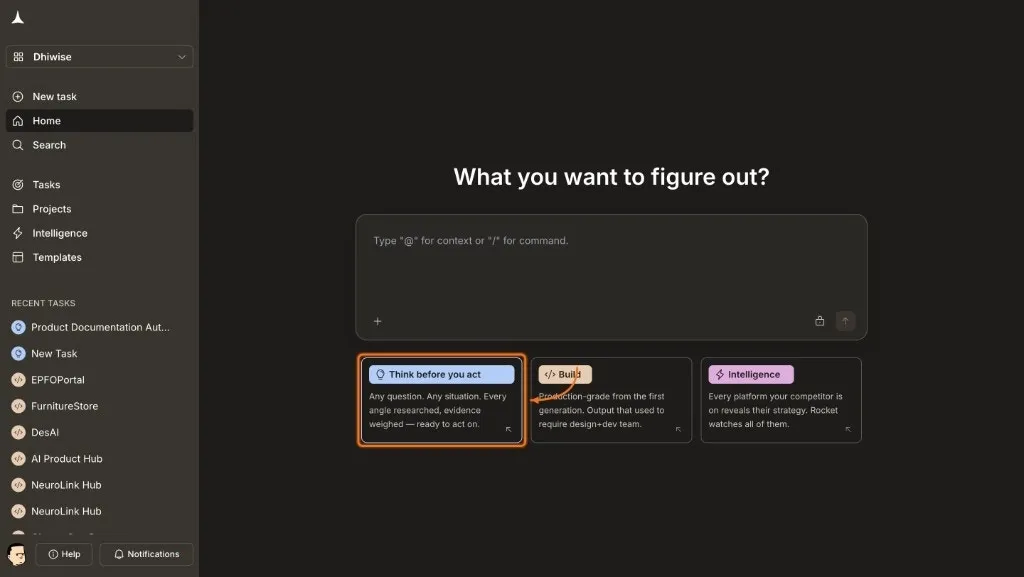 Here is what the process actually looks like:
-
You type a question, for example: "What is the market opportunity for a B2B invoicing tool for freelancers in Southeast Asia?"
-
Solve classifies the question into one of nine intelligence types automatically.
-
If the prompt is ambiguous, Solve asks clarifying questions before starting.
-
The question gets broken down into separate research dimensions.
-
Each dimension runs as a parallel agent stream, pulling from live data sources.
-
All streams merge into one structured report with a summary, analysis, evidence, and recommendations.
The output is not a chatbot reply. It is a complete research deliverable, formatted for clarity and speed, with every section standing on its own.
👉Head to Rocket.new, sign up, run a Solve task, and request your presentable report in one prompt.
What Does the Structured Output Actually Include?
When a Solve report is ready, it follows a decision-first layout for readers. The most critical information, including the recommendation, analytics, and key findings, sits at the top. You do not need to read 40 pages before you get the point.
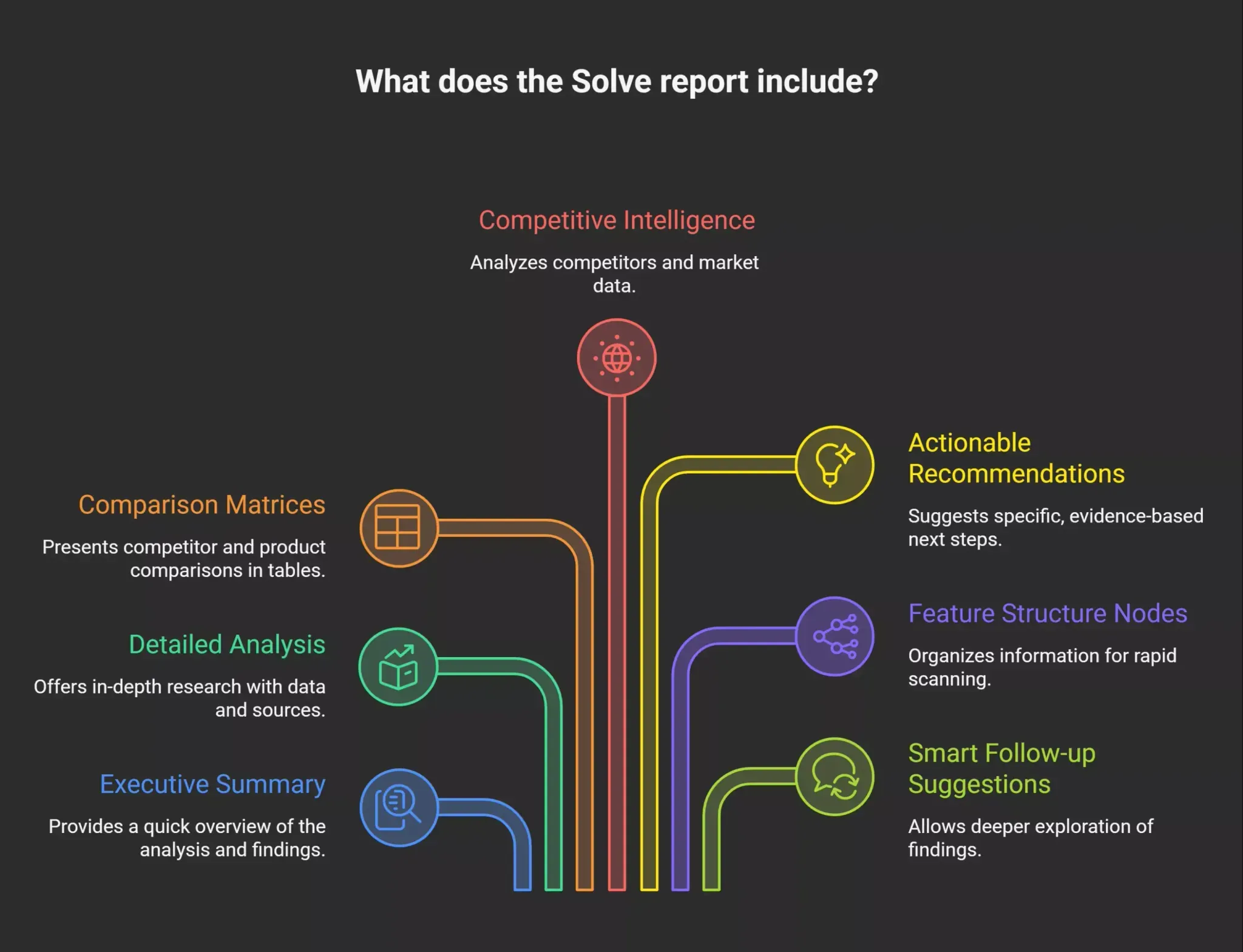 A finished Solve output typically includes:
-
Executive summary: A condensed overview of the analysis and top-line findings, written for quick review.
-
Detailed analysis sections: Each research dimension gets its own section, with supporting data and source references.
-
Comparison matrices: Competitor and product comparisons in table format, so you can do a side-by-side review without digging through paragraphs.
-
Competitive intelligence: Analysis of competitors and market data, including positioning, pricing, and any notable patterns.
-
Actionable recommendations: Specific, evidence-based suggestions tied directly to the research. Not generic next steps. Real decisions you can act on.
-
Feature structure nodes: Rather than long linear text, the output is organized so you can scan and decide rapidly.
-
Smart follow-up suggestions: Interactive elements that let you drill deeper into any finding without re-framing the whole task.
The goal of every output is to connect research to app building. It transforms ideas into an application structure, logic, and code when you are ready to move into the Build stage, all on one platform.
How Does Solve Format its Output for Stakeholders?
Once your report is complete, Solve lets you generate a presentable version in one step. You type a single prompt like "Generate a polished HTML report" or "Create a slide deck from this report," and Rocket produces the output automatically; it's that simple.
The platform selects the most appropriate theme based on your content type. You can override it if you want something specific.
Document output options:
| Theme | Best For |
|---|---|
| Executive | Board presentations and investor updates |
| Technical | Data-heavy reports with tables and diagrams |
| Academic | Research papers and literature reviews |
| Minimal | Short summaries and internal memos |
Presentation output options:
| Theme | Best For |
|---|---|
| Corporate | Professional stakeholder decks |
| Dark | Screen presentations in low-light settings |
| Gradient | Keynotes requiring visual impact |
| Minimal | Maximum readability, pure white layout |
| Vibrant | Modern, energetic presentations |
The presentation format runs in any browser, with keyboard, mouse, and touch navigation. Each slide has a unique URL, so you can deep-link directly to any part of the deck.
What Export Formats Does Solve Support?
Every output is versioned. Each time you generate a new presentable report, a new version appears in the Documents panel. You can export in several formats depending on how you plan to use the output.
| Format | Output Type | Use Case |
|---|---|---|
| Document HTML | Paginated HTML file | Share as a link or embed in internal tools |
| Presentation HTML | Interactive slide deck | Present directly in the browser |
| Static document | Print or distribute as a fixed-layout file | |
| PPTX | PowerPoint file | Edit further in PowerPoint or Google Slides |
| PRD | Product requirements document | Hand off research as a structured product spec |
The PDF option is useful for stakeholders who prefer a printed format. The PRD format is especially useful if your output is going straight into the build process, because it structures the research as a product spec that feeds directly into Rocket's Build feature.
How Does Solve on Rocket.new Connect to Actually Building an App?
This is where Rocket separates itself from standalone research tools or vibe coding tools that start at line one of code with no prior thinking.
From Research to Build Without Switching Tools
Solve's output is designed to feed directly into Build. The feature structure is organized as a blueprint for app development. Once you have a Solve report, the research, decisions, and recommendations carry into the build context automatically. You are not copying and pasting findings into a separate tool or explaining the background for the call to another system.
From a Single Prompt to a Working App
Rocket.new generates applications by interpreting natural language prompts and producing fully functional web and mobile apps, rather than just wireframes. The platform can create production-ready applications in as little as 10 to 15 minutes, depending on the complexity of the project. And because Solve happened first, the build starts from validated thinking, not guesswork.
Web Apps and Mobile Apps from One Place
Rocket.new supports the generation of both web apps and mobile apps from a single prompt, allowing for a seamless transition between different platforms. On the backend, Rocket automates setup entirely. It configures services like Supabase for database management and authentication without requiring manual setup. The platform supports zero setup integrations for Supabase, Stripe, Resend, SendGrid, Brevo, Mailchimp, and Twilio, handling boilerplate code while letting teams keep control over business logic.
Why Vibe Coding on Rocket Beats Most Low Code Tools
This is what makes vibe coding on Rocket different from most low code tools. In low code environments, you still spend significant time wiring together services and fixing broken logic. With Rocket, the backend infrastructure is treated as a first-class part of every project from the start. You focus on what to build. Rocket takes care of how it gets built.
Who Uses Solve on Rocket.new? Real Examples by User Type
| User Type | What They Use Solve For | How the Output Helps |
|---|---|---|
| Startup founder | Validating a market before committing to build | Structured report with market size, competitor analysis, and a clear go or no-go recommendation |
| Product manager | Prioritizing features for a roadmap decision | Evidence-backed comparison of user needs with a ranked feature list |
| Consultant or strategist | Preparing a client-facing deliverable | Board-ready HTML or PPTX output with executive summary and recommendations |
| Operator or analyst | Running competitive intelligence before a pitch | Comparison matrices with competitor positioning, pricing, and messaging |
| Developer or builder | Getting a PRD before starting a working application | Structured product requirements document that feeds directly into the build |
Across all these roles, the common outcome is the same. Research turns into a ready-to-present structured output, and that output turns into decisions, working apps, or both.
Does Rocket.new Offer Free Plan? What Plan Do You Need for Solve?
Rocket.new offers a free plan that gives you 20 one-time credits and access to all Build capabilities. It is a solid starting point for exploring the platform.
Solve is available on the paid plans. The Solve plus Build plan starts at $250 per month and includes 1000 monthly credits, board-ready output formats, smart follow-up suggestions, and context ingestion. The free tier covers Build only, so if you want the full research-to-build pipeline, you will need to step up to a paid plan.
Credits never expire, and there are no per-seat fees. Your whole team can be on the platform without the cost scaling by headcount.
What Do Real Users Say About Solve Outputs?
The community response to Rocket.new has been broad, covering everything from rapid app building to the platform's ability to move from idea to a working product fast.
One user who built a multi-feature application with real data models, authentication flows, and business logic noted that:
"The output was structured with clean architecture and sensible defaults, and that the platform compressed weeks of work into hours while cutting development budget significantly."- Trustpoint
Another user, who had avoided coding for years, described discovering Rocket.new through an article about vibe coding and building a working app to manage short-term rental properties by simply describing what they wanted in plain English.- Trustpoint
For Solve specifically, Rocket's own documentation and the platform's Discord community are the best places to see real outputs and talk to people using the research-to-build pipeline. You can join the conversation at the Rocket Discord.
So, What Does a Structured Output from Solve on Rocket.new Actually Look Like When It Is Ready to Present?
It looks like a finished document, not a draft. The answer to what a structured output from solve on Rocket.new actually look like when it is ready to present is this: a paginated, themed, stakeholder-ready report with an executive summary, evidence sections, comparison tables, recommendations, and export options including PDF, PPTX, and PRD formats, all generated from a single prompt.
You type the question. Rocket does the research, formats the output, and hands you something you can walk into any room with. Go to Rocket.new and run your first Solve task to see it for yourself.
Table of contents
- -What is Solve on Rocket.new, and How Does This AI Tool Work?
- -What Does the Structured Output Actually Include?
- -How Does Solve Format its Output for Stakeholders?
- -What Export Formats Does Solve Support?
- -How Does Solve on Rocket.new Connect to Actually Building an App?
- -From Research to Build Without Switching Tools
- -From a Single Prompt to a Working App
- -Web Apps and Mobile Apps from One Place
- -Why Vibe Coding on Rocket Beats Most Low Code Tools
- -Who Uses Solve on Rocket.new? Real Examples by User Type
- -Does Rocket.new Offer Free Plan? What Plan Do You Need for Solve?
- -What Do Real Users Say About Solve Outputs?
- -So, What Does a Structured Output from Solve on Rocket.new Actually Look Like When It Is Ready to Present?