
What this post covers: How Rocket's Visual Edit system uses a live dependency graph — capturing 4 edge types across style inheritance, layout containment, data flow, and responsive scope — to apply surgical, component-level changes to AI-generated code without regenerating the full app, breaking cascades, or losing manual refinements made since first generation.
The Problem With "Just Regenerate It"
Every AI builder lets you build something. The divergence comes at step two: iteration.
You build an app. You spend twenty minutes tweaking the header layout. You adjust the color palette manually. You move a card component. Now you want to change the size of a primary CTA button.
Every AI builder I've seen responds to this the same way: regenerate the whole app.
The result: your twenty minutes of manual refinements are gone. The model produces something new that incorporates your text instruction but doesn't know about the heading adjustment, the card placement, the color you carefully dialed in. It can't — those changes lived in the output, not in the prompt history.
This is a real architectural problem. Not a UX annoyance. An architectural problem that every AI builder currently solves by pretending it doesn't exist.
We built a different answer: surgical editing. Change exactly what was asked. Preserve everything else.
Why Changing One Component Is Harder Than It Sounds
The reason other builders regenerate is that scoped editing in AI-generated code is genuinely difficult.
Take a seemingly trivial change: make the primary CTA button larger. Here's what that actually touches:
- The button's own padding and font-size
- The button's container layout — if it's in a flex row, enlarging it shifts siblings
- The responsive breakpoint where that row stacks to a column — the breakpoint threshold may now be wrong
- Tailwind utility classes that may be shared with other components in the codebase
- CSS variables that may feed more than this one component
Naively applying the change — find the button, update the size — works 40% of the time. The other 60%, something downstream breaks visibly. Maybe not on desktop. Maybe only in the 375px viewport. Maybe only when the user is logged in and a conditional element appears.
The system needs to know about the cascade before it applies anything.
The Dependency Graph
The core of Visual Edit is a dependency graph built from the generated codebase at first-generation time and kept current across every subsequent change.
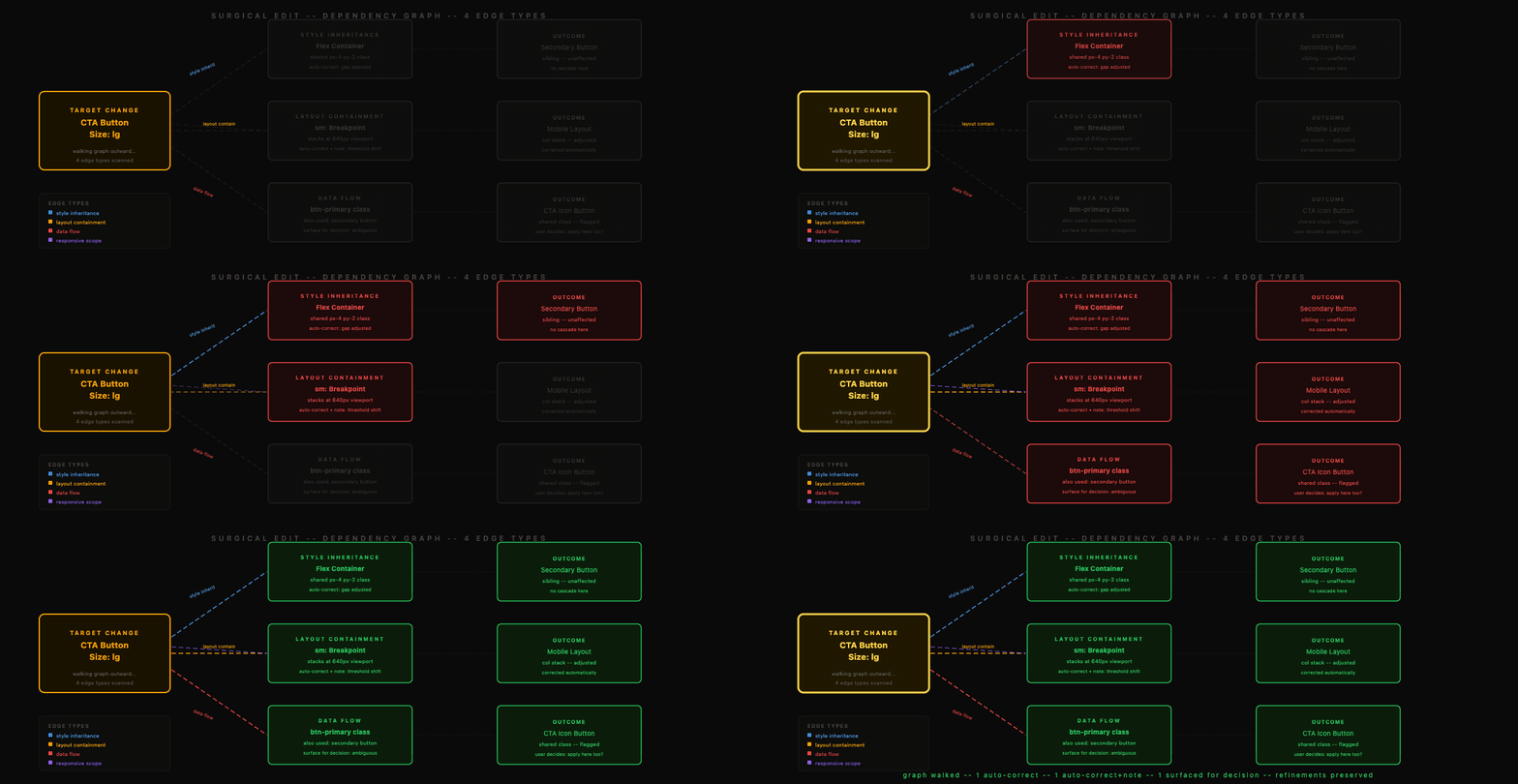
The graph captures four types of relationships:
1. Style inheritance — which components share CSS variables, which Tailwind classes are shared across components, which values are derived from a parent's computed property.
2. Layout containment — which components are flex/grid parents, which children are sized relative to the parent, which breakpoints are active at each nesting level.
3. Data flow — which components receive props from a shared state, which conditional renders depend on a parent's state, which components are co-located in a context that would be affected.
4. Responsive scope — which breakpoints affect this component, what layout behavior changes at each, what other components change layout at the same breakpoints.
When a change request arrives — "make the CTA button larger" — the system doesn't apply it immediately. It walks this graph from the target node outward, identifies every node reachable through a dependency edge, and classifies each as: unaffected, automatically correctable, or requires a decision.
The change is applied only after this mapping is complete.
How the System Handles the Cascade
Different types of downstream effects are handled differently:

Auto-corrected silently: A sibling in a flex row that needs its margin adjusted because the button grew. The system knows the correct adjustment from the layout containment graph — it applies it with the primary change, no user input needed.
Auto-corrected with note: A responsive breakpoint that needs to shift because the component is now wider at 768px. The system applies the corrected breakpoint and surfaces a note: "Breakpoint at 768px adjusted — CTA was overflowing on tablet."
Surfaced for decision: A Tailwind class shared between the CTA and a secondary button that the user probably doesn't want to change. The system flags it: "This class also applies to the secondary action button — apply change there too?"
The goal: the user asked to change one thing. They should get exactly that change, plus the minimum set of downstream corrections that prevent a broken state, plus explicit visibility into anything ambiguous.
The CSS-vs-Structural Distinction
Not every change requires touching the model at all. This is where precision matters.

| Change Type | Dependency Impact | LLM Required | How It's Handled |
|---|---|---|---|
| Color value update | Style inheritance only | No | Direct property substitution |
| Spacing / padding | Style inheritance + possibly layout | No (if isolated) | CSS variable or class swap |
| Font size | Type scale, possibly layout reflow | No (if isolated) | Direct substitution |
| Component size | Layout containment + breakpoints | Sometimes | Graph traversal, auto-correct |
| Component swap | Data flow + layout + style | Yes | Scoped LLM call on subgraph |
| Layout restructure | Full containment subtree | Yes | Scoped LLM call on subtree |
| Adding new behavior | Data flow + new dependencies | Yes | Scoped LLM call + graph update |
For CSS-level changes — a color hex, a spacing value, a font size on an isolated component — the system makes the modification directly. No model call. No tokens consumed. The dependency graph tells us there's no cascade to handle.
For structural changes — swapping a component, changing a layout pattern, adding behavior — the model is involved, but scoped. The input to the model is not "here is the entire codebase, please make this change." The input is the affected subgraph: the target component, its direct dependencies, its parent context, and the specific constraint being modified. Everything outside that subgraph is explicitly marked as out-of-scope.
This scoping is what makes structural edits precise rather than probabilistic. The model is reasoning about thirty lines of context, not three thousand.
Preserving User Refinements
The dependency graph also solves the refinement preservation problem.
When the system maps a change, it first reads the current state of the codebase — not the originally generated state, but the current state including every manual refinement the user has made. The graph is built from what's actually there.
When the model is called for a structural change, the affected subgraph it receives already reflects the user's refinements. The model is not re-generating from the original prompt. It is modifying the current code, within the current context.
This means: if you moved a card component manually, then asked to change the data it displays, the card stays where you put it. The system is editing your refined version, not regenerating from scratch.
A Concrete Example
Request: "Make the hero CTA button larger on mobile."
Step 1 — Target identification. System identifies the CTA button component, locates its source in the codebase, finds the mobile Tailwind classes controlling its size.
Step 2 — Dependency traversal. Graph walk from the button node: the button is in a flex container with a secondary link; the container stacks to column at sm: breakpoint; the column layout has explicit gap values; no shared CSS variables with other components; no shared Tailwind classes with siblings.
Step 3 — Impact classification. Flex siblings: auto-correctable gap adjustment. No breakpoint shift needed for the stacking — the change is confined to mobile size, the breakpoint itself is correct. No data flow implications. No LLM needed.
Step 4 — Application. Update mobile size classes on button. Adjust gap in parent container. Preview updates.
Total: no model call. Zero tokens. Precise change applied with one automated correction. User's other refinements to the hero section — the custom headline they changed, the background image they swapped — untouched.
What This Looks Like in the System
Visual Edit sits in the same Build layer as the slash commands and chat I described yesterday. The same codebase. The same project session. The dependency graph is built once at first generation and maintained through every subsequent edit — whether that edit came from chat, a command, or Visual Edit.
This is intentional. The system doesn't have separate state for each interaction mode. A change made via Visual Edit is reflected in the graph the command reads. A change made by a command updates the graph Visual Edit walks. The session is the source of truth for the full dependency state of the project.
The framing "surgical editing" isn't a product metaphor. It's an engineering description. A surgical cut is precise, bounded, and leaves everything it doesn't need to touch intact. That's the specification the system is built against.
Key Takeaways
- Rocket's Visual Edit is built on a live dependency graph captured at first-generation time and updated after every subsequent edit — from chat, slash commands, or direct visual changes.
- The graph tracks 4 edge types: style inheritance (shared CSS variables and Tailwind classes), layout containment (flex/grid parent-child relationships and breakpoints), data flow (props, shared state, conditional renders), and responsive scope (which breakpoints affect which components).
- Before applying any change, the system walks the dependency graph from the target node outward and classifies every reachable node as unaffected, auto-correctable, or requiring a decision — three-way triage.
- CSS-level changes (color values, isolated spacing, isolated font sizes) require zero LLM calls — the dependency graph confirms no cascade exists and the system applies the change directly.
- Structural changes (component swaps, layout changes, new behavior) do use the LLM, but scoped: the model receives the affected subgraph of ~30 lines rather than the full codebase of ~3,000 lines.
- Manual user refinements are never lost — the system always reads and modifies the current codebase state, not the originally generated state, meaning moved components, adjusted colors, and changed copy are preserved across all subsequent edits.