
What drives rapid app development without complexity? An instant app creation platform lets teams build quickly, test early, and adapt efficiently, supporting shorter cycles while maintaining clarity and productivity.
What makes fast development feel almost effortless?
Recently, many companies have moved toward shorter cycles and lighter workloads, and this shift shows no signs of slowing.
But, how do you keep that pace without losing clarity?
Teams want tools that help them build sooner, test earlier, and stay flexible. This is where an instant app creation platform often brings everything together, enabling a smoother flow.
Why Quick Development Matters Today?
Today’s cycles run fast.
The mobile space changes constantly, and teams adjust—from publishing an app on Google Play to refining a release for the Apple App Store or the Google Play Store. Along the way, they handle analytics, push notifications, form submissions, or map integrations using Google Maps. At the same time, they may restructure their own database or update visual flows across multiple devices.
As expectations rise, teams look for ways to keep things simple.
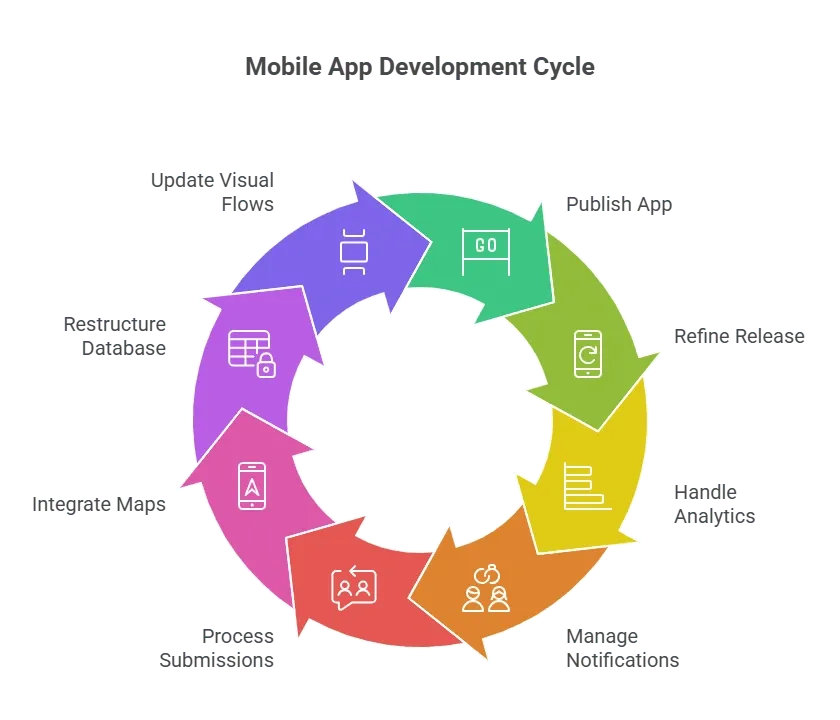 Many non-technical users want a direct path to start building without heavy software steps. They need a workspace where they can create apps, shape database flows, or add advanced logic. And when the process stays simple, they save time, reduce the maximum number of repeated steps, and move faster toward releasing a mobile app or progressive web app that feels ready for real use.
What Defines a Strong Rapid App Platform?
A strong platform keeps every step clear while remaining flexible. Teams often evaluate tools by looking at the basics:
- No code app builder performance
- Code flexibility when needed
- Clean connections across data and logic
- Smooth integration for external api or rest api
- Simple publishing for app store, apple app store, and google play
- Helpful support and an active forum
This matters because teams want stability and room to grow. They look for systems that support multiple devices, offer unlimited apps or workspaces, and provide predictable workflows from idea to launch.
How No-Code and Low-Code Shape Workflows?
Teams often blend no-code with code. They design simple apps and basic screens using no-code tools, then refine specific parts with small snippets of code. A mobile app builder makes this mix work smoothly for many groups.
For example, a finance team may use Google Sheets, a database, and layered advanced logic to build internal tools. Meanwhile, a marketing team may ship a web app using AI features, automated flows, and adjusted code elements.
This approach gives everyone room to contribute. Even when the app becomes more complex, the builder keeps the process accessible.
Key Features Teams Pay Attention To
When comparing tools, teams usually consider features that help them build apps faster and with fewer blockers.
Here’s a quick breakdown:
| Feature Type | Why It Matters |
|---|---|
| Data tools | A direct way to structure and manage data |
| Logic tools | Clear paths to add logic, build flows, and run actions |
| UI elements | Simple options to place components or introduce new elements |
| Deployment | Smooth launch steps for android, google, or apple app store |
| Output types | Publishing options for native mobile, native mobile app, web app, or progressive web app |
| Security | Reliable enterprise grade security |
| Collaboration | Tools that allow users to work together without friction |
With this foundation, teams focus on the idea rather than fighting the structure.
How Teams Use These Platforms Daily
A typical day might start with someone sketching the idea, organizing the database, and connecting an external api. Another teammate adjusts the mobile layout and prepares device views. Someone else works on functionality checks, layout spacing, and Android updates.
Later in the process, a developer adds advanced logic, tests rest api calls, or sets up AI agents. Another teammate edits a single line of code, improves transitions, or fine-tunes actions through app actions.
This shared method lets everyone contribute. And since the coding required stays low, the workflow remains smooth. Teams can test the mobile app across multiple devices without rewriting the product.
Community Insight
Communities often guide teams in unexpected ways. On Reddit, a user in r/NoCode shared:
“I switched from a traditional stack to a drag-and-drop builder, and my team delivered an internal app in a week instead of a month.”
The Expanding Role of AI
AI now plays a major role in modern building. Many teams use AI to shape screens, refine code, review data, or automate layout improvements. A growing number of tools include AI features that help generate workflows, suggest improvements, or build small automation blocks.
Some platforms introduce AI agents that perform tasks behind the scenes. Others rely on AI-assisted troubleshooting to identify layout or logic issues. Since these tools operate within the app builder, the process stays fluid.
Publishing for Every Output Type
Teams often need multiple formats. Some need a native mobile app. Others prefer a lighter progressive web app. Larger dashboards may need a full web app. And certain teams need native mobile layouts tailored for each device.
Modern builders let teams publish across these outputs with ease. That flexibility helps maintain a steady rhythm without forcing major rewrites for every format.
Rocket.new: An Excellent Vibe Solutioning Platform
Many teams explore Rocket.new when comparing rapid development tools. It offers a clean workspace that supports non-technical users while still giving developers space to add code when they want to. Its structure remains approachable, making it suitable for small, growing, and more technical teams that want to move quickly.
Features
- Natural-language app generation: Describe what you want in everyday language and get a complete full-stack app built for you.
- Design-to-app conversion: Bring in a Figma design and turn it into a working web or mobile app in moments.
- Automatic backend setup: Let Rocket handle databases, authentication, APIs, and infrastructure without any manual coding.
- One-click deployment: Push your app live on the web or mobile without touching DevOps or setup steps.
- Export full codebase: Download a clean, editable codebase so you keep full control and long-term flexibility.
- Starter templates and libraries: Launch dashboards, MVPs, landing pages, or internal tools faster with ready-made templates.
Publishing Across Stores
Launching across stores often feels intimidating. Guidelines for Google Play, the Google Play Store, the Apple App Store, and the wider App Store can be strict. Even so, modern builders guide teams through the required assets, versions, and checks.
Once the app is live, teams review data, adjust functionality across devices, and update their product regularly. With helpful support teams, troubleshooting becomes far easier.
Choosing the Best Instant App Creation Platform
Choosing the right platform comes down to clarity, pace, and how well it supports your goals. The best instant app creation platform blends strong data control, flexible logic, reliable AI help, supportive publishing paths, and a workspace that keeps everyone aligned. With the right fit, ideas move into real-world use quickly and with far less friction.
Table of contents
- -Why Quick Development Matters Today?
- -What Defines a Strong Rapid App Platform?
- -How No-Code and Low-Code Shape Workflows?
- -Key Features Teams Pay Attention To
- -How Teams Use These Platforms Daily
- -Community Insight
- -The Expanding Role of AI
- -Publishing for Every Output Type
- -Rocket.new: An Excellent Vibe Solutioning Platform
- -Features
- -Publishing Across Stores
- -Choosing the Best Instant App Creation Platform