
Rocket.new supports 26+ built-in integrations, including Stripe, Supabase, OpenAI, HubSpot, Webflow, and Razorpay. Two connector types keep things organized: workspace-level OAuth (connect once, all projects) and task-level API keys (per build). An API importer extends this to any REST service.
Rocket supports 26+ built-in integrations when building an app, covering payments, AI models, databases, email, analytics, forms, scheduling, CRM, and deployment. Two connector types keep credentials organized: workspace-level OAuth connectors shared across all projects and task-level API key connectors scoped per build.
An open API importer extends this to virtually any REST service. All generated web apps are built in Next.js TypeScript; mobile apps in Flutter.
Does Rocket Support the Integrations My App Needs?
Yes. Rocket supports faster app development by generating full-stack applications from a natural language prompt instead of requiring extensive manual coding, and it connects to 26+ services out of the box. The full list spans payments (Stripe, Razorpay), AI models (OpenAI, Anthropic, Gemini, Perplexity), databases (Supabase, Airtable, Strapi, Directus, Webflow), email (Resend, SendGrid, Brevo, MailerLite, Mailchimp, Twilio), analytics (Google Analytics, Mixpanel), forms (Typeform, Tally), scheduling (Calendly), CRM (HubSpot), productivity (Google Workspace, Notion, Linear, Confluence, Azure DevOps), and design and deployment (Figma, GitHub, Netlify).
For anything not on this list, the API importer connects to any REST service from a Postman collection, cURL command, or OpenAPI/Swagger spec.
This article covers the Build pillar of Rocket specifically. Rocket also includes Solve (AI-powered business research) and Intelligence (continuous competitive monitoring), both of which share context with Build so research flows directly into what gets generated.
How Rocket Organizes Connectors: Workspace-Level vs Task-Level
Before getting into specific services, it helps to understand how Rocket organizes its connectors. There are two types.
- Workspace-level connectors
- Task-level connectors
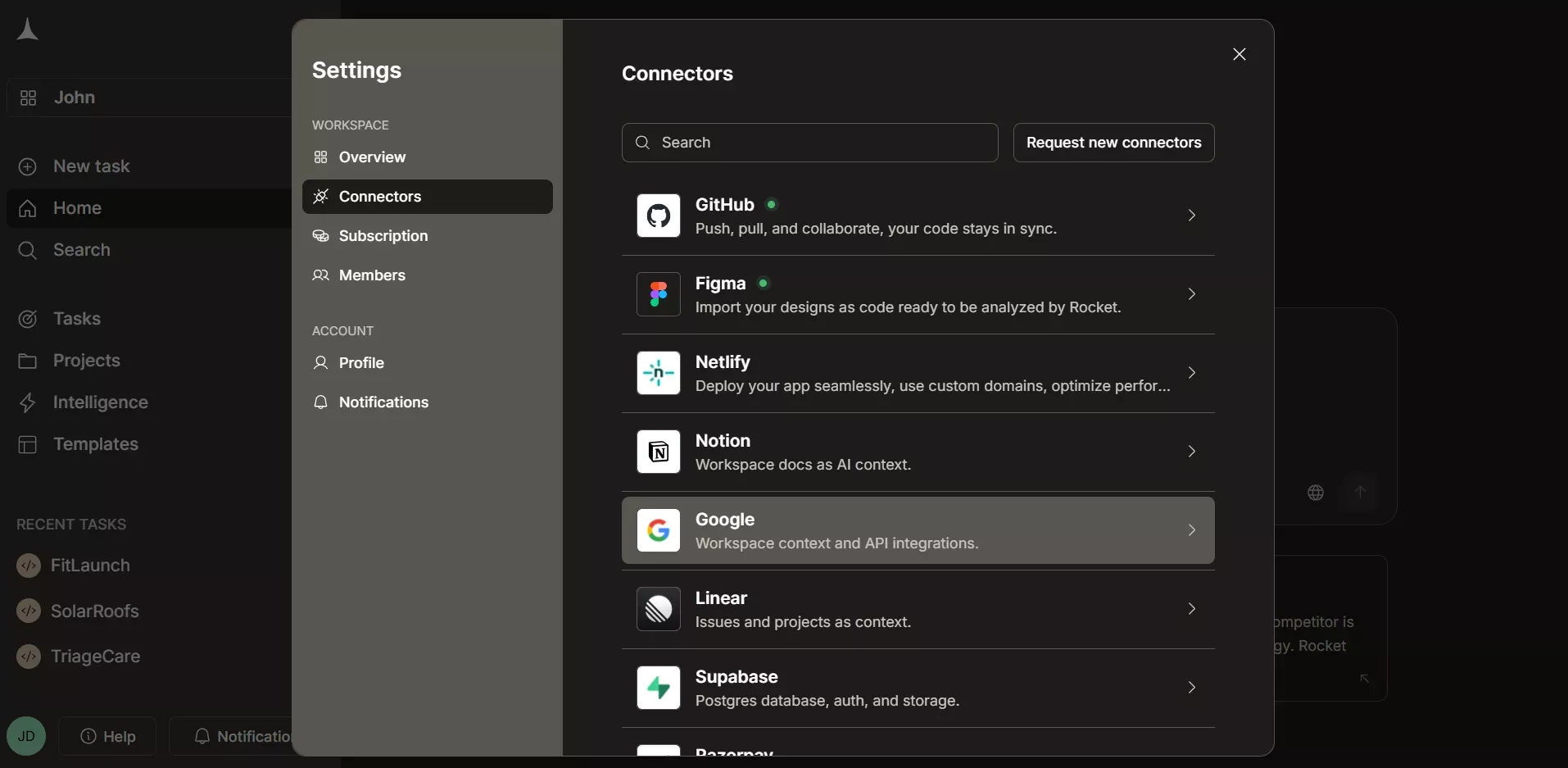
Rocket.new organizes 26+ integrations into two tiers: 14 workspace-level OAuth connectors shared across all projects, and task-level API key connectors scoped per build.
Workspace-level connectors are OAuth-based services you authorize once from workspace Settings. Once connected, every project in your workspace can access them. These include Notion, Google Workspace, GitHub, Supabase, Figma, Netlify, Airtable, Linear, Mailchimp, Typeform, Calendly, Razorpay, Webflow, and Confluence, totaling 14 connectors.
Task-level connectors are connected per task using an API key. You paste your key directly inside the Build environment, and each task stores its own credentials independently. Services like Stripe, OpenAI, Anthropic, Resend, and Google Analytics fall into this category.
Rocket.new organizes 26+ integrations into two tiers: 14 workspace-level OAuth connectors shared across all projects, and task-level API key connectors scoped per build.
Rocket Integration Stack at a Glance
| Category | Built-In Connectors | Also Available via API Importer |
|---|---|---|
| Payments | Stripe, Razorpay, AdSense | PayPal, Square, Paystack, Paddle, Lemon Squeezy |
| Email and Messaging | Resend, SendGrid, Brevo, MailerLite, Mailchimp, Twilio | Mailgun |
| AI Models | OpenAI, Anthropic, Gemini, Perplexity | Together.ai, Cohere, OpenRouter, Grok, Fal AI |
| Databases and CMS | Supabase, Airtable, Strapi, Directus, Webflow | Firebase, Shopify |
| Analytics | Google Analytics (GA4), Mixpanel | PostHog, Plausible, Tableau, Power BI |
| Forms and Scheduling | Typeform, Tally, Calendly | Luma, Ticketmaster |
| CRM | HubSpot | Salesforce, Pipedrive |
| Productivity | Google Workspace, Notion, Linear, Confluence, Azure DevOps | Slack, Discord, Zapier, n8n |
| Design and Development | Figma, GitHub, Netlify | BuildShip, RunPod |
| Data and Media | Mapbox, YouTube, Pixabay, OpenWeather |
Does Rocket Support Stripe Payments?
Yes. Stripe is a task-level connector connected per build using your Secret key and Publishable key from the Stripe Dashboard. It handles one-time payments, subscriptions, and donations, with full sandbox testing before going live using Test mode keys.
Just describe what you need, for example, "add Stripe checkout for a $29/month pro plan with an annual discount," and Rocket builds the complete checkout experience. The generated code covers checkout completion events, invoice payments, subscription updates, and proper error handling throughout.
Stripe works best paired with Supabase for user accounts. Rocket links Stripe customers to authenticated Supabase users automatically. For a deeper look at building payment flows, see how to build a payment gateway with Stripe on Rocket.new.
Razorpay is a native workspace-level connector (OAuth-based), so you connect it once from Settings, and it is available across all tasks. It handles payments, order management, refunds, and subscription billing, making it the recommended path for India-based payment flows without any API importer setup required.
Does Rocket Support Email and Messaging?
Yes. Rocket supports six email and SMS services depending on your scale and use case.
- Resend is the developer-first option, great for transactional emails like receipts, password resets, and notifications.
- SendGrid handles high-volume delivery for both transactional and marketing emails at scale.
- Brevo (previously Sendinblue) combines email marketing and transactional sending.
- MailerLite is a clean, simple pick for newsletters and subscriber automation.
- Mailchimp covers campaigns, audience management, and marketing automation.
- Twilio sends SMS messages for verifications, alerts, and notifications directly to users' phones.
Rocket's documentation includes a comparison table with pricing, strengths, and recommendations for each email service.
Does Rocket Support AI Models?
Yes. Rocket supports four AI providers as built-in task-level connectors.
- OpenAI covers GPT-powered chat, content generation, summarization, and text analysis.
- Anthropic brings Claude in for safe, nuanced responses and long-form content generation.
- Google Gemini handles multimodal tasks, including text, chat, and image understanding.
- Perplexity adds AI-powered search with cited, fact-based answers pulled from the web.
Each connects via an API key at the task level, so credentials stay encrypted and never appear in the generated code. For full-stack apps that need AI at their core, the recommended stack is OpenAI or Anthropic combined with Supabase and Stripe, covering chat features, conversation storage, and usage-based billing in one go.
Beyond the four native AI providers, the community API importer list includes Together.ai, Grok (xAI), Cohere, OpenRouter, Fal AI, HuggingFace Transformers.js, Google Imagen, Ideogram, Recraft, and Firecrawl. If you want to understand how to integrate AI into an app more broadly, Rocket's blog covers the full workflow.
Does Rocket Support Databases and CMS?
Yes. Rocket's primary database connector is Supabase, a workspace-level OAuth connector that connects once and is available across all tasks. You get a PostgreSQL database, user authentication, file storage, and edge functions, all wired in from one prompt.
Describe your data model in plain language, and Rocket generates the schema, Row Level Security policies, TypeScript types, and the UI to go with it. Authentication flows, including email and password, magic links, and OAuth with Google and GitHub, are all available through Supabase without writing a line of code yourself.
For content-heavy apps and internal tools, Rocket also supports:
- Airtable (workspace-level): spreadsheet-style database for leads, content, inventory, and internal workflows
- Strapi (task-level): open-source headless CMS with a visual admin panel
- Directus (task-level): open-source CMS that wraps any SQL database with a REST and GraphQL API automatically
- Webflow (workspace-level): pull CMS collections and site content as a live data source; a blog collection becomes a blog page; a product catalog becomes a storefront. Webflow is only available for Next.js TypeScript web tasks.
Does Rocket Support Analytics?
Yes. Rocket supports Google Analytics (GA4) and Mixpanel as native task-level connectors. With a single prompt like "add Google Analytics 4 tracking to all pages with custom events for signups and purchases," Rocket writes the script injection, the event logic, and any relevant funnel tracking into your app's code automatically.
Mixpanel goes deeper into user behavior, feature adoption, and conversion funnels for apps that need more granular product analytics. Once your app is live, Rocket also includes built-in SEO and discoverability tools, including Core Web Vitals tracking, structured data, and SEO reports, that work alongside your analytics connectors to give you a complete performance picture.
For privacy-focused alternatives, PostHog and Plausible are available through the community API importer.
Does Rocket Support Forms and Scheduling?
Yes. Rocket supports four native connectors for lead capture and booking.
- Typeform handles conversational forms for lead capture, surveys, quizzes, and feedback.
- Tally is a simpler option with a generous free plan.
- Calendly (workspace-level) gives you automatic calendar sync and appointment booking.
- Cal.com is available via the API importer for Next.js projects that need full open-source customization.
For social proof, Instagram (task-level) lets you pull your feed, recent posts, and content directly into your app.
Does Rocket Support CRM Integrations?
Yes. HubSpot is a task-level CRM connector connected with a Private App access token from your HubSpot account. It supports contact creation and management from lead forms, deal pipeline views and stage management, email event tracking (opens, clicks, bounces), and marketing automation triggers from user actions like signups or form submissions.
HubSpot is only available for Next.js TypeScript web tasks. Rocket uses Composio under the hood to execute HubSpot API calls, so no separate Composio configuration is needed.
Does Rocket Support Productivity and Collaboration Tools?
Yes. Rocket connects to five productivity tools as workspace-level connectors.
- Google Workspace lets you read from Docs, Sheets, and Calendar to pull real context into your app builds and write outputs back.
- Notion gives you read and write access to pages, databases, and wikis.
- Linear connects your build tasks directly to your issue tracker, letting you create follow-up tickets from within Rocket.
- Confluence lets you use team docs, specs, and wikis as context so generated code reflects your organization's actual standards.
- Azure DevOps lets you build from work items, repos, pipelines, and wiki, and create or update work items back in Azure DevOps.
All five are workspace-level connectors, authorized once and available across every project in your workspace. The community API importer list adds Slack, Discord, Zapier, n8n, Gumloop, Canva, Odoo, and more. For teams building internal dashboards that pull from multiple productivity tools, see how Rocket builds internal tools without a developer.
Does Rocket Support Design and Deployment Tools?
Yes. Three native connectors cover the design-to-deployment pipeline.
Figma is a workspace-level connector. Import a public Figma file URL, and Rocket converts your frames, components, and variants into production-ready code using Tailwind CSS for web or Flutter widgets for mobile apps. The developer handoff becomes unnecessary; designers can ship directly. For a detailed walkthrough, see how Figma files become production code.
GitHub handles version control and code sync as a workspace-level connector. Once you authorize it, you can push your project to a new or existing repository directly from the interface. Two-way sync for Next.js TypeScript projects is available, letting you pull changes back into Rocket for further AI-powered iteration.
Netlify covers instant deployment. Click deploy, Rocket configures the build commands and environment variables, and your app is live on a subdomain within minutes.
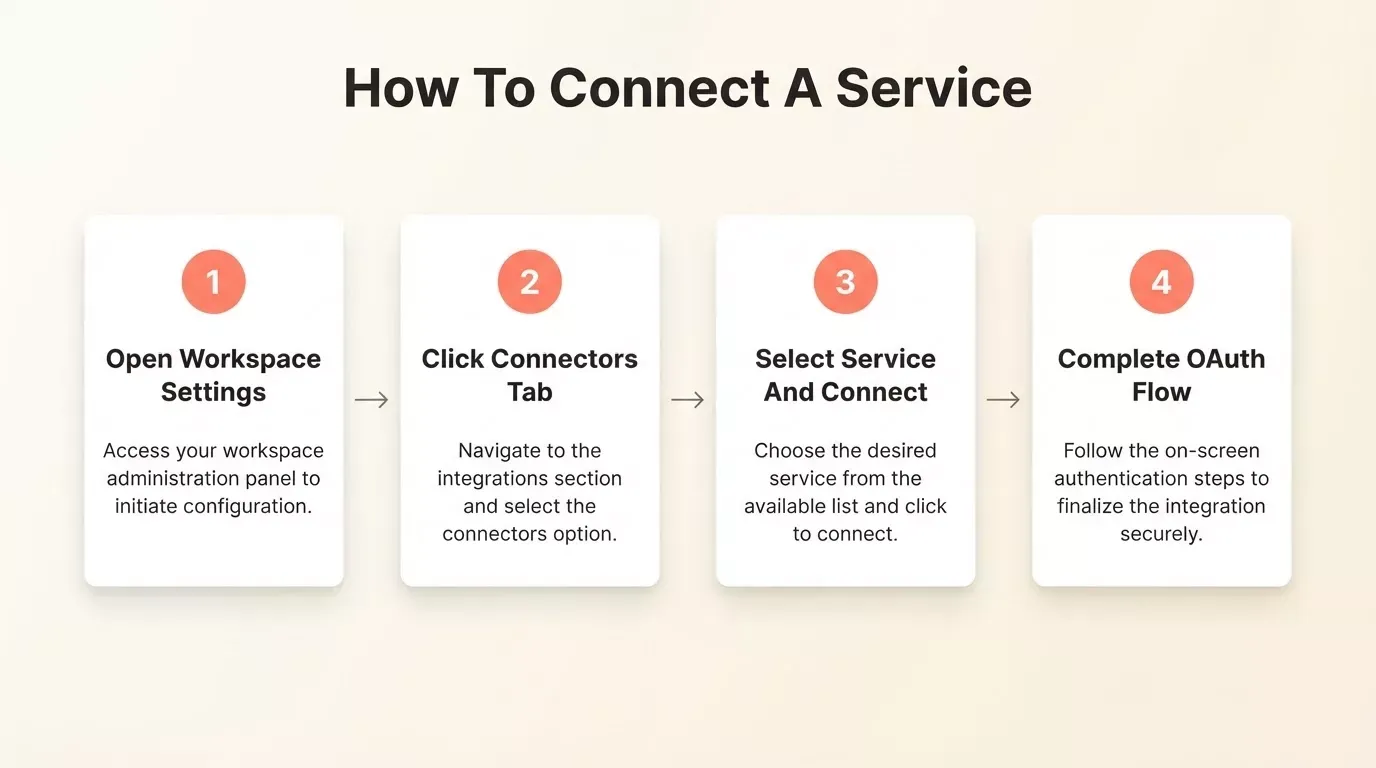
Connecting any workspace-level connector in Rocket.new takes four steps: open Settings, click Connectors, select the service, and complete the OAuth flow.
How to Connect Any API Not on the Built-In List
Rocket does not stop at the built-in connector list. You can connect to any REST API using the API importer by uploading a Postman collection, a Swagger/OpenAPI spec, or a raw cURL command. Rocket generates the service class, auth handling, retry logic, pagination, and type definitions automatically.
The community has already used this to connect PayPal, Square, Mapbox, YouTube, Shopify, Firebase, Tableau, Power BI, Plotly, Alpha Vantage, OpenWeather, Ticketmaster, Luma, HeyGen, and dozens more.
Example prompts that work with this:
- "When a user submits this form, POST to our HubSpot contacts endpoint with validation and error toasts"
- "Sync new leads to Airtable when they sign up"
- "Send a Slack notification to the sales channel when a payment completes"
Your API keys are encrypted at rest across all connectors. Environment variables are auto-injected into your exported code, so nothing sensitive appears in the codebase.
How the Connector Architecture Works
Rocket uses two connector tiers: workspace-level OAuth connectors (GitHub, Figma, Notion, Supabase, Razorpay, Webflow, Confluence, and 7 more) connect once and flow into every project. Task-level connectors (Stripe, OpenAI, Anthropic, HubSpot, Google Analytics, and more) use API keys scoped per build. The API importer connects to any additional REST API from Postman, OpenAPI, or cURL.
What Stack Should I Use for My Mobile Apps Type?
Not sure which integrations to combine? Rocket's docs recommend specific stacks for each app type.
| App Type | Recommended Stack |
|---|---|
| SaaS product | Supabase + Stripe + Resend + Netlify |
| E-commerce store | Supabase + Stripe + SendGrid + Google Analytics |
| AI-powered app | OpenAI or Anthropic + Supabase + Stripe |
| Blog or content site | Strapi or Directus + Netlify + Google Analytics |
| Booking or scheduling app | Calendly + Supabase + Twilio or Resend |
| Lead generation site | Typeform + Mailchimp + Airtable + Google Analytics |
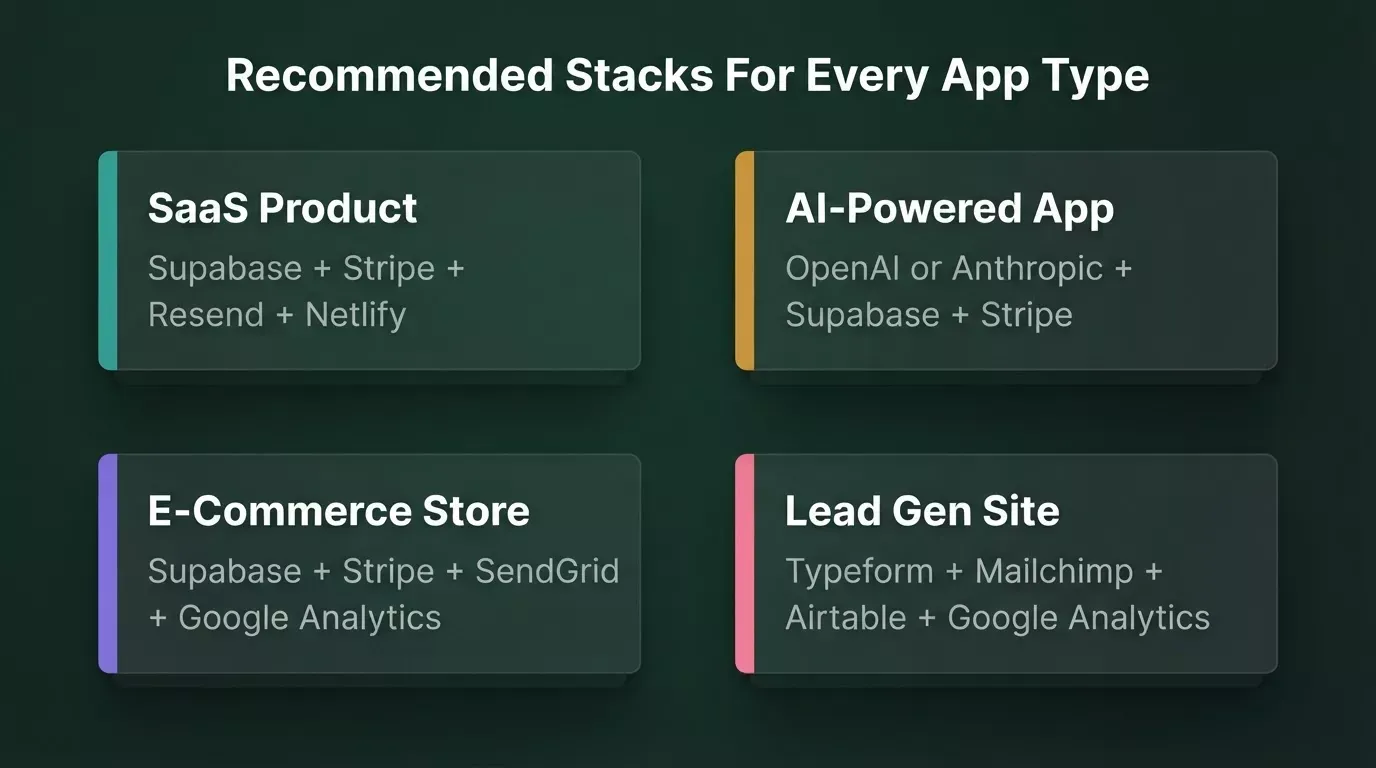
Rocket.new recommends proven connector combinations for each app type, from SaaS products to lead gen sites.
How Does Rocket Compare to Other AI App Builders for Integrations?
Rocket stands apart from other AI builders primarily through its depth of native, production-ready integrations. Most competing tools require manual setup, third-party plugins, or custom code for the same connections that Rocket handles from a single prompt.
| Feature | Rocket.new | Bubble | Replit | v0 (Vercel) |
|---|---|---|---|---|
| Native payment connectors | Stripe + Razorpay | Stripe (plugin) | Stripe (manual) | None built-in |
| Native AI model connectors | 4 (OpenAI, Anthropic, Gemini, Perplexity) | Via plugins | OpenAI only | None built-in |
| Database connectors | Supabase, Airtable, Strapi, Directus, Webflow | Bubble DB + plugins | Neon/Postgres | None built-in |
| CRM connectors | HubSpot (native) | Via plugins | None built-in | None built-in |
| Design-to-code | Figma (native, workspace-level) | No | No | Partial |
| OAuth workspace connectors | 14 (connect once, all projects) | No | No | No |
| API importer (any REST) | Yes (Postman/OpenAPI/cURL) | Limited | No | No |
| Output framework | Next.js TypeScript + Flutter | Bubble proprietary | Any | React/Next.js |
Rocket.new leads on native integrations across payments, AI models, OAuth workspace connectors, and design-to-code.
What Makes Rocket the Right Choice for Low-Code App Building?
Rocket is not just a code generator. It is the world's first vibe solutioning platform, meaning the thinking, building, and operating happen in the same system. The connector setup reflects this: you are not just wiring up APIs; you are describing what your app should do, and Rocket handles the full-stack logic behind it.
For non-technical users, this means you can build a SaaS platform with Supabase auth, Stripe billing, and Resend emails without writing code. For developers, it means rapid prototyping at a speed that traditional development cannot match, with full source code ownership on paid plans, all in Next.js TypeScript for web and Flutter for mobile.
The global AI software market is expected to reach $298 billion by 2027, and platforms like Rocket are a big reason why non-technical users and developers alike are choosing AI-powered tools to build full-stack apps faster. Over 70% of developers now use or plan to use AI tools in their development workflow, and integration depth is consistently ranked as a top decision factor.
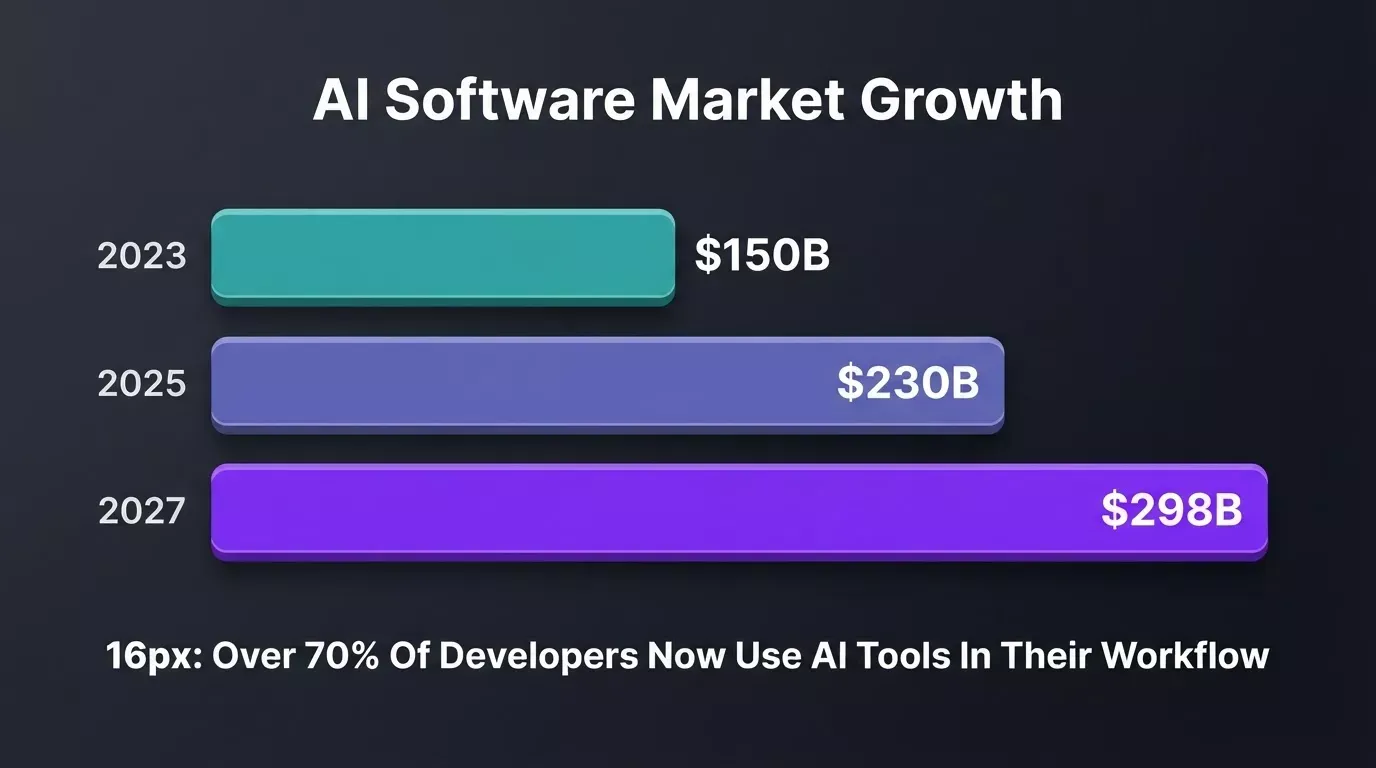
The AI software market is projected to reach $298B by 2027, with integration capabilities ranking as a critical factor in platform adoption decisions.
Key Facts
- 26+ built-in connectors across payments, AI, databases, email, analytics, CRM, and more
- 14 workspace-level OAuth connectors shared across all projects (GitHub, Figma, Notion, Google Workspace, Supabase, Airtable, Linear, Mailchimp, Typeform, Calendly, Razorpay, Webflow, Confluence, Netlify)
- Task-level API key connectors per build (Stripe, OpenAI, Anthropic, Resend, HubSpot, and others)
- API importer for any REST API via Postman, cURL, or OpenAPI/Swagger specs
- All API keys are encrypted at rest and auto-injected into exported code
- Output stack: Next.js TypeScript (web apps), Flutter (mobile apps)
- Recommended stacks for SaaS, e-commerce, AI apps, blogs, booking tools, and lead generation
Use Cases
- A solo founder building an AI-powered writing tool connects Anthropic for content generation, Supabase for user accounts, and Stripe for subscriptions, all from one prompt per connector
- A software development team building internal tools connects Google Workspace and Notion at the workspace level, then uses those as context across every new build task
- A developer building a marketplace connects Stripe via the task-level connector to handle checkout and subscription logic, with Rocket generating the full payment flow
- A non-technical founder building a lead gen site connects Typeform, Mailchimp, and Airtable to capture, nurture, and organize leads without writing code
The free plan lets you test all of this before committing. Paid plans add more tokens, advanced features, and full ownership of your generated source code. To see what kinds of apps you can build end-to-end, explore what you can build on Rocket.new.
The Right Integrations for Your App Idea
What integrations does Rocket.new support when building an app?
26+ built-in services and hundreds more through the community API importer, spanning databases, payments, AI models, email, analytics, forms, scheduling, CRM, productivity tools, design, and deployment. All generated web apps run on Next.js TypeScript; mobile apps on Flutter.
Whether you are building mobile apps, web apps, full-stack applications, or internal tools, the connector ecosystem is designed to handle the backend logic so you can focus on what makes your app different.
Rocket is the most complete AI app builder for teams that need real integrations, not just a prototype. Start building with Rocket today and connect the services your app needs from day one.
Table of contents
- -Does Rocket Support the Integrations My App Needs?
- -How Rocket Organizes Connectors: Workspace-Level vs Task-Level
- -Rocket Integration Stack at a Glance
- -Does Rocket Support Stripe Payments?
- -Does Rocket Support Email and Messaging?
- -Does Rocket Support AI Models?
- -Does Rocket Support Databases and CMS?
- -Does Rocket Support Analytics?
- -Does Rocket Support Forms and Scheduling?
- -Does Rocket Support CRM Integrations?
- -Does Rocket Support Productivity and Collaboration Tools?
- -Does Rocket Support Design and Deployment Tools?
- -How to Connect Any API Not on the Built-In List
- -How the Connector Architecture Works
- -What Stack Should I Use for My Mobile Apps Type?
- -How Does Rocket Compare to Other AI App Builders for Integrations?
- -What Makes Rocket the Right Choice for Low-Code App Building?
- -Key Facts
- -Use Cases
- -The Right Integrations for Your App Idea