Which AI Development Tool is Better for Building SaaS: Rocket.new or Rork AI?
When comparing which AI development tool is better for building SaaS Rocket.new or Rork AI, Rocket.new is the stronger choice for full-stack SaaS development, offering production-ready code, backend logic, and deployment in one place. Instead of juggling multiple tools, you describe your idea in plain english and get a live app with real backend infrastructure.
Go to Rocket.new, start with a prompt, and ship.
Building a SaaS product used to mean months of setup, a team of engineers, and a long list of third-party infrastructure tools. So what if you could describe your idea in plain English and get a working app in hours?
That is exactly what AI app builders promise today. The market for these tools is growing fast, with platforms catering to everything from full-stack web applications to native mobile apps. Two names that come up often are Rocket.new and Rork AI.
Both use AI to generate apps from natural language prompts, but they serve very different goals. This blog breaks down exactly where each tool shines, where it falls short, and which one is the right tool for building a SaaS product.
What are AI App Builders?
AI app builders are platforms that let you create applications by describing your idea using natural language, without needing deep coding knowledge. You type what you want, and the platform generates the app structure, backend logic, and often the frontend too.
Here is what most AI app builders include:
-
Code generation from natural language prompts
-
Frontend UI creation
-
Backend setup, including databases and authentication
-
Deployment tools to push your app live
-
Pre-built templates to speed up the process
Some also offer:
-
Visual editor for tweaking layouts
-
Login systems and role-based access control
-
API endpoints and database schema controls
-
Exportable code so you are not locked in
The key outcome is this: you can go from idea to live app without deep technical experience, and in a fraction of the time traditional development takes.
How Do AI App Builders Help You Ship Faster?
AI app builders cut the time between idea and live product significantly. Instead of setting up servers, writing boilerplate code, and connecting services manually, the platform handles it.
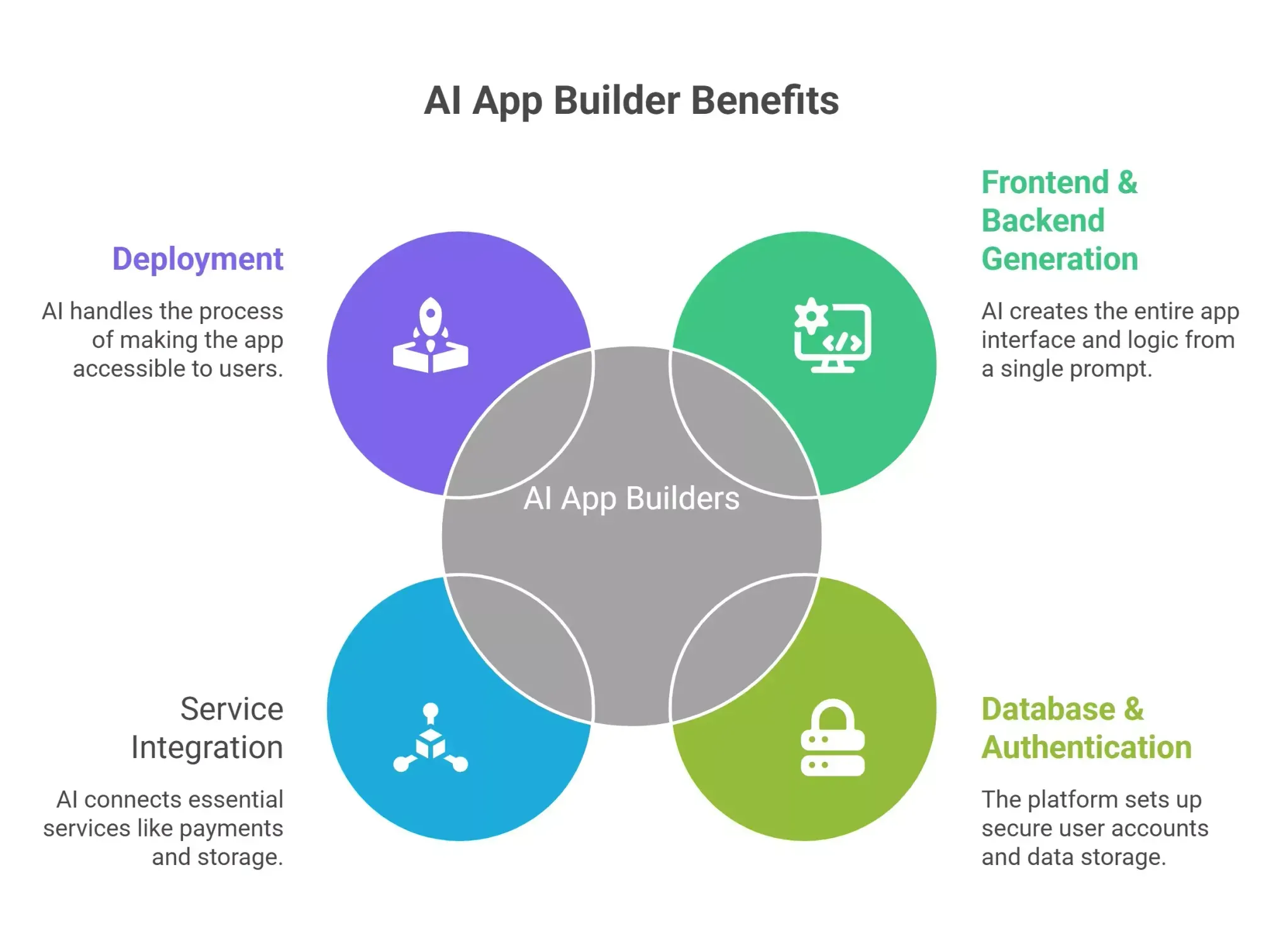 A typical AI app builder does this for you out of the box:
-
Generates the full frontend and backend from a single prompt
-
Sets up database structure and user authentication
-
Connects backend services like payments and storage
-
Handles deployment so real users can access your app immediately
Here is who benefits most from these platforms:
-
Founders and solo builders who want to test ideas without writing code
-
Product managers who need to prototype fast
-
Startup teams that want production-ready applications without a large engineering team
-
Freelancers building apps for clients on tight timelines
-
Non-technical operators who need internal tools without engineering help
How to Choose Between Rocket.new and Rork AI
The right choice depends entirely on what you are building. Here is a direct breakdown.
Goal-to-Tool Mapping
| Goal | Best Tool | Why It Works |
|---|---|---|
| Build a full SaaS web app | Rocket.new | Full-stack generation with backend, auth, and deployment |
| Prototype a native mobile app fast | Rork AI | Rapid mobile app generation with QR preview |
| Launch a web app with payments | Rocket.new | Supabase and Stripe are integrated out of the box |
| Test a mobile UI on a device quickly | Rork AI | Instant device preview via QR code |
| Build internal tools with complex business logic | Rocket.new | Specialized AI agents handle multi-layer logic |
| Build data-driven applications for real users | Rocket.new | Production-ready with real data handling |
| Create landing pages and full-stack applications | Rocket.new | Covers web and mobile with full deployment |
Platform Comparison Breakdown
| Feature | Rocket.new | Rork AI |
|---|---|---|
| App Type | Web apps and mobile apps | Native mobile apps only |
| Backend Logic | Full, built-in | Limited, requires manual coding |
| Free Plan | Yes, 1M tokens | No free tier |
| Paid Plans Start At | $25/month | $20/month |
| Code Export | Full codebase to GitHub | Limited |
| Visual Editor | Yes | Limited |
| Templates | 25,000+ Templates | Not specified |
| Production Ready | Yes | Prototypes only |
| AI Agents | Specialized per build stage | Single generation flow |
Steps to pick the right platform:
-
Define whether you are building a web app, a mobile app, or both
-
Decide if you need backend logic and a real database setup
-
Check if you need the app to serve real users at launch
-
Look at whether you need production-ready code or just a prototype
-
Compare pricing against how many builds and iterations you plan to run
Tip: Focus on backend control, not just UI speed. A good-looking prototype that cannot scale to real users is not a SaaS product. What matters is whether the platform can handle your backend logic and data as you grow.
Step-by-Step: How to Start Building a SaaS App on Rocket.new
Let us walk through building a simple subscription-based project management tool on Rocket.new.
Step 1: Start with a prompt
Go to Rocket.new and type your idea in natural language. For example: "Build a project management SaaS with user login, task boards, team collaboration, and Stripe billing." Rocket reads this and begins generating your full-stack app.
Step 2: Review the generated structure
Rocket presents an editor panel showing your frontend, backend logic, and database schema. You can see the underlying code, review the data models, and make changes using the visual editor or AI chat.
Step 3: Configure your backend setup
Rocket connects to Supabase for your database and authentication. You can set up role-based access control, define your database schema, and configure API endpoints directly from the dashboard without writing backend code manually.
Step 4: Connect payments and deploy
Stripe is integrated out of the box. Add your pricing tiers, set up billing logic, and hit deploy. Rocket pushes your app live with custom domains and handles the infrastructure.
Step 5: Iterate with AI assistance
As feedback comes in, use the AI chat to request changes. The specialized AI agents maintain context across your UI, backend, and data layers so updates do not break existing functionality.
The full flow takes you from a text prompt to a production-ready, deployed SaaS with login systems, payments, and real users in a single session.
Who Uses These Tools? Real Examples by User Type
| User Type | What They Want to Build | How Rocket.new or Rork AI Helps |
|---|---|---|
| Startup Founder | Full-stack SaaS with auth, payments, and a user dashboard | Rocket.new generates production-ready code with Stripe and Supabase built in |
| Freelancer | Client-facing web apps and internal tools | Rocket.new builds fully functional web apps with minimal setup and exportable code |
| Product Manager | Mobile app prototype for stakeholder demos | Rork AI generates native mobile app previews quickly via QR code |
| Small Business Owner | Booking or CRM tool for real users | Rocket.new handles backend logic and deploys to custom domains |
| Mobile App Developer | React Native prototype to test on a device | Rork AI is fast for native mobile prototyping with react native output |
Across all user types, the common outcome is the same: both platforms reduce the time from idea to something tangible. The difference is whether that tangible output is a prototype or a production-ready product.
What Real Users Say About AI App Builders
The AI-powered platform space has grown quickly, and user feedback tells a consistent story. Platforms that maintain context across UI, backend, and data layers produce more reliable apps. Ones that only handle the front end leave builders stuck when complexity grows.
"I built a complete, working web in just 15 minutes with no coding required at all." "I used Rocket by Rocket (by DhiWise), and it completely transformed how I approach web development." - LinkedIn
For broader community discussion on AI app builders and how they compare, this Reddit thread on no-code SaaS tools covers real builder experiences across multiple platforms: Reddit
How Rocket.new Takes SaaS Building Further
Rocket.new is not just an AI app builder. It is a full production environment for anyone who wants to go from idea to live SaaS without a team of engineers.
Key features of Rocket.new:
-
Full-stack generation from a single natural language prompt
-
Specialized AI agents for different build stages, improving output consistency
-
Built-in Supabase for database and authentication
-
Stripe integration for payments and billing
-
Visual editor plus direct code editing for manual control
-
Export full codebase to GitHub, no vendor lock-in
-
25,000+ pre-built templates across categories
-
Custom domains and one-click deployment
-
Team collaboration tools built in
-
Audit logs and role-based access control for complex business logic
-
Free plan with 1 million tokens to start building and testing
How Rocket.new applies to SaaS specifically:
-
Generates login systems, user dashboards, and subscription flows out of the box
-
Handles complex business logic without requiring a coding background
-
Builds data-driven applications that scale to many users from day one
-
Supports web and mobile from the same platform
-
Let's you extend functionality with code snippets or manual code editing
-
Designed for production-ready applications, not just demos
Rocket.new vs Rork AI: A Direct Comparison for SaaS Builders
Where Rork AI does well:
-
Genuinely fast at generating native mobile app prototypes
-
QR code preview gets your app on a device in minutes
-
Great for designers, PMs, and founders who need a clickable mobile demo
-
Strong choice for quick user testing on real hardware
Where Rork AI falls short for SaaS:
-
No backend control is built into the platform
-
No path to production-ready code without significant manual development work
-
Generates the initial mobile app but requires manual coding for further changes
-
No free plan to test before committing
-
Credits do not roll over, which adds up fast during active iteration
-
Not built for SaaS requirements like user data, payment processing, and real backend logic
Where Rocket.new covers what Rork AI does not:
-
Full-stack development, including backend services built in from the start
-
Production-ready code from the first generation, not after manual rework
-
Specialized AI agents that handle different parts of the build, from frontend to backend to deployment
-
Built-in support for complex business logic and workflows
-
Custom domains and live deployment without switching tools
-
Exportable code so you are never locked into the platform
-
A free plan so you can test before committing to a paid plan
Pricing comparison at a glance:
-
Rork AI Pro starts at $20/month for 100 credits with no rollover
-
Rocket.new Starter starts at $25/month with unused credits rolling over
-
The rollover feature matters when you are iterating fast on a product
-
Rocket.new also offers a free tier, Rork AI does not
The bottom line:
-
Rork AI earns its place for mobile prototyping and quick demos
-
Rocket.new is built for the full journey from idea to deployed SaaS product
For SaaS builders who need backend logic, real users, and maintainable code, Rocket.new is the stronger platform
Rocket.new vs Rork AI: Pricing Comparison
Rocket.new Pricing
| Plan | Price | What You Get |
|---|---|---|
| Free | $0 | 20 one-time credits, all Build capabilities, custom domains, public projects |
| Starter for Rocket Build | $25/month | 100 monthly credits, unlimited workspaces, custom domains, 25+ integrations, staging and production environments, role-based access, performance analytics |
| Solve + Build | $250/month | 1000 monthly credits, all Build capabilities plus consultant-grade solutions, board-ready formats, context ingestion, smart iteration suggestions |
| Solve + Build + Intelligence | $350/month | 1500 monthly credits, all Solve + Build capabilities, plus 24/7 competitive tracking, daily briefs, trend synthesis, and company intelligence |
Rocket.new offers transparent pricing with a free tier, so you can test production-ready code before spending anything.
Rork AI Pricing
| Plan | Price | What You Get |
|---|---|---|
| Free | $0 | Free trial of Rork Pro, public projects, 5 credits/month (max 5/day) |
| Rork Pro | $20/month | 100 to 500 credits, iOS, Android and Web via Expo, private projects, dev mode, 5 Rork Max uses/week, email support |
| Rork Max | $200/month | 1K to 10K credits, SwiftUI for iOS, Watch, iPad and Vision Pro, premium UI, private projects, dev mode, priority chat support |
Rork AI does offer a free entry point with 5 credits per month, which is enough to explore the platform but is limited for active building.
The Pro plan works for basic cross-platform apps via Expo, while Rork Max is built for native Apple ecosystem development across iOS, watchOS, iPadOS, and Vision Pro. Credits do not roll over, so heavy iteration cycles can move through your monthly allocation fast.
Which AI Development Tool is Better
When it comes to which AI development tool is better for building saas Rocket, new or Rocket AI, the answer depends on your goal, but for most SaaS builders, Rocket.new is the clear choice. It covers full-stack development, backend logic, real deployment, and production-ready applications from a single natural language prompt, while giving you the flexibility to extend, export, and scale.
Rork AI has a place for rapid native mobile prototyping, but it is not built for the full arc of a SaaS product. Build with Rocket, type your idea, and see a working app in hours.
Table of contents
- -What are AI App Builders?
- -How Do AI App Builders Help You Ship Faster?
- -How to Choose Between Rocket.new and Rork AI
- -Goal-to-Tool Mapping
- -Platform Comparison Breakdown
- -Step-by-Step: How to Start Building a SaaS App on Rocket.new
- -Step 1: Start with a prompt
- -Step 2: Review the generated structure
- -Step 3: Configure your backend setup
- -Step 4: Connect payments and deploy
- -Step 5: Iterate with AI assistance
- -Who Uses These Tools? Real Examples by User Type
- -What Real Users Say About AI App Builders
- -How Rocket.new Takes SaaS Building Further
- -Rocket.new vs Rork AI: A Direct Comparison for SaaS Builders
- -Rocket.new vs Rork AI: Pricing Comparison
- -Rocket.new Pricing
- -Rork AI Pricing
- -Which AI Development Tool is Better