AI-Powered Enrollment Scoring Landing Page Template
Score is an AI-powered enrollment lead scoring landing page template built for K-12 admissions teams. It watches every click, form-fill, and campus interaction from prospective families, then ranks leads hot, warm, or cold in real time. Enrollment directors, diocesan coordinators, and charter network growth leads get a live, ranked pipeline before the school day begins.
by Rocket studio
Quick summary
Score is a hub-and-spoke landing page template for K-12 enrollment intelligence. It uses ai lead scoring to rank prospective families by their likelihood to enroll, turning a chaotic inquiry pool into a clean, prioritized list. The template shows enrollment directors exactly which leads deserve a call today and which ones need a nurturing campaign first.
Who this template is for
Enrollment teams at schools of every size deal with the same fundamental problem: too many leads, not enough clarity. This template was designed for the professionals who feel that pain every February when yield rates hang in the balance. It gives each team member a dashboard view that replaces gut instinct with ranked, scored data.
- Enrollment directors at independent day schools managing manual spreadsheet chaos and missed hot leads
- Diocesan coordinators overseeing inquiry pipelines across eight or more campuses who need a unified scoring system
- Charter network growth leads focused on demand generation and February yield rates across multiple sites
What problem this template solves
Traditional lead scoring is prone to bias and subjectivity. It often relies on surface-level criteria like job title, location, or email engagement, and it leans heavily on human intuition and predefined criteria. The result is that sales teams and admissions staff waste time on lower scores while high-intent families slip away. This template presents a solution built around ai lead scoring, making the case that machine learning and predictive analytics can rank potential customers far more accurately than any spreadsheet.
- Admissions staff spend hours manually reviewing leads with no clear scoring criteria, missing high scoring families
- Marketing teams and sales and marketing teams operate on gut instinct rather than behavioral data, producing inconsistent follow ups
- School networks managing big data across campuses have no unified scoring model to prioritize leads at scale
What you get with this template
The Score template is a fully structured, single-page hub-and-spoke landing page with five anchor-navigated spokes and a live interactive header. Every section is built to show the math before asking for a commitment, so website visitors trust the platform before they ever fill out a form. The real power of this layout is that comparison-shoppers stay engaged because the anchor nav keeps every section one click away.
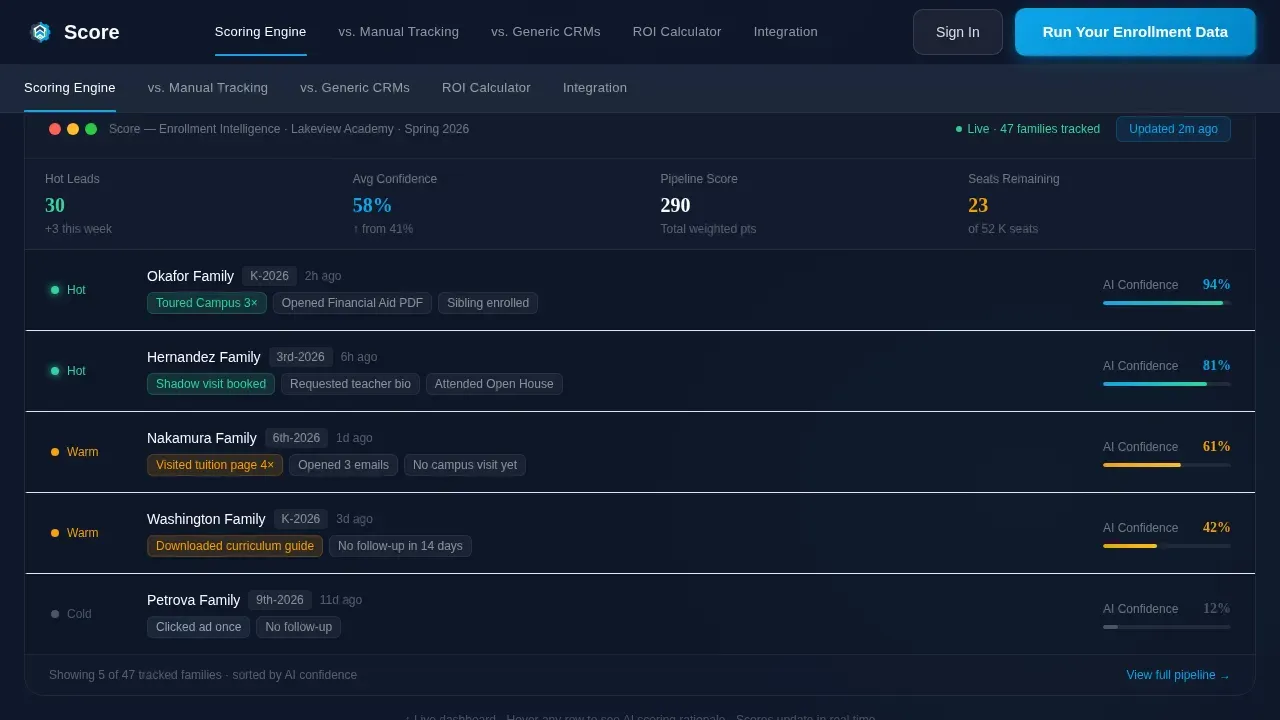
- A full-viewport interactive dashboard header showing ai powered lead scoring with real-time confidence scores ticking upward
- Five spoke sections covering the scoring engine, versus manual tracking, versus generic customer relationship management tools, an ROI calculator, and integration details
- A two-step "Run Your Enrollment Data" form and a competitor-comparison dropdown that deep-links to the relevant spoke
Feature list
This template surfaces a rich set of capabilities directly from the product brief. Each feature block is designed to communicate value clearly to sales and marketing teams, enrollment leaders, and decision-makers evaluating ai tools for their school networks.
Live Interactive Scoring Dashboard
The header renders a functioning lead-scoring dashboard at full viewport width. Anonymized family records display AI confidence scores ticking upward in real time. Visitors hover rows to watch the scoring rationale appear in tooltips, turning abstract ai capabilities into something tangible and immediate. This is not a screenshot: the product itself is the hero, alive on the page.
Multi-Signal Scoring Engine
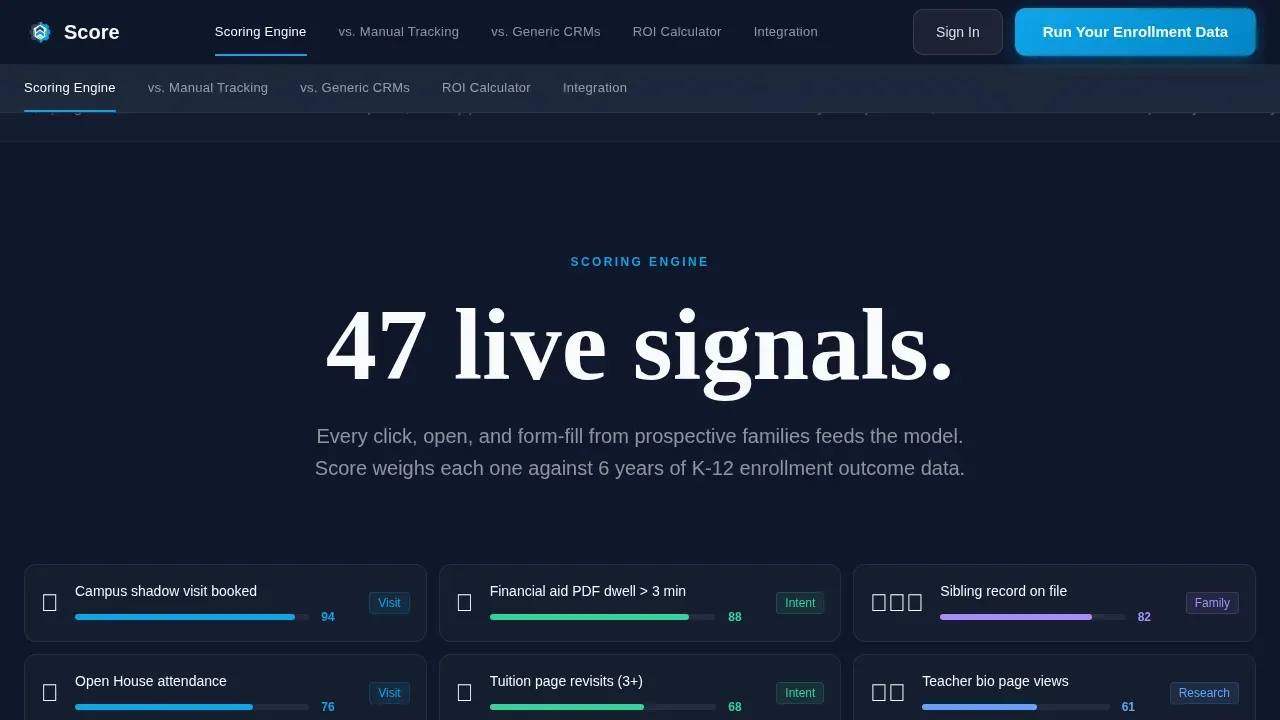
The scoring engine section unpacks how ai agents weigh dozens of data points simultaneously. Shadow-visit frequency, sibling-record flags, financial-aid page dwell time, and browsing behavior all feed instantly into the ai scoring model. This goes far beyond what traditional lead scoring can do with a job title and an email open. The result is predictive lead scoring grounded in behavioral signals that reflect genuine enrollment intent.
Versus Split-View Comparison
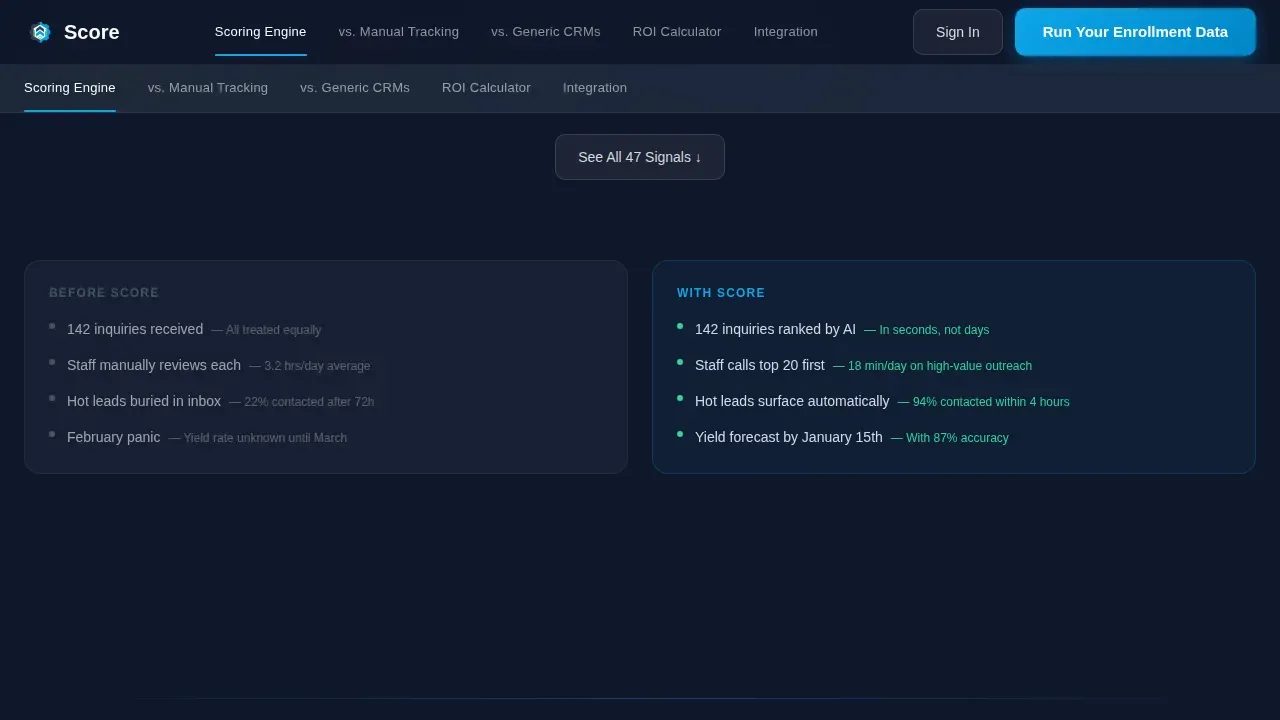
A persistent split-view section pits the platform against manual spreadsheet tracking on one side and generic customer relationship management lead scoring on the other. Animated counters show time-to-contact, missed-inquiry rates, and yield-percentage lift. Sales teams and marketing teams can see exactly where manual processes break down and where ai powered lead scoring wins. This comparison supports closing deals faster by removing doubt before the demo.
Interactive ROI Calculator
The ROI calculator spoke lets visitors input their school type and current enrollment size, then returns a projected yield lift. This is where ai lead scoring becomes personal: the math applies to a visitor's actual pipeline, not a generic case study. The calculator supports lead prioritization decisions by converting abstract scoring thresholds into concrete enrollment numbers.
Two-Step Enrollment Form with Competitor Dropdown
The primary call-to-action form collects school type and enrollment size in step one, then email and customer relationship management name in step two. A secondary path uses a dynamic dropdown labeled "See How We Beat [Competitor]" that deep-links to the relevant spoke. This progressive profiling approach recognizes different buyer intents and routes each team member to the content most relevant to their decision.
Anchor Navigation with Five Spokes
A persistent anchor nav keeps five spoke sections always one click away: Scoring Engine, versus Manual Tracking, versus Generic customer relationship management tools, ROI Calculator, and Integration. Comparison-shoppers can jump between spokes without scrolling. This structure supports longer page visits from high-intent website visitors who want to evaluate every angle before they commit.
Page sections overview
| Section | Purpose |
|---|---|
| Interactive Dashboard Hero | Shows live ai lead scoring with real-time confidence scores and tooltip rationale |
| Scoring Engine Spoke | Explains how ai agents weigh behavioral signals, sibling flags, and dwell time |
| Versus Manual Tracking | Animated counters compare time-to-contact and missed-inquiry rates against spreadsheets |
| Versus Generic CRMs | Side-by-side features highlight education-specific scoring criteria advantages |
| ROI Calculator Spoke | Inputs school type and enrollment size to project yield lift |
| Integration Spoke | Displays system integration details and the two-step enrollment form |
| Linear Footer | Single-row footer with navigation links and trust signals |
Design & branding system
The template follows a Dashboard Pro visual theme built around a Slate and Sky color system. Every color choice is deliberate: the palette reads like a freshly cleaned whiteboard in a head-of-school's office, authoritative and calm, with that single sky-blue pull drawing the eye forward. Typography pairs DM Sans for interface labels with Fraunces for oversized stats and headlines, giving the page both data-density and editorial weight.
- Deep chalkboard slate (#1E293B) sets the primary background authority; brushed graphite (#475569) handles supporting text; open-sky blue (#0EA5E9) drives all accent and interactive elements; cloud white (#F8FAFC) surfaces card backgrounds
- Data-green (#34D399) marks positive lift metrics and high scoring lead indicators throughout the dashboard and spoke sections
- Fraunces renders every oversized statistic first at each scroll stop, so the Stats-First Impact creative direction lands before any explanation appears
Mobile & speed optimization
The template is built desktop-first, reflecting how enrollment directors actually work: reviewing dashboards at a desk, not on a phone. Interactive elements like the live scoring dashboard and ROI calculator are implemented as client components, while static spoke sections use server components to keep load behavior predictable. The layout prioritizes clean rendering of data-dense views without sacrificing performance on standard office hardware.
- Desktop-first layout optimized for dashboard-style data review at full viewport width, with responsive behavior maintained for smaller screens
- Server components handle static content sections; client components isolate the interactive dashboard, calculator, and animated counters to keep rendering efficient
- Animation is scoped to scroll-triggered counter reveals, real-time score ticking, tooltip displays, and split-view transitions so motion never interrupts content clarity
How this template helps you convert
The Score landing page earns the click by showing the math first. Every design and content decision is built to move a skeptical enrollment director from "interesting" to "I need to run my data." The page does not ask for anything before it delivers value.
- The Stats-First Impact creative direction opens every spoke with a single oversized number, such as "3.2 times more enrolled families from the same inquiry pool," so the value proposition lands before any explanation. This approach builds trust with sales and marketing teams who are used to being sold promises rather than shown proof.
- The live interactive dashboard lets visitors hover real anonymized lead records and watch ai lead scoring rationale unfold in tooltips. Seeing a card labeled "Toured Campus 3 times, Opened Financial Aid PDF" glow at 94% confidence makes the scoring model feel real, not theoretical. Real-time scoring like this converts skeptics into believers faster than any testimonial.
- The two-step form with competitor dropdown captures qualified leads efficiently without overwhelming visitors. Progressive profiling collects school type and enrollment size first, then email and customer relationship management name, so each answer feeds instantly into the ai scoring model on the back end. Intent-based calls to action route each visitor to the spoke most relevant to their stage, improving conversion rates by matching content to buyer intent.
Other information about this template
The Score template is designed to support a range of marketing strategies used by enrollment teams working across complex, multi-campus environments. It reflects current thinking in ai marketing and demand generation for K-12 education, where lead quality and data quality are as important as lead volume. Enrollment teams looking to implement ai lead scoring will find the page structure mirrors best practices: start with clean, connected data sources, define what a qualified lead looks like, then integrate scores into existing workflows so every high scoring family triggers an immediate follow up.
- The scoring model improves over time by training on historical data that reflects both past closed won deals and losses, identifying hidden patterns that human review would miss
- Ai agents continuously re-score leads based on new data, so lead management stays accurate even as families move through the pipeline at different speeds
- Firmographic data inputs such as company size equivalents in education (school type, enrollment size) combine with behavioral data to produce richer, more actionable scores
- Intent data from page visits, financial-aid dwell time, and form-fill sequences helps distinguish genuinely qualified leads from website visitors who clicked once and went cold
- Dynamic content blocks built into the template allow ai models to personalize headlines and spoke introductions based on a visitor's referral source or firmographic data
- Marketing automation connections and system integration touchpoints are surfaced in the Integration spoke, where deep customer relationship management integration ensures real-time updating of scores as leads interact with the platform
- Hidden data captures automatically map UTM parameters, traffic sources, and device types to lead records, enriching every profile without adding friction to the visitor experience
- Customizable fit fields allow the ai to calculate a fit score based on enrollment-specific inputs, going beyond generic scoring criteria to reflect what actually predicts enrollment at a given school type
- Conversational ai slots built into the template structure support chatbots or virtual advisors that can qualify leads before they reach the main form, improving sales productivity and reducing sales cycle length
- Rich media testimonial blocks provide space for student success stories or partner logos that build immediate authority, supplementing the stats-first impact approach with social proof
- Security and privacy badge placements are included in the template layout, giving website visitors confidence that their data is handled responsibly
- Real world examples in the versus sections use animated counters grounded in real enrollment metrics, making the comparison between manual tracking and ai powered lead scoring concrete and credible for sales reps and enrollment leadership alike
- Predictive analytics in the ROI calculator analyzes historical data patterns to project which behavioral combinations lead to enrollment, giving each visitor a personalized yield-lift estimate
- The template supports web analytics connection at the integration layer, and its behavioral tracking evaluates page visits, content downloads, and interaction frequency to build a comprehensive engagement picture for every prospective family
- Digital marketing teams and marketing and sales teams working across independent, diocesan, and charter school networks will find the spoke structure naturally maps to their existing pipeline stages, making it easier to score leads based on signals that actually matter in K-12 enrollment

Theme
Dashboard Pro
Creative direction
Stats-First Impact
Color system
Slate & Sky
Style
Hub & Spoke (Anchor Nav)
Direction
Comparison/Versus
Page Sections
Live Interactive Scoring Dashboard Header
Multi-signal AI Scoring Engine
Animated Versus Comparison Sections
Interactive ROI Calculator
Two-step Progressive Profiling Form
Persistent Anchor Navigation
Related questions
How does the scoring engine decide which leads are hot versus cold?
Can enrollment teams trust ai lead scoring over their own judgment?
How does this compare to generic customer relationship management lead scoring tools?
What happens after a visitor submits the two-step form?
Does the template support integration with existing CRM or student information systems?



