Dental Software Cost Estimator Website Template
Adjudicate is a dental claims management landing page template built to turn stalled revenue into recovered payments. It features a live Claims Recovery Calculator, an animated comparison table across five claim lifecycle stages, and a single click-through call to action. The design uses a Dynamic Motion theme with an AI Iridescent color palette to make every interaction feel purposeful and fast.
by Rocket studio
Quick summary
Adjudicate is a single-page template for dental claims management platforms. It opens with a live recovery calculator, flows into an animated comparison table, and closes with a focused click-through call to action. The design is built on deep blacks, iridescent gradients, and motion-led interactions that make the visitor feel the difference between a stuck process and a working one.
Who this template is for
This template is built for dental software companies and billing platform teams who need to convert practice-side buyers quickly. The audience already lives inside the problem, so the page skips education and goes straight to proof.
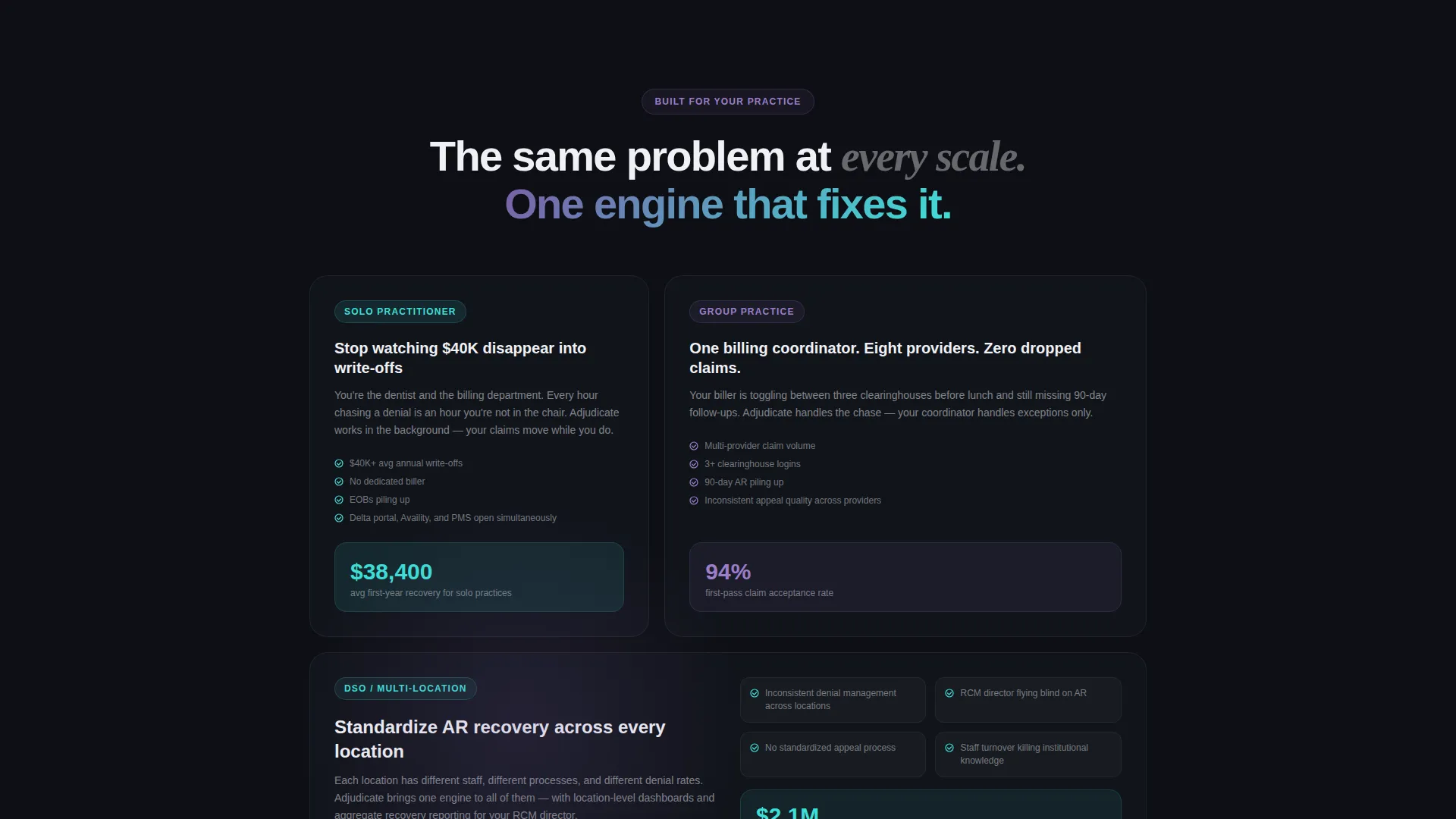
- Office managers at multi-location dental service organizations (DSOs) juggling stacked explanation of benefits (EOB) documents across sites
- Solo practitioners watching write-offs accumulate while claims age in clearinghouse queues
- Billing coordinators who toggle between multiple systems daily just to track a single claim's status
What problem this template solves
Dental practices lose real money when claims sit denied, underpaid, or simply forgotten. The problem is not awareness; it is urgency. Visitors who land on a dental claims platform page often know they have a revenue gap but cannot feel how large it is. A static feature list does not create that urgency.
- No immediate way for visitors to see their own recovery opportunity in real numbers
- Comparison pages that describe workflow improvements without showing the drag of the current process
- Calls to action that ask for a form fill before the visitor has earned a reason to trust the platform
What you get with this template
This template delivers a complete single-page layout designed to move a visitor from curiosity to a demo click in one scrolling session. Every section builds on the previous one, and the design system reinforces momentum throughout.
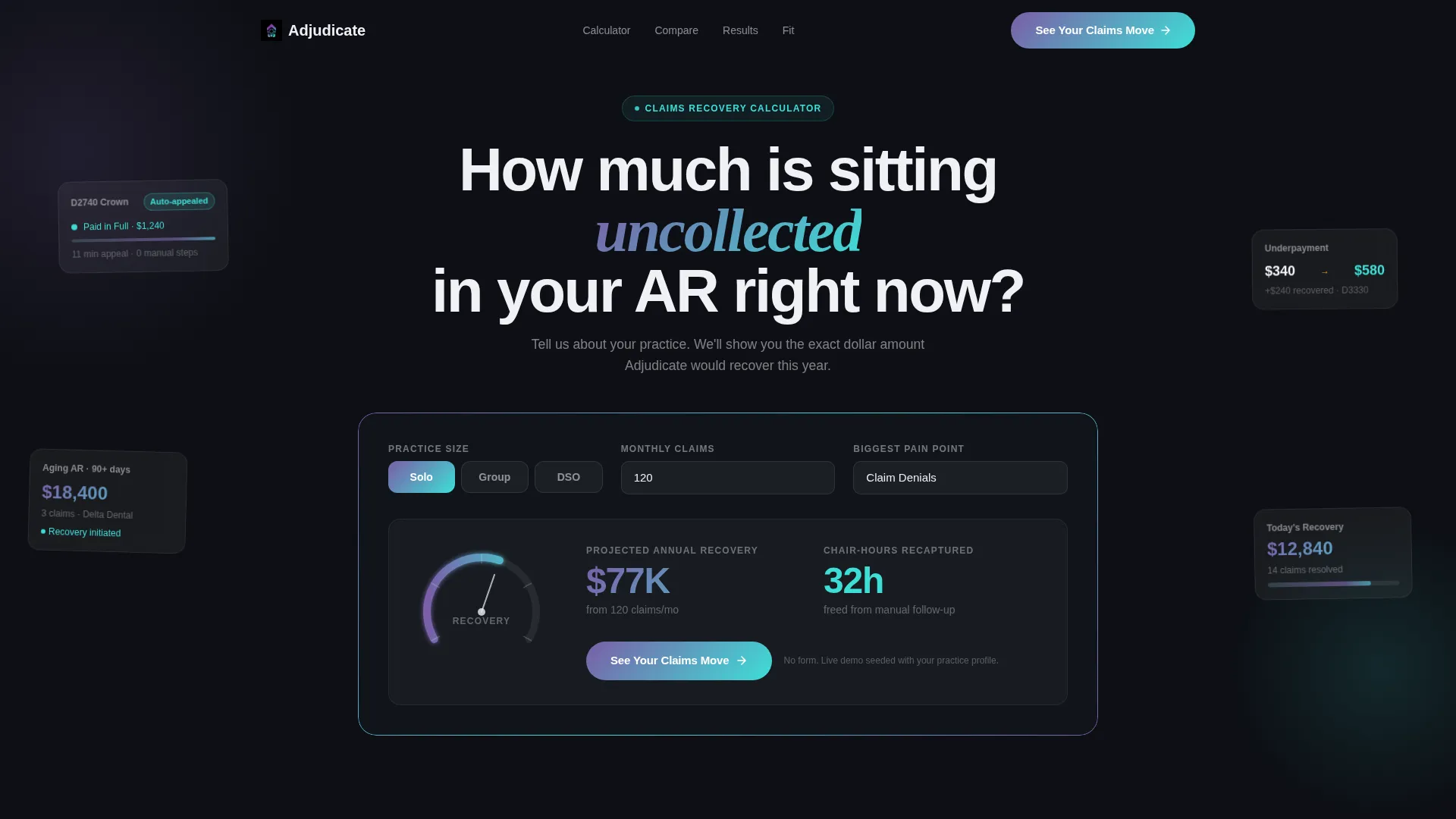
- A live Claims Recovery Calculator in the header that personalizes the visitor's experience before they read a single feature
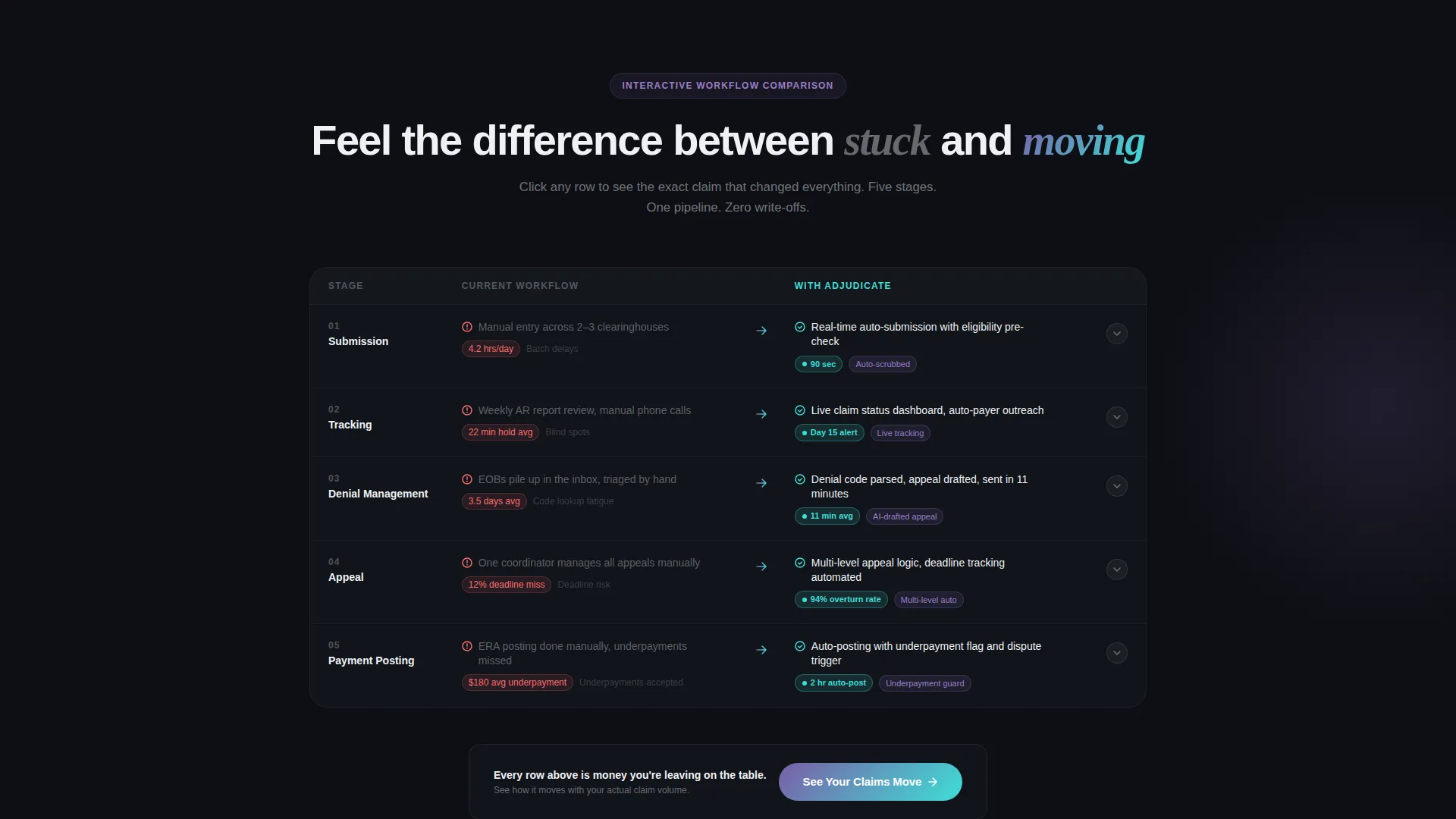
- An interactive, animated comparison table covering five claim lifecycle stages with expandable micro-case-study rows
- Three strategically placed "See Your Claims Move" call-to-action buttons that guide the visitor without interrupting the scroll
Feature list
This template is built around a small number of high-impact components. Each one is designed to do one job well.
Live Claims Recovery Calculator
Visitors select their practice size, enter monthly claim volume, and choose their top pain point. The calculator animates in real time: a radial gauge sweeps upward showing projected annual recovery dollars while a secondary counter tallies recaptured chair-hours. The interaction takes roughly eight seconds and ends with a personalized dollar figure.
Animated Comparison Table
The comparison table covers five claim lifecycle stages: submission, tracking, denial management, appeal, and payment posting. Each row animates on entry. The "before" column renders in muted gray with friction indicators, and the "after" column blooms in iridescent teal with speed metrics and auto-resolution badges.
Expandable Micro-Case-Study Rows
Clicking any row in the comparison table expands a real claim journey. One built-in example shows a D2740 crown denied for a missing narrative, auto-appealed in 11 minutes, and paid in full. These details make the platform's speed feel concrete rather than claimed.
Persistent Click-Through Call to Action
The primary call to action, "See Your Claims Move," appears three times across the page. It sits locked to the calculator result, floats at the comparison table midpoint, and anchors the final section. No form is required. The click leads directly to a pre-built interactive demo seeded with dummy claims.
Dynamic Motion Design System
The template uses a Dynamic Motion theme throughout. Numbers accelerate, decelerate, and settle like a speedometer needle. Row entries slide into view. Hover states and progress bar edges trace iridescent gradients to suggest constant activity happening just beneath the surface.
Page sections overview
| Section | Purpose |
|---|---|
| Recovery Calculator Header | Personalizes visitor's projected recovery value in real time |
| Practice Size Selector | Lets visitor choose solo, group, or DSO context |
| Pain Point Picker | Focuses the calculator on denials, underpayments, or aging AR |
| Animated Comparison Table | Contrasts current workflow against platform workflow across five stages |
| Expandable Case Study Rows | Shows a real claim journey inside each comparison row |
| Floating call to action Block | Keeps the demo click accessible at the table midpoint |
| Final Anchor Section | Closes the page with the third and final call to action |
Design & branding system
The color palette is built around an AI Iridescent system that feels like light refracting through a prism on a dark surface. Clinical precision and flashes of intelligence coexist in every screen state.
- Core colors: deep processing black (#0D0F14) for backgrounds, holographic violet (#7B5EA7) for accents, shimmer teal (#3EDFD7) for active states and "after" column highlights, and signal white (#F0F1F5) for tables and data cards
- Iridescent gradients trace along progress bars, hover states, and the edges of active comparison rows to suggest live computation
- The Dynamic Motion theme governs all interactive states, so numbers, rows, and gauges animate with physics-based easing rather than flat transitions
Mobile & speed optimization
The template is structured for a single scrolling session, which naturally supports mobile viewing. The interaction model is designed to work without complex setup or heavy dependencies.
- The calculator, comparison table, and call-to-action buttons are all contained in a single-page vertical flow that adapts to narrower viewports
- Animation timing is set to complete within roughly eight seconds per interaction so visitors on any device finish the experience without waiting
- The no-form click-through model removes friction at the conversion point, keeping the path from landing to demo entry as short as possible
How this template helps you convert
Every design and layout decision in this template points toward a single outcome: earning the demo click without a form fill.
- The calculator makes the visitor's recovery number feel personally real before any feature is described, giving them an emotional reason to keep reading.
- The animated comparison table shows the cost of the current process row by row, so the visitor arrives at the call to action already convinced rather than still skeptical.
- Three non-intrusive placements of "See Your Claims Move" ensure the click is always one scroll away, whether the visitor converts early or reads to the end.
Other information about this template
This template is part of the Comparison Table template style category and is built specifically for the dental claims management niche within the broader dental software and dental technology space. It is designed as a click-through landing page, meaning it does not collect lead data on the page itself. Instead, it routes qualified visitors directly into a pre-seeded demo environment matched to their selected practice size. The Interactive Explorer creative direction and Calculator/Estimator header concept are core to the template's structure and cannot be removed without rebuilding the primary conversion flow. The AI Iridescent color system and Dynamic Motion theme are integrated throughout and are intended to work together as a single visual identity.
- Template style: Comparison Table with Interactive Explorer creative direction
- Header concept: Calculator/Estimator with radial gauge and chair-hour counter
- Landing page direction: Click-Through with no on-page form
- Category placement: Technology, Dental Software, Dental Claims Management
- Color system: AI Iridescent with Dynamic Motion interaction theme
Theme
Dynamic Motion
Creative direction
Interactive Explorer
Color system
AI Iridescent
Style
Comparison Table
Direction
Click-Through
Page Sections
Live Claims Recovery Calculator
Animated Comparison Table
Expandable Micro-case-study Rows
Persistent Click-through Call to Action
Dynamic Motion Interaction Theme
Related questions
Does this landing page include a lead capture form?
Can I change the practice sizes shown in the recovery calculator?
What claim lifecycle stages does the comparison table cover?
Is the micro-case-study content inside the comparison rows editable?
Who is this template designed for?



