Admissions — Seamless Education Landing Page Template
Enroll is a bento grid landing page template built for schools and academies that need to turn inquiries into enrolled students. It pairs a live-style dashboard header with a versus-driven scroll experience, an interactive enrollment calculator, and dual conversion paths, making it purpose-built for admissions directors, academy owners, and charter school teams.
by Rocket studio
Quick summary
Enroll is a dark-themed, bento grid landing page template designed for school and academy lead capture. It opens with a frozen-mid-session dashboard header showing live enrollment metrics, then walks visitors through a data-driven versus argument that exposes gaps before offering the product as the solution. Two conversion paths capture both demo-ready and research-stage visitors.
Who this template is for
This template is designed for education professionals who manage enrollment pipelines and need to prove performance at a glance. It speaks directly to the people responsible for turning inquiries into students.
- Admissions directors at private K-12 schools managing inquiries across multiple sources
- Academy owners running martial arts, music, or similar programs who lose leads between sessions
- Charter school network administrators who report conversion metrics to boards each quarter
What problem this template solves
Most enrollment teams track leads in spreadsheets and follow up by memory. Inquiries go cold, tours get missed, and no one can clearly explain why conversion rates stall. This template gives those teams a landing page that reflects their real operational problem and positions a solution immediately.
- Visitors arrive and instantly see benchmark data that mirrors their own performance gaps
- The versus structure makes the cost of inaction visible before any product pitch appears
- Two separate conversion paths mean both demo-ready leads and early-stage researchers are captured
What you get with this template
You get a fully structured, single-page bento grid layout built around a dashboard aesthetic. Every section serves the conversion flow, from the header metrics down to the case study tiles at the bottom.
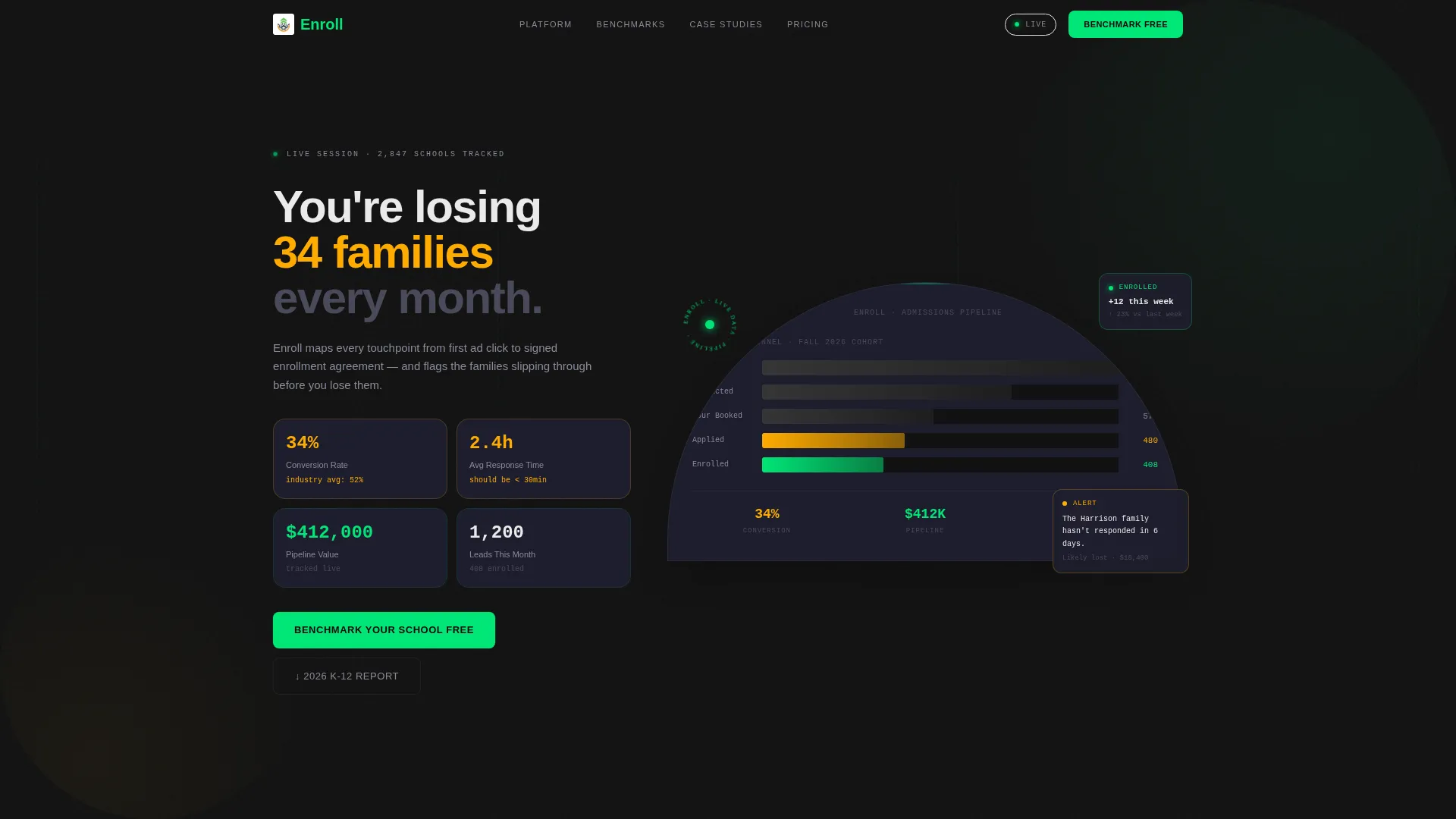
- A stats dashboard header with animated counters showing enrollment rate, response time, pipeline value, and funnel visualization
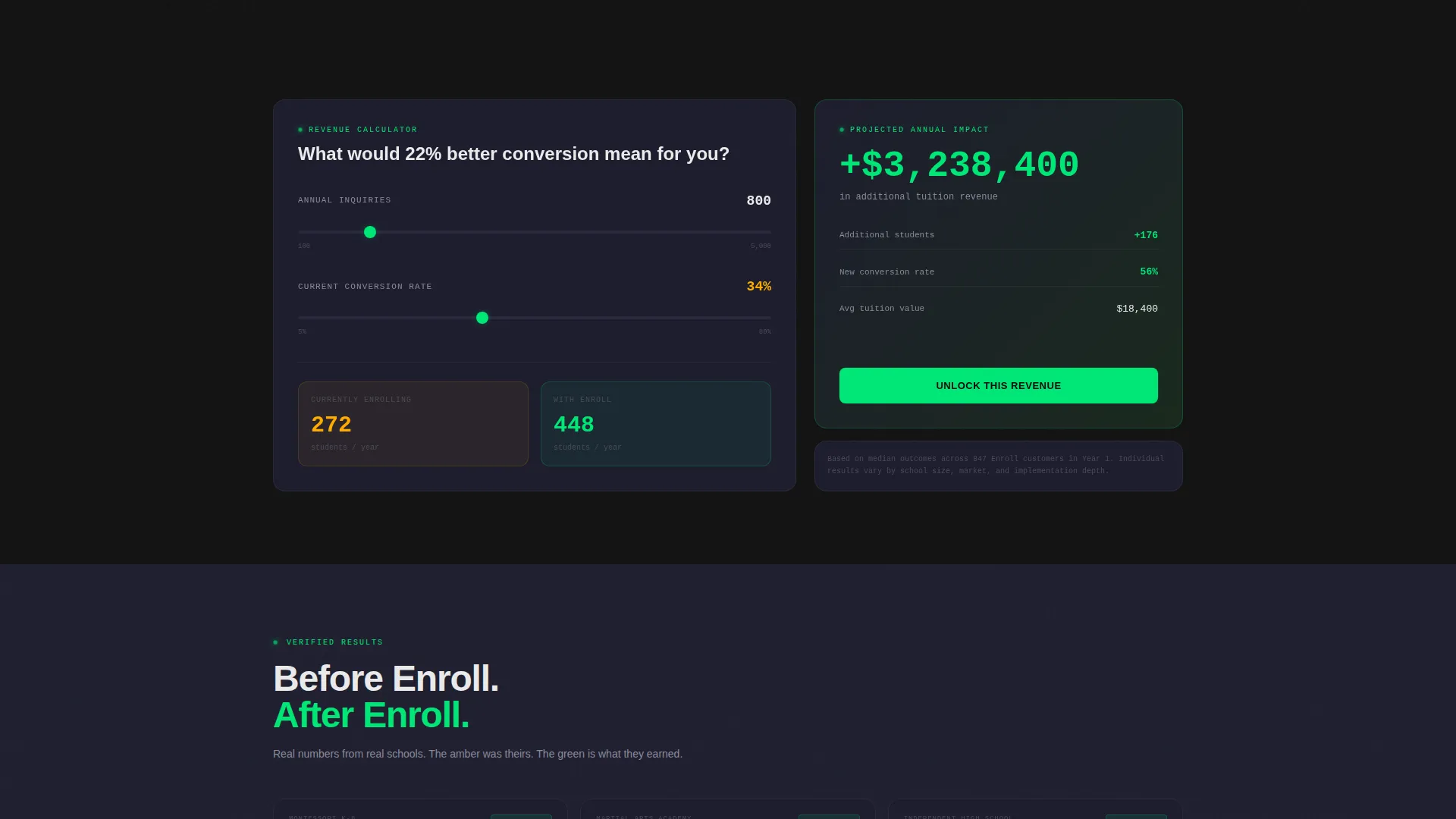
- A midpage interactive calculator tile where visitors input their inquiry volume and see projected enrolled students
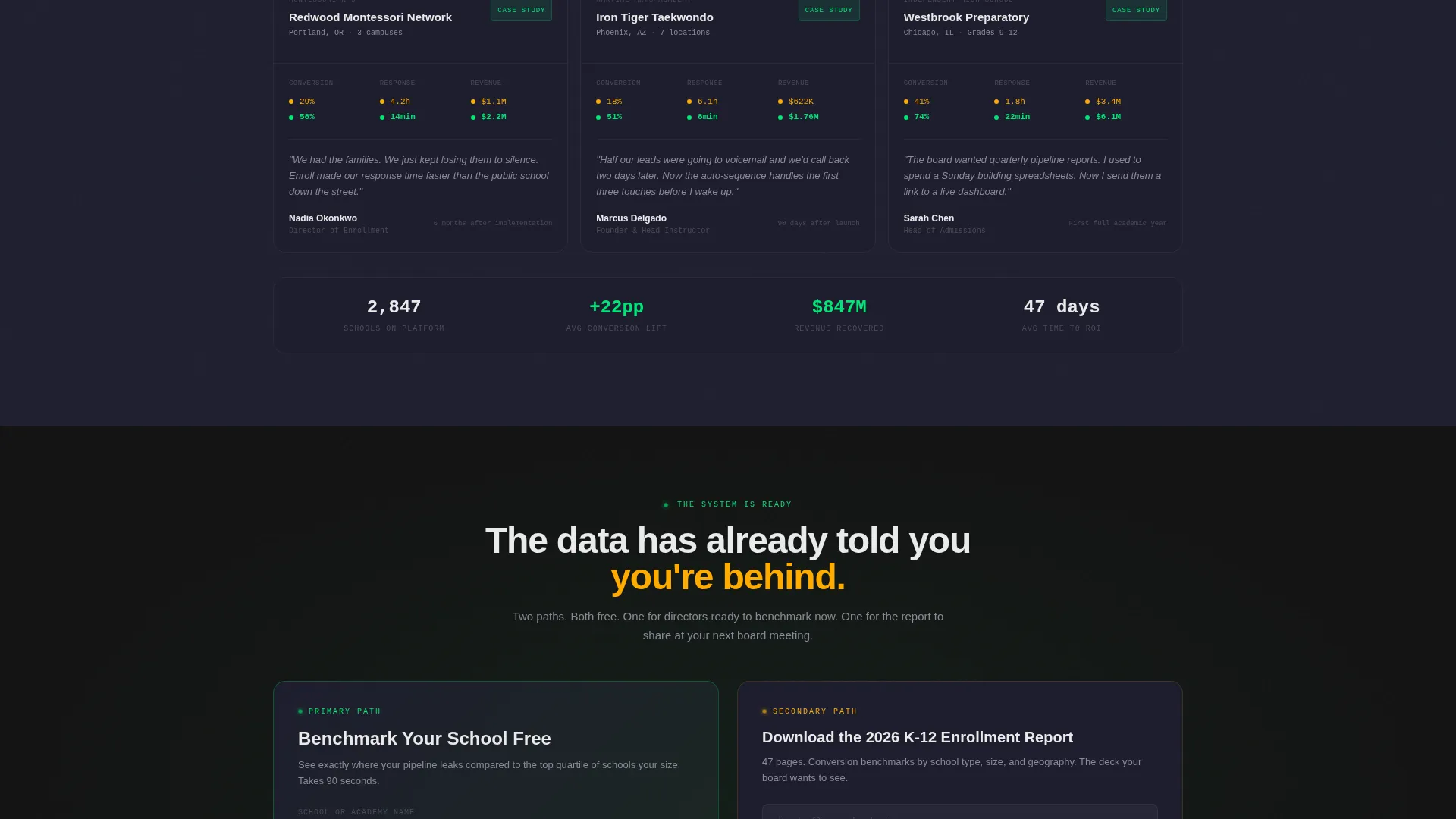
- Three case study tiles showing before-and-after dashboards from a Montessori network, a taekwondo academy chain, and a private high school
Feature list
This template packs its conversion power into a set of carefully structured components. Each one serves a specific role in the admissions-focused landing page flow.
Live-Style Dashboard Header
The header mimics a frozen mid-session analytics screen. It displays enrollment conversion rate at 34%, average response time of 2.4 hours, pipeline value of $412,000, and a funnel visualization compressing 1,200 inquiries down to 408 enrolled students. Monospaced typography and subtle counter animations give every number a sense of urgency.
Versus Comparison Bento Grid
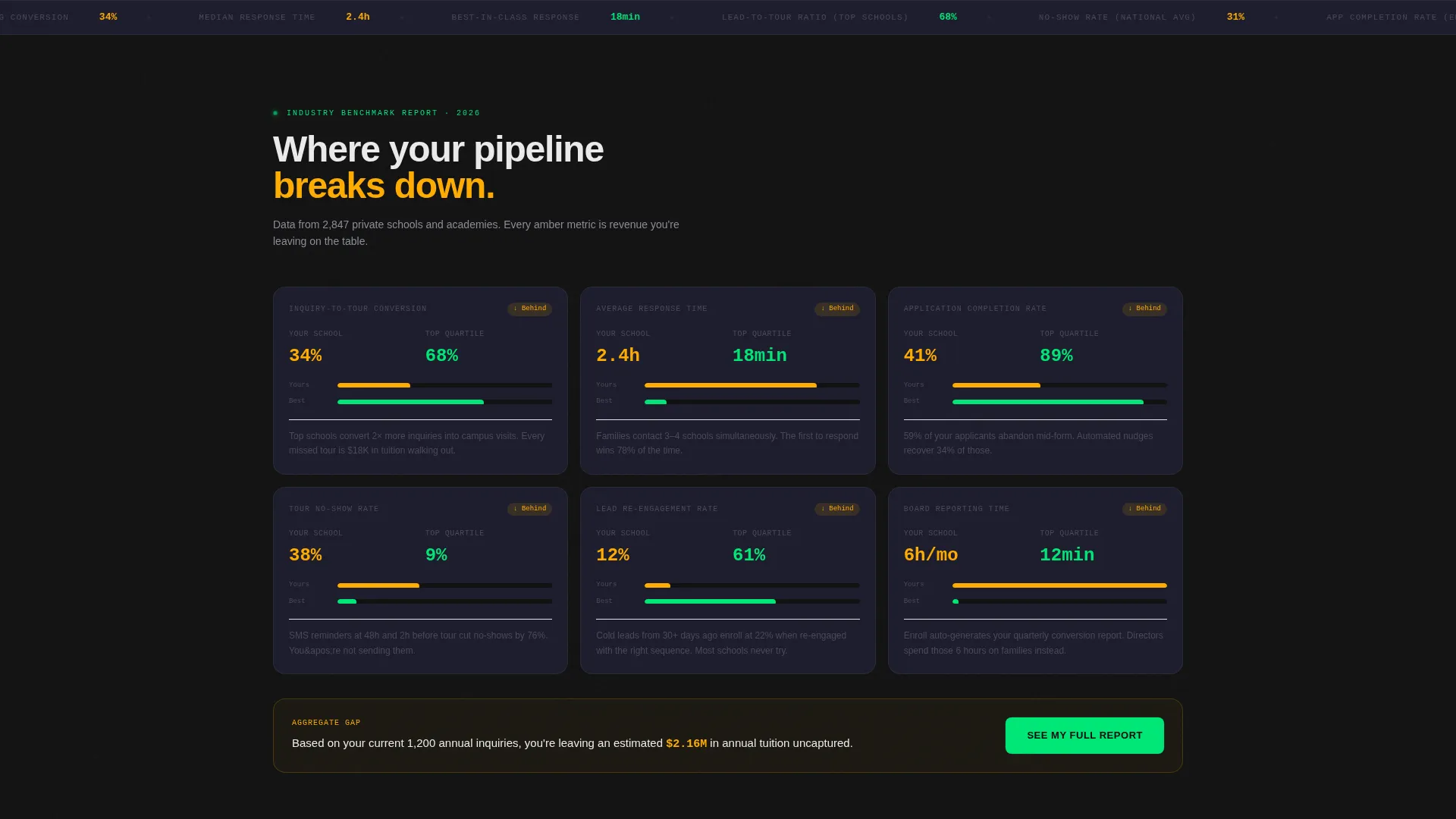
Each bento tile presents a side-by-side comparison of the visitor's school against an industry benchmark. Metrics covered include response time, lead-to-tour ratio, application completion rate, and no-show percentage. The scroll builds a quiet case of inadequacy before the product appears as the bridge between both columns.
Interactive Enrollment Calculator
A midpage calculator tile lets visitors enter their current annual inquiry volume. The tile immediately outputs a projected enrolled student count. This makes the value of the platform tangible before the visitor reaches any call to action.
Dual Conversion Path Design
The primary call to action reads "Benchmark Your School Free" and sits inside a bento tile styled to match the dashboard. It asks for school name, current annual inquiries, and enrollment goal. A secondary path offers a downloadable report gated behind an email field only, capturing visitors who are researching but not yet ready to request a demo.
Before-and-After Case Study Tiles
The bottom grid shifts from comparison data to social proof. Three case study tiles show real scenario types: a Montessori network, a taekwondo academy chain, and a private high school. Each tile displays a before dashboard and an after dashboard, giving the claim visual weight.
Carbon Fiber Color System
The entire template uses a four-color instrument-panel palette. Deep cockpit black and woven graphite cover backgrounds. Status-light green signals positive interaction states. Alert amber appears only when a metric needs attention, such as a dipping conversion rate or a benchmark gap.
Page sections overview
| Section | Purpose |
|---|---|
| Dashboard Header | Display live enrollment metrics and funnel visualization |
| Versus Comparison Grid | Show school versus. industry benchmark side by side |
| Enrollment Calculator Tile | Let visitors project their own enrolled student count |
| Primary call to action Tile | Capture demo-ready leads with a three-field form |
| Secondary Lead Capture | Gate the enrollment report behind an email field |
| Case Study Grid | Prove results with before-and-after dashboard tiles |
Design & branding system
The visual identity follows a Dashboard Pro theme built on a Carbon Fiber color system. The palette is deliberately tight, keeping every color purposeful and every glow intentional.
- Backgrounds stay within the deep cockpit black (#121212) to woven graphite (#1E1E2E) range, with crisp white (#EAEAEA) body text
- Status-light green (#00E676) drives hover states and positive indicators; alert amber (#FFAB00) appears only on metrics that need attention
- Monospaced typefaces are used for all numeric data, reinforcing the instrument-panel aesthetic throughout the page
Mobile & speed optimization
The bento grid layout is structured to reflow cleanly at smaller viewport sizes. The dashboard aesthetic remains legible and functional whether viewed on a desktop command center or a mobile screen in a hallway between classes.
- Bento tiles stack vertically on smaller screens without losing their paired comparison logic
- Counter animations and hover states are lightweight by design, keeping the page feeling fast across devices
- The dark background system reduces visual noise on mobile, helping data-heavy tiles remain easy to scan
How this template helps you convert
The entire scroll is engineered as a conversion argument, not a feature list. Visitors are measured by the page before they ever touch a form.
- The header metrics establish credibility immediately. Visitors recognize the dashboard as their world, which builds trust faster than any headline claim.
- The versus scroll makes the cost of inaction concrete. By the time visitors reach the call to action, they have already seen their own performance gap reflected in the data.
- Dual conversion paths ensure no visit is wasted. A visitor not ready to demo can still enter the funnel by downloading the report, giving the admissions team a warm lead to follow up with later.
Other information about this template
This template is part of a school and academy website templates subcategory within the broader technology category on the platform. It is designed specifically for the school and academy lead capture landing page niche.
- The template style is Bento Grid, the theme is Dashboard Pro, and the color system is Carbon Fiber
- The creative direction follows an Industry Report structure, and the landing page direction is Comparison/Versus
- The header concept is Stats/Metrics, making this template distinct from hero-image or testimonial-led layouts common in the education space
Theme
Dashboard Pro
Creative direction
Industry Report
Color system
Carbon Fiber
Style
Bento Grid
Direction
Comparison/Versus
Page Sections
Live-style Dashboard Header
Versus Comparison Bento Grid
Interactive Enrollment Calculator
Dual Conversion Path Design
Before-and-after Case Study Tiles
Carbon Fiber Instrument Panel Palette
Related questions
Who is this landing page template designed for?
Can I customize the dashboard metrics shown in the header?
What are the two conversion paths included in this template?
Does this template work for non-K-12 education programs?
What makes this different from a standard education landing page template?



