Precision Drone Component Manufacturer Website Template
Airframe is a hub-and-spoke landing page template built for precision drone component manufacturers. It guides engineering buyers through a structured factory walkthrough, from raw material to crated shipment, using anchor navigation, specification callouts, and a gated Component Library download. The design uses a Monochrome Steel palette that communicates cleanroom-level precision from the first scroll.
by Rocket studio
Quick summary
Airframe is a single-page, anchor-navigated landing page template designed for drone component makers who serve serious engineering buyers. The layout moves visitors through five manufacturing stages, each backed by real specification data and expandable compliance panels. The primary call to action gates a full PDF component library, while ungated resources build trust before the form appears.
Who this template is for
This template is built for precision manufacturers supplying parts to the unmanned aerial vehicle (UAV) industry. It speaks directly to engineering-led buyers who evaluate suppliers on traceability and tolerances, not brand storytelling.
- UAV component manufacturers supplying agricultural survey, defense intelligence payloads, or last-mile delivery teams
- Aerospace and aviation parts makers who need to present material certifications, lot traceability, and compliance standards to procurement engineers
- Industrial businesses in the drone component space that need a content-rich resource hub to generate qualified leads from technical audiences
What problem this template solves
Most industrial product pages fail engineers because they lead with marketing language instead of specifications. A buyer who reads datasheets before brochures will leave a generic landing page in seconds.
- The template replaces vague benefit claims with a structured process walkthrough, giving engineers the specification depth they need to evaluate a supplier
- It solves the trust gap by surfacing compliance standards, inspection certificates, and material lot traceability directly on the page before asking for contact details
- It converts a technically complex product offering into a scannable, anchor-navigated experience that respects how engineers actually research and qualify vendors
What you get with this template
You get a fully structured hub-and-spoke landing page that functions as a content and resource hub for a drone components business. Every section is designed to earn attention from technical buyers and guide them toward a high-value download.
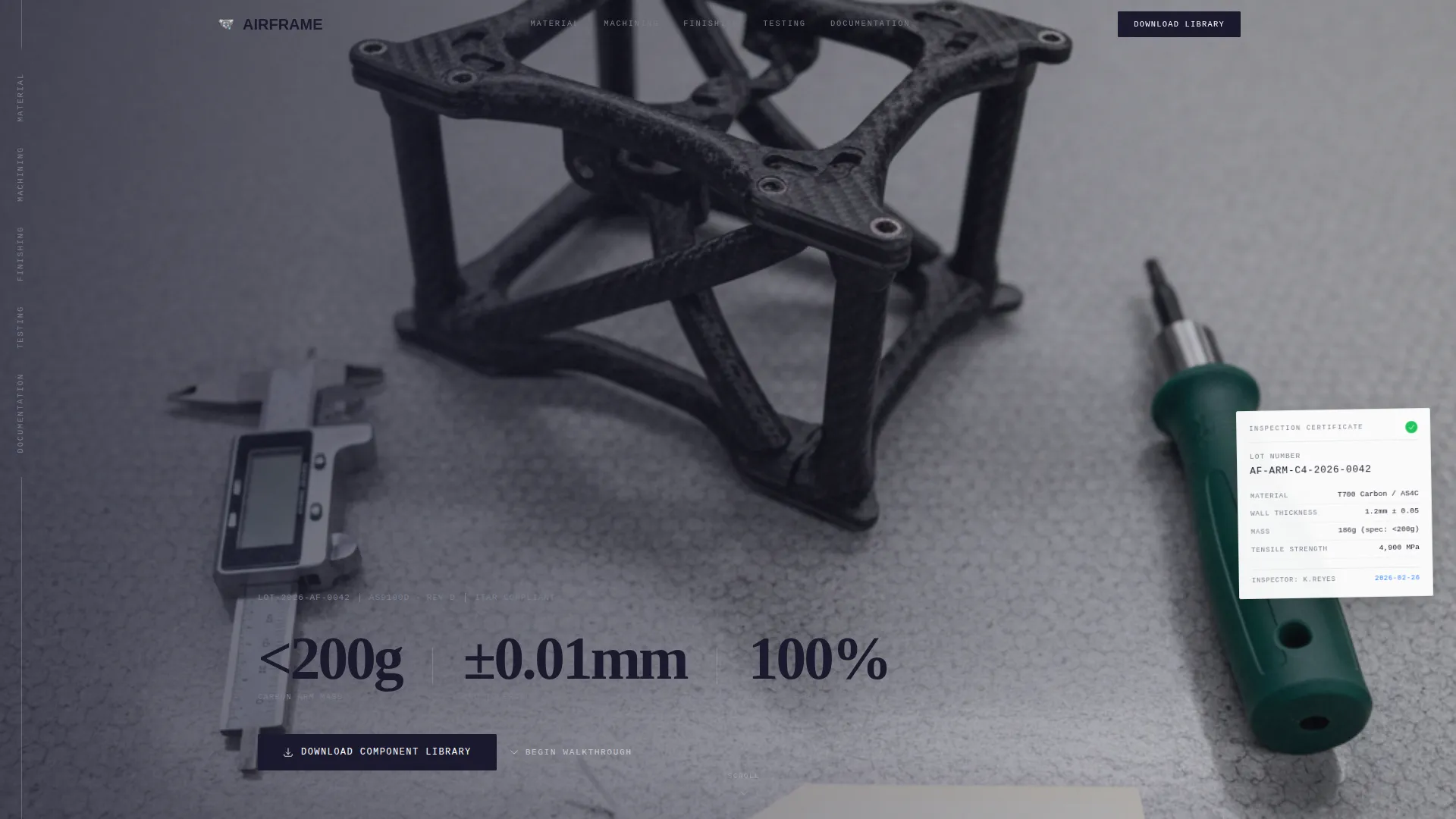
- A full-bleed overhead photo header with pinned anchor navigation linking to five process stage sections: Material, Machining, Finishing, Testing, and Documentation
- Five spoke sections, each pairing a process photo with numbered specification callouts and expandable compliance panels referencing standards such as AS9100D, ITAR notes, and REACH compliance
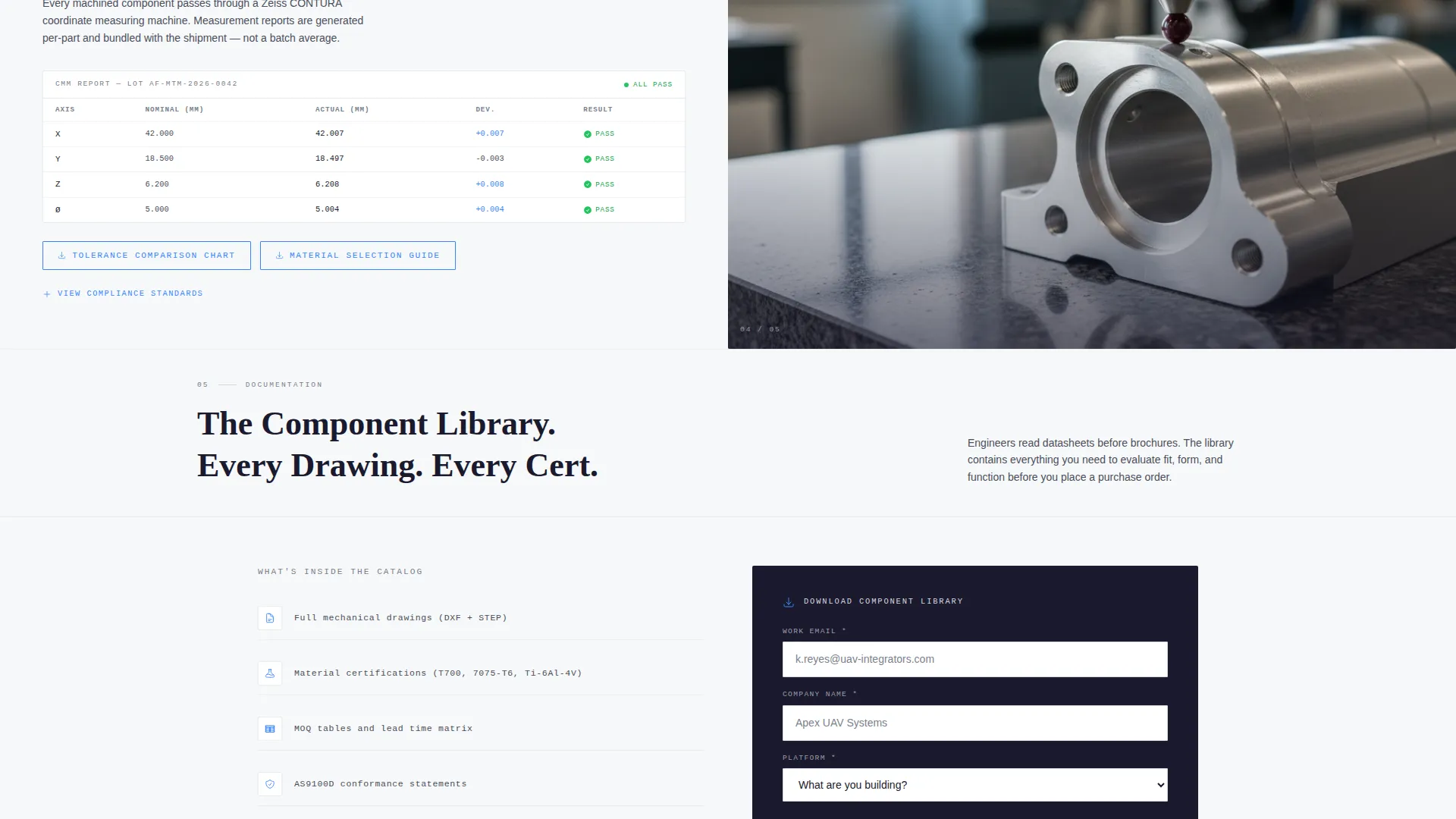
- A gated Component Library download form with a work email field, company name field, and a build-type dropdown, plus two ungated resources: a tolerance comparison chart and a material selection guide
Feature list
This template includes purpose-built components that serve technical manufacturing audiences. Each one is grounded in the prompt brief and designed to convert engineering buyers.
Anchor Navigation Rail
A fixed left-rail navigation links to each manufacturing stage by process name. Visitors can jump directly to Material, Machining, Finishing, Testing, or Documentation without losing context. The rail keeps the factory walkthrough structure clear at every scroll depth.
Process Stage Spoke Sections
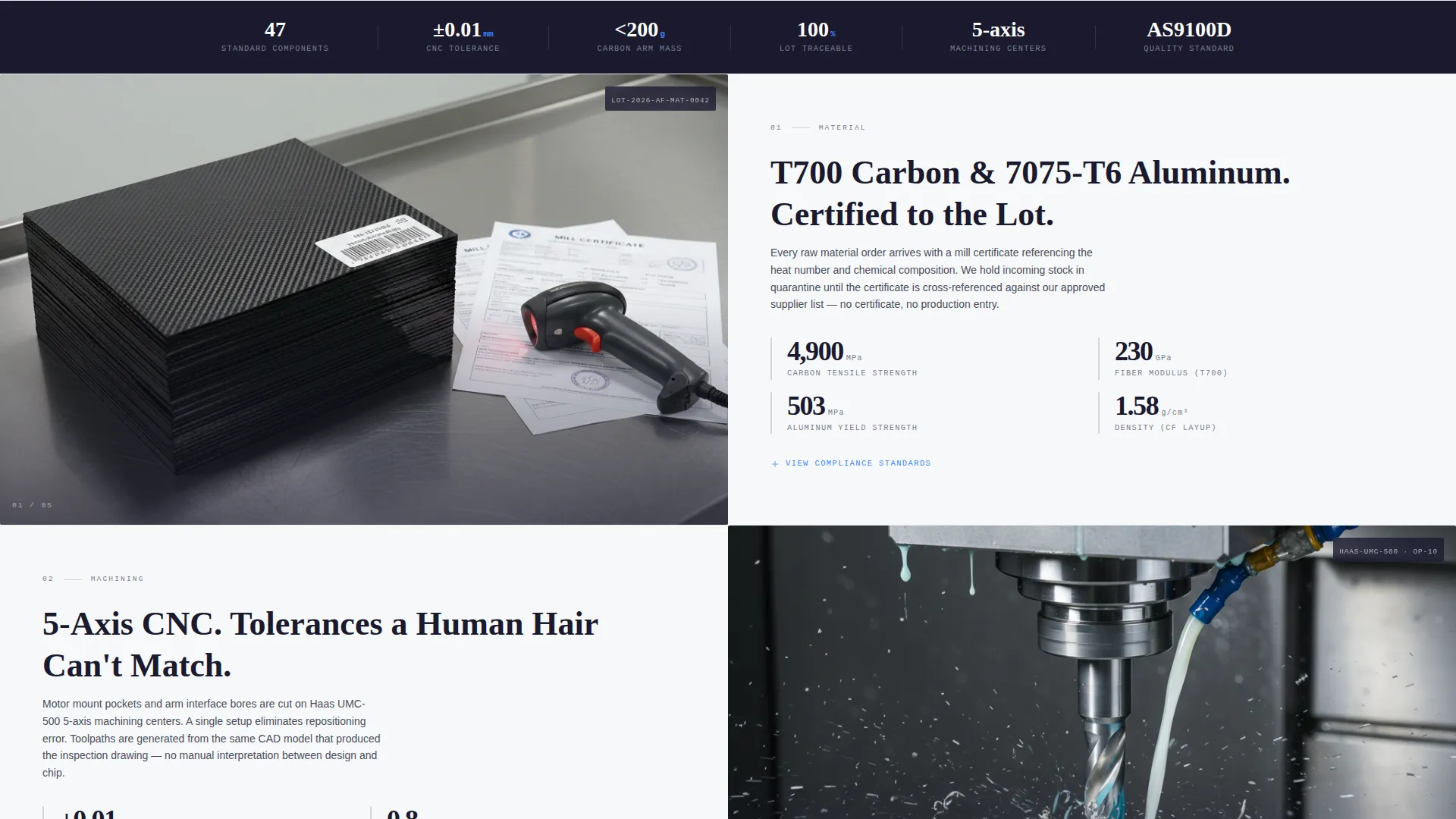
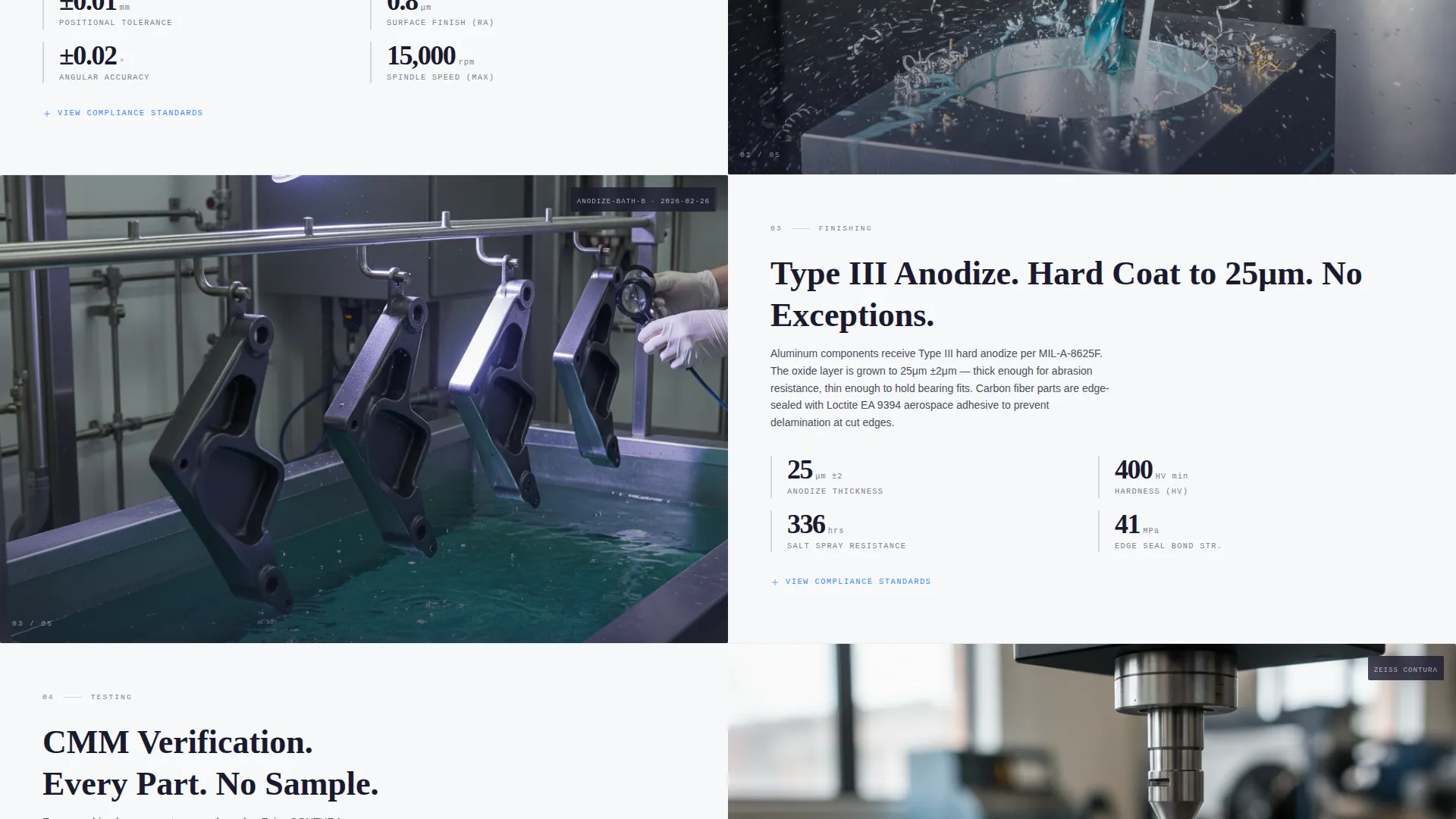
Each of the five sections pairs a full process photograph with a numbered specification callout panel. The layout puts visual evidence and hard data side by side. This format mirrors how engineers review component documentation: image first, then numbers.
Expandable Compliance Panels
Every process stage includes an expandable panel that surfaces the actual standard the step conforms to. Referenced standards include AS9100D clauses, ITAR notes, and REACH compliance markers. Buyers can verify conformance depth without leaving the page.
Gated Component Library Form
The primary call to action offers a downloadable PDF catalog containing mechanical drawings, material certificates, and minimum order quantity (MOQ) tables. The short form asks for work email, company name, and a single dropdown labeled "What are you building?" with options covering Fixed-Wing, Multirotor, VTOL, and Custom Platform.
Ungated Pre-Gate Resources
Two resources are available without a form: a tolerance comparison chart and a material selection guide. These build credibility before the gate appears. Visitors see enough real data on-page to trust that the full catalog is worth the trade.
Horizontal Wipe Section Transitions
Each section transition uses a subtle horizontal wipe animation that mimics a part moving down a production line. The motion reinforces the factory walkthrough narrative without relying on decorative effects.
Page sections overview
| Section | Purpose |
|---|---|
| Full-Bleed Header | Establishes precision manufacturing credibility with a QA bench overhead shot and pinned anchor nav |
| Material Stage | Presents raw material sourcing with specification callouts and expandable compliance panel |
| Machining Stage | Showcases five-axis CNC cutting tolerances with process photo and numbered data panel |
| Finishing Stage | Details anodize bath process with visual and specification evidence |
| Testing Stage | Documents CMM measurement step with inspection data and compliance references |
| Documentation Stage | Covers crated shipment and lot traceability with certification context |
| Component Library Gate | Hosts the gated PDF download form with build-type qualification dropdown |
| Ungated Resources | Provides tolerance chart and material guide as trust-building pre-gate content |
Design & branding system
The visual identity follows a Corporate Precision theme built on a Monochrome Steel color system. Every color choice references a real surface from precision manufacturing, creating a palette that engineers will recognize without being told what it means.
- Core colors include mill-finish aluminum (#D4D7DC), deep tooling black (#1A1A2E), and inspection-light white (#F7F8FA) for all structural surfaces and typography
- Laser-etch blue (#3A86FF) is reserved exclusively for interactive elements: anchor links, hover states, and download icons
- The overall aesthetic is described in the brief as a cleanroom under fluorescent strips: no warmth, no decoration, only the quiet confidence of deburred and anodized surfaces
Mobile & speed optimization
The template is structured with a scrollable single-page layout that adapts naturally to smaller screens. The anchor navigation and process sections are designed to remain readable and functional across device sizes.
- The fixed left-rail anchor nav collapses cleanly for mobile viewports, keeping navigation accessible without blocking content
- Process stage sections use a two-column photo-plus-data layout that stacks vertically on narrow screens, preserving readability of specification callouts
- Ungated resources and the gated form are positioned as standalone blocks, making them easy to reach on any device without scrolling through the full factory walkthrough
How this template helps you convert
This template converts by earning trust before asking for anything. The resource hub structure is specifically designed for technical buyers who qualify vendors through documentation, not sales copy.
- The ungated tolerance comparison chart and material selection guide give engineers immediate value, establishing the manufacturer as a serious technical source before the Component Library gate appears
- The gated form is short and contextually relevant: three fields and one qualification dropdown that feels like a supplier intake form rather than a marketing capture, reducing friction for engineering buyers
- The five-stage process walkthrough demonstrates traceability from raw billet to crated shipment, giving procurement teams the evidence they need to justify a vendor evaluation internally
Other information about this template
This template is built for a specific intersection of manufacturing and aerospace, and it carries details that matter in that context. A few practical notes for teams considering it.
- The template style is Hub and Spoke with Anchor Navigation, making it well suited for companies with multiple product or process stories to tell within a single page
- The Transparent Process creative direction is integral to the layout: removing the compliance panels or specification callouts would reduce the core trust mechanism the design depends on
- The header concept calls for a real overhead QA bench photograph; the brief specifies exact props including digital calipers, a torque driver, and a printed inspection tag with a visible lot number, so sourcing or commissioning this image is part of a complete implementation
- The template sits at the intersection of the Manufacturing and Industrial category with the Aerospace and Aviation Parts subcategory, making it relevant for any precision parts business that sells to engineers rather than consumers
Theme
Corporate Precision
Creative direction
Transparent Process
Color system
Monochrome Steel
Style
Hub & Spoke (Anchor Nav)
Direction
Content/Resource
Page Sections
Anchor Navigation Rail
Process Stage Spoke Sections
Expandable Compliance Panels
Gated Component Library Download
Ungated Pre-gate Resources
Horizontal Wipe Transitions
Related questions
Who is this landing page template designed for?
What is the primary call to action on this template?
Can visitors access any content without filling out the form?
What compliance standards does the template reference?
What does the anchor navigation include?



