Aisle - Intelligent Retail Landing Page Template
Aisle is a hub and spoke landing page template built for retail AI voice assistant products. It uses a tabbed header, a versus-narrative scroll structure, and a persistent anchor nav to guide retail operators through a clear problem-to-solution story. A built-in savings calculator and gated demo call to action turn visitors into qualified leads before they ever fill out a form.
by Rocket studio
Quick summary
Aisle is a single-page retail AI voice assistant landing page template. It follows a Problem-to-Solution arc, anchored by a tab-switching header and a persistent hub-and-spoke navigation. The layout walks retail operations leaders from daily floor friction to full-store cost impact, then hands them a savings calculator before asking for any contact details.
Who this template is for
This template speaks directly to the people responsible for keeping retail floors profitable and running without constant firefighting. It is built for operators who have outgrown clipboards and walkie-talkies.
- Regional retail chain operators managing between 15 and 80 store locations
- Loss prevention directors trying to diagnose shrink faster than overnight reports allow
- Operations vice presidents who need real-time floor data without adding headcount
What problem this template solves
Retail operations leaders know their current tools are slow, but most product pages cannot show the cost of that slowness in a compelling, side-by-side way. This template makes the case visually, before a single paragraph of dense copy appears.
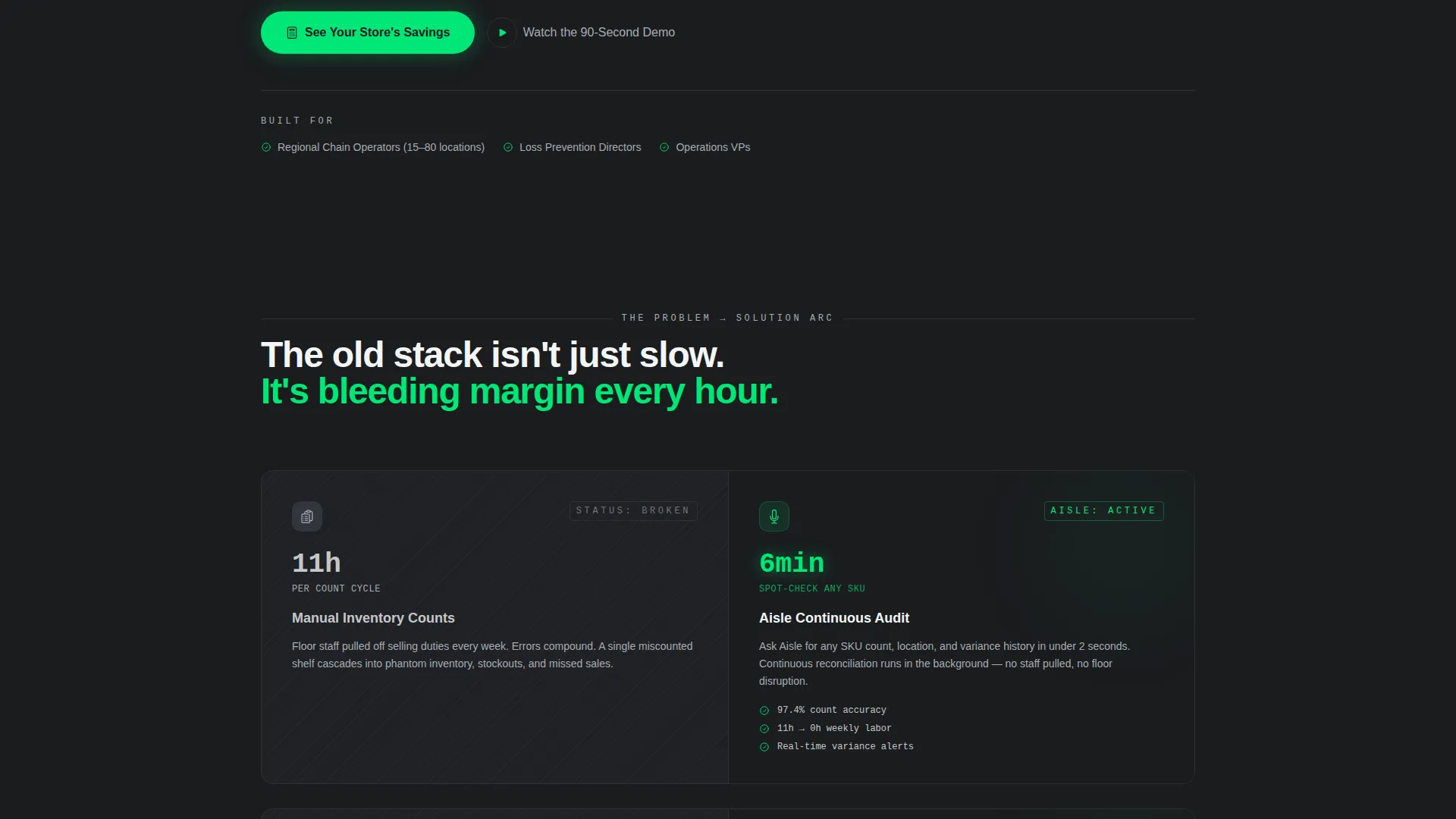
- Manual inventory counts that consume 11 hours of labor per cycle are shown directly against a real-time voice response
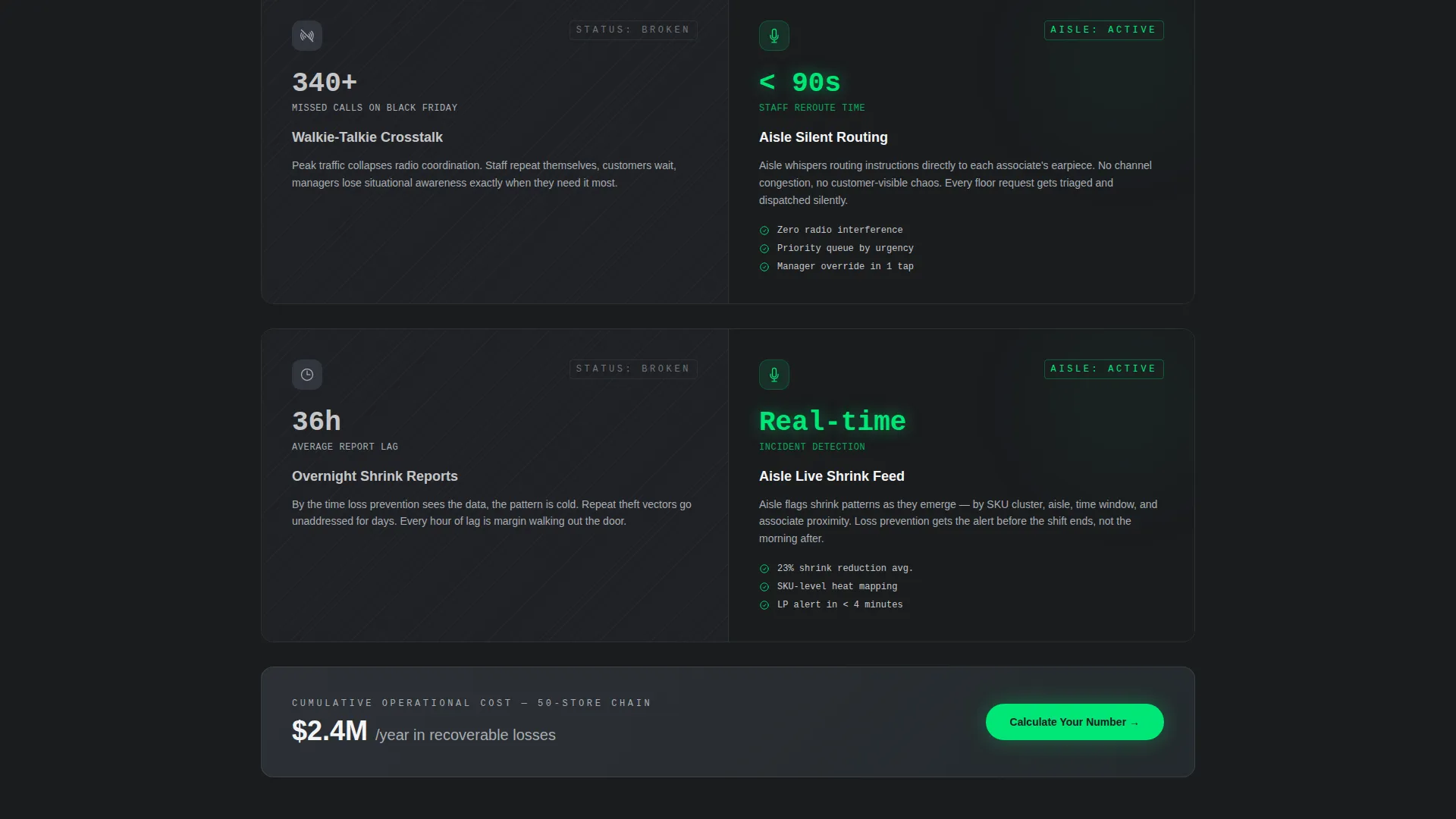
- Walkie-talkie crosstalk during peak sales events is contrasted with instant, silent staff routing
- Shrink reports arriving 36 hours after an incident are placed beside live margin data delivered through an earpiece
What you get with this template
You get a fully structured, conversion-focused landing page layout ready for a retail AI voice assistant product. Every section is purpose-built to move a skeptical operations leader from awareness to action.
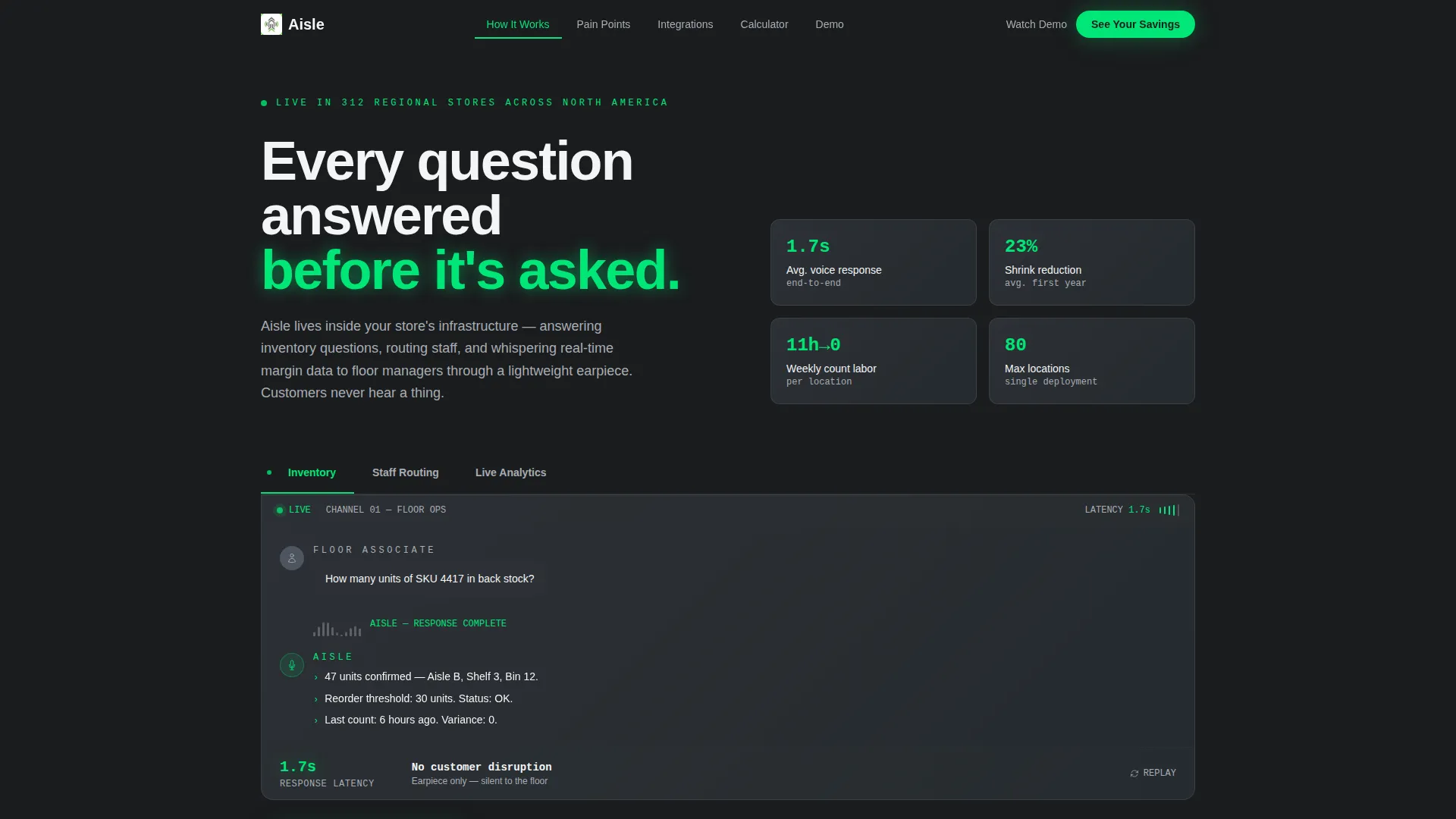
- A Feature Tab Switcher header with three live voice interaction simulations across Inventory, Staff Routing, and Live Analytics tabs
- A hub-and-spoke anchor navigation that locks to the top on scroll and links each pain-point section
- A lightweight savings calculator and a gated 90-second demo video as dual conversion paths
Feature list
This template includes a focused set of purpose-built components. Each one earns its place in the conversion flow.
Feature Tab Switcher Header
Three horizontal tabs labeled Inventory, Staff Routing, and Live Analytics each reveal a simulated voice interaction. The active tab displays a waveform visualization mid-conversation, showing a floor associate asking about back-stock units and receiving a count, location, and reorder status in under two seconds.
Persistent Hub and Spoke Anchor Nav
A sticky navigation bar locks to the top of the page on scroll. Each anchor link jumps directly to a specific spoke section, letting busy operations leaders skip to the pain point most relevant to their role without scrolling through unrelated content.
Problem-to-Solution Versus Layout
Each spoke section pairs a specific retail pain point on the left with Aisle's response on the right. Live metrics, latency benchmarks, and integration logo slots fill the right column, building a cumulative operational cost argument across the full scroll.
Savings Calculator Component
Visitors enter their number of locations, average headcount per store, and current inventory method from a dropdown. The calculator returns estimated annual labor hours recovered and a shrink reduction percentage, delivering concrete value before any email field appears.
Gated Demo Video call to action
A secondary call to action labeled "Watch the 90-Second Demo" gates a short product video behind a single work email field. This self-selection mechanism qualifies leads who want deeper engagement without interrupting visitors still in the evaluation stage.
Signal Green Active State System
A single electric accent color, signal green at hex code #00E676, is reserved exclusively for active tab states, live data indicators, and primary call-to-action buttons. Every other element uses the monochrome steel palette, so the green always means something is live or actionable.
Page sections overview
| Section | Purpose |
|---|---|
| Tab Switcher Header | Demonstrate three voice capabilities without copy |
| Anchor Nav Bar | Persistent scroll navigation across all spokes |
| Inventory Pain Spoke | Contrast manual counts with real-time voice response |
| Staff Routing Spoke | Show walkie-talkie chaos versus silent AI routing |
| Shrink and Analytics Spoke | Compare late reports to live margin earpiece data |
| Savings Calculator | Deliver personalized ROI before any form gate |
| Demo Video call to action | Qualify deeper leads with a single email field |
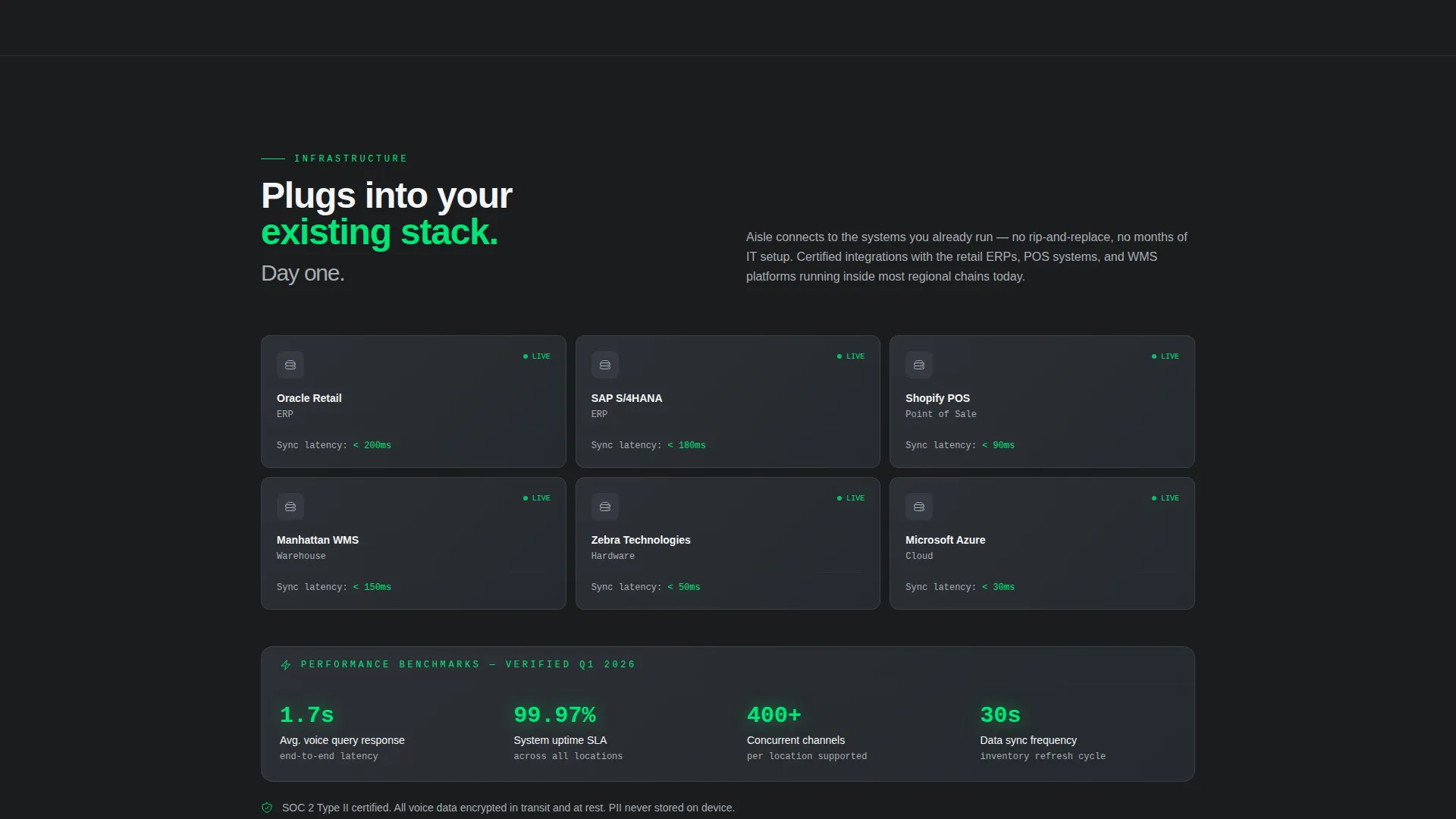
| Integration Logos Row | Reinforce compatibility with existing retail systems |
Design & branding system
The visual identity runs on a Monochrome Steel palette that feels like the inside of a server rack: cool, metallic, and built for function. Color is rationed deliberately so that every accent carries meaning.
- Base tones are gunmetal (#3B3F45), brushed aluminum (#A8ADB3), and warehouse white (#F4F5F6) for all structural and typographic elements
- Signal green (#00E676) appears only on active states, live data readouts, and primary call-to-action buttons
- The overall theme follows Startup Velocity energy: sharp grid lines, high contrast between dark and light surfaces, and no decorative elements that do not serve the layout
Mobile & speed optimization
The layout is designed to remain fully navigable on smaller screens without losing the versus-narrative structure that drives the conversion argument.
- The persistent anchor nav collapses cleanly on mobile so spoke sections remain reachable without excessive scrolling
- The Feature Tab Switcher stacks vertically on narrow viewports, keeping each simulated voice interaction readable at any screen width
- The savings calculator inputs are sized and spaced for touch interaction, so visitors on phones can complete the estimate without pinching or zooming
How this template helps you convert
The conversion architecture is layered so that visitors receive value at multiple points before committing to any form or follow-up.
- The savings calculator delivers a personalized labor and shrink estimate upfront, creating a concrete reason to keep reading and eventually share contact details
- The gated demo video acts as a second conversion gate that only activates for visitors who have already engaged with the calculator, ensuring the leads who reach the demo are self-qualified
- The versus-narrative scroll structure escalates from individual task friction to system-wide margin loss, so by the time a visitor reaches the primary call to action, the cost of inaction feels specific and real
Other information about this template
This template is designed for teams building or marketing a retail AI voice assistant product and who need a landing page that earns trust with a technically skeptical audience.
- The integration logo row supports placement of retail platform identifiers such as Oracle Retail, SAP, and Shopify POS to reinforce compatibility with existing store infrastructure
- The hub-and-spoke structure makes the page easy to extend: new spoke sections can be added for additional use cases without breaking the navigation or visual hierarchy
- The Startup Velocity theme and Monochrome Steel color system are matched as a paired intersection, meaning the design decisions are intentional and internally consistent rather than assembled from mismatched parts
Theme
Startup Velocity
Creative direction
Problem→Solution Arc
Color system
Monochrome Steel
Style
Hub & Spoke (Anchor Nav)
Direction
Comparison/Versus
Page Sections
Feature Tab Switcher Header
Persistent Hub and Spoke Nav
Versus Narrative Scroll Layout
Savings Calculator Component
Gated Demo Video Call to Action
Signal Green Active State System
Related questions
Who is the primary audience for this landing page template?
Can I customize the savings calculator inputs and outputs?
Does this template include actual AI voice assistant functionality?
How does the gated demo video component work?
Is the hub-and-spoke navigation easy to extend with new use cases?



