Specialized Chiropractic Careers Landing Page Template
The Adjust technique filtered chiropractic job board landing page template is a dark-dashboard, comparison-driven landing page built for the chiropractic profession. It matches associate chiropractors, clinic owners, and mobile practitioners with positions filtered by technique specialty, state licensure, and patient volume. The layout combines a product screenshot hero, a live comparison table, hiring trend visualizations, and a streamlined posting form.
by Rocket studio
Quick summary
Adjust is a focused chiropractic landing page template built around one idea: filtering jobs by technique, not just zip code. It serves both sides of the hiring market, clinic owners who need credentialed providers and associate doctors of chiropractic (DCs) who want roles that match their training. The design runs dark, data-dense, and purposeful, like a professional analytics dashboard.
Who this template is for
This template speaks directly to the people making hiring decisions inside the chiropractic profession. It is built for two clear audiences who both land on the same page and follow separate conversion paths.
- Clinic owners and multi-location managers who need a reliable pipeline of credentialed providers before patient volume outpaces their staff
- Associate DCs, new graduates, and mobile practitioners scanning for positions that match their technique specialty, compensation structure, and state licensure requirements
What problem this template solves
Generalist job platforms do not speak the language of chiropractic care. They filter by zip code and job title, not by Gonstead, Activator, or Thompson technique. That mismatch costs clinic owners quality leads and costs job-seeking chiropractors wasted time. Chiropractic landing pages that fail to address profession-specific needs lose potential patients and candidates to competitors before the first scroll.
- Clinic owners cannot find credentialed providers fast enough and have no way to signal technique requirements upfront
- Associate DCs have no efficient way to filter positions by technique, production-bonus structure, or licensure match
What you get with this template
This landing page delivers a fully structured, single-page flow built around comparison and conversion. Every section is purposeful. Every call to action is placed where competitive advantage is highest.
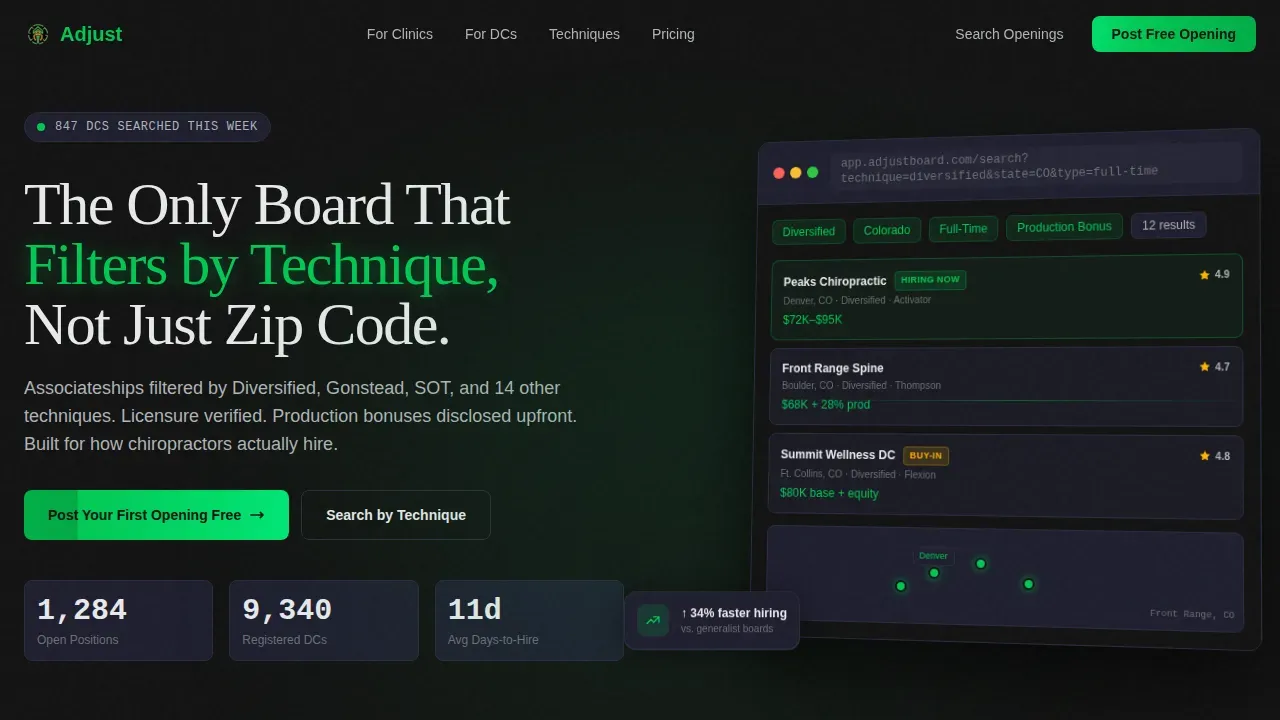
- A hero section with an isometric product screenshot, a bold headline, and three live stat counters showing open positions, registered DCs, and average days-to-hire
- A side-by-side comparison table, hiring trend data visualizations, clinic owner testimonial cards with retention stats, and a four-field posting form with dual conversion paths
Feature list
This template includes several key features designed to optimize both sides of the job board experience.
Technique-Filtered Search Bar
The dynamic search bar combines technique specialty, location, and job type into one filterable form. Dropdowns cover specific techniques like Gonstead, Activator, and Thompson. Job seekers in healthcare spend less than 20 seconds on a page, so relevant results must appear immediately above the fold.
Live Comparison Table
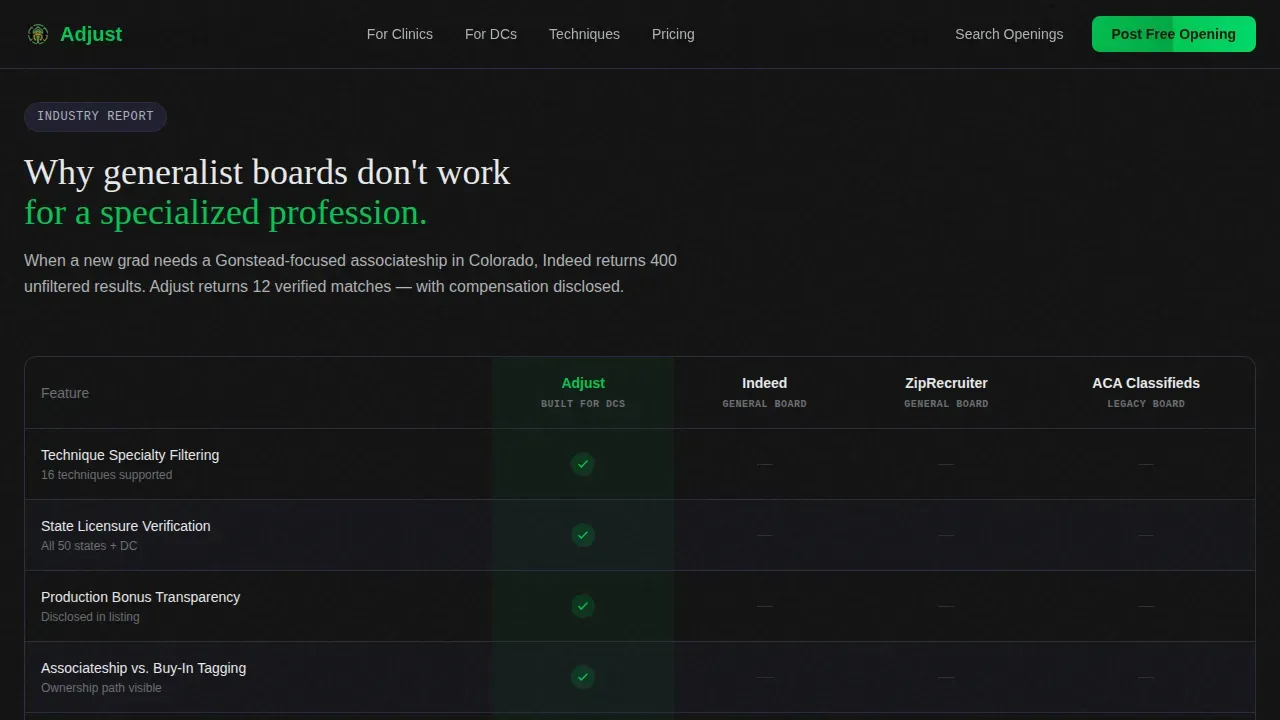
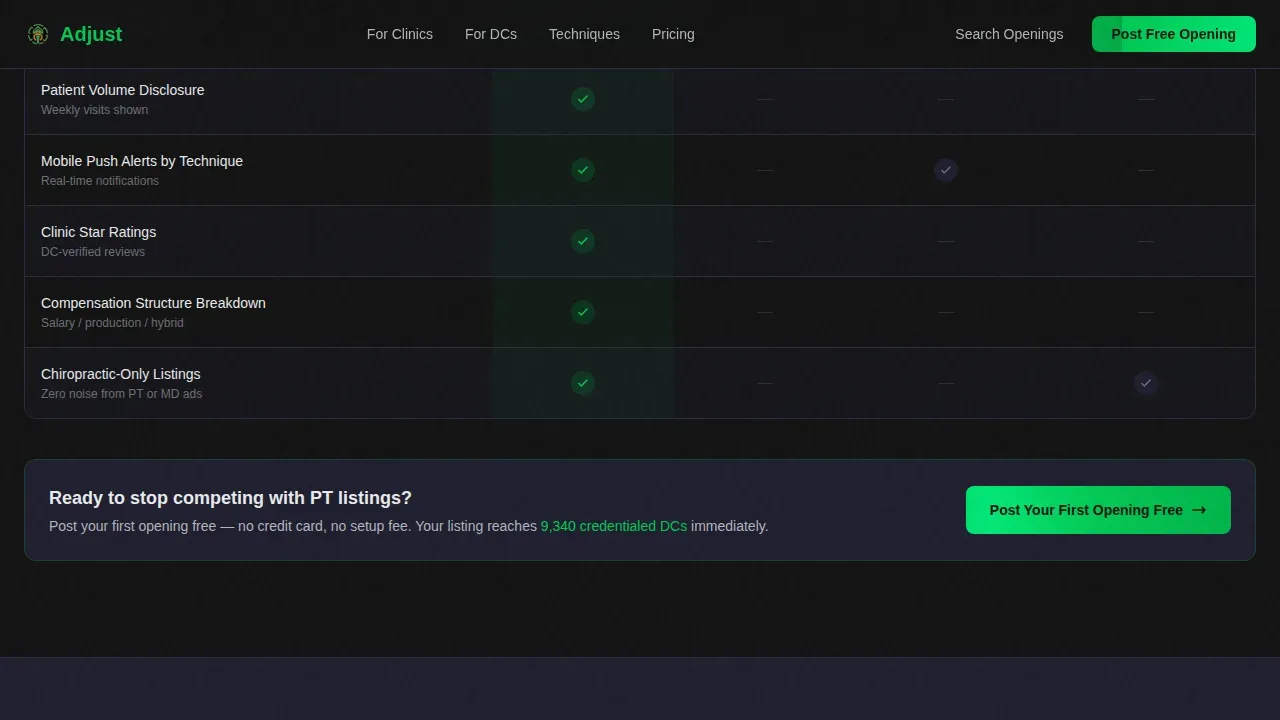
A structured table pits this board against generalist platforms, row by row. Rows cover technique filtering, licensure verification, production-bonus transparency, continuing education (CE) credit integration, and mobile alerts. Green checkmarks stack on the Adjust side; gray dashes accumulate on the others. This layout drives conversions by making the competitive case visually and instantly.
Hiring Trend Data Panels
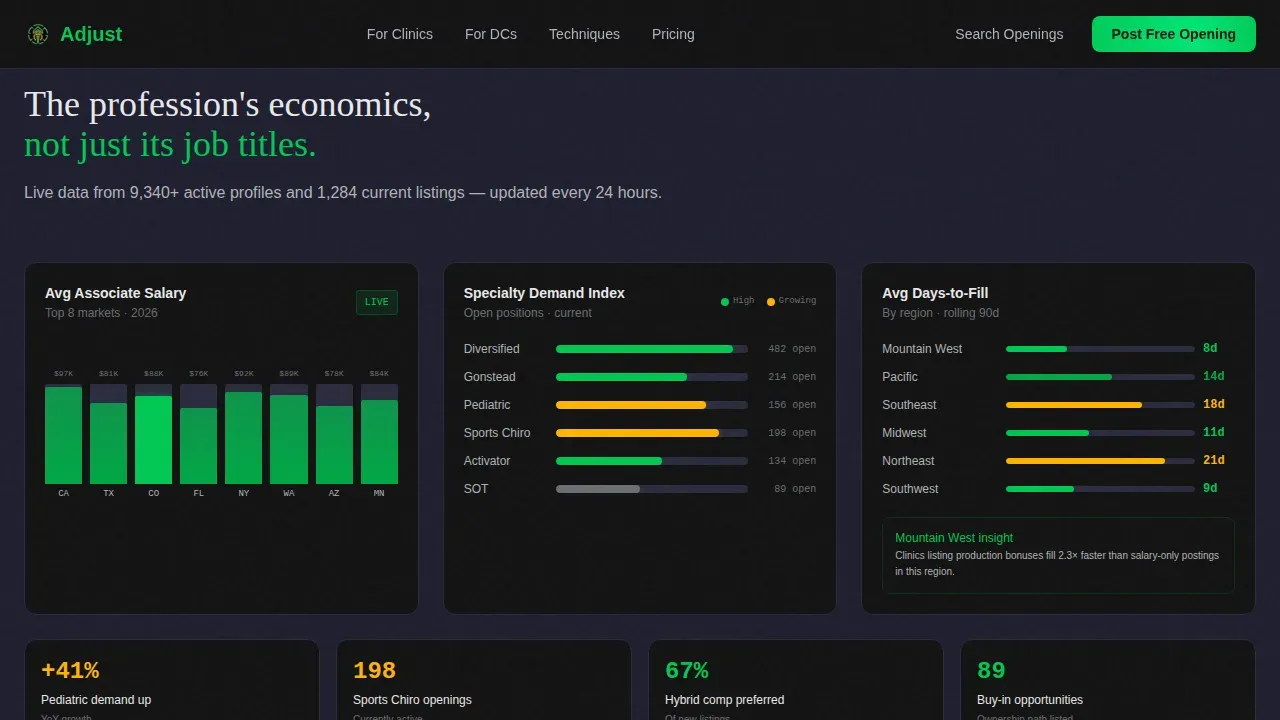
Data visualization panels display average associate salary by state, time-to-fill by region, and demand curves for specialty areas such as pediatric and sports chiropractic. Each chart reinforces that this platform understands profession economics. These panels support lead generation by giving clinic owners the context they need to act.
Clinic Owner Testimonial Cards
Testimonial cards from clinic owners include hire-to-retention percentages rather than vague praise. Social proof elements aligned to the specific audience builds trust faster than generic endorsements. Trust signals placed early and often on chiropractic landing pages reassure visitors before they reach the form.
Four-Field Posting Form
The posting form asks only for clinic name, state, primary technique, and compensation structure. Fewer fields mean a higher conversion rate. The form qualifies each listing and signals to the poster that this board understands how chiropractic practice actually works.
GSAP Animation and Interactivity Layer
The template includes high-animation components: GSAP-powered counters, scroll reveals, scan-line effects, and a marquee strip. Chart bars animate on scroll. The comparison table reveals progressively. Server components handle static content while client components power the interactive layer, keeping load performance practical.
Page sections overview
| Section | Purpose |
|---|---|
| Hero Product Screenshot | Establish credibility with live counters and filtered search preview |
| Comparison Table | Show technique-specific advantages over generalist platforms |
| Hiring Trends Panels | Provide salary, time-to-fill, and specialty demand data by state |
| Testimonial Cards | Build trust with clinic retention stats and verified employer profiles |
| call to action and Posting Form | Convert clinic owners and DC job seekers with two distinct paths |
| Footer Linear Row | Deliver contact links, legal pages, and navigation in one clean row |
Design & branding system
The visual identity follows a Dashboard Pro theme using a Carbon Fiber color system. The palette feels like the interior of a performance vehicle at night, dark, intentional, and data-dense. Every color has a job.
- Background layers stay in the deep cockpit black (#121212) to instrument-panel charcoal (#1E1E2E) range; cards float on subtle 1-pixel charcoal borders
- Status-green (#00C853) marks active listings and primary call-to-action elements; warning amber (#FFB300) appears only on urgency badges to keep attention focused
- Typography pairs DM Sans for body text with Fraunces for display accents, keeping the clean design both readable and distinctive
Mobile & speed optimization
Mobile optimization on this template goes beyond visual appearance, it extends to conversion functionality. Over 70% of chiropractic ad clicks come from mobile devices, and most local healthcare searches happen on mobile devices. A landing page that is not built mobile-first loses the majority of its traffic before a single form field is touched.
- The layout uses a vertical scroll structure that works naturally on smaller screens; thumb-friendly form fields with large inputs and dropdown menus prevent lead dropout on mobile devices
- The template is fully responsive and uses server components for static content to support fast load times, targeting practical performance on mobile alongside desktop
How this template helps you convert
A high-converting chiropractic landing page matches search intent, builds trust, makes a compelling offer, and simplifies the next step. This template is designed around those four principles.
- The comparison table is placed at peak competitive-advantage moment, with the primary call to action "Post Your First Opening Free" directly beneath it, meeting clinic owners exactly where they are ready to commit
- The secondary path for job-seeking DCs drops them into a live, filtered search with no account wall, removing friction and encouraging immediate action toward an appointment with the right opportunity
- The four-field posting form, live urgency counter, and testimonial cards with retention data work together to optimize conversions by combining social proof, scarcity, and a clear patient offer equivalent for each user type
Other information about this template
This template supports chiropractic lead generation landing flows for both sides of the market. It is built as a single-page structure, so the focus stays on one objective at a time for each visitor type. The design minimizes navigation menus to guide visitors toward the primary conversion goal without distraction.
- The hero section communicates essential information within the first three seconds: who the board is for, what makes it different, and how to take the next step, whether that is to post an opening or search by technique
- Pages like this one can support Google Ads traffic and seo friendly campaign landing flows because the layout matches specific profession-intent keywords rather than broad generic terms; using A/B testing to test headlines and call-to-action button copy helps optimize the conversion rate over time
- The template can support chiropractic lead generation landing strategies for services including back pain treatment, lower back pain care, pain relief programs, and auto accident injuries recovery roles where clinics need to source DCs trained in specific treatment plan protocols
- Clinic owners running a chiropractic practice that handles specific conditions such as sports injuries or pediatric care can use dedicated technique-category pages to capture targeted traffic; each page can surface a new patient offer, free consultation prompt, or initial consultation incentive calibrated to the role type
- The template is built with no-code deployment in mind, AI-powered no-code tools allow users to build landing pages quickly, and this template reduces the time from concept to live site by providing a ready-to-customize structure; video content blocks and additional assessment or examination detail sections can be added without extensive technical knowledge
- This template works well when connected to Google search campaigns and can be adapted for chiropractor landing page variants targeting quality leads across different states and technique categories; the chiropractic website structure supports ongoing practice growth without rebuilding from scratch
Theme
Dashboard Pro
Creative direction
Industry Report
Color system
Carbon Fiber
Style
Comparison Table
Direction
Comparison/Versus
Page Sections
Technique-filtered Dynamic Search Bar
Side-by-side Comparison Table
Hiring Trend Data Visualizations
Clinic Owner Testimonial Cards
Four-field Posting Form with Dual Call to Action Paths
GSAP Animation and Interactivity Layer
Related questions
Can clinic owners and DCs both use the same landing page?
How does the comparison table work for visitors?
Is this template suitable for paid search campaigns?
How many fields does the posting form include?
Can this template be customized without writing code?



