Specialist Consulting Firm Software Professional Website Template
Allocate is a hub-and-spoke landing page template built for consulting firm project management platforms. It opens with a live project profitability simulator, then guides visitors through a structured feature matrix covering resource allocation, client dashboards, time and expense tracking, margin analytics, and integrations, each section ending with a looping in-app screen recording.
by Rocket studio
Quick summary
Allocate is a single-page, anchor-nav landing page template designed for consulting firm project management software. It leads with a live profitability estimator, uses a feature matrix to systematically compare the platform against spreadsheets and generic tools, and closes with a sticky download call-to-action. The result feels less like a product page and more like a command briefing.
Who this template is for
This template is built for software founders, product marketers, and growth teams who sell project management or resource tracking tools to consulting firms. It speaks directly to the workflows those buyers live in every day.
- Managing partners juggling multiple active client engagements who need margin visibility fast
- Project managers chasing consultants for timesheets across multiple time zones
- Operations directors preparing quarterly board presentations and needing real-time burn rate data
What problem this template solves
Consulting teams lose billable hours not because they work less, but because their tracking tools are fragmented. Status emails, disconnected spreadsheets, and generic project tools create blind spots that cost real margin every quarter.
- Teams struggle to see deliverable progress, burn rates, and client milestones in one place
- Visitors to a software product page often leave before understanding the cost of their current process
- Generic landing pages fail to personalize urgency, so potential buyers never feel the gap
What you get with this template
You get a fully structured, dark-themed landing page template that combines an interactive estimator, a detailed feature comparison matrix, and a conversion-optimized download flow. Every section is designed to build the case before asking for a commitment.
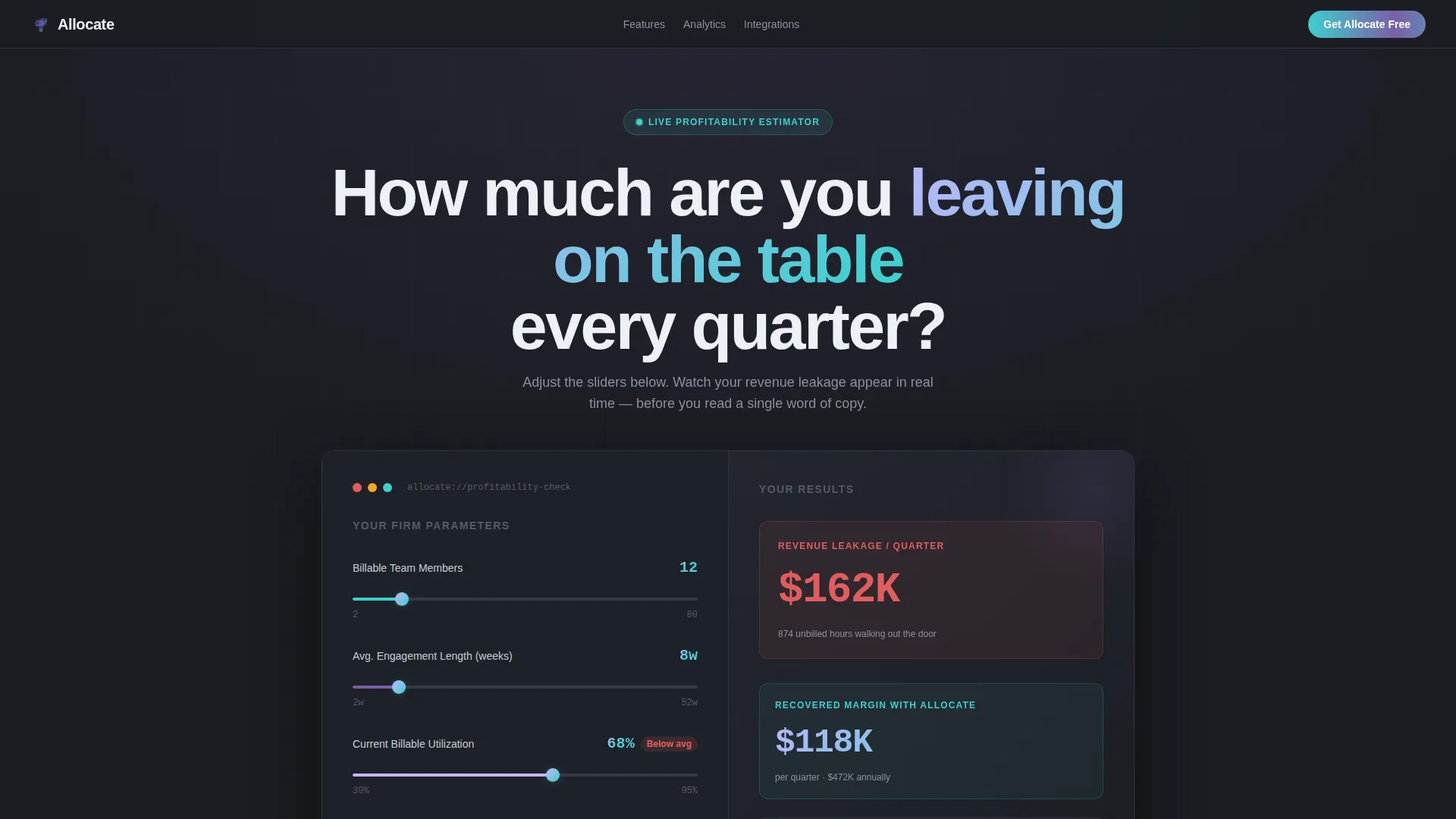
- A live project profitability simulator in the header with slider inputs and real-time output
- Five anchor-navigated spoke sections, each containing a feature comparison grid and a looping screen recording
- A sticky bottom bar with platform toggle pills for iOS, Android, and Desktop download paths
Feature list
This template packages several high-intent design and functional patterns into one cohesive layout. Each feature is sourced directly from the brief and serves a specific role in the conversion journey.
Live Profitability Estimator Header
Visitors input their average team size, engagement length in weeks, and current billable utilization rate using on-screen sliders. The estimator instantly calculates projected revenue leakage, unbilled hours per quarter, and a recovered margin figure displayed in bold iridescent type. No stock imagery is needed because the tool itself becomes the hero.
Hub-and-Spoke Anchor Navigation
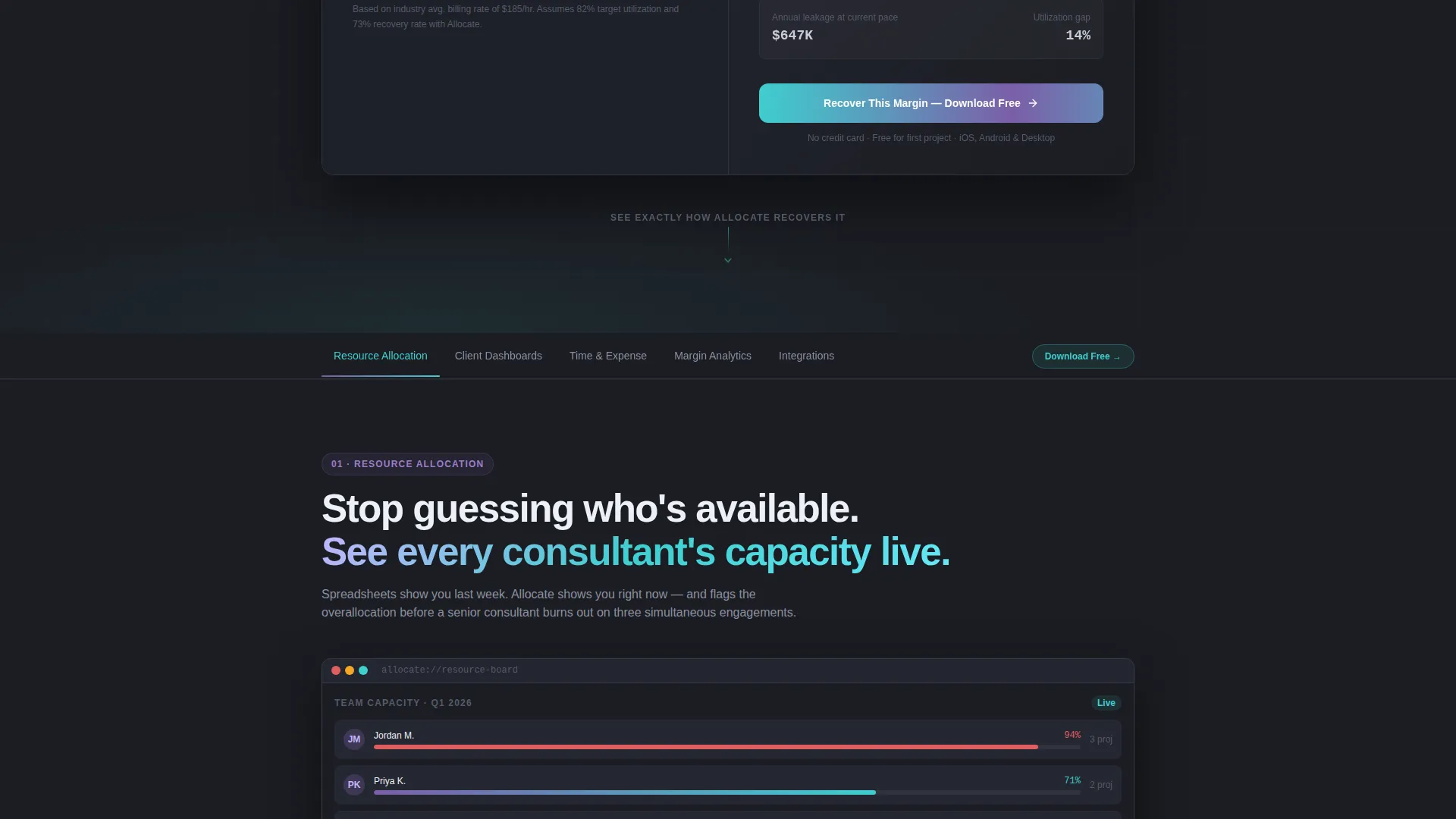
After the header scroll, a navigation bar pins to the top of the page. Spoke labels include Resource Allocation, Client Dashboards, Time and Expense, Margin Analytics, and Integrations. Each label links directly to its corresponding section below, keeping long-scroll pages easy to navigate.
Feature Matrix Comparison Grid
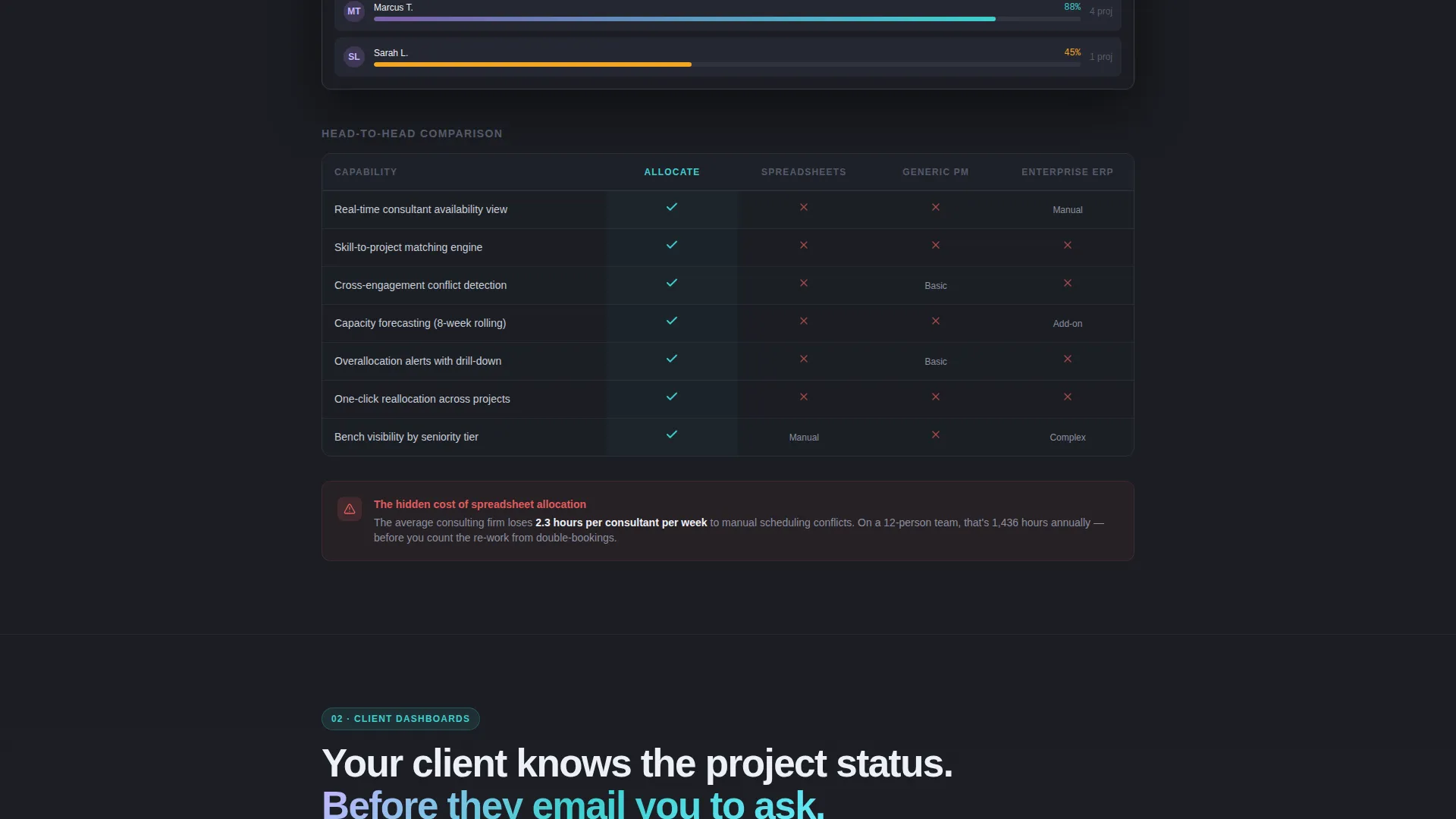
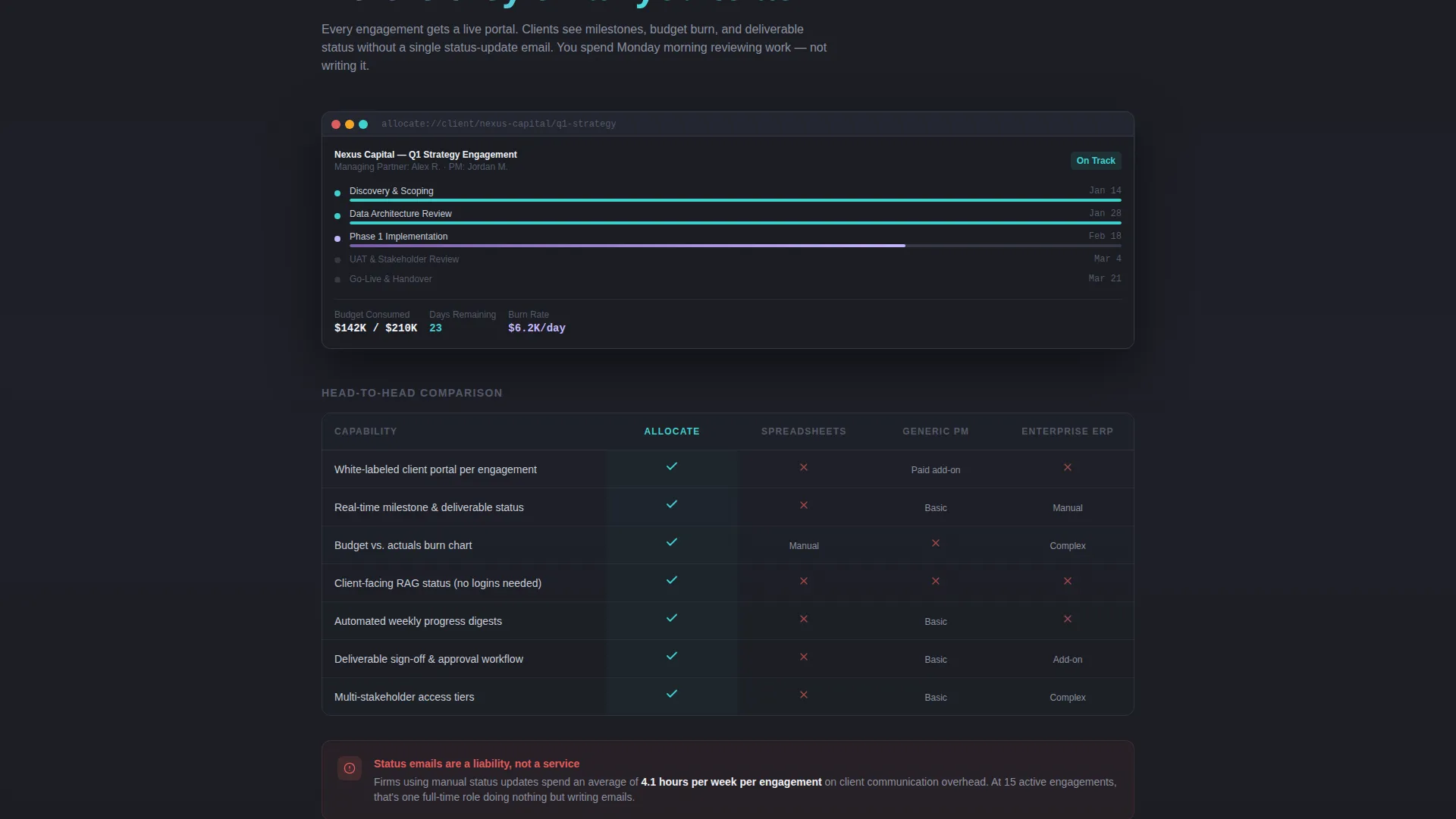
Each spoke section contains a structured comparison grid showing the platform against spreadsheets, generic project management tools, and enterprise resource planning systems. Supported capabilities appear with iridescent violet checkmarks and gaps in the competitor columns are marked in muted red, making the platform's advantage immediately readable.
Looping In-App Screen Recordings
Every spoke section ends with a short looping screen recording of the exact feature described, displayed in a dark device mockup that matches the page aesthetic. Visitors see real product behavior rather than illustrated mockups or stock photography.
Persistent Floating Urgency Card
Once a visitor interacts with the header estimator, a small floating card follows them down the page displaying their personalized result, such as "You're leaving $X on the table quarterly." This keeps the emotional impact of their own inputs alive throughout the rest of the page.
Sticky Download Bar with Platform Toggles
A sticky bar anchors to the bottom of the viewport after the estimator interaction. It carries the primary call-to-action "Download and Run Your First Project Free" with toggle pills for iOS, Android, and Desktop. A secondary path offers a guided demo booking with a single email field and a company size selector.
Page sections overview
| Section | Purpose |
|---|---|
| Estimator Header | Simulate profitability and surface revenue leakage using visitor inputs |
| Anchor Nav Bar | Pin spoke labels to viewport top for fast section access during scroll |
| Resource Allocation | Compare resource planning features against spreadsheets and generic tools |
| Client Dashboards | Show milestone and reporting features versus competing workflow types |
| Time and Expense | Contrast timesheet and expense tracking against manual alternatives |
| Margin Analytics | Display burn rate and margin visibility features in comparison format |
| Integrations Spoke | Outline platform connectivity against ERP and spreadsheet limitations |
| Floating Urgency Card | Keep estimator result visible as a persistent scroll companion |
| Sticky Download Bar | Drive app download with platform pills and secondary demo booking path |
Design & branding system
The visual identity follows a Directory and Discovery theme built on an AI Iridescent color system. The palette is restrained and purposeful, color only appears when the visitor engages, giving the interface a sense of controlled intelligence.
- Deep graphite (#1B1D23) as the primary background, with cool mist white (#EDF0F5) for card surfaces
- Holographic violet (#7B5EA7) and electric teal (#3ECFCF) used as accent gradients on hover states and active navigation elements
- An iridescent shimmer gradient from (#C4B5FD) to (#67E8F9) applied to interactive elements, with muted red (#E05D5D) marking competitive gaps in the comparison grids
Mobile & speed optimization
The template is structured to support responsive viewing across device sizes. The sticky navigation and bottom bar are particularly important on smaller screens where visitors scroll through long comparison sections.
- Anchor navigation pins cleanly to the top of the viewport on mobile, keeping spoke labels accessible during scroll
- Platform toggle pills in the sticky bar allow visitors to select iOS, Android, or Desktop without leaving the current view
- The floating urgency card is designed as a compact component that does not obstruct content on narrower screen widths
How this template helps you convert
The page is engineered to build urgency from the visitor's own data before asking them to act. Every structural decision serves the download or demo booking outcome.
- The estimator header personalizes the value proposition immediately, converting abstract platform benefits into a specific dollar figure the visitor calculated themselves
- The feature matrix dismantles the visitor's existing workflow section by section, making the cost of inaction concrete before the platform is presented as the solution
- The sticky download bar with platform toggles removes friction at the moment of highest intent, while the secondary demo path captures visitors who need one more qualifying step
Other information about this template
This template is categorized under Technology, specifically within the Consulting Firm Software subcategory and the Consulting Firm Project Management niche. It is designed as a single landing page using a hub-and-spoke layout with anchor navigation as its structural backbone.
- The template style is Hub and Spoke with Anchor Nav, making it well suited for platforms with five or more distinct feature areas that each require dedicated explanation
- The header concept is a Calculator and Estimator, a pattern proven to increase engagement on software product pages by giving visitors an interactive reason to stay before reading any marketing copy
- The creative direction is a Feature Matrix, which is particularly effective for consulting firm software where the buyer needs to justify switching costs to a managing partner or operations director
- The landing page direction targets App Download as the primary conversion, supported by a secondary guided demo booking path for higher-consideration buyers
Theme
Directory & Discovery
Creative direction
Feature Matrix
Color system
AI Iridescent
Style
Hub & Spoke (Anchor Nav)
Direction
App Download
Page Sections
Live Project Profitability Estimator
Pinned Anchor Navigation Bar
Feature Matrix Comparison Grid
Looping Screen Recording Frames
Persistent Floating Urgency Card
Sticky Download Bar with Platform Toggles
Related questions
Can I customize the estimator inputs for my platform's specific metrics?
Do I need a developer to set up the anchor navigation?
What format are the in-app screen recordings delivered in?
Is this template suitable if my platform targets industries beyond consulting?
How does the floating urgency card work if a visitor skips the estimator?



