Auto Repair Shop Specialist Booking Website Template
Torque is a single-page auto repair shop landing page template built around a hub and spoke anchor navigation system. It combines a dark diagnostic aesthetic with kinetic scroll animations, a live-style code snippet header, and a structured lead generation flow. The result is a shop homepage that earns trust fast and turns first-time visitors into booked appointments.
by Rocket studio
Quick summary
Torque is a hub and spoke landing page template for auto repair shops. It opens with an animated diagnostic code snippet, guides visitors through five anchor-linked sections, and captures leads through a focused three-field form. The design runs on a dark iridescent palette that feels as precise as the diagnostic work it represents.
Who this template is for
This template is built for independent auto repair shops and diagnostic specialists who want a modern, high-trust homepage without starting from scratch. It works equally well for single-bay garages and multi-bay service centers.
- Shop owners who want to convert website visitors into booked appointments
- Mechanics or service advisors building their first professional web presence
- Established shops refreshing an outdated site with a tech-forward look
What problem this template solves
Most auto repair shop websites feel generic, hard to scan, and slow to build trust. Visitors arrive anxious about their car and leave without booking because nothing on the page speaks their language or shows a clear next step.
- No clear path from "I have a warning light" to "I have an appointment"
- Shop expertise is buried in long paragraphs instead of shown upfront
- Contact forms feel impersonal and miss the chance to earn trust before the ask
What you get with this template
You get a complete single-page layout with five anchor-linked hub sections, each designed to answer a specific visitor question before moving them toward the primary call to action. Every component is defined in the source template with intentional placement.
- An animated code snippet header, sticky anchor navigation, and a fixed mobile call-to-action bar
- A three-field lead form with a symptom selector and a text-update opt-in toggle
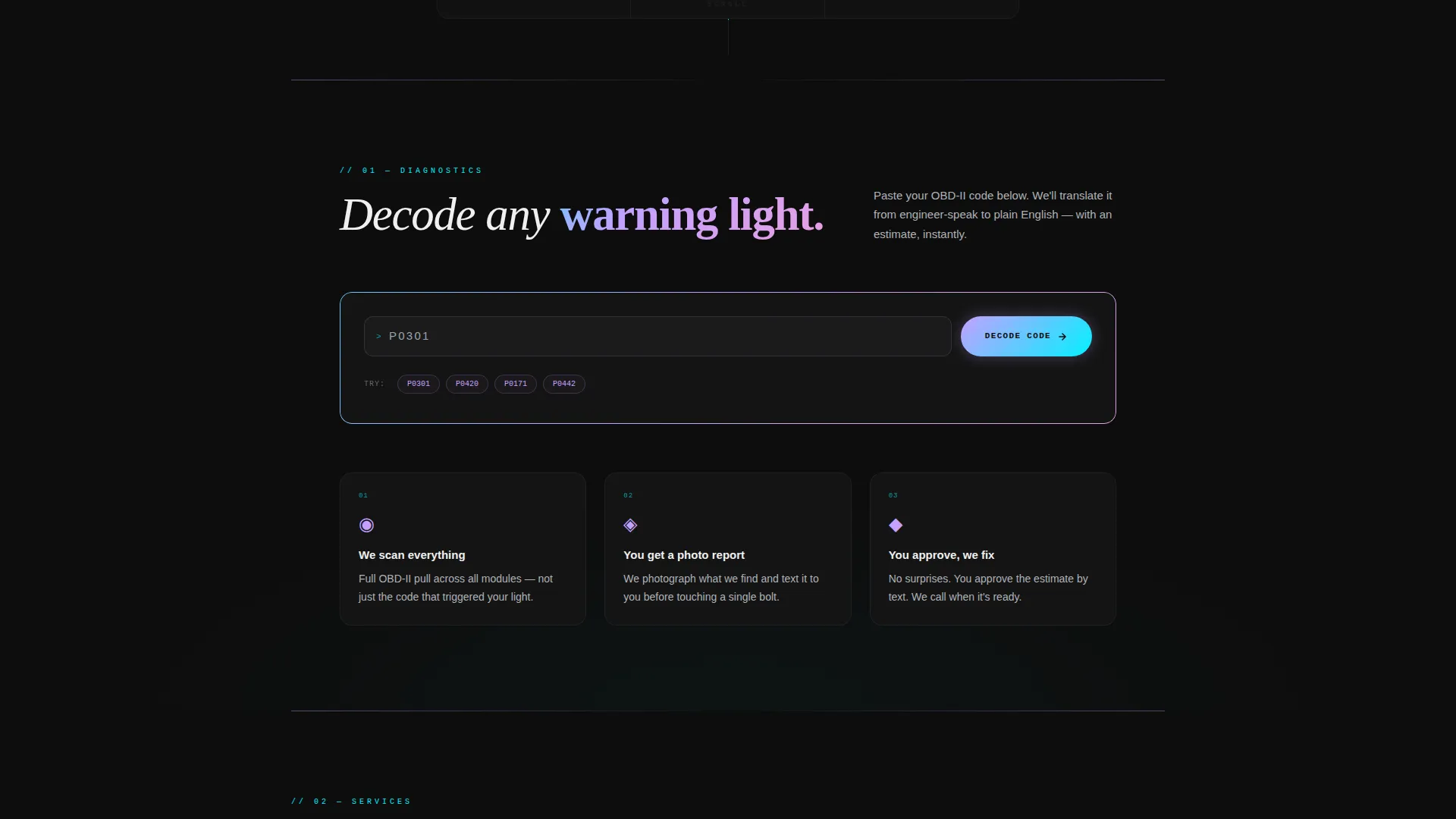
- A secondary "Send Us Your Code" field that lets visitors paste an OBD-II code for an instant plain-language explanation
Feature list
This template includes the following built-in features grounded in the source design brief.
Animated Diagnostic Code Snippet Header
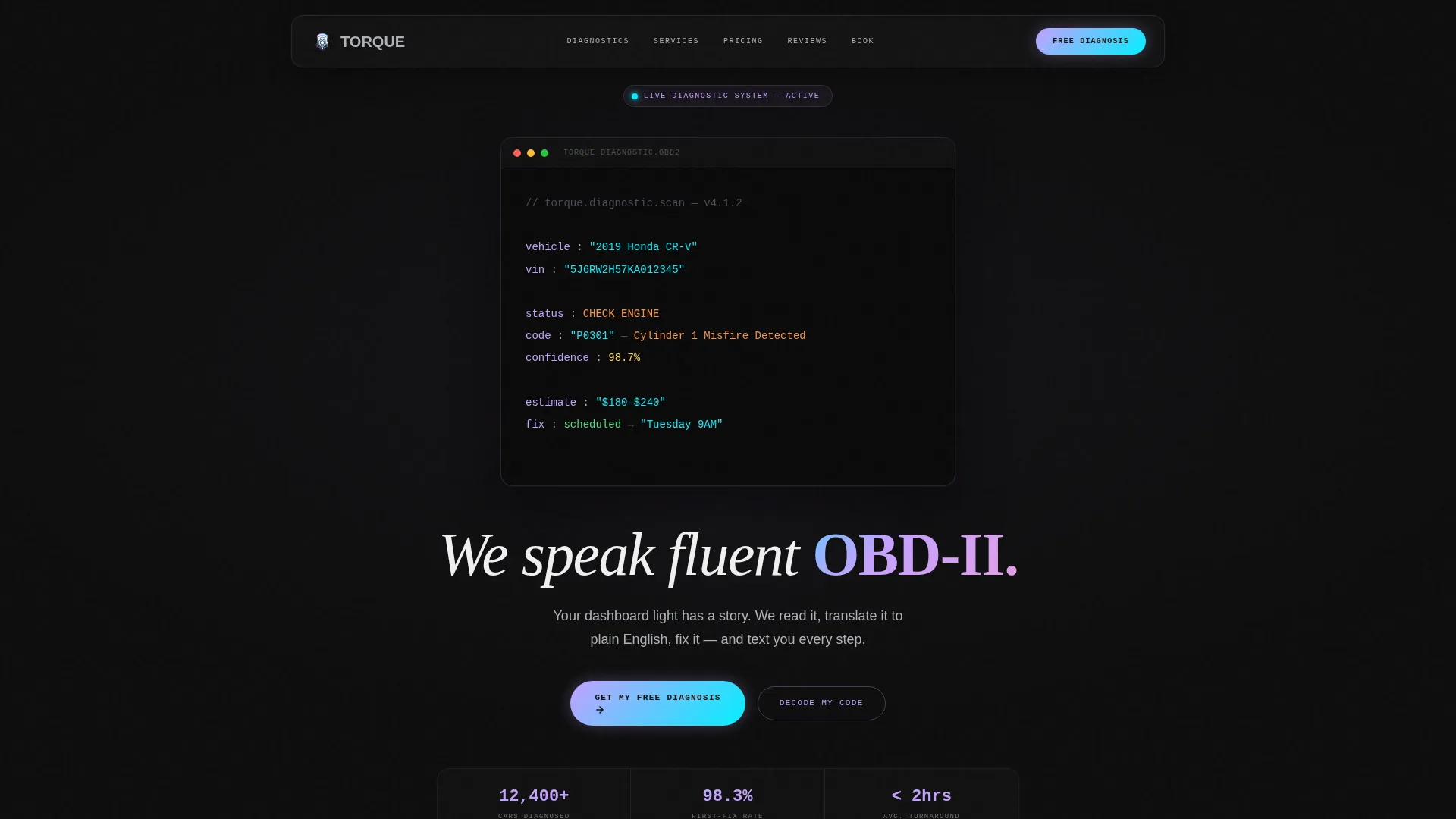
The header displays a syntax-highlighted block styled like a live vehicle diagnostic pull. Lines animate in sequence, simulating a real-time system read. It ends with a blinking cursor and a scheduled fix confirmation, followed by the headline "We speak fluent OBD-II."
Hub and Spoke Anchor Navigation
A sticky top navigation bar links to five named sections: Diagnostics, Services, Pricing, Reviews, and Booking. Each spoke label illuminates in scanner-beam cyan as the visitor scrolls into that section, keeping orientation clear throughout the page.
Three-Field Lead Capture Form
The primary lead form runs in a clean sequence: a year, make, and model dropdown; a symptom selector with preset options including dashboard light, noise, fluid leak, routine maintenance, and other; and a phone number field with a text-update opt-in toggle.
OBD-II Code Lookup Field
A secondary form field lets technically minded visitors paste their own on-board diagnostic code directly into the page. The template is designed to return a plain-language explanation and an estimate range, delivering real value before asking for a booking.
Launch Energy Scroll Animations
Each hub section enters the viewport with kinetic momentum, timed like a system booting module by module. Section transitions use a subtle iridescent wipe effect that reinforces the diagnostic theme without distracting from the content.
Fixed Mobile Call-to-Action Bar
On mobile viewports, a persistent bottom bar keeps the primary call to action visible at all times. Visitors can tap to start a diagnosis request without having to scroll back to the top of the page.
Page sections overview
| Section | Purpose |
|---|---|
| Diagnostic Code Header | Hooks visitors with an animated live-read code block and the core headline |
| Sticky Anchor Nav | Keeps section orientation clear as visitors scroll through the page |
| Diagnostics Hub | Frames the problem: warning lights, strange noises, and what they mean |
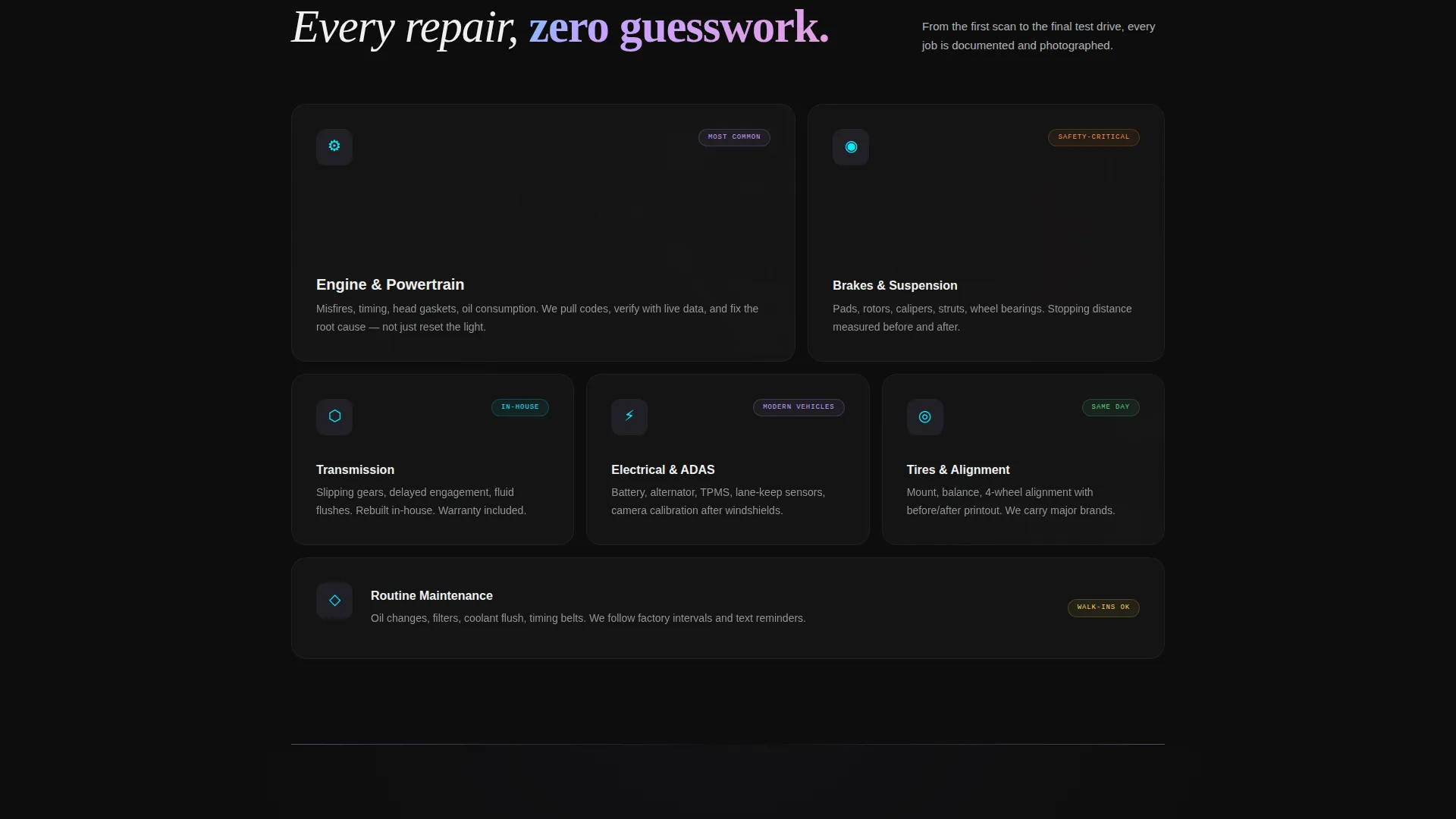
| Services Hub | Explains the transparent repair process including photo updates by phone |
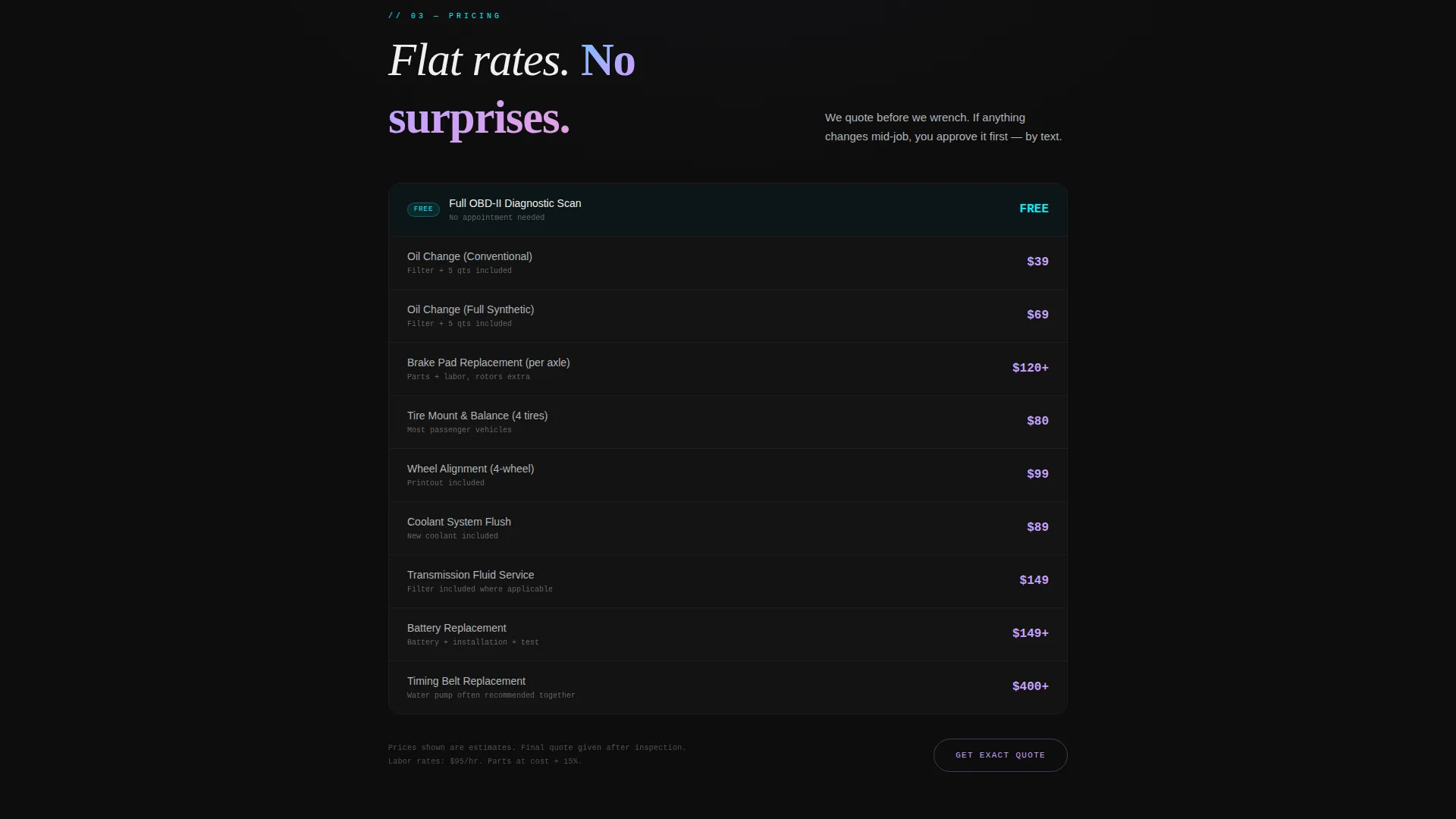
| Pricing Hub | Presents service pricing in a clear, scannable format |
| Reviews Hub | Builds trust through five-star stories with specific repair details |
| Booking Hub | Delivers the primary lead form and the secondary OBD-II code field |
| Mobile call to action Bar | Keeps the primary action reachable on smaller screens at all times |
Design & branding system
The visual identity runs on the Dashboard Pro theme through an AI Iridescent color system. The overall effect is like staring into an advanced diagnostic tablet in a dim service bay: dark, luminous, and precisely layered.
- Deep OBD-port black (#0D0D0D) as the base background, holographic lilac (#C4A1FF) for hover states, scanner-beam cyan (#00F0FF) for active navigation indicators and progress bars, and muted titanium (#B0B3B8) for body text
- Iridescent gradients ripple across section dividers, refracting light the way engine oil catches overhead fluorescents
- Monospaced typography anchors the header code block, reinforcing the diagnostic precision feel throughout
Mobile & speed optimization
The template is structured to deliver a clean experience on smaller screens without removing any conversion-critical components. The layout adapts so the most important actions stay reachable regardless of device size.
- The fixed bottom call-to-action bar keeps "Get My Free Diagnosis" visible on mobile without requiring a scroll back to the top
- The three-field form and OBD-II code entry field are built to work in a linear, thumb-friendly sequence on narrow viewports
How this template helps you convert
The page is designed with a single conversion goal: turn an anxious visitor into a booked service appointment. Every design and copy decision supports that path.
- The animated header creates immediate relevance by speaking in the same diagnostic language visitors already associate with their car trouble, earning attention before asking for anything.
- The progressive hub structure moves visitors from problem awareness through proof and pricing before landing on the booking form, reducing friction at every step.
- The OBD-II code lookup field delivers instant value to self-researching visitors, building enough trust that asking for a phone number and appointment feels like a fair exchange.
Other information about this template
This template is part of a broader set of auto repair shop website templates designed for shops that want to position themselves as technical specialists, not just a corner garage. A few additional details worth knowing before you customize it.
- The template style is Hub and Spoke with anchor navigation, meaning all content lives on one scrollable page with section links rather than separate pages
- The creative direction follows a Launch Energy countdown pacing, so section reveal timing and animation sequencing are baked into the template structure
- The header concept is a Code Snippet block, which is a design-forward choice well suited to shops that want to signal diagnostic expertise upfront
- The lead generation direction means every section is ordered to reduce objections before the form appears, not to showcase the shop's history first
- This template fits the auto repair shop homepage niche specifically, meaning it is scoped for a primary shop page rather than a service detail or blog layout
Theme
Dashboard Pro
Creative direction
Launch Energy
Color system
AI Iridescent
Style
Hub & Spoke (Anchor Nav)
Direction
Lead Generation
Page Sections
Animated Diagnostic Code Snippet Header
Hub and Spoke Anchor Navigation
Three-field Lead Capture Form
Obd-ii Code Lookup Field
Launch Energy Scroll Animations
Fixed Mobile Call-to-action Bar
Related questions
Can I change the color palette to match my shop's existing brand colors?
Does the OBD-II code field require a backend integration to work?
What does the symptom selector in the lead form include?
Is this template suitable for a shop that offers only one type of service?
How does the sticky navigation work on mobile devices?



