Archivault - Powerful Architecture Landing Page Template
Archivault is a bento grid landing page template built for architecture directory and listing sites. It uses a Bold Brutalist visual identity with an Electric Indigo color system to project authority and momentum. The template is designed for lead generation, featuring a tab-switching header, layered scroll animations, tiered listing cards, and a two-step modal form that turns directory visitors into registered practices.
by Rocket studio
Quick summary
Archivault is a single-page bento grid template for launching an architecture directory. It combines a Feature Tab Switcher header, cascading scroll-reveal cells, and a structured lead generation flow into one monumental layout. The Bold Brutalist design signals weight and credibility from the first viewport, making both firms and browsers feel the directory is already alive and worth joining.
Who this template is for
This template is built for founders and operators who want to launch a credible, high-energy architecture directory without starting from scratch. It speaks directly to people who understand that a blank page loses registrations before they begin.
- Studio founders and solo practitioners who need a listing presence that competes with established firms on search visibility
- Development company project managers hunting for architecture specialists by typology, city, or sector
- Directory entrepreneurs and platform builders who want a launch-ready layout that signals the site is already populated and active
What problem this template solves
Most directory landing pages feel unfinished. They ask visitors to sign up before showing them any value, and they look identical to every other SaaS signup screen. Architecture firms need more than a form. They need proof that the directory is worth their time.
- Firms with strong portfolios lose commissions to competitors who simply have better digital visibility
- Directory operators struggle to convert both the supply side (firms getting listed) and the demand side (clients searching) from a single page
- Generic templates cannot carry the visual weight or professional tone that architecture audiences expect
What you get with this template
You get a complete, ready-to-customize bento grid landing page that covers every stage of the directory launch funnel. The layout is structured, motion-forward, and built around two distinct conversion paths.
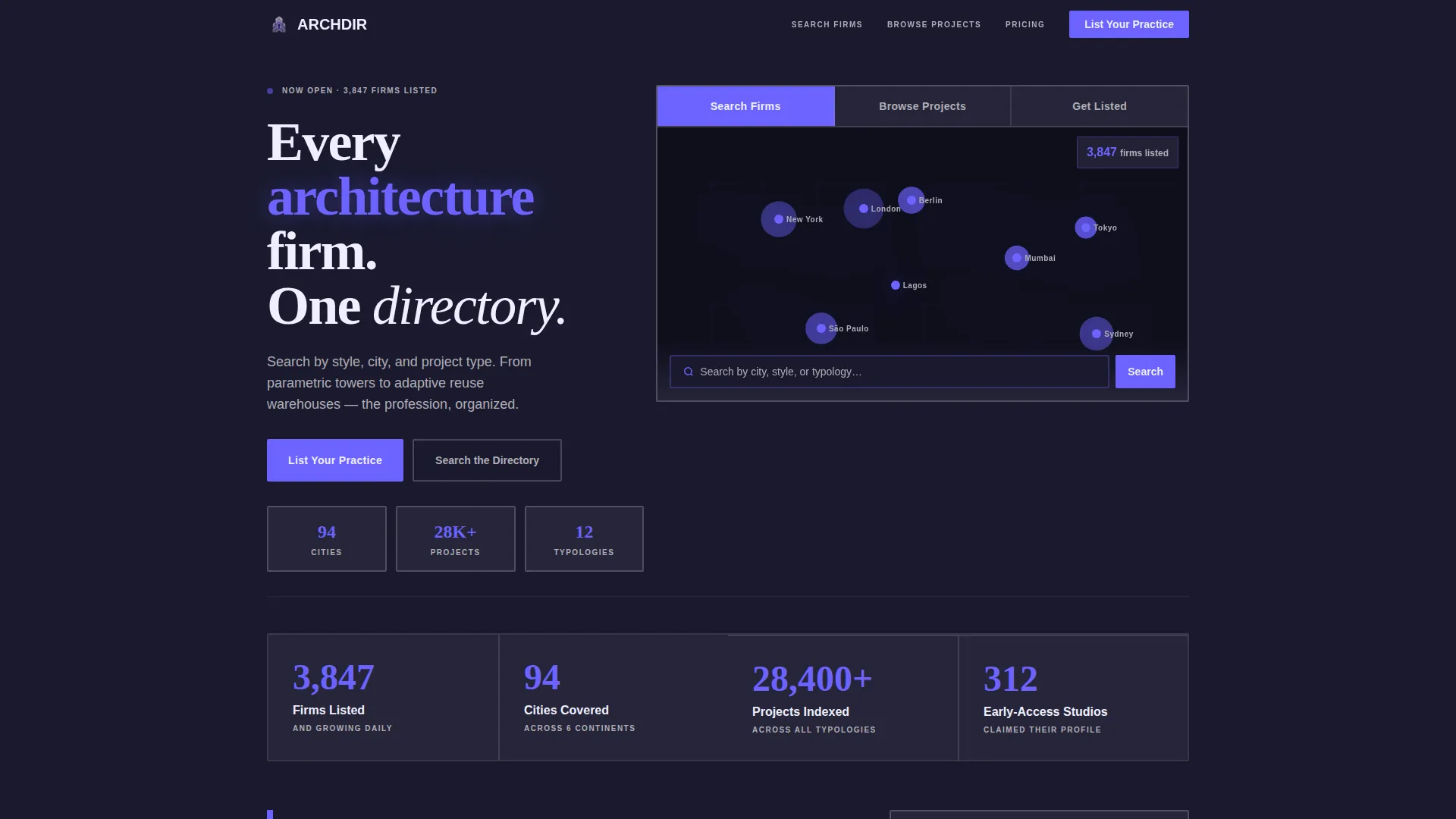
- A Feature Tab Switcher header with three panels: Search Firms, Browse Projects, and Get Listed, each revealing a live preview inside an oversized bento cell
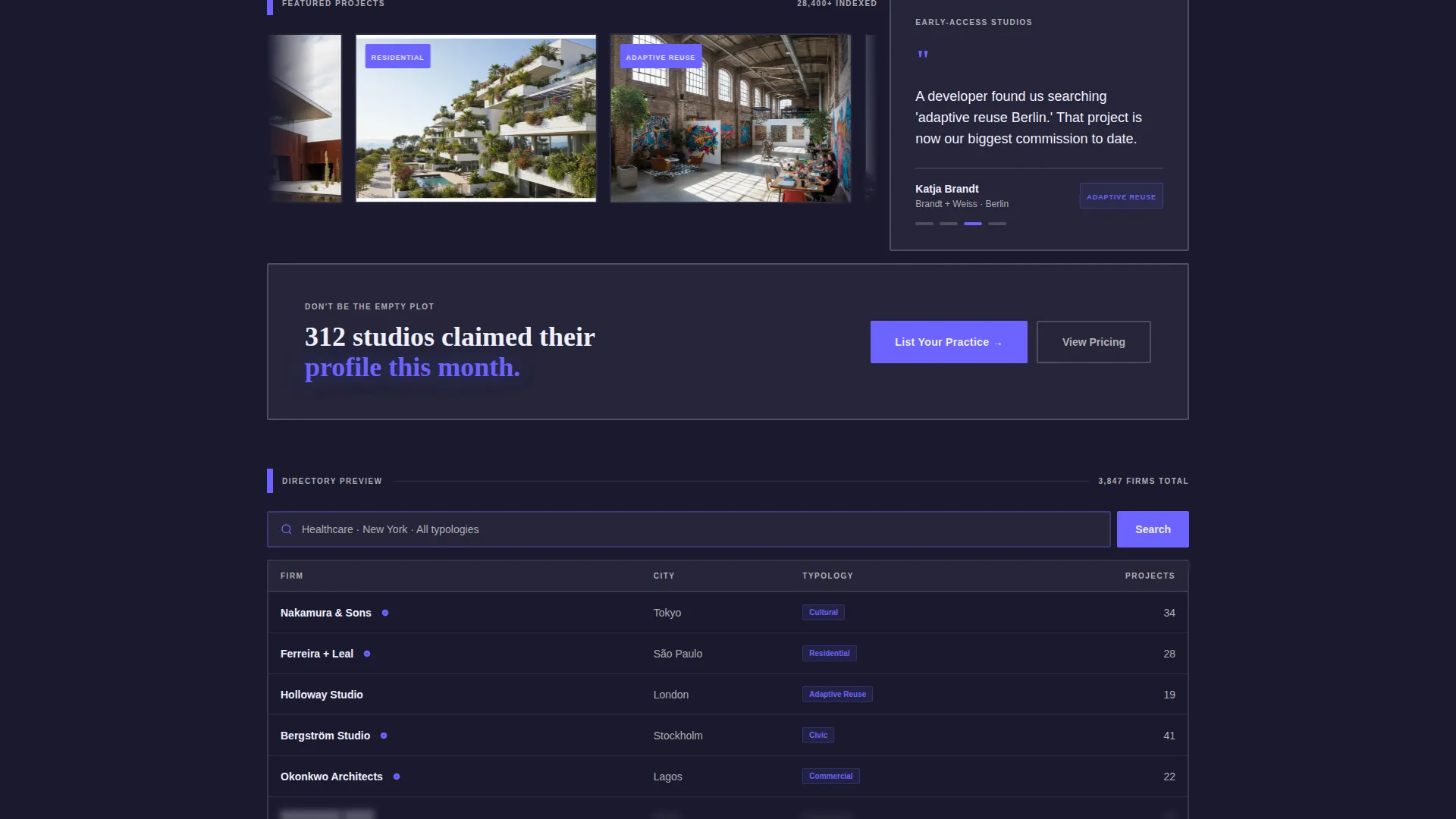
- Asymmetric scroll-reveal grid cells covering firm counters, testimonial stacks, project photography reels, and tiered listing plan blocks
- A two-step brutalist modal form and a soft-gated secondary search path that collects emails from browsers who explore before committing
Feature list
This section describes the core functional and design components included in the Archivault template.
Feature Tab Switcher Header
Three oversized tabs labeled Search Firms, Browse Projects, and Get Listed each reveal a distinct live preview. The Search Firms tab shows a map view with indigo pins pulsing across multiple cities. Browse Projects displays a mosaic of project thumbnails tagged by typology. Get Listed flips to a mock firm profile card with a glowing indigo call-to-action button.
Bento Grid Scroll Layout
The page uses an asymmetric bento grid that assembles itself cell by cell as the visitor scrolls. Each cell serves a specific purpose: a wide counter cell, a tall testimonial stack, a square project reel, and a double-wide listing tier block. The visual rhythm mirrors a building going up floor by floor.
Tiered Listing Plan Display
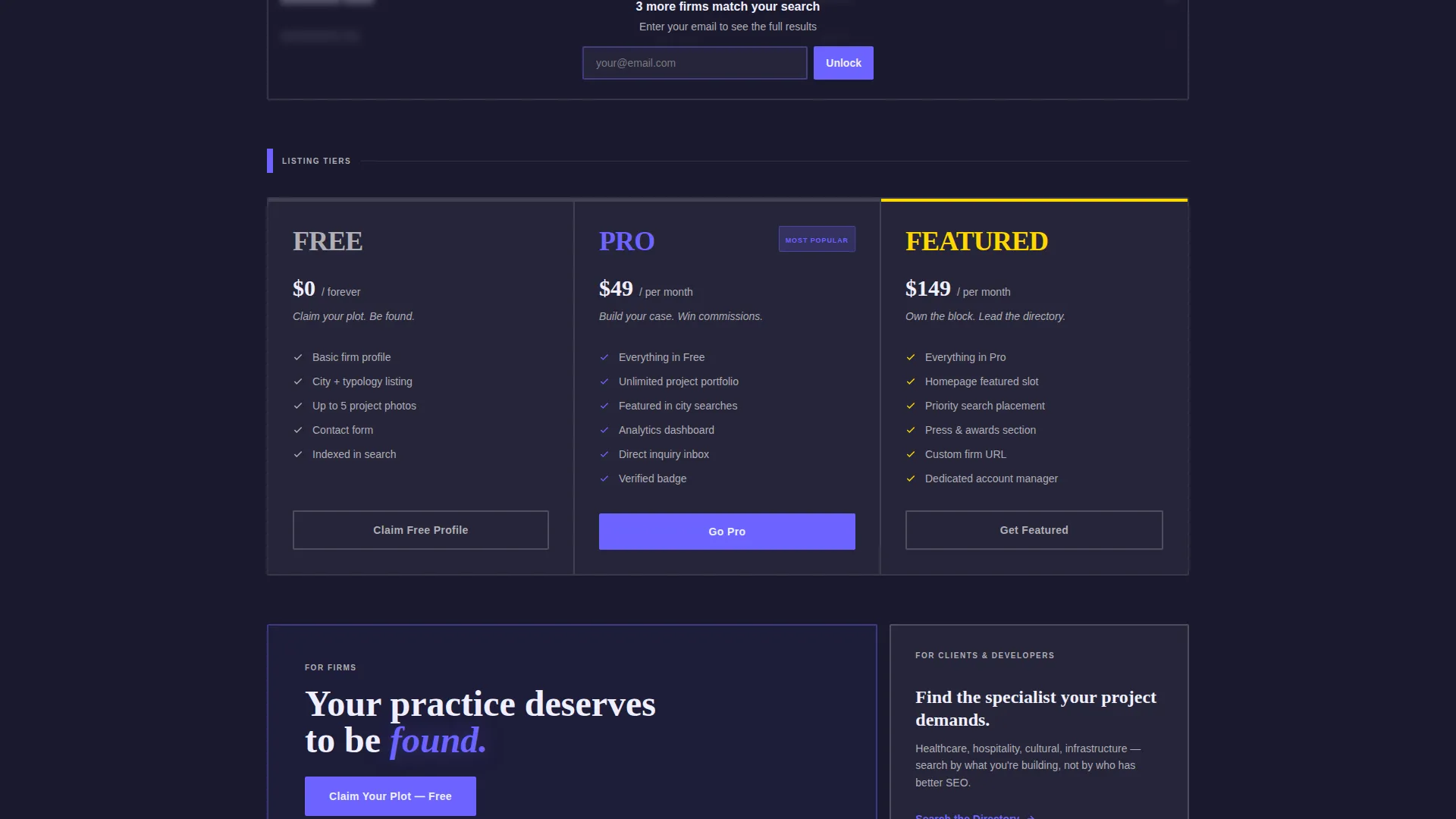
Three listing tiers, FREE, PRO, and FEATURED, are each presented in their own concrete-styled block using bold brutalist typography. The layout makes the cost of staying unlisted feel visible and immediate, which reinforces the primary conversion goal.
Two-Step Lead Capture Modal
The primary call-to-action triggers a two-step modal. Step one collects firm name, city, and primary typology using a visual icon selector covering residential, commercial, cultural, and infrastructure categories. Step two requests a contact email and an optional portfolio link.
Soft-Gated Directory Preview
A secondary conversion path lets browsers explore a limited free preview of the directory. When a visitor reaches the fifth search result, a soft gate prompts them to enter their email. This captures intent from browsers who are not yet ready to list their practice.
Fixed Mobile Call-to-Action Bar
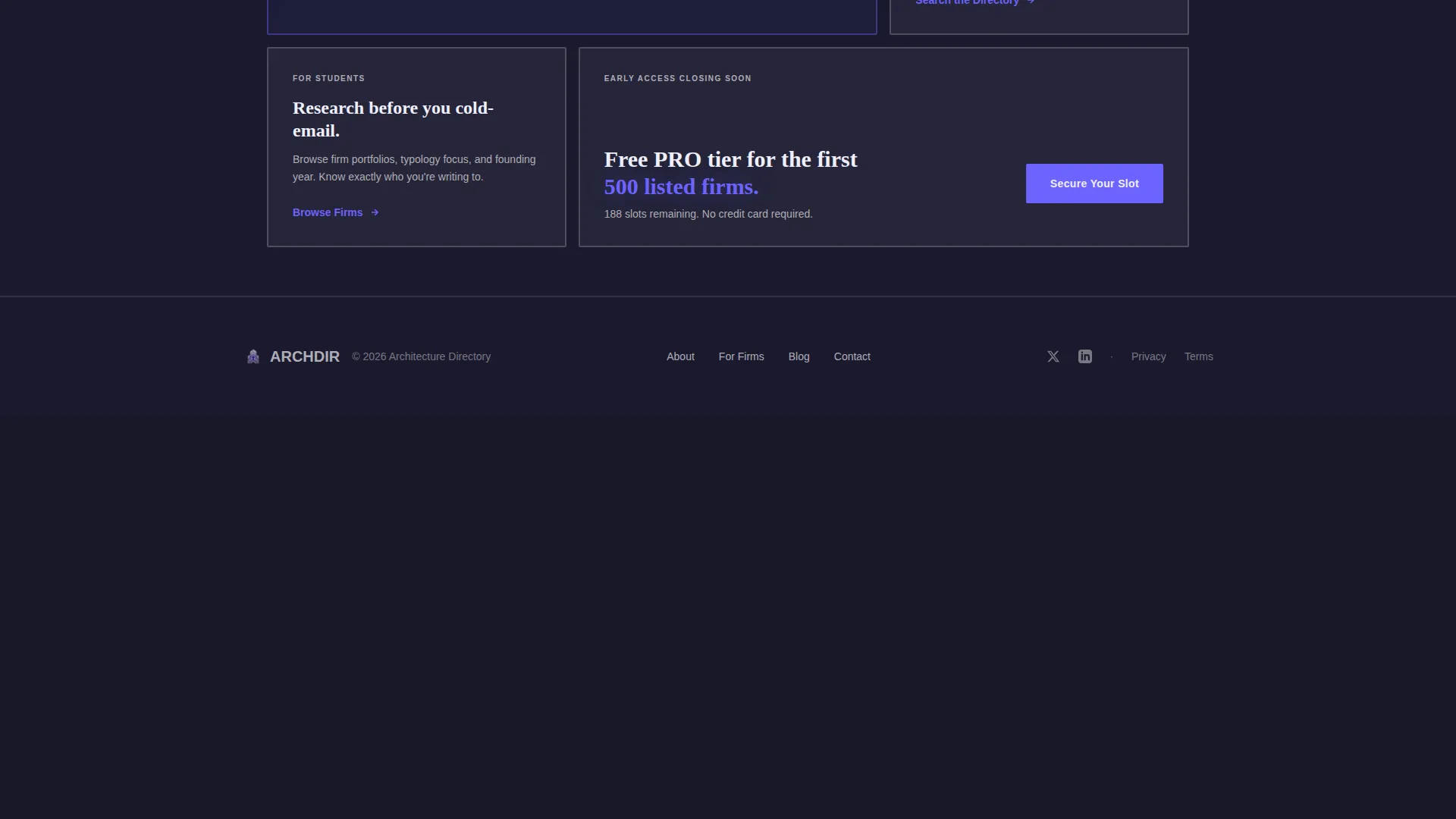
On mobile viewports, the primary List Your Practice call-to-action is fixed to the bottom of the screen. It is also repeated inside three bento cells at natural scroll pauses, so the conversion prompt appears at every moment of high intent without feeling aggressive.
Page sections overview
| Section | Purpose |
|---|---|
| Tab Switcher Header | Introduces the three core directory use cases with live previews |
| Firm Counter Cell | Shows a live-style count of firms already listed to signal active community |
| Testimonial Stack | Stacks early-access studio quotes in a tall narrow cell to build trust |
| Project Photography Reel | Loops project images from listed firms to prove the directory is populated |
| Listing Tier Block | Presents FREE, PRO, and FEATURED plans side by side in brutalist type blocks |
| Two-Step Modal Form | Captures firm details and contact info across two focused form steps |
| Soft Gate Preview | Limits free search results to encourage email capture from browsers |
| Fixed Mobile call to action | Anchors the List Your Practice button to the bottom bar on mobile |
Design & branding system
The visual identity is built on a Bold Brutalist theme driven by an Electric Indigo color system. The palette feels like a neon tube bolted to a poured-concrete wall: industrial weight electrified by a single commanding frequency.
- Deep slab charcoal (#1A1A2E) forms the primary background, electric indigo (#6C63FF) covers every interactive surface and hover state, exposed concrete gray (#B0AEB5) defines secondary panels and card borders, and sharp signal white (#F0EFFF) punches typography into dark blocks
- Card borders are thick and visible, whitespace is deliberate like the gap between brutalist window bays, and indigo does not accent but commands
- Typography is bold and oversized throughout, reinforcing the monumental civic-building feeling the design aims to deliver
Mobile & speed optimization
The layout is designed to carry its full visual impact on smaller screens without losing the structural weight of the desktop bento grid. Every major conversion touchpoint remains accessible at every scroll depth.
- The fixed bottom call-to-action bar on mobile keeps the List Your Practice prompt visible without disrupting content consumption
- Bento cells restack responsively so the asymmetric grid reads cleanly on portrait and landscape mobile viewports
- The two-step modal is touch-friendly by design, with a visual icon selector that works as well on a phone screen as on a wide desktop
How this template helps you convert
The page is built around lead generation from the first viewport to the final scroll. Every design decision is tied to a specific conversion moment.
- The Feature Tab Switcher header immediately shows three reasons to engage: searching, browsing, and listing. Visitors self-identify their intent within seconds, which lowers friction before any call-to-action appears.
- The scroll-reveal bento grid creates a launch energy effect. Counter cells, testimonial quotes, and project reels make the directory feel active and already valuable, which makes the cost of not being listed feel concrete and real.
- The soft-gated directory preview creates a second conversion path for visitors who are not ready to list. By surfacing a partial result set and asking for an email at the fifth result, the template captures high-intent browsers who would otherwise leave without converting.
Other information about this template
Archivault is built for the architecture digital presence niche, sitting at the intersection of professional directory design and lead generation landing page structure. It is a strong fit for operators who want to launch quickly with a layout that already feels populated and trusted.
- The template style is a bento grid single-page layout, which makes it straightforward to customize cell content, swap photography, and update tier pricing without restructuring the overall grid
- The creative direction is Launch Energy, meaning every section is designed to communicate momentum and existing traction rather than an empty starting point
- This template is particularly relevant for architecture directory and listing site projects where establishing credibility with both supply-side firms and demand-side clients from a single page is essential
Theme
Bold Brutalist
Creative direction
Launch Energy
Color system
Electric Indigo
Style
Bento Grid
Direction
Lead Generation
Page Sections
Feature Tab Switcher Header
Asymmetric Bento Grid Layout
Tiered Listing Plan Blocks
Two-step Lead Capture Modal
Soft-gated Directory Preview
Fixed Mobile Call-to-action Bar
Related questions
Who is this template designed for?
Can I customize the listing tiers and pricing blocks?
How does the two-step modal form work?
What makes the header different from a standard hero section?
Does the template include a mobile-optimized layout?



