Museum Vertical SaaS Cost Estimator Website Template
The Catalog Museum CRM Dashboard Pro landing page template is a dark, bento-grid layout built for museum operations teams who need every key metric on one screen. It combines an interactive membership revenue calculator, six live metric tiles, and role-specific dashboard views into a single, high-impact landing page designed to drive free app installs from operations directors and membership managers.
by Rocket studio
Quick summary
This template turns a complex museum operations pitch into one focused landing page. It opens with a dark glass bento grid showing live museum metrics, walks visitors through an interactive calculator, and closes with a clear install call-to-action. The design feels like a precision control room: every element earns its place, and the product speaks through the data itself.
Who this template is for
This landing page template is built for teams that run cultural institutions and need to present their platform compellingly. The page layouts are structured to speak directly to operations-led buyers who recognize the pain of scattered spreadsheets.
- Operations directors and museum registrars at mid-size natural history and contemporary art museums
- Membership managers tracking lapsed donors and renewal rates before fiscal year-end
- Curatorial teams who need attendance-by-gallery data to justify acquisition proposals
What problem this template solves
Museum operations teams manage admissions, memberships, exhibitions, and donor pipelines across many disconnected tools. A landing page for a museum platform needs to make the cost of that chaos visible and the solution immediately credible.
- Visitors arrive without context; the bento grid of live museum metrics gives them instant proof of product value before they scroll
- Museum landing pages that rely on stock photography lose trust; this template makes the product itself the visual, removing that friction
- Donation and membership data is often siloed; the template shows a unified dashboard view that helps users understand the full picture at a glance
What you get with this template
You get a complete, ready-to-deploy single-page layout that covers every stage of the buyer journey. From the fold to the footer, every section is designed to build confidence and drive installs. The template ships with structured page layouts, interactive elements, and a full design system.
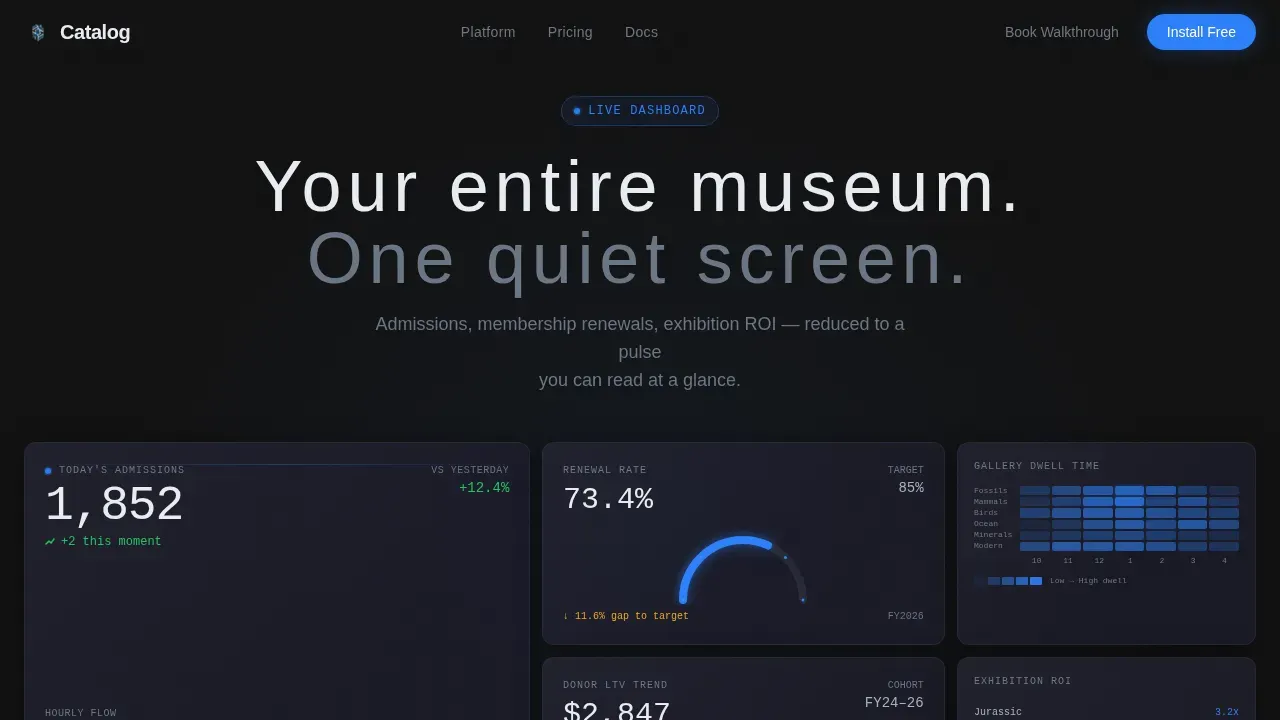
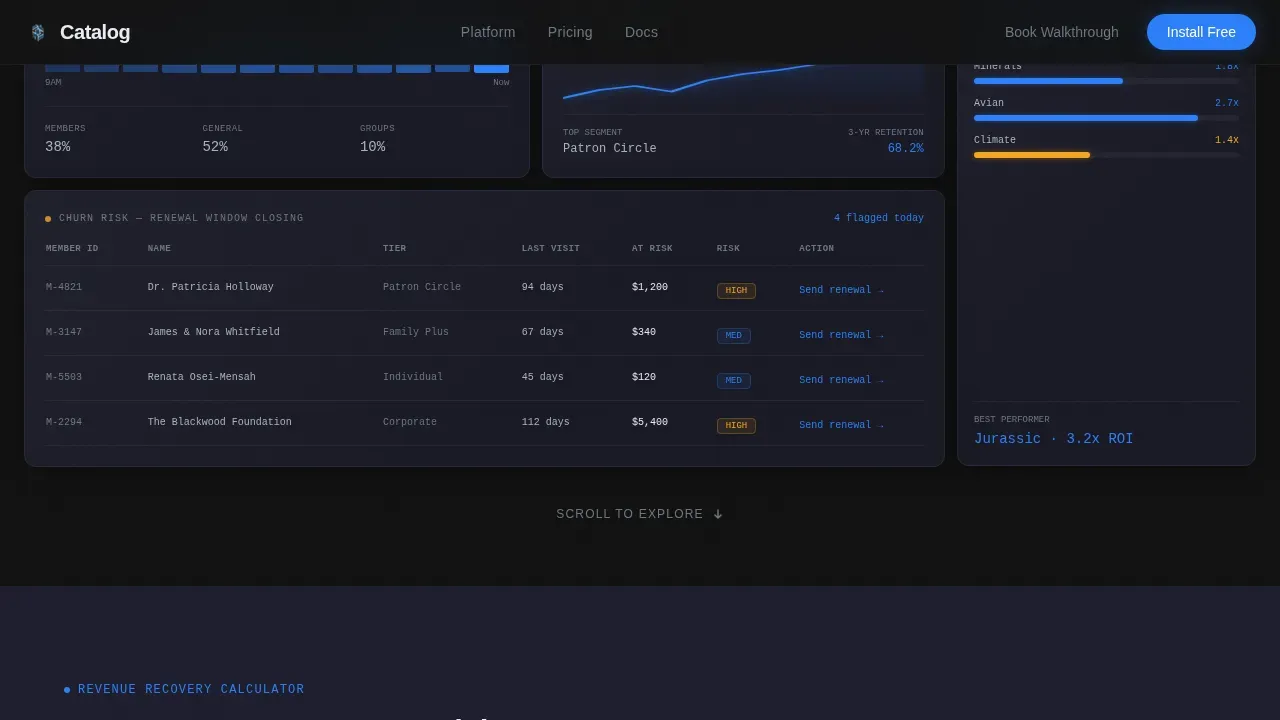
- A six-tile dark glass bento header with distinct live metric panels covering admissions, memberships, donor value, exhibition ROI, gallery dwell time, and churn risk
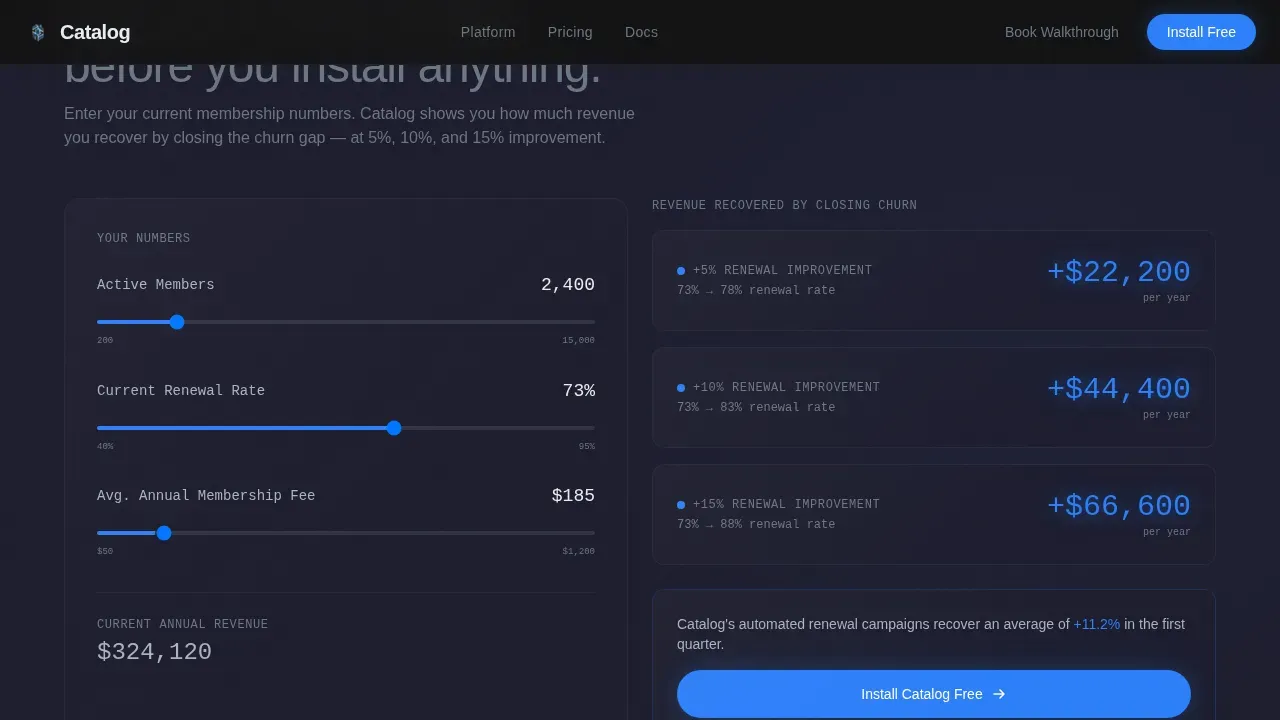
- An interactive Membership Revenue Calculator that projects recovered revenue at 5%, 10%, and 15% churn reduction scenarios
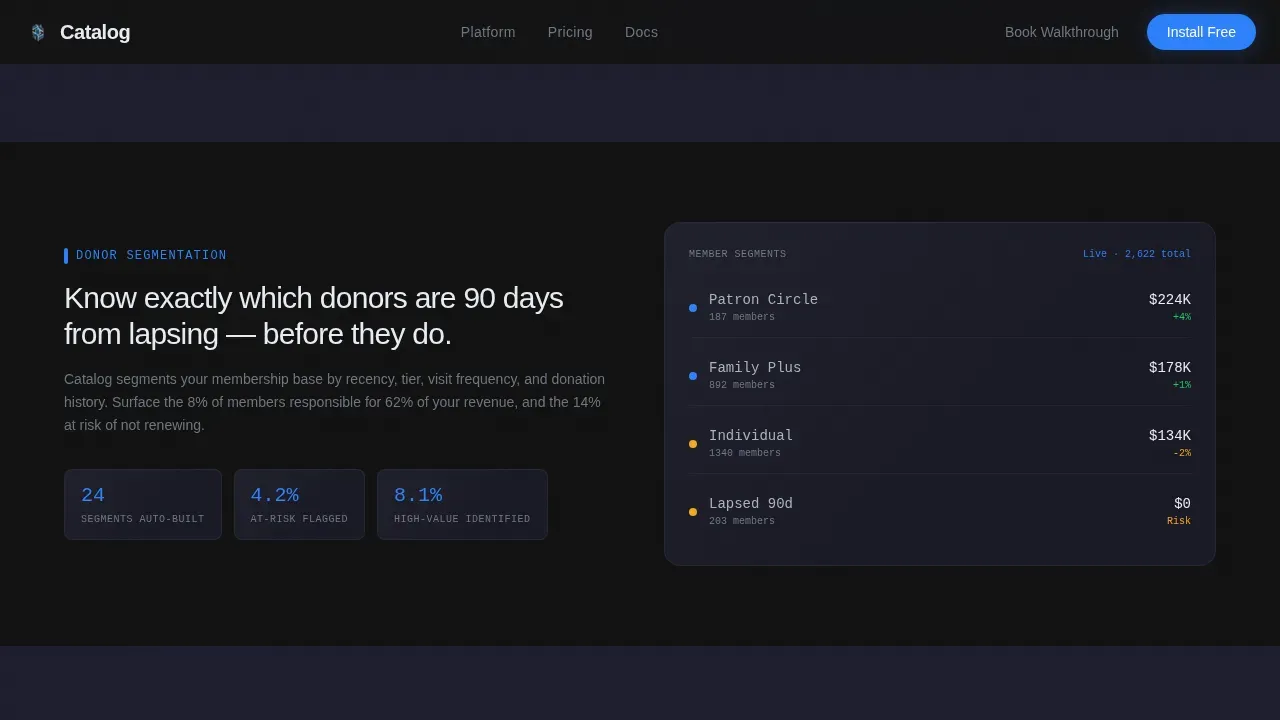
- Role-specific product capability rows for donor segmentation, exhibition analytics, and automated renewal campaigns, each presented as a mini-dashboard inside a glass tile
Feature list
This template includes purpose-built features drawn from the full product brief. Each one is ready to support your museum landing page projects without additional customization overhead.
Interactive Revenue Calculator Tile
One bento tile on the landing page is fully interactive. Users enter their member count, average renewal rate, and ticket price. The calculator instantly outputs projected annual revenue recovered at three churn-reduction levels. The result appears as a glowing blue figure, giving visitors a personal financial reason to install before they scroll further.
Six-Panel Dark Glass Bento Header
The header is an asymmetric grid of six frosted-glass panels, each holding a different live museum metric. Panels display today's admissions count, a membership renewal arc, a gallery dwell-time heatmap, a donor lifetime-value graph, an exhibition ROI comparison, and a churn-risk list with amber flags. The layout uses parallax depth and subtle panel reflections to create a control-room atmosphere without any hero image.
Role-Aware Product Capability Rows
Scrolling past the calculator reveals dedicated bento rows for donor segmentation, exhibition analytics, and automated renewal campaigns. Each row is its own mini-dashboard screenshot inside a glass tile. This design approach helps membership managers, development officers, and curatorial teams each see the view that is relevant to their role.
Sticky Install Call-to-Action Bar
A conservation-blue pill button labeled "Install Catalog Free" appears first beneath the calculator result, then returns as a sticky bottom bar after 60% scroll depth. A secondary "Book a Walkthrough" path sits alongside it for directors who prefer a guided demo. The download flow asks only for institution name and work email.
Social Proof Section
A dedicated testimonials section features museum professionals with institution names, roles, and specific outcome metrics. Social proof from real cultural institutions builds credibility and helps hesitant buyers trust the platform before they sign up.
Carbon Fiber Typography System
The template uses DM Sans for all interface labels and navigation, and JetBrains Mono for all data values and numbers. This pairing creates a clear visual hierarchy that separates contextual copy from live metrics, making the data feel authoritative and the user interface feel engineered.
Page sections overview
| Section | Purpose |
|---|---|
| Dark Glass Header | Display six live metric bento tiles and the primary headline |
| Revenue Calculator | Interactive churn-reduction projection tool for micro-conversion |
| Donor Segmentation Row | Show donor grouping and lifetime-value dashboard capability |
| Exhibition Analytics Row | Present gallery dwell time and ROI comparison views |
| Renewal Automation Row | Illustrate automated membership renewal campaign features |
| Social Proof Block | Testimonials from museum professionals with outcome metrics |
| Primary call to action Section | "Install Catalog Free" button with institution name and email form |
| Sticky Bottom Bar | Persistent install prompt after 60% scroll depth |
| Footer | Linear single-row footer with secondary links |
Design & branding system
The design follows a Carbon Fiber color system built around four values: deep carbon black (#121212) for backgrounds, woven graphite (#1E1E2E) for surface layers, instrument-panel silver (#A8B2C1) for all body text and labels, and conservation blue (#2D7FF9) reserved exclusively for live data points, toggle states, and primary buttons.
- Backgrounds alternate between carbon black and graphite to create visual depth between bento cells, making the grid feel layered and dimensional
- Blue appears only where something is live, clickable, or actively updating, so users immediately recognize interactive elements without instruction
- High-contrast text-to-background pairings keep data legible across the full page, and descriptive link text throughout the layouts supports clear navigation
Mobile & speed optimization
The template is desktop-first, reflecting that operations directors typically work on large monitors. Responsive layouts ensure the bento grid and calculator remain fully functional on smaller screens and tablets used by floor staff.
- Bento grid columns reflow for tablet and mobile viewports, preserving the visual hierarchy of each metric tile without horizontal scrolling
- The calculator and sticky call-to-action bar are built as client-side components while static sections use server-rendered markup, keeping initial load lean
- Key Performance Indicator (KPI) widgets for total members, event revenue, and donation tracking are prominent on every viewport size, not buried below the fold
How this template helps you convert
An effective museum landing page requires a clean, data-driven design that moves visitors from curiosity to action in a single scroll. This template is structured to accomplish exactly that.
- The calculator creates a personal revenue projection before the visitor has scrolled past the fold, making the value of the platform concrete and specific to their own institution
- Role-specific capability rows let membership managers, curatorial teams, and operations directors each find the view that speaks to their daily work, reducing the cognitive load of a generic feature list
- Two coordinated call-to-action placements, one beneath the calculator and one as a sticky bar, keep the install prompt visible at the exact moments when intent is highest
Other information about this template
This template is suited to a wide range of museum platform projects and can support broader cultural institution apps beyond natural history and contemporary art. It is also relevant for teams building or evaluating crm dashboard templates for their own web app deployments.
- The Catalog Museum CRM Dashboard Pro landing page template is the reference implementation for this design system and can be downloaded as a complete project file
- The page layouts are built around a bento grid structure with plenty of room to extend additional metric tiles or product capability rows as your platform grows
- Teams who need to connect a CRM platform to other business apps, email marketing tools, or social media channels will find the layout flexible enough to accommodate those messaging additions
- The admin panel layout within the dashboard screenshot tiles can be adapted to reflect your own platform's user interface, making the template useful across different museum vertical SaaS projects
- Museum catalog templates and this CRM landing page template share a focus on showcasing collections and data in a professional, polished manner, making the design sensibility transferable across cultural institution websites
- The template is free to download and requires only an institution name and work email to sign up, with no credit card or org-size qualifier needed
Theme
Dashboard Pro
Creative direction
Calculator/Tool First
Color system
Carbon Fiber
Style
Bento Grid
Direction
App Download
Page Sections
Interactive Membership Revenue Calculator
Six-panel Dark Glass Bento Header
Role-aware Product Capability Rows
Dual-placement Sticky Call to Action System
Social Proof Testimonials Block
Carbon Fiber Typography and Color System
Related questions
Who is this landing page template designed for?
Can I customize the bento grid panels for different museum metrics?
Does the template include the interactive calculator logic?
What do I need to sign up and download this template?
Can this template support cultural institution web apps beyond a museum CRM?



