Edtech Assessment Platform Landing Page Template
Assess is a hub-and-spoke landing page template built for assessment and testing platforms. It opens with an interactive quiz starter, guides visitors through FAQ-driven spoke sections, and drives event registrations for a live product demo. The botanical color system and playful geometric design make a technically rigorous platform feel approachable and trustworthy.
by Rocket studio
Quick summary
Assess is a single-page landing page template designed for assessment and testing platforms. It combines a quiz-style header, anchor navigation, and FAQ-driven spoke sections to walk visitors through the platform's value. The goal is one conversion: a seat reserved for the live product walkthrough.
Who this template is for
This template speaks directly to the people who live and breathe hiring pipelines and learning outcomes. If you are building or marketing a platform that runs evaluations at scale, this is your starting point.
- Talent acquisition leads managing hundreds of applicants per open role
- Learning and development managers who need to prove training results with data
- Edtech founders building proctored exam infrastructure for thousands of simultaneous test-takers
What problem this template solves
Hiring and assessment platforms are hard to explain in a single page visit. Visitors arrive with specific, urgent questions and leave if the page feels like a brochure. This template replaces passive scrolling with active engagement.
- Visitors self-select their use case from the opening quiz, so the page feels immediately relevant
- FAQ-anchored spoke sections answer the exact questions buyers type before they ever book a demo
- The registration form is short and purposeful, reducing friction at the final conversion step
What you get with this template
You get a fully structured, conversion-focused landing page that does the work of a sales discovery call before the demo even happens. Every section is designed to earn trust one honest answer at a time.
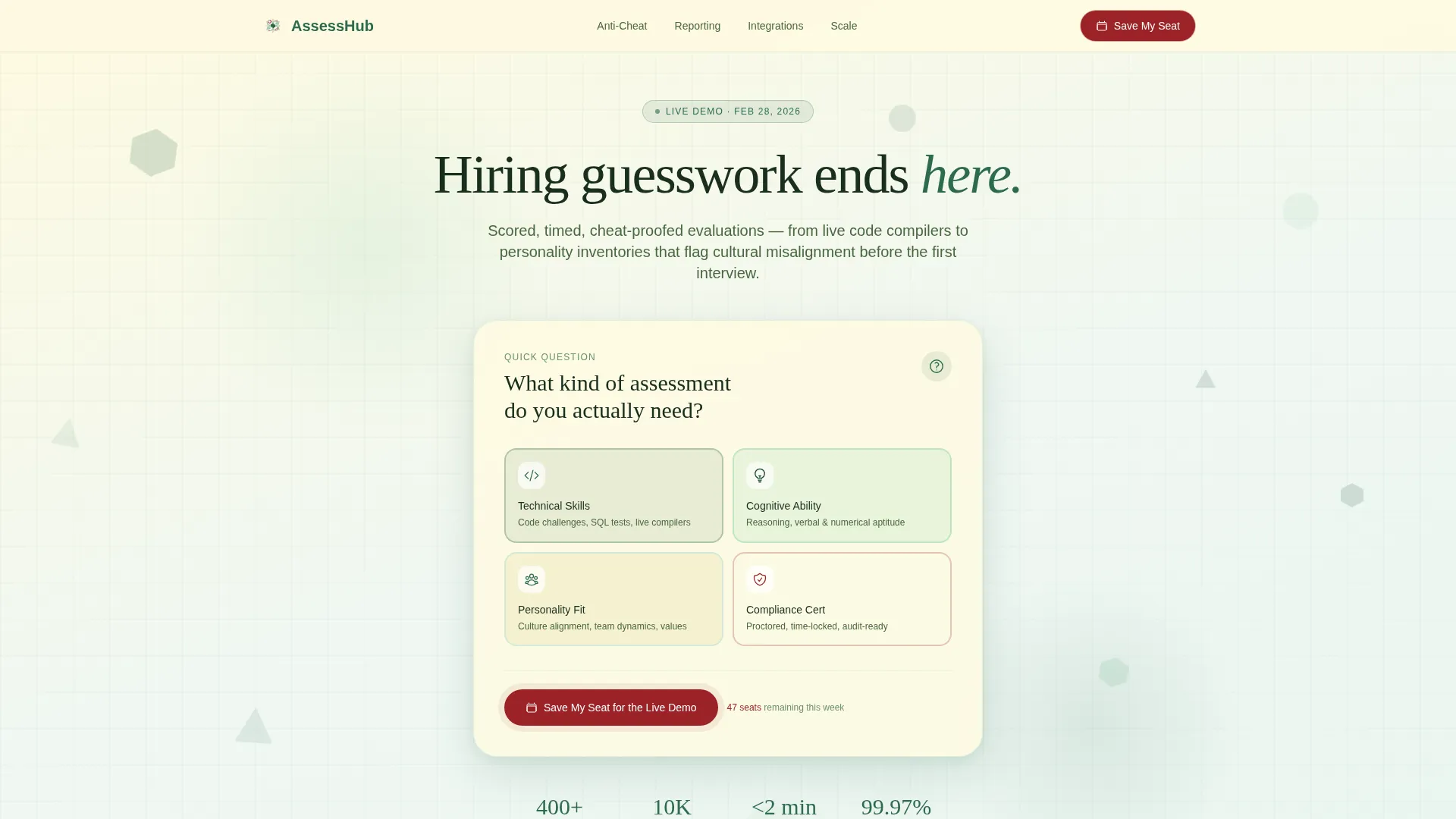
- An interactive quiz starter header with four illustrated answer tiles and micro-animation scroll behavior
- Hub-and-spoke anchor navigation with persistent demo registration access after visitor engagement
- A three-field event registration form with live seat counter and a berry-red pulsing call-to-action button
Feature list
This template ships with purpose-built components that reflect the way real buyers evaluate assessment tools.
Interactive Quiz Starter Header
The viewport opens on a floating question card asking "What kind of assessment do you actually need?" Visitors choose from four tiles: Technical Skills, Cognitive Ability, Personality Fit, and Compliance Certification. Clicking a tile triggers a micro-animation where background geometric shapes rearrange and the page scrolls directly to the matching spoke section.
Hub-and-Spoke Anchor Navigation
A central hub nav connects every spoke section and keeps the visitor oriented throughout the page. After a visitor engages with two or more spoke sections, the primary call-to-action button becomes persistent inside the anchor nav, keeping the registration path visible without being intrusive.
FAQ-Driven Spoke Sections
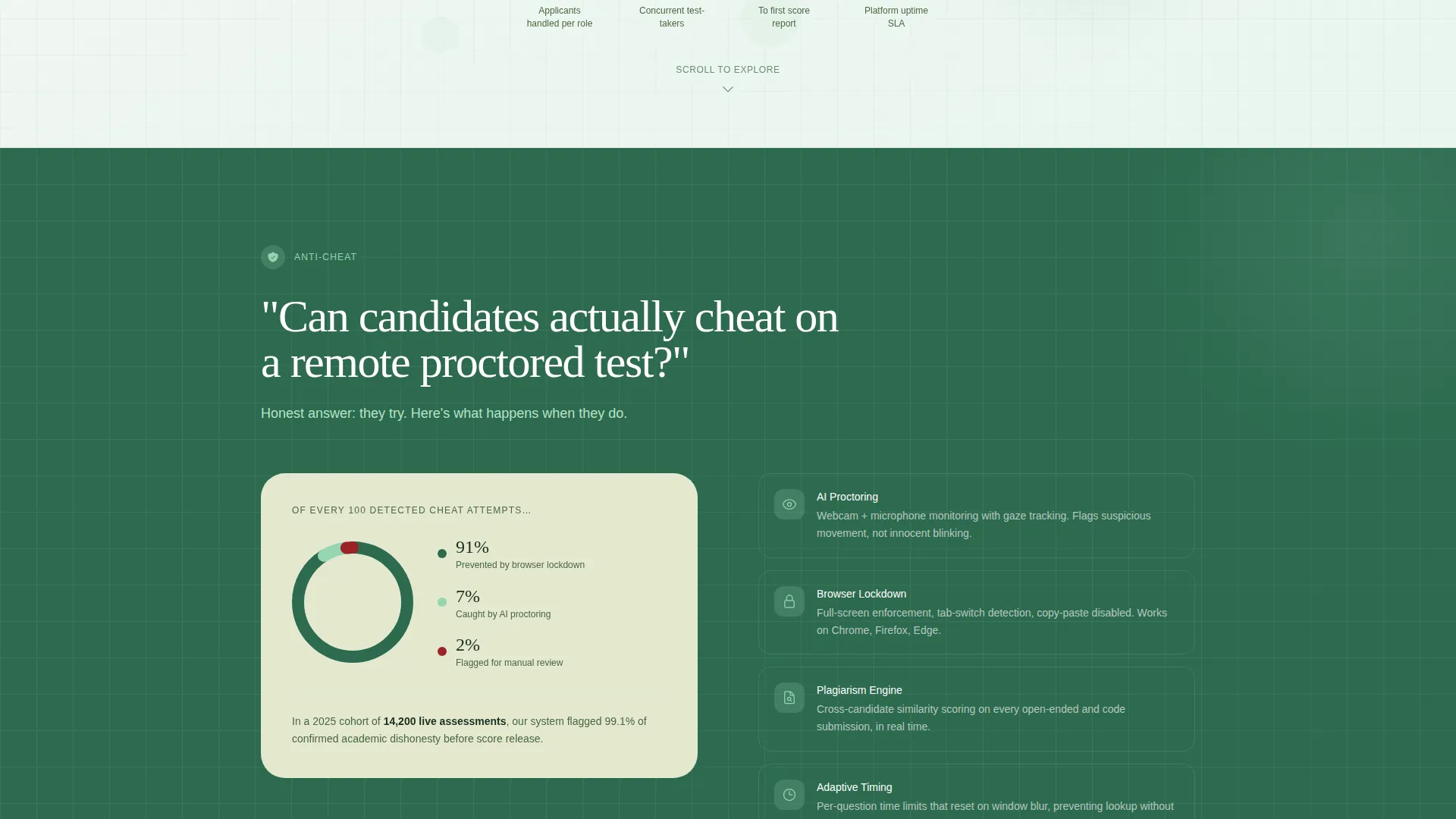
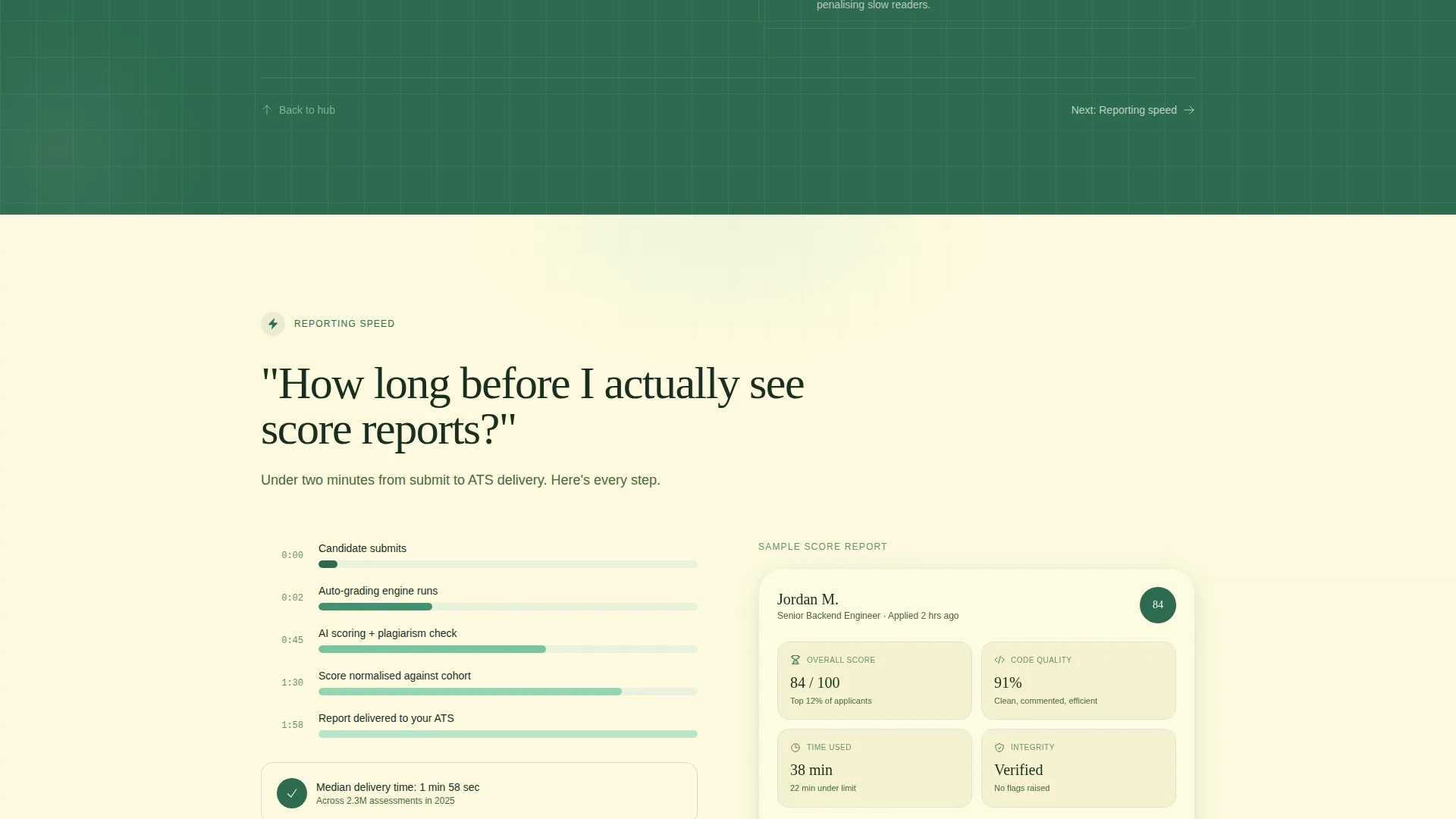
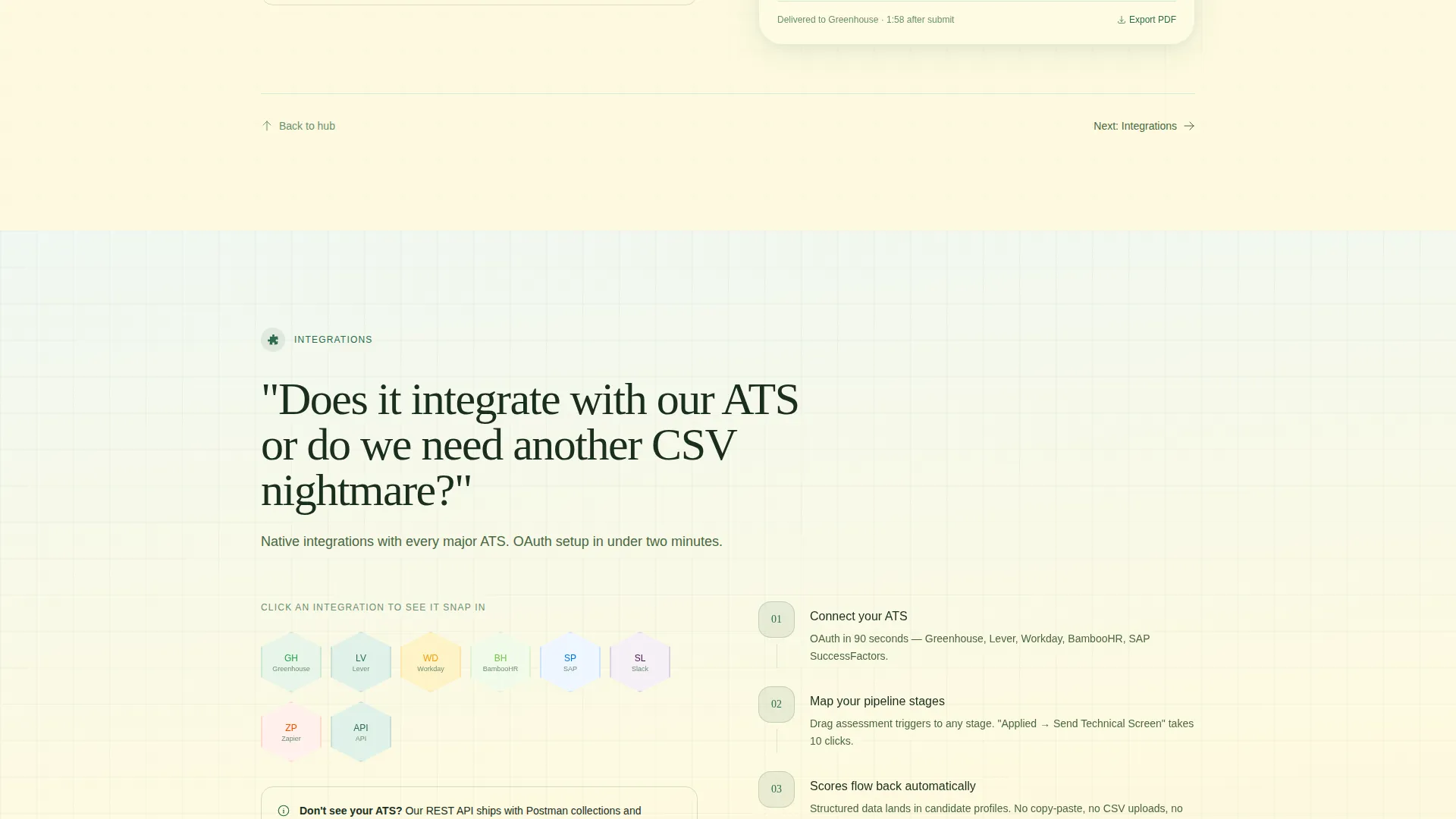
Each spoke section is anchored by a real, direct question that hiring managers and learning leads actually ask. Questions like "Can candidates cheat on a remote proctored test?" and "How long before I see score reports?" unfold into answers with geometric animations including growing pie charts, filling timeline bars, and integration logos that click into a hexagonal grid.
Event Registration Form
The registration form is intentionally short. It asks for a work email first, then company size via a dropdown with three ranges, and one optional open-text field. This structure keeps the barrier low while collecting the data needed to qualify attendees before the live demo.
Live Seat Counter
A visible counter shows remaining seats for the live walkthrough. This creates real scarcity tied to actual availability, not artificial pressure. The counter supports honest urgency without fabrication.
Botanical Geometric Visual System
Soft hexagons, circles, and rounded triangles drift slowly in the header background. Geometric animations accompany data reveals throughout the spoke sections. The entire visual language combines scientific structure with organic warmth, making a complex platform feel inviting rather than intimidating.
Page sections overview
| Section | Purpose |
|---|---|
| Quiz Starter Header | Opens engagement with a self-selecting assessment type question |
| Hub Anchor Nav | Connects all spoke sections and hosts the persistent demo call to action |
| Technical Skills Spoke | Answers questions about live code challenges and scoring |
| Cognitive Ability Spoke | Covers timed evaluations and score report delivery |
| Personality Fit Spoke | Addresses cultural alignment flags and inventory logic |
| Compliance Certification Spoke | Explains proctored exam scale and cheat-proofing |
| Event Registration Block | Captures work email, company size, and optional pain-point input |
Design & branding system
The visual identity follows a Playful Geometric theme built on a Botanical color system. Every color choice serves a specific functional role, so the palette feels deliberate rather than decorative.
- Deep terrarium green (#2D6A4F) anchors primary backgrounds; sun-warmed leaf (#95D5B2) handles hover states and progress bars; pressed-flower cream (#FEFAE0) fills open content areas
- Ripe berry (#9B2226) is reserved exclusively for call-to-action buttons and validation errors, keeping urgency signals focused and unambiguous
- Illustrated line-art tile artwork, drifting geometric shapes, and ink-outlined botanical motifs give the page the feel of a field notebook opened inside a greenhouse
Mobile & speed optimization
The template is structured so that the hub-and-spoke layout translates clearly to smaller screens. Navigation and registration stay accessible throughout the scroll experience on any device.
- The anchor nav collapses gracefully to keep the demo registration button reachable on mobile without crowding the viewport
- Geometric animations are designed to enhance engagement without adding unnecessary visual weight to the page load experience
- The registration form's three-field structure keeps the conversion step fast and thumb-friendly on small screens
How this template helps you convert
Every design and content decision in this template points toward one action: reserving a seat for the live demo. The path from first impression to registration is short and intentional.
- The quiz starter header creates immediate personal relevance, making visitors feel like they have already started using the product before they read a single marketing claim
- FAQ-driven spoke sections address real objections in the language buyers already use, building trust through honest, specific answers rather than feature lists
- The persistent call-to-action button, live seat counter, and subtly pulsing berry-red registration button all work together to move engaged visitors toward the final conversion step
Other information about this template
This template is built specifically for the assessment and testing platform category within the broader edtech and learning platform space. It is a strong fit for teams presenting at industry events, launching a new evaluation product, or replacing a generic demo request page with something that qualifies leads before the call.
- The template style is Hub and Spoke with Anchor Navigation, meaning visitors can enter the page through any spoke section and always find their way back to the central hub and registration form
- The creative direction is FAQ-Driven, a format that works especially well for platforms where buyer skepticism is high and trust must be earned before a sales conversation begins
- The header concept is a Quiz Starter, which is particularly effective for platforms that serve multiple buyer personas, since it lets each visitor self-segment from the very first interaction
- The landing page direction targets Event Registration, making it well-suited for product walkthrough launches, live demo campaigns, and cohort-based onboarding events
Theme
Playful Geometric
Creative direction
FAQ-Driven
Color system
Botanical
Style
Hub & Spoke (Anchor Nav)
Direction
Event Registration
Page Sections
Interactive Quiz Starter Header
Hub-and-spoke Anchor Navigation
Faq-driven Spoke Sections
Event Registration Form
Live Seat Counter with Honest Urgency
Botanical Geometric Visual System
Related questions
What type of platform is this template designed for?
Can I customize the quiz tiles in the header?
How does the anchor navigation work across spoke sections?
Is this template built specifically for event registration campaigns?
Why does the FAQ-driven layout work well for assessment platforms?



