Self-Hosted Enterprise Software Complete Professional Website Template
Fleet is a scroll-reveal landing page template built for self-hosted mobile device management (MDM) platforms. It pairs a live dashboard hero with data-driven scroll sections, an animated benchmark chart, and a two-step trial conversion flow. The design uses a deep terminal-black and teal color system that communicates control, uptime, and quiet engineering authority.
by Rocket studio
Quick summary
Fleet is a single-page, scroll-reveal landing page template for self-hosted MDM software. It opens with a pixel-perfect dashboard hero and unfolds like an analyst brief, each section surfaces a new insight before pointing to a free deployment call to action (call to action). The result is a page that earns trust before it asks for a click.
Who this template is for
This template was built for technical founders, DevOps leads, and infrastructure teams who need to communicate serious engineering credibility without relying on stock photography or generic SaaS copy.
- Startup CTOs preparing for SOC 2 compliance audits ahead of a funding round
- DevOps engineers at defense or regulated contractors who require fully air-gapped device management
- School district sysadmins managing thousands of devices on a constrained budget
What problem this template solves
Most MDM landing pages look like every other SaaS product page: hero image, three feature cards, a pricing table. They fail to address the specific fears of a technical buyer who has already ruled out vendor-hosted solutions. This template speaks directly to that reader.
- Vendor-hosted MDM creates data exposure risks that self-hosted deployments eliminate entirely
- Legacy MDM platforms require large IT ops teams; solo engineers need proof that one person can run the whole stack
- Generic landing pages cannot communicate the hands-on, terminal-level control that technical buyers demand
What you get with this template
The template delivers a complete, production-ready landing page structured around progressive scroll reveals. Every section is designed to move a skeptical technical reader from curiosity to action.
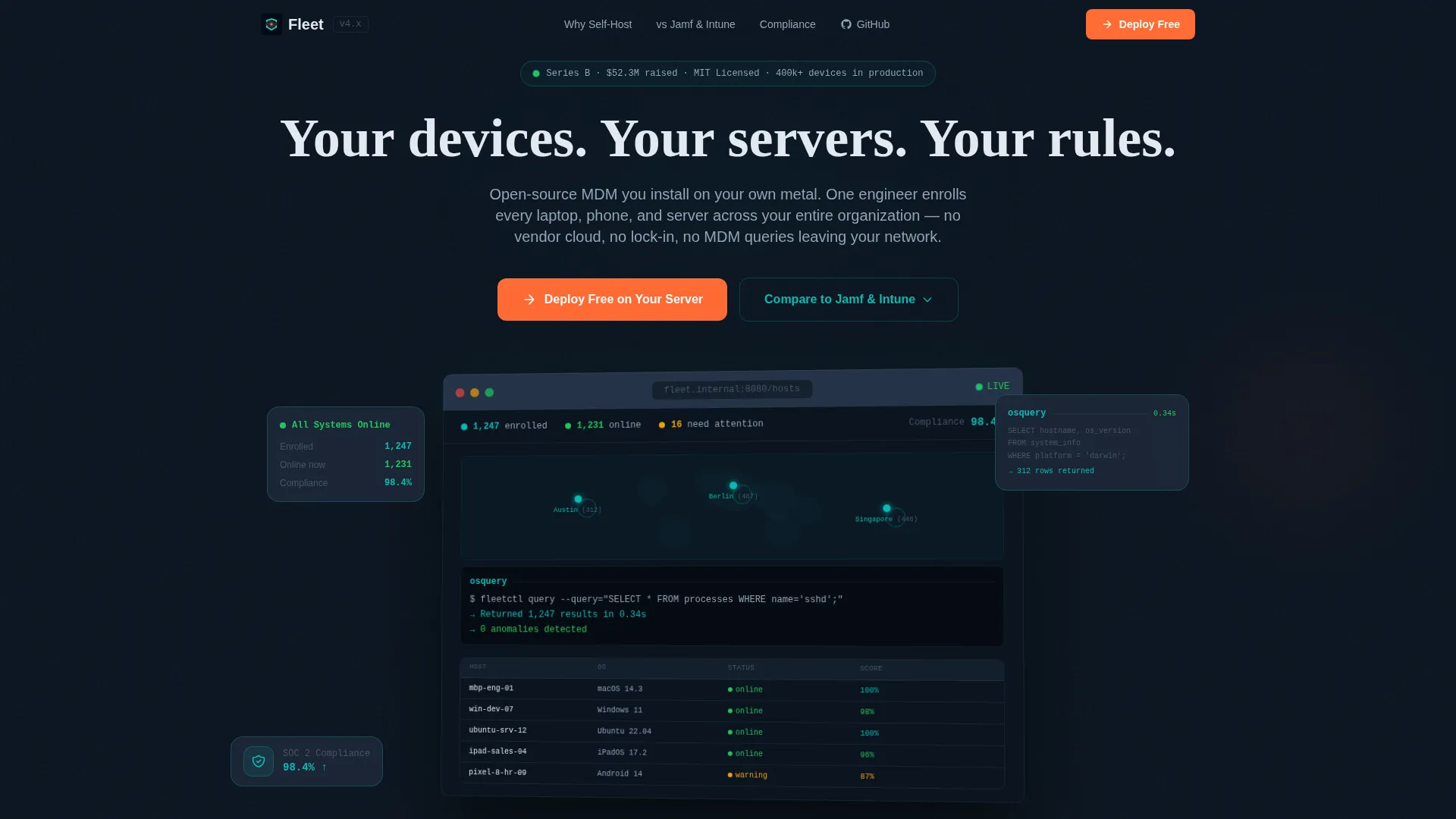
- A live-style dashboard hero showing 1,247 enrolled devices, a world map with pulsing green status dots, an osquery result in mid-return, and a 98.4% compliance score
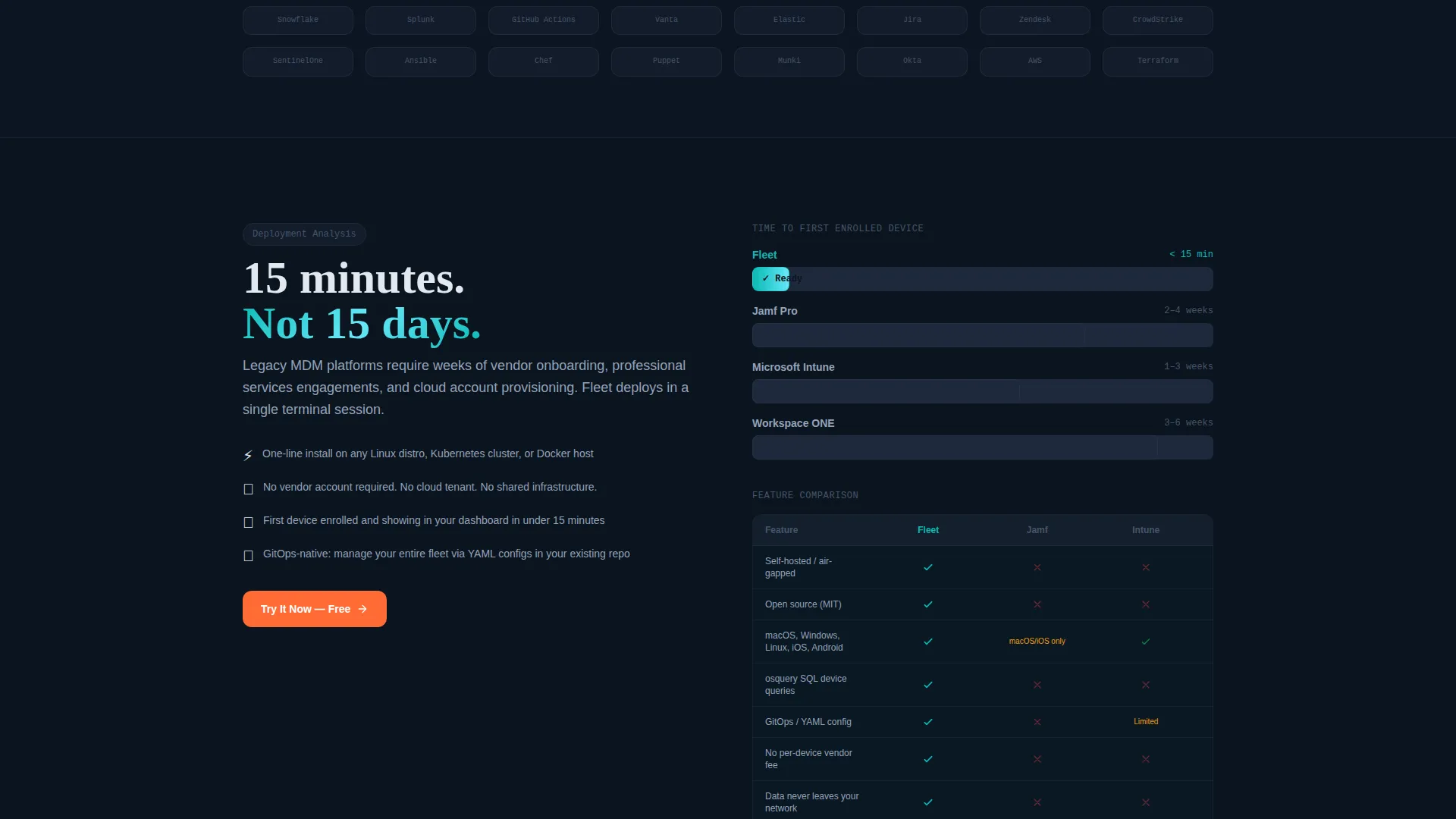
- An animated horizontal bar chart that benchmarks deployment time against legacy MDM platforms, filling as it enters the viewport
- A sticky mobile call to action bar, a two-step environment selector flow (Linux, Kubernetes, or Docker), and a feature matrix comparison path
Feature list
This section covers the core built-in components that define the template's structure and conversion strategy.
Scroll Reveal Progressive Layout
Each section animates into view on scroll, following a deliberate narrative arc. The reader moves from a dramatic dashboard opener through stat-backed insights to a confident deployment call to action, without feeling pushed.
Live Dashboard Hero Section
The header renders a pixel-perfect MDM console mockup at a 3-degree tilt with a soft drop shadow. It shows real-looking device counts, a world map cluster visualization, an osquery mid-query result, and a compliance score. A character-by-character headline types itself out above the screen.
Animated Benchmark Bar Chart
A horizontal bar chart compares deployment time for this self-hosted platform against legacy MDM competitors. The bars fill as the section enters the viewport, turning a data point into a visual moment the reader experiences rather than just reads.
Two-Step Trial Conversion Flow
The primary call to action opens a two-step modal. Step one asks the user to choose their environment: Linux, Kubernetes, or Docker. Step two collects a work email. No credit card and no sales call are required. The install script is the conversion event.
Sticky Mobile call to action Bar
On mobile, a persistent bottom bar keeps the primary call to action visible throughout the entire scroll. The bar uses the hot catalyst accent color so it stands out without interrupting the reading experience.
Feature Matrix Comparison Path
A secondary call to action links to a feature comparison matrix that highlights every row where self-hosted deployment wins. The matrix ends with its own embedded call to action, giving comparison-minded buyers a clear path to conversion without leaving the page flow.
Page sections overview
| Section | Purpose |
|---|---|
| Dashboard Hero Header | Establishes product credibility with a live-style console mockup and typed headline |
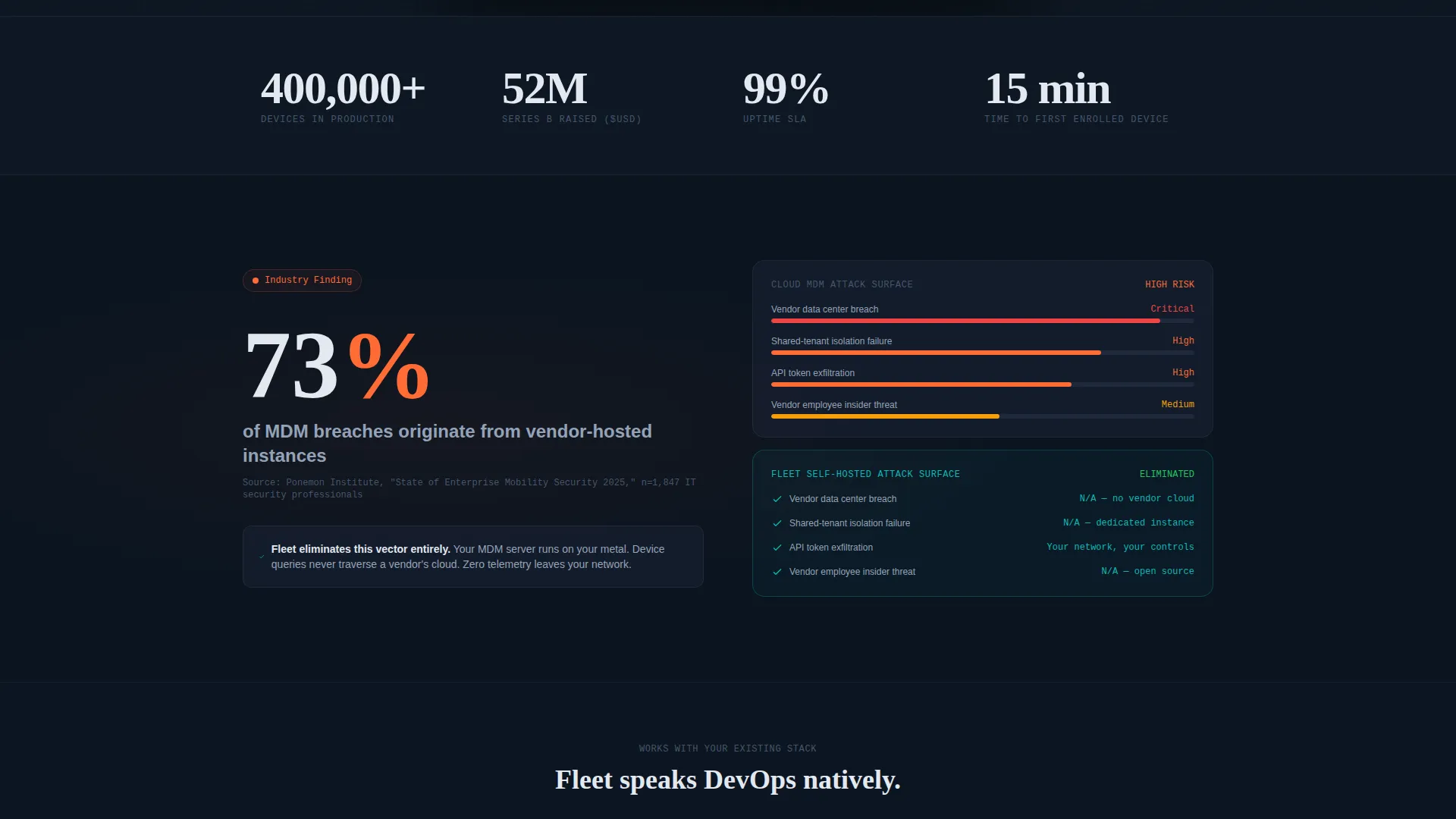
| Breach Stat Reveal | Surfaces a vendor-hosted MDM risk statistic with a source citation to reframe assumptions |
| Deployment Benchmark Chart | Animated bar chart compares deployment speed against legacy MDM platforms |
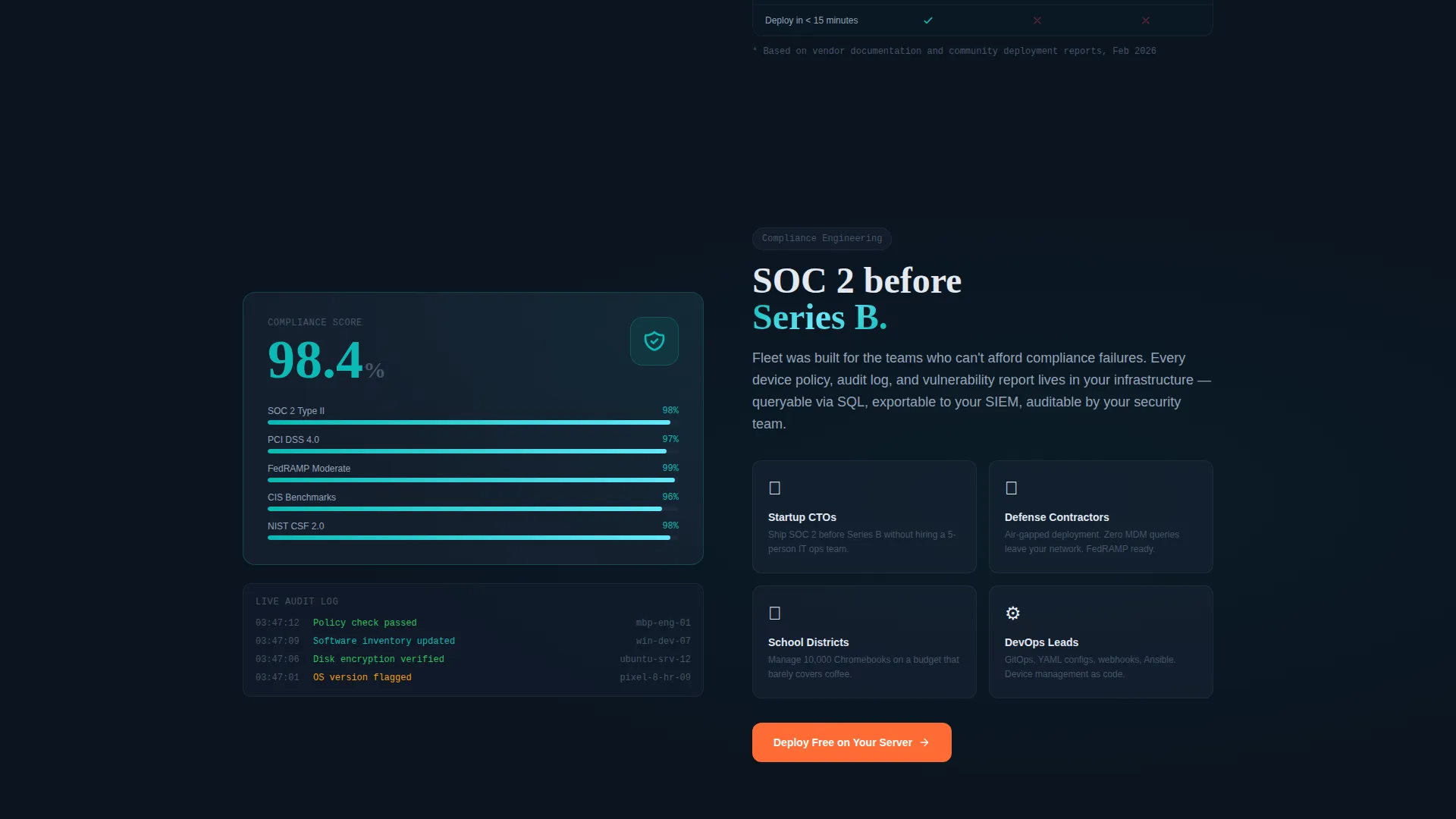
| Compliance Score Section | Shows compliance metrics and reinforces the self-hosted security narrative |
| Post-Compliance call to action | Repeats the primary deploy call to action after the compliance trust moment |
| Feature Matrix Comparison | Side-by-side feature table with embedded secondary call to action |
| Sticky Mobile Bar | Persistent bottom call to action bar visible throughout the mobile scroll |
Design & branding system
The visual identity follows a Startup Velocity theme with a Teal Catalyst color system. Every color choice is intentional: the palette reads like a dark-mode operations dashboard, not a marketing site.
- Deep terminal black (#0B1420) as the page background, soft slate (#1E293B) for card surfaces, and primary teal (#0ABAB5) for active states and status indicators
- Hot catalyst accent (#FF6B35) reserved exclusively for call to action buttons and alert states, so every orange element on the page signals a required action
- No stock photography and no illustrations; the product console mockup is the visual hero throughout the entire page
Mobile & speed optimization
The template is built with a mobile-first scroll experience in mind. The sticky call to action bar ensures conversion intent is never more than a thumb tap away, regardless of where the reader pauses in the scroll.
- Sticky bottom call to action bar persists on mobile across the full page length without obstructing content
- Scroll reveal animations are tied to viewport entry, keeping each section visually clean and focused before it appears
How this template helps you convert
The page is structured around a freemium and trial conversion strategy. Every design and copy decision moves the reader toward a no-friction deployment action.
- The dashboard hero establishes immediate product credibility before the reader has scrolled a single pixel, reducing the bounce risk from skeptical technical buyers.
- The industry-report scroll narrative builds trust section by section, so by the time the primary call to action reappears after the compliance section, the reader has already convinced themselves.
Other information about this template
This template sits at the intersection of the self-hosted enterprise software category and the broader technology space. It was designed to serve technical go-to-market teams who need a landing page that can hold its own in a room full of engineers.
- The template style is Scroll Reveal (Progressive), meaning content layers in on scroll rather than loading all at once
- The creative direction is Industry Report, a format that presents data-backed findings sequentially to guide the reader to a conclusion
- The header concept is Dashboard Preview, a design pattern that uses a realistic product screenshot as the primary visual instead of an illustration or abstract graphic
- This template is well suited for self-hosted MDM platforms, open-source device management tools, and enterprise infrastructure products that compete on transparency and technical control
Theme
Startup Velocity
Creative direction
Industry Report
Color system
Teal Catalyst
Style
Scroll Reveal (Progressive)
Direction
Freemium/Trial
Page Sections
Scroll Reveal Progressive Layout
Live Dashboard Hero Section
Animated Benchmark Bar Chart
Two-step Trial Conversion Flow
Sticky Mobile Call to Action Bar
Feature Matrix Comparison Path
Related questions
Does this template require any design software to edit?
Can I replace the dashboard mockup with my own product screenshot?
Is the two-step call to action flow included in the template?
Who is the primary conversion audience for this template?
Can I adapt the feature matrix for different competitors?



