Specialist Geography Education FAQ & Common Questions Website Template
Atlas is a sidebar companion landing page template built for geography video lesson libraries. It combines a live-stats header, FAQ-driven scroll structure, and an on-page quiz flow to convert teachers, students, and parents into engaged users. The Institutional Authority design system uses slate, cream, sky blue, and cartographic red to feel credible, orderly, and ready to use.
by Rocket studio
Quick summary
Atlas is a single-page sidebar companion template for a geography video lesson library. It opens with a live-metrics dashboard, walks visitors through real teacher questions in a structured FAQ scroll, and closes with a free diagnostic quiz that proves depth before asking for a sign-up. The layout feels like a well-organised classroom resource wall.
Who this template is for
This template is built for educators and learners who need a credible, content-rich landing page for a geography video lesson library. It speaks directly to the people who actually open revision resources at short notice.
- Secondary school geography teachers preparing classes for exam season
- Homeschool parents filling curriculum gaps at the kitchen table
- A-level students revising independently, often late at night
What problem this template solves
Most education landing pages either bury their content value or ask for a sign-up before the visitor has seen a single reason to trust the product. Atlas solves this by structuring the entire scroll around the real questions teachers type into search bars, and then answering each one visually and concisely before any form appears.
- Visitors leave because they cannot quickly confirm syllabus alignment or topic coverage
- A generic layout fails to show the depth of a video lesson library before requesting an account
- There is no clear conversion path that builds trust progressively, from curiosity to commitment
What you get with this template
You get a fully structured sidebar companion landing page with every section pre-built and ready to customise. The layout is designed so each scroll step earns trust before the next one asks for action.
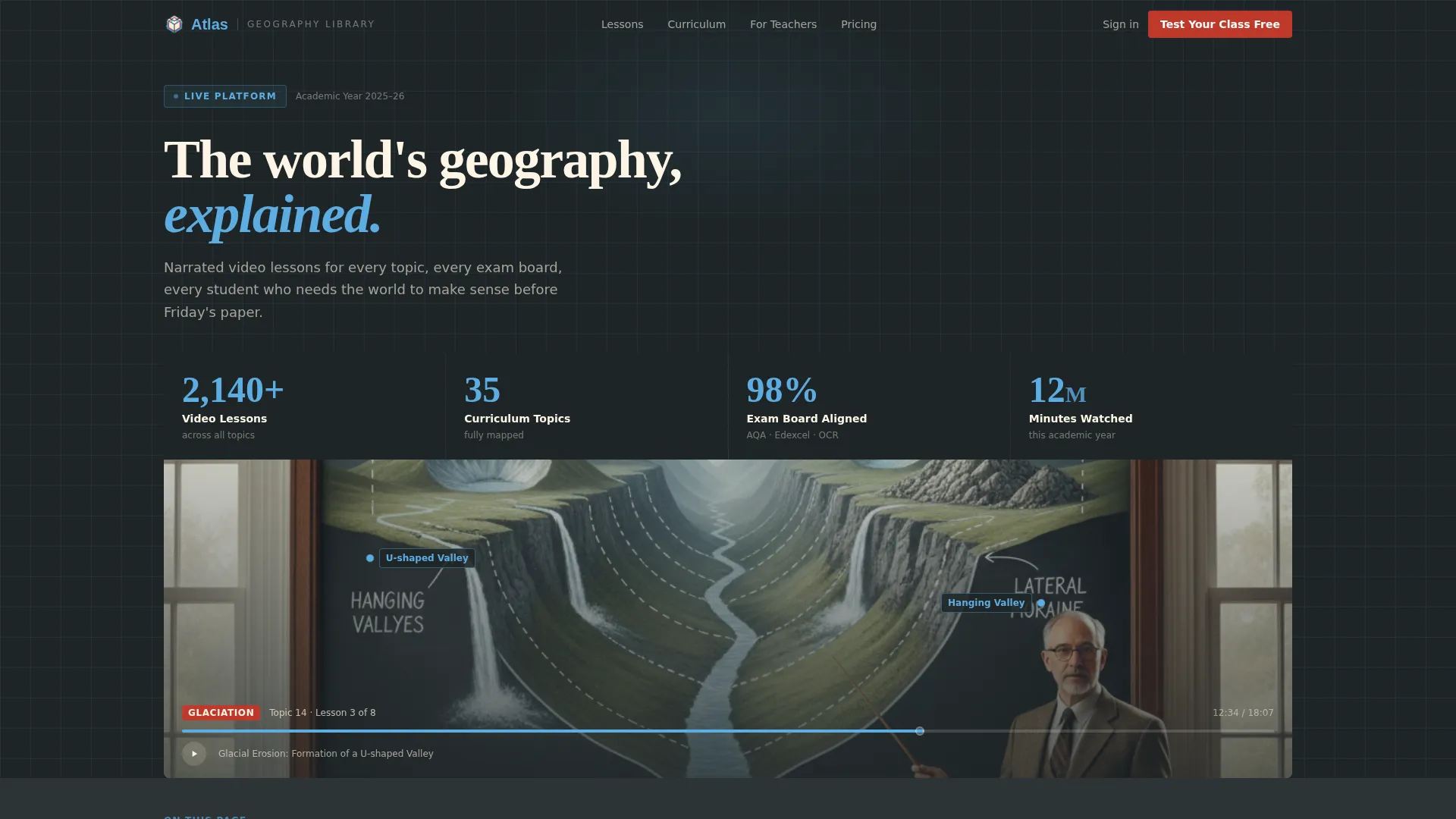
- A live-counter metrics header showing lesson count, topic count, exam-board alignment, and total minutes watched
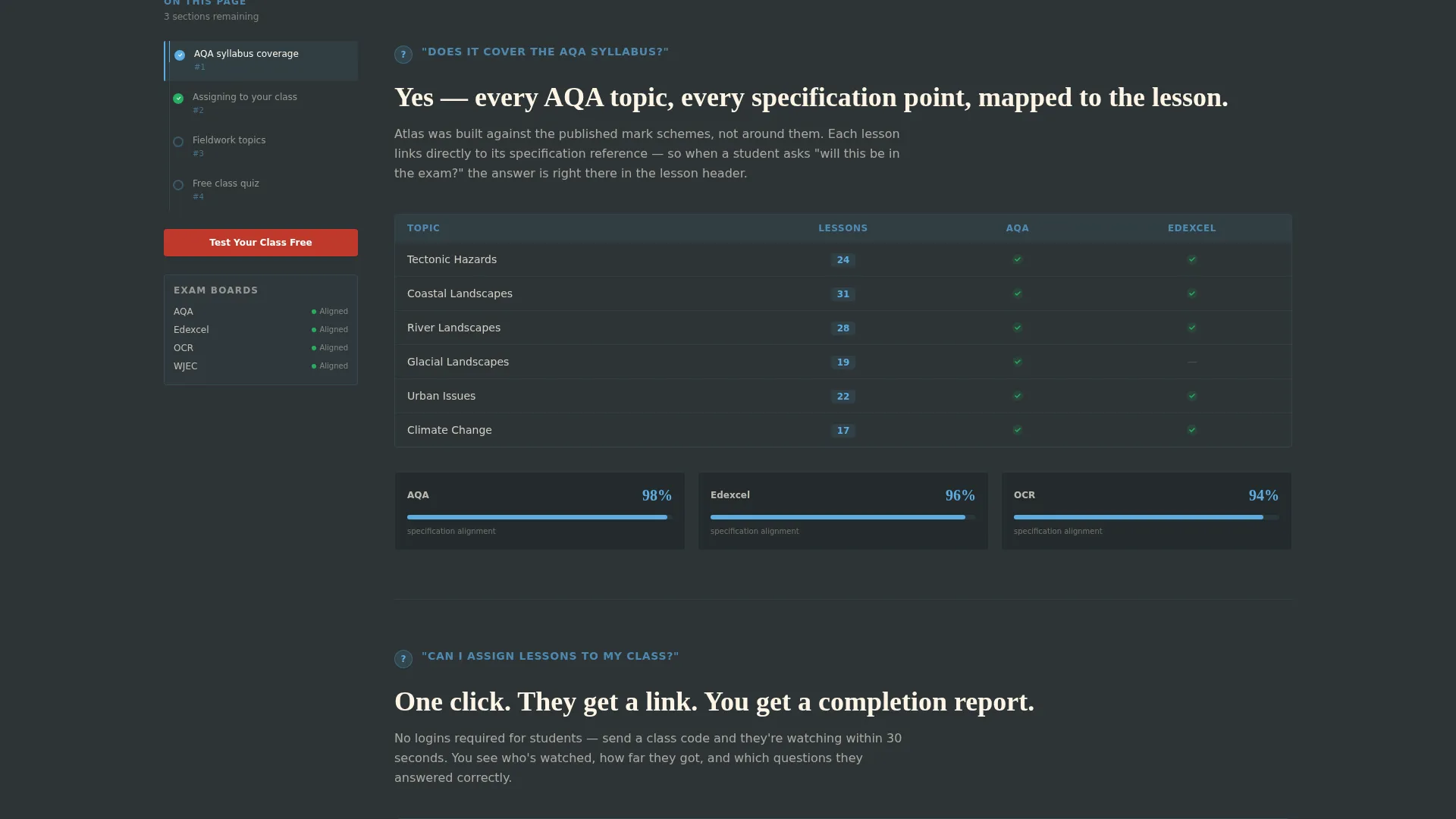
- A persistent left sidebar topic navigator that updates contextually as the visitor scrolls through FAQ sections
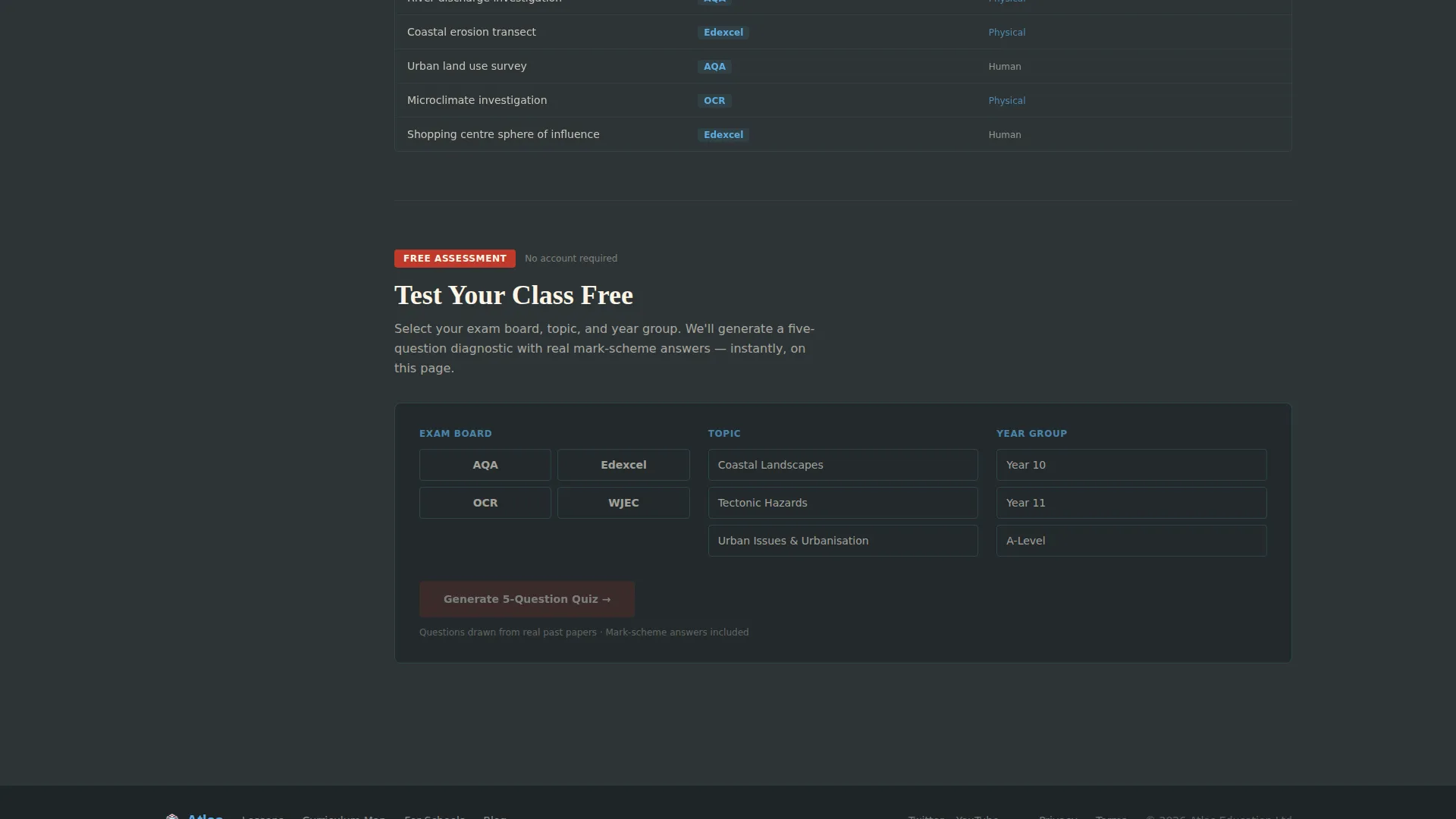
- A three-step on-page quiz flow: exam board selection, topic choice, year group pick, and an instantly generated five-question sample quiz
Feature list
This template includes purposefully built components that work together as a complete, conversion-focused geography education landing page.
Live Stats Dashboard Header
The header displays four key trust metrics: 2,140 or more video lessons, 35 curriculum topics, 98 percent exam-board alignment, and 12 million minutes watched this academic year. Numbers are rendered large in sky blue against a slate background and animate upward with subtle easing. A paused annotated glacial valley diagram sits below the counters to ground the statistics in real lesson content.
Persistent Sidebar Topic Navigator
A fixed left-column navigator stays visible throughout the scroll. It updates contextually to show which FAQ section the visitor is currently reading and how many sections remain. This turns a long page into a structured checklist and rewards the visitor for completing the full journey.
FAQ-Anchored Scroll Structure
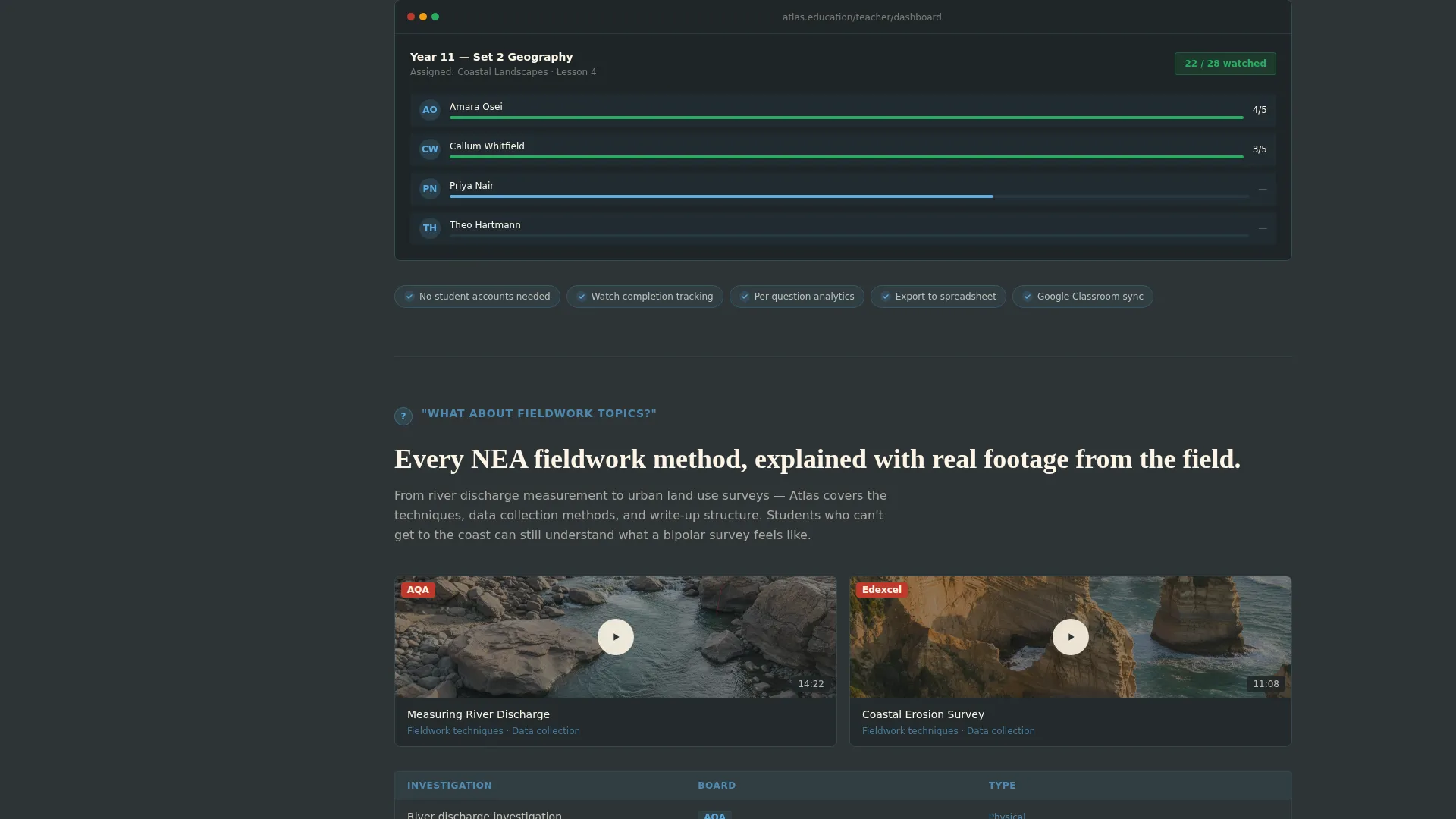
Each scroll section is anchored by a real teacher search question, such as syllabus coverage, class assignment capability, or fieldwork topic availability. Every question opens with a bold one-sentence answer, then expands into a short video clip placeholder, a curriculum-mapping table, or a screenshot area. The structure mirrors how educators actually research tools.
On-Page Diagnostic Quiz Flow
After the third FAQ section, a lightweight quiz launcher appears. The visitor selects their exam board, a topic from coasts, tectonics, or urbanisation, and a year group. A five-question sample quiz generates instantly on the page with no account required. Real questions with real marking criteria are visible before any form is shown.
Progressive Conversion call to action System
The primary call to action, "Test Your Class Free", appears first after the third FAQ section and then pins to the sidebar for the remainder of the scroll. After the visitor completes the sample quiz, a secondary call to action, "Unlock Full Question Bank", asks for a school email address and role. Trust is built before the form is presented.
Institutional Authority Color System
The Slate and Sky color system applies chalkboard slate as the dominant background and type color, examination-paper cream for content panels, stratosphere blue for navigation and progress states, and cartographic red exclusively for scores, calls to action, and incorrect-answer flags. The palette is restrained and purposeful.
Page sections overview
| Section | Purpose |
|---|---|
| Live Metrics Header | Establish scale and credibility instantly with animated trust counters |
| Glacial Diagram Still | Ground statistics in a real mid-lesson content preview |
| FAQ Section One | Answer syllabus alignment question with a bold sentence and visual proof |
| FAQ Section Two | Address class assignment capability with screenshot or table support |
| FAQ Section Three | Cover fieldwork topics with curriculum-mapping table |
| Primary call to action Block | Introduce "Test Your Class Free" after three answered questions |
| Quiz Launcher Panel | Collect exam board, topic, and year group choices on-page |
| Sample Quiz Display | Show five real questions with marking criteria, no account needed |
| Secondary call to action Form | Request school email and role after quiz value is demonstrated |
| Sidebar Navigator | Persist as a contextual progress tracker throughout the full scroll |
Design & branding system
The visual identity follows an Institutional Authority theme. Every color and typographic choice is deliberate and restrained, creating the feeling of a well-funded department's resource wall rather than a consumer product page.
- Chalkboard slate (#2D3436) dominates backgrounds and body typography; examination-paper cream (#FDF5E6) softens content panels to reduce eye strain across long reading sessions
- Stratosphere blue (#5DADE2) marks navigation elements, counter figures, and progress states in the sidebar navigator
- Cartographic red (#C0392B) appears only where attention must land: quiz scores, call-to-action buttons, and incorrect-answer indicators
Mobile & speed optimization
The sidebar companion layout adapts responsibly for smaller screens. The fixed left navigator collapses gracefully so the main content column remains the full focus on mobile devices.
- The sidebar navigator stacks or hides on narrow viewports, keeping the FAQ scroll clean and unobstructed
- The on-page quiz flow is structured in single-column steps on mobile, making exam board, topic, and year group selection easy to tap through
How this template helps you convert
The conversion architecture is intentional. Every structural decision moves a hesitant visitor closer to taking action, without forcing commitment before trust is earned.
- The live-metrics header answers the credibility question in the first three seconds, removing the most common reason an educator bounces from an unfamiliar resource
- The FAQ-anchored scroll mirrors the exact language teachers use when searching, so each section feels like a direct answer rather than a sales pitch
- The on-page quiz delivers real assessment value before the sign-up form appears, making the "Unlock Full Question Bank" call to action feel like a natural next step rather than a cold ask
Other information about this template
This template is part of the Atlas series, designed specifically for geography education contexts. A few additional points are worth noting for anyone evaluating it for a geography video lesson library.
- The template style is a sidebar companion, meaning the main content area and the persistent navigator are two distinct layout columns that work in tandem throughout the scroll
- The FAQ-driven creative direction means the page structure is editorial, not promotional, which tends to perform well with professional educator audiences who are skeptical of marketing language
- The header concept uses a Stats and Metrics panel rather than a hero image, which signals institutional confidence and is well suited to the geography education niche where exam-board alignment figures carry real weight
- The quiz and assessment conversion path is designed to require no account creation for the initial sample, lowering the barrier for first-time visitors significantly
Theme
Institutional Authority
Creative direction
FAQ-Driven
Color system
Slate & Sky
Style
Sidebar Companion
Direction
Quiz/Assessment
Page Sections
Live Metrics Dashboard Header
Persistent Sidebar Topic Navigator
Faq-anchored Scroll Structure
On-page Diagnostic Quiz Flow
Progressive Conversion Call to Action System
Institutional Authority Color System
Related questions
Who is the Atlas template designed for?
What makes the conversion path different from a standard education landing page?
How does the sidebar navigator enhance the page experience?
Can the FAQ sections be customised for different exam boards?
Does the quiz require an external tool or account to function?



