This audit civic authority tax compliance landing page template is built for government tax audit divisions that need to replace taxpayer fear with clarity. It follows a single-column flow with a civic institutional design, a structured form, a taxpayer rights section, and a downloadable PDF guide. The page turns a notice into a conversation, not a confrontation.
by Rocket studio
Loading preview…
Quick Summary
This landing page template serves government tax audit divisions that need to communicate with flagged taxpayers, corporate finance officers, and small business owners facing compliance review. It delivers a calm, authoritative single-column layout that guides each visitor from anxiety to informed action, ending with a short lead-capture form and a free PDF download gate.
Who This Template Is For
This template is designed for civic revenue and tax audit divisions that conduct formal audit reviews and need a clear public-facing page. It works equally well for government agencies, compliance teams, and organizations that manage audit report workflows.
Individual taxpayers who received an audit notice and need plain-language guidance
Corporate finance officers preparing documentation for a scheduled compliance review
Small business owners who need to understand the audit process before their response date
What Problem This Template Solves
Receiving an audit notice creates immediate anxiety. Most people read it twice and still do not know what to do next. A poorly structured page adds confusion and drives visitors away before they ever fill out a form. This template solves that by presenting the audit process in a clear, logical sequence that replaces jargon with plain language.
Visitors leave before converting because the page fails to explain procedures clearly
Organizations lose leads when form fields ask for too much before building trust
Civic authorities struggle to convey credibility without document-heavy, inaccessible copy
What You Get With This Template
The template includes a fully structured single-column landing page with every section already in place. Each block of copy and each layout choice is grounded in the visual authority of a civic institution. You do not need to create anything from scratch.
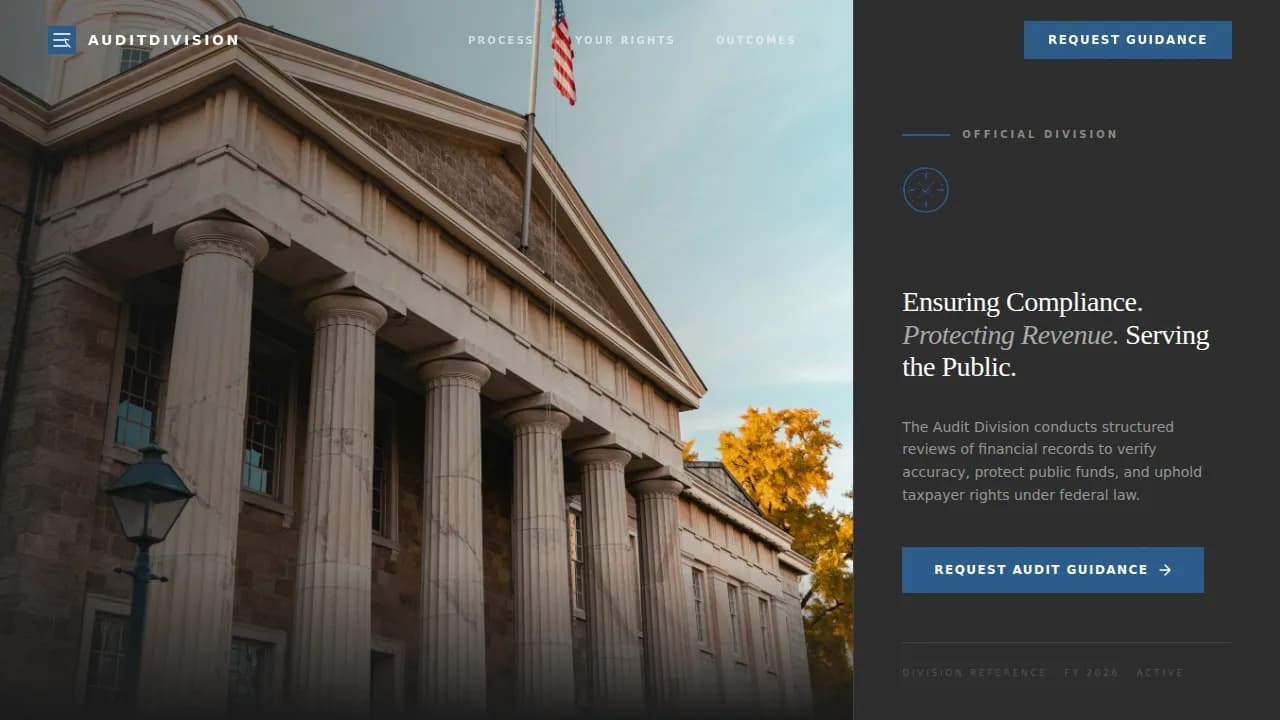
A half-page photo and text hero with a serif headline and government building imagery
A division mandate section, three-pillar audit process layout, a taxpayer rights editorial grid, an outcomes panel, and a lead-capture form with a secondary PDF gate
Theme
Civic Service
Creative direction
Vision & Mission
Color system
Monochrome Steel
Direction
Lead Generation
Page Sections
Civic Hero with Serif Headline
Three-pillar Audit Process Layout
Taxpayer Rights Editorial Grid
Lead Capture Form with Contact Toggle
PDF Download Gate
Outcomes and Social Proof Panel
Related questions
What is the 5% rule for tax audit?
What are the 7 steps in the audit process?
What is a tax audit checklist?
How do you upload an audit report on an income tax site?
Can this template be used by small businesses and nonprofits, not just government agencies?
A compact two-row footer with legal links and official contact details
Feature List
This template ships with a focused set of built-in sections and design decisions. Each feature is directly grounded in what the source brief describes.
Civic Hero with Serif Headline
The header uses a half-page photo and text composition. The left two-thirds holds a high-resolution government building photograph shot from a low angle, morning light on stone columns, with an American flag visible at the top. The right third carries a tight serif headline: "Ensuring Compliance. Protecting Revenue. Serving the Public." No animation, no parallax. The stillness carries the authority.
Three-Pillar Audit Process Layout
The audit process section uses an asymmetric three-pillar structure. Each pillar covers one dimension: what the audit involves, the expected timeline, and the documentation required. This sequential roadmap helps readers track each stage and reduces the anxiety that comes with not knowing what happens next. A well-structured audit report follows a standard format, and this section reflects that logic visually.
Taxpayer Rights Editorial Grid
This section presents the rights protected throughout the audit in a scannable editorial grid. It replaces fear with facts. Visitors find the information they need quickly, and the layout reinforces the idea that reaching out is a right, not a risk. The copy follows plain-language standards to avoid government acronyms and complex jargon.
Lead Capture Form with Contact Toggle
The primary call-to-action form collects taxpayer type (individual, business, or nonprofit), an optional notice reference number, and a preferred contact method toggled between phone and email. The form fields are kept minimal to reduce friction and support higher form submissions. The form appears after the process explanation, so visitors are already informed before they sign.
PDF Download Gate
A secondary conversion path lets visitors download the Taxpayer Rights Guide by providing only their email address. This builds an email list of engaged users without requiring a full form commitment. It gives visitors a free, practical resource and gives the division a follow up channel.
Outcomes and Social Proof Panel
A dark-panel section displays verified case statistics: cases resolved, revenue recovered, and compliance rates improved. This is where social proof lives on the page. Customer testimonials and data points in this section help convince visitors that the division delivers results. Credibility is a vital asset for civic authorities that must answer to the public.
Page Sections Overview
Section
Purpose
Hero Header
Establish civic authority with photo and serif headline
Division Mandate
State the division's vision and mission in plain language
Audit Process
Walk visitors through the three-pillar process sequence
Taxpayer Rights
Present protected rights in a scannable editorial grid
Outcomes Record
Display verified stats and social proof in a dark panel
Guidance Form
Capture leads with a short, low-friction form
PDF Gate
Offer a free downloadable guide via email capture
Compact Footer
Provide legal links, contact details, and official seals
Design & Branding System
The visual identity follows a Civic Service theme built on the Monochrome Steel color system. Every color choice is functional. The palette is described in the brief as a freshly stamped government document: no warmth, no decoration, just the quiet weight of authority.
Colors: institutional charcoal (#2C2C2C), filing-cabinet gray (#6B6B6B), form-paper white (#F4F4F2), and civic blue (#2A5C8A) reserved for links, buttons, and official seals
Typography: Fraunces serif display for headlines and DM Sans for body and interface copy, creating a clear visual hierarchy between authority and readability
Photos: one cinematic government building exterior shot anchors the hero; images throughout the page are purposeful, not decorative
Mobile & Speed Optimization
The template is designed desktop-first, matching the workstation context of government and corporate users. Full mobile support is built in so the page adapts across every device without losing structure or function.
The single-column layout reflows cleanly on mobile devices, keeping the form, menu, and call-to-action buttons accessible on smaller screens
Animations are kept low: subtle scroll-triggered fade-ins only, no parallax, so the page loads and feels fast on any device
Server-rendered components handle static sections; client components are used only for the interactive form and PDF gate toggle
How This Template Helps You Convert
This template earns each conversion by building trust before asking for anything. The page is structured so that by the time a visitor reaches the form, they already understand the process, know their rights, and see documented outcomes.
The hero and mandate sections establish authority immediately, so readers do not bounce before they reach the form
The audit process pillars and taxpayer rights grid answer the questions visitors arrive with, reducing drop-off and increasing the chance they fill out the form or download the guide
The outcomes panel, customer testimonials block, and minimal form design work together to turn informed visitors into captured leads, with a clear follow up path for each submission
Other Information About This Template
This section covers additional practical details that help teams and agencies assess whether this template fits their needs.
The template is part of a broader Government and Public category on the platform, under the Revenue and Tax Authority subcategory, making it easy to find alongside related civic templates
Audit forms are specialized tools used by compliance teams, auditors, and organizations responsible for oversight. They help track corrective actions and support continuous improvement across a wide range of categories, from safety inspections to internal process reviews
Tax audit reports serve as official records of an entity's compliance with tax laws. A tax audit report is a formal summary of the findings of an audit activity focused on taxation policies and procedures. Reports should be accurate and follow a standard format including Introduction, Methodology, Findings, Recommendations, and Conclusion
A tax compliance report summarizes your compliance status as compliant, non-compliant, or compliance issue. Employers, federal agencies, and banks sometimes request this report to assess whether tax obligations have been met. You can download a copy from your individual online account or your business tax account
The report lists your tax filing history and any federal taxes owed but does not show your income, dependents, or filing status
The page template includes a legal footer with space for Privacy Policy, Terms and Conditions, and Cookie Consent links, supporting data-protection obligations
Jotform is one example of a platform where audit forms are mobile-friendly and can be completed on smartphones or tablets, making them practical for on-site inspections and field audits
For teams that want to test and refine the page after launch, AI-powered landing page audit tools can analyze pages across conversion factors and generate professional reports with visual scoring and impact ratings. These tools help agencies present data-driven insights and can deliver quick wins when the landing page is already receiving traffic
The SEO structure of the page, including the prominent H1 headline and logical content flow, follows best practices for discoverability and clear intent signaling