Specialist Consulting Firm Software Privacy Policy & Terms Website Template
A precision quality management landing page built for audit and compliance consulting firms. It uses an interactive comparison table layout to present three consulting tiers, a live-style code snippet header, and violet-on-void-black visual identity. Visitors see their exact pain points itemized row by row, then click through to a scoping questionnaire, no form required on the page itself.
by Rocket studio
Quick summary
This landing page template is designed for quality management consulting firms that help manufacturers close compliance gaps before regulators arrive. It opens with an animated code snippet header, moves through three interactive comparison tables, and ends with a persistent click-through call to action. The design feels like a live monitoring dashboard: dark, data-dense, and urgent.
Who this template is for
This template is built for consulting firms that serve quality and operations leaders in regulated manufacturing industries. If your firm turns audit findings into corrective action plans, this page presents your services with the precision your clients already expect.
- Quality management consultants serving mid-market manufacturers
- Compliance advisory firms supporting pharmaceutical and automotive suppliers
- Audit specialists preparing clients for ISO, FDA, or IATF certification reviews
What problem this template solves
Consulting firms in this space often struggle to communicate service depth without a long sales call. A generic services page loses the client before the conversation starts. This template solves that by letting the comparison tables do the selling.
- Buyers cannot easily distinguish consulting tiers from a plain text services list
- Quality directors and ops leaders need to see their specific pain points named, not described in vague terms
- A standard contact form creates friction before trust is established
What you get with this template
You get a single, focused landing page built around a three-tier service comparison structure. Every section is designed to move a skeptical quality director from recognition to action without requiring a form on this page.
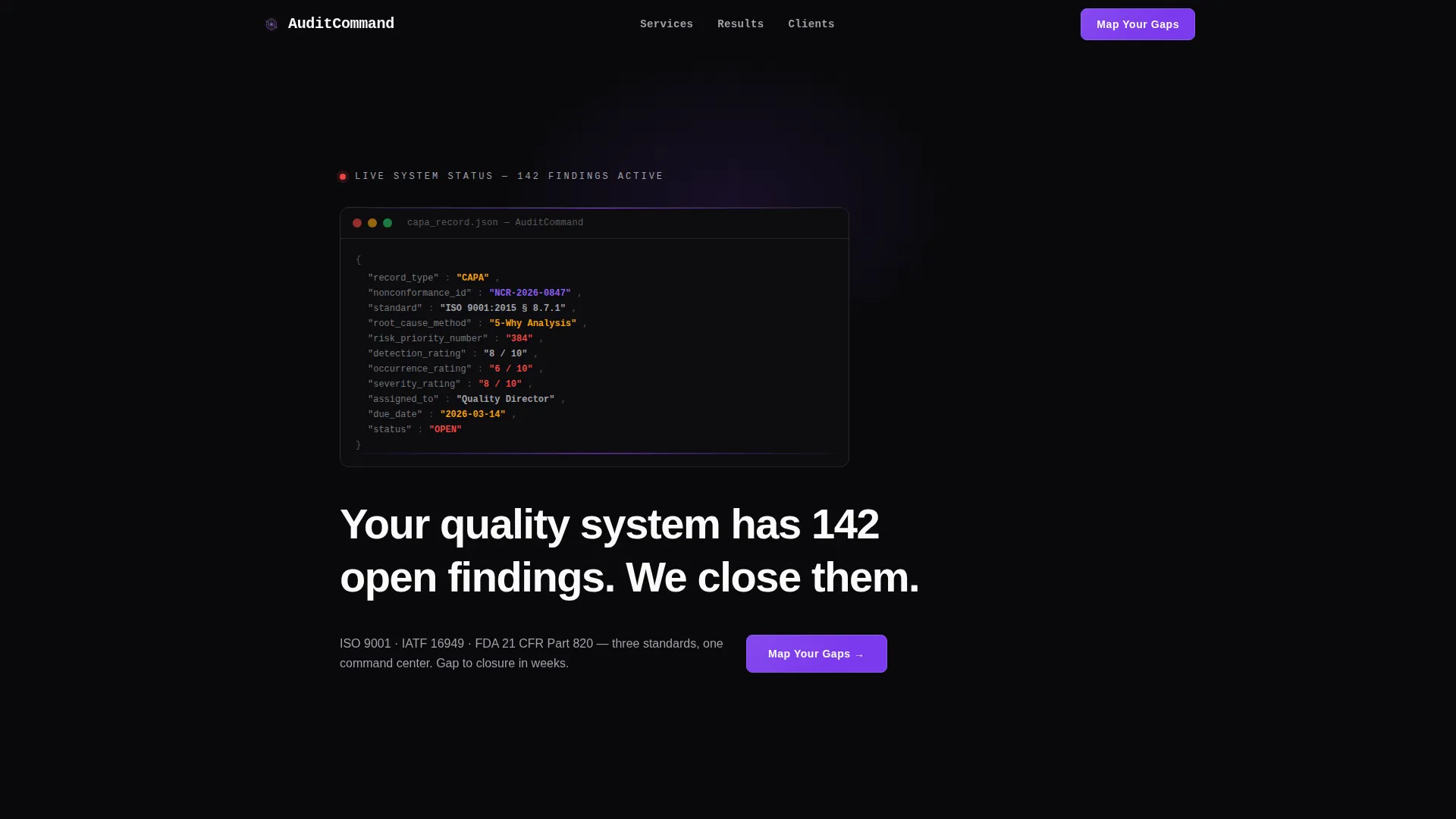
- An animated code snippet header that opens like a live Corrective and Preventive Action (CAPA) record populating in real time
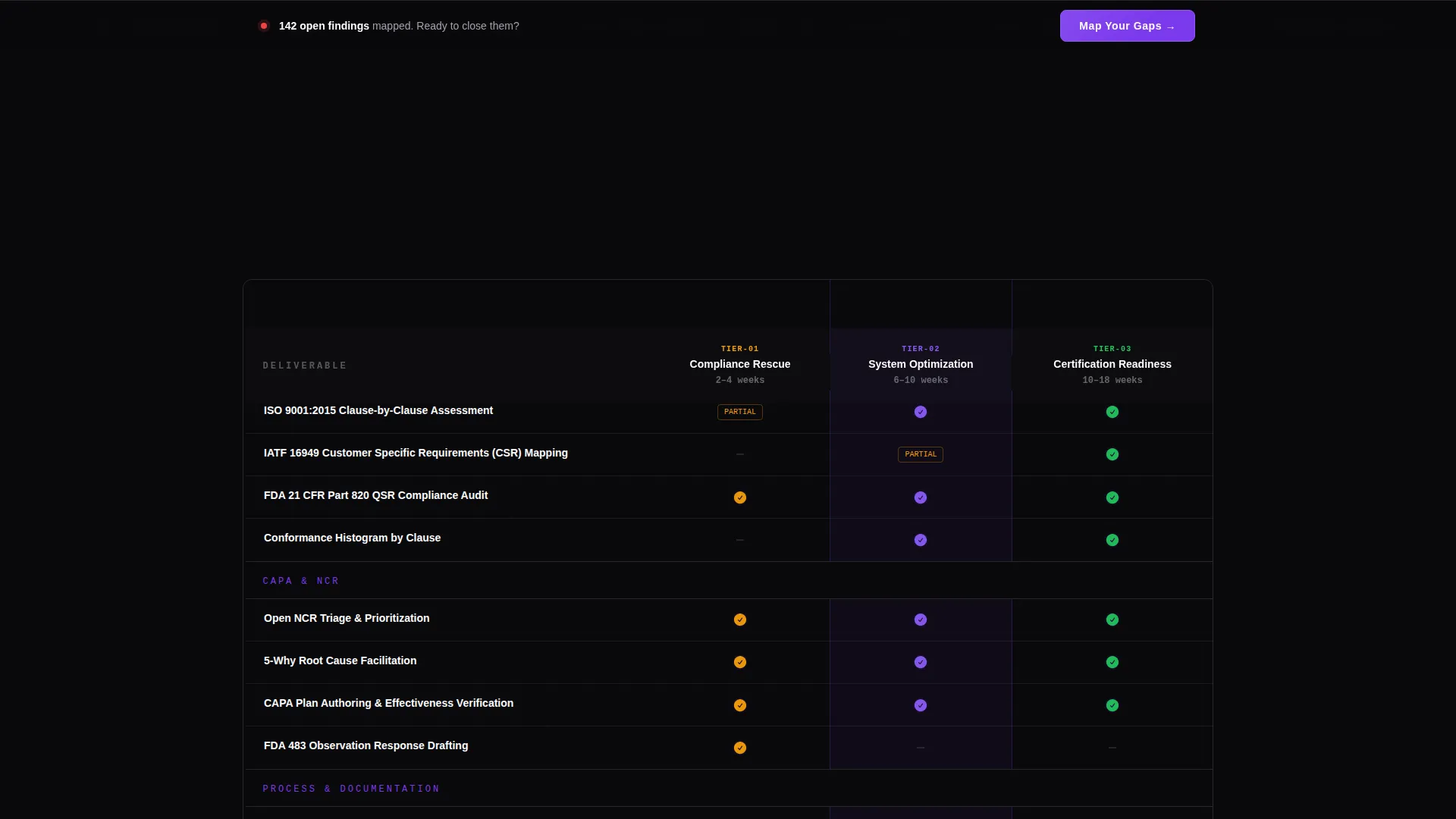
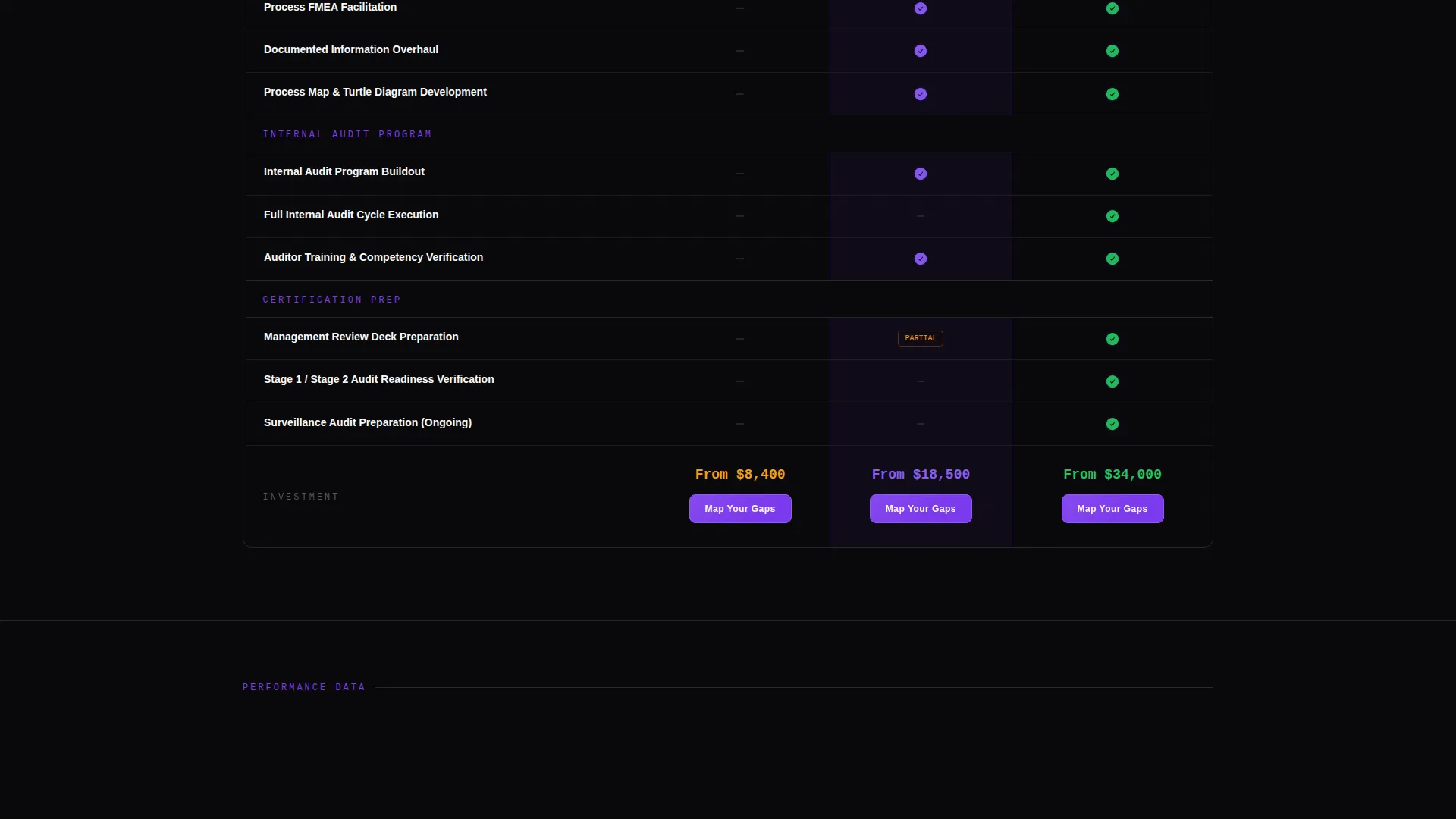
- Three interactive comparison tables covering Compliance Rescue, System Optimization, and Certification Readiness tiers
- A persistent floating call-to-action bar and anchored violet buttons that push visitors to a scoping questionnaire
Feature list
This template ships with purpose-built components that reflect the visual and functional requirements of a data-command quality consulting brand.
Animated Code Snippet Header
The header opens with a structured markup block styled as a live CAPA record. Fields such as nonconformance ID, root cause method, risk priority number, and status populate line by line in violet against void black. A single headline types itself out below the animation.
Interactive Comparison Tables
Three consulting tiers sit inside interactive tables where rows illuminate on hover and checkmarks pulse in violet. Each row names a specific Quality Management System (QMS) deliverable: gap analysis against ISO 9001:2015 clauses, process Failure Mode and Effects Analysis (FMEA) facilitation, internal audit program buildout, and management review deck preparation.
Escalating Urgency Layout
The tables are structured to escalate from left to right. The leftmost tier shows what is missing in a client's current system. The rightmost tier shows what closed-loop quality looks like. This layout guides visitors toward the most comprehensive offering naturally.
Single-Stat Metric Callouts
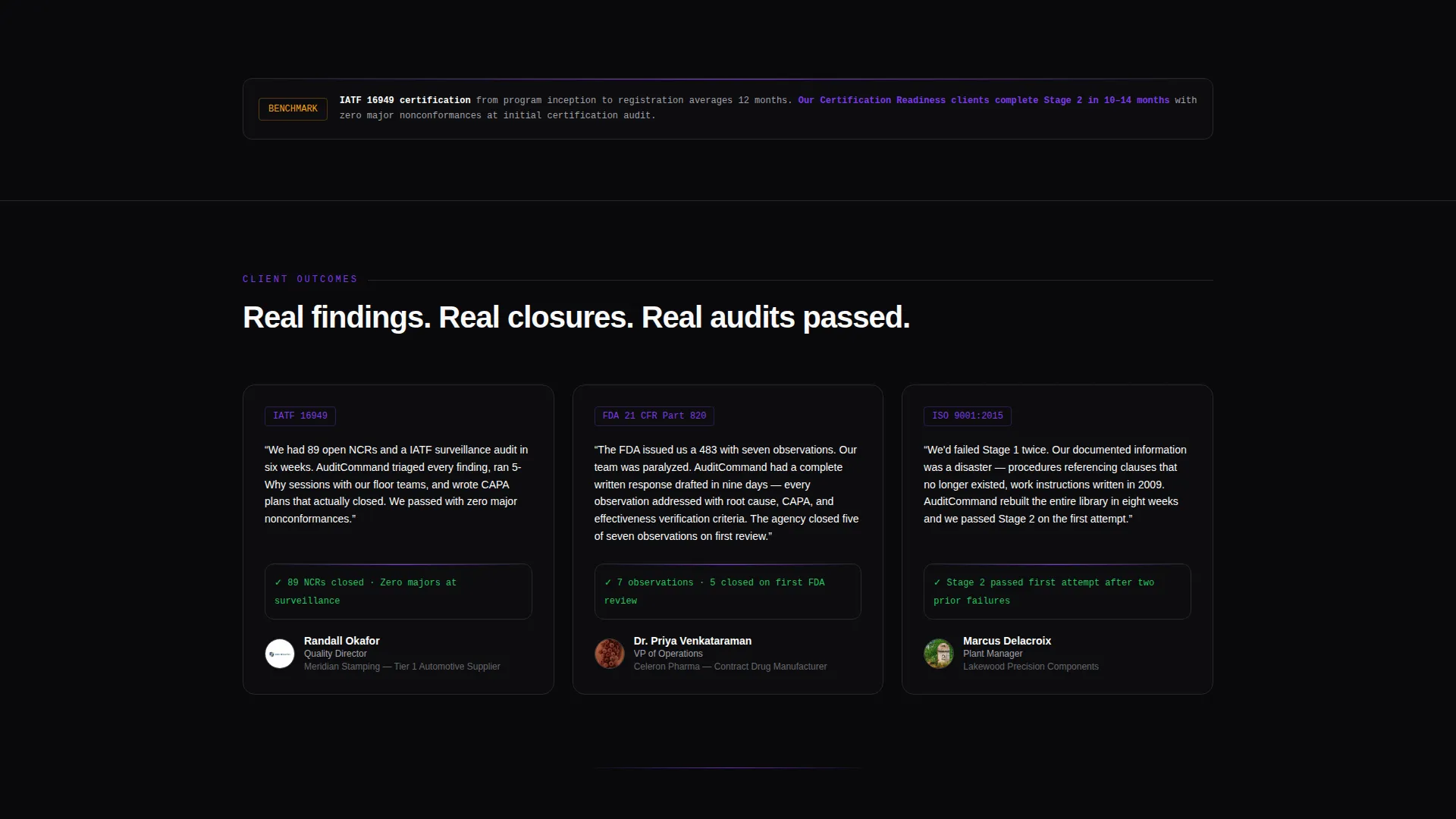
Between comparison tables, bold single-statistic callouts flash specific performance metrics. Examples from the brief include an average FDA 483 response drafted in 11 days and a 94 percent first-attempt surveillance audit pass rate. These figures build trust through specificity.
Persistent Floating Call-to-Action Bar
After the first scroll, a floating bar locks to the bottom of the viewport. It carries the primary "Map Your Gaps" call to action in a violet button. Each comparison table also has an anchored button so the path to the scoping questionnaire is always one click away.
Click-Through Scoping Flow
This page carries no on-page form. The call to action pushes visitors to a separate scoping questionnaire that asks for certification standard, current nonconformance volume, and next audit date. This reduces page friction and qualifies leads before the first conversation.
Page sections overview
| Section | Purpose |
|---|---|
| Code Snippet Header | Opens the page with an animated live CAPA record and typed headline |
| Tier One Table | Presents the Compliance Rescue consulting tier with QMS deliverables |
| Metric Callout One | Flashes a specific performance stat to reinforce credibility |
| Tier Two Table | Presents the System Optimization consulting tier row by row |
| Metric Callout Two | Reinforces trust with a second data-backed performance figure |
| Tier Three Table | Presents the Certification Readiness tier as the complete solution |
| Persistent call to action Bar | Floats after first scroll with the Map Your Gaps action button |
Design & branding system
The visual identity follows a Data Command theme built on the Void and Violet color system. Every design decision reinforces the feeling of a live monitoring dashboard viewed in a dark room, where the screen is the only light source.
- Absolute void black (#09090B) dominates all backgrounds, creating depth that makes content float
- Deep terminal violet (#7C3AED) concentrates on interactive states, hover rows, toggle switches, and selected table elements
- Phosphor gray (#A1A1AA) handles secondary text and table borders, while electric white (#FAFAFA) carries primary type against dark fields
Mobile & speed optimization
The layout is built to remain readable and functional on smaller screens without sacrificing the data-dense visual language that gives this template its authority.
- Comparison tables adapt for narrower viewports so deliverable rows remain scannable on mobile
- The persistent floating call-to-action bar is designed to stay visible and tappable across screen sizes
How this template helps you convert
This template is structured as a click-through landing page, meaning every design and copy decision is aimed at a single outcome: getting the visitor to request a scope of work.
- The animated header creates immediate recognition for quality professionals who live inside nonconformance systems, holding attention from the first second
- The row-by-row comparison tables itemize exact client pain points in QMS language, building trust through specificity before any ask is made
- The persistent floating call-to-action bar and per-table buttons ensure the path to the scoping questionnaire is always visible, reducing drop-off at the decision moment
Other information about this template
This template sits within the Technology category under the Consulting Firm Software subcategory, with a niche focus on quality management consulting. It is optimized for firms whose clients include quality directors, operations vice presidents, and plant managers in regulated industries such as pharmaceutical manufacturing and automotive supply chains.
- The template style is a Comparison Table layout with a Feature Matrix creative direction
- The header concept is a Code Snippet, and the landing page direction is Click-Through
- This page is designed to complement, not replace, a firm's broader site; it functions as a focused entry point that sends qualified visitors to a scoping questionnaire
Theme
Data Command
Creative direction
Feature Matrix
Color system
Void & Violet
Style
Comparison Table
Direction
Click-Through
Page Sections
Animated CAPA Code Snippet Header
Three-tier Interactive Comparison Tables
Qms-specific Deliverable Rows
Single-stat Performance Callouts
Persistent Floating Call to Action Bar
Click-through to Scoping Questionnaire
Related questions
Does this template include the scoping questionnaire page?
Can I update the consulting tier names and deliverable rows?
Who is the primary audience this landing page is designed to attract?
Is the animated code snippet header customizable?
Does this template work as a standalone page or as part of a larger site?



