Complete Architecture Firm Software Cost Estimator Website Template
Comply is a compliance management landing page template built for architecture firm software platforms. It opens with an interactive cost estimator, anchors attention with bold performance stats, and guides visitors through a detailed comparison table. The design uses a dark command-center palette with teal confirmation states, driving prospects toward a free compliance audit sign-up.
by Rocket studio
Quick summary
Comply is a single-page compliance management landing page template for architecture firm software platforms. It leads with an interactive estimator that calculates real cost exposure, then builds conviction through stat-first impact sections and a feature-by-feature comparison table. The dark Dashboard Pro design and teal-dominant color system make every data point feel urgent and credible.
Who this template is for
This template is purpose-built for software platforms serving the architecture, engineering, and construction compliance space. It speaks directly to the buyers who feel the most pain in day-to-day regulatory work.
- Compliance officers managing building code tracking across multiple active projects
- Architecture firm principals responsible for permit submissions and code requirement sign-off
- Project managers coordinating International Building Code (IBC), International Residential Code (IRC), and local zoning amendments simultaneously
What problem this template solves
Manual compliance tracking creates compounding risk. Spreadsheet-based workflows miss updated zoning ordinances, and legacy tools rarely surface missed Americans with Disabilities Act (ADA) requirements until plan check, when corrections are expensive and deadlines are at risk.
- Teams lose hundreds of hours per year re-checking code requirements that a live dashboard could flag automatically
- Missed permit requirements generate penalty exposure and Request for Information (RFI) rejections that delay projects
- No single view of regulatory status forces project managers to switch between tools, spreadsheets, and jurisdiction-specific amendment documents
What you get with this template
The template delivers a full-funnel, single-page layout designed to move compliance-focused visitors from curiosity to action. Every section is built to earn trust before asking for commitment.
- An interactive compliance cost estimator in the header that produces personalized output for each visitor
- A centerpiece comparison table contrasting manual tracking, legacy compliance tools, and the platform being promoted
- Three strategically placed calls to action (calls to action) and a secondary gated PDF download path for visitors still evaluating options
Feature list
This template includes a focused set of interactive and persuasive components, each grounded in the source brief.
Interactive Compliance Cost Estimator
The header section houses a live calculator where visitors select firm size, number of active projects, and primary code jurisdictions from dropdowns. As they interact, the tool instantly surfaces hours lost to manual tracking, estimated penalty exposure, and projected time savings. Results populate in catalyst teal, reinforcing the platform's visual identity at the moment of highest engagement.
Stats-First Impact Scroll Flow
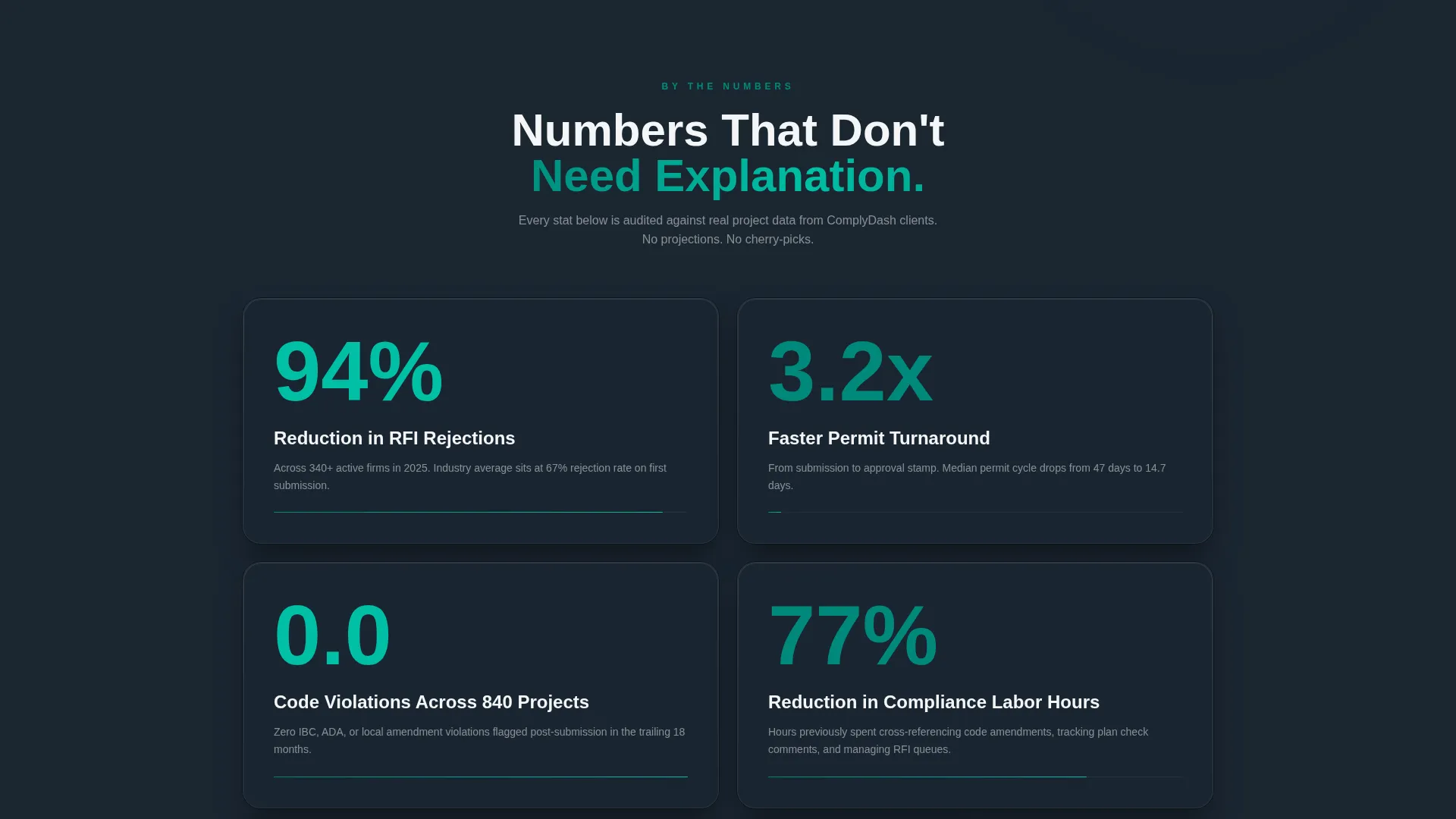
Each major scroll stop leads with a headline statistic before any explanatory copy appears. Numbers like "94% reduction in RFI rejections," "3.2x faster permit turnaround," and "Zero code violations across 840 projects" are formatted to land visually before the supporting paragraph follows. This sequence builds credibility through data before asking visitors to read deeper.
Centerpiece Comparison Table
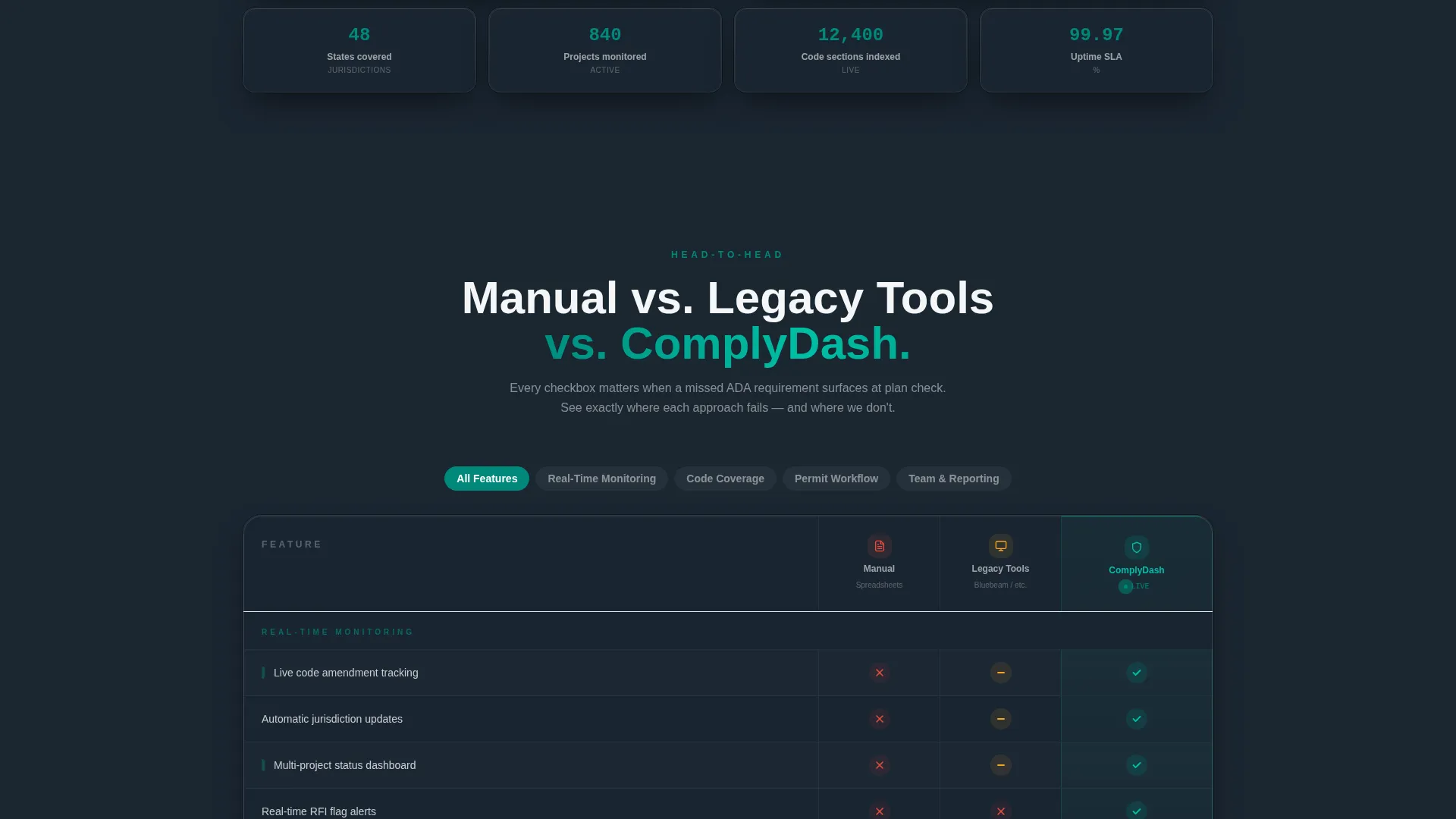
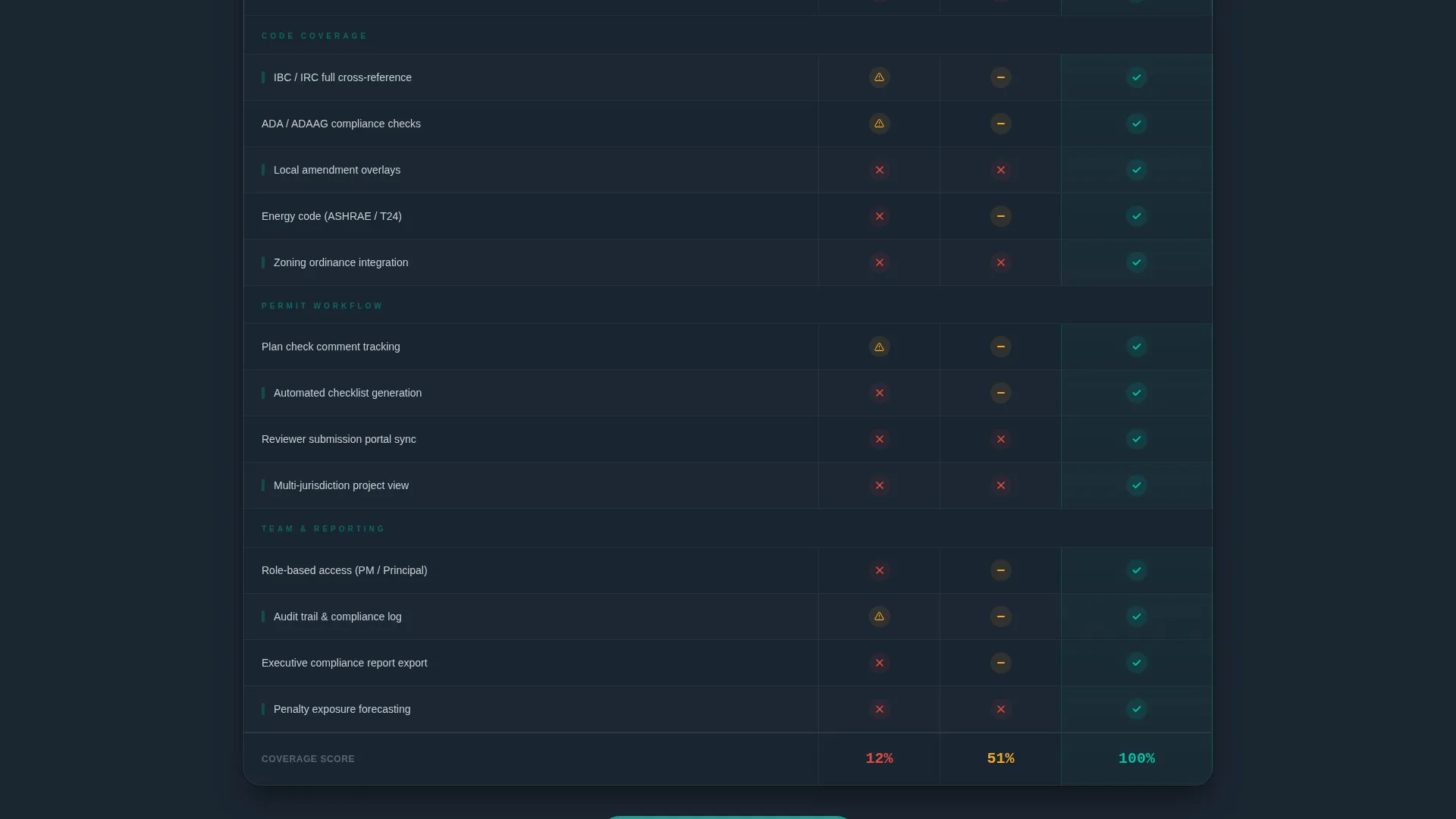
The page's core persuasion engine is a structured, feature-by-feature comparison table. It evaluates manual tracking, legacy compliance tools, and the promoted platform side by side. Teal checkmarks stack in the platform column while competitor columns display gaps and amber caution icons, making the value gap immediately visible.
Progressive Disclosure Lead Form
The primary call to action form captures firm name, number of licensed architects, primary jurisdiction state, and email address. It is sequenced so that jurisdiction is asked first, matching how compliance professionals think about their work. A lighter secondary form captures only email and firm size for visitors who prefer to download the full comparison report.
Pinned and Repeated call to action Architecture
The "Run Your Compliance Audit Free" call to action appears three times: pinned after the calculator interaction, embedded mid-table, and anchored at the final section. This repetition ensures that a visitor who converts at any stage of the scroll is never far from the next step.
Dual Conversion Path Design
Beyond the primary audit call to action, the template includes a gated PDF download offer labeled "Download the Full Comparison Report." This secondary path captures visitors who are still benchmarking options, turning passive readers into leads without requiring them to commit to the primary funnel immediately.
Page sections overview
| Section | Purpose |
|---|---|
| Cost Estimator Header | Opens with a personalized, interactive compliance cost calculator |
| Headline Stat Block | Delivers the first undeniable performance number to anchor trust |
| Platform Stats Row | Stacks three key metrics before any explanatory copy appears |
| Comparison Table | Side-by-side feature breakdown of three compliance approaches |
| Mid-Table call to action | Captures leads at peak persuasion, mid-scroll |
| ROI Detail Section | Escalates from individual pain to industry-wide compliance data |
| Secondary Download Path | Offers gated PDF for visitors still in the benchmarking phase |
| Final call to action Section | Closes the page with the primary audit sign-up form |
Design & branding system
The visual identity follows a Dashboard Pro theme built around the Teal Catalyst color system. The palette is designed to feel like a mission-critical control room, dark surfaces making every number luminous, teal reinforcing confirmation and progress states.
- Deep command-center charcoal (#1B2631) as the primary background, keeping the interface focused and distraction-free
- Catalyst teal (#00897B) used across progress bars, checkmarks, and live counter outputs to signal all-clear status
- Crisp interface white (#F4F6F7) for data labels and body text, with alert amber (#F5A623) reserved for warning states and hover interactions
Mobile & speed optimization
The template's layout is structured with compliance professionals in mind, people who may review the page between project meetings or during a commute. The design prioritizes fast comprehension at any screen size.
- The comparison table is built to reflow cleanly on smaller screens so the platform column remains the visual anchor
- The estimator dropdowns and form fields are sized and spaced for comfortable use on touch devices
- Section-by-section scroll pacing keeps the stats-first impact rhythm intact regardless of device or viewport width
How this template helps you convert
The page is engineered around the Comparison/Versus conversion model, which works by making the cost of inaction visible before presenting the solution.
- The estimator personalizes the pain immediately, giving each visitor a specific number tied to their own firm's situation before they read a single feature claim.
- The comparison table makes switching logic visual and undeniable, stacking teal confirmation states in one column while the alternatives show gaps and caution markers.
- The dual call to action structure with progressive disclosure removes friction from both high-intent visitors ready to request an audit and lower-intent visitors who need the comparison report before committing.
Other information about this template
This template is designed to work within a broader architecture firm software marketing strategy. A few additional details are worth noting for teams evaluating it.
- The template style is Comparison Table, which suits platforms positioning themselves against spreadsheet-based workflows or older legacy tools
- The Dashboard Pro theme and Teal Catalyst color system are matched to the visual language of compliance and regulatory technology products
- The Stats-First Impact creative direction is particularly effective in the architecture firm compliance management niche, where decision-makers respond to quantified risk and time-savings data over feature lists alone
- The Calculator/Estimator header concept aligns with how compliance officers evaluate tools, by translating platform value into hours saved and penalty risk reduced
- The template is categorized under Technology and Architecture Firm Software, making it relevant for platforms serving professional services firms that operate under strict regulatory frameworks

Theme
Dashboard Pro
Creative direction
Stats-First Impact
Color system
Teal Catalyst
Style
Comparison Table
Direction
Comparison/Versus
Page Sections
Interactive Compliance Cost Estimator
Stats-first Impact Scroll Sections
Feature-by-feature Comparison Table
Progressive Disclosure Lead Form
Dual Conversion Path Structure
Pinned Multi-point Call to Action Placement
Related questions
Who is this template designed for?
Can I customize the comparison table columns and feature rows?
How does the dual call to action structure work?
Does the cost estimator work without custom development?
What conversion model does this template follow?



