Advanced Consulting Firm Software Pricing & Packages Website Template
Automate is a single-page lead generation landing page built for consulting firm workflow automation services. It uses animated KPI dashboards, scrolling before-and-after comparison tables, and a glassmorphic visual system to show mid-tier consultancies exactly what changes when manual processes give way to self-running workflows. Two conversion paths capture leads at different levels of readiness.
by Rocket studio
Quick summary
Automate is a conversion-focused landing page template for consulting firm workflow automation. It opens with a live-style metrics dashboard, moves through animated comparison tables covering five operational areas, and closes visitors toward two distinct lead capture paths. The design feels precise and modern, built around a dark glassmorphic visual identity that makes every number feel consequential.
Who this template is for
This template is built for firms and service providers that help consultancies replace manual operations with automated workflows. It speaks directly to the people who feel the friction most.
- Managing directors at mid-tier consulting firms dealing with utilization tracking and visibility gaps
- Associate partners managing multiple statements of work across several disconnected platforms
- Operations leads who spend most of their time copying data between tools rather than doing strategic work
What problem this template solves
Consulting firms carry an invisible operational tax. Spreadsheets, email threads, and recurring status meetings consume hours that should go toward billable work. This template gives an automation service a page that makes that cost visible and undeniable.
- Visitors arrive with vague pain and leave with a specific picture of what changes after automation
- The comparison table format makes the before-and-after case without relying on testimonials or long-form copy
- Two lead capture paths accommodate buyers who are ready to talk and buyers who are still calculating
What you get with this template
You get a fully structured single-page layout with every section pre-built to the Automate brief. The page is ready to customize with your firm's real metrics and service details.
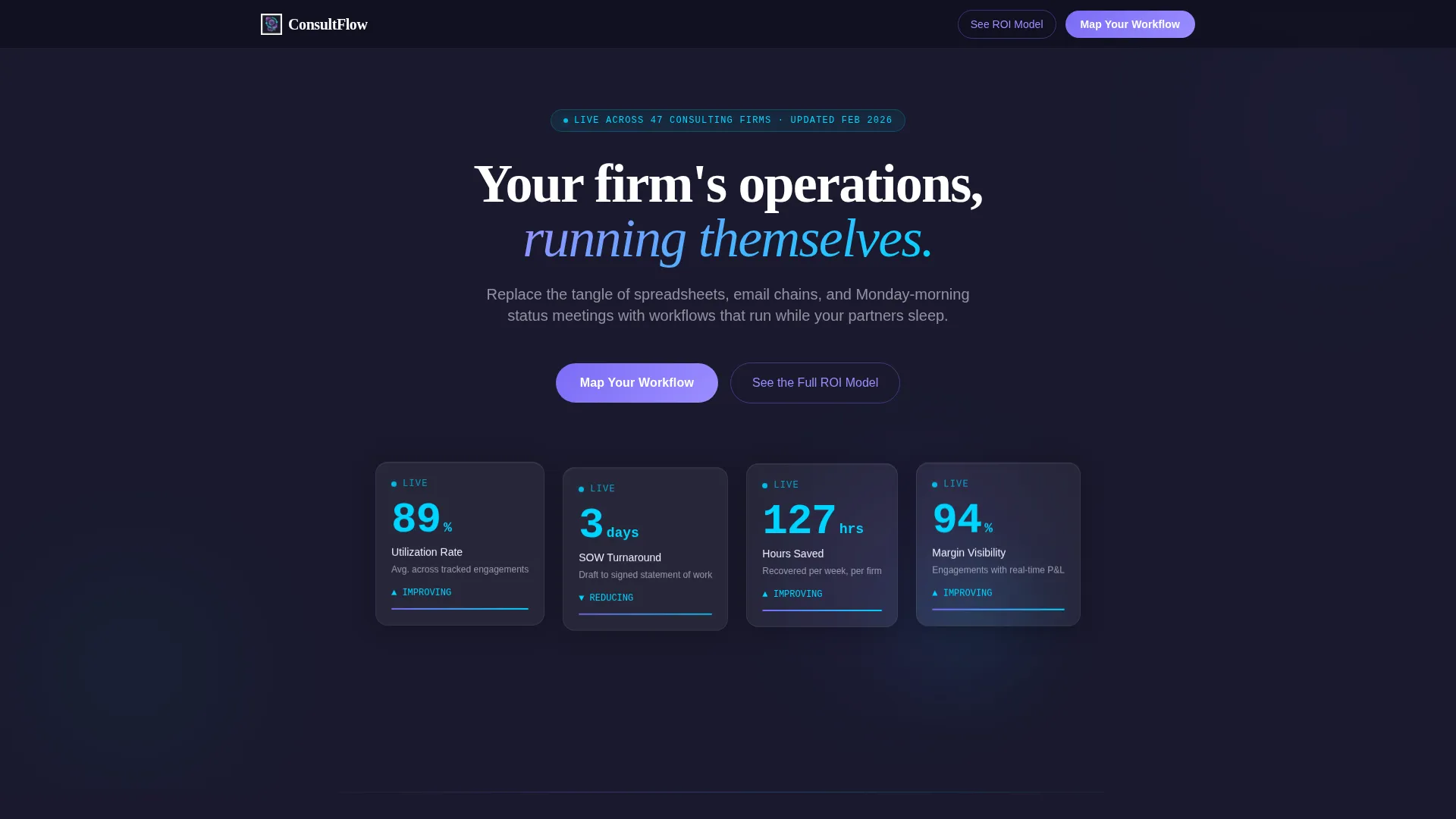
- An animated stats header showing live-style KPI counters for utilization rate, statement of work turnaround, and hours saved per week
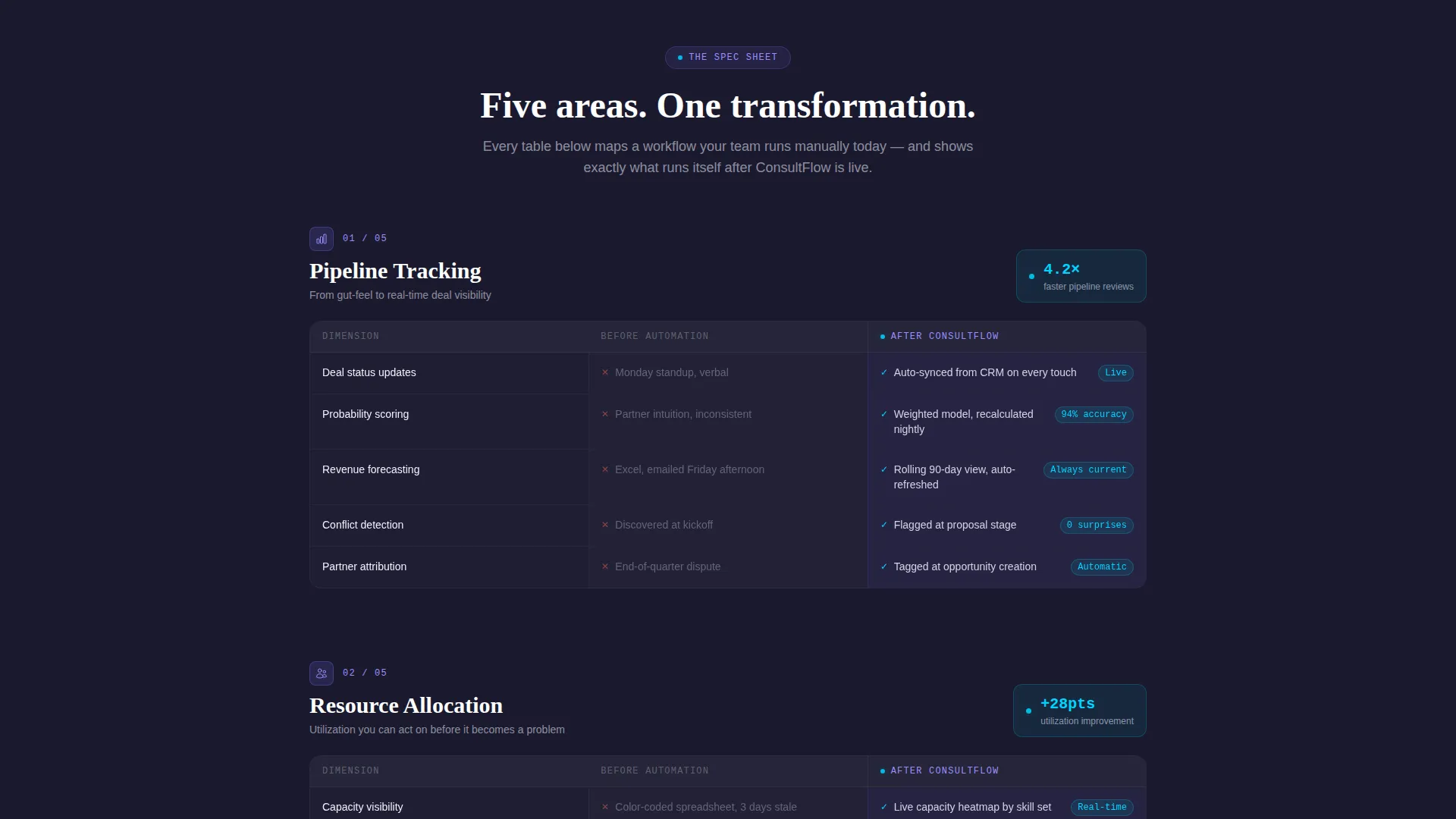
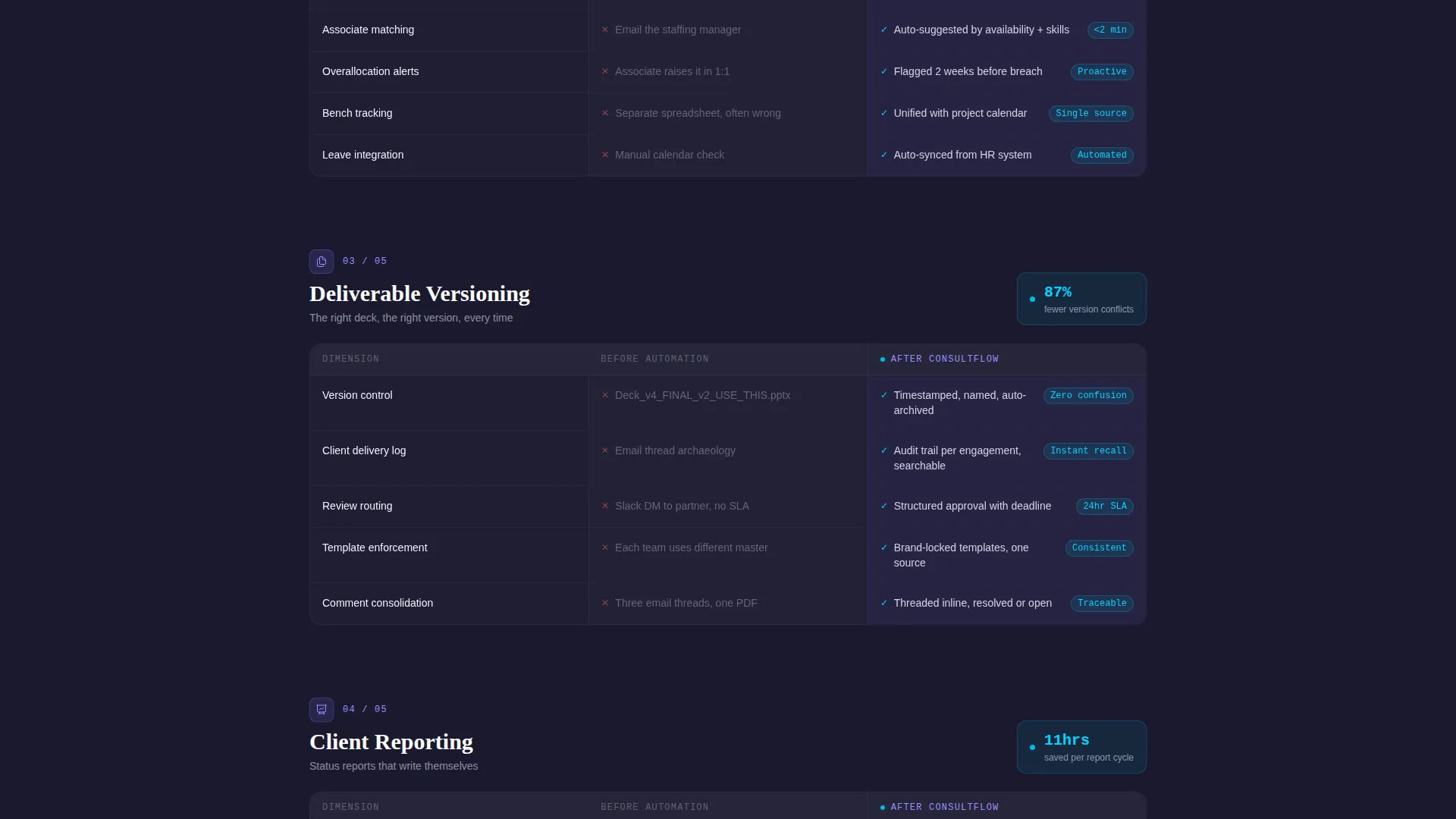
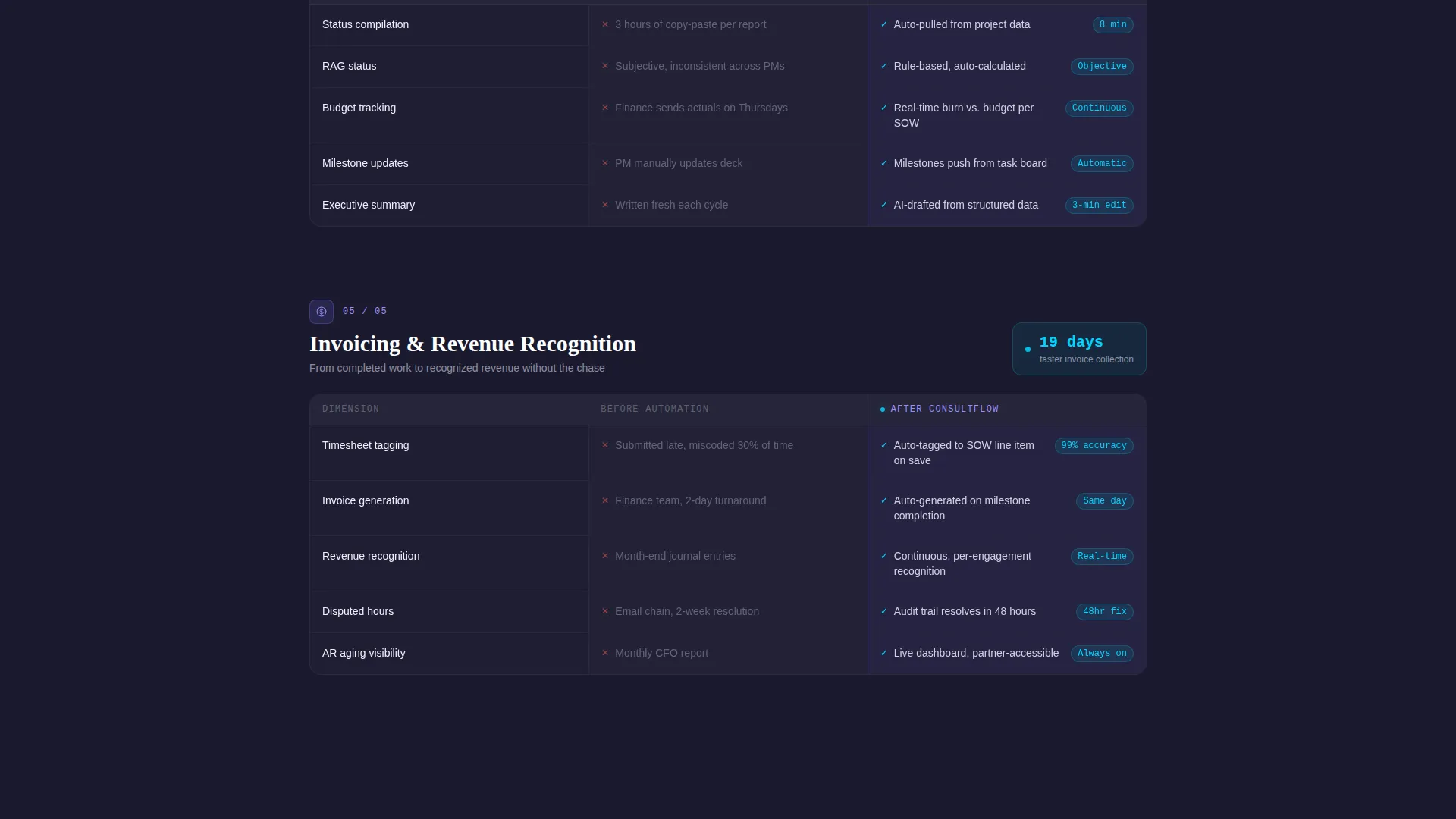
- Five scrolling before-and-after comparison tables covering pipeline tracking, resource allocation, deliverable versioning, client reporting, and invoicing
- A pinned primary call-to-action button and a glassmorphic three-step progressive form modal for lead capture
Feature list
This section describes the key functional and design capabilities built into the Automate template.
Animated KPI Header Dashboard
The header is a live-style metrics panel, not a static image. It displays consulting-specific numbers: utilization rate climbing from 61% to 89%, statement of work turnaround dropping from 14 days to 3, and a weekly hours-saved counter spinning past 127. Cards sit on frosted glass panels and drift with subtle parallax as the cursor moves.
Scrolling Comparison Tables
Five section-by-section comparison tables form the core of the page. Each table contrasts the "Before Automation" state in static muted gray against the "After Automation" state rendered with frosted lavender cards and cyan motion indicators. Rows animate in on scroll, building a procurement-style case that escalates from small wins to firm-wide transformation.
Pinned Primary Call-to-Action
A "Map Your Workflow" button pins to the bottom of the viewport after the visitor scrolls past the first comparison table. It stays visible throughout the rest of the page, reducing the friction between intent and action at any scroll depth.
Three-Step Progressive Lead Form
Clicking the primary call-to-action opens a glassmorphic modal with a structured three-step form. Step one collects firm size and number of active engagements. Step two presents checkboxes for specific pain points. Step three captures name, email, and a preferred audit window.
Gated Secondary Conversion Path
A "See the Full ROI Model" link offers a downloadable return-on-investment PDF gated behind a single email field. This path catches visitors who are not yet ready to book a call but are actively evaluating the business case for automation.
Glassmorphic Motion Design System
The full page uses a Dynamic Motion theme with translucent panel cards, deep charcoal backgrounds, frosted lavender interactive surfaces, and signal cyan accents on anything that moves or updates. The visual system creates depth and a sense of live data without requiring any imagery.
Page sections overview
| Section | Purpose |
|---|---|
| Animated Metrics Header | Opens with live KPI counters proving value before copy is read |
| Pipeline Tracking Table | Compares manual versus. automated pipeline visibility side by side |
| Resource Allocation Table | Shows before-and-after contrast for staffing and utilization workflows |
| Deliverable Versioning Table | Highlights version control gains from automated document workflows |
| Client Reporting Table | Contrasts manual report assembly against automated client-ready outputs |
| Invoicing Automation Table | Closes the operational loop with billing and invoice workflow comparison |
| Pinned call to action Bar | Keeps the primary lead action visible at all scroll depths |
| Lead Capture Modal | Three-step progressive form collecting qualified prospect details |
| ROI Download Gate | Secondary path capturing emails from visitors still in evaluation mode |
Design & branding system
The visual identity uses a Glassmorphic color system layered over a Dynamic Motion theme. Every element is designed to feel like data in motion rather than a static brochure.
- Core palette: deep workspace charcoal (#1A1A2E) backgrounds, translucent panel white (#FFFFFF at 12% opacity) for glass cards, frosted lavender (#7B6CF6) for buttons and active states, and signal cyan (#00D4FF) for metrics, progress bars, and hover interactions
- Typography uses a monospaced typeface for all KPI numbers, reinforcing the sense of a live operational dashboard
- No stock photography or hero illustrations appear anywhere on the page; the design relies entirely on data, motion, and color depth to communicate
Mobile & speed optimization
The template is structured for clean rendering across device sizes. The glassmorphic card system and animated elements are designed to scale without breaking the visual hierarchy.
- Comparison tables reflow for smaller screens so the before-and-after structure stays readable on mobile
- The pinned call-to-action bar and modal form are sized and spaced for comfortable touch interaction
- Parallax and counter animations are contained to purpose-built components so they do not interfere with the page's overall layout integrity
How this template helps you convert
Every design and structural decision on this page is oriented toward one outcome: turning a consultant's operational frustration into a qualified lead submission.
- The animated KPI header creates an immediate proof moment before any body copy loads, anchoring the visitor's attention on measurable outcomes rather than marketing claims.
- The escalating comparison tables build a cumulative case across five workflow categories, moving the visitor from recognition of small daily friction to understanding of firm-wide impact, which primes them for the lead form at the right psychological moment.
Other information about this template
This template sits at the intersection of consulting firm software and workflow automation, making it a strong fit for any service offering that replaces manual operations inside professional services firms.
- The comparison table format mirrors how procurement and operations buyers already evaluate vendor solutions, which reduces cognitive resistance
- The two-path conversion structure (book a call versus download a model) serves both decision-stage and research-stage visitors without requiring separate pages
- The template is built as a single-page layout, making it straightforward to deploy, test, and iterate without managing a multi-page site structure
- The page structure supports customization: real firm metrics, actual pain-point checkboxes, and live ROI figures can replace all placeholder values to sharpen relevance for a specific target audience
Theme
Dynamic Motion
Creative direction
Spec Sheet
Color system
Glassmorphic
Style
Comparison Table
Direction
Lead Generation
Page Sections
Animated KPI Header Dashboard
Scrolling Before-and-after Tables
Pinned Viewport Call-to-action
Three-step Progressive Lead Form
Gated ROI Download Path
Glassmorphic Dynamic Motion Design
Related questions
Who is this landing page template designed for?
What are the two conversion paths included on this page?
Can the KPI metrics in the animated header be updated?
Does this template use stock photography or hero illustrations?
How does the comparison table structure work?



