No-Code Enterprise Software Cost Calculator Website Template
Automate is a split-screen no-code business process management (BPM) landing page template built for operations teams. It pairs a live-style metrics dashboard with an interactive ROI calculator, a bold conversion headline, and a click-through funnel that carries visitor data into signup. The Carbon Fiber color system and Dashboard Pro theme give it a focused, mission-control feel.
by Rocket studio
Quick summary
Automate is a single-page, split-screen landing page template for a no-code BPM platform. It opens with a real-time metrics wall, drops immediately into an interactive ROI calculator, and closes with a frictionless click-through call to action. Every section is designed to move operations professionals from curiosity to conversion without a single form on the page.
Who this template is for
This template is built for teams and founders who need to communicate the value of process automation quickly and credibly. It works best when the product sells through tangible numbers rather than feature lists.
- Operations managers who track workflows in spreadsheets and need a faster path to software
- Department heads tired of chasing approvals through long email threads
- Process analysts whose whiteboard diagrams never make it into a real system
What problem this template solves
Most software landing pages ask visitors to imagine value. This template shows it. The ROI calculator puts the visitor's own numbers on screen before they ever reach a signup button.
- Visitors leave pages that lead with feature lists and ask for commitment too early
- Operations buyers are skeptical; they need proof that the math works for their team size
- Generic landing pages fail to connect abstract platform benefits to real daily friction
What you get with this template
You get a fully structured, single-page layout that guides a skeptical operations buyer from first impression to confident click. Every section builds on the one before it.
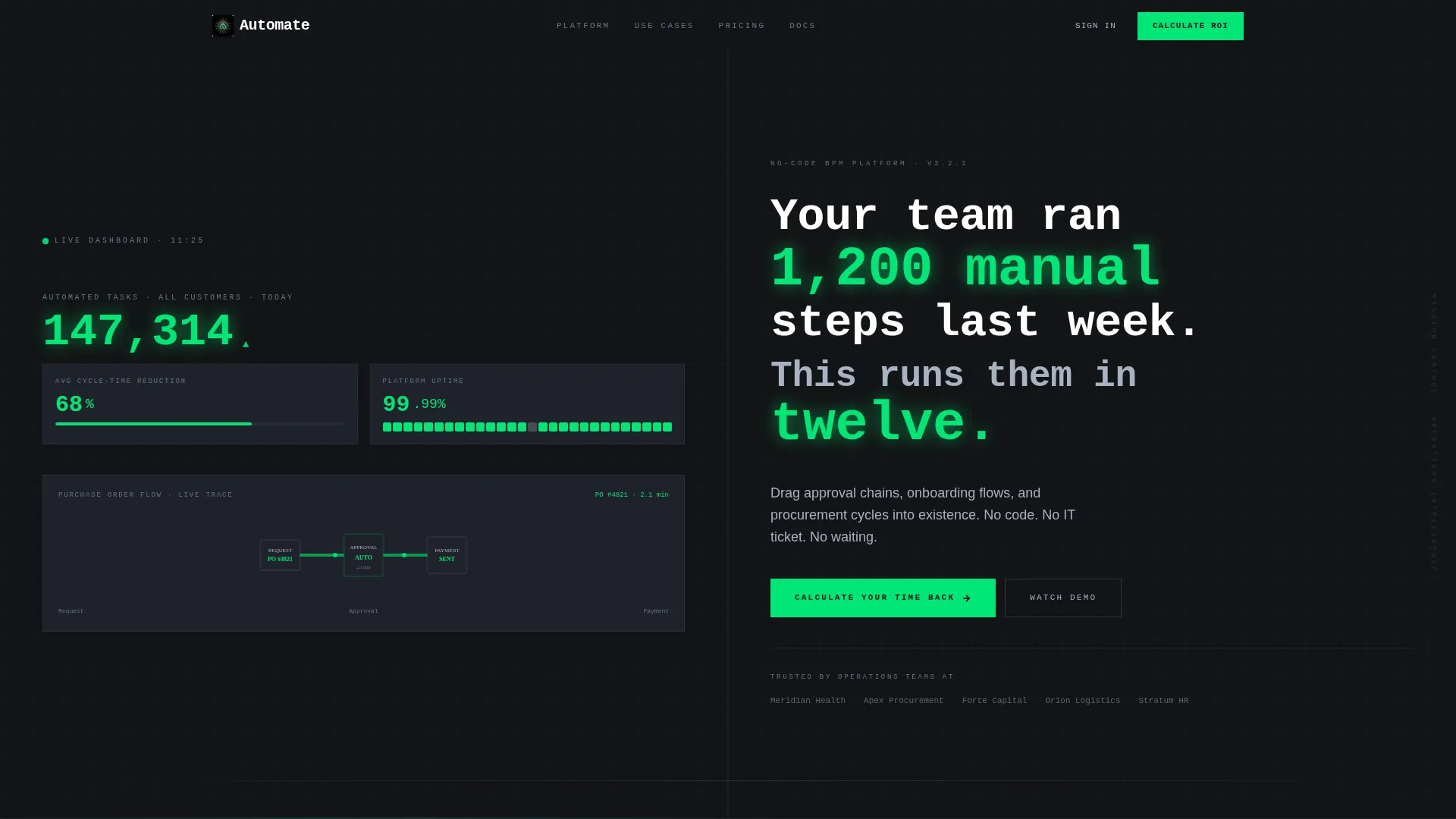
- A Stats and Metrics header panel displaying live-style process counts, cycle-time reduction figures, and a miniature Sankey diagram
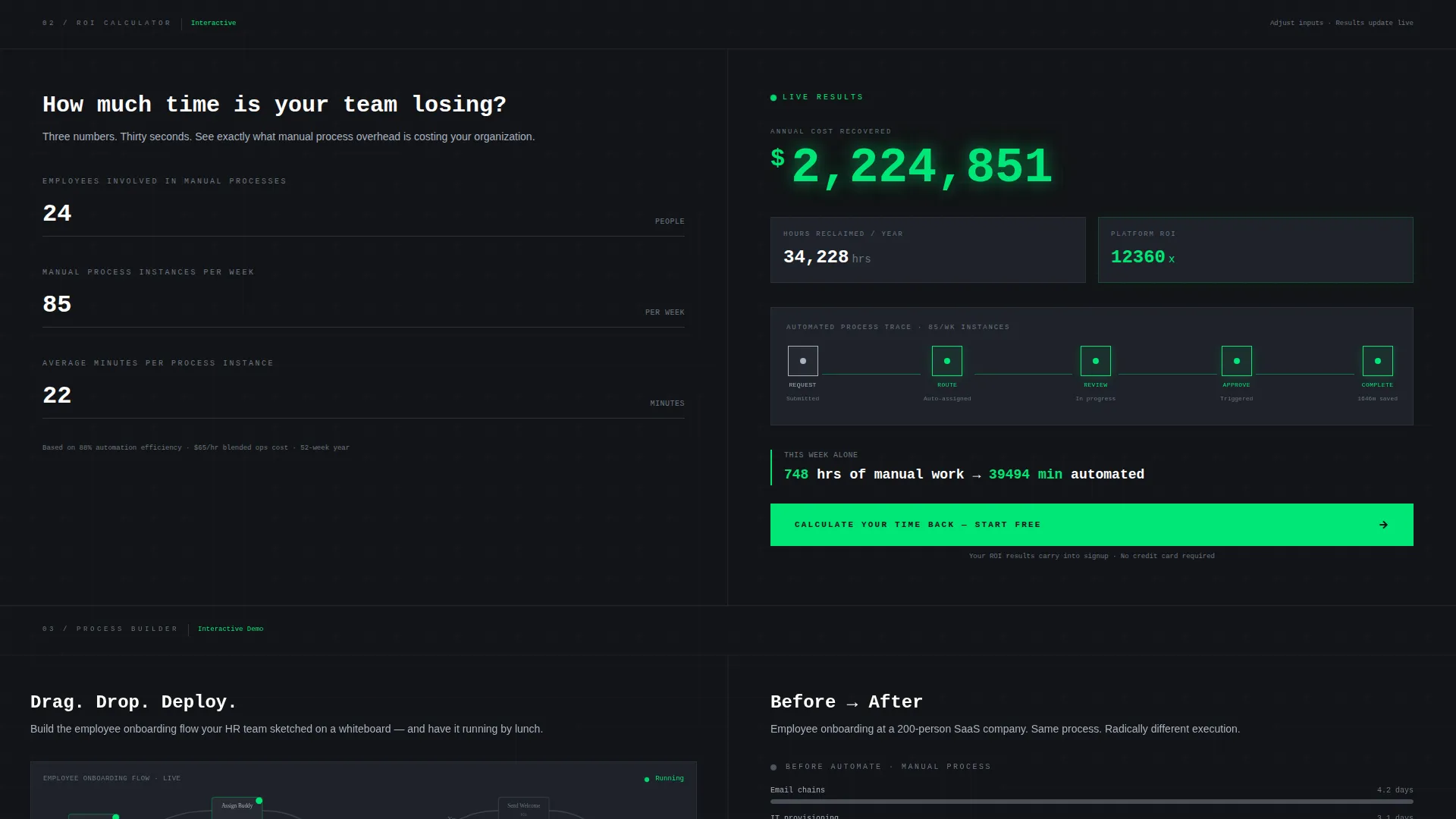
- An interactive ROI calculator split across both panels, with three inputs on the left and live output on the right
- A sticky "Start Building Free" bar that appears once a visitor scrolls past the calculator section
Feature list
This template is built around five tightly integrated components. Each one earns its place in the conversion sequence.
Live Metrics Header Wall
The header is split 50/50. The left panel shows a running count of automated tasks, an average cycle-time reduction percentage, and a Sankey diagram tracing a purchase-order flow. The right panel holds a bold monospaced headline with numbers rendered in signal green against cockpit black.
Interactive ROI Calculator
Immediately below the fold, visitors enter three inputs: number of employees, manual processes per week, and average minutes per process. The right panel updates in real time to show hours reclaimed and annual cost saved, with a process-flow animation that builds as the numbers change.
Click-Through Funnel with No On-Page Form
The primary call to action, "Calculate Your Time Back," anchors the calculator section. A sticky bar reading "Start Building Free" replaces it as the visitor scrolls. Clicking either button carries the calculator inputs into the signup flow so results greet the visitor on the other side.
Social Proof Escalation Sequence
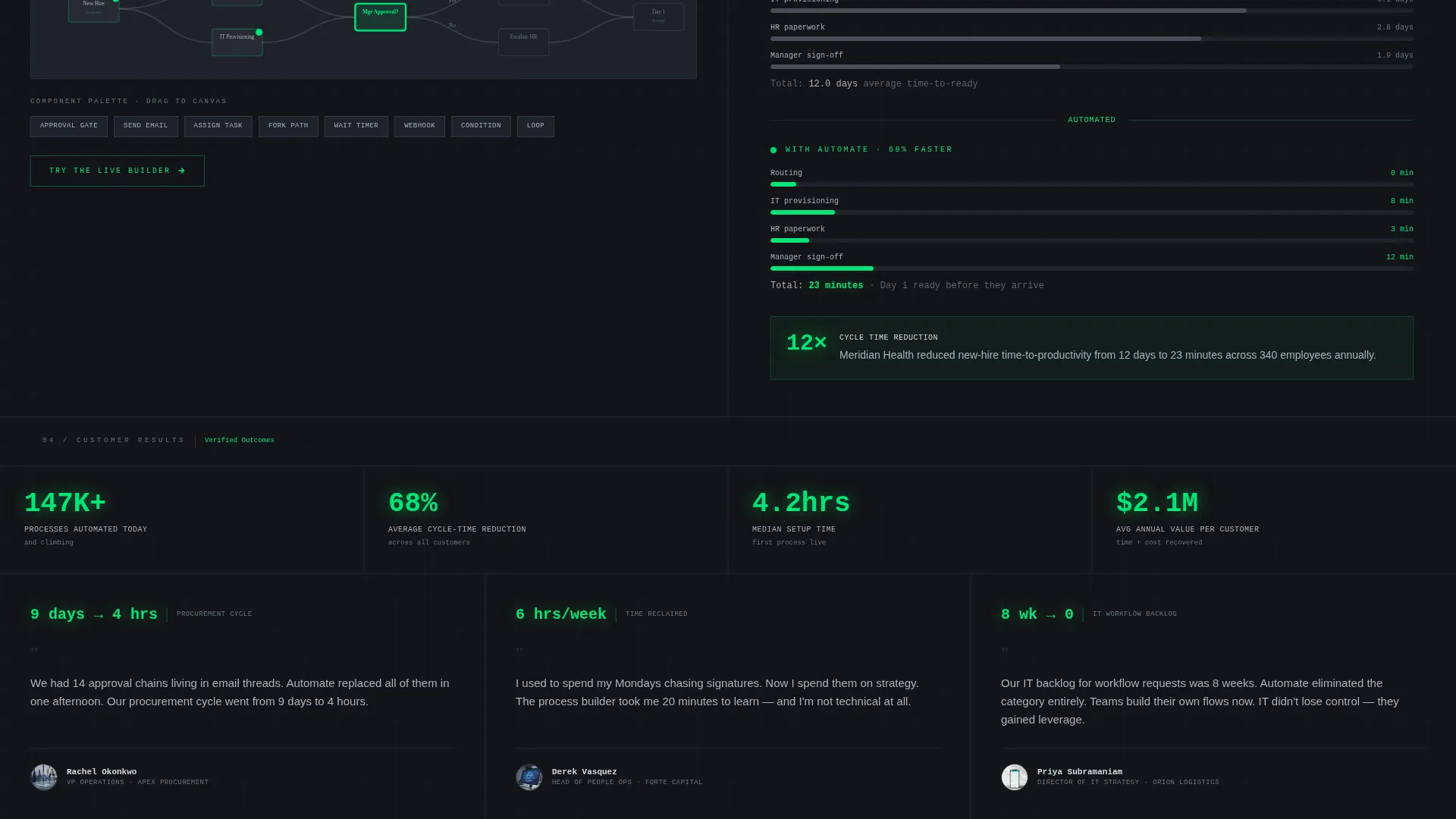
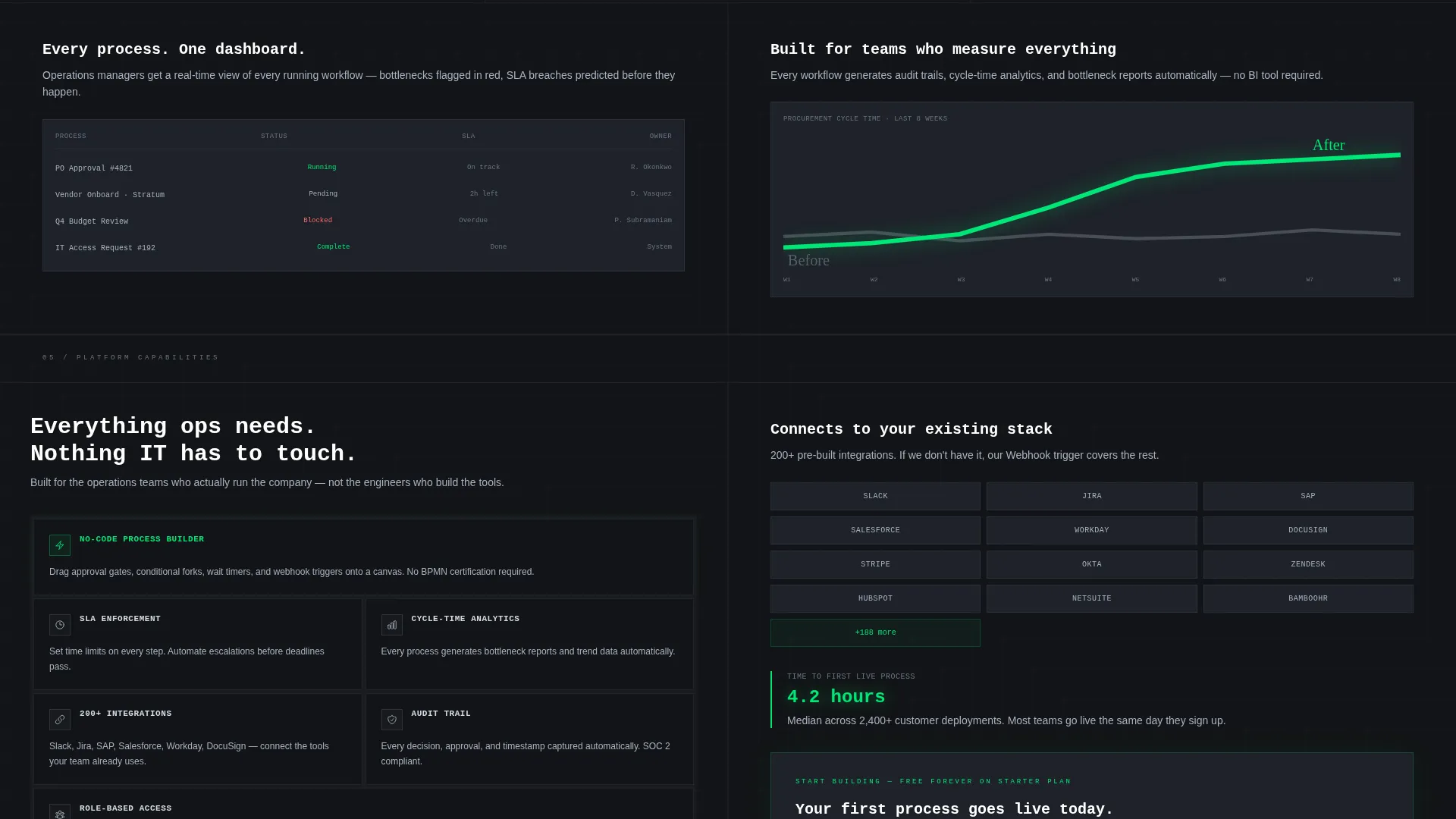
After the calculator, the scroll reveals customer dashboards, before-and-after cycle-time charts, and a draggable process builder demo. Each section layers in more concrete evidence that the visitor's own ROI estimate is achievable.
Dashboard Pro Visual System
The layout uses the Carbon Fiber color palette throughout. Deep cockpit black and woven graphite form the base. Electric signal green is reserved exclusively for active-state indicators, call-to-action elements, and live data pulses, so every glowing element carries clear meaning.
Page sections overview
| Section | Purpose |
|---|---|
| Split Stats Header | Display live-style metrics and a bold conversion headline side by side |
| ROI Calculator Panel | Let visitors calculate hours reclaimed and annual cost saved in real time |
| Process Animation Strip | Show a self-building process-flow visual tied to calculator inputs |
| Customer Dashboard Gallery | Provide social proof through real-looking workflow dashboards |
| Cycle-Time Chart Section | Visualize before-and-after process improvements with comparison charts |
| Draggable Builder Demo | Let visitors interact with a simplified drag-and-drop process builder preview |
| Sticky call to action Bar | Keep the "Start Building Free" prompt visible after the calculator scrolls out of view |
Design & branding system
The template uses the Dashboard Pro theme with a Carbon Fiber color system. The palette is built around contrast and intentionality. Every color has a defined role and does not stray from it.
- Deep cockpit black (#121417) and woven graphite (#1E2229) form the page background layers, creating a focused, low-distraction environment
- Instrument-panel silver (#A8B2C1) handles body text, labels, and secondary user interface elements for clean readability against dark backgrounds
- Electric signal green (#00E676) is reserved exclusively for active states, call-to-action buttons, and live data indicators, making every actionable element immediately visible
Mobile & speed optimization
The split-screen layout is structured so that both panels reflow cleanly on smaller screens. The conversion sequence stays intact regardless of device.
- The 50/50 split stacks vertically on mobile so the metrics panel and calculator both remain fully readable
- The sticky call to action bar is designed to persist across scroll on all screen sizes, keeping the primary action always within reach
- The ROI calculator inputs are touch-friendly by design, allowing mobile visitors to adjust values without precision pointing
How this template helps you convert
The Automate template is built around a single insight: a visitor who has calculated their own ROI is far more likely to click than one who has only read about features. The conversion architecture reflects that.
- The metrics header establishes immediate credibility with real-looking numbers, setting a data-driven tone before the visitor reads a single paragraph of copy
- The ROI calculator turns passive browsing into active participation, so by the time the visitor sees the call-to-action button, they have already done the math themselves
Other information about this template
This template is a strong fit for no-code BPM platforms competing in enterprise software markets where buyers are analytical and conversion cycles are long. A few additional details worth noting:
- The template style is Split Screen (50/50), making it well-suited for products that benefit from showing data alongside messaging simultaneously
- The header concept follows a Stats and Metrics approach, which pairs naturally with platforms that can cite concrete efficiency numbers
- The landing page direction is Click-Through, meaning the goal is a single confident click rather than an on-page form submission
- The creative direction is Calculator and Tool First, a proven approach for process-automation products where ROI is the primary sales argument
- This template is categorized under Technology, specifically No-Code Enterprise Software within the No-Code BPM niche, making it relevant for drag-and-drop workflow tools, approval-chain platforms, and onboarding automation products
Theme
Dashboard Pro
Creative direction
Calculator/Tool First
Color system
Carbon Fiber
Style
Split Screen (50/50)
Direction
Click-Through
Page Sections
Live Metrics Header Panel
Interactive ROI Calculator
Click-through Funnel Design
Social Proof Escalation Sequence
Carbon Fiber Color System
Split Screen 50/50 Layout
Related questions
Does this template include an actual working ROI calculator?
Is there a contact form or lead capture form on the page?
Can I change the metrics shown in the header panel?
Who is this landing page template best suited for?
Does the sticky call to action bar appear automatically as visitors scroll?



