Financial Services Software Complete Privacy Policy Website Template
Automate is a hub-and-spoke landing page template built for financial operations workflow platforms. It features an interactive workflow canvas in the header, a persistent anchor navigation rail, and five animated spoke sections covering reconciliation, compliance, reporting, integrations, and audit trail. The Tech Glass visual identity and Electric Indigo color system give the page a precise, high-trust feel suited to operations leaders at asset managers, regional banks, and insurance firms.
by Rocket studio
Quick summary
Automate is a single-page landing page template for financial operations workflow automation platforms. It combines an interactive header canvas, a persistent left-rail anchor navigation, and five deep-dive spoke sections. Each section assembles an animated workflow diagram as the visitor scrolls, building a compounding case for automation before a primary call to action appears.
Who this template is for
This template is designed for software companies and platform builders selling workflow automation to financial services teams. It speaks directly to buyers who live inside operational complexity every day.
- Operations directors at mid-market asset managers managing spreadsheet-heavy reconciliation handoffs
- Compliance officers at regional banks stitching audit trails across disconnected systems
- Chief financial officers at insurance firms whose month-end close depends on email threads and manual workarounds
What problem this template solves
Financial operations software is hard to sell on a static page. Prospects need to feel the relief of automation before they commit to a demo. This template closes that gap by showing the product in motion rather than describing it in text.
- Disconnected before-and-after messaging that fails to build a cumulative business case as the visitor scrolls
- Generic hero sections that do not demonstrate real workflow logic to skeptical operations buyers
- Premature calls to action that ask for commitment before enough value has been shown
What you get with this template
You get a fully structured, single-page layout built around five core workflow themes. Every section is designed to deepen the case for automation one spoke at a time.
- An interactive header canvas showing three live financial processes as animated node graphs with hover tooltips
- A persistent left-rail anchor navigation with five spoke labels written in operations language
- A progressive call-to-action strategy that shifts from a ghost button to a solid electric-cyan button after the third spoke section
Feature list
This template packages several purpose-built components for financial operations platform marketing. Each one is described below.
Interactive Workflow Canvas Header
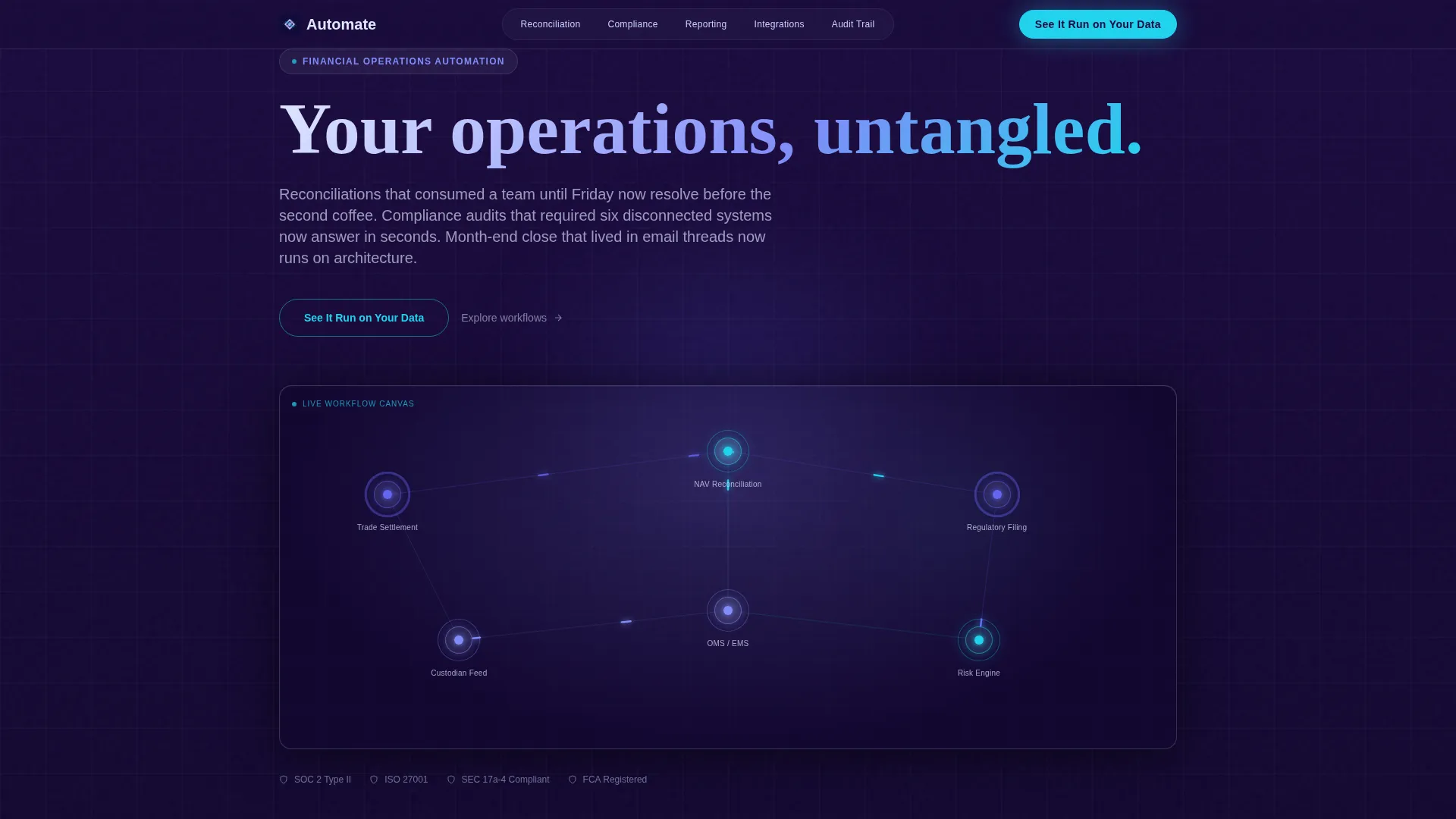
The header renders a miniature, functioning workflow canvas directly in the viewport. Three financial processes, trade settlement, NAV reconciliation (net asset value reconciliation), and regulatory filing, appear as animated node graphs with visible data packets flowing between systems. Visitors can hover any node to see it pulse and reveal a tooltip showing real transformation logic.
Hub-and-Spoke Anchor Navigation
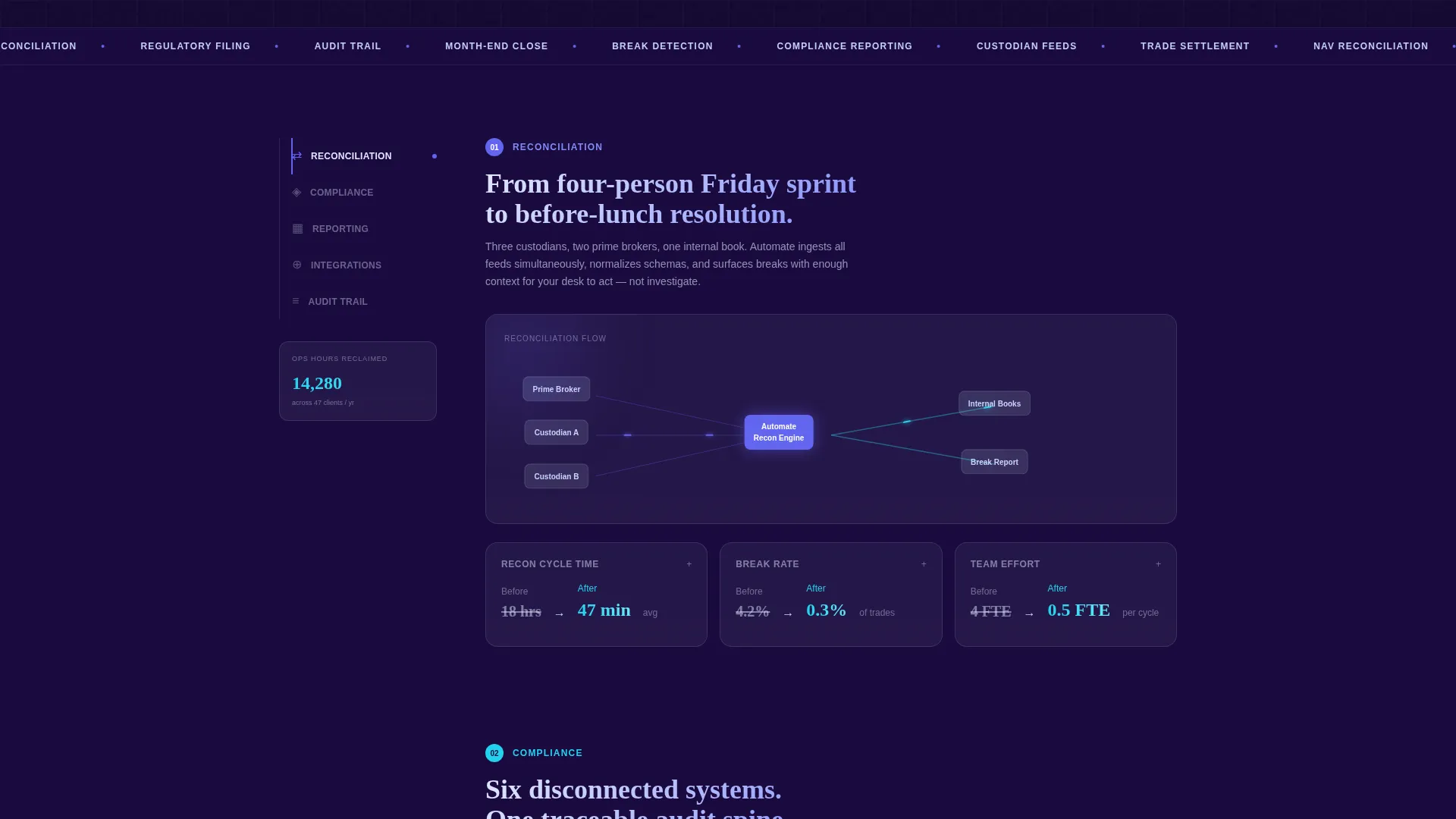
A persistent left-rail navigation keeps five spoke labels always visible as the visitor scrolls. The labels use operations language: Reconciliation, Compliance, Reporting, Integrations, and Audit Trail. Clicking any label smooth-scrolls to the corresponding section without losing context.
Progressive Animated Diagram Sections
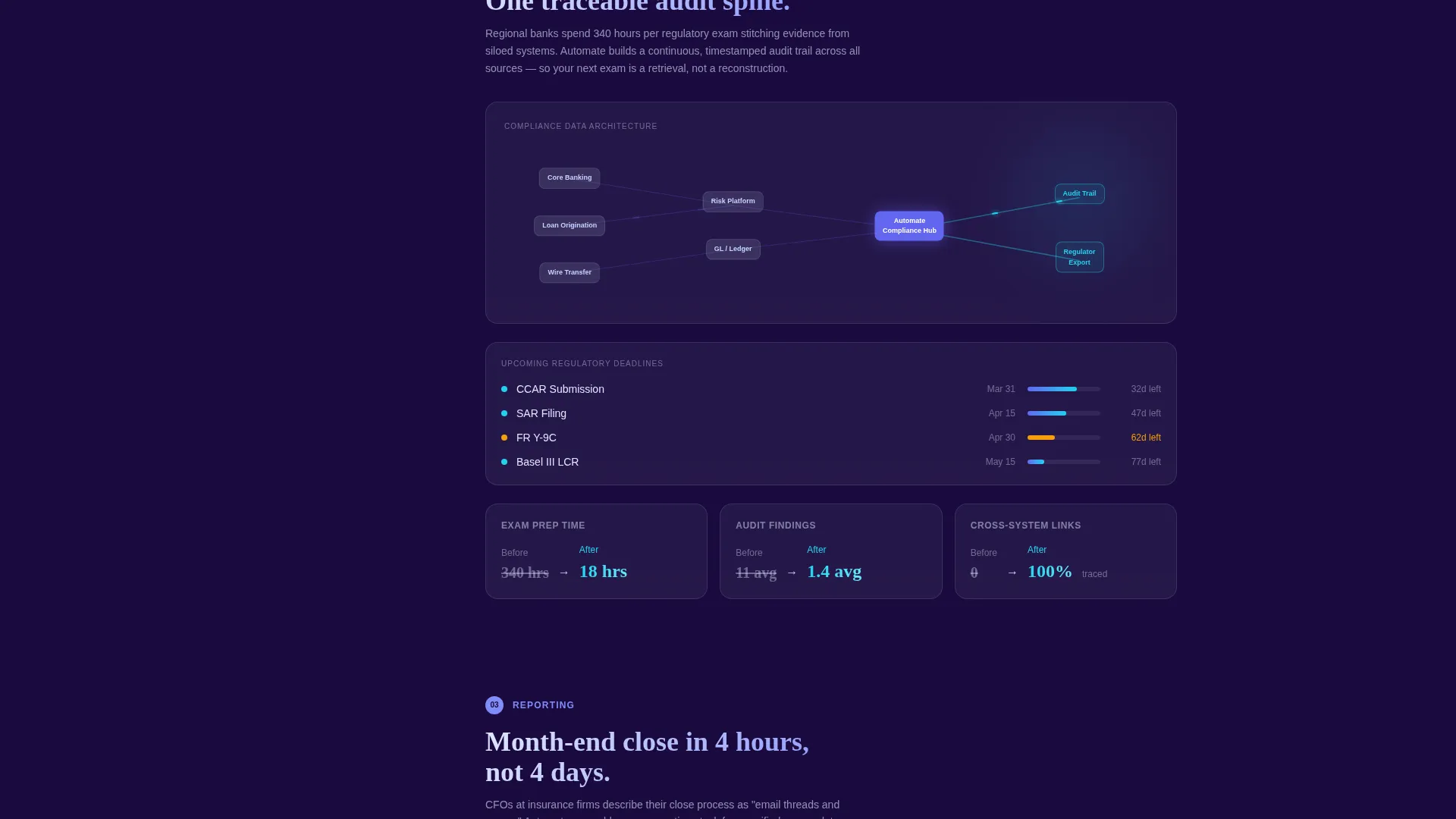
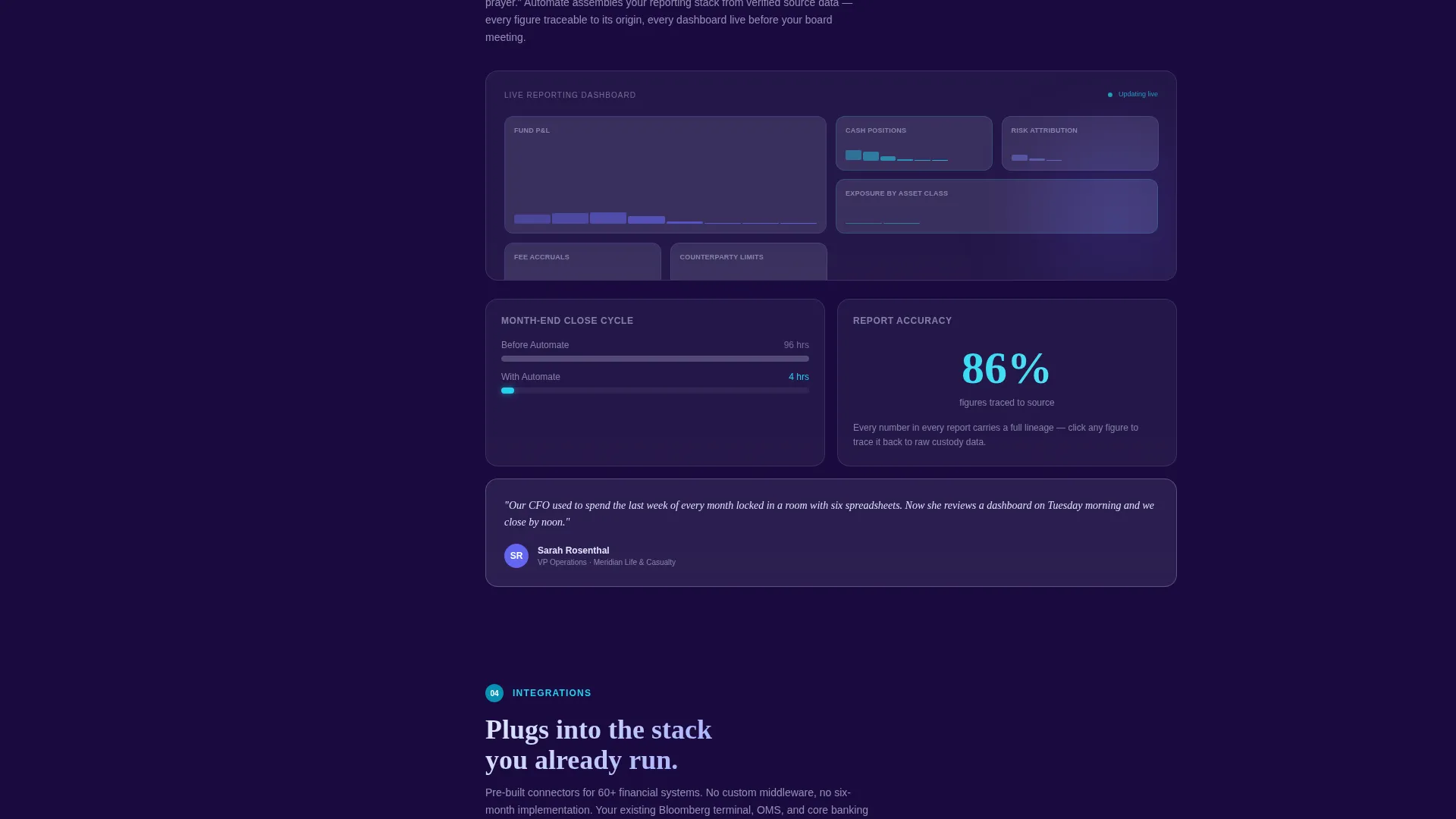
Each spoke section assembles a workflow diagram piece by piece as it enters the viewport. Individual nodes are clickable and expand into detail cards showing before-and-after metrics such as manual hours versus automated hours, error rates, and cycle time. The effect escalates from single workflow wins to a cumulative dashboard view at the bottom.
Staged Call-to-Action System
The primary call to action, "See It Run on Your Data," appears first as a ghost button in the header. It solidifies into a full electric-cyan button after the visitor passes the third spoke section. This approach mirrors the visitor's growing confidence rather than demanding commitment upfront.
Lightweight Demo Signup Form
The demo route collects only three inputs: work email, assets under management (AUM) range selector, and a checkbox grid of current pain points covering manual reconciliation, audit prep, and regulatory deadlines. Reducing friction at the conversion point keeps qualified prospects moving forward.
Secondary Lead Capture Path
A parallel conversion path, "Download the Ops Leader's Playbook," targets earlier-funnel visitors. It collects an email address in exchange for a PDF that quantifies automation return on investment by firm size. This path keeps the template useful for visitors who are not yet ready to book a demo.
Page sections overview
| Section | Purpose |
|---|---|
| Interactive Canvas Header | Demonstrates live workflow logic and sets the platform tone immediately |
| Anchor Navigation Rail | Keeps all five spoke sections reachable from any scroll position |
| Reconciliation Spoke | Shows automated reconciliation workflow with before-and-after metrics |
| Compliance Spoke | Illustrates how compliance audit trails consolidate across systems |
| Reporting Spoke | Presents automated reporting flows and cycle time reductions |
| Integrations Spoke | Maps how the platform connects to existing financial systems |
| Audit Trail Spoke | Displays traceable, consolidated audit trail architecture |
| Cumulative Dashboard View | Summarizes total operational hours reclaimed across all spokes |
| Demo Signup Section | Captures qualified leads with a three-field form |
| Playbook Download Section | Converts earlier-funnel visitors with a gated PDF offer |
Design & branding system
The template uses a Tech Glass visual identity built on the Electric Indigo color system. Every color choice reinforces the feeling of a controlled, high-precision environment.
- Deep void indigo (#1A0A3E) as the primary background, evoking a server room at midnight with full depth
- Luminous indigo (#6366F1) for active navigation states and animated pulses across the workflow canvas
- Frosted glass white (#E0E7FF) for card surfaces, detail panels, and body text
- Electric cyan (#22D3EE) as the signal accent used on data in motion and the primary call-to-action button
Mobile & speed optimization
The layout is designed to translate its interactive depth into a focused, scroll-friendly experience on smaller screens. The hub-and-spoke structure naturally adapts to vertical reading.
- The persistent left-rail anchor navigation collapses gracefully to keep spoke labels accessible without consuming screen space
- Animated diagram sections are built to assemble progressively, keeping the visual experience intact as viewport size changes
How this template helps you convert
Every structural and design decision in this template serves a single goal: moving a skeptical operations buyer from curiosity to demo request.
- The interactive canvas header delivers an immediate proof of concept, showing real workflow logic before the visitor has scrolled a single pixel, which builds trust faster than any headline alone could.
- The escalating spoke structure means each section adds a new layer of evidence, so by the time the solid call-to-action button appears after the third spoke, the visitor has already seen their specific pain points addressed in animated detail.
Other information about this template
This template is built specifically for the financial services workflow automation niche and reflects the buying psychology of operations-focused roles rather than general software buyers.
- The template style is Hub and Spoke with Anchor Navigation, suited for platforms with multiple distinct workflow modules to demonstrate
- The header concept is classified as Interactive Preview, meaning the first thing visitors experience is a working simulation rather than a static graphic
- The creative direction follows an Interactive Explorer pattern, where scrolling builds a progressive, compounding argument rather than presenting a flat feature list
- The click-through landing page direction means every layout decision prioritizes moving visitors toward the demo signup form or the playbook download
- The template fits financial operations automation platforms targeting mid-market firms across asset management, banking, and insurance verticals
Theme
Tech Glass
Creative direction
Interactive Explorer
Color system
Electric Indigo
Style
Hub & Spoke (Anchor Nav)
Direction
Click-Through
Page Sections
Interactive Workflow Canvas in Header
Persistent Hub-and-spoke Anchor Navigation
Progressive Diagram Assembly Per Section
Staged Call-to-action Button Behavior
Three-field Demo Signup Form
Secondary Playbook Download Path
Related questions
Who is this landing page template designed for?
Can I adapt the five spoke sections to different workflow categories?
What makes the call-to-action strategy different in this template?
Does the template include both a demo path and a content download path?
Is the interactive workflow canvas editable?



