Cloud-Native Enterprise Software Directory Website Template
Automate is a bento grid landing page template built for cloud-native robotic process automation (RPA) platforms. It uses an interactive comparison experience, a product screenshot hero, and a Carbon Fiber visual system to speak directly to IT directors, operations leads, and technology executives evaluating enterprise-scale automation infrastructure.
by Rocket studio
Quick summary
Automate is a single-page, bento grid landing page template designed for cloud-native RPA platforms. It leads with a live orchestration dashboard screenshot, guides visitors through interactive comparison tiles, and closes with a migration estimate form. The Carbon Fiber color system and terminal-dark aesthetic signal enterprise credibility from the first scroll.
Who this template is for
This template is built for teams selling cloud-native automation infrastructure to a technical, evaluation-driven buying committee. If your product orchestrates software robots at scale across cloud environments, this page was designed around your sales conversation.
- IT directors managing high volumes of manual data entry tickets who need a faster path to automation
- Operations leads whose current on-premises orchestrator has failed during critical processing cycles like month-end reconciliation
- Chief Technology Officers comparing enterprise automation renewal costs against cloud infrastructure budgets
What problem this template solves
Legacy RPA sales pages list features. This template builds a business case. Most cloud automation platforms struggle to communicate real differentiation to buyers who have already been burned by a previous vendor. The page solves that trust gap by replacing adjectives with specific numbers.
- Buyers arrive skeptical after bad experiences with on-premises orchestration tools that crashed under load
- Evaluation committees need side-by-side cost and capability data before they can advocate internally for a switch
- Generic landing pages fail to surface the right information for different buyer roles, wasting high-intent traffic
What you get with this template
You get a fully structured, single-page layout that walks a technical buyer from product proof to migration readiness without a single dead end. Every section earns the next interaction through specific, comparative data.
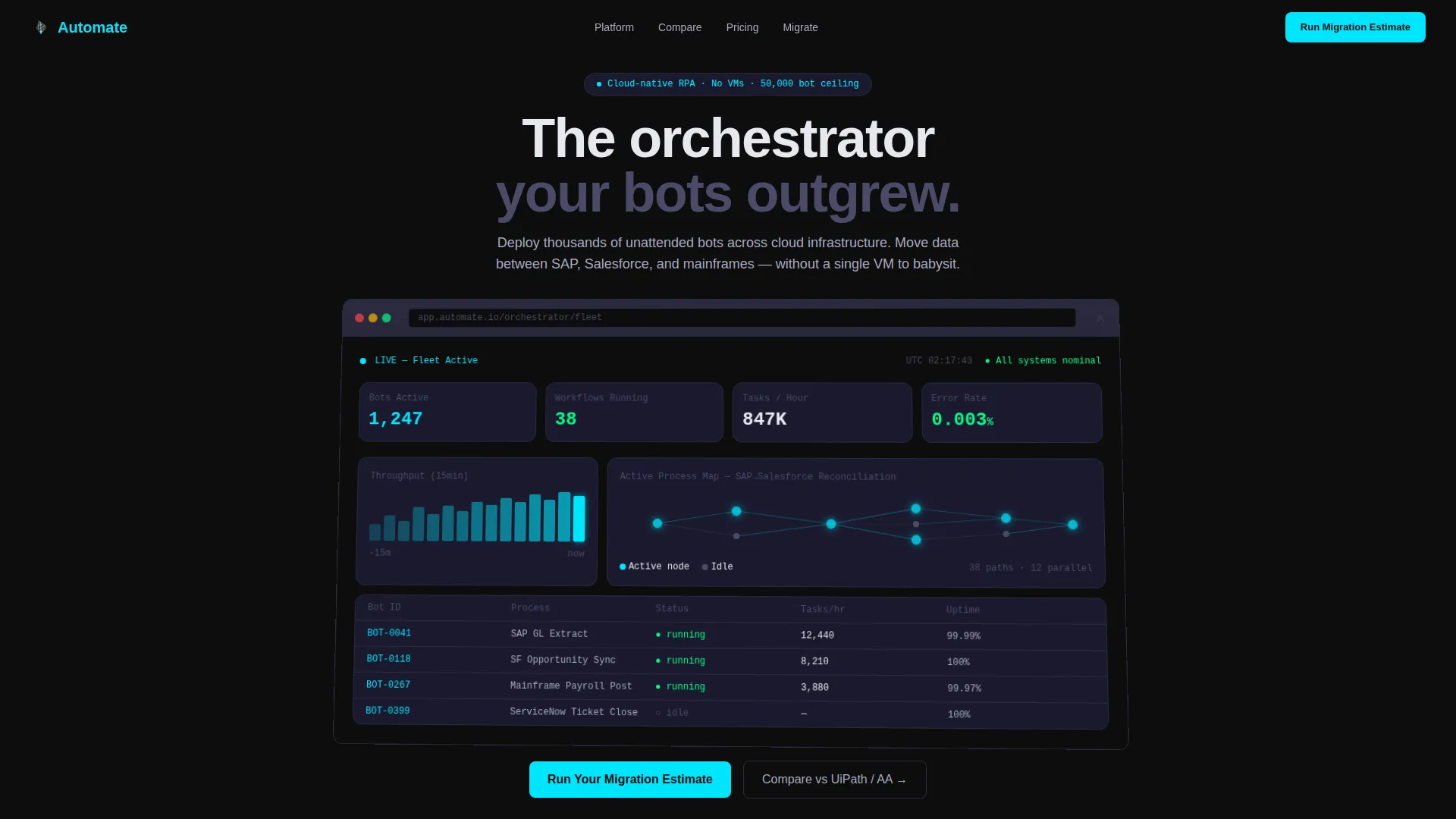
- A full-width product screenshot hero section inside a browser chrome mockup with a perspective tilt, showing a live bot fleet with active counts, parallel workflows, a throughput graph, and a pulsing process map
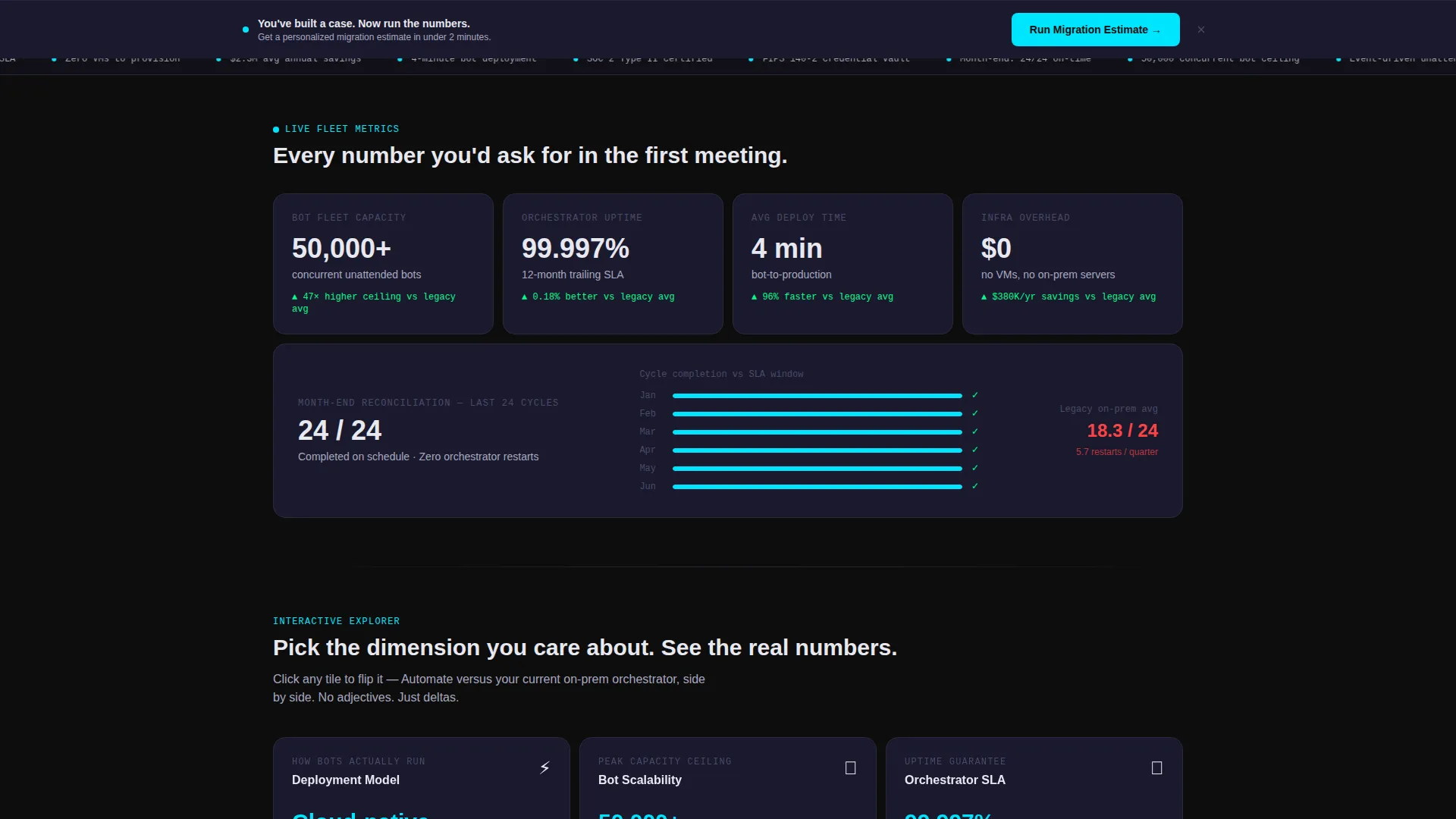
- An interactive bento grid where each tile is a comparison dimension that flips on click to reveal side-by-side metrics between this platform and legacy on-premises RPA
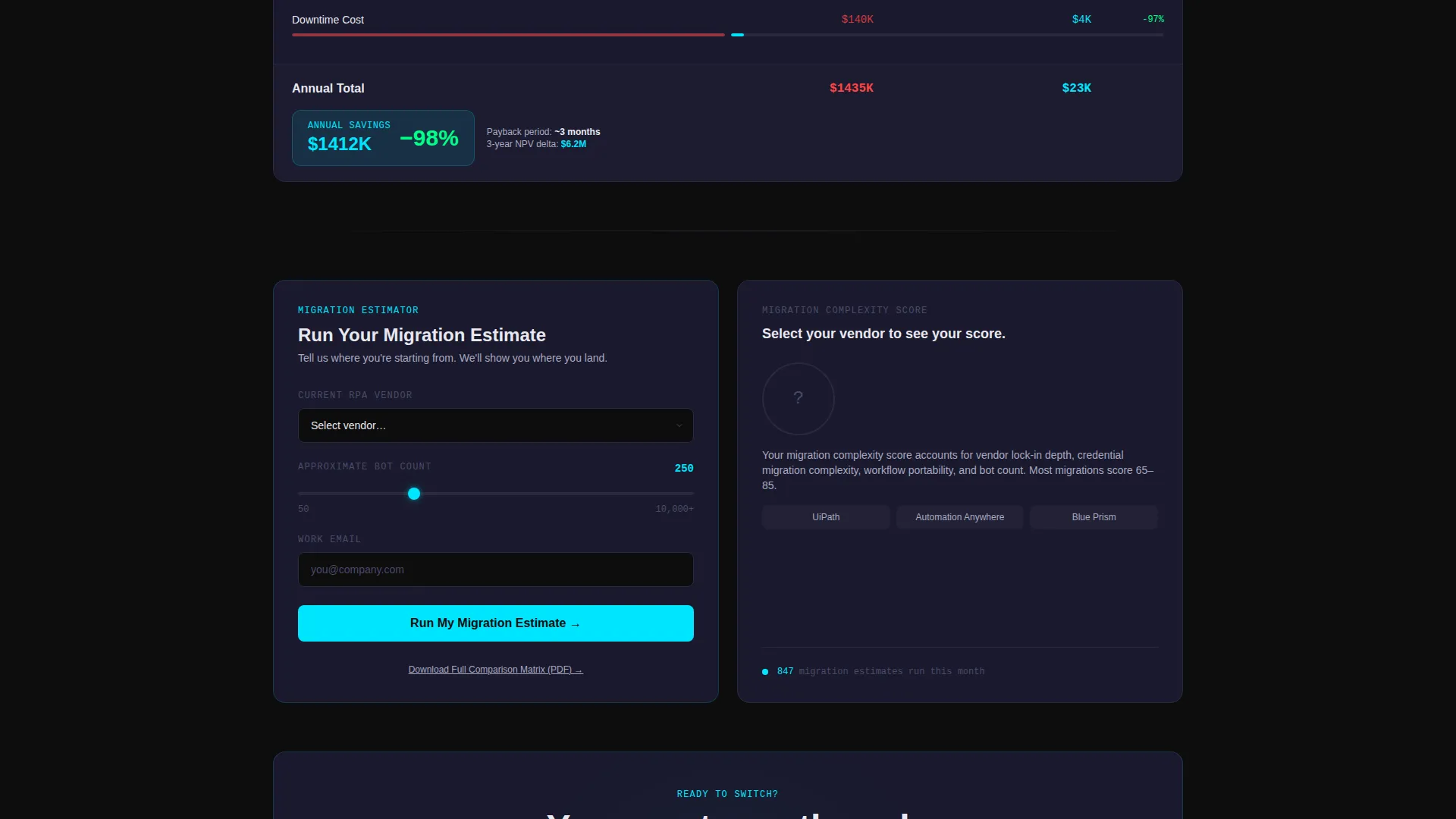
- A dual conversion path: a primary migration estimate form with vendor dropdown, bot count slider, and work email field, plus a secondary gated PDF download for committee-stage buyers
Feature list
This section describes the core template components included in the Automate landing page layout.
Interactive Comparison Bento Grid
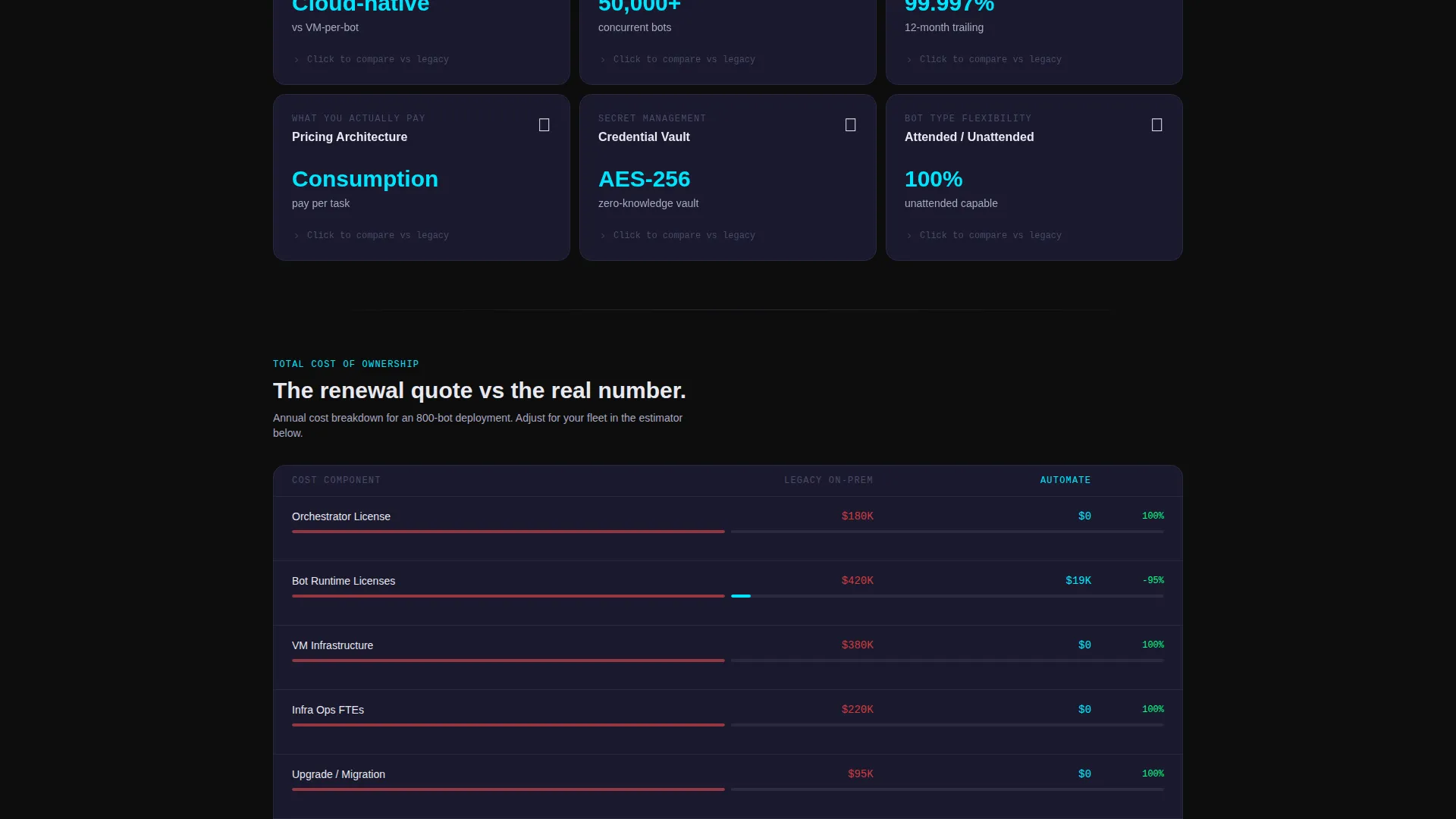
Each bento tile represents one evaluation dimension: deployment model, bot scalability ceiling, orchestrator uptime, pricing architecture, credential vault security, and attended versus unattended bot ratio. Clicking any tile flips it to reveal a structured side-by-side column with specific numbers. The grid rearranges dynamically as visitors interact, surfacing the dimensions most relevant to each buyer's behavior.
Product Screenshot Hero Section
The header uses a full-width, pixel-accurate orchestration dashboard screenshot inside a browser chrome mockup with a subtle perspective tilt. The dashboard displays 1,247 active bots, 38 parallel workflows, a real-time throughput graph, and a process map with cyan-pulsing nodes. A single headline in titanium type sits beneath it: "The orchestrator your bots outgrew."
Persistent Migration call to action Bar
After three tile interactions, a bottom bar appears with the primary call to action: "Run Your Migration Estimate." The form collects current RPA vendor via dropdown, approximate bot count via a slider ranging from 50 to 10,000 or more, and a work email address. The same call to action appears inside the final bento tile, reinforcing action at the natural end of the scroll journey.
Gated PDF Conversion Path
A secondary conversion option lets committee-stage buyers download a full comparison matrix as a gated PDF. This path captures leads who are not yet ready to run a migration estimate but are actively building an internal business case. It extends the page's reach into multi-stakeholder buying cycles.
Stakes-Escalating Grid Layout
The bento grid is structured so stakes increase from top to bottom. Operational metrics appear first, followed by infrastructure comparisons, and the layout closes with a total-cost-of-ownership calculation and a migration complexity score. This sequencing mirrors how technical buyers evaluate a platform switch and makes the final call to action feel earned rather than forced.
Page sections overview
| Section | Purpose |
|---|---|
| Dashboard Hero | Establishes product proof with a live orchestration screenshot and primary headline |
| Comparison Bento Grid | Lets visitors explore evaluation dimensions through interactive, flippable tiles |
| Operational Metrics Tiles | Surfaces bot scalability, uptime, and throughput data in the upper grid area |
| Infrastructure Comparison Tiles | Compares deployment model and credential security against legacy on-premises RPA |
| Cost and TCO Tiles | Presents pricing architecture and total-cost-of-ownership calculations lower in the grid |
| Migration Complexity Score | Closes the grid with a complexity rating that frames switching as achievable |
| Migration Estimate Form | Primary call to action tile with vendor dropdown, bot count slider, and work email field |
| Persistent Bottom Bar | Appears after three tile interactions with the "Run Your Migration Estimate" call to action |
| Gated PDF Download | Secondary conversion path for committee buyers researching a vendor switch |
Design & branding system
The template uses a Carbon Fiber color system built for dark, high-contrast enterprise interfaces. Every color decision carries functional meaning, the way status indicators do inside a live operations environment.
- Core palette: deep carbon black (#0D0D0D) as the page ground, graphite weave (#1A1A2E) as tile backgrounds with hairline borders, titanium mid-tone (#4A4A68) for body type and secondary labels, and cool-white (#E8E8F0) for interface headings and primary text
- Electric cyan (#00E5FF) is used exclusively for interactive states, active bot indicators, hover glows along the bottom edge of bento tiles, and primary call-to-action elements
- The visual theme is Directory and Discovery: the layout feels like a structured terminal environment where every element is active and purposeful, with no decorative imagery or stock illustrations
Mobile & speed optimization
The bento grid layout is designed to adapt across screen sizes without losing the interactive comparison experience. Tile interactions and the persistent call to action bar remain functional and accessible on smaller viewports.
- Bento tiles reflow into a single-column stack on mobile, maintaining the top-to-bottom stakes escalation sequence
- The persistent bottom call to action bar is sized for thumb interaction on touch screens, ensuring the migration estimate form remains reachable throughout the scroll
How this template helps you convert
The Automate template is built around a specific insight: enterprise buyers do not convert on claims. They convert when they have already built a mental business case. The page structure enforces that sequence deliberately.
- The interactive bento grid makes visitors active participants. Each tile flip adds a data point to their internal evaluation, so by the time they reach the call to action, they have already decided they need more information from you.
- The dual conversion path captures buyers at two different stages of readiness. The migration estimate form serves buyers close to a decision, while the gated PDF download serves committee researchers who need shareable evidence.
Other information about this template
This template is categorized under Technology, specifically the Cloud-Native Enterprise Software subcategory, with a niche focus on cloud-native RPA platforms. The intersection match score of 13 reflects a high alignment between the template's visual system, interactive mechanics, and the buying behavior of enterprise automation audiences.
- The template style is Bento Grid, a layout format well suited to comparison-driven evaluation pages where multiple data dimensions need equal visual weight
- The creative direction is Interactive Explorer, meaning the scroll itself functions as a discovery engine rather than a passive read
- The header concept is Product Screenshot, which means the product interface is treated as the primary hero asset with no reliance on stock photography or abstract illustration
- The landing page direction is Comparison versus Legacy, meaning every layout decision is oriented toward making the case for switching from an existing vendor
- Teams evaluating this template alongside other enterprise automation page options will find it particularly relevant if their platform competes directly with on-premises orchestration tools
Theme
Directory & Discovery
Creative direction
Interactive Explorer
Color system
Carbon Fiber
Style
Bento Grid
Direction
Comparison/Versus
Page Sections
Interactive Flippable Comparison Tiles
Orchestration Dashboard Hero
Persistent Migration Estimate Call to Action
Gated PDF Comparison Download
Stakes-escalating Grid Sequence
Related questions
Who is the primary audience for this landing page template?
Can I customize the comparison dimensions shown in the bento tiles?
What does the migration estimate form collect from visitors?
Is the gated PDF download section required, or can I remove it?
What makes this template different from a standard SaaS product page?



