Parking Vertical SaaS Cost Calculator Website Template
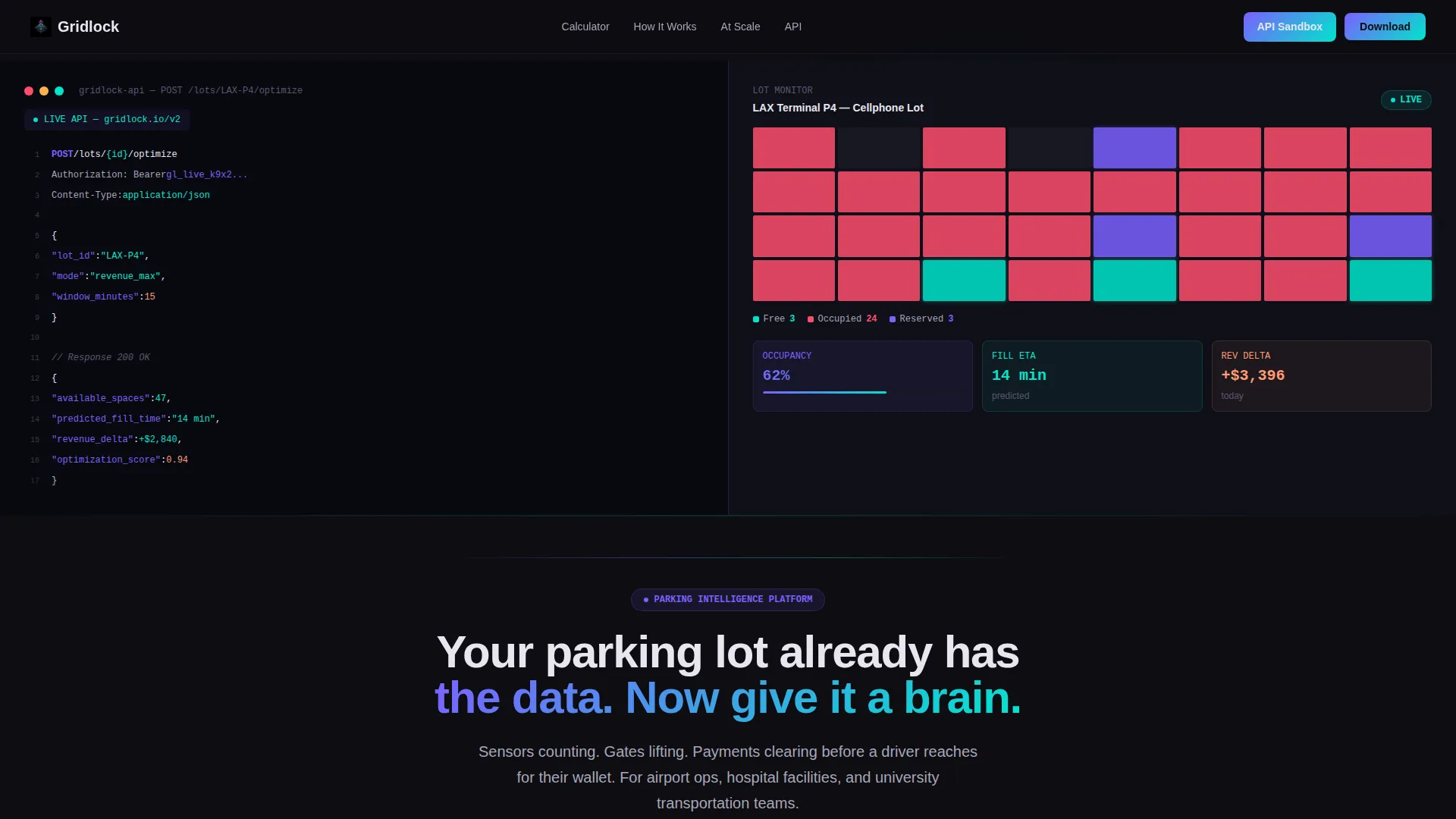
Gridlock is a split-screen landing page template built for parking management software. It leads with an interactive revenue calculator, a live lot map visualization, and a syntax-highlighted API code snippet. Designed for airport, hospital, and university facility teams, the template moves visitors from personalized projections to an app download with a single, confident scroll.
by Rocket studio
Quick summary
Gridlock is a single-page template for parking management software platforms. It opens with a split-screen header pairing a live API code snippet with a real-time lot map. An interactive revenue calculator anchors the scroll journey, turning raw lot data into projected gains before any commitment is asked.
Who this template is for
This template is built for software teams selling intelligent parking solutions to operations-heavy buyers. It speaks directly to facility directors, transportation coordinators, and airport operations managers who need hard numbers before they act.
- Airport operations managers dealing with overcrowded cellphone lots and unpredictable turnover
- Hospital facility directors whose patients lose time navigating garage congestion
- University transportation coordinators managing seasonal parking surges and complaint volume
What problem this template solves
Parking management software is a hard sell without proof. Buyers need to see their own numbers, not a generic pitch deck. This template removes that friction by leading with a personalized calculator and a visual architecture that builds trust before asking for anything.
- Generic software pages fail to connect platform capabilities to a specific lot's revenue potential
- Facility managers need projected payback periods and occupancy gains, not abstract feature lists
- Technical evaluators want sandbox access before committing to a download or a demo
What you get with this template
You get a complete, scroll-driven landing page that takes a visitor from curiosity to confident action. Every section is purposefully sequenced and visually cohesive.
- A split-screen hero with a syntax-highlighted API terminal on the left and a color-coded live lot map on the right
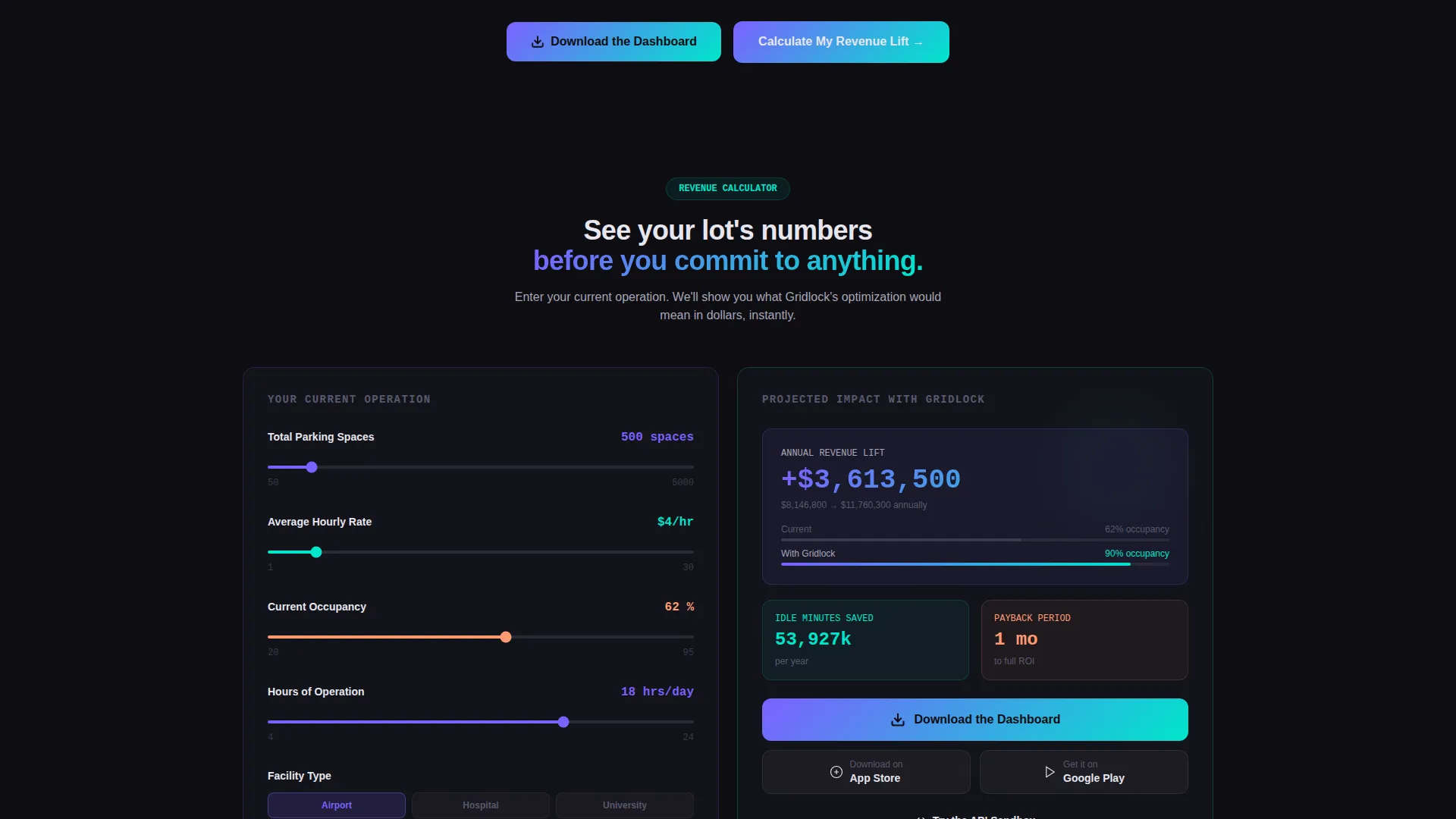
- An interactive revenue calculator with input fields and animated output projections
- App Store and Google Play download badges styled in iridescent gradients, with a sticky mobile bottom bar
Feature list
This template includes purpose-built components designed for parking vertical software. Each one is grounded in the source brief and serves a specific conversion role.
Interactive Revenue Calculator
The left panel accepts inputs for total spaces, average hourly rate, current occupancy percentage, and hours of operation. The right panel instantly renders projected annual revenue lift, idle-space minute reduction, and payback period. Numbers animate upward in iridescent gradients as values change.
Split-Screen API Code Header
The hero section divides into two equal halves. The left terminal displays a live POST /lots/{id}/optimize API call with syntax highlighting in violet and teal. Characters appear as if being typed, mid-scroll, against an asphalt-black background. The right panel renders the JSON output as a visual lot map.
Real-Time Lot Map Visualization
Parking spaces are color-coded from green to red based on occupancy state. An occupancy counter ticks upward and a revenue counter climbs alongside it. This component gives technical and non-technical buyers an immediate, intuitive read on platform output.
Sensor-to-Cloud Architecture Diagram
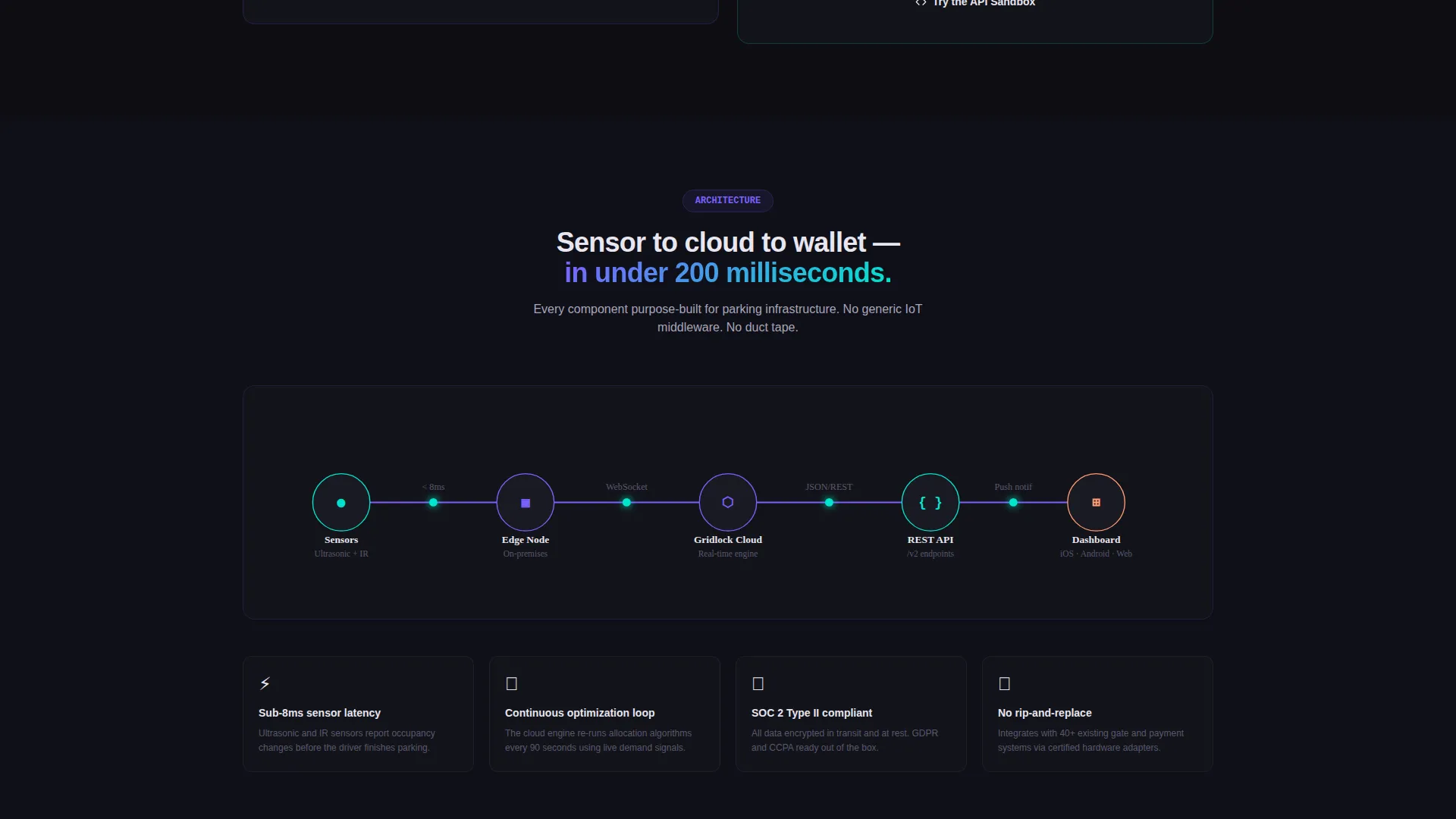
A dedicated section shows the full data flow from physical sensors through to cloud processing. It answers the "how does this actually work?" question that facility directors and IT evaluators both ask before moving forward.
Car Journey Timeline
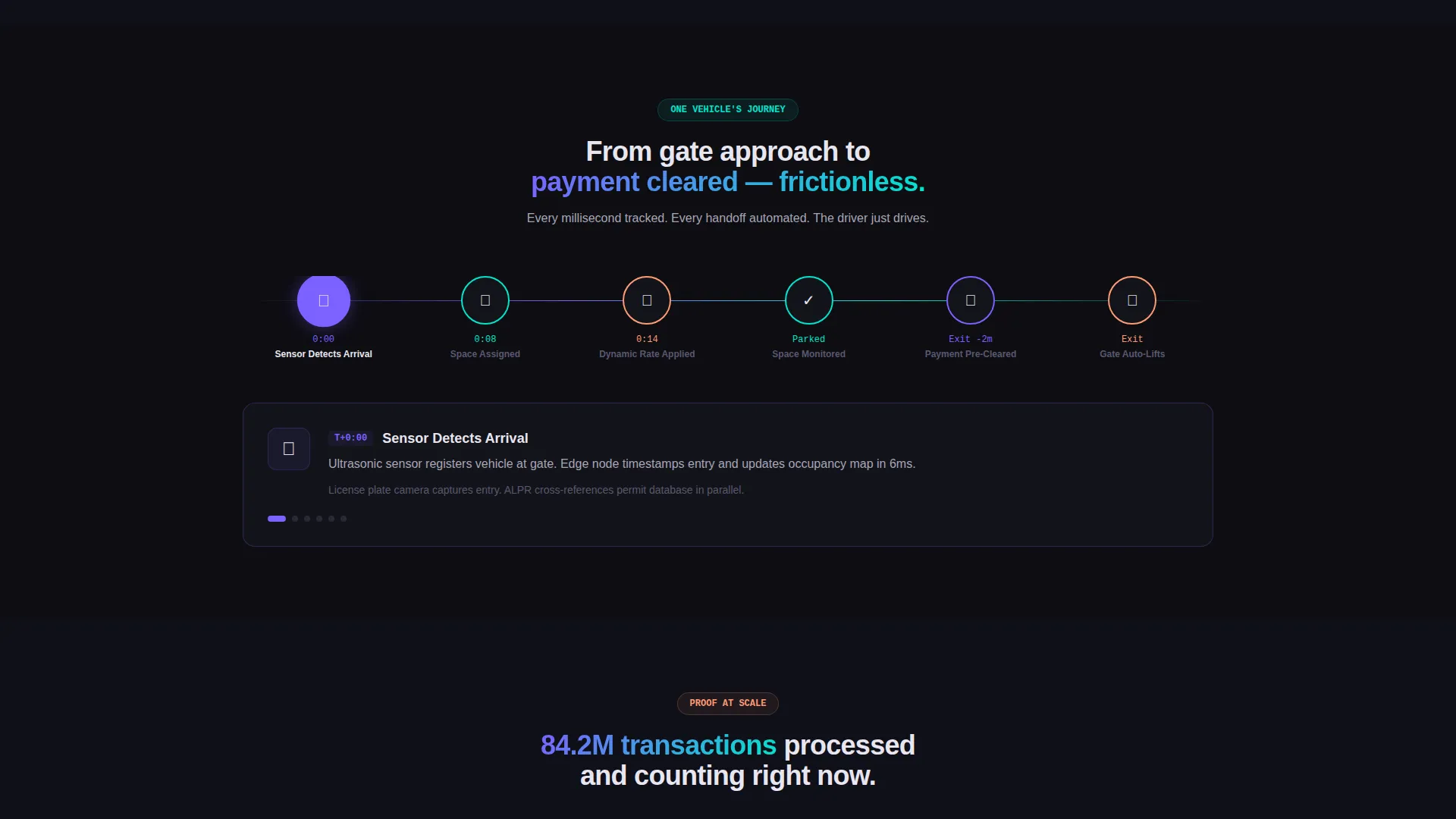
A horizontal timeline traces a single vehicle from lot entry through payment clearance. It makes the platform's automation tangible, showing exactly where sensors, gates, and payment systems interact without requiring a technical background to follow.
App Download Call-to-Action Block
The primary call to action, "Download the Dashboard," appears immediately after the calculator results with paired App Store and Google Play badges. A secondary path offers API sandbox access for technical evaluators. The sticky mobile bottom bar repeats the download prompt throughout the scroll.
Page sections overview
| Section | Purpose |
|---|---|
| Split-Screen Hero | Pairs API terminal with live lot map and headline |
| Revenue Calculator | Delivers personalized projected gains instantly |
| Calculator Results | Animates revenue lift, idle reduction, payback period |
| App Download Block | Presents primary call to action with store badges |
| Architecture Diagram | Shows sensor-to-cloud data flow visually |
| Car Journey Timeline | Traces single vehicle from entry to payment |
| Live Transaction Counter | Demonstrates platform scale across client lots |
| API Sandbox call to action | Offers technical evaluators a no-commitment entry point |
| Sticky Mobile Bar | Repeats app download prompt during scroll |
Design & branding system
The visual identity follows a Dynamic Motion theme built on the AI Iridescent color system. The palette draws from light refracting off wet pavement, dark and grounded until motion or gradient catches it alive.
- Core colors: deep asphalt black (#0D0D12) for backgrounds, iridescent white (#E8E6F0) for body text, holographic violet (#7B61FF) and electric teal (#00E5CC) for gradients, buttons, and data visualizations
- Violet-to-teal gradients pulse across interactive elements including buttons, progress bars, and animated counters
- Card surfaces and dividers carry a soft iridescent sheen that shifts as the eye moves across them
Mobile & speed optimization
The template is structured for mobile-first interaction without losing the split-screen sophistication of the desktop layout. The sticky bottom bar ensures the download call to action stays reachable at every scroll depth.
- Sticky bottom bar on mobile keeps the "Download the Dashboard" prompt visible throughout the page
- Calculator inputs and animated result panels are designed to reflow cleanly for smaller viewports
- App Store and Google Play badges are rendered in the iridescent gradient style and remain tap-friendly at mobile scale
How this template helps you convert
The conversion path in this template is deliberate. It moves visitors through a sequence that builds personal investment before presenting any ask.
- The revenue calculator engages visitors with their own numbers first, creating a sense of ownership over the projected results before any pitch is made.
- Architecture diagrams and the car journey timeline answer technical and operational questions in context, reducing hesitation for both facility directors and developer evaluators.
- The app download call to action appears at peak conviction, immediately after personalized results animate on screen, with a secondary API sandbox path for buyers who need a hands-on proof of concept first.
Other information about this template
Gridlock is a single-file landing page template built for the parking management software vertical. It is part of a broader collection of Parking Vertical SaaS templates in the Technology category.
- The template style is Split Screen (50/50), making it well suited for platforms that need to show both technical depth and visual output side by side
- The header concept uses a live code snippet, which positions the platform as developer-friendly and API-first without requiring a separate technical documentation page
- The creative direction is Calculator/Tool First, meaning the page earns attention before asking for it
- The landing page direction targets app downloads, with dual store badges and a sticky mobile bar reinforcing the primary action throughout
Theme
Dynamic Motion
Creative direction
Calculator/Tool First
Color system
AI Iridescent
Style
Split Screen (50/50)
Direction
App Download
Page Sections
Interactive Revenue Calculator
Split-screen API Code Hero
Real-time Lot Map Display
Sensor-to-cloud Architecture Diagram
Single Vehicle Journey Timeline
App Download and API Sandbox Ctas
Related questions
Who is the Gridlock template designed for?
Can I customize the calculator inputs and output metrics?
What is the primary call to action in this template?
Does the template include the API code snippet content?
What color scheme does this template use?



