Accounting Firm Booking Website Template
The Ledger Data Command accounting firm landing page template is a hub-and-spoke, anchor-nav layout built for professional accounting firms. It pairs a Bloomberg-terminal dark aesthetic with forensic-precision copy, comparison grids, and a Tax Gap Analysis call-to-action. Every section leads with a hard number, then delivers context, making it easy for prospective clients to understand exactly what poor bookkeeping is costing them.
by Rocket studio
Quick summary
Ledger is a single-page, hub-and-spoke landing page template for accounting firms ready to compete on evidence, not marketing promises. The layout opens with a dashboard product screenshot, leads with oversized statistics, stacks a three-way comparison grid, and closes with a dual-call to action conversion section. It is built for firms whose clients include small business owners, startup founders, and high-net-worth individuals navigating complex tax situations.
Who this template is for
This template is designed for accounting and bookkeeping firms that serve clients with real financial complexity. It works especially well for practices that need to demonstrate advisory depth against generic accounting software and big-box tax chains.
- Small businesses and LLC or S-Corp owners who need audit-ready books and proactive tax strategy
- Startup founders post-funding who require due-diligence-ready general ledger account records
- High-net-worth individuals managing multi-state portfolios, K-1s, accounts receivable, and estimated payments
What problem this template solves
Poor ledger management creates compounding risks: missed deductions, compliance errors, and financial data that cannot survive a due diligence review. Most firms fail to communicate these risks clearly on their website. This template fixes that gap directly.
- It exposes the cost of disorganized books through comparison tables and hard proof points
- It positions the firm as the only logical alternative to DIY accounting software and generic tax prep
- It converts skeptical visitors into consultation requests before they leave the page
What you get with this template
You get a complete, conversion-focused landing page structured around evidence and authority. The template includes every section needed to move a visitor from awareness to booked consultation in a single scroll.
- A hero section with a product screenshot, floating metric cards, and a bold headline
- A stats-impact ticker, a three-way comparison grid, a services bento layout, and a testimonial and form section
- A dual conversion path: a Tax Gap Analysis form and a gated PDF lead magnet
Feature list
This section covers the core capabilities delivered by the Ledger template, drawn directly from the brief.
Stats-First Impact Hero
The hero opens with a full-width, pixel-sharp product screenshot showing a real-time financial dashboard. Floating metric cards display figures like a P&L summary, a tax liability countdown, and a categorization accuracy gauge. A bold headline fades in above the screenshot to immediately communicate value before a single paragraph of body copy appears.
Oversized Stat Ticker
Three oversized statistics anchor the page's second section. Each stat, for example an average tax savings figure, a client retention rate, and a monthly close turnaround time, hits the viewport before any explanatory text follows. This forensic-audit pacing builds credibility through data before asking for trust through words.
Three-Way Comparison Grid
A side-by-side feature grid stacks the firm against DIY accounting software and big-box CPA chains. The grid exposes gaps in advisory depth, response time, and audit support across each column. A comparison toggle lets visitors interact with the data rather than simply read it.
Services Bento Layout
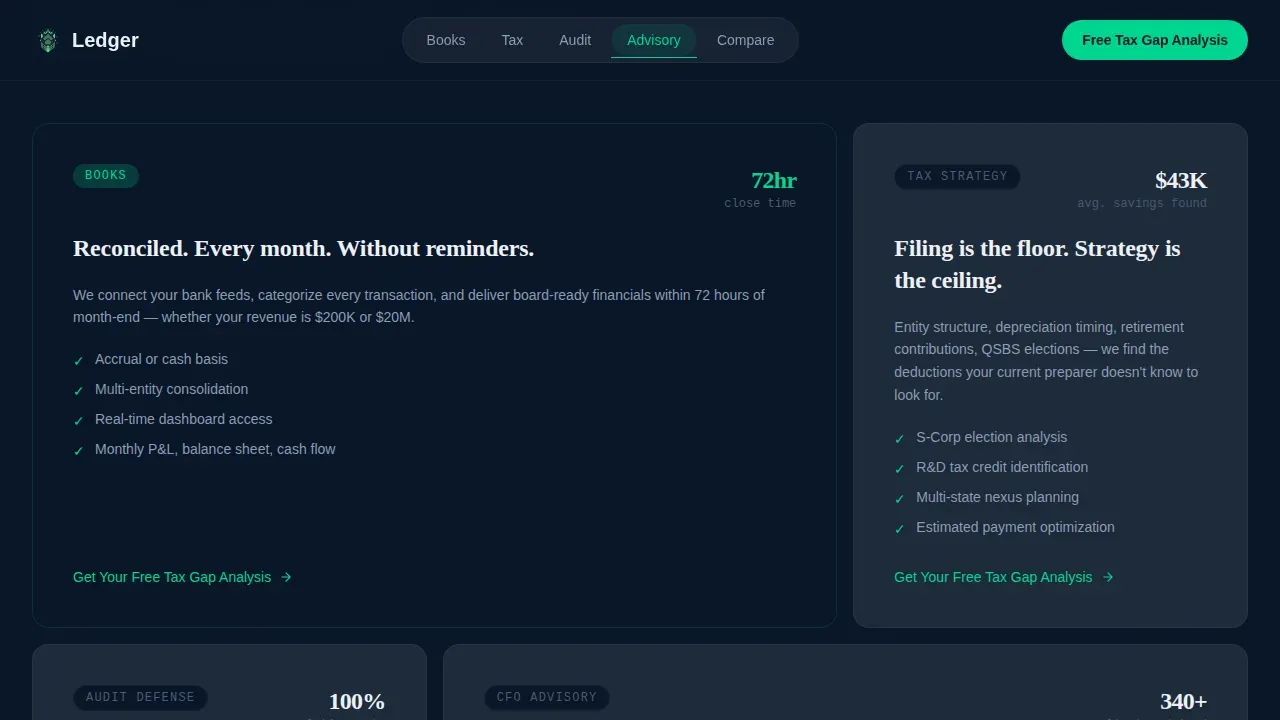
Four core service areas, bookkeeping, tax strategy, audit defense, and CFO advisory, are displayed in a bento-style card grid. Each card is a spoke in the hub-and-spoke anchor navigation, meaning visitors can jump directly to the service most relevant to their situation. This structure keeps financial data organized and easy to scan.
Dual Conversion Section
The conversion section combines social proof testimonials with two separate capture paths. The primary call-to-action collects business type, annual revenue range, and current accounting method through a structured form with dropdown fields. A secondary path offers a downloadable PDF lead magnet gated behind an email field, giving hesitant visitors a lower-commitment entry point.
Anchor Navigation Hub Structure
The top navigation anchors to each spoke section of the page, letting visitors move directly to bookkeeping, tax strategy, audit defense, or CFO advisory without scrolling through irrelevant content. Each spoke section repeats the primary call-to-action, keeping the conversion prompt consistently visible throughout the experience.
Page sections overview
| Section | Purpose |
|---|---|
| Hero Dashboard | Opens with product screenshot, headline, and floating metric cards |
| Stats Impact Ticker | Leads with oversized proof-point numbers before explanatory copy |
| Comparison Feature Grid | Stacks firm against software and big-box chains in side-by-side columns |
| Services Bento Cards | Presents four core service areas in a scannable card layout |
| Testimonials and Form | Combines social proof with Tax Gap Analysis form and PDF lead magnet |
| Footer Linear Row | Closes with single-row footer linking to key page anchors |
Design & branding system
The visual identity follows a Data Command theme that feels like a Bloomberg terminal at midnight. Deep terminal navy forms the primary background, with ledger-line slate used for card surfaces and section separators. The palette is built for authority and precision, not decoration.
- Typography pairs DM Sans for body text and data labels with Fraunces for display headlines, creating contrast between analytical and editorial registers
- Signal green handles all active states, positive delta indicators, and call-to-action buttons, drawing the eye to moments of action and forward momentum
- Decimal white text on dark backgrounds ensures strong readability across the entire accounting ledger-style layout
Mobile & speed optimization
The template is designed desktop-first to honor the Bloomberg-terminal aesthetic, with a fully responsive layout that adapts cleanly to smaller screens. Animation is handled through GSAP ScrollTrigger for staggered reveals, floating card effects, and number count-up sequences that only fire when elements enter the viewport.
- Scroll-linked stat reveals and number count-up animations are scoped to client components, keeping static sections lean and fast to render
- The comparison grid and bento card layout reflow gracefully on mobile, preserving readability of financial reports and service descriptions without horizontal scrolling
- Mobile optimization supports fast load times, which is critical for preventing conversion rate drops among visitors arriving from mobile search or social referrals
How this template helps you convert
This template is built around the principle that persuasion happens before the call-to-action, not at it. By the time a visitor reaches the form, the comparison grid has already done the work.
- The hero and stats ticker establish immediate credibility through hard numbers, putting financial health metrics front and center above the fold before any paragraph of copy asks for attention
- The comparison grid surfaces the hidden costs of bad books, specifically the compliance risks, advisory gaps, and response-time failures that generic accounting software and big-box firms cannot solve
- The dual conversion path captures visitors at two levels of intent: those ready to book a consultation and those who need one more piece of evidence before committing, reducing the drop-off between interest and action
Other information about this template
This template is well-suited for firms that want to educate visitors on the mechanics of sound financial record-keeping while simultaneously converting them. The page structure supports natural coverage of concepts like the general ledger, journal entries, and debit and credit discipline without sounding like a textbook.
- A general ledger is the central record of all financial transactions in a business. The general ledger organizes debits and credits across different accounts to produce reliable financial statements at the end of each accounting cycle.
- Entries in the general ledger correspond with journal entries, and every entry must record the transaction date, description, journal reference, and debit and credit balances. Total debits must equal total credits in the double entry accounting system to maintain balance.
- The general ledger template concept behind this page mirrors how real accounting ledger structures work: each general ledger account carries an account name, account number, account type, and a running balance updated with every new entry.
- Keeping track of accounts payable, accounts receivable, payroll, fixed assets, cash flow, and expenses inside a structured format reduces mathematical errors and supports accurate records across all reporting periods.
- Recording transactions consistently and reconciling the general ledger with bank statements regularly helps businesses spot discrepancies before they become compliance problems. Balance discrepancies typically result from missing entries, duplicate records, or unrecorded bank fees.
- A well-chosen ledger template saves time by providing a ready-made structure rather than building from scratch. For firms or clients still using a money ledger or manual methods, this page demonstrates the advisory value of moving to a professional accounting system.
- Firms that serve clients using excel-based tracking or free general ledger templates can use this template to communicate why a managed accounting ledger with professional oversight produces more reliable financial data than self-managed tools.
- The template is also relevant for practices explaining the difference between a simplified ledger template suitable for cash-basis operations with fewer than 50 monthly transactions and a comprehensive general ledger template designed for businesses processing 50 to 200 transactions monthly.
- google sheets-based free general ledger templates work well for very early-stage businesses, but growing operations benefit from professional oversight that this template's firm narrative is positioned to provide.
- This article-style depth of content, embedded in the landing page's spoke sections, helps prospects make informed decisions by understanding their current accounting risks before they even speak with a firm advisor.



Theme
Data Command
Creative direction
Stats-First Impact
Color system
Midnight Blue
Style
Hub & Spoke (Anchor Nav)
Direction
Comparison/Versus
Page Sections
Stats-first Hero with Dashboard Screenshot
Oversized Stat Ticker Section
Three-way Comparison Grid with Toggle
Services Bento Card Layout
Dual Conversion Path Section
Hub-and-spoke Anchor Navigation
Related questions
What sections are included in this landing page template?
Can I customize the comparison grid for my firm's specific services?
What conversion paths does this template include?
Who is the primary audience this template's design style is built for?
Does this template include GSAP animations?



