Online Skill Courses Booking Website Template
Ledger is a comparison table landing page template built for practical accounting and bookkeeping online courses. It guides career-changers, small business owners, and new hires from confusion to confidence using a clean Corporate Precision design, an isometric desk illustration, instructor credentials, a student outcome carousel, and a three-field free module lead capture form.
by Rocket studio
Quick summary
Ledger is a single-page lead generation template for a practical accounting course. It pairs a warm isometric header illustration with a side-by-side comparison table that makes the gap between "struggling with numbers" and "in control of every dollar" feel bridgeable. Visitors leave their name and email in exchange for the free first module, no credit card required.
Who this template is for
This template is built for course creators and educators who teach real accounting tasks to people who need them now, not in theory. It speaks directly to the learner's situation and converts that recognition into action.
- Career-changers studying at kitchen tables who need to understand general ledger accounting from scratch
- Small business owners drowning in receipts who want to read a balance sheet and produce financial statements on their own
- New hires handed accounting software on day one with zero training in journal entries or the accounting cycle
What problem this template solves
Most accounting course pages either look too academic or too salesy. They fail to show the learner that the gap between confusion and competence is real but closeable. This template solves that by making the contrast visible and human.
- Learners cannot picture what "after the course" looks like, so the comparison table maps specific tasks, bank reconciliation, accounts payable aging, trial balance review, row by row
- Visitors distrust online courses, so the instructor credentials section and student portrait carousel build credibility through real faces and one-sentence outcomes
- The free module offer removes financial risk, letting the learner prove the course works before paying a cent
What you get with this template
You get a fully structured, single-page layout that handles the entire persuasion arc from first impression to email capture. Every section is designed to do a specific job, and nothing is decorative without purpose.
- A five-section page flow: hero with animated headline, instructor video thumbnail, comparison table, student outcome carousel, and lead capture form with a simple footer
- A Corporate Precision visual system using a Soft Mist color palette, ruled notebook aesthetic, and three carefully chosen typefaces
- A mobile-first layout with a sticky bottom call-to-action bar so late-night learners on a phone can convert without scrolling back up
Feature list
This template includes the following built-in design and layout features based on the source brief.
Isometric Desk Hero Illustration
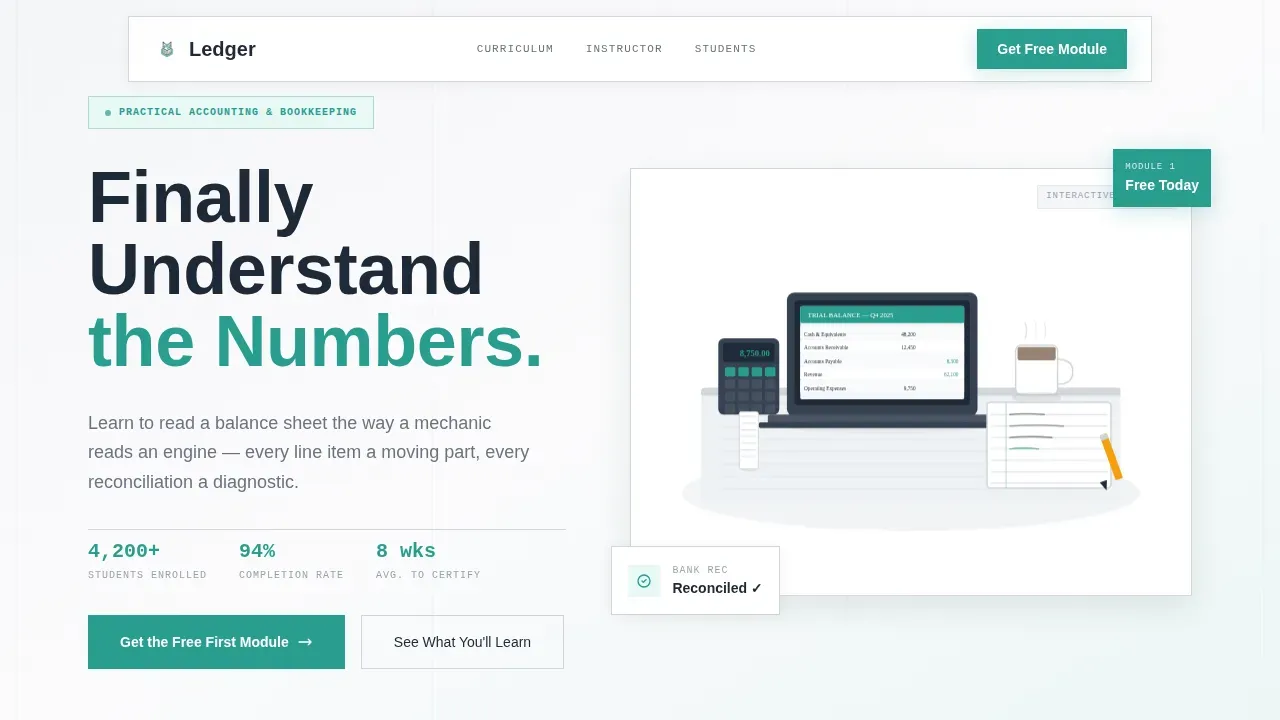
The header opens with a custom flat-textured isometric scene: an open laptop showing a trial balance, a coffee mug, a calculator with curling paper tape, and a hand writing in a ruled journal. A headline fades in over the illustration using a blur-in reveal animation. The visual immediately signals competence without feeling corporate or cold.
Side-by-Side Comparison Table
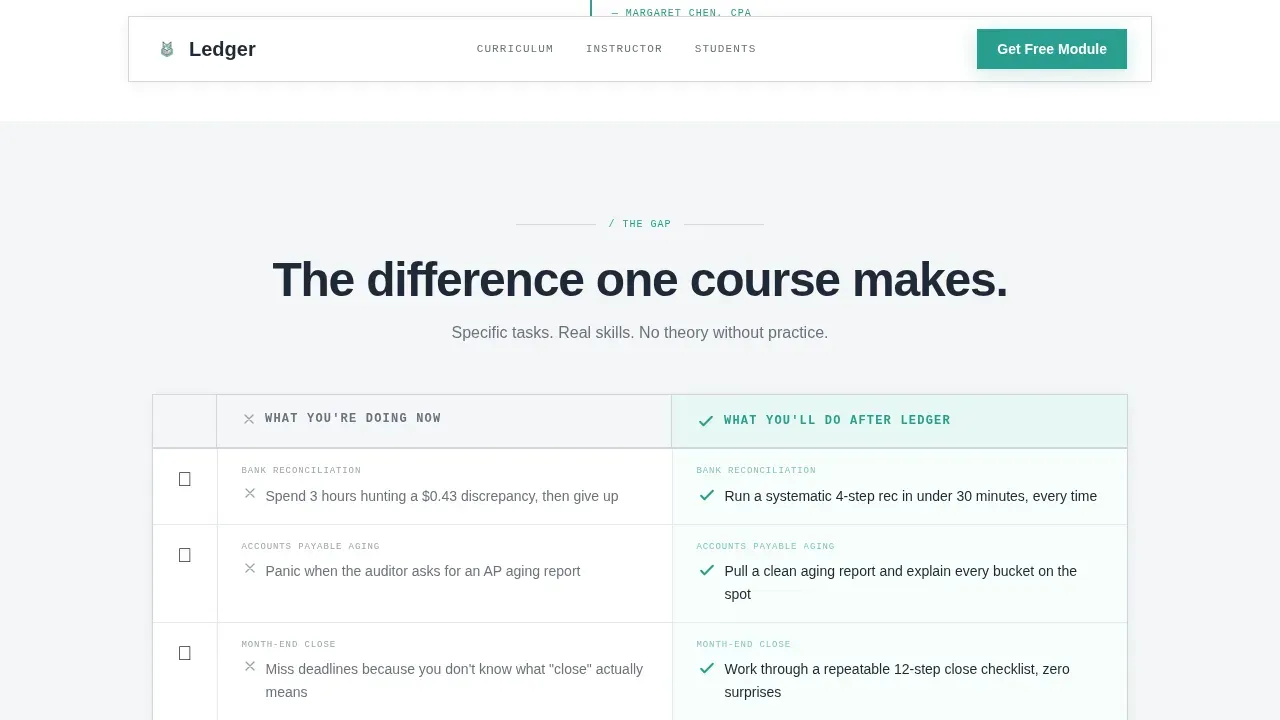
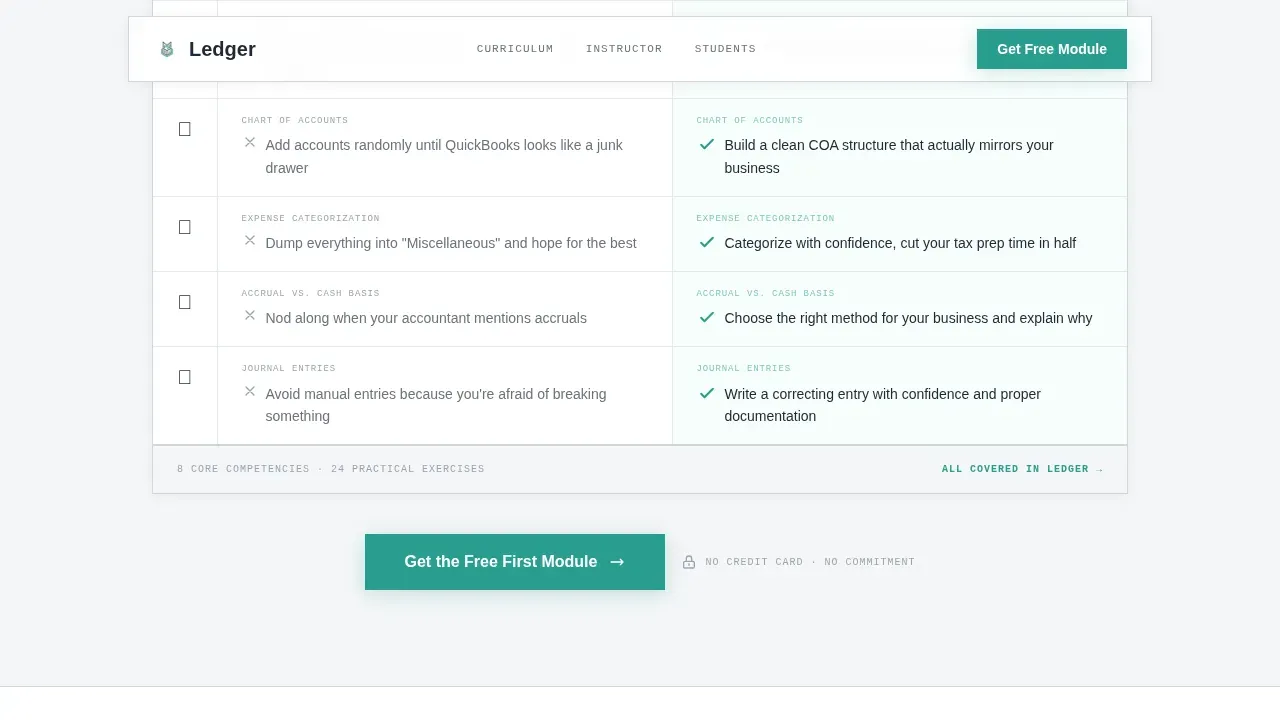
The core persuasion engine of the page is a two-column table contrasting "What You're Doing Now" with "What You'll Do After This Course." Each row covers a specific task, from recording transactions and handling accounts receivable to running a month-end close. Teal checkmarks and illustrated icons mark the "after" column, and hover states keep the table interactive.
Instructor Credential Section
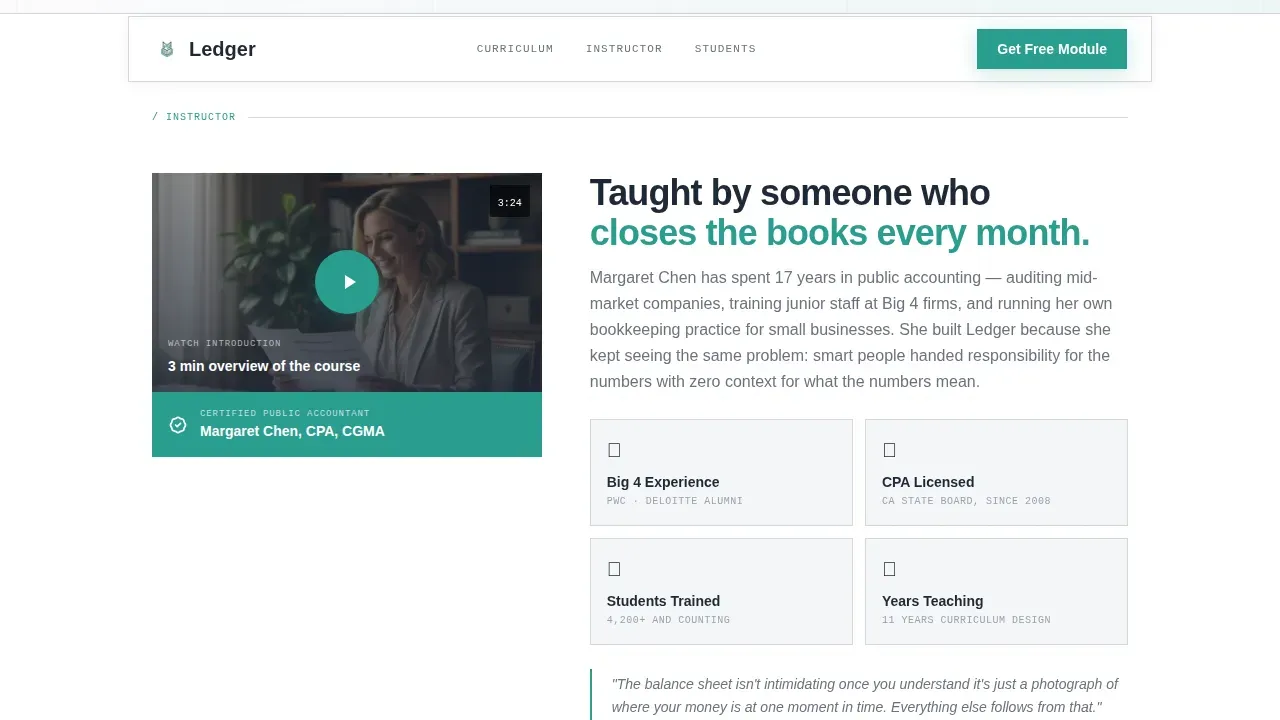
A video thumbnail card introduces the instructor alongside their professional certification (Certified Public Accountant) and years of practice. Prominently displaying credentials builds the trust that converts a curious visitor into a committed lead. This section moves the page from visual appeal to verified authority.
Student Outcome Carousel
A portrait carousel presents real student faces alongside one-sentence outcome statements. Results range from passing a bookkeeping certification in eight weeks to replacing a monthly accountant bill with an hour of personal work. The carousel deepens social proof as the visitor scrolls, building a rhythm of faces and data that reinforces the course's credibility.
Three-Field Lead Capture Form
The primary call-to-action is a lightweight form asking for first name, email address, and a single dropdown: "What describes you best?" Options include Career changer, Small business owner, and New hire learning on the job. The form appears once below the comparison table and again as a sticky bar on mobile, keeping conversion accessible at every scroll depth.
Page sections overview
| Section | Purpose |
|---|---|
| Hero with illustration | Deliver the headline and set the visual tone |
| Instructor credential card | Establish authority through credentials and video |
| Comparison table | Show the before-and-after gap task by task |
| Student outcome carousel | Build social proof with real faces and results |
| Lead capture form | Convert visitor interest into an email lead |
| Footer | Close the page with a clean single-row layout |
Design & branding system
The design follows a Corporate Precision theme expressed through the Soft Mist color palette. Every color choice is intentional, and the result feels like a freshly printed financial statement on heavyweight paper.
- Colors: cool fog white (#F4F6F8) for backgrounds, ledger-line gray (#D1D5DB) for borders and table rules, deep charcoal ink (#1F2937) for all body text, and a single confident teal (#2A9D8F) reserved for call-to-action buttons, checkmarks, and active states
- Typography: DM Sans for display headings, Manrope for body text, and IBM Plex Mono for data labels and table figures, giving the page a ruled notebook precision without sacrificing warmth
- Illustration style: flat but textured, with subtle paper-grain and soft mist gradients, human enough to feel approachable and precise enough to signal professional competence
Mobile & speed optimization
This template is built mobile-first, reflecting the reality that many learners study late at night on a phone, not a desktop. The layout adapts cleanly from wide screens down to small devices without losing its structure.
- A sticky bottom call-to-action bar appears on mobile so the "Get the Free First Module" prompt is always visible without scrolling
- Blur-in reveal animations, counter animations, and carousel interactions are applied through client components, while static sections use server rendering to keep the initial load light
- The comparison table, instructor card, and student carousel each reflow gracefully for narrow viewports so no key content is hidden or truncated on smaller screens
How this template helps you convert
The page is built around one conversion goal: collecting an email address in exchange for the free first module. Every design and copy decision supports that goal in sequence.
- The isometric hero illustration and animated headline create an immediate emotional connection, making the learner feel seen before they read a single bullet point
- The comparison table does the persuasion work by mapping the learner's current confusion, scattered financial records, unreconciled ledger accounts, missed account balances, against a clear picture of post-course competence, row by row
- The three-field form and mobile sticky bar make it frictionless to act the moment conviction arrives, whether the visitor is on a laptop at noon or a phone at midnight
Other information about this template
This template is designed specifically for the accounting and bookkeeping education niche, and several of its structural choices reflect how learners in this space think and behave.
- The general ledger template concept underpins the course content itself. A general ledger is the central record of all financial transactions within a business, and the course teaches learners to work with it confidently, covering journal entries, ledger accounts, the trial balance, and financial statements including the income statement and balance sheet.
- The accounting cycle is a step-by-step process: it begins with reviewing bank statements and payment records, moves through recording transactions as journal entries, posts those entries to the general ledger, prepares a trial balance to confirm debits equal credits, and closes with a zero balance at the end of each accounting period.
- A general ledger organizes debits and credits across different accounts using a double entry bookkeeping method where each transaction impacts two accounts. This double entry accounting system is what the course demystifies for learners who have never formally studied it.
- The general ledger template structure used in the course covers account number, account name, transaction date, debit and credit columns, and running account balances. A well-structured accounting ledger template helps small businesses track expenditure patterns, revenue streams, asset accounts, liability accounts, retained earnings, and cash balance across a specific accounting period.
- Learners who complete the course are equipped to handle daily transactions, produce reliable financial statements, understand credit balances and credit entries, and navigate the reconciliation process without making mathematical errors or relying on manual tasks that could be automated.
- The course content covers practical skills like tracking accounts payable and accounts receivable, reading financial reports, assessing business liquidity and overall financial health, and using accounting records to support informed decision making.
- The ledger template page design follows the principle that visuals and simplicity are critical for a high-converting lead generation landing page. Clean, uncluttered layouts reduce cognitive overload and keep the visitor focused on the single call-to-action.
- An excel general ledger template or a version in Google Sheets can serve as a companion resource for learners who want to practice recording transactions with built in formulas before moving to full accounting software.
- The template's lead magnet model, offering a free first module rather than a discount or a webinar, reflects the "Resource Lead Magnet" approach: high-value, immediately useful, and proof-of-concept before commitment.
- All financial information provided through this course is for educational purposes. The course does not constitute legal or financial advice, and learners should consult a qualified professional for guidance specific to their business needs.
- The page's consent category for form submissions and reporting requirements for data collection should be configured according to the applicable regulations of the jurisdiction where the course is offered.
Theme
Corporate Precision
Creative direction
Team & People
Color system
Soft Mist
Style
Comparison Table
Direction
Lead Generation
Page Sections
Isometric Desk Hero with Animated Headline
Side-by-side Task Comparison Table
Instructor Video Thumbnail and Credentials
Student Portrait Outcome Carousel
Three-field Mobile-first Lead Capture Form
Sticky Mobile Call-to-action Bar
Related questions
Who is this landing page template designed for?
What is the primary call-to-action on this page?
Can I customize the comparison table rows for my course content?
What design style does this template use?
Does this template include the student carousel and instructor section?



