Security Ops Landing Page Template
Sentinel is a cybersecurity landing page template built around a dashboard-first experience. It combines dark glass panel headers, a live-data visual system, and an interactive Attack Surface Calculator to give security teams an immediate sense of their exposure. SOC analysts, CISOs, and DevSecOps engineers can see the template in action before a single line of marketing copy appears.
by Rocket studio
Quick summary
Sentinel is a single-page cybersecurity template designed for security-focused products. It leads with live-metric panels, then walks visitors through an interactive risk calculator before presenting app modules and a frictionless download prompt. The entire layout feels like a real operations center, dark, data-dense, and built to earn trust through evidence rather than promises.
Who this template is for
Sentinel is purpose-built for teams and vendors operating in high-stakes security environments. It speaks to people who evaluate tools by how the data looks before they read a word of marketing.
- Security Operations Center (SOC) analysts who need a product page that mirrors their own working environment
- Chief Information Security Officers (CISOs) preparing board-level risk summaries and evaluating vendor credibility at a glance
- DevSecOps engineers hunting misconfigurations across cloud environments who want proof of depth before committing to a download
What problem this template solves
Most cybersecurity product pages look like generic software landing pages. They lead with slogans, bury the capability proof, and ask for a demo before showing anything real. Sentinel flips that order.
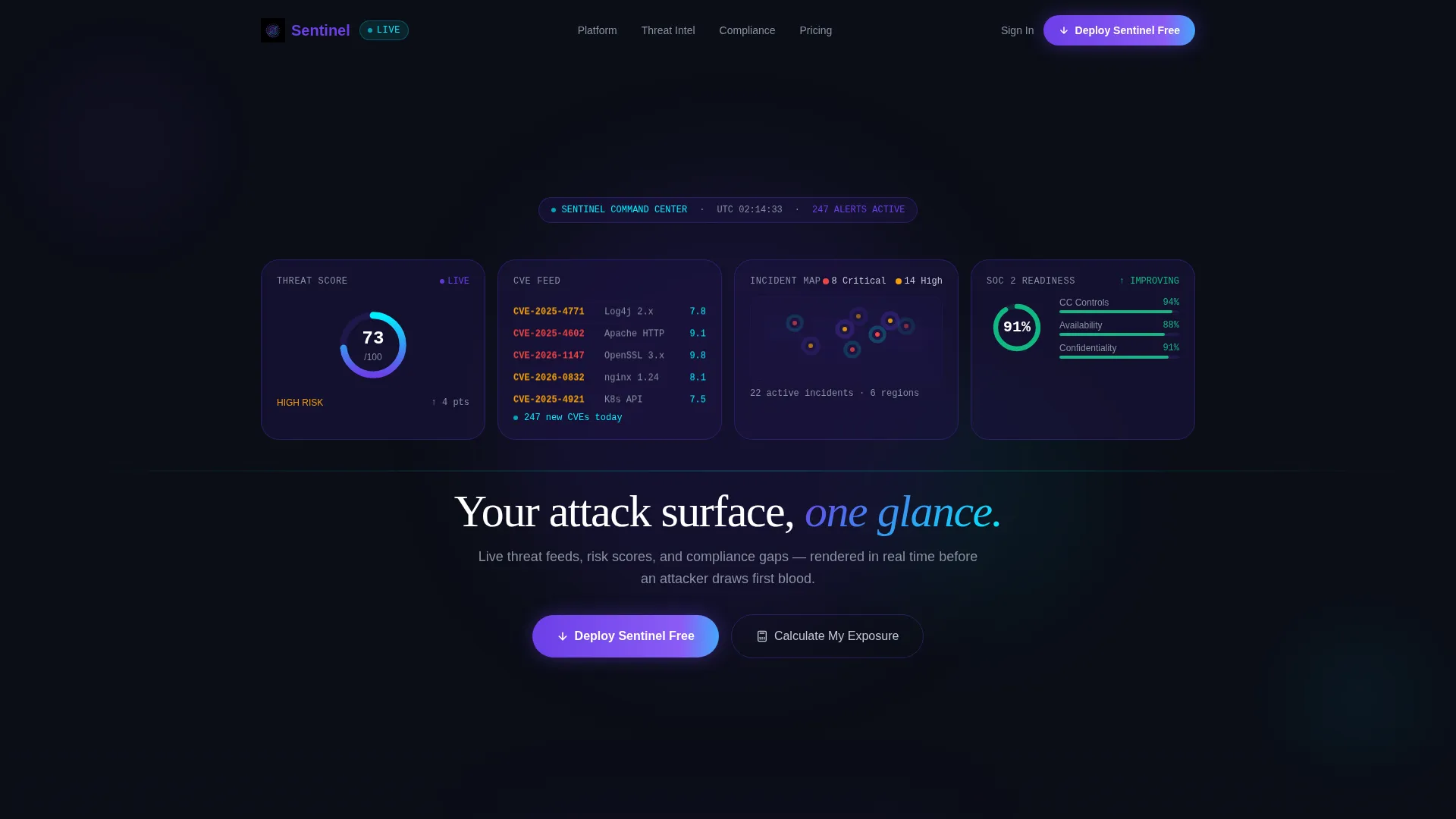
- Visitors see live-style metrics and a pulsing threat score the moment the page loads, before any headline appears
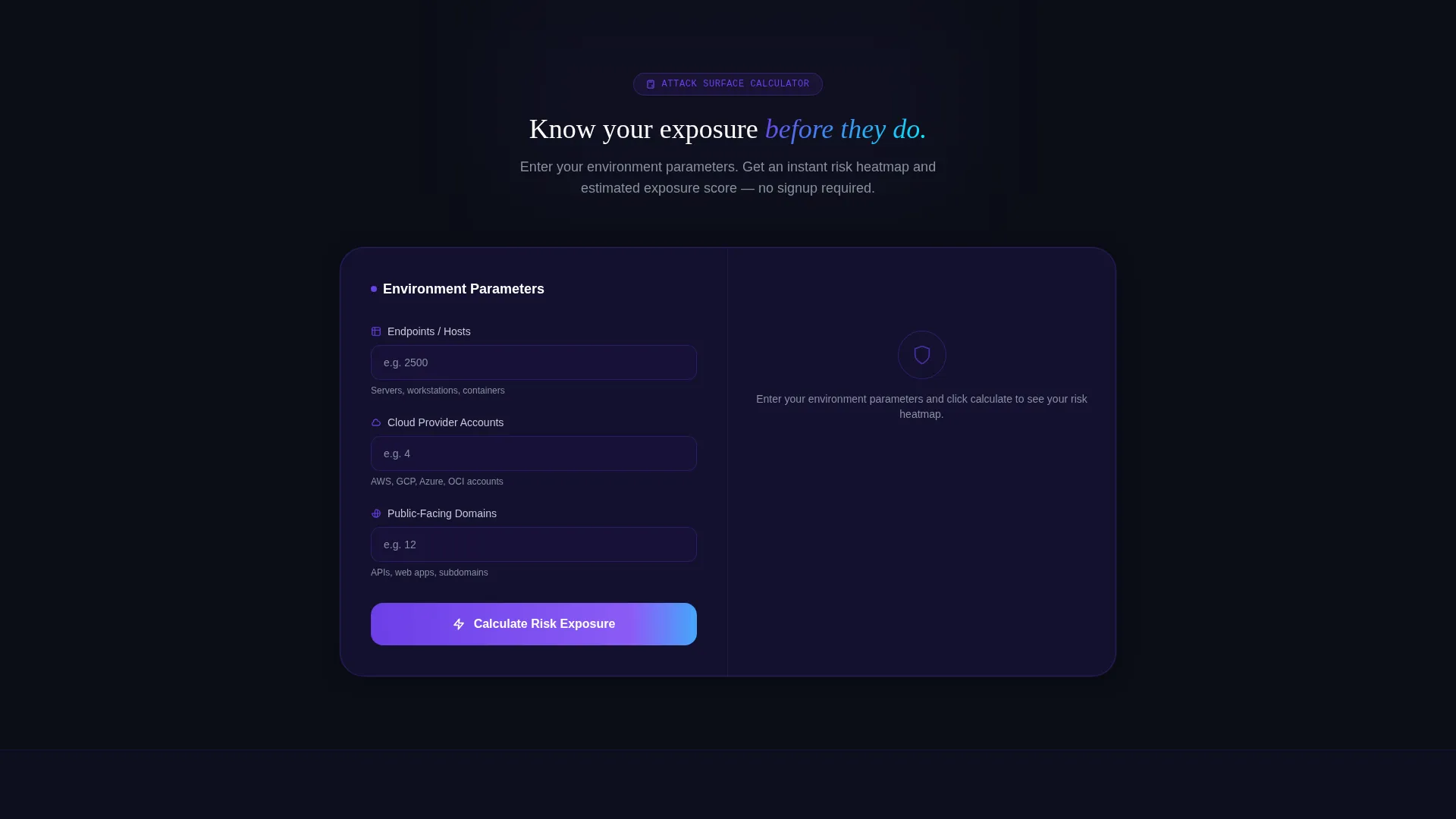
- The interactive Attack Surface Calculator delivers a personalized exposure score immediately, so the download ask is earned rather than assumed
- The scroll-through module presentation gives analysts and engineers the granular detail they need to justify adoption internally
What you get with this template
Sentinel delivers a fully designed, single-page layout with every section pre-built and ready to customize. Every visual and interaction element described below is included in the template structure.
- A full-viewport dark glass header with four live-metric panel cards, parallax depth, and a delayed fade-in headline
- An embedded Attack Surface Calculator that renders a simulated risk heatmap and exposure score based on visitor input
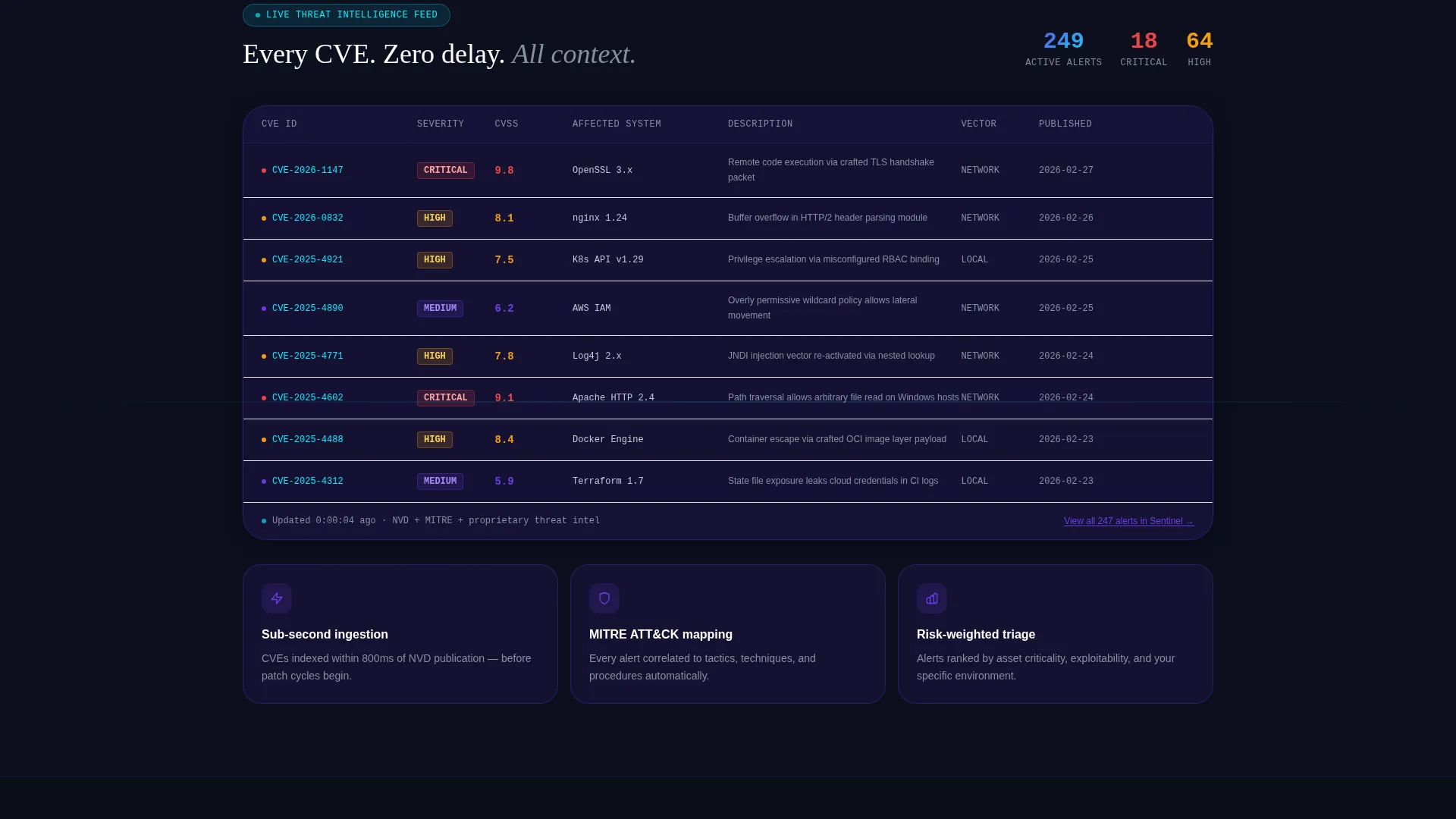
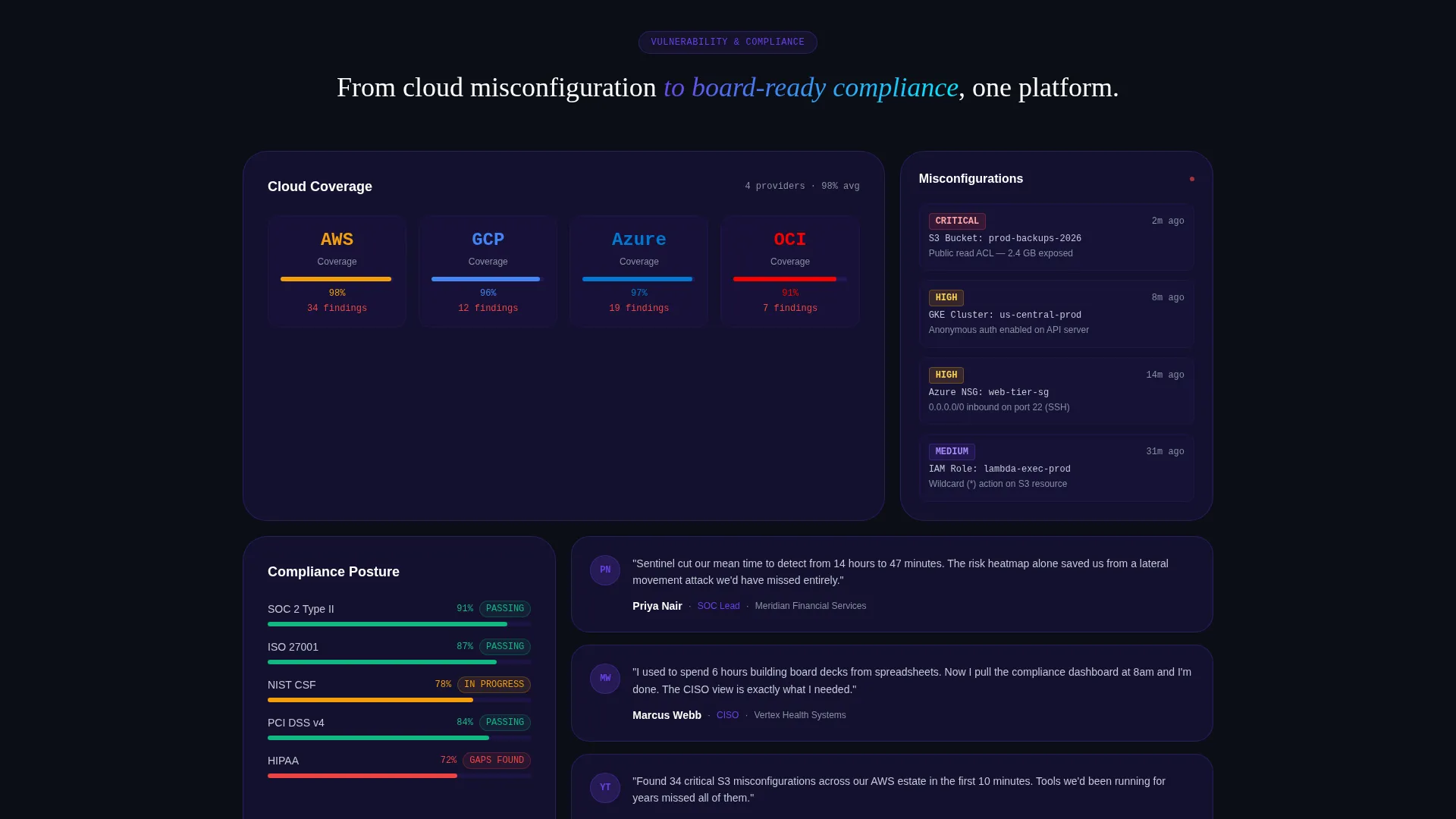
- Four scroll-animated module sections covering Threat Intel, Vulnerability Management, Compliance Mapping, and Incident Timeline, each with sample data grids
Feature list
Sentinel's features are drawn directly from its brief and reflect what the template structure actually delivers.
Dark Glass Panel Header
The header fills the full viewport with translucent frosted-glass cards floating over a void black canvas. Four panels display distinct live-style metrics: a radial threat score at 73/100, a scrolling CVE (Common Vulnerabilities and Exposures) feed in monospace phosphor cyan, a world map with incident markers, and a SOC 2 compliance readiness gauge at 91%. Subtle parallax separates card layers so they breathe with cursor movement. No headline appears for two seconds, the data speaks first.
Interactive Attack Surface Calculator
Positioned directly below the header, the calculator lets visitors enter their number of endpoints, cloud providers, and public-facing domains. The tool instantly renders a simulated risk heatmap and an estimated exposure score inside a mini dashboard card. The primary call to action, "Deploy Sentinel Free," appears inside the results panel after the score renders, earning the click through personalized value.
Scroll-Animated Module Sections
Four dedicated data-grid sections walk through the app's core modules in sequence: Threat Intel, Vulnerability Management, Compliance Mapping, and Incident Timeline. Each section animates into view as the visitor scrolls, with sample data growing more granular with each panel, reinforcing the depth behind the calculator score.
Pinned Navigation with Dual calls to action
A slim top navigation bar stays pinned during the entire scroll. It carries the primary "Deploy Sentinel Free" call to action at all times. A secondary call to action, "See Your Full Report in the App," gates a PDF export behind the download to create a second conversion path for visitors who want more detail.
Low-Friction Download Flow
The download prompt requests only two inputs: a work email address and a platform preference from macOS, Windows, or Linux. This minimal form reduces abandonment and automatically routes the correct installer to the visitor.
Electric Indigo Visual System
The full color palette is built around void black (#0B0E17) backgrounds, deep indigo (#1A1440) card surfaces, electric violet (#6C3FE8) active states, phosphor cyan (#00F0FF) critical-alert accents, and cool silver (#C4C9D4) body text. Gradients between indigo and violet give layered depth to panels without introducing warmth. The result is a terminal-glow aesthetic that feels operationally credible.
Page sections overview
| Section | Purpose |
|---|---|
| Dark Glass Header | Opens with four live-metric panels and a delayed headline fade |
| Attack Surface Calculator | Delivers a personalized exposure score before any marketing ask |
| Threat Intel Module | Presents animated intelligence feed data in a scrollable grid |
| Vulnerability Management Module | Shows vulnerability data rows animating into a ranked grid |
| Compliance Mapping Module | Displays compliance framework gaps in a structured data layout |
| Incident Timeline Module | Renders a chronological event grid proving incident-tracking depth |
| Pinned Navigation Bar | Keeps the primary download call to action visible at all scroll positions |
| Download Prompt Panel | Collects work email and platform choice with minimal friction |
Design & branding system
Sentinel uses the Dashboard Pro theme expressed through an Electric Indigo color system. Every palette choice reinforces the feeling of a live operations center viewed through dark glass.
- Core palette: void black (#0B0E17) for backgrounds, deep indigo (#1A1440) for card surfaces, electric violet (#6C3FE8) for highlights and active states, phosphor cyan (#00F0FF) for critical alerts and live-data pulses, and cool silver (#C4C9D4) for body text
- Indigo-to-violet gradients add depth to layered panels without warmth, keeping the tone charged and precise
- Typography runs in monospace for data feeds and cool silver for readable text, maintaining the terminal aesthetic throughout
Mobile & speed optimization
The template layout is designed to remain legible and functional on smaller screens, with data-dense panels reordered for vertical reading without losing hierarchy.
- The dashboard card grid collapses gracefully so metric panels stack cleanly on mobile viewports
- The Attack Surface Calculator input fields and heatmap result card are sized for touch interaction
- Scroll-triggered animations are designed to fire at natural reading breakpoints, so the reveal sequence works on both desktop and mobile without feeling out of sync
How this template helps you convert
Sentinel is structured around a value-first conversion path. Every layout decision is designed to reduce skepticism and create the right moment for a download request.
- The dark glass header delivers immediate visual credibility, four live-style metrics replace a traditional hero, so the product proves itself before any copy loads
- The Attack Surface Calculator makes the conversion personal, a visitor who has already seen their own simulated exposure score is far more motivated to act on "Deploy Sentinel Free" than a visitor reading generic feature bullets
- The dual call to action structure ensures no visitor leaves empty-handed, the primary download path captures the ready buyer, while the PDF export call to action captures the researcher who needs more evidence before committing
Other information about this template
Sentinel is built as a single-page layout following a Dashboard/Data Grid template style. The creative direction is Calculator/Tool First, meaning the interactive element appears before any standard marketing section. The landing page direction targets app downloads with a two-field form designed to minimize drop-off. The header concept, Dark Glass Panels, is a specific visual treatment that uses translucent frosted-glass card layering and parallax motion rather than a static hero image. The theme is Dashboard Pro, which informs the dense data-grid aesthetic used across all module sections.
- The template is category-matched to Technology and the Cybersecurity Digital Presence subcategory
- It is designed for vendors and teams operating in the cybersecurity space who need a page that communicates competence visually, not just verbally
- All four app modules, Threat Intel, Vulnerability Management, Compliance Mapping, and Incident Timeline, are represented as distinct sections with sample data, giving the page genuine depth even before a product is connected
Theme
Dashboard Pro
Creative direction
Calculator/Tool First
Color system
Electric Indigo
Style
Dashboard/Data Grid
Direction
App Download
Page Sections
Dark Glass Panel Header with Parallax
Interactive Attack Surface Calculator
Scroll-animated Data Module Sections
Pinned Navigation with Persistent Call to Action
Two-field Low-friction Download Form
Electric Indigo Color System
Related questions
Who is the Sentinel template designed for?
Can I customize the Attack Surface Calculator inputs and results?
What makes the header different from a standard hero section?
How does the two-field download form reduce friction?
Is this template suitable for a product in early access or beta?



