Blockchain-Based Enterprise Software Specialist Cost Calculator Website Template
Ledger is a blockchain-based point-of-sale landing page template built for merchants who are done losing money to interchange fees and three-day clearing cycles. It leads with a live code snippet header, an interactive savings calculator, and a scrolling comparison table that builds the case through pure arithmetic. The design runs on a dark Midnight Blue palette lit by real-time data colors.
by Rocket studio
Quick summary
Ledger is a single-page landing page template for a blockchain-based point-of-sale system. It settles transactions on-chain in under two seconds, cuts interchange fees to fractions of a cent, and replaces the three-day clearing cycle. The page leads with a live code snippet, an interactive savings calculator, and a row-by-row comparison table that makes the financial case without a single line of rhetoric.
Who this template is for
This template speaks directly to the people who feel traditional payment processing in their margins every single day. It is built for founders and operators who already understand the cost problem and just need to see the numbers laid out clearly.
- Coffee shop and independent retail owners losing roughly 2.9% on every contactless payment
- Direct-to-consumer brand founders who hold stablecoins and want to accept them at checkout
- Chief financial officers managing multi-location franchises who are tired of reconciling across several payment processors
What problem this template solves
Traditional card processing extracts a quiet, compounding tax from small and mid-size merchants. The fee is taken before the money even arrives, and the money itself takes days to clear. This template exists to make that cost visible and then replace it.
- Interchange fees that silently consume 2.9% of every transaction add up to thousands lost per year
- Three-day clearing cycles create cash flow gaps that hurt daily operations for small businesses
- Managing five separate payment processors creates reconciliation complexity that drains staff time and introduces errors
What you get with this template
You get a complete, conversion-focused landing page layout built around proof rather than promises. Every section is designed to let the numbers do the persuading.
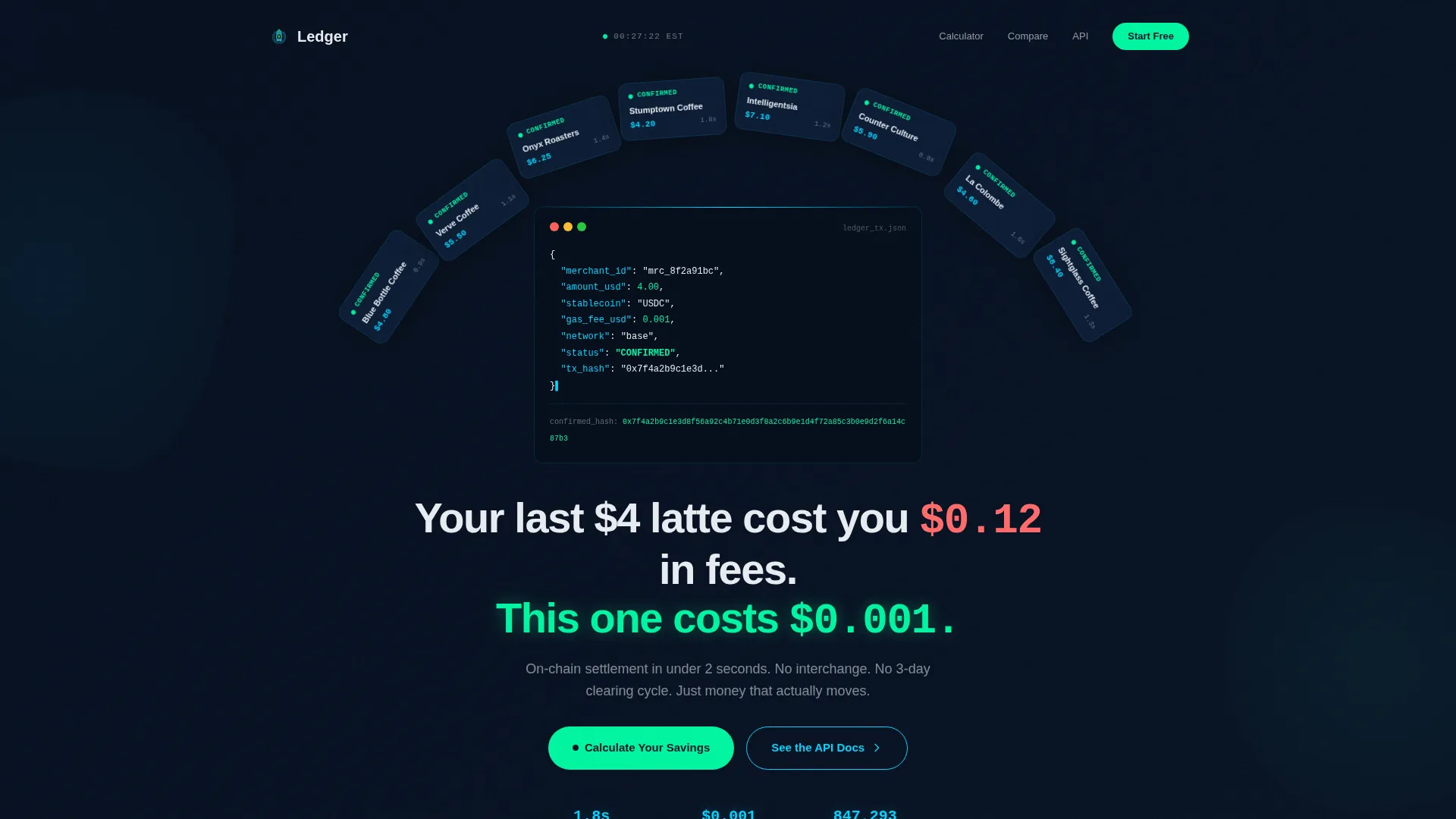
- An animated code snippet header showing a real payment settling with merchant ID, stablecoin equivalent, gas fee, and a live confirmation hash
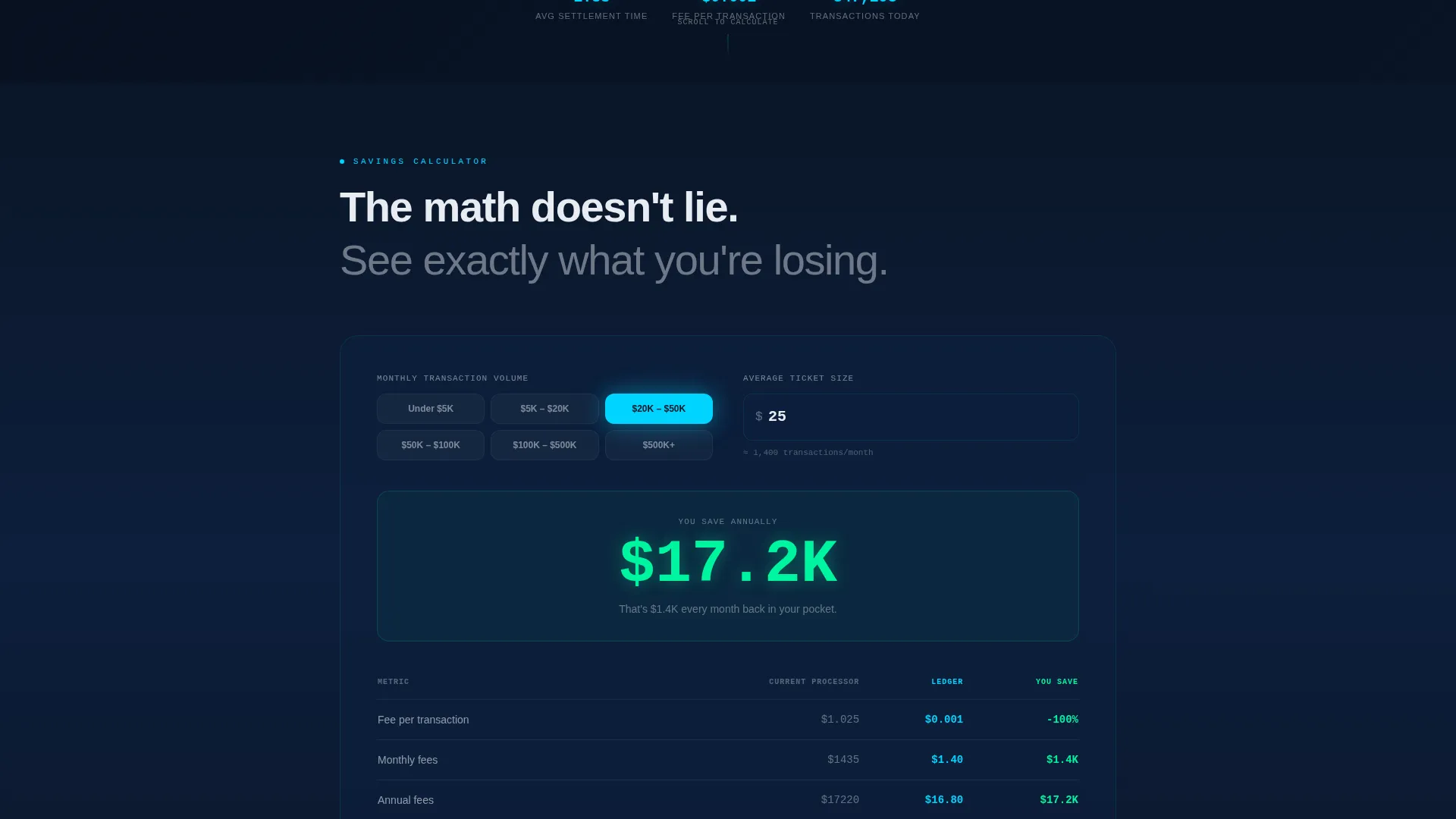
- An interactive savings calculator where visitors input their monthly volume and average ticket size to instantly see fee comparisons
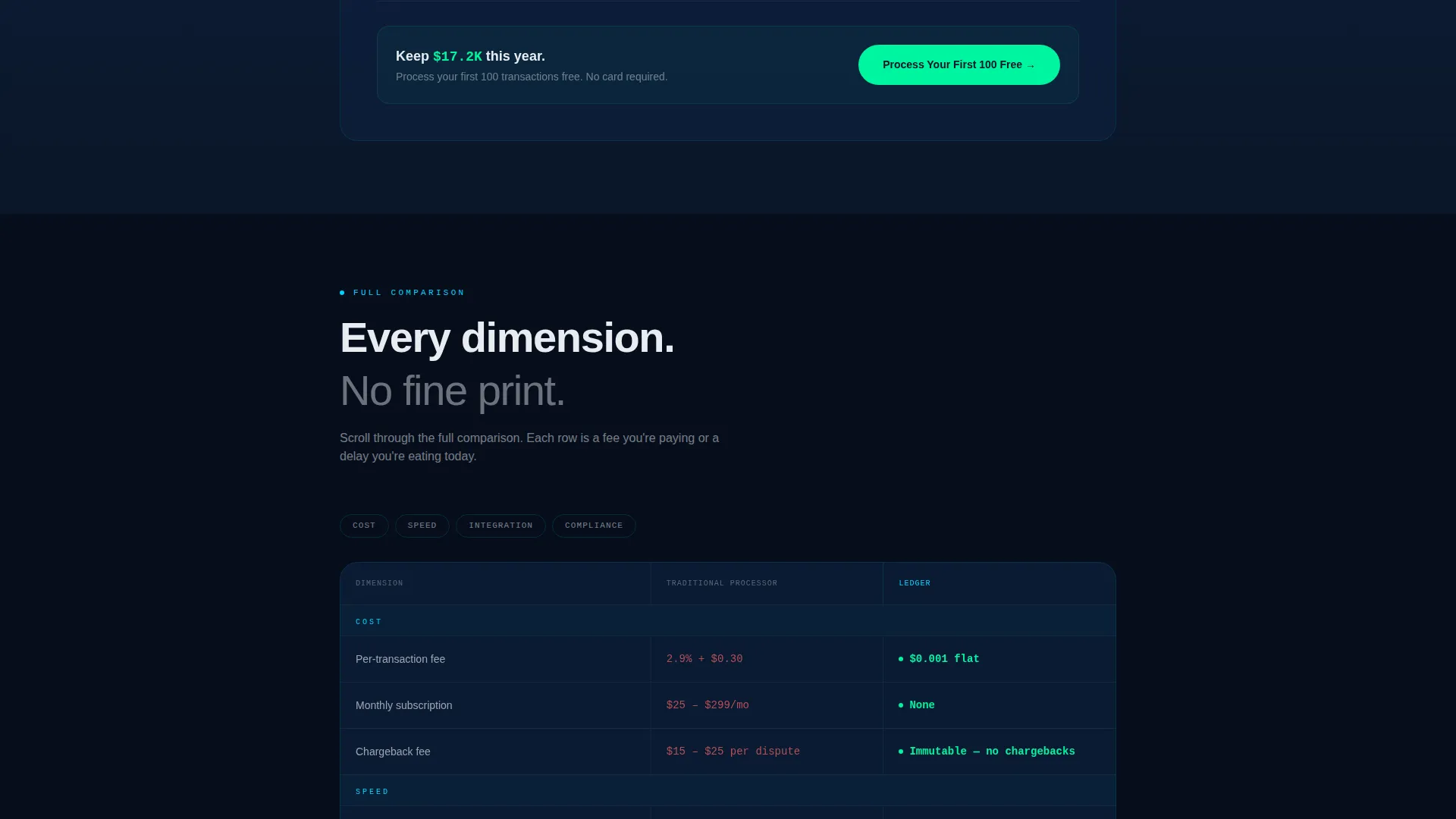
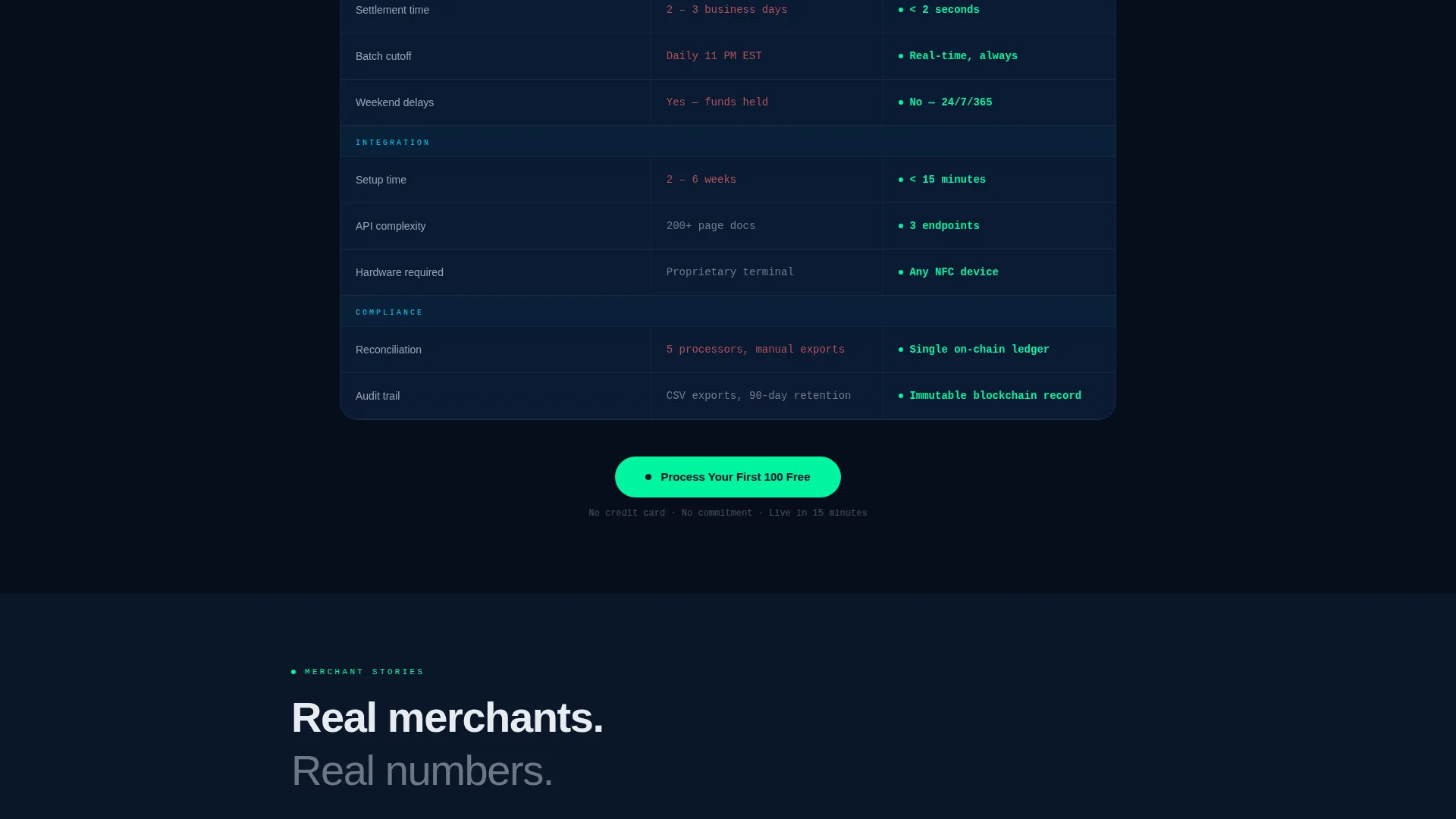
- A scrolling comparison table covering settlement speed, chargeback mechanics, and integration complexity, with each row revealing on scroll
- A primary call-to-action form placed directly below the calculator results, capturing business email and monthly volume range
- A secondary developer path linking to API documentation for technical founders who convert from the bottom up
Feature list
This section covers the core interactive and structural features built into the Ledger landing page template.
Animated Code Snippet Header
The header opens with a live-rendered block of monospaced transaction code in cyan on navy. It displays merchant ID, transaction amount in US dollars, stablecoin equivalent, a gas fee of $0.001, and a confirmation hash that writes itself character by character. A single headline fades in below it.
Interactive Savings Calculator
Before any pitch copy, visitors reach a fully interactive calculator. They enter their monthly transaction volume and average ticket size. The tool instantly renders a side-by-side fee breakdown comparing their current processor to on-chain settlement, shown per transaction, per month, and per year.
Scrolling Comparison Table
The comparison table deepens the calculator results as the visitor scrolls. Each row reveals itself in sequence, covering settlement speed (2 seconds versus 3 days), chargeback mechanics, and integration complexity. The progressive reveal builds a cumulative, data-driven argument without requiring the visitor to read dense copy.
Freemium Trial Call-to-Action
The primary call-to-action, "Process Your First 100 Free," is placed immediately below the calculator results while the savings figure is still on screen. The form requests only a business email and a monthly volume range, keeping friction minimal.
Developer Secondary Path
A secondary call-to-action, "See the API Docs," routes technically minded founders directly to integration documentation. This path captures developer leads who prefer to evaluate the product through code before committing to a sales conversation.
Startup Velocity Visual Theme
The Startup Velocity design theme gives every section a live-data aesthetic. Dark navy surfaces, cyan data elements, and confirmation green reserved for success states and primary actions create a visual language where every color flash signals something meaningful.
Page sections overview
| Section | Purpose |
|---|---|
| Code Snippet Header | Opens with animated transaction code and a fee-comparison headline |
| Savings Calculator | Lets visitors calculate their exact fee savings before reading pitch copy |
| Comparison Table | Reveals rows on scroll comparing fees, speed, chargebacks, and complexity |
| Primary call to action Form | Captures business email and volume range directly below the savings result |
| Developer API Path | Routes technical founders to integration docs as a secondary conversion path |
Design & branding system
The visual identity follows a Startup Velocity theme centered on the Midnight Blue color system. The palette is designed to feel like a trading floor at 2 AM, where dark surfaces are lit by the glow of real-time data and every color flash signals action.
- Deep terminal navy (#0A1628) as the base surface, live-data cyan (#00D4FF) for code and data elements, and ledger white (#E8ECF1) for body text
- Confirmation green (#00F5A0) reserved exclusively for success states and primary call-to-action buttons, making action moments impossible to miss
- Monospaced typography in the header code block reinforces the on-chain, developer-native identity of the product
Mobile & speed optimization
The Ledger template is structured for fast comprehension on any screen size. The calculator and comparison table are the functional core of the page, so their layouts are built to remain clear and usable on smaller viewports.
- The interactive savings calculator renders inputs and results in a stacked layout on mobile, keeping the fee comparison readable without horizontal scrolling
- The scrolling comparison table adapts to narrower screens so each row reveal remains legible and the visual progression stays intact
How this template helps you convert
This template is engineered around a single insight: merchants convert when they see their own money in the numbers, not when they read feature lists. Every structural decision on the page is aimed at shortening the distance between first impression and form submission.
- The calculator forces a personal, specific savings calculation before any marketing copy appears, anchoring the visitor to their own financial reality
- The comparison table reinforces that anchored number with a row-by-row proof of advantage, building momentum toward the call-to-action through accumulated arithmetic
- The "Process Your First 100 Free" form appears at peak emotional engagement, with a minimal two-field ask that removes every possible reason to pause
Other information about this template
This template is a strong fit for the blockchain-based point-of-sale software category and the broader blockchain-based enterprise software space. It is particularly well-suited for teams launching a new payment product into a merchant audience that is skeptical of crypto complexity.
- The template style is a comparison table landing page, which aligns well with high-consideration B2B and prosumer purchase decisions where proof beats persuasion
- The Freemium/Trial landing page direction means the page is optimized for low-friction lead capture, not a hard close, making it appropriate for products with a self-serve onboarding path
- The Calculator/Tool First creative direction makes the page useful on first visit, which supports return traffic and word-of-mouth sharing among cost-conscious merchant communities
- The Code Snippet header concept signals technical credibility to developer audiences without alienating non-technical operators who respond to the plain-language headline beneath it
Theme
Startup Velocity
Creative direction
Calculator/Tool First
Color system
Midnight Blue
Style
Comparison Table
Direction
Freemium/Trial
Page Sections
Animated Code Snippet Header
Interactive Savings Calculator
Scroll-reveal Comparison Table
Freemium Trial Call to Action Placement
Developer API Secondary Path
Midnight Blue Visual Identity
Related questions
Who is the primary audience for this landing page template?
Can I customize the savings calculator values and fee inputs?
What does the primary call-to-action form ask from visitors?
Does the comparison table support adding or removing rows?
Is this template suitable for a developer-led go-to-market strategy?



