Architecture Firm Careers & Recruitment Website Template
Blueprint is an architecture firm careers landing page built around an interactive Career Fit Tool. Visitors adjust three sliders to map their ambitions to open roles, studio locations, and mentorship tracks. The hub-and-spoke layout, Tech Glass visual theme, and freemium conversion model combine to attract M.Arch graduates, mid-career architects, and senior designers who are ready for ambitious work.
by Rocket studio
Quick summary
Blueprint is a single-page, anchor-navigated careers landing page designed for architecture firms that pursue landmark-scale work. Its defining feature is a Career Fit Tool placed before any job listing, giving visitors real, personalized role matches before asking for anything in return. The Electric Indigo color system and Dark Glass Panels header make the page feel as considered as the buildings the firm designs.
Who this template is for
This template is built for architecture firms that need to attract serious design talent rather than casual applicants. It speaks directly to the kind of candidates who read project portfolios at midnight and care deeply about where their career goes next.
- Graduating Master of Architecture students comparing firms during late-night research sessions
- Mid-career project architects quietly exploring lateral moves without broadcasting their search
- Senior designers evaluating whether a firm actually ships ambitious, large-scale work
What problem this template solves
Most architecture careers pages list jobs and stop there. They give candidates nothing to engage with, no signal that the firm understands their specific situation, and no reason to stay past a first scroll. Blueprint solves this by leading with a tool that does real work for the visitor.
- Candidates leave generic careers pages quickly because nothing feels relevant to their career stage
- Firms lose qualified applicants who never find the right role because the structure is too flat
- The gap between "I'm exploring" and "I'm ready to apply" goes unbridged without a clear, low-friction path
What you get with this template
Blueprint delivers a complete single-page careers experience structured around a central interactive tool and five supporting anchor-navigation spokes. Every section is designed to deepen the visitor's sense of fit before asking them to act.
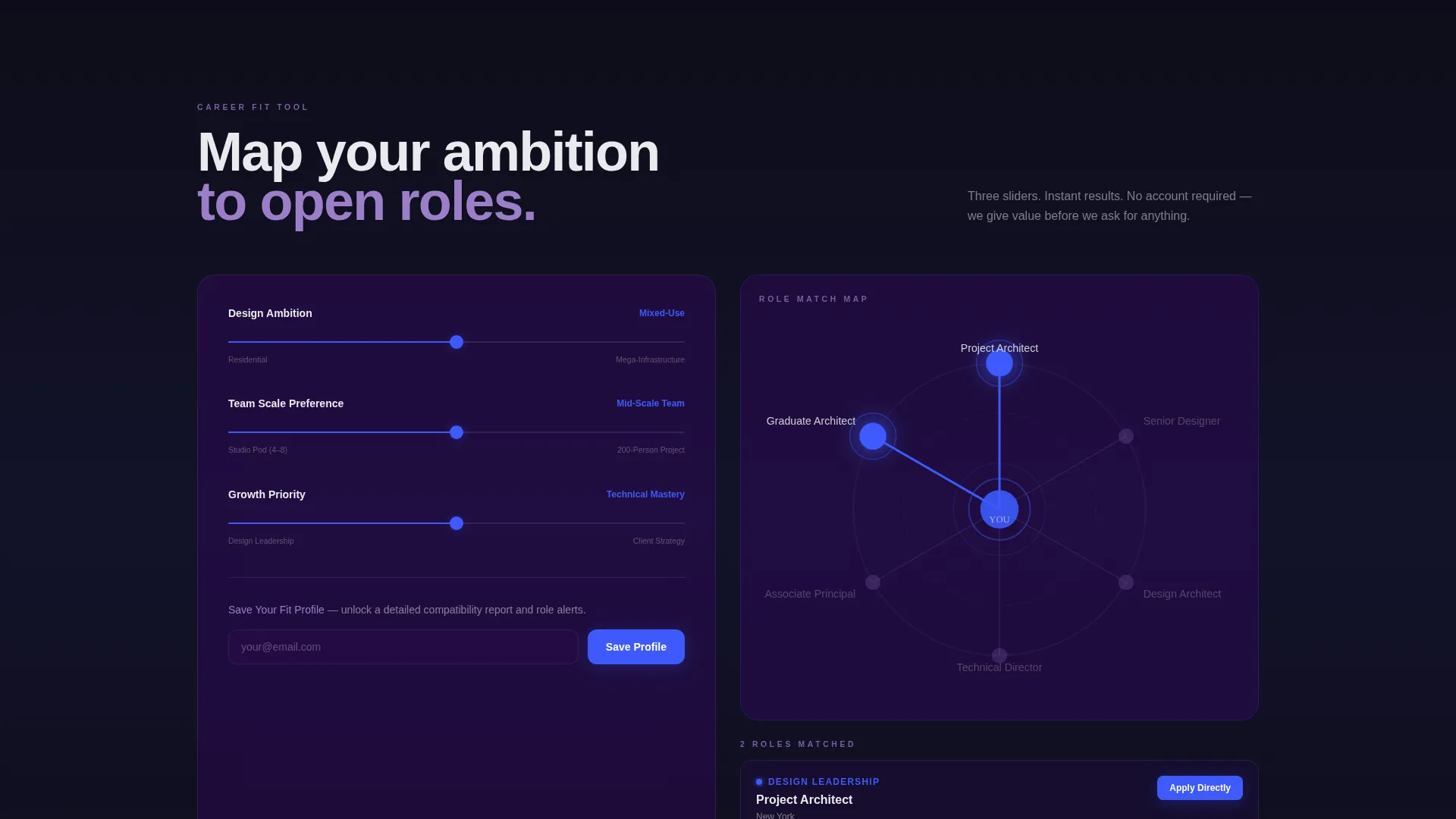
- An interactive Career Fit Tool with three sliders mapping ambition, team scale preference, and growth priority to open roles
- A hub-and-spoke anchor navigation covering Studio Culture, Active Projects, Benefits Architecture, Growth Trajectories, and Application Timeline
- A freemium conversion path: free anonymous tool results, a soft "Save Your Fit Profile" email capture, and an inline "Apply Directly" form beside matched roles
Feature list
This section describes the core built-in capabilities that define what Blueprint does and how it works.
Interactive Career Fit Tool
Three sliders let visitors define their Design Ambition (ranging from residential to mega-infrastructure), Team Scale Preference (studio pod to 200-person project team), and Growth Priority (design leadership, technical mastery, or client strategy). Results appear instantly as glowing nodes on a spoke diagram, mapping inputs to open roles, studio locations, and mentorship tracks.
Hub-and-Spoke Anchor Navigation
A central hub connects to five named spokes: Studio Culture, Active Projects, Benefits Architecture, Growth Trajectories, and Application Timeline. Each spoke is reachable from the top navigation and from the tool results view, so visitors can explore the dimension most relevant to their fit profile without scrolling blindly.
Personalized Section Highlights
As visitors scroll past the Career Fit Tool, each anchor-nav spoke references their tool results with highlighted matches. The page behaves as if it already knows what the visitor is looking for, reinforcing relevance at every scroll depth.
Freemium Conversion Model
The Career Fit Tool delivers genuine value before asking for anything. After results populate, a soft call to action reads "Save Your Fit Profile," requiring only an email address. This unlocks a detailed compatibility report, role-match alerts, and an invitation to a monthly virtual studio tour.
Inline Application Form
Beside any matched role, an "Apply Directly" path expands an inline form with three fields: portfolio URL, earliest start date, and one open-text prompt reading "Describe the building you wish you'd designed." The form stays in context, removing the friction of navigating away to apply.
Dark Glass Panels Header
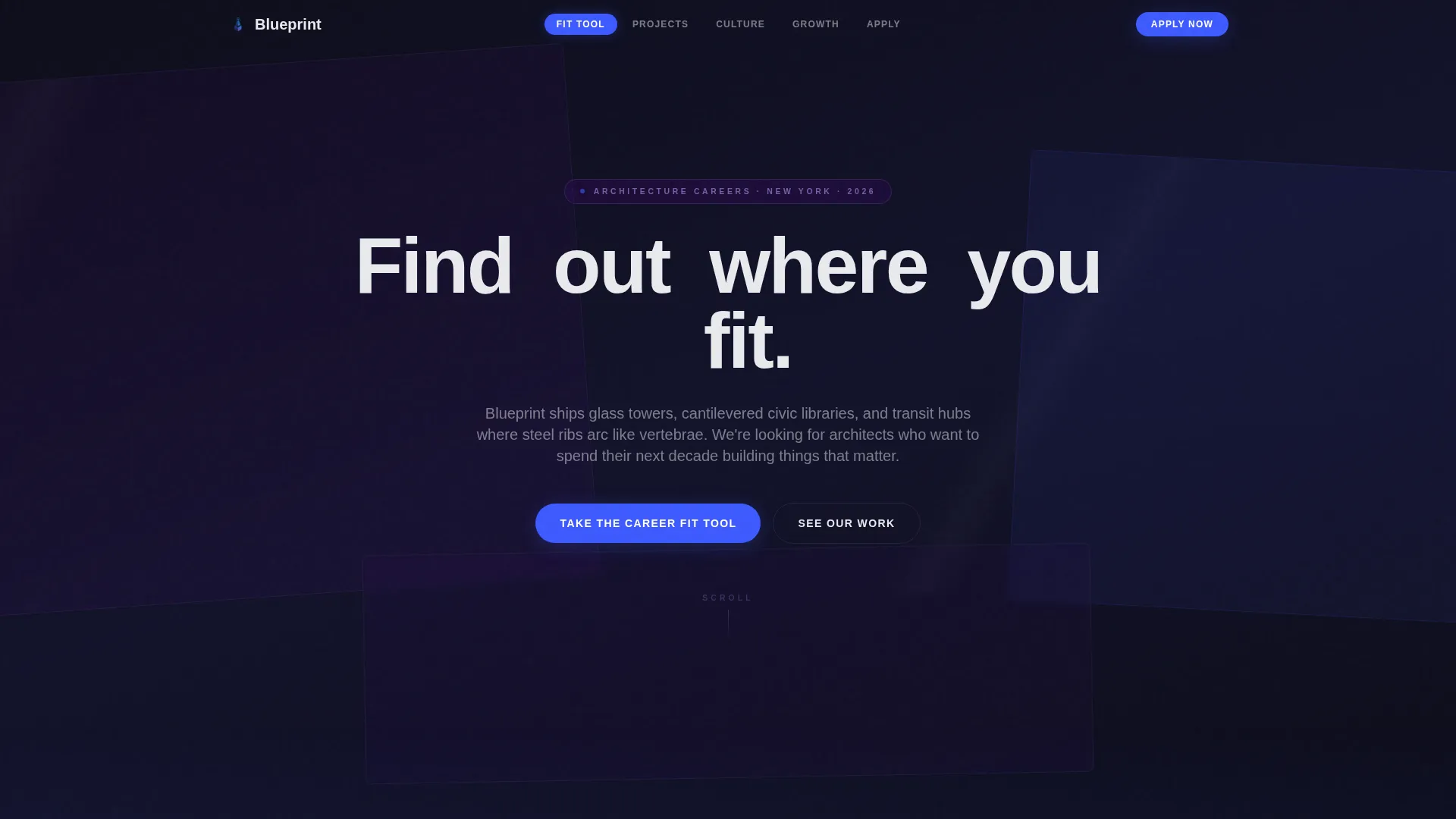
The header renders overlapping translucent rectangles in frosted indigo and obsidian, layered like curtain wall mullions. Architectural wireframes drift slowly behind the glass surfaces. The headline, "Find out where you fit," builds letter by letter in thin white sans-serif as the page loads.
Page sections overview
| Section | Purpose |
|---|---|
| Dark Glass Header | Establishes firm identity and delivers the animated "Find out where you fit" headline |
| Career Fit Tool | Maps visitor inputs across three sliders to matched roles and mentorship tracks |
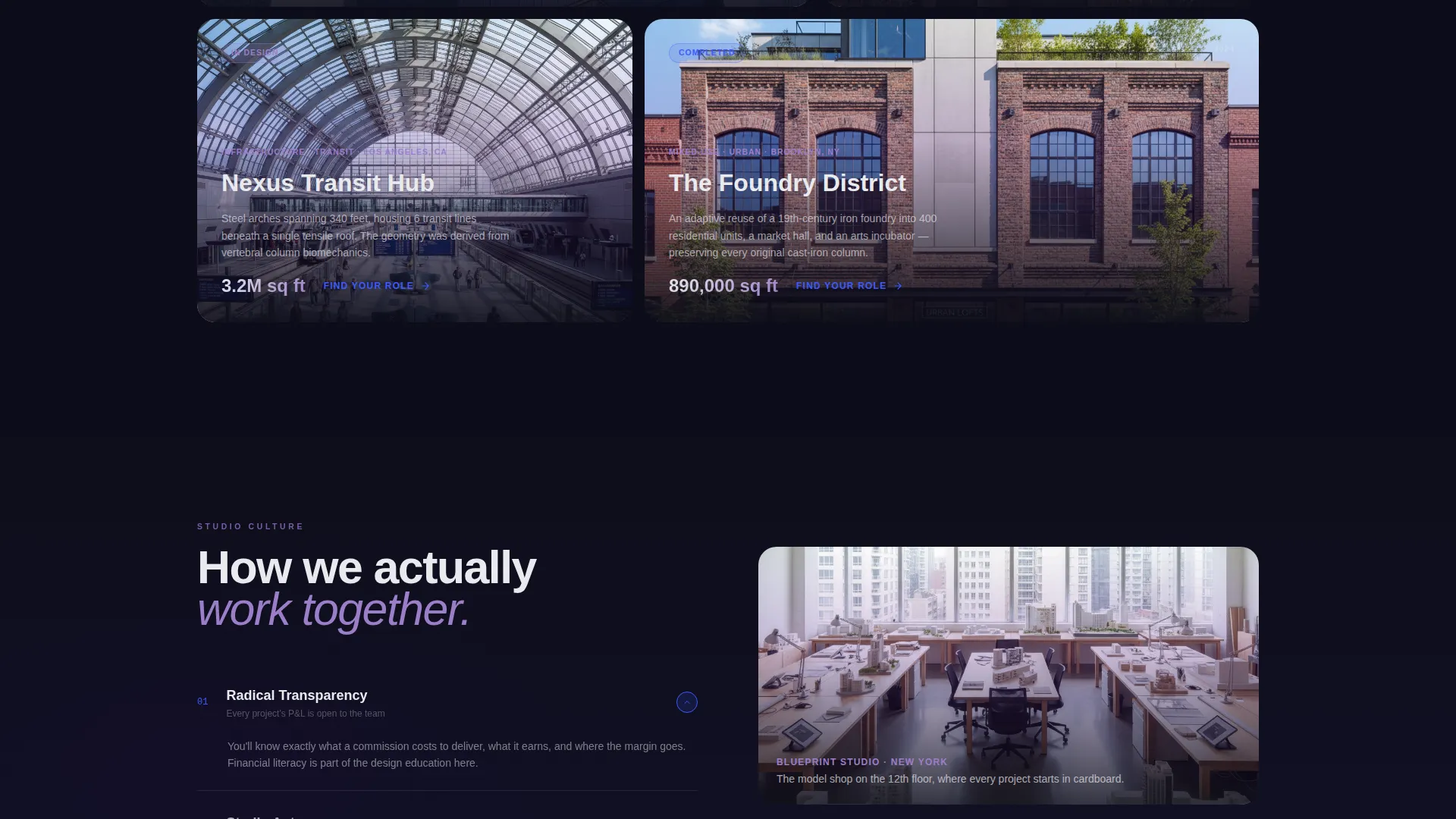
| Studio Culture Spoke | Communicates the working environment and team values for evaluating cultural fit |
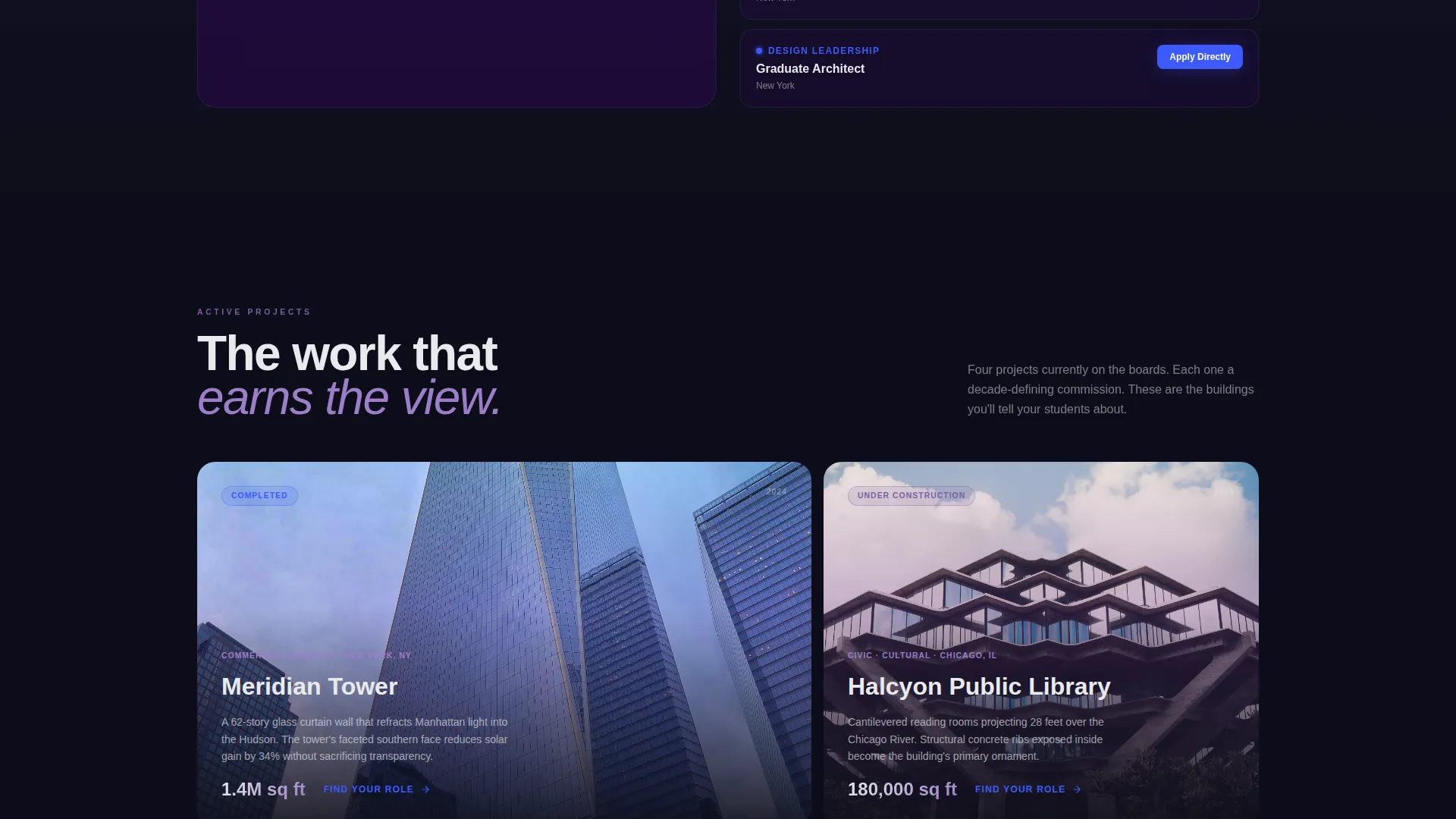
| Active Projects Spoke | Showcases the scale and ambition of current work to attract design-driven candidates |
| Benefits Architecture Spoke | Presents compensation, perks, and support structures relevant to serious candidates |
| Growth Trajectories Spoke | Outlines design leadership, technical mastery, and client strategy career paths |
| Application Timeline Spoke | Sets clear expectations for the hiring process from first contact to offer |
| Save Fit Profile call to action | Captures email in exchange for a detailed compatibility report and role alerts |
| Apply Directly Form | Inline application form with portfolio URL, start date, and open design prompt |
Design & branding system
The Electric Indigo color system keeps the page feeling precise, immersive, and distinctly architectural. Every color decision is intentional, referencing the materials and atmosphere of the firm's built work.
- Core palette: deep obsidian (#0D0D1A) and structural indigo (#4B0082) for all backgrounds, luminous violet (#7B5EA7) for floating text and section accents, and reactive electric blue (#3D5AFE) for hover states and interactive element edges
- Typography floats in accent white (#E8EAED) and violet tones, with thin white divider lines separating sections cleanly
- Interactive elements pulse with electric blue on hover, giving every clickable component a tactile, cursor-ready energy that matches the firm's precision aesthetic
Mobile & speed optimization
The layout is built to hold its visual integrity on smaller screens without losing the immersive quality the design demands. The interactive tool and spoke navigation remain fully usable on touch devices.
- The three-slider Career Fit Tool and spoke diagram reflow cleanly for mobile viewports, keeping the core experience intact
- Anchor navigation collapses into a scannable mobile menu so candidates can jump directly to any spoke section from a phone
- Section transitions and the header's subtle cursor-responsive reflection effects are scoped to respect device capability without breaking the layout
How this template helps you convert
Blueprint is structured so that value flows to the visitor before any commitment is requested. Each conversion step builds on the one before it.
- The Career Fit Tool gives candidates an immediate, personalized result with zero friction, establishing trust and demonstrating that the firm understands nuanced career motivations before asking for an email.
- The "Save Your Fit Profile" prompt follows naturally once results feel meaningful, making the email capture feel like a useful next step rather than a gate, and the unlocked compatibility report reinforces that exchange.
- The inline "Apply Directly" form appears precisely where a matched candidate is most motivated, reducing the distance between interest and action to a single in-context decision.
Other information about this template
Blueprint is categorized under Architecture Firm Website Templates with a specific focus on the architecture firm careers page niche. It is built as a hub-and-spoke anchor navigation landing page, making it a structured single-page experience rather than a multi-page site.
- The template style is Hub and Spoke with Anchor Navigation, a format that supports non-linear exploration while keeping every section reachable from one central point
- The theme is Tech Glass, a visual direction that pairs high-contrast dark backgrounds with translucent layered panels and glowing interactive states
- The freemium and trial conversion model is built into the page architecture, not added as an afterthought, so the tool-first experience is native to the layout
- The template is designed for architecture firms that want to position careers as a serious design decision, not a routine HR function
Theme
Tech Glass
Creative direction
Calculator/Tool First
Color system
Electric Indigo
Style
Hub & Spoke (Anchor Nav)
Direction
Freemium/Trial
Page Sections
Interactive Three-slider Career Fit Tool
Hub-and-spoke Anchor Navigation
Personalized Spoke Highlights
Freemium Email Capture Path
Inline Apply Directly Form
Dark Glass Panels Animated Header
Related questions
Can I customize the Career Fit Tool sliders for my firm's actual roles?
Does the Save Your Fit Profile email capture require a third-party service?
Is the spoke diagram on the results screen interactive?
Can I add or remove spokes from the hub-and-spoke navigation?
Who is this landing page template designed for?



