Construction Company FAQ Website Template
Blueprint is a construction company FAQ landing page built around a live project cost calculator. It uses comparison tables to answer the questions contractors and homeowners actually argue about, demolition versus framing costs, permit timelines, and scope breakdowns. The Electric Indigo color system and app-download flow turn a single page into a trust-building, lead-generating tool for any construction outfit.
by Rocket studio
Quick summary
Blueprint is a single-page construction FAQ resource built for crews that pour foundations, frame walls, and hand over keys. A live cost estimator fills the top of the page, and stacked comparison tables answer the pricing and permit questions visitors actually come looking for. Every section is scannable, skippable, and built to earn an app download.
Who this template is for
This template works best for construction companies that want to replace guesswork with transparent pricing information. It speaks directly to the people who land on construction sites at midnight looking for answers before they commit.
- Homeowners pricing a kitchen remodel, addition, or full gut-job and needing a ballpark before calling anyone
- General contractors sourcing a reliable subcontractor for commercial tenant improvement projects
- Property managers budgeting recurring work such as parking lot repaving for the next quarter
What problem this template solves
Most construction websites make visitors search for basic pricing and timeline information. They bury scope details, hide permit requirements, and offer nothing useful until a form is submitted. Blueprint flips that logic.
- Visitors land on a working cost estimator instead of a stock photo and a mission statement
- Comparison tables answer specific cost and timeline questions without forcing a phone call
- The app download path captures leads only after the template has already delivered real value
What you get with this template
Blueprint is a fully designed, single-page layout built around the calculator-first principle. Every component is already placed and ready to customize with your company's real numbers and scope details.
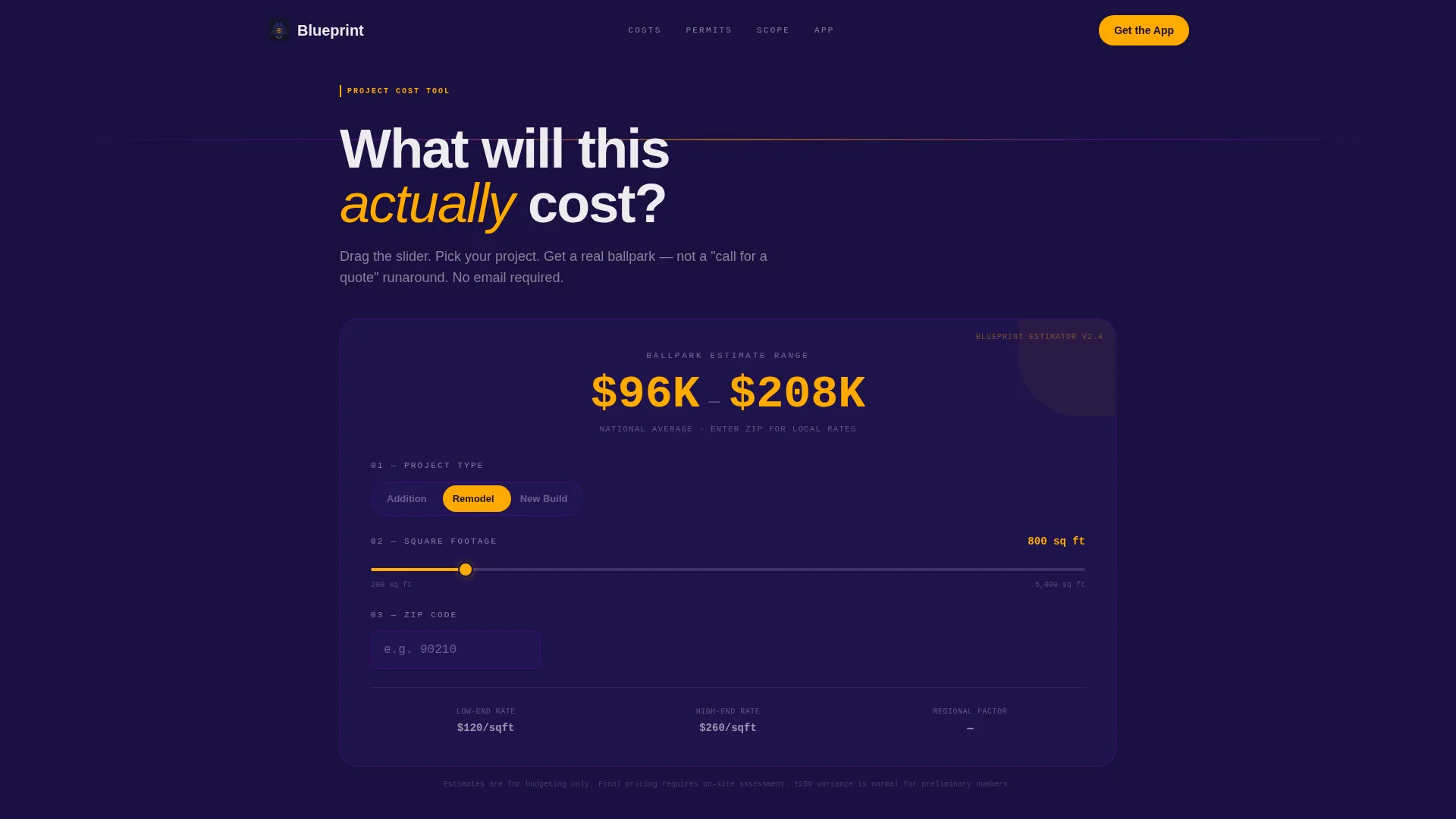
- A viewport-filling project cost calculator with three visible inputs: project type toggle, square footage slider, and zip code entry
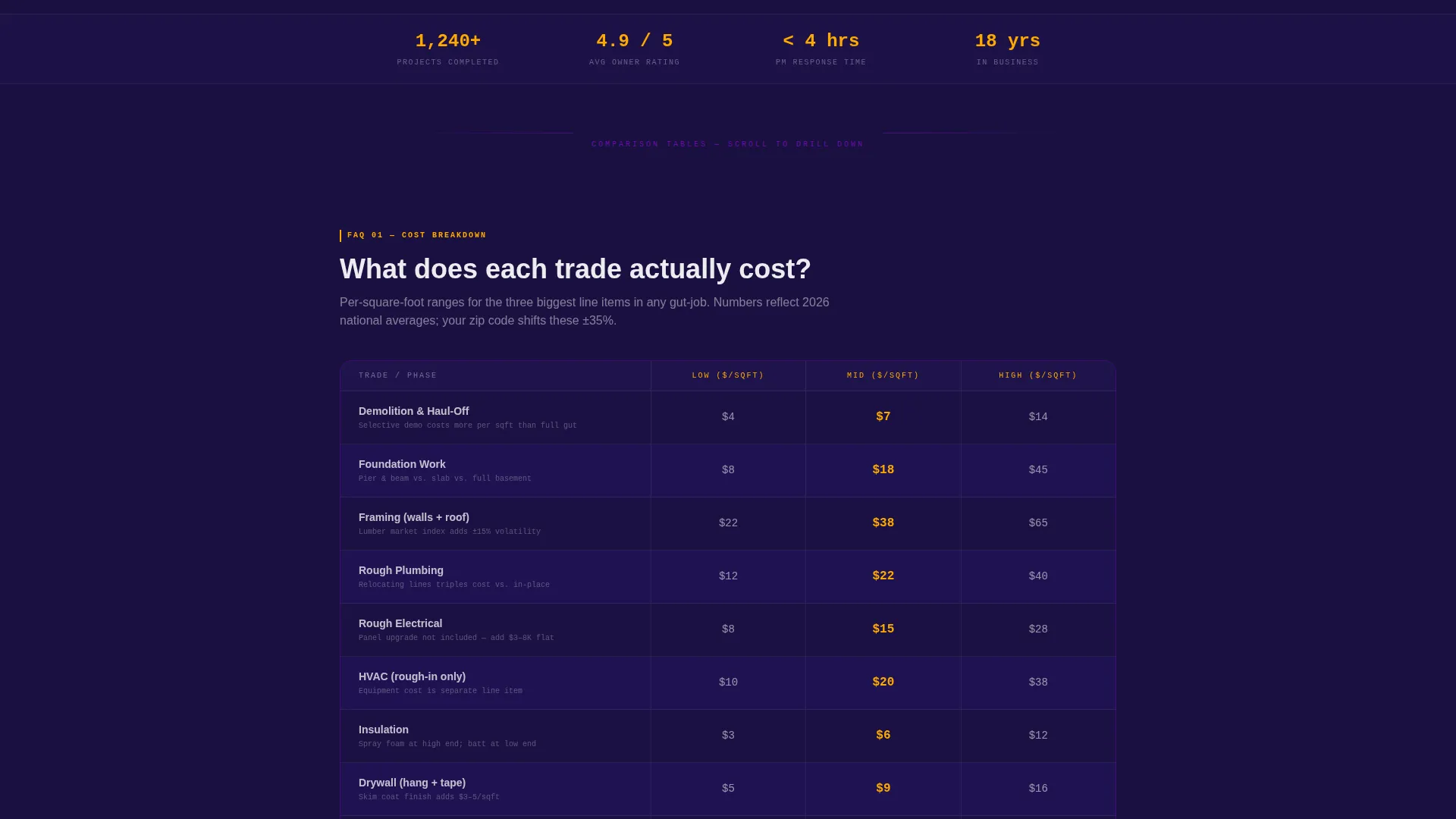
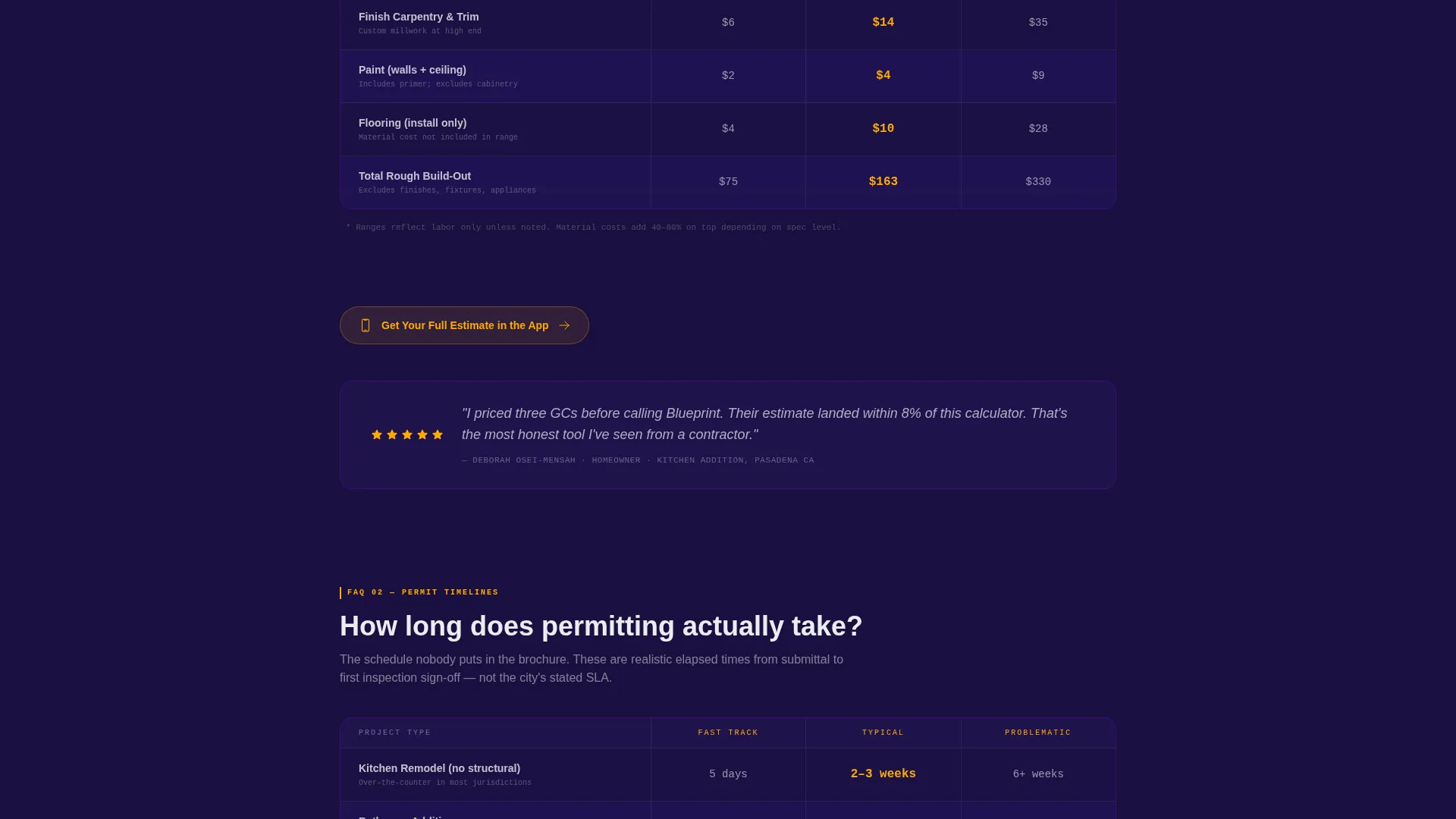
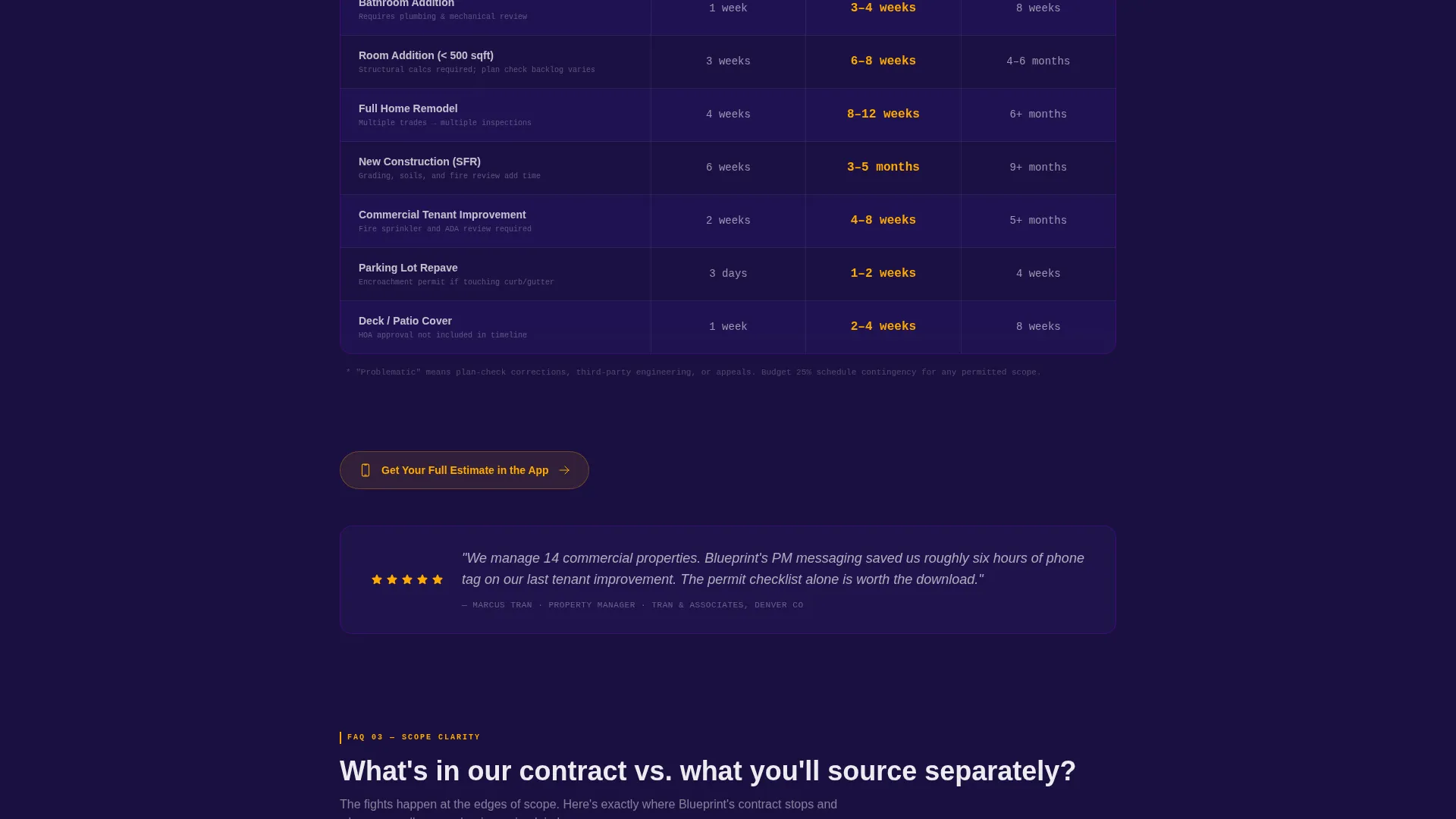
- Stacked comparison tables covering demolition versus framing versus finish costs, permit timelines by project type, and included versus excluded scope
- A sticky app-download call to action with a two-field form and a secondary QR code path for desktop visitors
Feature list
This section walks through the specific components built into the Blueprint landing page.
Live Project Cost Calculator
The header fills the viewport with a three-input estimator. Visitors choose a project type (addition, remodel, or new build), drag a square footage slider, and enter a zip code. The ballpark cost range updates live as inputs change, displayed in safety-vest amber so the number is impossible to miss.
Stacked Comparison Tables
Three focused comparison tables stack vertically below the calculator. Each one answers a single FAQ cluster: cost breakdowns by trade, permit timelines by project type, and a scope inclusion versus exclusion breakdown. Indigo row striping and amber cell highlights draw the eye to the data points visitors care most about.
Sticky App Download Bar
After the first calculator interaction, a sticky bottom bar appears with the primary call to action: "Get Your Full Estimate in the App." It follows the visitor through the scroll without blocking content, then reappears anchored below each comparison table.
Two-Field Lead Capture Form
Tapping the app download call to action opens a minimal form requesting a phone number and project type. The project type field pre-fills from the calculator selection, reducing friction and keeping the experience consistent from tool to conversion.
QR Code for Desktop Visitors
Desktop visitors who prefer not to type a phone number see a secondary QR code path. This lets them scan directly to the app without breaking their browsing flow, making the download offer accessible across device types.
Directory-Style Navigation Logic
Every comparison table section is self-contained and skippable. Visitors can jump directly to the question most relevant to them, get a clear answer, and move to the next action. No section requires reading the one before it.
Page sections overview
| Section | Purpose |
|---|---|
| Cost Calculator Header | Opens with live estimator tool filling the full viewport |
| Project Type Toggle | Lets visitor select addition, remodel, or new build |
| Square Footage Slider | Adjusts scope size and updates cost range live |
| Zip Code Entry | Localizes the ballpark estimate by region |
| Cost Breakdown Table | Compares demolition, framing, and finish costs side by side |
| Permit Timeline Table | Shows permit lead times by project type |
| Scope Inclusion Table | Clarifies what is covered versus what is separate |
| Sticky call to action Bar | Persists app download prompt after calculator interaction |
| App Download Form | Captures phone number and pre-filled project type |
| Desktop QR Code | Offers scan-to-download path for non-mobile visitors |
Design & branding system
Blueprint uses an Electric Indigo color system that feels like a blueprint pinned under a UV inspection lamp. The palette is precise, high-contrast, and built to direct attention without visual noise.
- Deep site-plan navy (#1A1040) and live-wire indigo (#4B0082) form the dark background field, keeping the layout feeling technical and grounded
- Poured-concrete pale (#EDECF0) handles body text and table content, giving comfortable reading contrast against the dark field
- Safety-vest amber (#FFAA00) is reserved strictly for interactive elements, live cost totals, call to action buttons, and highlighted table cells that visitors typically dispute
Mobile & speed optimization
The Blueprint layout is designed to work just as well on a phone as it does on a wide desktop monitor. The calculator, tables, and download form are all structured for touch-first interaction.
- The project type toggle, square footage slider, and zip code field are each sized and spaced for comfortable thumb use on a mobile screen
- The sticky app download bar sits at the bottom of the viewport on mobile, exactly where a thumb naturally rests, reducing the tap distance to zero
- Comparison tables use horizontal scroll behavior on narrow screens so no data is clipped or hidden on smaller devices
How this template helps you convert
Blueprint earns trust before it asks for anything. The conversion path is built on a give-first principle: deliver a useful answer, then make the next step obvious.
- The calculator gives an immediate ballpark cost range, which builds credibility in the first interaction before any contact information is requested
- Comparison tables answer follow-up pricing and permit questions that would otherwise require a phone call, keeping the visitor engaged through the scroll
- The sticky app download call to action appears at the natural moment of highest intent, right after a visitor has received useful information, and the pre-filled form removes the last barrier to tapping through
Other information about this template
Blueprint sits at the intersection of the construction company FAQ page niche and the broader construction company website templates category. A few additional points worth knowing before you customize it.
- The template style is a comparison table layout, making it well suited for any trade contractor who needs to present side-by-side pricing or timeline data clearly
- The Directory and Discovery theme means the page is organized like a reference resource: defined sections, clear labels, and a visitor experience that rewards skimming
- The creative direction is calculator-first, meaning the tool is not a secondary widget but the primary reason the page exists
- The app download landing page direction makes this template especially useful if your construction business has a companion estimator app or plans to build one
- This template is built under the Technology category, reflecting the tool-driven, data-forward nature of the layout rather than a traditional portfolio or brochure approach
Theme
Directory & Discovery
Creative direction
Calculator/Tool First
Color system
Electric Indigo
Style
Comparison Table
Direction
App Download
Page Sections
Live Project Cost Calculator
Stacked Comparison Tables
Sticky App Download Call to Action
Pre-filled Lead Capture Form
Desktop QR Code Path
Directory-style Section Logic
Related questions
Can I update the cost figures in the comparison tables with my own numbers?
Does the calculator require a backend connection to show live estimates?
Is Blueprint suitable for a specialty subcontractor rather than a general contractor?
How does the QR code for desktop visitors work?
Can the two-field form be used for a goal other than an app download?



