Sign & Banner Digital Presence Careers Website Template
Board is a scroll-reveal landing page template built for sign and banner industry job boards. It connects wide-format print operators, vinyl wrappers, fabricators, and install crews with shops that actually understand the trade. With a Dashboard Preview header, a Problem-to-Solution arc, and a trade-specific comparison table, it makes the case for niche hiring fast and clearly.
by Rocket studio
Quick summary
Board is a single-page, scroll-reveal landing page template purpose-built for the sign and banner job board market. It opens with a live-style Dashboard Preview header showing active listings and real hiring counters. The page then walks visitors through a Problem-to-Solution arc before landing on a detailed feature comparison table. Every section targets shop owners, production managers, and trade-specific job seekers.
Who this template is for
This template is built for founders and operators launching a job board focused on the sign and banner trade. It speaks directly to the people who hire and the people who are hired in that world.
- Shop owners and production managers who need trade-qualified hires fast
- Wide-format print operators, vinyl wrappers, fabricators, and install crews looking for relevant work
- Entrepreneurs building a niche hiring platform for the sign, graphics, and wide-format industry
What problem this template solves
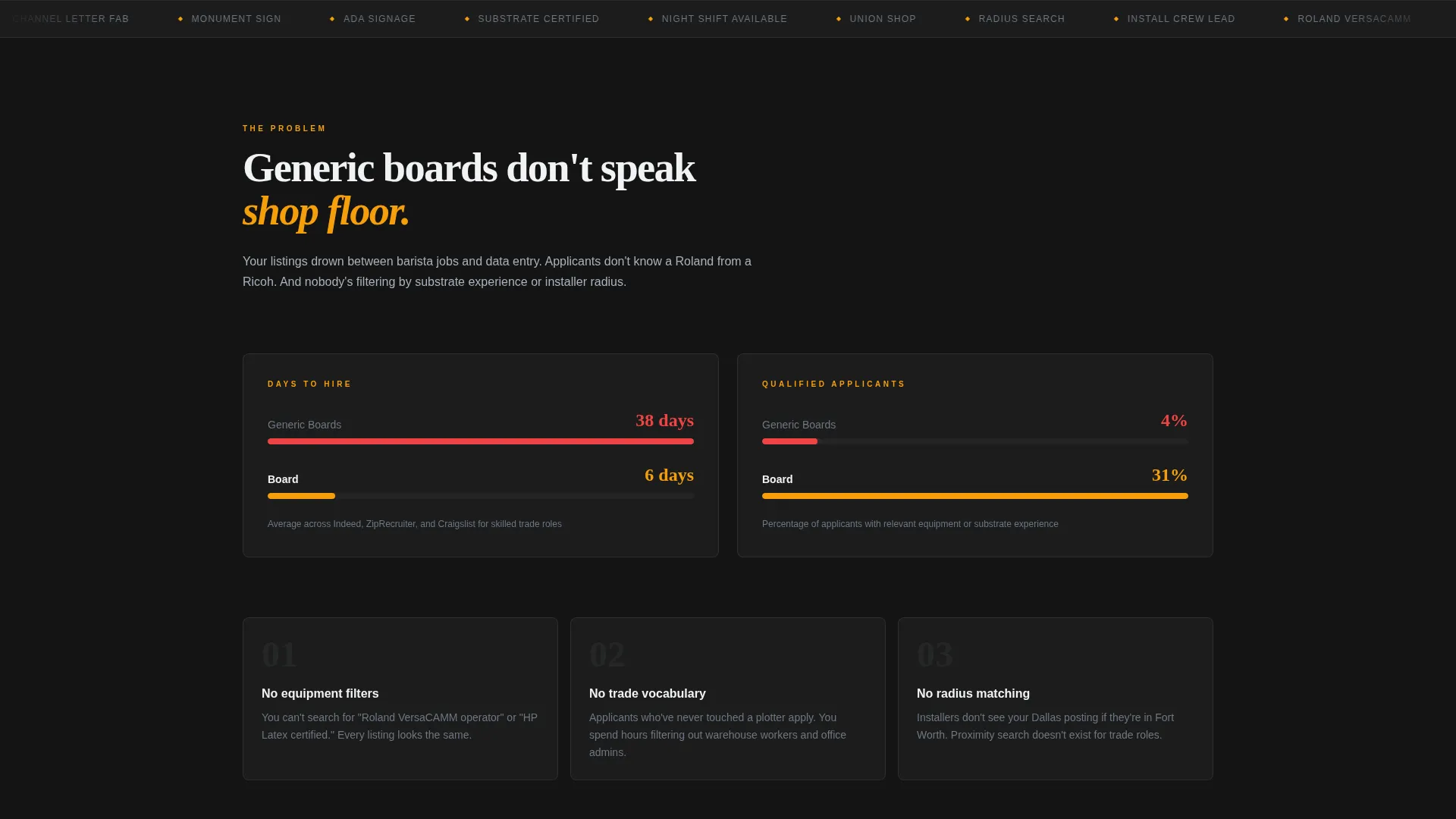
Generic job boards force sign shops to sort through barista listings and data entry posts to find one qualified applicant. Trade workers waste time on boards that cannot filter by equipment type, install specialty, or shift availability. Board addresses this gap head-on.
- No way to filter by substrate experience, equipment certification, or installer radius on general platforms
- Shop owners face long hiring timelines because listings disappear into irrelevant search results
- Job seekers in the trade cannot find work near them without browsing dozens of unrelated postings
What you get with this template
You get a complete, single-page scroll-reveal layout that builds the product story section by section as the visitor scrolls. Every element is designed to reflect the urgency and specificity of trade hiring.
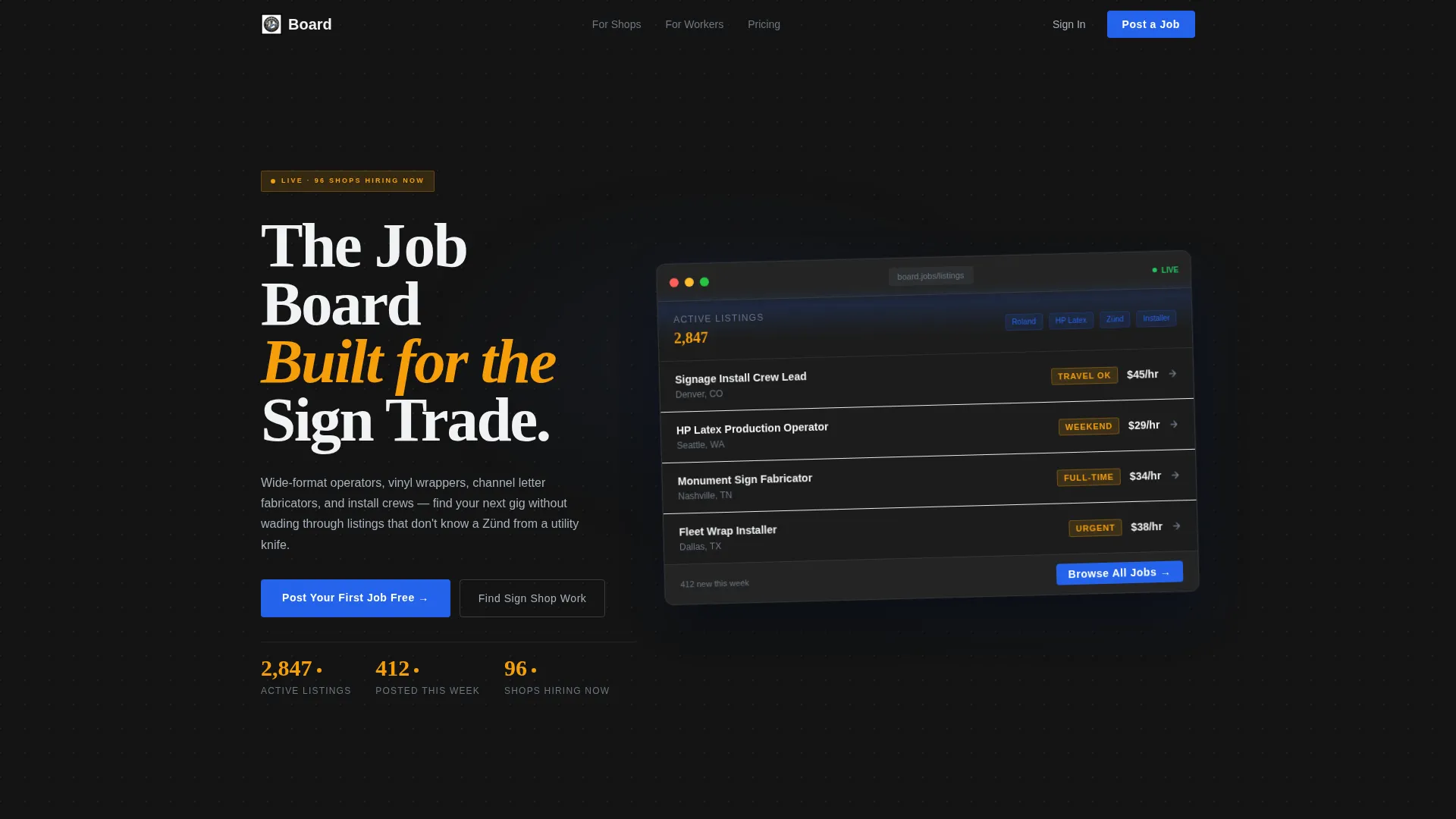
- A live-style Dashboard Preview header with scrolling job listings and upward-ticking counters
- A progressive Problem-to-Solution arc with stat reveals, feature animations, and a twelve-criteria comparison table
- Two distinct call-to-action paths: one for shop owners posting jobs, one for trade workers searching by zip code and role
Feature list
This template is built around a small set of high-impact sections that each carry clear purpose. Every feature below comes directly from the template design described in the source brief.
Scroll-Reveal Progressive Layout
Each section animates into view as the visitor scrolls. Features reveal one by one, building understanding before the comparison table appears. This pacing keeps attention high and reduces overwhelm.
Live Dashboard Preview Header
The header shows a stylized job board interface with real-looking listings scrolling in. Three counters tick upward displaying active listings, weekly postings, and shops currently hiring. The dashboard floats at a slight angle over a deep carbon background with a depth shadow for visual depth.
Problem-to-Solution Arc
Three sequential reveal blocks walk visitors through the hiring pain, why general boards fail, and how trade-specific filters solve it. Each block uses stats and concrete language to earn trust before asking for a click.
Twelve-Criteria Comparison Table
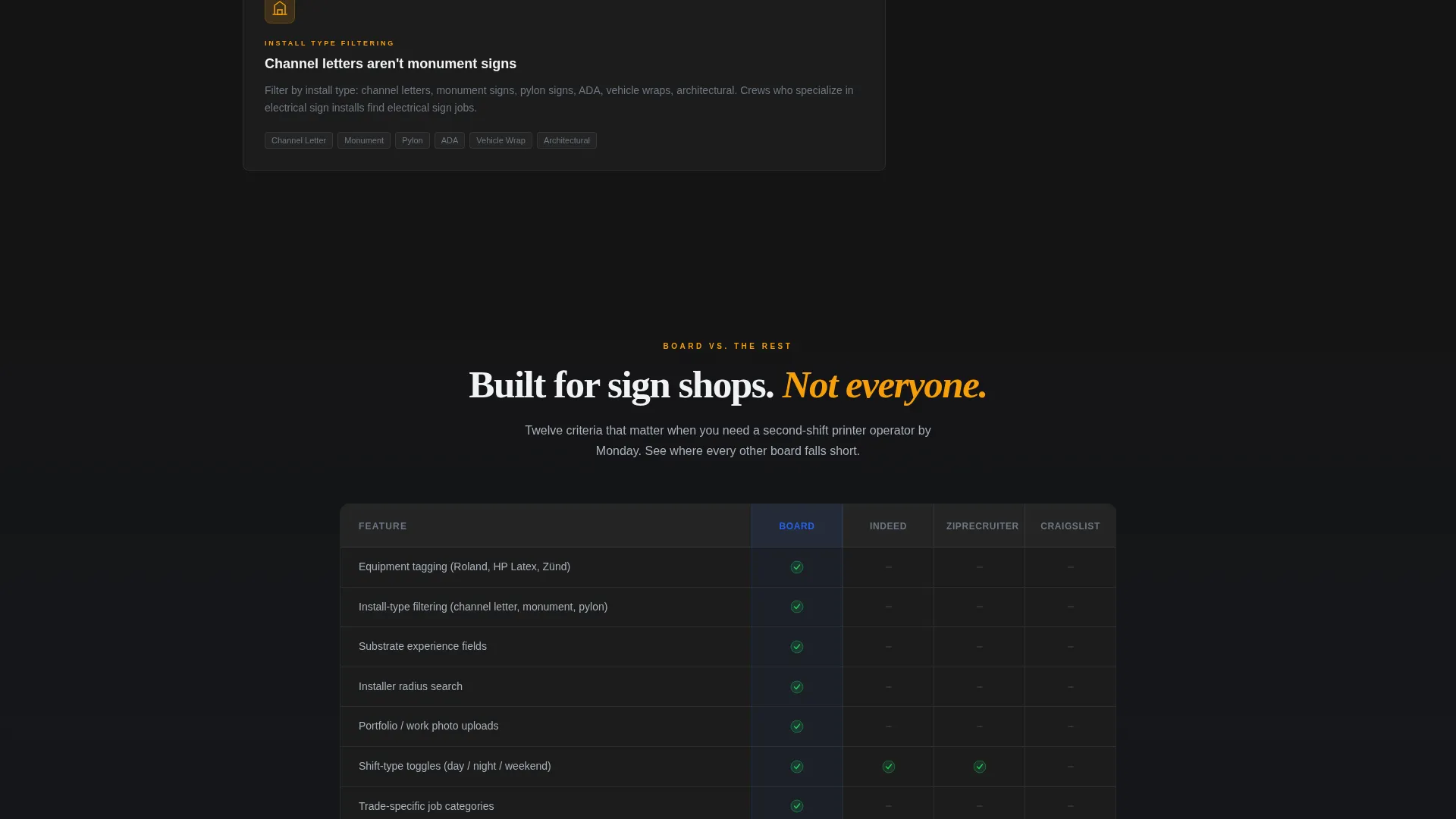
A full feature table compares the board against three competing platforms across criteria including equipment tagging, install-type filtering, portfolio uploads, radius-based matching, shift scheduling, and substrate experience fields. Green checkmarks stack in the board's column while gray dashes fill the others.
Dual Call-to-Action Paths
The primary call to action, "Post Your First Job Free," appears after the header and again anchored below the comparison table. A secondary path invites job seekers with a zip code input and a trade-role selector covering wrapper, fabricator, printer operator, designer, and installer roles.
Trade-Specific Filter Display
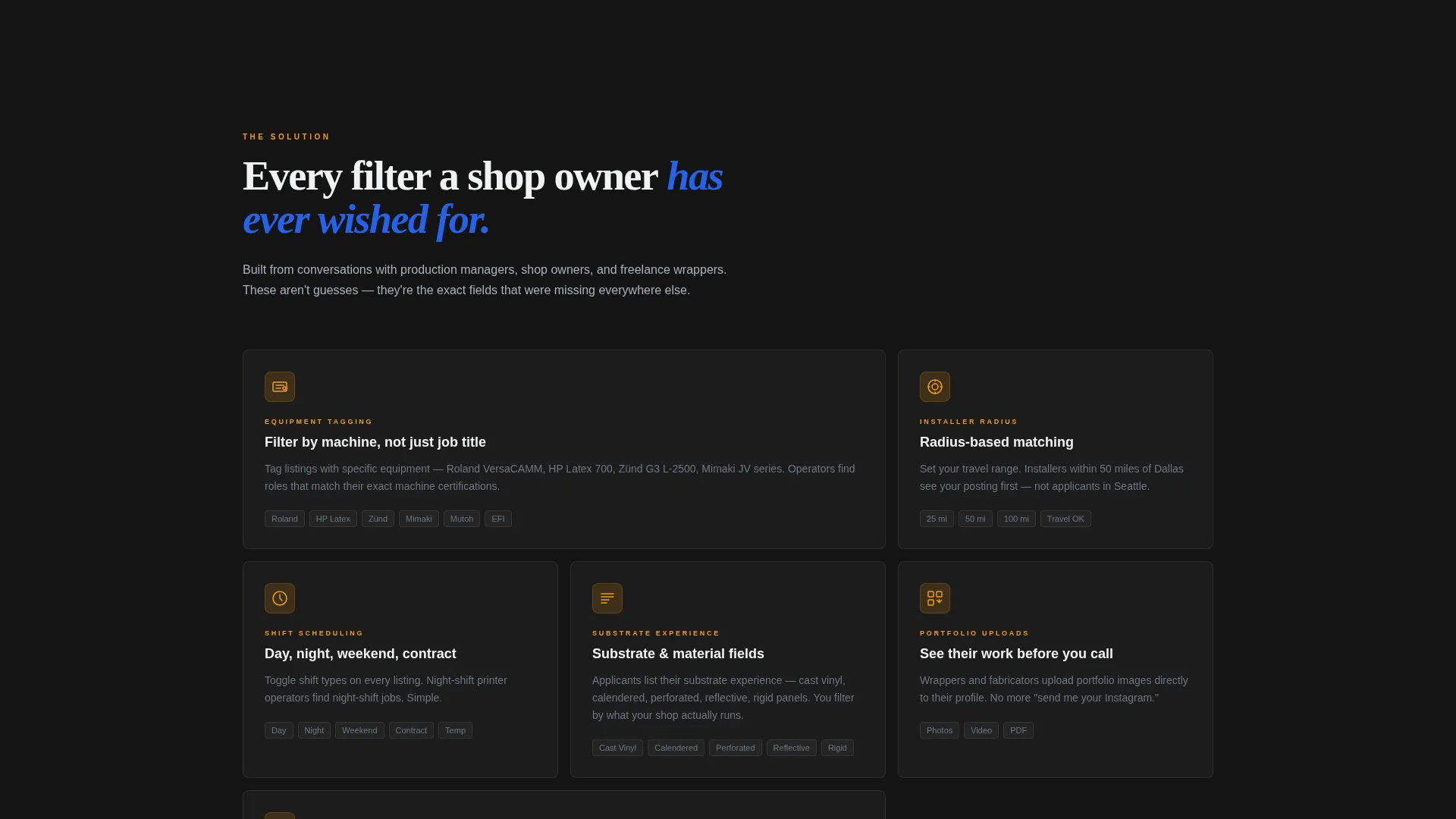
The template visualizes filters built for the industry: equipment brand experience, installer radius search, and shift-type toggles. Each filter animates into place as part of the solution reveal sequence, demonstrating product specificity before the visitor reaches the main call to action.
Page sections overview
| Section | Purpose |
|---|---|
| Dashboard Preview Header | Shows live-style job listings and hiring counters to establish credibility immediately |
| Pain Stat Reveal | Displays a split stat comparing hiring timelines on generic versus trade-specific boards |
| General Board Failures | Lists why broad platforms fail sign and banner hiring needs |
| Solution Feature Reveal | Animates trade-specific filters into view one by one as the visitor scrolls |
| Comparison Table | Pins the board against three competitors across twelve trade criteria |
| Job Seeker call to action | Presents a zip code input and trade-role selector for workers searching for sign shop work |
Design & branding system
The visual identity channels a Startup Velocity theme through a Carbon Fiber palette. The look references the back of a CNC router: matte black housings, brushed metal rails, and one glowing status light that signals the machine is ready.
- Deep shop-floor black (#141414) dominates all backgrounds; machined aluminum (#A8B2BD) carries body text and secondary interface elements
- Hazard-tape amber (#F59E0B) marks counters, badges, and urgency indicators throughout the page
- Acetylene-torch blue (#2563EB) appears only on primary action elements, reserved for buttons and interactive tap targets
Mobile & speed optimization
The template is structured for clean rendering across screen sizes. The scroll-reveal sections stack naturally on smaller viewports without breaking the narrative flow.
- Floating dashboard card and angled preview scale proportionally on mobile screens
- Comparison table is designed to scroll horizontally on narrow viewports so no criteria are hidden
- Call-to-action buttons and the zip code input field remain clearly tappable at mobile sizes
How this template helps you convert
Every design decision in this template points toward one outcome: getting a shop owner to post their first job or a trade worker to search for work nearby. The page earns the click before it asks for it.
- The dashboard header establishes immediate credibility with specific numbers, live-feel listings, and a visual product preview that makes the board feel real and active before the visitor reads a word of copy.
- The Problem-to-Solution arc addresses objections in sequence so that by the time the visitor reaches the comparison table, they already understand why trade-specific hiring is different and why this board was built for it.
Other information about this template
This template is categorized under Technology and the Sign and Banner Digital Presence subcategory, making it a strong fit for niche platform launches in the wide-format and sign industry.
- The template style is Scroll Reveal (Progressive), meaning sections animate in as the user scrolls rather than loading all at once
- The header concept is a Dashboard Preview, a pattern common in software-as-a-service landing pages that creates a product-feels-real impression before signup
- The creative direction follows a Problem-to-Solution Arc, a proven structure for comparison-driven landing pages where the visitor needs to be educated before converting
- The landing page direction is Comparison/Versus, anchored by a detailed side-by-side feature table designed to position the board against Indeed, ZipRecruiter, and Craigslist
Theme
Startup Velocity
Creative direction
Problem→Solution Arc
Color system
Carbon Fiber
Style
Scroll Reveal (Progressive)
Direction
Comparison/Versus
Page Sections
Scroll-reveal Progressive Layout
Live Dashboard Preview Header
Problem-to-solution Arc
Twelve-criteria Comparison Table
Dual Call-to-action Paths
Animated Trade-specific Filter Display
Related questions
Can I customize the job listing examples shown in the dashboard header?
Is this template designed for both job posters and job seekers?
How many sections does this landing page include?
Does the comparison table come ready to edit?
Can this template be adapted for a job board in a different trade niche?



