Booking - Powerful Restaurant Landing Page Template
Booking is a comparison-focused landing page template built for food and beverage software. It leads with a live ROI calculator above the fold, drops into a feature comparison table, and closes with a live dashboard preview. The design uses a dark iridescent palette to match the tone of modern restaurant operations software.
by Rocket studio
Quick summary
Booking is a single-page template designed for food and beverage booking software. It opens with a fully functional ROI estimator, moves into a structured competitor comparison table, and ends with a live dashboard preview. The dark, iridescent visual system reflects a modern operations environment and every section is built to earn trust before asking for a click.
Who this template is for
This template is built for teams selling or marketing restaurant operations software. It speaks directly to the people who evaluate, buy, and switch platforms.
- Operations managers at multi-location restaurant groups managing reservations and waitlists
- Catering directors quoting complex events with open bars and dietary restrictions
- Beverage directors forecasting inventory pars across seasonal menus
What problem this template solves
Most software landing pages talk about features. This template proves value. Restaurant operations professionals are tired of vague promises. They need a page that shows them the numbers before asking them to book a demo.
- Spreadsheet-driven reservation and catering workflows create costly gaps that are hard to quantify
- Comparison shopping across platforms is slow when no single page lays out feature parity clearly
- Generic software pages do not speak the language of an ops manager justifying a switch to ownership
What you get with this template
You get a structured, single-page layout that moves a skeptical operations buyer from curiosity to confidence. Every section has a clear job. Nothing is decorative for its own sake.
- A live ROI calculator above the fold with three inputs and animated, real-time output
- An expandable competitor comparison table covering the features operators actually debate
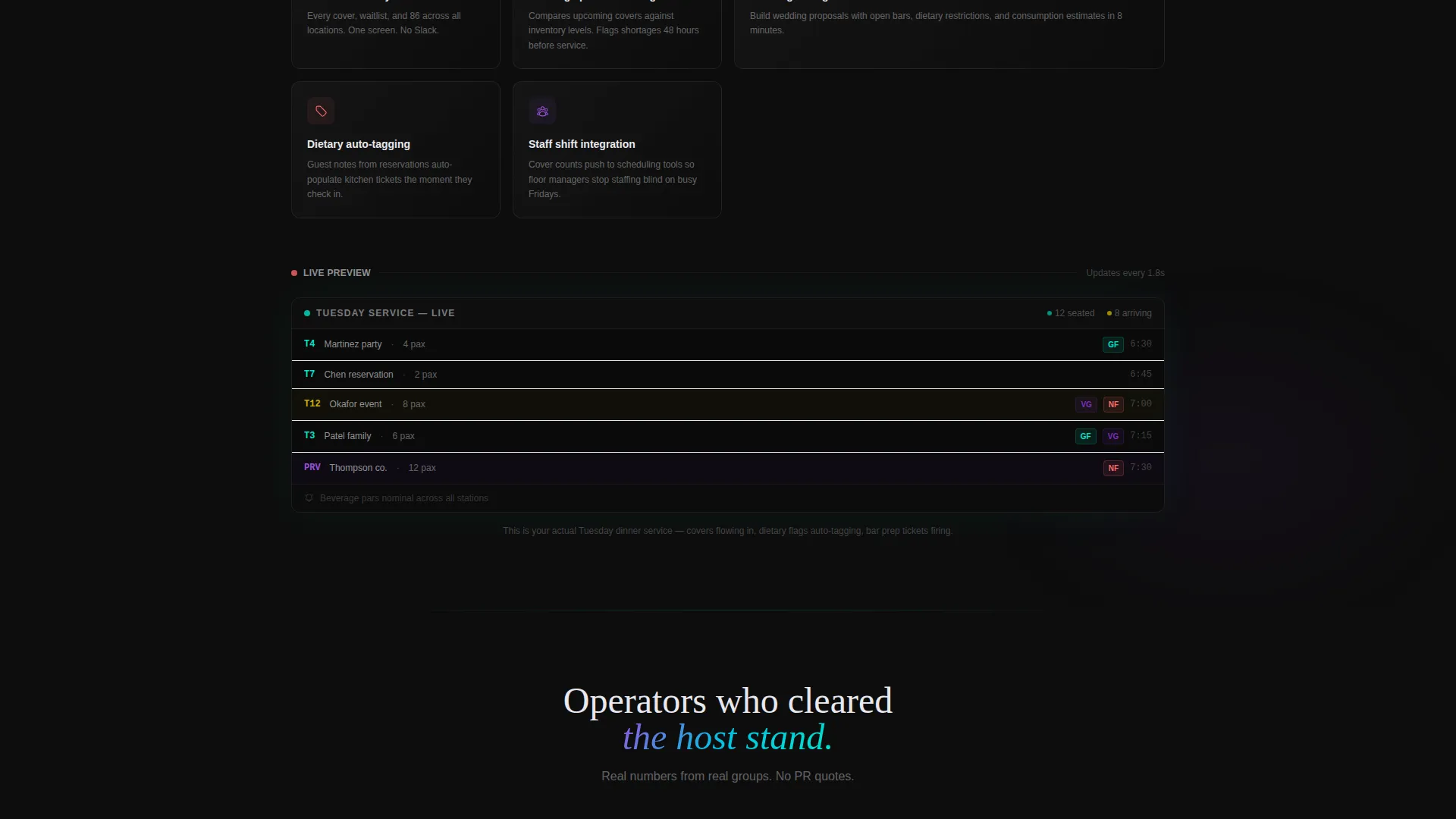
- A live dashboard preview section showing a real dinner service unfolding in real time
Feature list
This template packages a focused set of high-intent components for a food and beverage booking software landing page.
Live ROI Calculator Header
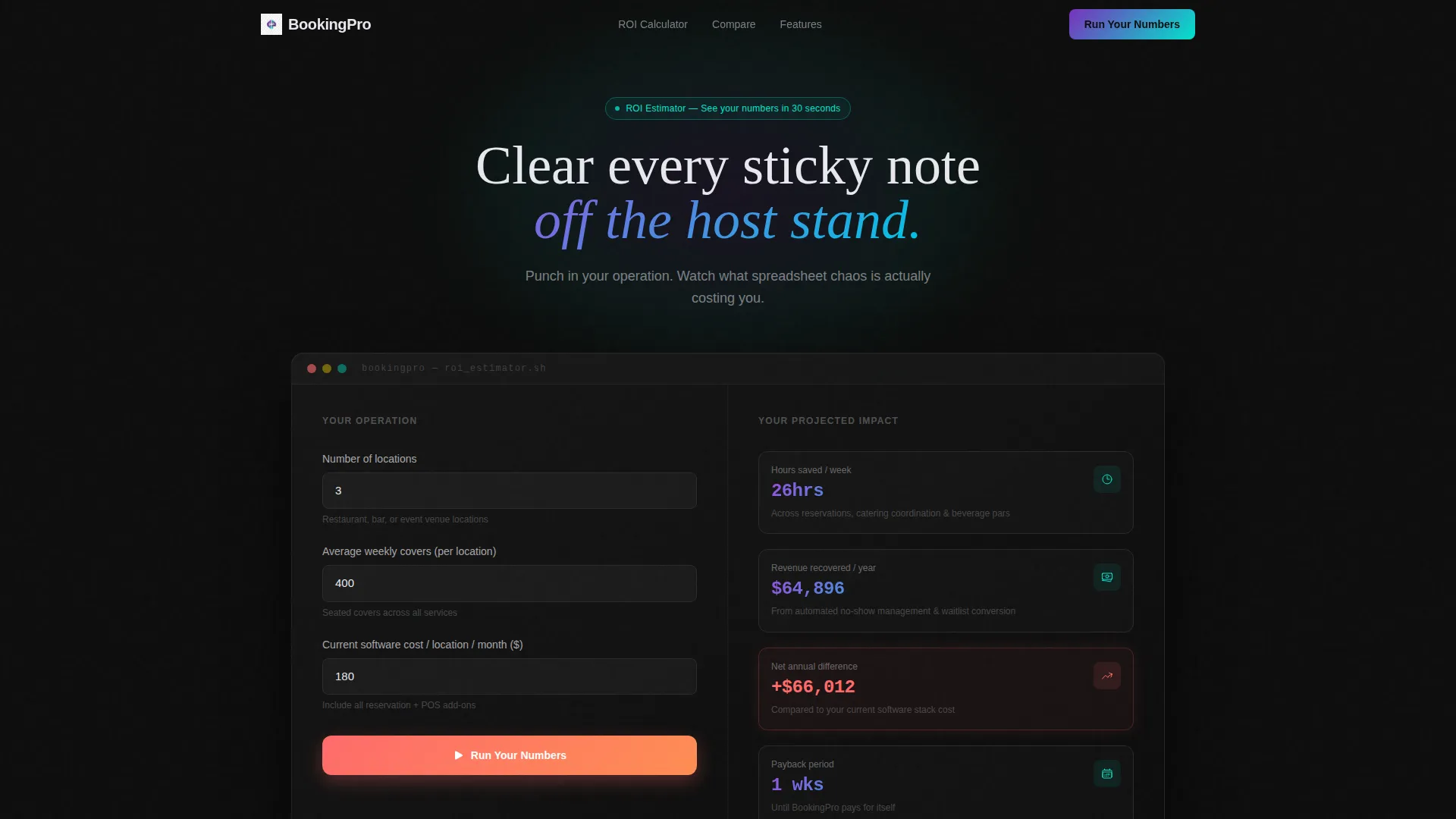
The page opens with a fully functional estimator. Visitors enter number of locations, average weekly covers, and current software cost. The tool instantly outputs hours saved per week, projected revenue recovered from no-shows, and annual cost difference. Results animate in iridescent gradient text against the onyx background, each figure appearing with a micro-animation that feels like a receipt printing.
Expandable Comparison Table
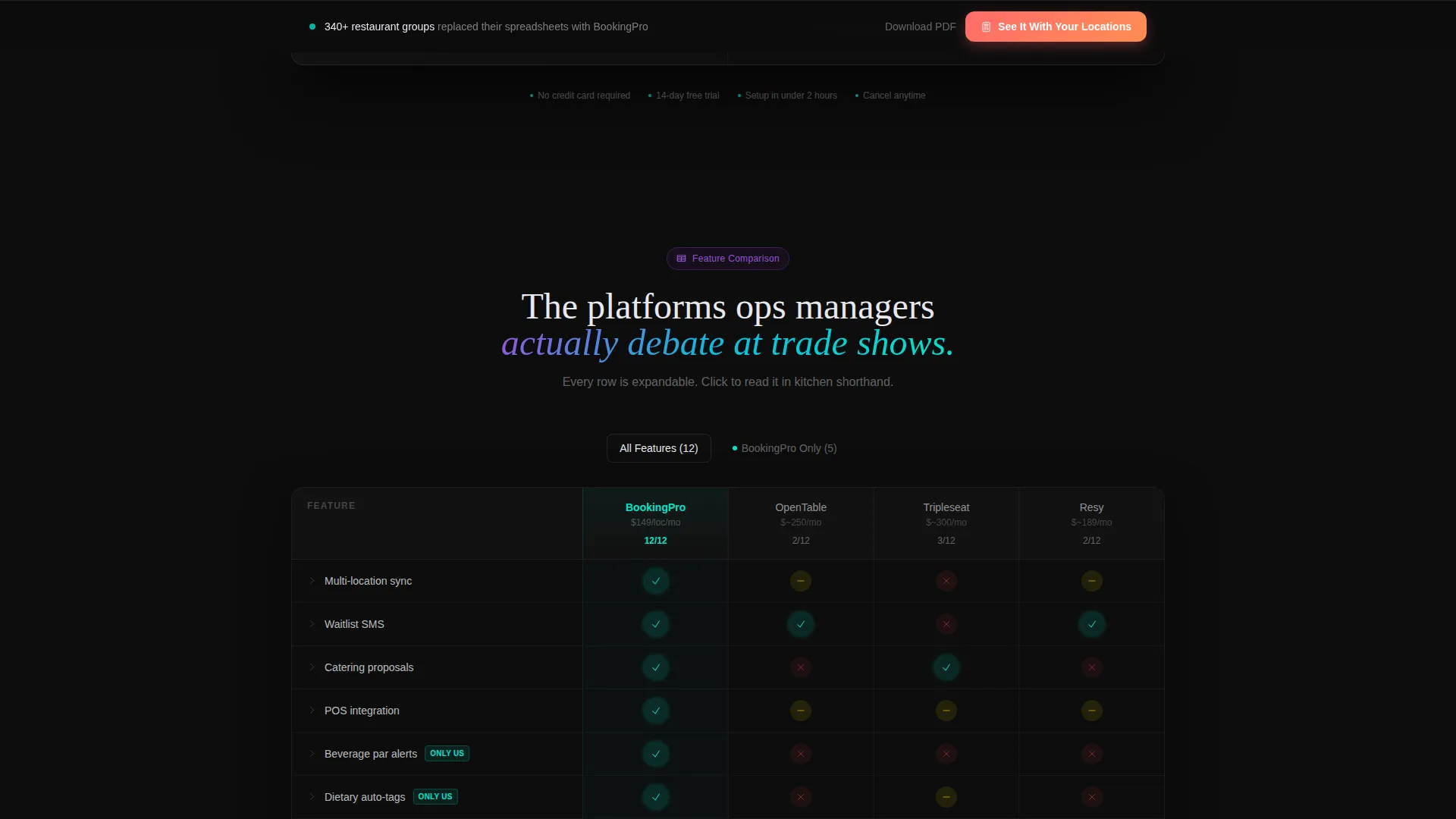
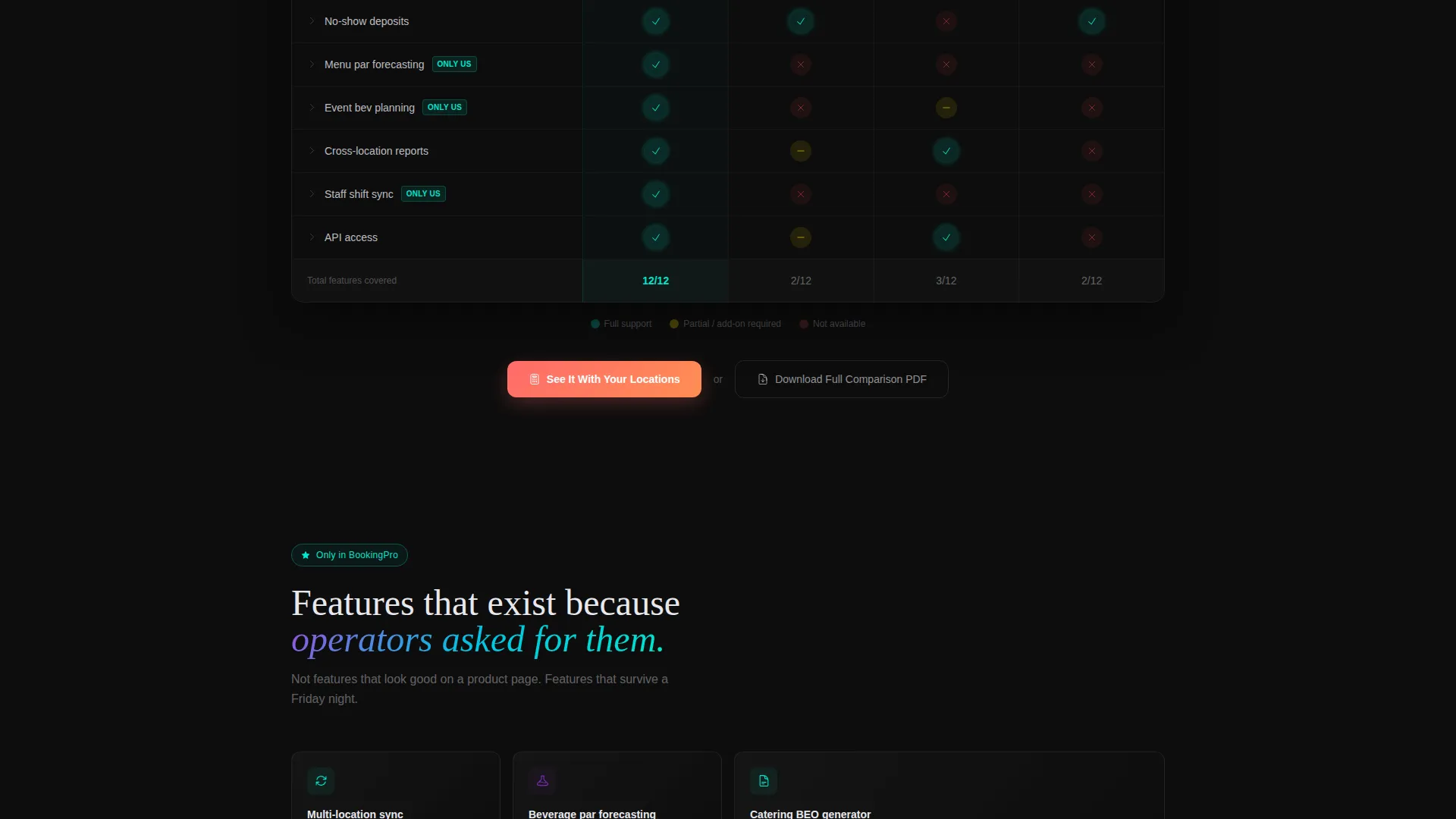
The core of the page is a structured table comparing the product against three competitors operators actually debate. Rows cover features including multi-location sync, automated beverage pars, waitlist SMS, catering proposal generation, and point-of-sale integration. Checkmarks pulse in electric teal. Gaps render in muted red. Each row is expandable, revealing a one-sentence explanation written in kitchen shorthand.
Escalating Feature Reveal
The scroll structure is intentional. The table begins with feature parity and escalates toward capabilities only this platform offers. This progression builds rational confidence as the visitor moves down the page, rewarding attention with increasingly compelling information.
Live Dashboard Preview
Near the bottom of the page, a live dashboard preview shows a Tuesday dinner service unfolding in real time. Covers flow in, dietary flags auto-tag, and bar prep tickets fire. This section makes the software feel operational and immediate rather than abstract.
Sticky Conversion Bar
After the comparison table, a sticky bar reappears with the text "See It With Your Locations." This keeps the primary call to action visible without interrupting the reading flow. A secondary path offers a downloadable full comparison document gated behind a single email field.
Dual Call-to-Action Architecture
The primary call to action, "Run Your Numbers," is anchored beside the calculator. The secondary path offers a gated comparison document download. Both paths match the mindset of an operations buyer: one for immediate proof, one for deeper due diligence.
Page sections overview
| Section | Purpose |
|---|---|
| ROI Calculator Header | Delivers immediate, personalized value before any scroll |
| Comparison Table | Builds rational feature confidence against named competitors |
| Escalating Feature Rows | Transitions from parity to unique platform advantages |
| Live Dashboard Preview | Shows the software operating in a real service context |
| Sticky call to action Bar | Keeps the primary conversion action visible throughout scroll |
| PDF Download Gate | Captures leads through a low-friction secondary offer |
Design & branding system
The visual identity follows a Dashboard Pro theme powered by an AI Iridescent color system. The palette is built to feel like a reservation terminal before service begins: dark, focused, and alive with data.
- Deep onyx (#0D0D0D) as the primary background; soft platinum (#E8E8EE) for table text and data fields
- Holographic violet (#7B2FBE) and electric teal (#00E5CC) as gradient accents on interactive elements and hover states
- Warm signal coral (#FF6B6B) reserved exclusively for conversion moments such as call-to-action buttons and highlight prompts
Mobile & speed optimization
The layout is structured for clarity at any screen size. Operations managers often review software options between shifts or during quick breaks, so the page needs to work on a phone as well as a desktop.
- The ROI calculator inputs and animated outputs are designed to remain usable and readable on smaller screens
- The comparison table uses expandable rows that keep the mobile view clean without hiding critical feature information
How this template helps you convert
This template is structured around a single principle: prove value before asking for anything. Every section earns the next click rather than demanding it.
- The ROI calculator delivers a personalized result immediately, giving the visitor a concrete reason to keep reading before any marketing copy appears
- The comparison table builds logical confidence by laying out feature gaps and advantages in a format that mirrors how operators already evaluate platforms internally
- The dual call-to-action system offers two commitment levels, a live demo path and a document download, so buyers at different stages of the decision both have a natural next step
Other information about this template
This template is part of the broader Dashboard Pro theme family and uses the AI Iridescent color system throughout. It is designed specifically for the food and beverage booking software niche within the technology and software-as-a-service category.
- The template style is Comparison Table, making it well-suited for competitive positioning pages in the food and beverage software space
- The creative direction is Calculator/Tool First, meaning the estimator functions as the hero element rather than any image or headline
- The header concept is a Calculator/Estimator, a format that works particularly well when the buyer's primary question is "how much will this save me"
- The landing page direction is Comparison/Versus, structuring the entire page around a side-by-side evaluation rather than a feature showcase
Theme
Dashboard Pro
Creative direction
Calculator/Tool First
Color system
AI Iridescent
Style
Comparison Table
Direction
Comparison/Versus
Page Sections
Live ROI Calculator Above the Fold
Expandable Competitor Comparison Table
Escalating Feature Scroll Structure
Live Dashboard Preview Section
Sticky Conversion Bar
Dual Call-to-action System
Related questions
Who is this landing page template designed for?
Can I customize the ROI calculator inputs and outputs?
How does the expandable comparison table work?
What are the two call-to-action paths included in this template?
Does this template include the live dashboard preview section?



