White-Label ITSM Landing Page Template
The Brandforge white label ITSM service management landing page template is a bento grid landing page built for MSPs, enterprise IT teams, and SaaS founders. It combines a dark-mode terminal hero, live brand color preview, and a three-step lead capture form. The result is a fully branded ITSM market presence that teams can launch in hours, not weeks.
by Rocket studio
Quick summary
This landing page template gives white-label IT Service Management (ITSM) platforms a high-converting, visually engineered market presence. It is designed around a bento grid layout with a terminal code-snippet hero, an interactive brand color preview, and a progressive lead-gen form. Teams can plan, customize, and launch a professional service page without building from scratch.
Who this template is for
This template serves a specific target audience of technical operators and business builders who need a polished ITSM market presence under their own brand. It is not a generic tool. It is built for people who need depth and control from day one.
- Managed service providers (MSPs) managing forty or more client tenants from a single platform pane
- Enterprise IT directors who need ITIL-aligned workflows that do not expose third-party branding to internal users
- SaaS founders embedding a help desk product into their platform before a funding round
What problem this template solves
Traditional ITSM tools are inflexible, making it difficult to customize and adapt them as requirements evolve. Building a branded service portal from scratch is slow, expensive, and pulls engineering resources away from the core product. This template solves that by giving teams a ready-to-launch page that already looks like theirs.
- MSP operators spend weeks trying to create a coherent, branded client-facing portal, losing time that could go toward service delivery
- IT directors struggle to align third-party tools with internal brand identity, which erodes trust from internal customers and end users
- SaaS founders pay high development costs to build a help desk interface that matches their product before they are ready to go to market
What you get with this template
This template packages a full bento grid landing page into one structured, immediately usable file. Having a complete brand customization feature ensures the user experience matches the corporate identity. Every section is purpose-built to improve conversion and build trust with a technical target audience.
- A dark-mode terminal hero block with a live branded API call, a typed headline animation, and a secondary link to API documentation
- An interactive live brand color-swap preview so visitors can see their own logos and color scheme on a mock dashboard before they speak to sales
- A three-step progressive lead capture form collecting work email, company name, tenant count, use case type, and an optional logo upload
Feature list
This template includes a focused collection of purpose-built sections and interactive components. Each capability tile in the bento grid is designed to communicate depth, not just style. The key features work together to move visitors from curiosity to a booked demo efficiently.
Terminal API Hero with Live Cursor
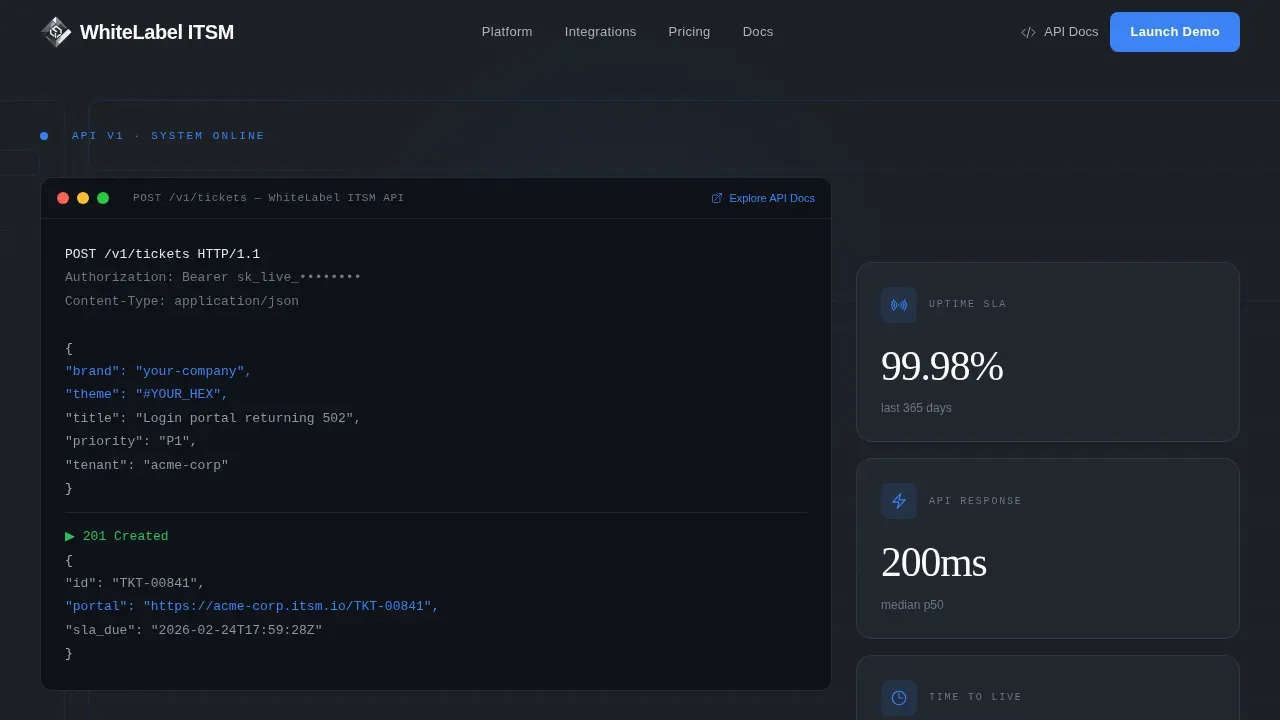
The hero opens with a dark-mode code snippet centered in the viewport. It displays a real branded API call with a JSON payload where the brand name and hex color values are highlighted in electric blue. A blinking cursor follows a 201 Created response, immediately signaling to technical evaluators that the platform has real API depth.
Interactive Brand Color Preview
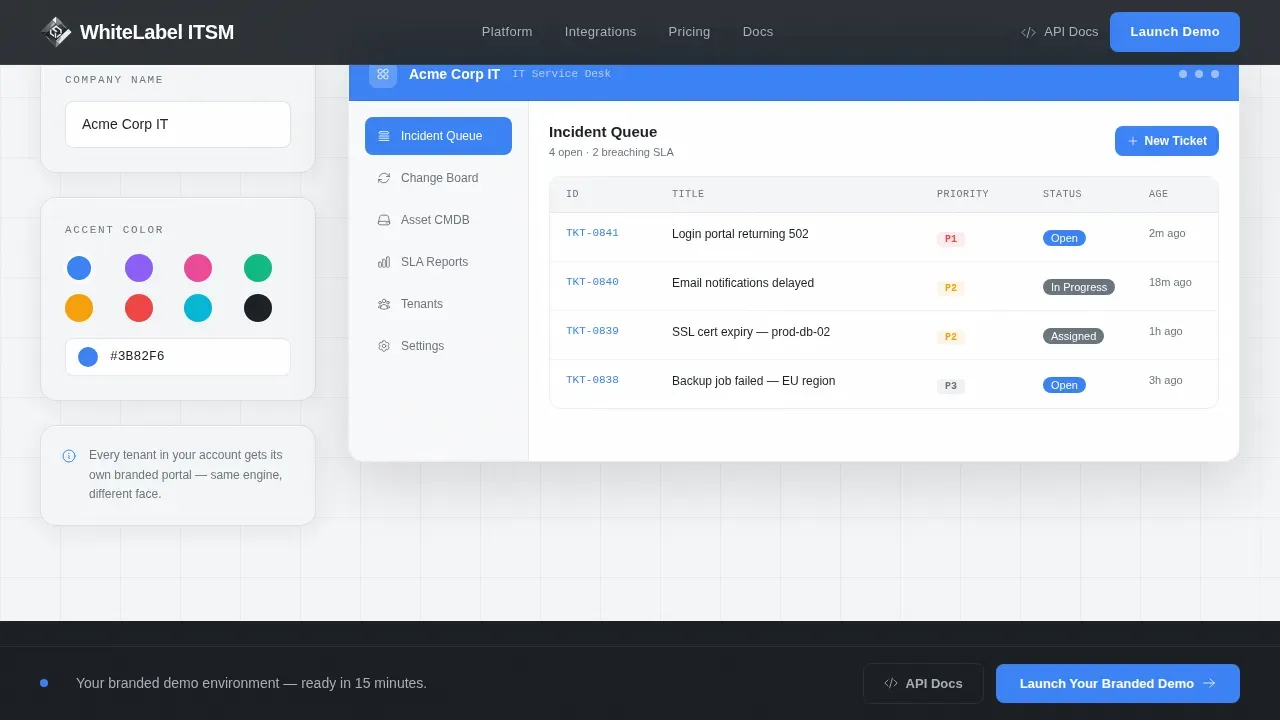
One bento card functions as a live interactive toggle. Visitors can swap brand colors on a mock dashboard in real time, seeing their own logos and style applied before any conversation with sales. This creates immediate trust and product confidence, which is critical for an ITSM market where buyers need proof before commitment.
Asymmetric Bento Feature Grid
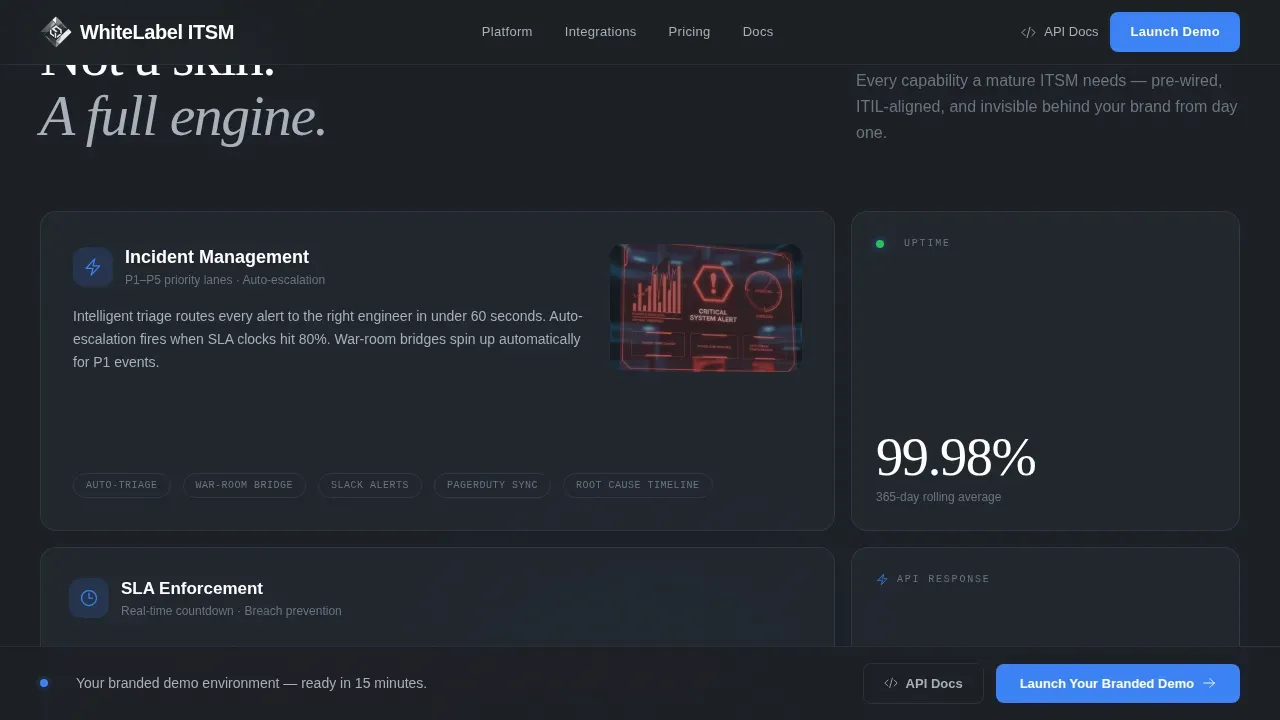
The bento grid uses asymmetric card sizing to communicate priority. Hero cards span two columns for flagship ITSM capabilities such as incident management, SLA timers, asset configuration management database (CMDB), and change advisory workflows. Smaller stat tiles display figures like 99.98% uptime and 12-minute median onboarding. This approach builds density and proof as users scroll.
Three-Step Progressive Lead Form
The lead capture form is broken into three steps to reduce friction and improve completion. Step one collects work email and company name. Step two presents a dropdown for tenant count and primary use case. Step three offers an optional logo upload so the demo environment arrives pre-skinned. This approach helps teams track lead quality and segment customers from the first interaction.
Sticky Conversion Bar
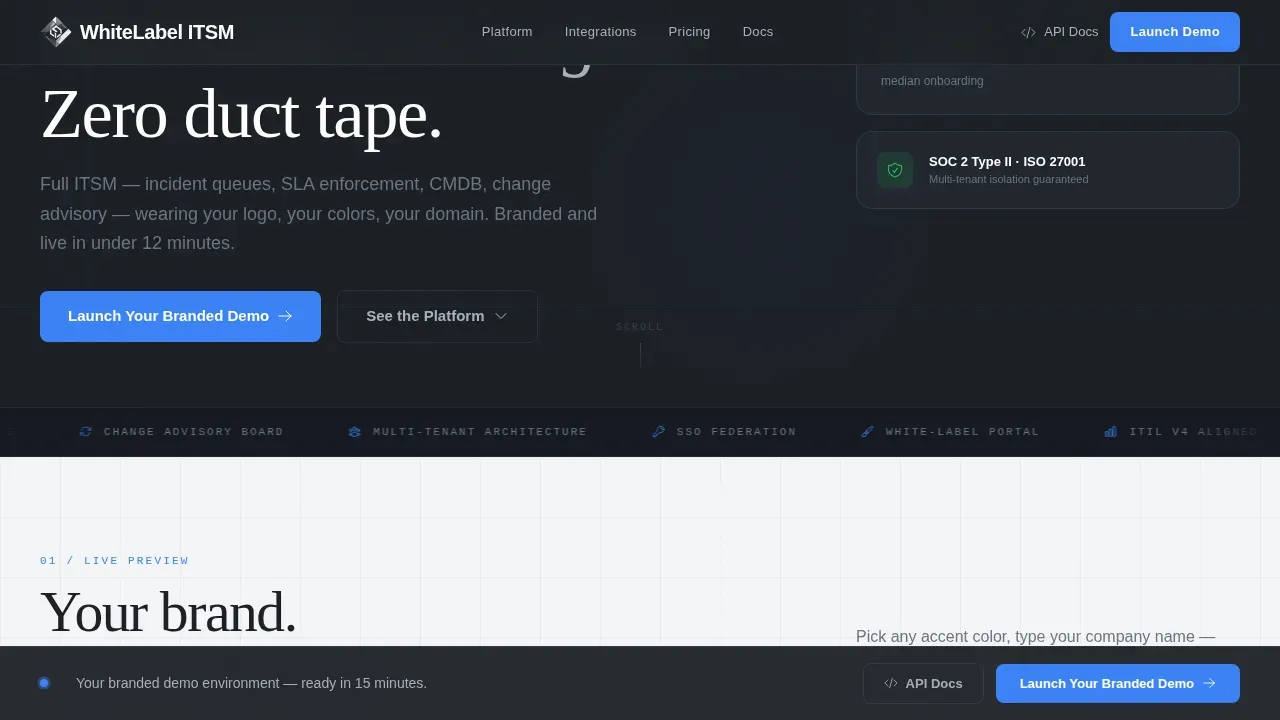
A sticky bottom bar activates after the first scroll fold. It anchors the primary call to action, "Launch Your Branded Demo," so the conversion path stays visible throughout the entire page. This persistent element helps improve click-through rates without interrupting the scroll experience.
Social Proof Testimonial Section
The template incorporates spotlight testimonial cards representing three distinct buyer voices: an MSP operator, an IT director, and a SaaS founder. Each card pairs a specific metric with a real-use-case context. This section helps customers build trust quickly and supports the product marketing goal of converting evaluators into long-term clients.
Page sections overview
| Section | Purpose |
|---|---|
| Terminal API Hero | Display a branded API call and typed headline to engage technical evaluators |
| Live Stats Panel | Show uptime, API response, and onboarding time as inline proof tiles |
| Brand Color Customizer | Let visitors swap logos and colors on a mock dashboard in real time |
| Bento Feature Grid | Present ITSM capabilities as asymmetric tiles with hero and stat cards |
| Social Proof Cards | Build trust with three testimonials tied to specific buyer personas |
| Progressive Lead Form | Capture work email, company details, tenant count, use case, and logo |
| Sticky call to action Bar | Keep the primary conversion action visible throughout the full page scroll |
| Linear Footer | Provide a single-row footer with navigation menu and secondary links |
Design & branding system
The visual style follows a Tech Glass direction built on a Monochrome Steel color system. The palette feels like a server rack environment: cool aluminum surfaces, precise indicator accents, and a layout that communicates reliability. Card surfaces use glassmorphism blur to float above the background, adding depth without clutter. Typography uses DM Sans for user interface labels and body copy, and Fraunces for display headlines.
- Color plan: deep gunmetal (#1B1F24) for dark backgrounds, brushed chromium (#A8B0BA) for text on dark, panel white (#F4F5F7) for light sections, and electric blue (#3B82F6) reserved exclusively for interactive states and live data signals
- Backgrounds alternate between gunmetal and panel white sections so each content block has clear visual separation
- The electric blue accent fires only on clickable elements and live data pulses, keeping the palette disciplined and intentional
Mobile & speed optimization
This template is designed desktop-first, reflecting the reality that MSP operators and IT directors typically work from workstations. A solid mobile fallback ensures that the page remains usable across device sizes without breaking layout or losing conversion functionality. The template uses Server Components for static sections and Client Components for the interactive demo and form.
- The bento grid layout reflows cleanly across screen sizes, keeping card content legible and the sticky conversion bar functional on smaller viewports
- Static sections are built to load efficiently without client-side overhead, reserving interactive rendering only for the color preview and form components
How this template helps you convert
This template is built specifically around lead generation. Every section is planned to move visitors toward one action: booking a pre-skinned branded demo. The conversion approach is sequential and friction-aware.
- The terminal hero qualifies technical buyers immediately by showing API depth, while the "Explore the API Docs" link offers a secondary path for evaluators who want proof before a sales conversation
- The live brand color preview lets visitors see their own product on screen, creating a personal stake in the demo outcome before they ever fill in a form field
- The three-step progressive form reduces abandonment by spreading the request across manageable steps, and the optional logo upload means the demo arrives pre-skinned, improving the quality of the first sales touchpoint
Other information about this template
This template is built to support a wide range of business types. Entrepreneurs, small businesses scaling their first service offering, and established MSPs alike can use it to launch a professional ITSM market presence quickly. White-labeling allows full customization of logos, colors, and domains, ensuring that all client interactions feel internal and professional, improving digital experience performance by over 25%.
Using a pre-built template can reduce upfront investment in engineering, design, and infrastructure by up to 60% compared to in-house development. Teams can replace original logos, colors, fonts, and styling to match their agency's or client's brand identity without needing advanced coding skills. The template is available as an instant download, so there is no waiting period between purchase and getting started.
The Brandforge white label ITSM service management landing page template is designed to help teams achieve a credible, conversion-ready market presence in hours rather than weeks. ITSM templates like this one help organizations create scalable service management processes and implement best practices for incident management, change management, and asset tracking. Advanced analytics and cross-team collaboration features built into the ITSM product itself are communicated clearly through the feature grid, giving visitors the information they need to make a confident decision. A CRM integration path and login flow can be communicated through the template's form and portal sections, helping customers understand the full product plan. The template also works well for teams that offer white-label landing page creation services, adding value by bundling the page with their broader service catalog.
- The collection of bento cards can be reordered or restyled to align with different market segments or messaging priorities
- Prices and checkout details for the ITSM platform itself can be added to a dedicated pricing section if the business plan requires it
- The template supports a div-based layout structure that developers can extend without redesigning from scratch
- Agencies committed to offering a branded portal for existing clients can use the template to give those customers a clean login experience and a recognizable service environment
Theme
Tech Glass
Creative direction
Feature Matrix
Color system
Monochrome Steel
Style
Bento Grid
Direction
Lead Generation
Page Sections
Terminal API Hero Block
Live Brand Color Customizer
Asymmetric Bento Feature Grid
Three-step Progressive Lead Form
Sticky Conversion Bar
Social Proof Testimonial Cards
Related questions
Can I customize the logos and colors without coding skills?
Is this template suitable for small businesses or only large enterprise teams?
What ITSM capabilities does the feature grid communicate?
How does the three-step form improve lead quality?
Can agencies use this template to market their ITSM service to multiple clients?



