Dynamic Legal Calendar Landing Page Template
Docket is a bento grid landing page template built for legal scheduling and docketing software. It targets law firms that need to communicate deadline management, conflict-check automation, and practice management capabilities. The template uses a Monochrome Steel visual system, Launch Energy scroll pacing, and a clear app-download conversion flow to move attorneys and paralegals toward the install moment.
by Rocket studio
Quick summary
Docket is a single-page bento grid template designed specifically for legal calendaring and docketing software products. It pairs a high-contrast slab serif headline with animated capability tiles and a firm, app-download-focused conversion path. The layout communicates the authority and precision that law firms expect from practice management tools, making it the right starting point for any legal scheduling product launch.
Who this template is for
This template is built for founders and product teams launching docketing software or legal practice management applications. It speaks directly to the buyers those products serve, so the copy, structure, and visual signals already match the expectations of the legal industry.
- Managing partners and paralegals at two- to fifty-attorney firms who juggle multi-courthouse schedules and need reliable case management.
- Solo practitioners replacing spreadsheet-based intake with a proper docketing system.
- Legal technology companies that want a conversion-ready landing page to drive app downloads and demo sign-ups.
What problem this template solves
Law firms live and die by dates. A missed filing deadline, an unresolved conflict, or a double-booked deposition can trigger a malpractice claim. Yet most general scheduling tools are not built around legal deadlines, court rules, or the six-minute billing increment. The result is that even experienced legal professionals patch together spreadsheets, sticky notes, and generic digital calendar apps that were never designed for the legal field.
This template solves the presentation problem: how do you communicate the value of a purpose-built docketing system quickly enough to earn the download? It gives docketing software companies a structured, high-trust landing page that frames missed deadlines as a real risk and positions the app as the precise remedy.
- Eliminates the need to design from scratch when time-to-market matters for new legal software launches.
- Communicates the stakes of missed deadlines and malpractice risks without lengthy explanations.
- Guides visitors through a capability reveal that builds confidence before asking for the app install.
What you get with this template
The template delivers a fully structured bento grid landing page with section-level purpose built around a legal scheduling product. Every section serves the conversion goal: earn trust, demonstrate capability, and drive the app download. The layout is organized like a well-prepared case file, with each tile in its correct place and every important date flagged.
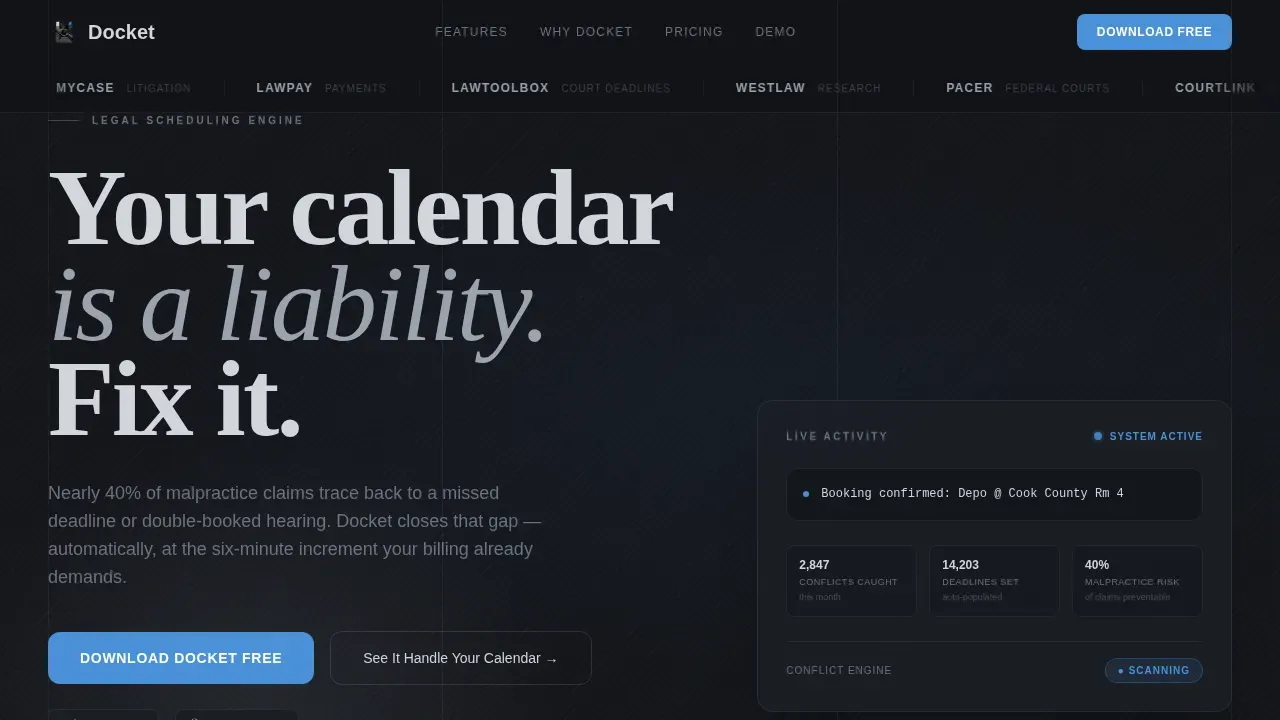
- A hero section with a tight slab serif headline, a live conflict indicator card, and a scrolling integration logo marquee.
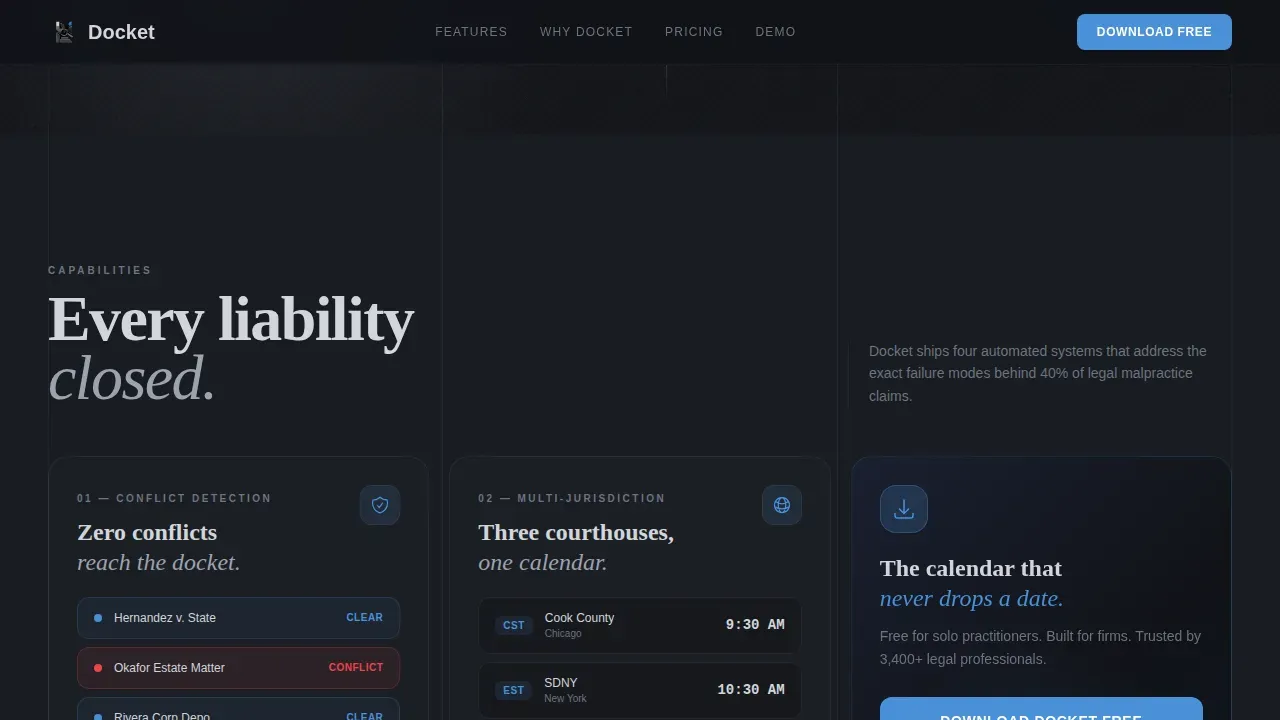
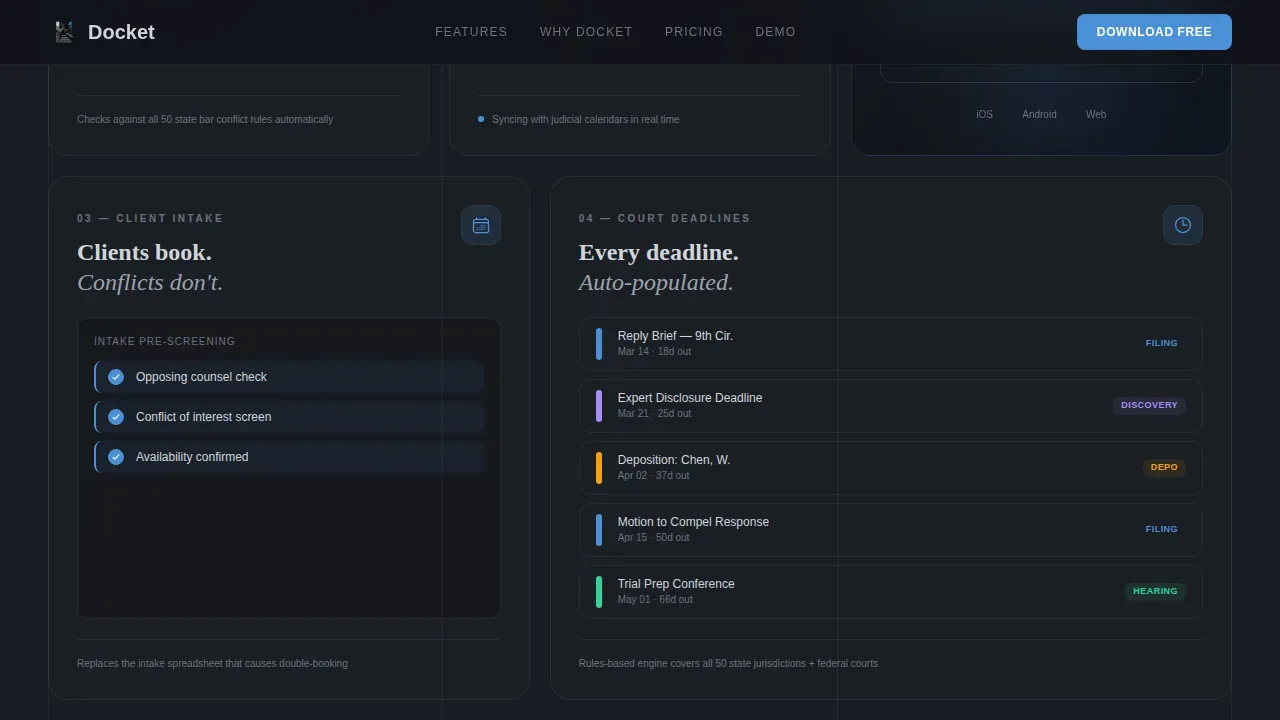
- Four animated bento capability tiles covering conflict-check automation, multi-jurisdiction timezone sync, client self-booking with intake pre-screening, and court deadline auto-population.
- A proof strip, three-tier pricing grid, full-width download call-to-action with app badges, an interactive demo link, and a footer.
Feature list
This section covers the key features built into the Docket template. Each capability is grounded in the source brief and designed to support law firms marketing docketing tools or case management software.
Bento Grid Capability Tiles
The core content area is organized as a bento grid. Each tile is a self-contained capability reveal that animates in like a system powering on. Numbers spin to final values, calendar grids populate in real time, and status indicators flip from neutral gray to courtroom blue. This approach lets visitors absorb case management information tile by tile without cognitive overload.
Live Conflict Indicator Card
A dedicated hero-area card displays a live conflict indicator. It communicates at a glance that the underlying docketing system is actively checking for scheduling conflicts. For legal professionals evaluating practice management software, this single element signals that the product understands the consequences of a missed conflict check.
Scrolling Integration Logo Marquee
The header opens with a horizontal ribbon of law firm logos and legal software integration badges scrolling in a slow, continuous marquee. This Logo Bar establishes institutional credibility before a single headline is read, which is especially important for cloud based docketing tools that need to prove compatibility with existing systems.
App Download Conversion Flow
The template is built around a single conversion goal: the app download. The primary call-to-action, "Download Docket Free," appears first inside the bento grid after the third capability tile and again as a sticky bottom bar on mobile. Platform badges for iOS and Android sit side by side. A secondary path links to a 90-second interactive demo.
Three-Tier Pricing Grid
A dedicated pricing section presents Solo, Firm, and Enterprise tiers in a clean three-column grid. This structure helps both small law firms and larger practices quickly identify the plan that fits their case load, team size, and practice management requirements without scrolling through dense feature tables.
Proof Strip with Social Metrics
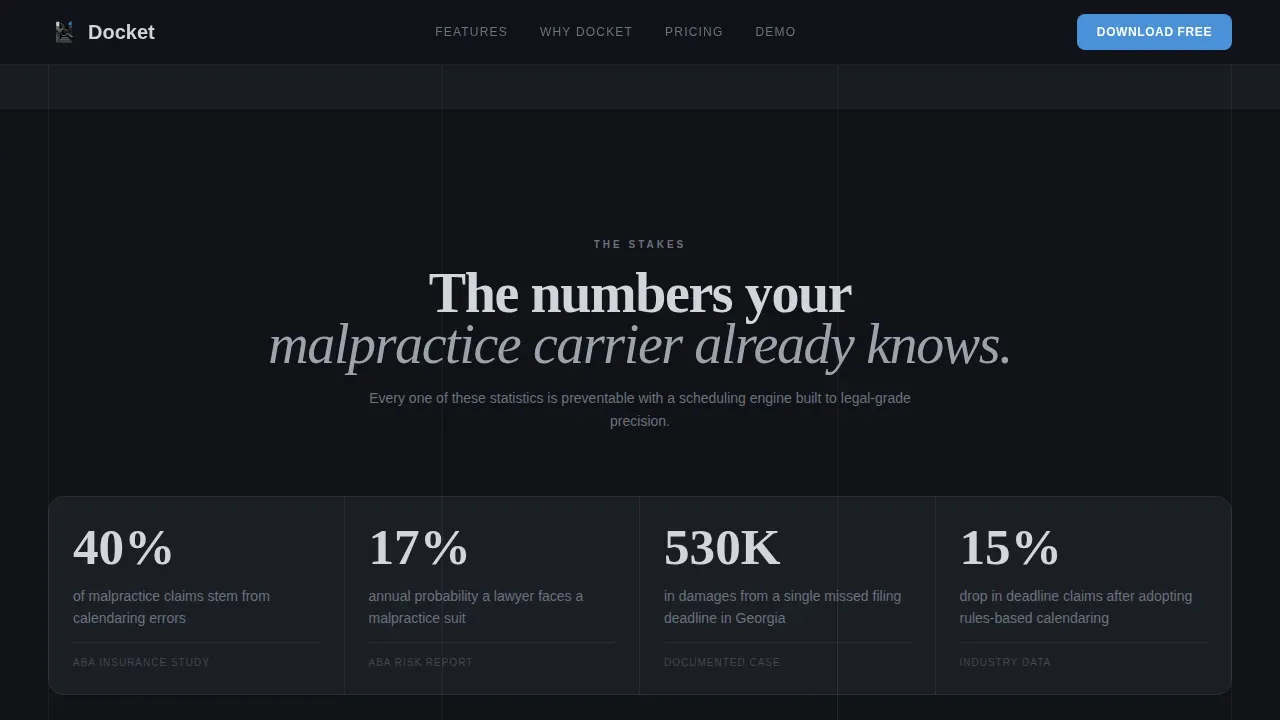
A dedicated proof strip section displays malpractice statistics, firm count metrics, and integration badges. Grounding claims in real data builds the kind of trust that legal professionals require before committing to new management software. The strip reinforces the argument that missing legal deadlines is a systemic risk, not an edge case.
Page sections overview
| Section | Purpose |
|---|---|
| Integration Logo Marquee | Establish credibility via legal software partner logos before the headline |
| Hero Headline Area | Deliver the core value statement with a live conflict indicator card |
| Bento Capability Grid | Reveal four core docketing system features with micro-interaction animations |
| App Download Tile | Present the primary call-to-action inside the bento grid after tile three |
| Proof Strip | Display malpractice stats, firm count, and integration badge social proof |
| Pricing Tiers | Show Solo, Firm, and Enterprise plans in a three-column comparison grid |
| Full-Width Download call to action | Reinforce the app download with platform badges and interactive demo link |
| Page Footer | Provide navigation, legal links, and brand close using a horizontal layout |
Design & branding system
The visual identity follows a Data Command theme built on a Monochrome Steel color system. The palette communicates the quiet jurisdictional authority of a well-run law firm, with no warmth and no unnecessary decoration. Color functions as a signal: blue means interactive or live, everything else is steel and shadow.
- Core colors: gunmetal base (#3B3F45), deep briefcase black (#111318) for alternating backgrounds, polished chrome (#D1D5DB) for text, and courtroom blue (#4A90D9) reserved exclusively for interactive states and live-data indicators.
- Typography: Fraunces slab serif for headlines, DM Sans for body copy. The combination delivers high contrast and strong hierarchy suited to practice management software marketing.
- Backgrounds alternate between briefcase black and gunmetal throughout the scroll, training the eye to read courtroom blue as an action signal and reinforcing the Data Command aesthetic.
Mobile & speed optimization
Around 60 percent of traffic to legal technology pages comes from mobile devices, so the template is built mobile-first. The sticky bottom call-to-action bar keeps the app download prompt visible at all times on smaller screens. The bento grid reflows cleanly for single-column mobile layouts without losing the tile-by-tile reveal pacing.
- Sticky mobile call-to-action bar ensures the "Download Docket Free" prompt is always one tap away, regardless of scroll depth.
- Server Components handle static sections to keep initial load light, while Client Components power animated docketing tiles and the interactive demo.
- The layout prioritizes fast, benefit-oriented scanning so legal professionals can assess value quickly on any device.
How this template helps you convert
The Docket template is engineered around a single conversion moment: the app download. Every design decision, from the opening marquee to the sticky mobile bar, reduces friction and builds enough trust to earn the install. Landing pages focused on a single goal consistently outperform multi-goal layouts, and this template keeps that principle central.
- The Launch Energy scroll pacing escalates section by section, moving from "here is what is broken in your practice" to "here is what launches when you download," building momentum that mirrors a product keynote and primes the visitor for the install decision.
- Animated tiles serve as proof, not just decoration. When a calendar grid populates in real time or a status indicator flips to courtroom blue, the visitor sees that the docketing software already understands how legal time works, which reduces the trust gap before the call-to-action.
- The 90-second interactive demo link gives hesitant buyers a low-commitment path. Seeing the system handle a real deposition booking conflict converts skeptical legal professionals more effectively than any static feature list.
Other information about this template
This template is built for the legal technology market, where knowledge management, data security, and matter management are not optional features but baseline expectations. It is equally useful for products serving small law firms and multi-office enterprises. A few additional points are worth noting for teams evaluating this template for their practice management software launch.
- The docket precision legal scheduling app landing page template is purpose-built for products in the legal docketing space, not adapted from a generic scheduling template.
- Docketing software used in the legal field must often address HIPAA compliance signals, audit trails, and user access controls. The template includes a proof strip section where these trust signals can be displayed.
- Many malpractice insurers offer discounts on insurance premiums to firms using robust, rules-based legal calendaring tools. Including this fact in the proof strip can strengthen the financial case for the download.
- The template supports document management and case notes content within the bento grid tiles, allowing product teams to highlight these capabilities without restructuring the layout.
- Integration with tools such as Google Calendar is essential for maintaining a single source of truth in scheduling. The integration marquee section is designed to surface these connections prominently.
- The pricing grid accommodates online payments messaging at the tier level, making it easy to communicate billing and subscription details clearly.
- Teams focused on business development can use the proof strip and pricing sections to communicate new business acquisition metrics alongside capability claims.
- The cloud based system architecture of the underlying product can be highlighted in the bento grid or proof strip without any template modifications.
- Software updates and update deadlines content can be surfaced in case notes or bento tiles as the product evolves.
- The template is compatible with legal case management software product positioning, case management systems marketing, and broader practice management software campaigns.
Theme
Data Command
Creative direction
Launch Energy
Color system
Monochrome Steel
Style
Bento Grid
Direction
App Download
Page Sections
Bento Grid Capability Tiles
Live Conflict Indicator Card
Scrolling Integration Marquee
App Download Conversion Flow
Three-tier Pricing Grid
Proof Strip with Malpractice Metrics
Related questions
Is this template specific to legal docketing software?
Can I use this template for a solo practitioner product?
How does the bento grid handle case management content?
Does the template support the interactive demo link?
Can the proof strip display compliance and data security signals?



