Real Estate AI Chatbot Comparison Landing Page
Broker is a bold brutalist real estate AI chatbot landing page built for independent brokerages, property management firms, and solo agents. It features a live chat widget demo, a stark comparison table, and a problem-to-solution visual arc. The single call to action routes visitors directly to a live demo environment, no form required.
by Rocket studio
Quick summary
Broker is a single-page comparison table landing page for a real estate AI chatbot. It opens with a functioning chat widget mid-conversation, moves through an oversized stat section, and resolves with a bold comparison table and three case-study cards. The entire page drives one click: "Watch It Sell For You."
Who this template is for
This template is built for real estate professionals who lose leads to slow response times. If your team handles a high volume of buyer inquiries and cannot always reply quickly, this page makes the case for AI-powered assistance without a single form field.
- Independent brokerages overwhelmed by portal inquiries and repeat buyer questions
- Property management firms fielding the same tenant questions daily across multiple listings
- Solo agents who miss deals because a callback arrives hours too late
What problem this template solves
Slow response time is the single biggest leak in a real estate sales funnel. Buyers ask questions at midnight and move on by morning. This template visualizes that problem and positions an AI chatbot as the fix, through real numbers, a direct comparison, and proof from real brokerages.
- Lost leads caused by delayed responses during off-hours or high-volume periods
- Hours wasted by agents answering the same listing questions over and over
- Visitor skepticism that AI can actually qualify leads and book showings effectively
What you get with this template
You get a full single-page layout with every section structured to move a skeptical visitor toward one confident click. Every element is pre-built and editable, from the simulated chat widget in the header to the sticky mobile call-to-action bar at the bottom.
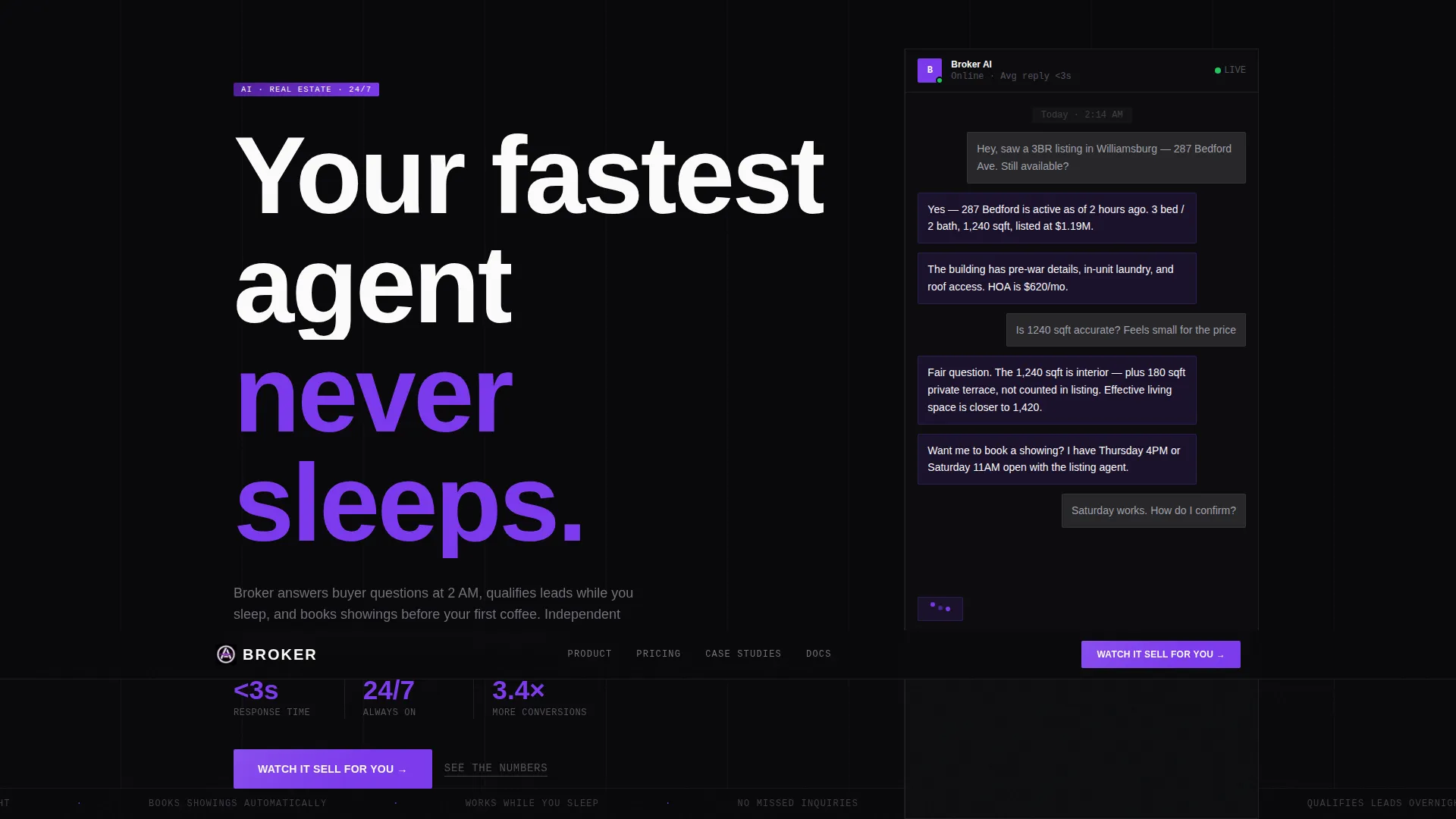
- A functioning header chat widget already mid-conversation with a simulated buyer
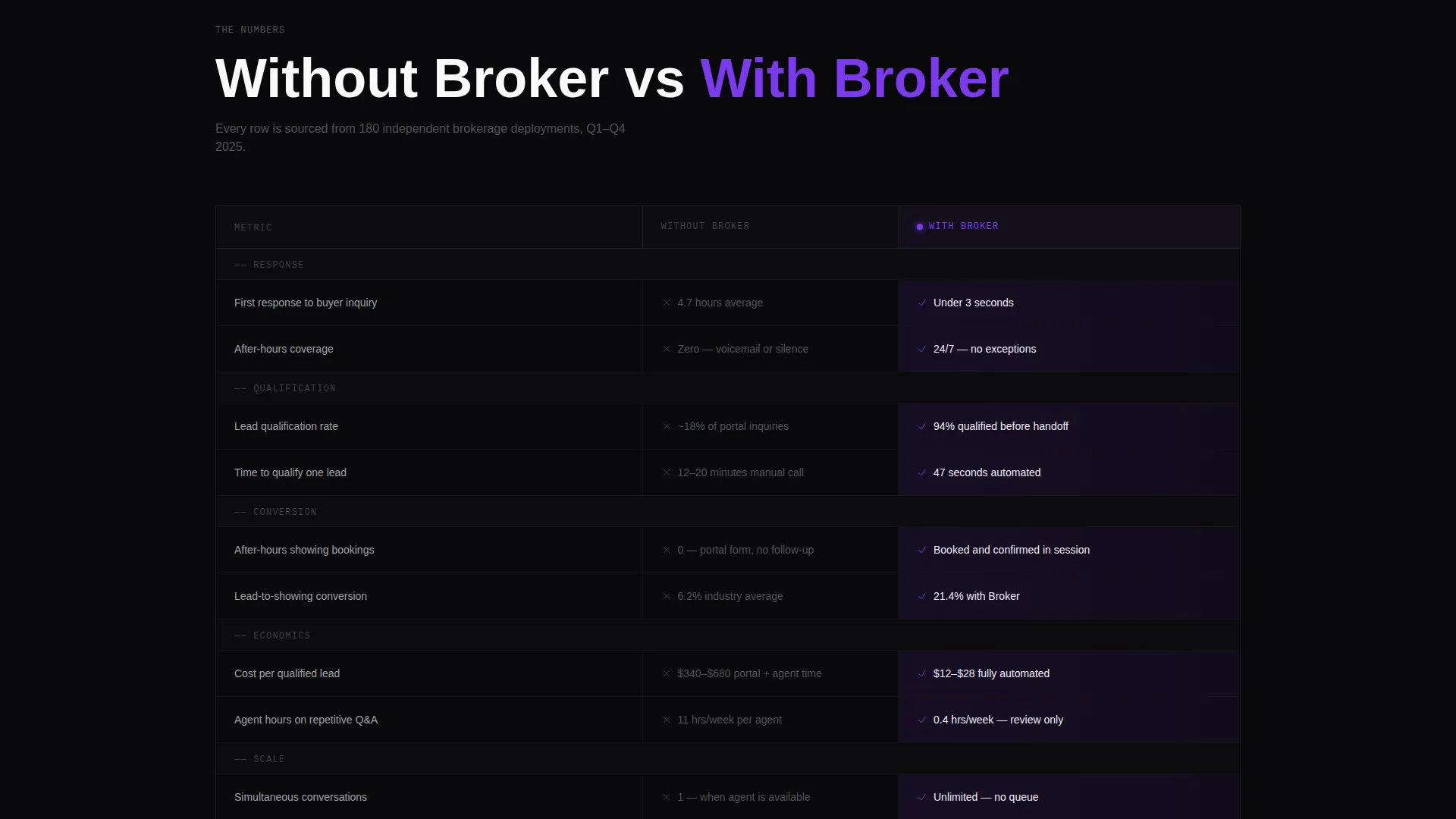
- A full-width comparison table contrasting "Without Broker" versus "With Broker" across four key metrics
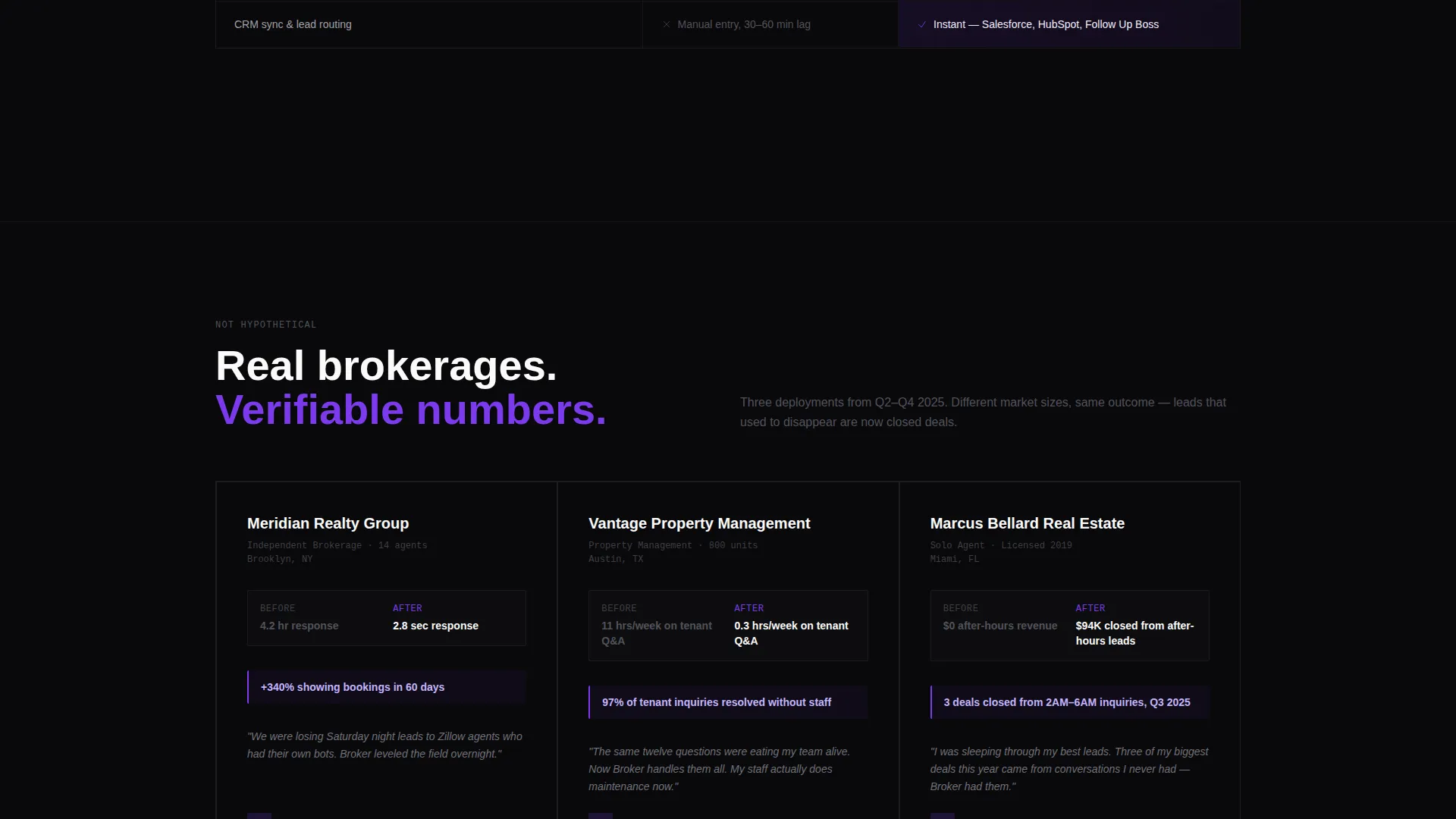
- Three case-study cards each showing a brokerage name, a before/after metric, and a one-sentence quote
Feature list
This template ships with a focused set of components. Each one is designed around the single goal of turning a skeptical real estate professional into a demo-ready click.
Live Chat Widget Preview
The header chat widget simulates a real buyer conversation in real time. Messages animate within six seconds, covering listing data, a square-footage question, a showing suggestion, and an email capture. It is the hero image and the product demo in one.
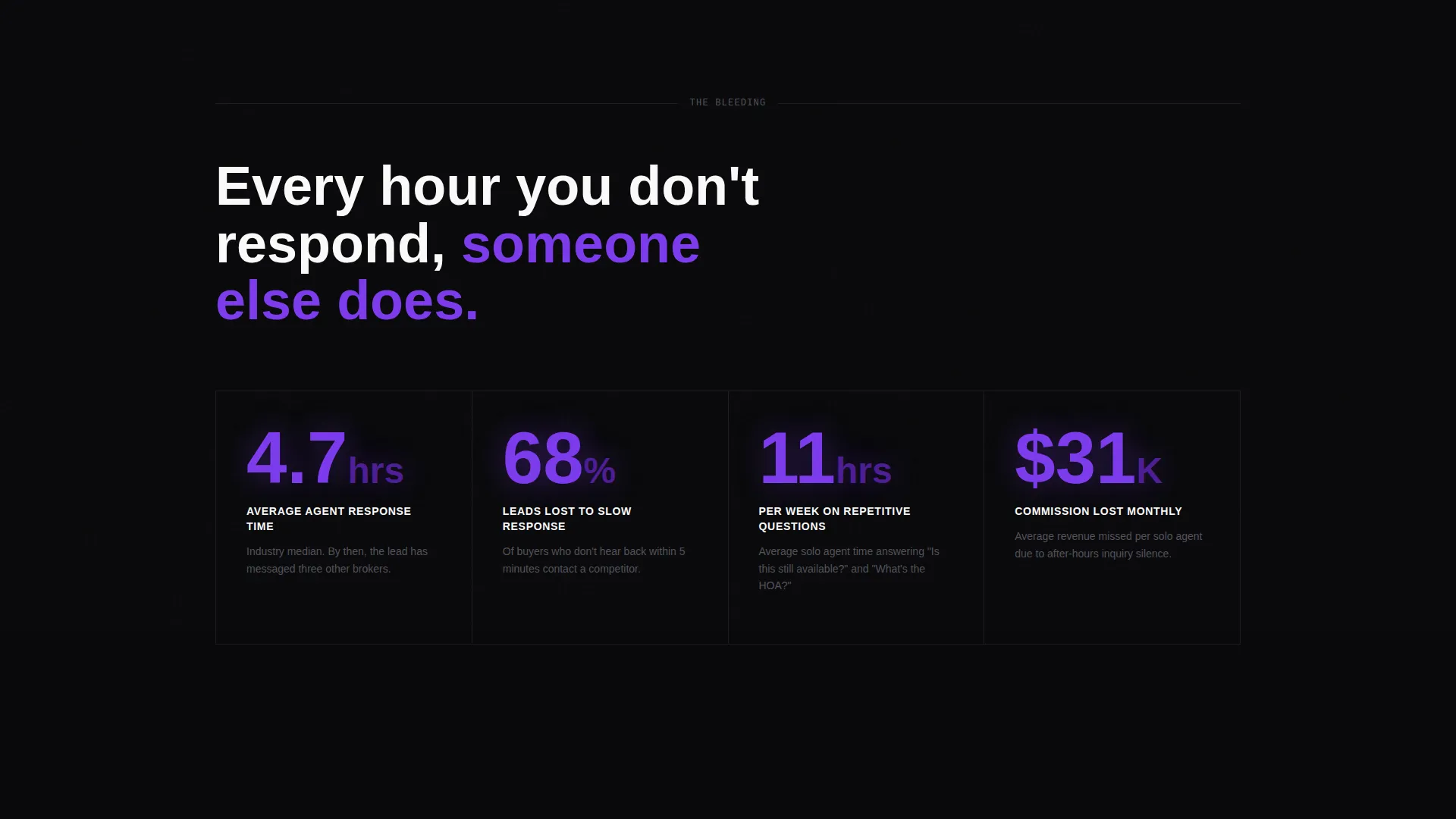
Oversized Stat Section
Three core pain-point statistics are rendered in large violet numerals against void black. Average response time, lost leads per month, and hours spent on repetitive questions are each given their own visual weight so visitors feel the problem before they see the solution.
Full-Width Comparison Table
A stark, full-width grid compares four performance metrics side by side. "Without Broker" cells use dim gray text. "With Broker" cells use violet highlights. The contrast is immediate and the verdict is visual before a single word is read.
Case Study Cards
Three cards sit below the comparison table, each representing a single brokerage. Every card shows a before/after metric and a one-sentence quote. They convert an abstract promise into a specific, human-sourced proof point.
Multi-Placement Call to Action
The primary call to action, "Watch It Sell For You," appears in three positions: inside the header widget after the simulated conversation ends, floating at the table midpoint, and anchored in a sticky bottom bar on mobile. No form interrupts the path to the demo.
Bold Brutalist Typography System
The page uses a massive condensed typeface for the headline and a strict typographic hierarchy throughout. Every heading, stat, and label is set with architectural intention. Nothing decorates, every typographic choice signals function.
Page sections overview
| Section | Purpose |
|---|---|
| Header Chat Widget | Drop visitors into a live simulated buyer conversation |
| Pain Stat Block | Visualize response-time and lost-lead data in oversized numerals |
| Comparison Table | Contrast key metrics with and without AI chatbot support |
| Case Study Cards | Prove table metrics with real brokerage before/after results |
| Sticky Mobile Bar | Keep the primary call to action reachable at all scroll depths |
Design & branding system
The Void & Violet color system makes every element carry weight. Void black dominates every background. Electric violet owns every button, toggle, and active state. Raw exposed white is used only for typography and table borders, drawn thin like architectural grid lines. The result feels like a neon sign buzzing inside a poured-concrete parking garage.
- Color palette: void black (#09090B), electric violet (#7C3AED), bruised ultraviolet (#4C1D95), and raw exposed white (#FAFAFA)
- Typography: massive condensed typeface for headlines, strict hierarchy for stats and body copy, nothing decorative
- Theme aesthetic: Bold Brutalist, where industrial weight meets something luminous and impossible to ignore
Mobile & speed optimization
On mobile, the layout collapses into a single scrollable column that preserves the full Problem-to-Solution Arc. The sticky bottom bar keeps the call to action visible at every scroll position so no mobile visitor has to hunt for the next step.
- Sticky bottom call-to-action bar keeps "Watch It Sell For You" accessible throughout the entire mobile scroll
- Comparison table adapts to narrow viewports without losing the visual contrast between dim gray and violet cells
- Chat widget and stat block reflow cleanly into the vertical mobile layout
How this template helps you convert
This template removes every traditional conversion barrier. There is no form, no contact page, and no gated PDF. The only commitment the visitor makes is a single click that opens a live demo environment.
- The simulated chat widget makes the product tangible within six seconds of arrival, before any scroll happens.
- The comparison table and case-study cards build trust through contrast and proof, removing the need for a sales call to explain value.
- Three placements of the primary call to action ensure the click opportunity is never more than a glance away, on desktop or mobile.
Other information about this template
This template is built for the real estate AI chatbot category and works especially well for technology-forward brokerages looking to differentiate from traditional portal-dependent competitors. It is a single landing page, not a multi-page website, so every design decision is concentrated on one outcome.
- Template style: Comparison Table landing page with a Problem-to-Solution Arc creative direction
- Header concept: Interactive Preview using a live chat widget as the primary visual element
- Landing page direction: Click-Through, routing all traffic to a live demo environment
- Ideal use case: real estate AI chatbot platforms targeting independent brokerages, property managers, and solo agents
- The page contains no lead-capture form by design; the demo environment handles qualification
Theme
Bold Brutalist
Creative direction
Problem→Solution Arc
Color system
Void & Violet
Style
Comparison Table
Direction
Click-Through
Page Sections
Live Chat Widget Preview
Oversized Pain-point Stat Section
Full-width Comparison Table
Brokerage Case Study Cards
Multi-placement Call to Action
Bold Brutalist Typography System
Related questions
Does this template include a working AI chatbot?
Can I edit the comparison table metrics?
Is there a lead capture form anywhere on this page?
Can the case study cards be replaced with my own client results?
Who is this landing page template built for?



