Expert Construction Software & SaaS Professional Website Template
Scaffold is a Bold Brutalist construction mobile app landing page built as a modular card grid. It showcases six core jobsite capabilities, drives freemium signups with a pinned rebar-orange call to action, and opens with a live stats wall. The design feels like a lit construction trailer at 5 AM: dark navy, concrete gray, and no-nonsense type.
by Rocket studio
Quick summary
Scaffold is a single-page modular landing page for a construction mobile app. It leads with a real-time metrics wall, inventories six feature capabilities through a brutalist card grid, and converts visitors through a frictionless freemium signup. The visual language is raw and load-bearing: deep navy backgrounds, concrete-gray cards, and rebar-orange calls to action throughout.
Who this template is for
This template is built for construction software teams and mobile app founders who need to sell credibility fast. It speaks the language of the field before a project manager has time to scroll twice.
- Construction software founders launching a mobile app to field crews
- Product teams pitching a jobsite management tool to general contractors and superintendents
- SaaS marketers targeting project managers who juggle multiple subcontractors daily
What problem this template solves
Field teams lose time to scattered systems: group texts, whiteboards, disconnected spreadsheets. A landing page that looks polished but generic will not earn trust from a superintendent reviewing it from a muddy trailer. This template solves the credibility gap.
- It replaces the need for a custom design by delivering a purpose-built, construction-specific visual identity out of the box
- It structures the pitch around proof first: real counters, real features, real screenshots before any sales copy
What you get with this template
You get a complete, ready-to-customize single-page layout built specifically for a construction mobile app. Every section is prompt-backed and intentional, from the animated stats header to the flipping feature cards and the pinned mobile call-to-action bar.
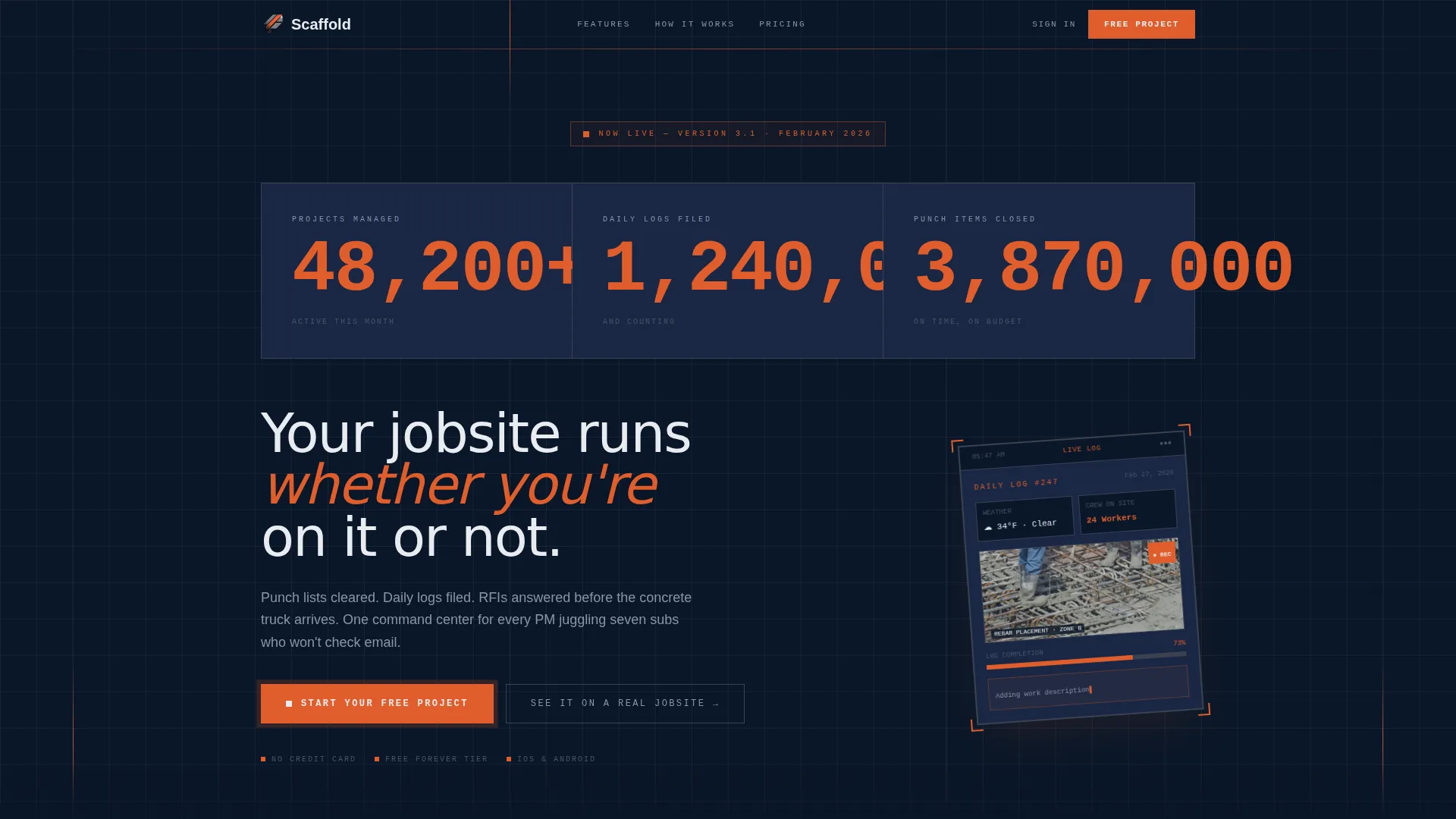
- A stats and metrics header with three live-count displays and a phone mockup showing a daily log in progress
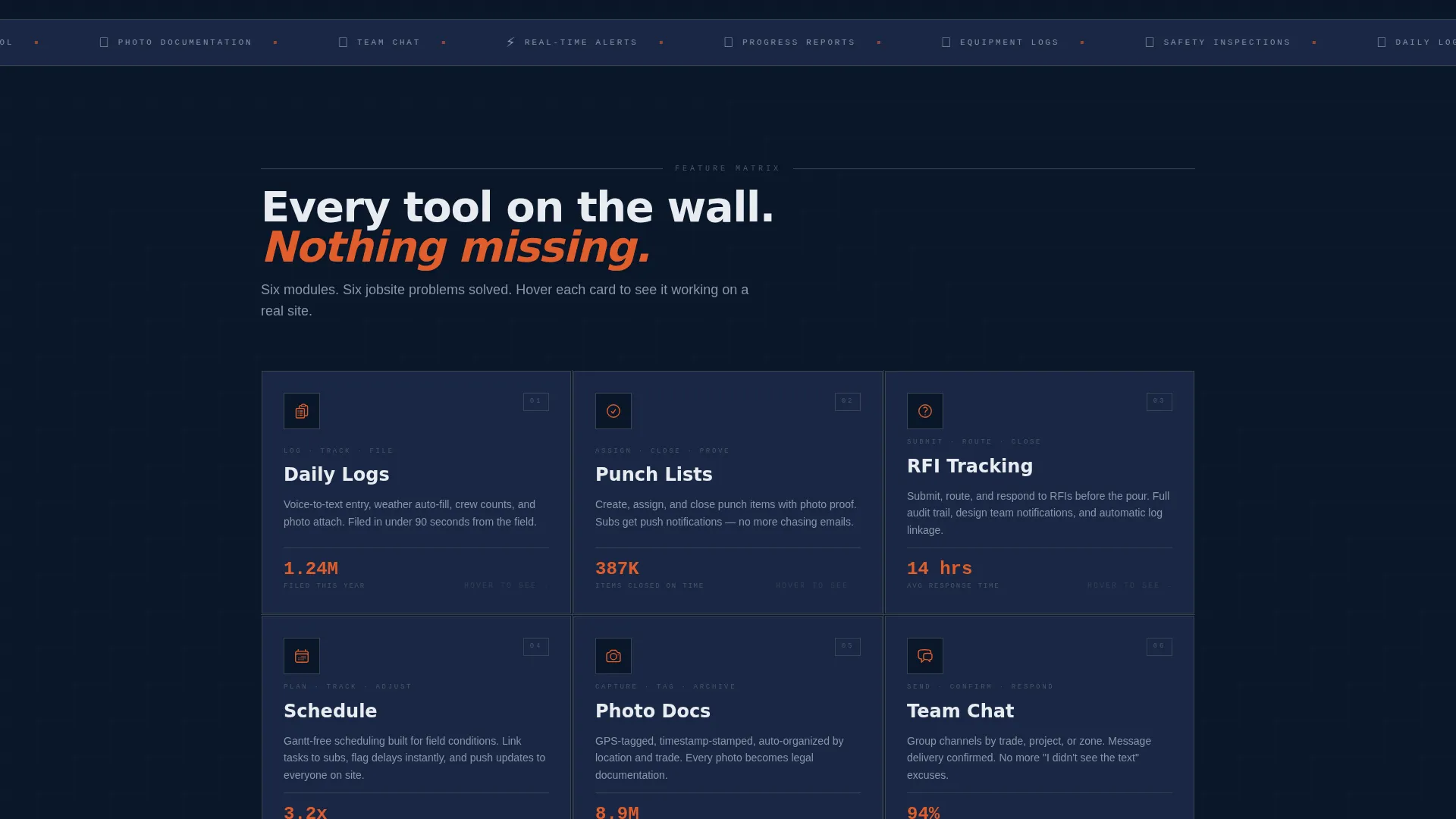
- A six-card feature matrix grid covering Daily Logs, Punch Lists, RFI Tracking, Schedule, Photo Documentation, and Team Chat
- A freemium conversion flow with a pinned "Start Your Free Project" button and a secondary "See It on a Real Jobsite" screen recording path
Feature list
This template is designed around one principle: show capability before asking for commitment. Every component earns its place on the page.
Real-Time Stats Header
Three oversized mechanical-style counters display live project metrics: projects managed, daily logs filed, and punch list items closed. The numbers are set in condensed monospaced type against a deep navy background, styled to feel like a split-flap departure board on a construction site.
Card Flip Feature Grid
Six modular feature cards each represent one core app capability. Every card shows an icon, a three-word label, and a single adoption stat on the front. On hover, the card flips to reveal a phone screenshot of that feature in active jobsite use.
Pinned Mobile Call-to-Action Bar
On mobile viewports, the primary "Start Your Free Project" button is pinned to the bottom of the screen at all times. It repeats after every second row of feature cards on desktop, keeping the conversion path always within reach.
Lightweight Freemium Signup
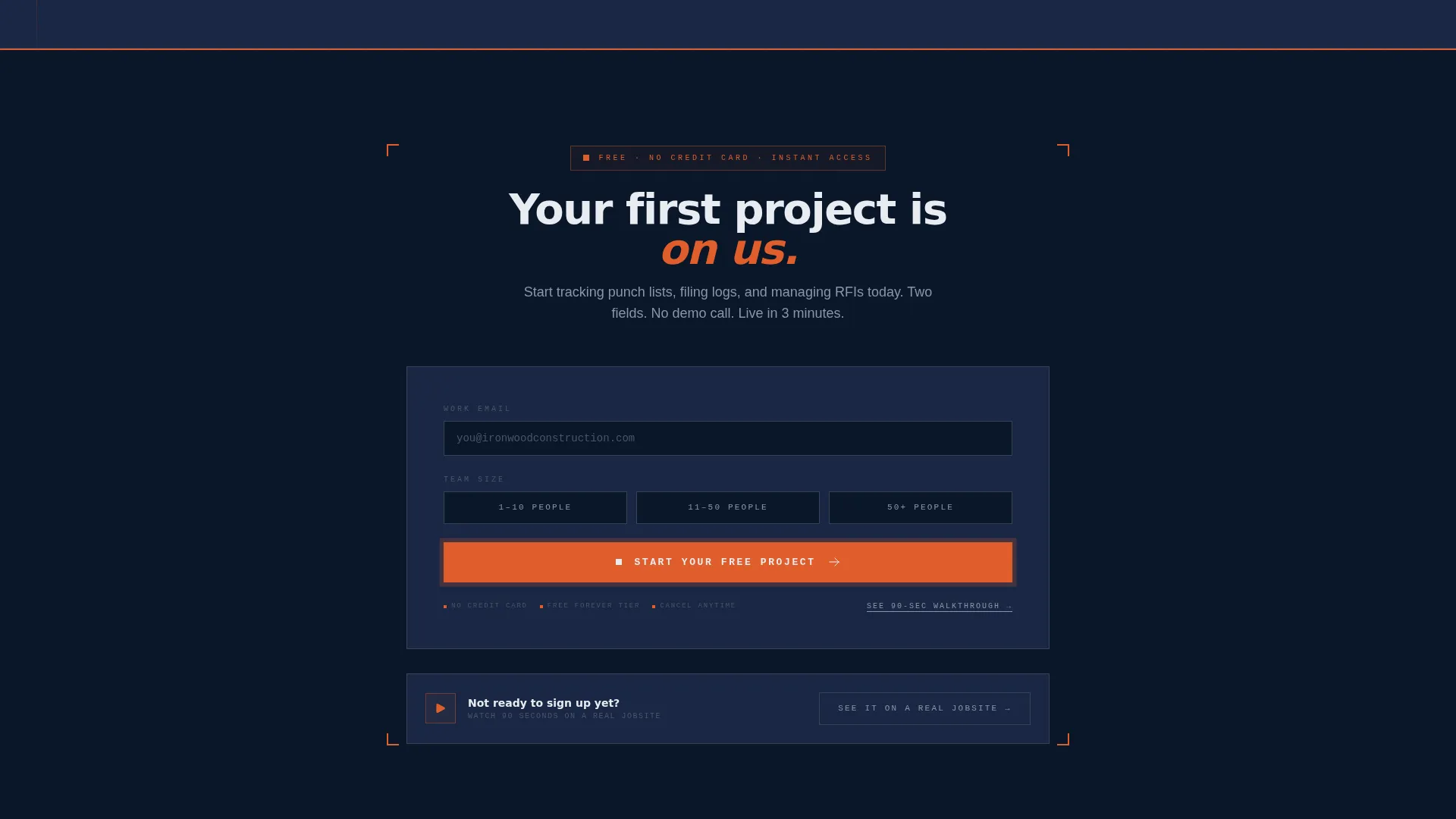
The signup form asks only for an email address and company size (1-10, 11-50, or 50+ people). No credit card is required and no demo call is gated. The low-friction entry point is designed to remove every reason to hesitate.
Secondary Video Path
A supporting call-to-action links to a 90-second screen recording walkthrough labeled "See It on a Real Jobsite." This gives skeptical buyers a way to verify the product before committing to even a free account.
Phone Mockup with Live Log
A single angled phone mockup sits below the stats wall. It shows a daily log entry mid-completion with a timestamp, a weather icon, a crew count, and a photo thumbnail of rebar placement in progress.
Page sections overview
| Section | Purpose |
|---|---|
| Stats Metrics Wall | Opens with three animated counters proving real usage at a glance |
| Phone Mockup Display | Shows a live daily log entry to ground the app in real jobsite context |
| Headline Fade-In | Delivers the core value statement after the visual proof lands |
| Feature Card Grid | Inventories all six app capabilities as flippable brutalist modules |
| Pinned call to action Bar | Keeps the primary signup action accessible throughout the scroll |
| Freemium Signup Form | Captures email and company size with zero friction, no card required |
| Secondary Video call to action | Offers a 90-second walkthrough as an alternative conversion path |
Design & branding system
The visual identity is Bold Brutalist, built around a Midnight Blue color system. Every design decision references the physical language of a construction site: heavy borders, no rounded corners, monospaced type, and surfaces that look load-bearing.
- Color palette: deep structural navy (#0A1628) for backgrounds, poured-concrete gray (#3B4252) on card surfaces, rebar orange (#E05E2C) for calls to action and interactive highlights, and blueprint white (#E8ECF1) for all body and headline typography
- Typography and structure: oversized condensed type for counter displays, monospaced fonts for card labels and detail text, visible card borders with hard edges and no corner rounding throughout the grid
Mobile & speed optimization
The card grid is built to rearrange responsively. On smaller screens, the modular cards stack like shipping containers, maintaining the brutalist structure without breaking the layout or losing information hierarchy.
- Cards reflow into a single-column stack on mobile, preserving the icon, label, and stat layout of each module
- The primary call-to-action button pins to the bottom of the mobile viewport so the conversion action is never out of reach during a scroll session
How this template helps you convert
The page is sequenced to build confidence before it asks for anything. A visitor who has scrolled six feature cards already understands what the app does and what it costs to try it.
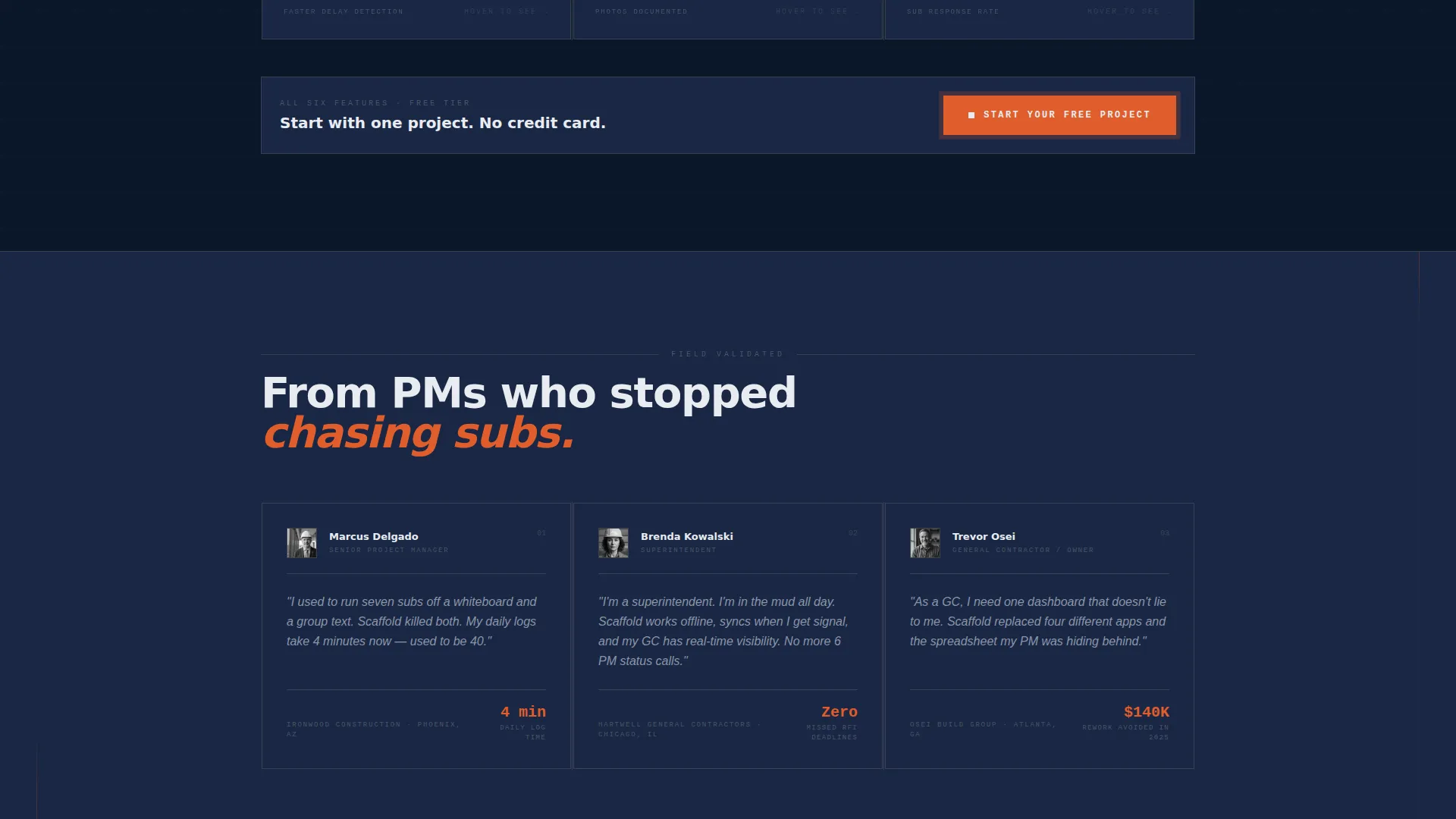
- The stats wall at the top establishes social proof immediately, before a single line of marketing copy appears on screen
- The feature card grid proves breadth through sheer coverage, so by the time a project manager reaches the signup form, the free tier feels like a natural next step
Other information about this template
This template is categorized under Technology with a Construction Software and SaaS subcategory, targeting the Construction Mobile App niche specifically. It is designed as a card grid layout with a Feature Matrix creative direction, a Stats and Metrics header concept, and a Freemium and Trial conversion path.
- The intersection match score for this template is 13, indicating a strong alignment between the chosen theme, template style, and niche use case
- The Bold Brutalist theme and Midnight Blue color system are applied consistently across all modules, making the visual identity easy to extend if additional sections are added later
- The template is ready to use as a standalone landing page and does not require multi-page navigation or external routing setup
Theme
Bold Brutalist
Creative direction
Feature Matrix
Color system
Midnight Blue
Style
Card Grid (Modular)
Direction
Freemium/Trial
Page Sections
Animated Stats and Metrics Wall
Card Flip Feature Matrix
Pinned Freemium Call-to-action
Angled Phone Mockup with Daily Log
Secondary Walkthrough Video Path
Responsive Modular Card Grid
Related questions
Who is this template designed for?
Does the freemium signup require a credit card?
Can I customize the feature cards to match my own app?
What is the secondary path for visitors not ready to sign up?
Does this template work well on mobile screens?



