Construction Software & SaaS Booking Website Template
Scaffold is a dark-cockpit landing page template built for construction booking software. It combines a three-panel glass hero, an interactive plan comparison table with expandable micro-demos, a live conflict simulator, and a streamlined demo request form. General contractors, operations directors, and estimators get a single-page presentation that shows, and sells, what modern scheduling software can do for chaotic jobsites.
by Rocket studio
Quick summary
The Scaffold template is a high-impact, single-page landing experience designed for construction booking software. It opens with floating glass data panels and a typewriter headline, then guides visitors through an interactive comparison table, a conflict-reduction simulator, and a focused demo request form. Every section builds the case that manual, text-chain scheduling is costing builders money on every pour day.
Who this template is for
This template is built for construction software companies that need a conversion-focused, visually distinct landing page. It speaks directly to the buyers who feel the daily cost of scheduling chaos on active construction projects.
- General contractors and project managers running eight or more trades across multiple active pours who need a faster, clearer way to confirm crew and equipment slots.
- Operations directors at mid-size commercial firms who lose real money when a concrete pump arrives and the rebar crew does not, and who need to see ROI evidence before committing.
- Estimators and office-based schedulers who still text booking confirmations from their truck and are ready for a platform that centralises every construction work detail in one place.
What problem this template solves
Scheduling chaos is the defining cost problem in commercial construction. When subcontractors, equipment dispatch, and permit timelines live in separate text threads, spreadsheets, and phone calls, conflicts are inevitable. A missed date or a double-booked crane can erase the margin on an entire pour day.
- Fragmented planning tools force a project manager to cross-reference multiple documents and phone logs to confirm a single booking, adding delay and error to every construction site handoff.
- No visual proof of value means construction software landing pages often describe features without letting visitors feel how the platform works, killing trust before a demo is booked.
- Slow, over-engineered lead forms scare off busy contractors who are on-site and have thirty seconds to decide whether to engage, making simplified, focused forms essential.
What you get with this template
You get a fully structured, single-page layout that is ready to adapt for any construction booking or scheduling software product. The template covers every stage of the buyer journey, from first impression to demo submission, with high interactivity built in from the start.
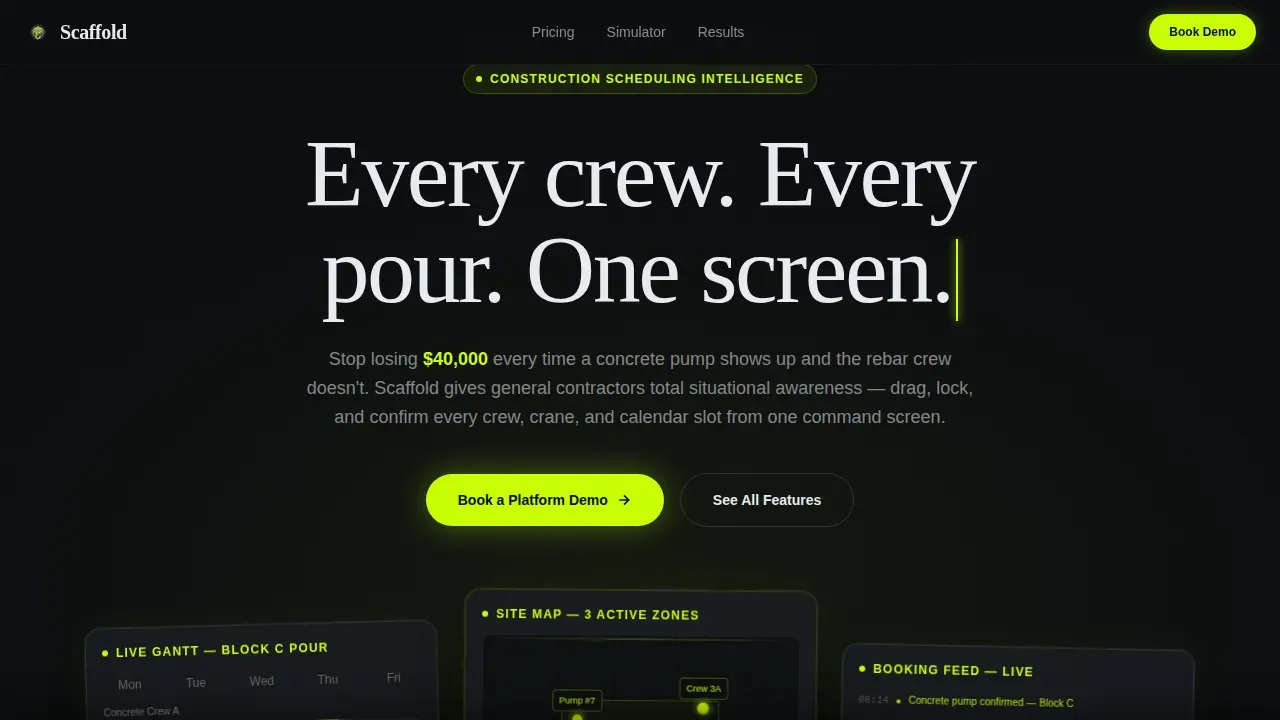
- A glass-panel hero section with three floating data layers, a Gantt-style crew timeline, a map with equipment pins, and a live booking confirmation feed, anchored by a typewriter-animated headline.
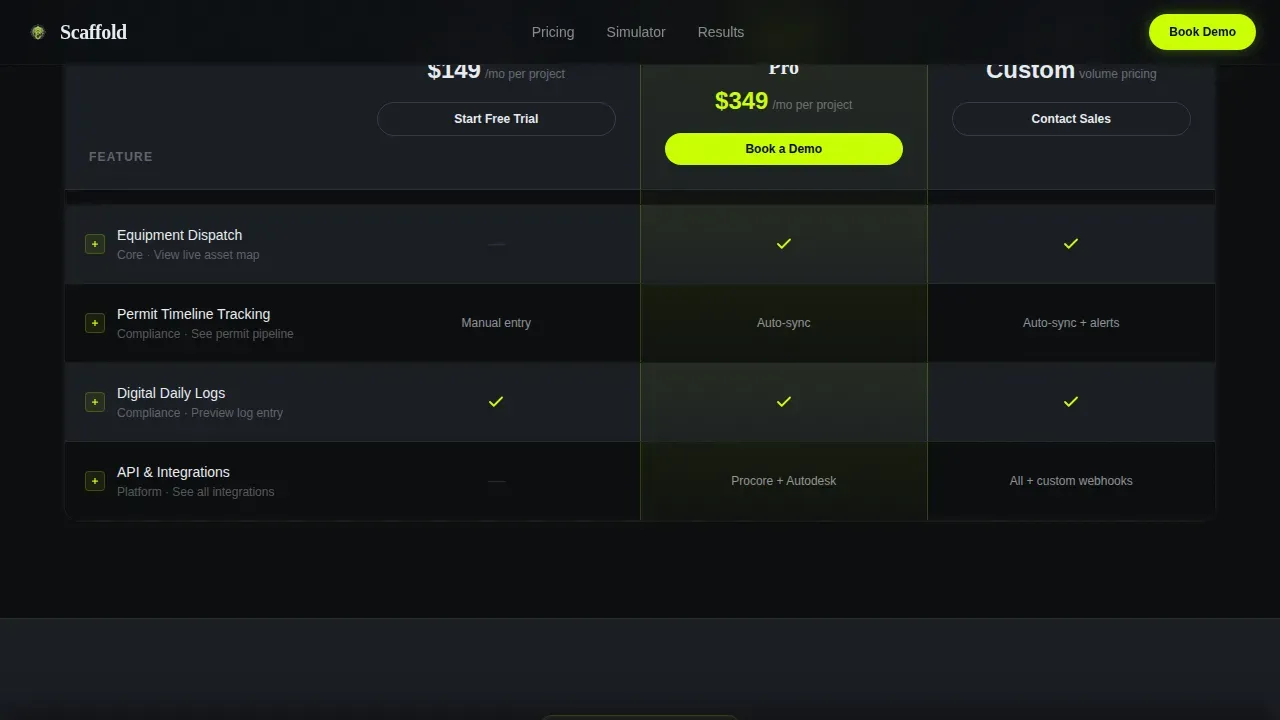
- A full-width plan comparison table with three pricing tiers, expandable feature rows that loop four-second micro-demo animations, and a sticky sidebar that persists as visitors scroll deeper into the page.
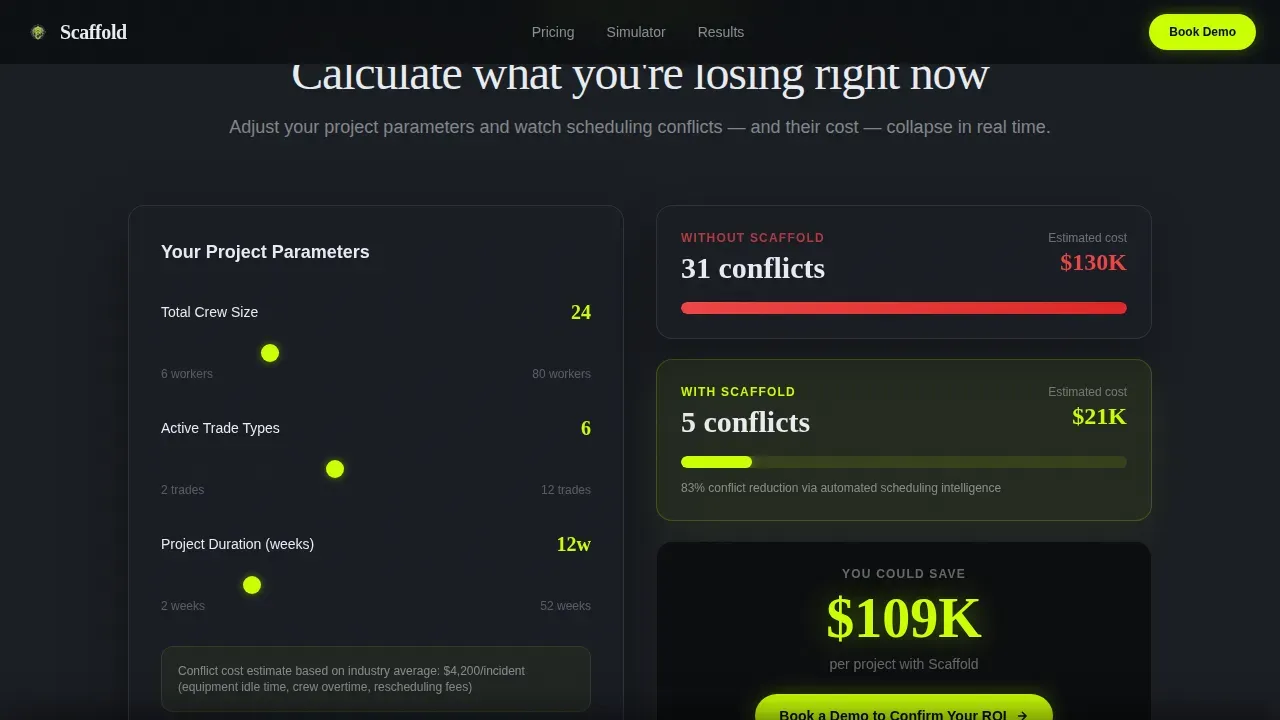
- An interactive project simulator where visitors toggle crew size, trade count, and project duration to watch booking conflicts decrease in real time, plus a demo request form and a secondary gated ROI calculator download.
Feature list
This template delivers a tightly integrated set of interactive features. Each one is designed to keep construction software buyers engaged and moving toward a booking.
Typewriter Hero with Floating Glass Panels
The hero opens on a void-black background and animates three translucent glass panels in slight parallax. Each panel displays a different live-data layer of the software: a Gantt crew timeline on the left, a map view with equipment pins in the center, and a scrolling booking confirmation feed on the right. The headline types in one character at a time, giving visitors an immediate sense of what the platform does and how it feels before they read a single word of body copy.
Interactive Plan Comparison Table
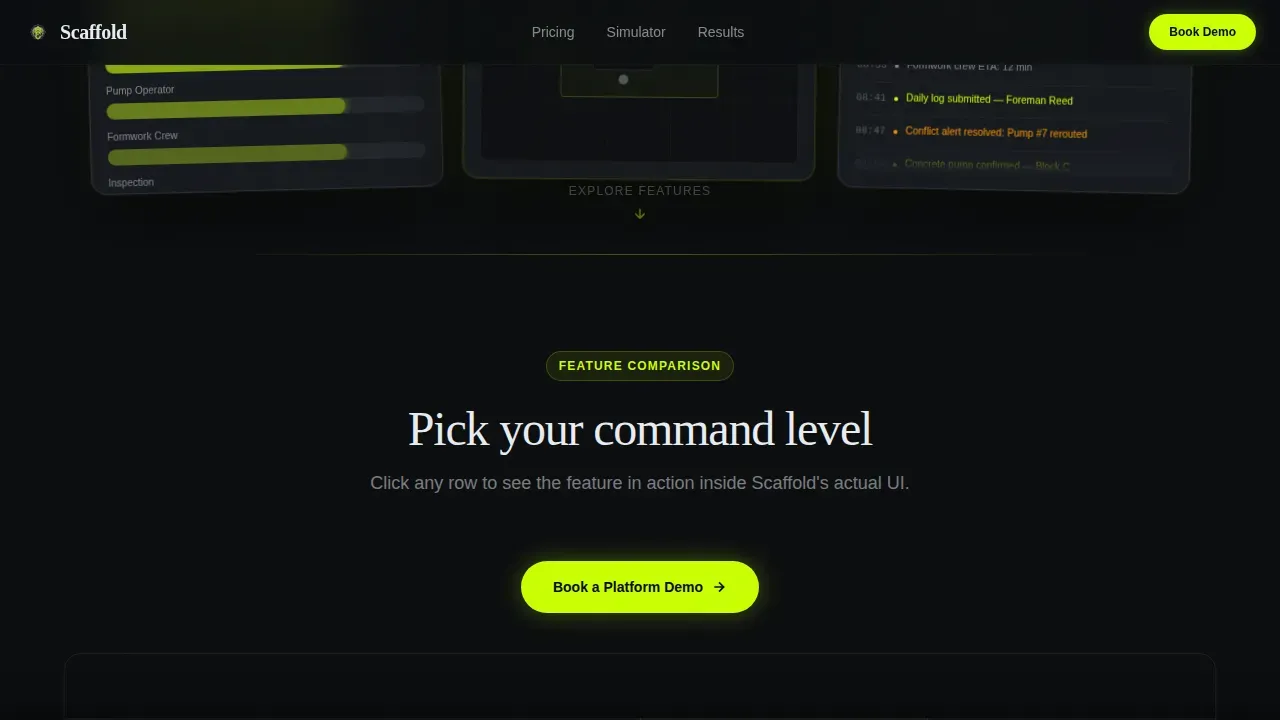
Three plan tiers are laid out in a full-width comparison grid. Feature rows cover subcontractor booking, equipment dispatch, permit tracking, daily logs, and application programming interface (API) integrations. Each row expands on click to reveal a four-second looping micro-demo animation showing that feature inside the actual software interface, turning a static comparison table into a live product tour that helps builders evaluate the platform without scheduling a call.
Conflict-Reduction Project Simulator
Below the comparison table, the layout shifts to an interactive simulator. Visitors toggle crew size, trade count, and project duration with simple controls. As they adjust each variable, the simulator calculates and displays how booking conflicts decrease. This section bridges the gap between "see what is included" and "feel what you are losing without it," making the cost of inaction visible and specific for every construction company evaluating the platform.
Sticky Demo Call-to-Action Bar
After a visitor has interacted with at least two expanded feature rows, a sticky bar appears at the bottom of the screen. It carries the primary call to action, "Book a Platform Demo", in electric lime on void black, keeping the next step always visible without interrupting the scroll. The demo form itself asks for company name, active project count, work email, and one optional open field for the visitor's biggest scheduling challenge, keeping the form short enough for busy contractors to complete on-site.
ROI and Social Proof Section
Between the simulator and the form, the template includes a dedicated ROI and social proof block. It is structured for specific dollar metrics such as pour-day savings, alongside three testimonial cards formatted to include a quote, a name, a firm type, and a logo placeholder. Testimonials focused on time saved and increased profitability build the credibility that construction site decision-makers need before committing to a platform demo.
Gated ROI Calculator Download
A secondary conversion path sits alongside the main demo form. Visitors not yet ready to talk can enter just their work email to download a gated ROI calculator as a portable document format (PDF). This path captures leads at an earlier stage of the buying journey while still providing genuine value, extending the platform's reach without adding friction to the primary conversion flow.
Page sections overview
| Section | Purpose |
|---|---|
| Glass Hero Panels | Open with live data layers and typewriter headline to establish product identity instantly |
| Plan Comparison Table | Show three tiers with expandable feature rows and looping micro-demo animations |
| Interactive Project Simulator | Let visitors toggle crew and trade variables to see booking conflict reduction |
| ROI and Social Proof | Reinforce value with specific dollar metrics and three contractor testimonial cards |
| Demo Form and Download | Capture leads via demo booking form or gated ROI calculator PDF |
| Single-Row Footer | Close with a clean linear footer row for navigation and brand details |
Design & branding system
The visual identity is built on the Acid Digital color system and a Tech Glass aesthetic. Every design choice is intentional: the dark layers recede so that the electric lime data and calls to action float forward, urgent and unmissable, like a heads-up display projected onto a tinted construction site windshield at night.
- Color palette: Void black (#0B0D0F) as the primary background, smoked glass charcoal (#1A1D23) for panel surfaces and alternating table rows, electric lime (#CAFF04) for every interactive accent including toggle switches, selected plan columns, and call-to-action buttons, and cool interface white (#E8ECF1) for body text, table headers, and logo presentation areas.
- Typography: DM Sans for body copy, interface labels, and form elements; Fraunces for display headlines and section titles, creating a contrast between technical clarity and editorial authority that fits both the office and the construction site.
- Visual elements: Frosted-glass blur at panel edges, a faint acid-lime glow behind each floating data panel, thin lime-ruled lines separating feature rows in the comparison table, and no photography, the product itself is rendered as architecture, giving the template a professional presentation that stands apart from generic construction software sites.
Mobile & speed optimization
The template is designed desktop-first to match how project managers and operations directors typically review scheduling software, on a site laptop or office screen. However, the layout is fully responsive and adapts cleanly for mobile, recognising that many estimators and subcontractors will access it from a phone on the construction site.
- Responsive layout: The three-panel glass hero stacks gracefully on smaller screens. The comparison table compresses into a scrollable format, and the sticky call-to-action bar remains visible at the bottom of the phone display so the "Book a Platform Demo" line is never out of reach.
- Performance-aware architecture: Static sections such as the hero copy, ROI block, and footer use server components for fast initial rendering. The interactive comparison table and project simulator use client components, keeping heavy animation isolated so the rest of the page loads quickly. A one-second loading delay can reduce conversions by seven percent, so the template separates static from interactive rendering to protect that first impression.
How this template helps you convert
Every section of this template is engineered to move a construction industry buyer one step closer to booking a demo. The conversion logic escalates naturally as the visitor scrolls.
- The hero earns attention immediately. Three floating data panels and a typewriter headline answer what the software does within seconds of arrival, meeting the expectation that the first view of a landing page must communicate value instantly. Visitors do not need to scroll to understand the platform's scope.
- The interactive table builds hands-on confidence. Expandable rows with looping micro-demo animations let visitors touch the product before committing. Each interaction increases investment in the experience and validates that the software handles their specific construction work challenges. The sticky demo bar appears after two interactions, so the call to action arrives at exactly the right moment.
- The simulator and secondary download path close gaps. Visitors ready to act book a demo. Visitors still evaluating download the ROI calculator, leaving their email for follow-up. Both paths are designed to reduce friction: the demo form limits fields to company name, project count, work email, and one optional open-text question, following the principle that simplified forms convert busy contractors more reliably than long intake questionnaires.
Other information about this template
This template is purpose-built for the intersection of construction technology and conversion-focused design. Several additional details are worth noting for teams evaluating it for their specific needs.
- The template's comparison table is structured to accommodate a construction work order tracking view, where each plan tier can highlight whether extra work order handling, change order documentation, or construction stop work order workflows are included as platform features.
- Work order rows in the table can include a description field and a date column, reflecting the industry standard that a construction work order should capture client approval name, title, signature, and date of approval alongside service scope and costs.
- The gated ROI calculator download is designed as a PDF that construction companies can use as a reference document internally, helping an engineer, architect, or operations director build the internal case for switching from spreadsheet-based planning to a dedicated platform.
- The social proof section provides ample space for logo placement from construction or scaffolding firms, which is a proven trust signal for tech-savvy buyers in building industries who recognise peer brands before they trust a new software company.
- The template's background system, void black to charcoal, gives the designer ample space to layer brand elements, product screenshots, or additional data visualisation without compromising the dark-cockpit aesthetic.
- Teams working on a renovation project scope or maintenance-focused service line can adapt the simulator toggles and comparison rows to reflect those specific workflows, since the template's modular layout supports tailored description blocks for each plan tier.
- The template is well suited for construction companies across multiple industries, including commercial building contractors, scaffolding specialists, electrical subcontractors, and civil engineer firms that manage complex scheduling across multiple active construction sites.
- Builders evaluating 3D or building information modelling (BIM) visualization tools as part of their construction technology stack will find the glass-panel hero concept naturally compatible with rendering product interfaces that show spatial or structural data.
- The scaffold smart construction booking software landing page template is listed in the Construction Software and Software as a Service (SaaS) category, making it discoverable for buyers searching specifically for construction management and scheduling platform templates.
- Growth-focused construction companies that want to present a polished, professional brand identity, complete with a prominent logo position, a focused demo form, and a strong primary call to action, will find this template ready to deploy with minimal copy and branding substitution.
Theme
Tech Glass
Creative direction
Interactive Explorer
Color system
Acid Digital
Style
Comparison Table
Direction
Lead Generation
Page Sections
Glass Panel Hero with Typewriter Headline
Expandable Plan Comparison Table
Interactive Conflict-reduction Simulator
Sticky Demo Call-to-action Bar
ROI Metrics and Testimonial Cards
Gated ROI Calculator PDF Download
Related questions
Can I adapt the comparison table for different plan tiers or feature sets?
Is the project simulator connected to real backend data?
How does the demo form perform for on-site mobile visitors?
Can I use this template for a scaffolding-specific software product?
Does the template include form submission logic or email capture backend?



