Smart Construction Command Landing Page Template
Scaffold is a Data Command construction project management landing page template built for general contractors, owners' representatives, and development firms. It features a glassmorphic dashboard aesthetic, an interactive comparison table with live scenario toggles, expandable case-study cards, a critical path timeline animation, and a lead-generation form designed to earn the click before asking for commitment.
by Rocket studio
Quick summary
Scaffold turns the chaos of active construction projects into a sequenced, readable command center. This template is purpose-built for construction project management platforms targeting enterprise clients. It pairs a dramatic terminal-code hero with an interactive comparison table, frost-open case-study cards, and a two-path lead generation form, all rendered in a dark glassmorphic design system that feels like a live site-office dashboard.
Who this template is for
This template is built for B2B SaaS platforms that serve the construction industry at scale. The design and copy structure speak directly to people making real decisions on eight-figure construction projects every day.
- General contractors who manage resources across dozens of parallel trades and need to track progress without waiting for a subcontractor's call
- Owners' representatives who require a single source of truth and clear communication across every key stakeholder group
- Development firms tired of reactive reporting and ready to deliver projects on a proactive, data-driven schedule
What problem this template solves
Construction project management is difficult when teams rely on scattered spreadsheets, manual updates, and disconnected logs. Schedule slips, unresolved change orders, and cost overruns often go undetected until they become crises. A construction project management template built around this reality has to do more than look good, it has to earn trust before asking for a conversion.
- Teams lose critical information between trades when there is no centralized way to monitor tasks, actual costs, and RFI status simultaneously
- Clients and other stakeholders receive lagging reports instead of a living document that reflects where the project actually stands
- Without a structured plan to define project scope and responsibilities from the start, construction projects drift from their baseline timeline and budget
What you get with this template
Scaffold gives a construction project management platform everything it needs to convert enterprise visitors into qualified leads. Each section is designed to build credibility through specificity, real metrics, real scenarios, and a form flow that positions the next step as a diagnostic rather than a sales pitch.
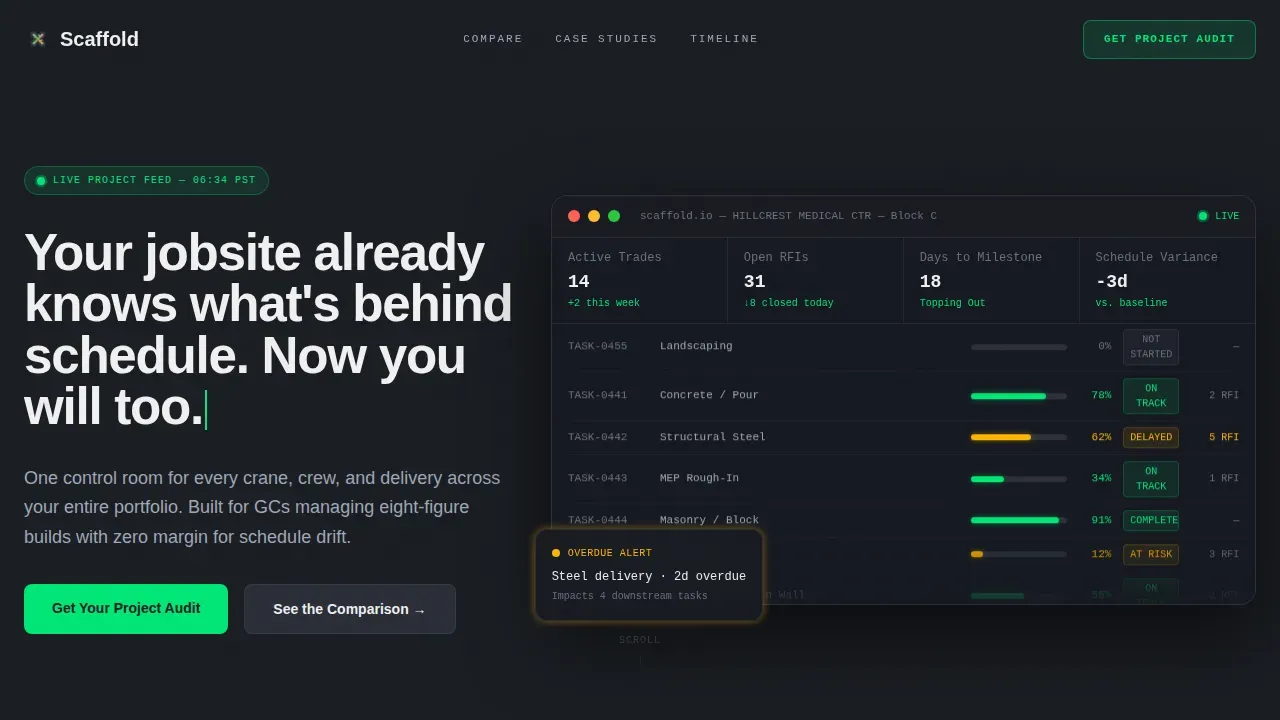
- A hero section that opens with a streaming terminal code block, then pulls back to reveal a full glassmorphic dashboard with a typewriter headline
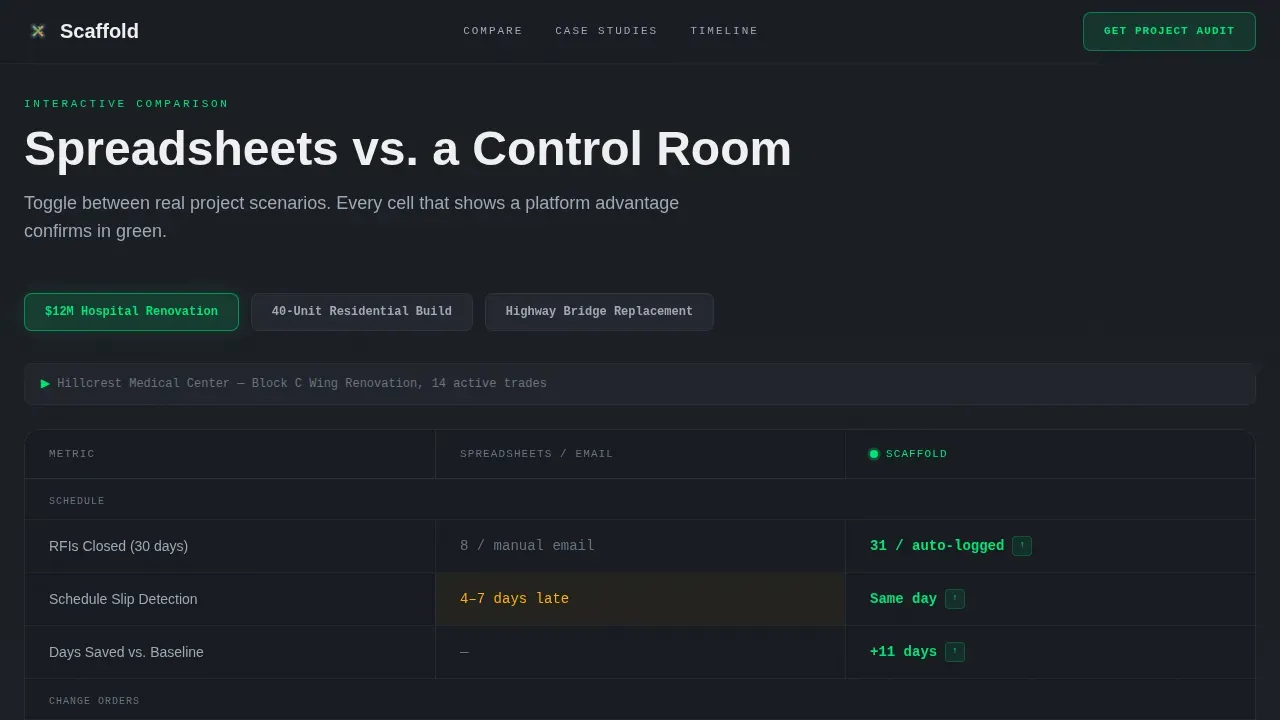
- An interactive comparison table with scenario toggles across three project types, pulsing green cells on platform-advantage metrics, and expandable case-study cards
- A two-path lead generation structure: a three-field primary form for project audits and a qualifying secondary form for deeper discovery
Feature list
Scaffold includes six purpose-built features designed to help construction project management platforms communicate value and capture qualified leads from contractors, owners' reps, and development firms.
Terminal Code Hero with Dashboard Reveal
The hero opens on a tight, scrolling block of monospaced project data, task names, trade assignments, completion percentages, and RFI counts, styled like a live market feed. After two seconds, the viewport pulls back to reveal the full glassmorphic dashboard and a typewriter headline types itself in. This sequence sets the tone: your platform knows more about the project than most people on site do.
Interactive Scenario Comparison Table
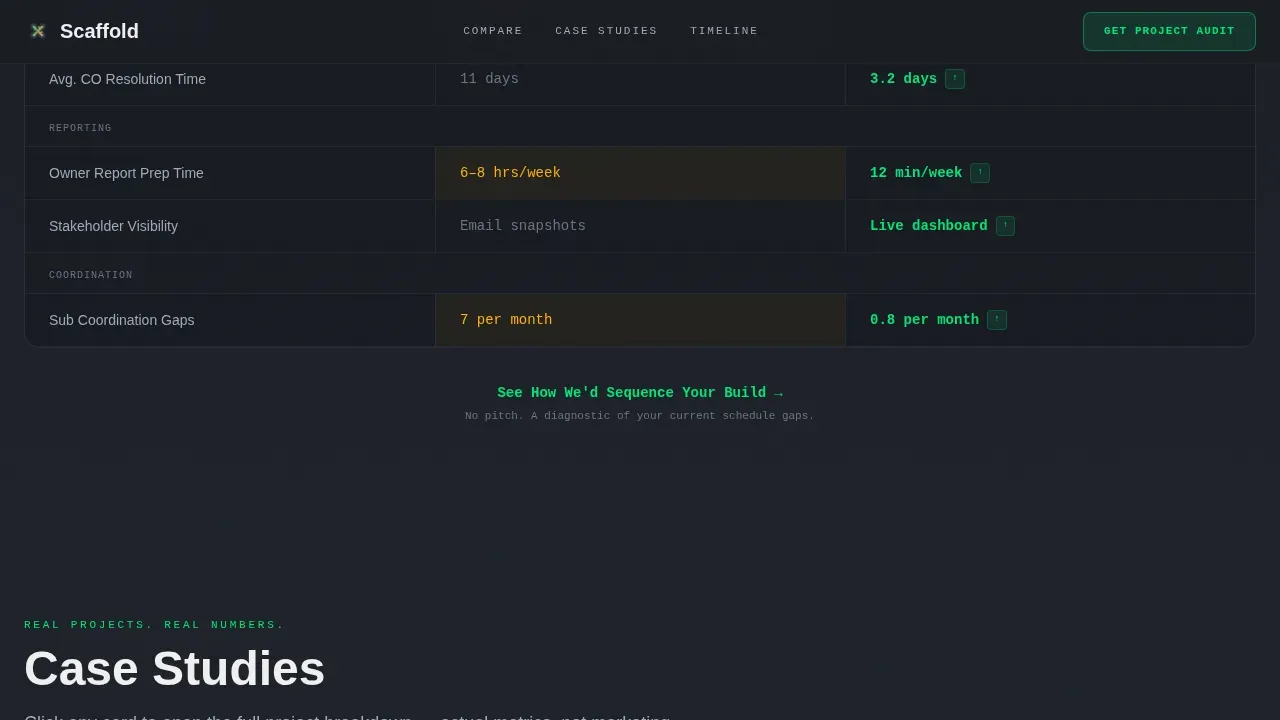
Visitors toggle between three real-world construction projects: a $12M hospital renovation, a 40-unit residential build, and a highway bridge replacement. Each toggle reconfigures the glassmorphic table with real metrics in every cell, change orders caught, days saved against baseline, RFIs closed. Cells showing a platform advantage pulse briefly in live-data green, making the difference between spreadsheets and the platform viscerally clear.
Frost-Open Case Study Cards
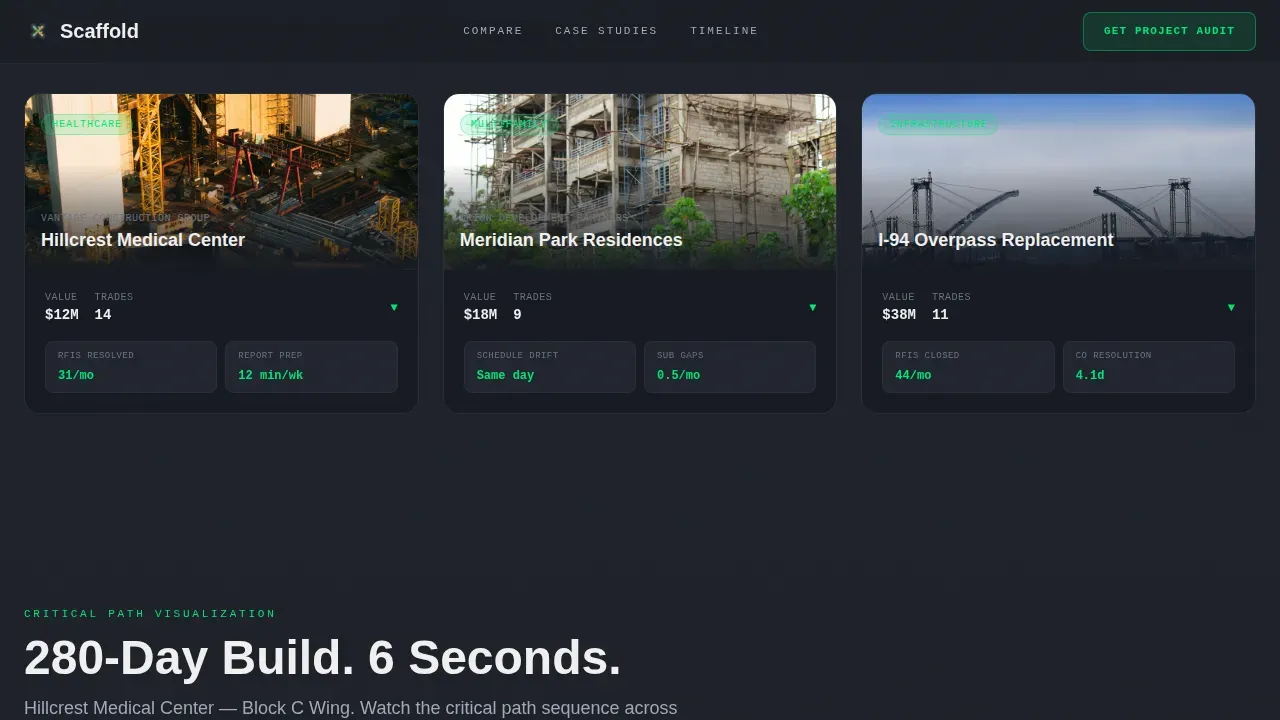
Below the comparison table, expandable cards open with a frosted-glass animation on click. Each card surfaces project-specific outcomes: actual costs controlled, schedule phases completed on time, and trade coordination wins. These cards let the construction project management platform document its results without relying on generic testimonials.
Critical Path Timeline Animation
A sixty-second compressed animation visualizes a real project's critical path from kickoff to completion. It gives project managers and other stakeholders a fast, compelling way to understand how the platform sequences construction projects and closes the gap between plan and reality.
Two-Path Lead Generation Forms
The primary call to action, "Get Your Project Audit," anchors a three-field glassmorphic form: project type dropdown, estimated total value slider ($1M to $500M+), and work email. A secondary path below the comparison table, "See How We'd Sequence Your Build," opens a qualifying modal that asks for number of active trades, current scheduling tool, and biggest pain point. No pricing is surfaced. The form earns the click by promising insight first.
Glassmorphic Data Command Design System
The entire template is built on a dark graphite base with translucent card surfaces, frosted steel-mist borders, and a strict color grammar: live-data green reserved for elements that confirm or update, alert amber reserved for warnings and overdue milestones. JetBrains Mono handles terminal and data display; DM Sans handles all interface text. The result is a construction site office at dusk, backlit by dashboards running overnight.
Page sections overview
| Section | Purpose |
|---|---|
| Terminal Hero Block | Opens with streaming project data, reveals full dashboard, types headline |
| Scenario Toggle Table | Lets visitors compare spreadsheet versus. platform across three project types |
| Case Study Cards | Frost-open expandable cards showing real project outcomes and metrics |
| Critical Path Animation | Sixty-second timeline visualization of a project's sequenced schedule |
| Project Audit Form | Three-field primary lead capture anchored to a diagnostic positioning |
| Qualifying Discovery Form | Secondary modal form for deeper trade and pain-point qualification |
| Linear Footer | Single-row footer pattern with minimal navigation and brand closure |
Design & branding system
Scaffold uses a Data Command visual language built on glassmorphism. Every surface, border, and accent color carries a functional meaning, nothing is decorative without purpose. The palette feels like rain-streaked glass in a site office, dark and layered, with dashboard glow cutting through the grain.
- Color system: deep graphite base (#1A1D23), frosted steel-mist borders (#3A3F4B at 40% opacity), live-data green (#00E676) for active indicators and confirmed progress, alert amber (#FFB300) for warnings and overdue milestones
- Typography: JetBrains Mono for all terminal, code, and data display; DM Sans for all interface and body text, clear, high-contrast white (#F0F0F0) on primary surfaces
- Animation grammar: terminal scroll in the hero, typewriter headline reveal, pulsing green cells in the comparison table, frost-open card transitions, and a sixty-second critical path animation
Mobile & speed optimization
Scaffold is designed desktop-first. The primary audience, general contractors and project managers, typically open their laptops at 5:45 AM in a site trailer, not on a phone. The template prioritizes that context while remaining structurally sound on other screen sizes.
- Animations are built with CSS-first logic and minimal JavaScript to keep the interaction layer lean across all devices
- The glassmorphic layout uses layered translucent surfaces that scale cleanly, preserving the data-command aesthetic without heavy asset loading
- The comparison table and form elements are structured to remain fully functional and readable on smaller viewports when accessed by clients or other stakeholders on the go
How this template helps you convert
Scaffold is engineered to move a skeptical, time-pressed general contractor from cold scroll to qualified lead without a single moment that feels like a sales push.
- The terminal hero sequence earns attention immediately by showing project intelligence in motion, task names, phases, trade assignments, before a single marketing claim appears, establishing credibility through detail rather than description
- The interactive comparison table makes the platform's value measurable in seconds, letting visitors track progress across scenarios and see how construction projects perform with and without the platform, building the case for conversion through data rather than copy
Other information about this template
This template is well suited for any construction project management platform that needs to communicate enterprise-grade capability to contractors, owners' reps, and development clients. It is especially effective for platforms that want to define their value against spreadsheet-based workflows and position the sales process as a discovery conversation.
- A construction budget template component within the dashboard comparison cells lets visitors see how the platform helps managers estimate and control actual costs, shifting budget oversight from reactive justification to proactive control
- A construction schedule template approach is reflected in the Gantt chart-style timeline animation, which outlines the start and finish dates for all project phases and gives the project team a visual sequence they can immediately understand
- Using a Gantt chart visualization inside the case-study cards helps every key stakeholder understand the critical path, project scope, and responsibilities without needing to request a separate briefing
- The comparison table works equally well for remodeling projects, infrastructure builds, and commercial construction projects, making this template adaptable regardless of project scale or sector
- A free construction schedule template framing can also support the secondary qualifying form, where visitors describe their current scheduling tool and pain points before the platform proposes a structured alternative
- Construction project management templates like Scaffold help standardize communication and documentation across a project team, which is essential for ensuring compliance, clear communication, and informed decisions at every phase
- Implementing a structured framework of construction project management templates establishes a common operational language for all stakeholders, including contractors, subcontractors, and clients
- Platforms that list construction project management templates for sale, such as those found on major marketplace sites, often highlight Gantt chart integration and continuous timelines as core selling points; Scaffold is built to reflect those same expectations
- The scaffold data command construction project management landing page template included in this product is designed to highlight tangible business benefits and address common construction project inefficiencies, from RFI bottlenecks to subcontractor coordination breakdowns
- Note that no pricing is displayed anywhere in the template, keeping the focus on diagnostic value rather than transactional friction
Theme
Data Command
Creative direction
Interactive Explorer
Color system
Glassmorphic
Style
Comparison Table
Direction
Lead Generation
Page Sections
Terminal Code Hero with Dashboard Reveal
Interactive Scenario Comparison Table
Frost-open Case Study Cards
Critical Path Timeline Animation
Two-path Lead Generation Flow
Data Command Glassmorphic Design System
Related questions
What types of construction projects does this template work for?
Does this template include a Gantt chart or timeline section?
Can this template support lead generation without showing pricing?
Who is this template best suited for?
Is the comparison table static or interactive?



