Music Theory Education Booking Website Template
Cadence is a single-page landing page template built for music theory tutoring services. It uses a warm Family First visual identity, a side-by-side comparison table, and a five-question diagnostic quiz to turn hesitant parents into booked clients. The layout guides visitors from a relatable problem to a clear, trust-building solution without ever feeling clinical or salesy.
by Rocket studio
Quick summary
Cadence is a landing page template designed for living-room-style music theory tutoring. It pairs a half-page photo-and-text header with a Problem-to-Solution scroll structure, a comparison table, session-detail sections, parent testimonials, a visual student timeline, and a friendly five-question quiz that earns the click before asking for a commitment.
Who this template is for
This template is built for independent music theory tutors and small tutoring services whose clients are parents, not students. It speaks directly to families navigating grade-based music exams and children who love playing but struggle with written theory.
- Parents of children preparing for graded music exams who need fast, visible progress
- Homeschool families building a structured music education from the ground up
- Tutors who want a professional landing page that feels warm and approachable, not institutional
What problem this template solves
Most tutoring service pages list credentials and pricing but never connect emotionally with the parent reading them at 10pm after a tearful theory homework session. Cadence closes that gap by mirroring the parent's exact internal experience before offering a solution.
- Parents land on a page that names their child's specific struggle before pitching anything
- The comparison table makes the cost of doing nothing visible alongside the benefit of guided tutoring
- The diagnostic quiz lets parents learn something real about their child's level before committing to a booking
What you get with this template
Cadence delivers a complete, single-page layout with every section pre-structured and ready to customize. No section requires a design decision from scratch. The visual system, copy flow, and interactive quiz framework are all included.
- A half-page split header with a photo slot, headline area, subline, and amber call-to-action button
- A two-column comparison table, session-detail blocks, testimonial pairings, and an eight-week student timeline
- A five-question diagnostic quiz with illustrated answer cards and a personalized output leading to a trial lesson booking form
Feature list
This template is built around a small number of high-impact components that work together to move a parent from recognition to registration.
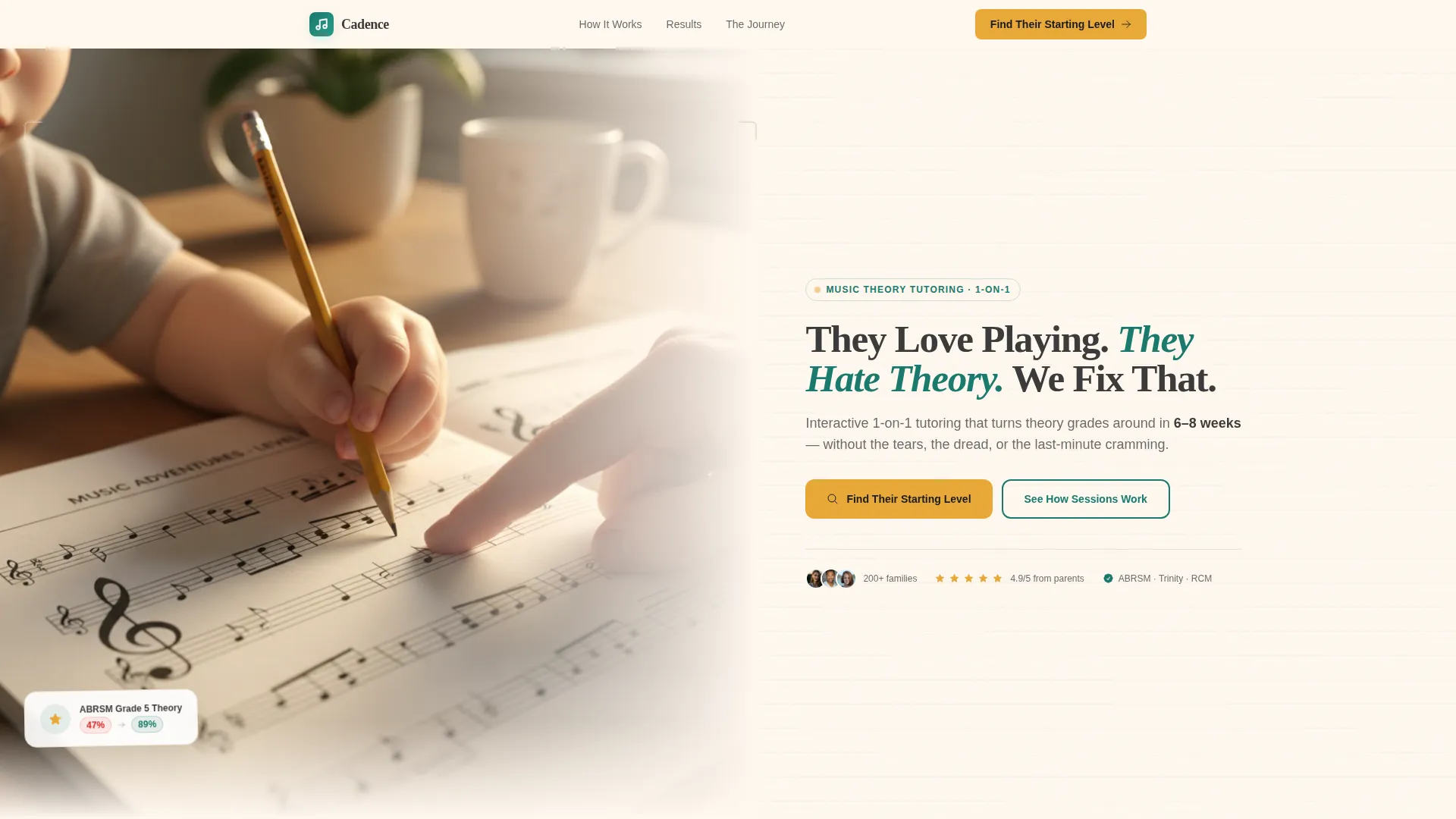
Half-Page Split Header
The header divides the screen between an over-the-shoulder photo slot on the left and the core headline on the right. The headline "They Love Playing. They Hate Theory. We Fix That." is set in charcoal over cream. A subline names the specific outcome, and the amber call-to-action button sits directly beneath it.
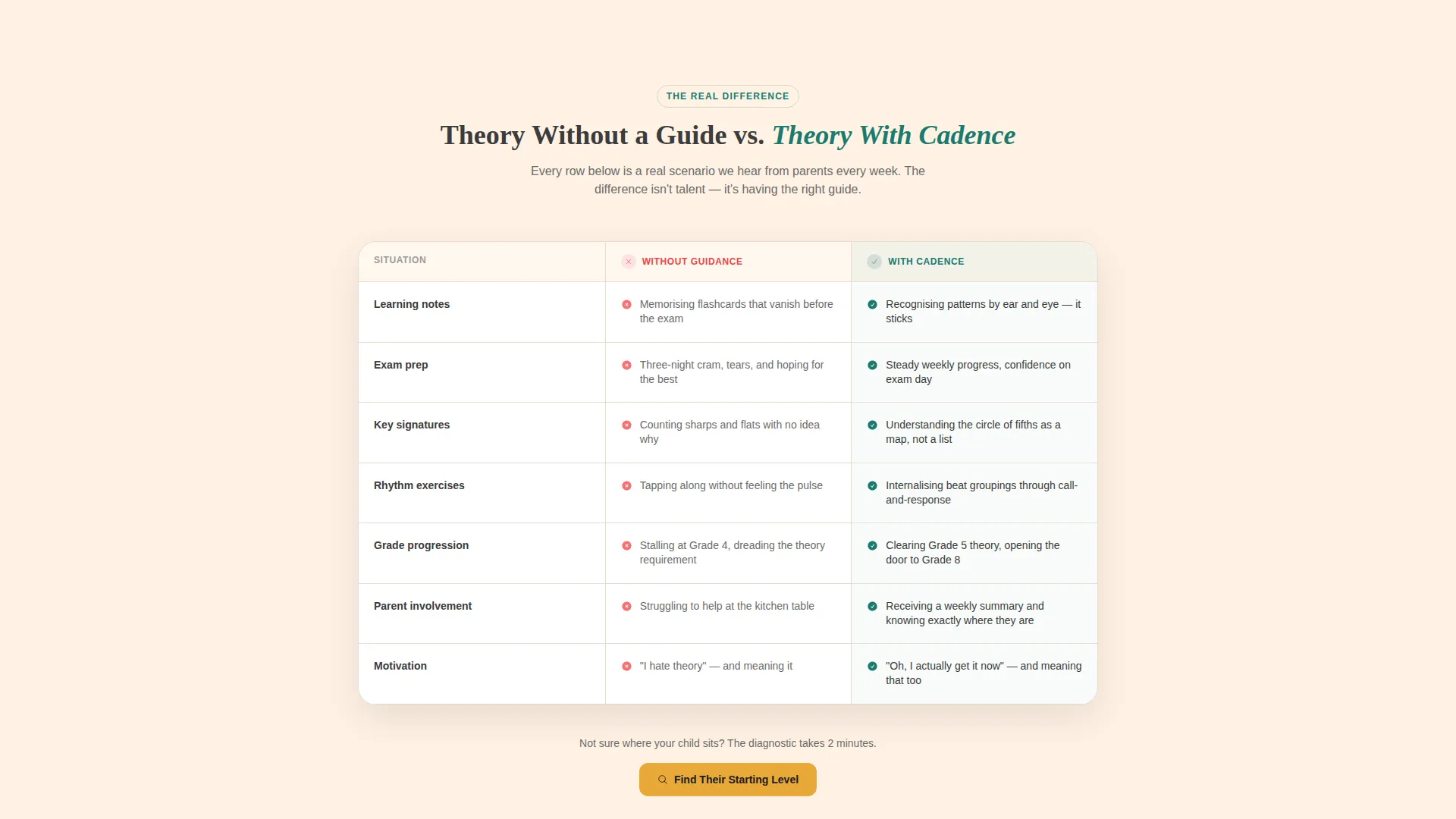
Two-Column Comparison Table
The comparison table runs two columns: "Without Guided Theory" and "With Cadence Tutoring." Each row names a real scenario a parent will recognize, such as memorizing rules without understanding them versus recognizing patterns by ear. The table makes the value of tutoring concrete and scannable.
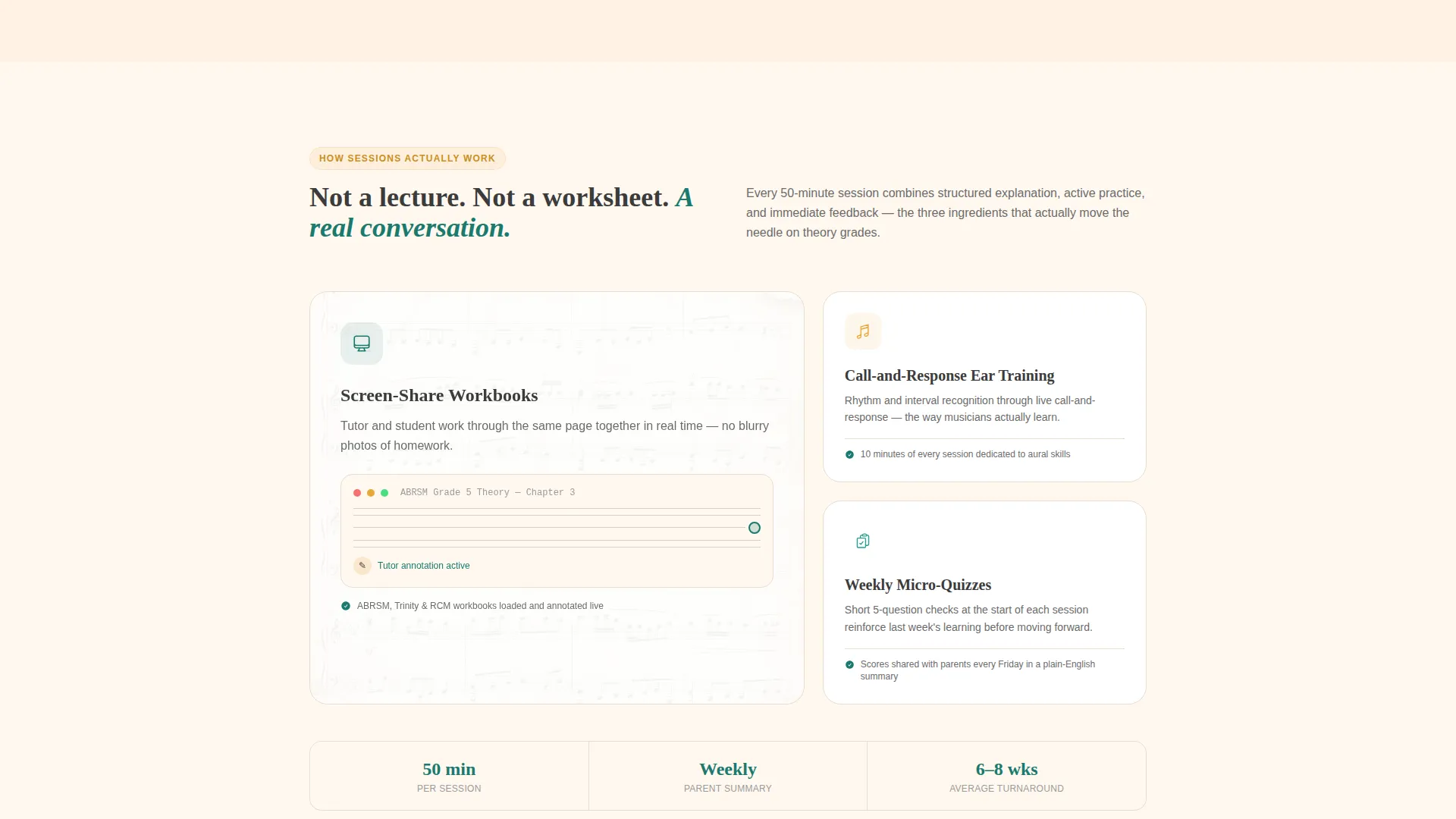
Session-Detail Content Blocks
A dedicated section explains how lessons actually work. It covers screen-share workbooks, call-and-response ear training, and weekly micro-quizzes. These specifics replace vague promises with a credible, repeatable method that parents can picture for their child.
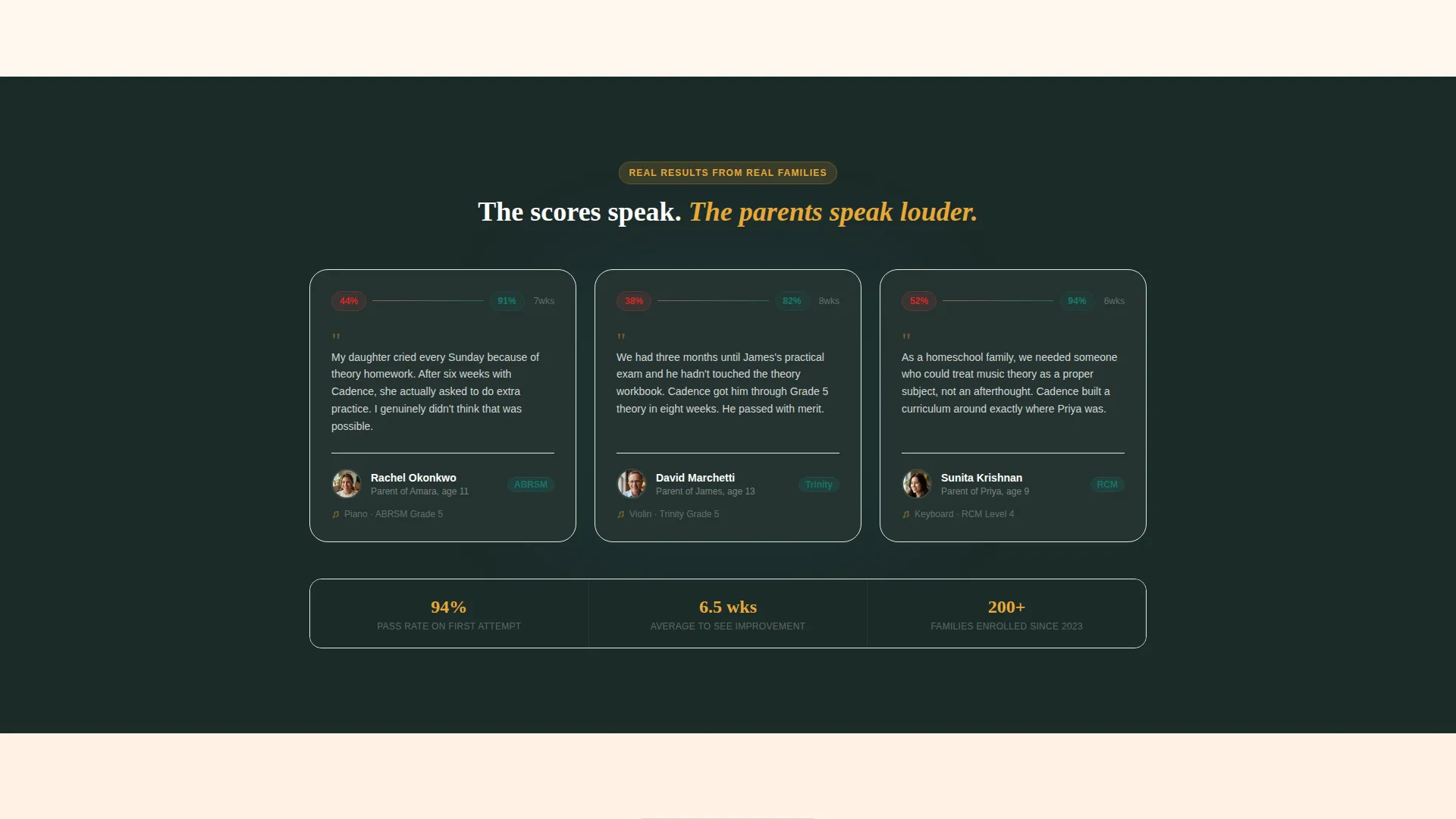
Parent Testimonials with Score Comparisons
Testimonial blocks are paired with before-and-after theory scores. This format anchors social proof in measurable outcomes rather than general praise, giving skeptical parents a concrete data point alongside a personal story.
Eight-Week Student Timeline
A visual timeline maps a typical student's journey from initial struggle to demonstrated competence across eight weeks. It sets a realistic expectation for results and reinforces the service's structured, goal-oriented approach.
Five-Question Diagnostic Quiz
The quiz asks about the child's age, current instrument, exam board, biggest theory struggle, and urgency of results. Each question uses friendly language and illustrated answer cards. On completion, the parent receives a personalized difficulty rating and a recommended session plan, followed by a secondary call-to-action to book a free trial lesson.
Page sections overview
| Section | Purpose |
|---|---|
| Split header | Introduce headline and primary call-to-action |
| Comparison table | Contrast life without and with tutoring |
| How sessions work | Explain the tutoring method clearly |
| Testimonials with scores | Build trust through measurable social proof |
| Eight-week timeline | Show a realistic student progress arc |
| Diagnostic quiz | Qualify and engage parents before booking |
| Trial lesson form | Capture name, email, and preferred time |
Design & branding system
The Teal Catalyst color system anchors the page in warmth and credibility. Every color choice references a physical, familiar object: notebook paper, colored pencils, afternoon kitchen light. The palette feels at home in a family kitchen, not a corporate classroom.
- Warm deep teal (#1A7A6D) for primary anchors, section headings, and structural elements
- Soft cream (#FFF8F0) for backgrounds that evoke notebook paper in afternoon light, paired with charcoal pencil (#3B3B3B) for readable body text
- Golden amber (#E8A838) reserved for buttons, highlights, and small visual victories that reward the eye as the parent scrolls
Mobile & speed optimization
The layout is designed to reflow cleanly for parents browsing on a phone, which is where most families first encounter a tutoring service recommendation. Key interactive elements remain accessible and easy to tap at mobile screen sizes.
- The comparison table collapses into a readable single-column format on smaller screens
- The diagnostic quiz cards are sized and spaced for comfortable thumb navigation on a smartphone
- The header photo-and-text split stacks vertically on mobile so neither element crowds the other
How this template helps you convert
Cadence is built around a principle: give value before asking for anything. Every section adds a layer of proof or utility that moves the parent one step closer to booking.
- The comparison table removes doubt early by showing the parent what continued struggle costs, then what guided tutoring delivers, in a single glance
- The diagnostic quiz earns the call-to-action by delivering a personalized output first, making the "Book a Free Trial Lesson" step feel like a natural next move rather than a cold ask
Other information about this template
Cadence is tagged under the Education and Training category, within the Music Theory Education subcategory, and is purpose-built for the Music Theory Tutoring Service niche. The template supports exam board contexts including ABRSM, Trinity, and RCM, as referenced in the quiz flow. It is a single-page landing page template, not a multi-page website, so all content lives in one scrollable experience.
- The quiz output includes a personalized difficulty rating and a recommended session plan, reducing friction before the trial lesson ask
- The Family First theme and Problem-to-Solution Arc creative direction are matched to the emotional reality of parents helping children through music grade preparation
- The template style is a Comparison Table layout, meaning the central persuasion mechanism is visual contrast rather than a text-heavy pitch
Theme
Family First
Creative direction
Problem→Solution Arc
Color system
Teal Catalyst
Style
Comparison Table
Direction
Quiz/Assessment
Page Sections
Half-page Split Header
Two-column Comparison Table
Session-detail Content Blocks
Testimonials with Score Comparisons
Eight-week Student Timeline
Five-question Diagnostic Quiz
Related questions
Who is this landing page template made for?
Can I customize the comparison table rows?
Does the quiz section require a third-party tool to work?
How long does the page take to set up?
Is this template suitable for tutors who do not follow a specific exam board?



