Calibrate - Immersive XR Certification Landing Page Template
Calibrate is a scroll-reveal landing page template built for spatial computing training and certification platforms. It opens with an interactive Career ROI Estimator, then unfolds like a living industry report, market tickers, competency matrices, curriculum card stacks, and Slack-style testimonials, all driving visitors toward a multi-platform app download with a browser-based free module preview.
by Rocket studio
Quick summary
Calibrate is a single-page, scroll-reveal landing page template designed for spatial computing training and certification programs. It leads with a Career ROI Estimator tool, then progressively reveals market data, skill gap matrices, curriculum modules, and social proof, guiding engineers, designers, and enterprise teams toward downloading a training lab app.
Who this template is for
This template serves organizations and individuals who need to communicate the real-world value of spatial computing training before asking for a commitment. It works equally well for independent certification providers and large enterprise learning teams.
- Extended reality (XR) training labs certifying engineers and designers in production-grade spatial applications
- Learning and development directors building procurement cases for mixed-reality headset programs
- Solo developers and career switchers who need to justify the pivot to spatial computing platforms
What problem this template solves
Most training program pages lead with a course catalog and hope visitors self-select. Spatial computing audiences are skeptical and technically sharp. They need proof before they commit, proof that the market demand is real, that the skills gap affects their role, and that the curriculum is worth their time.
- Visitors arrive unsure whether spatial computing skills justify the investment of time or money
- Enterprise buyers need concrete data, not aspirational copy, to write procurement documents
- Generic course landing pages fail to show role-specific relevance or career impact before asking for sign-up
What you get with this template
You get a complete scroll-reveal landing page structure that doubles as a demonstration of the product it sells. Every section adds a layer of evidence. By the time a visitor reaches the final call to action, the page has already done the selling.
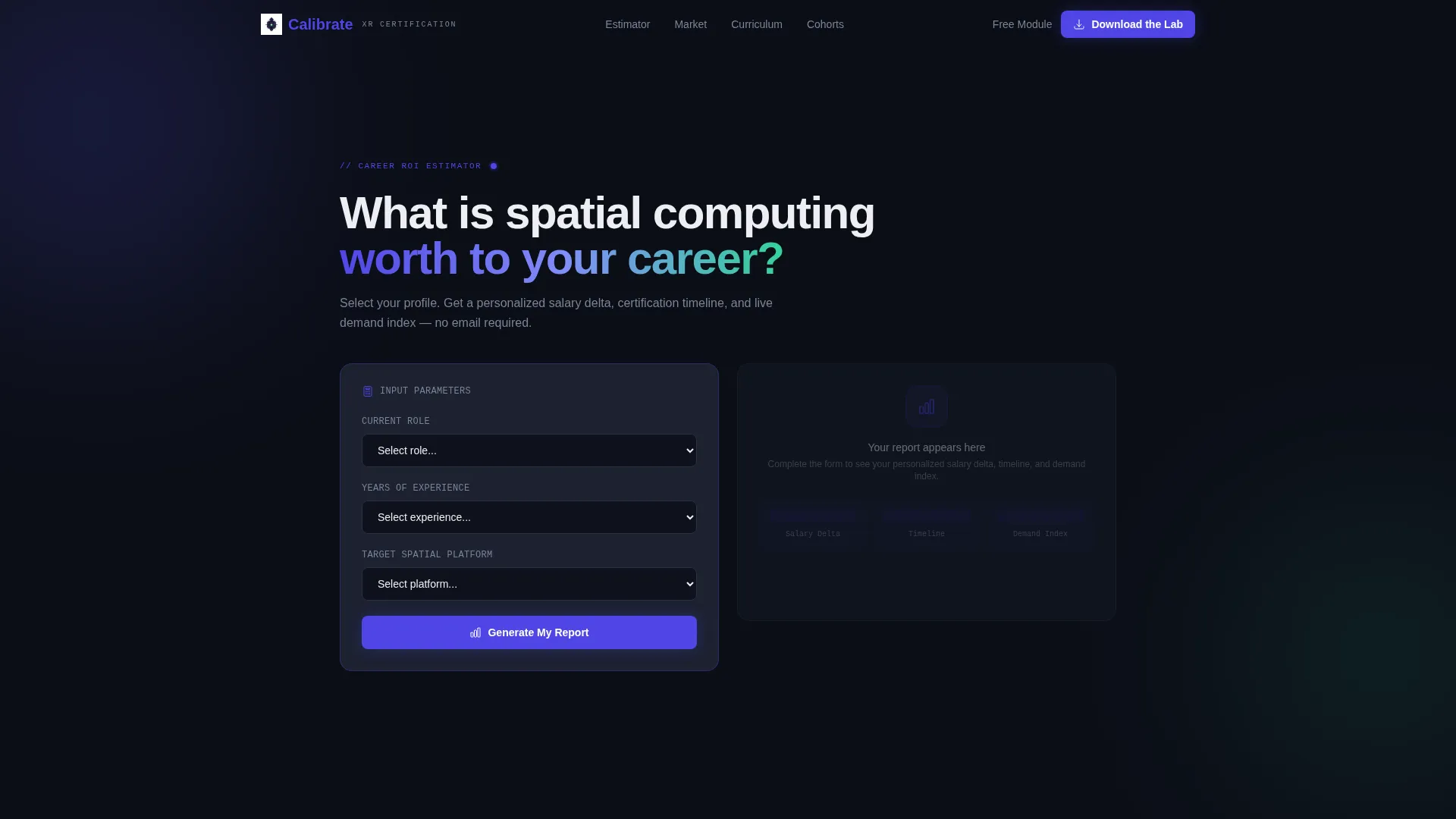
- An interactive Career ROI Estimator header that generates a personalized dashboard card with salary projections and certification timelines
- A progressive content reveal including a market-size ticker, a competency matrix, stacked curriculum module cards, and Slack-style testimonial blocks
- A dual call-to-action system: a persistent bottom bar driving app download and a secondary in-browser free module preview to reduce friction
Feature list
This template is built around interactive, data-forward components that earn attention before requesting action. Each section is purposeful and sequenced to build trust incrementally.
Career ROI Estimator Header
Visitors select their current role, years of experience, and target spatial platform. On submit, a personalized dashboard card animates in showing projected salary delta, certification timeline in weeks, and a demand-index score. The numbers populate like a financial terminal, precise, earned, and immediately relevant.
Progressive Scroll Reveal Layout
The page unfolds section by section as the visitor scrolls. Each viewport crossing triggers the next layer of content, from the market ticker to the competency matrix to the curriculum stack. The scroll behavior itself mirrors the dashboard-building skills the program teaches.
Spatial Computing Market Ticker
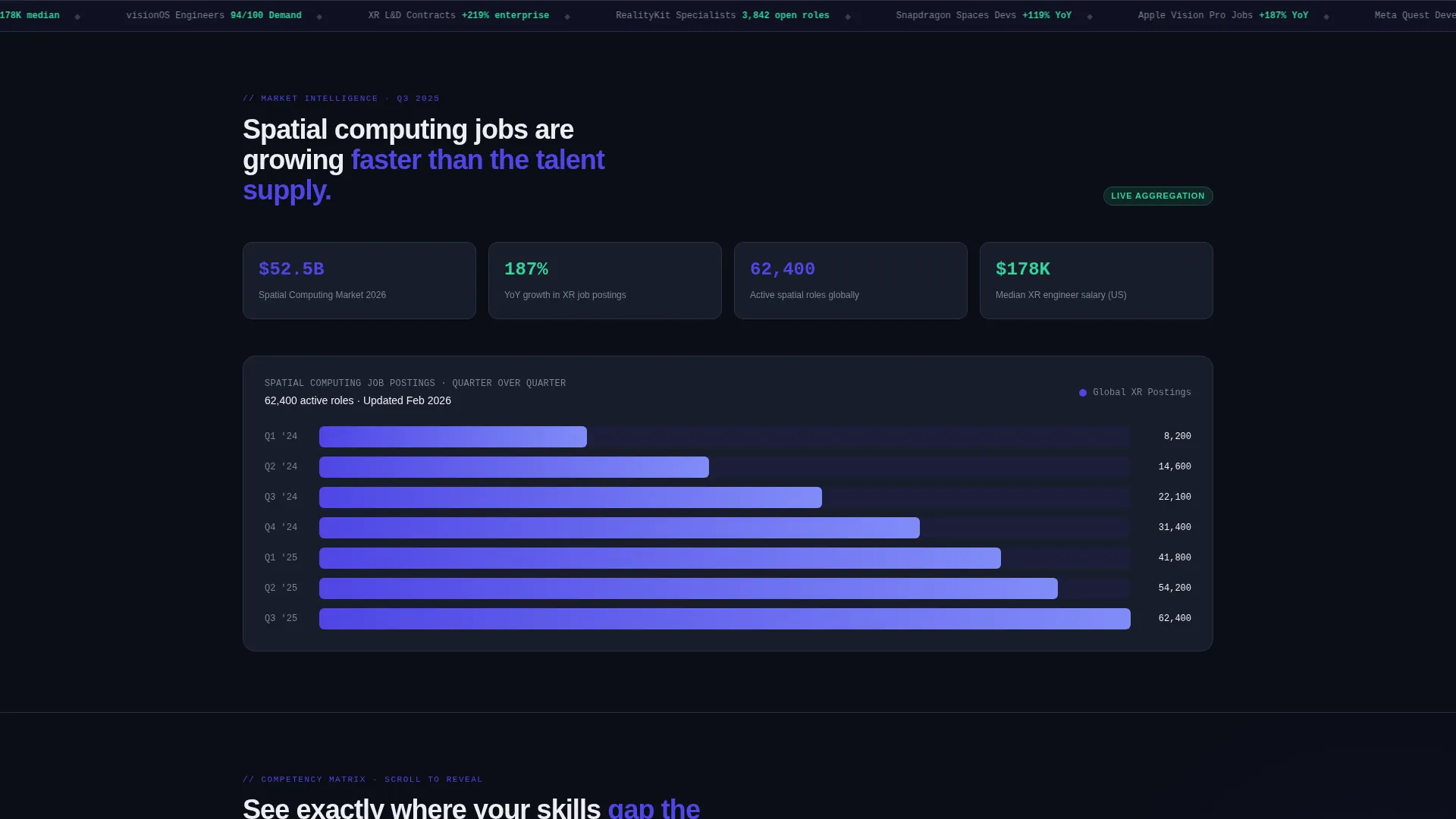
A live-style animated ticker displays spatial computing job posting volume quarter over quarter. It grounds the training value in observable market data before the visitor reaches a single course description.
Role-Based Competency Matrix
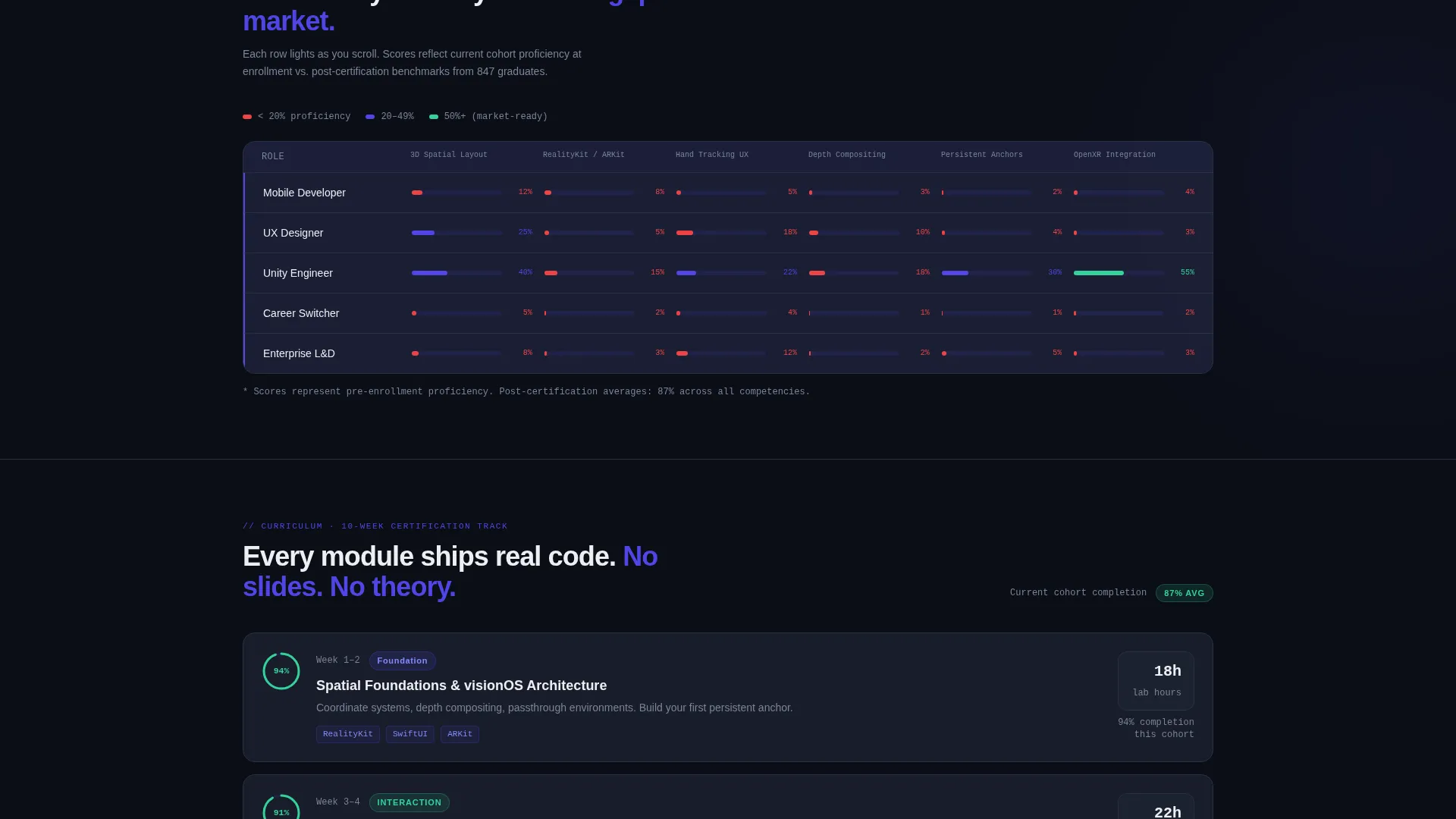
A skill gap matrix progressively lights up row by row as the page scrolls into view. Each row corresponds to a role type, with cells illuminating in electric indigo as they enter the viewport. This makes the skills gap feel personal and immediate.
Stacked Curriculum Module Cards
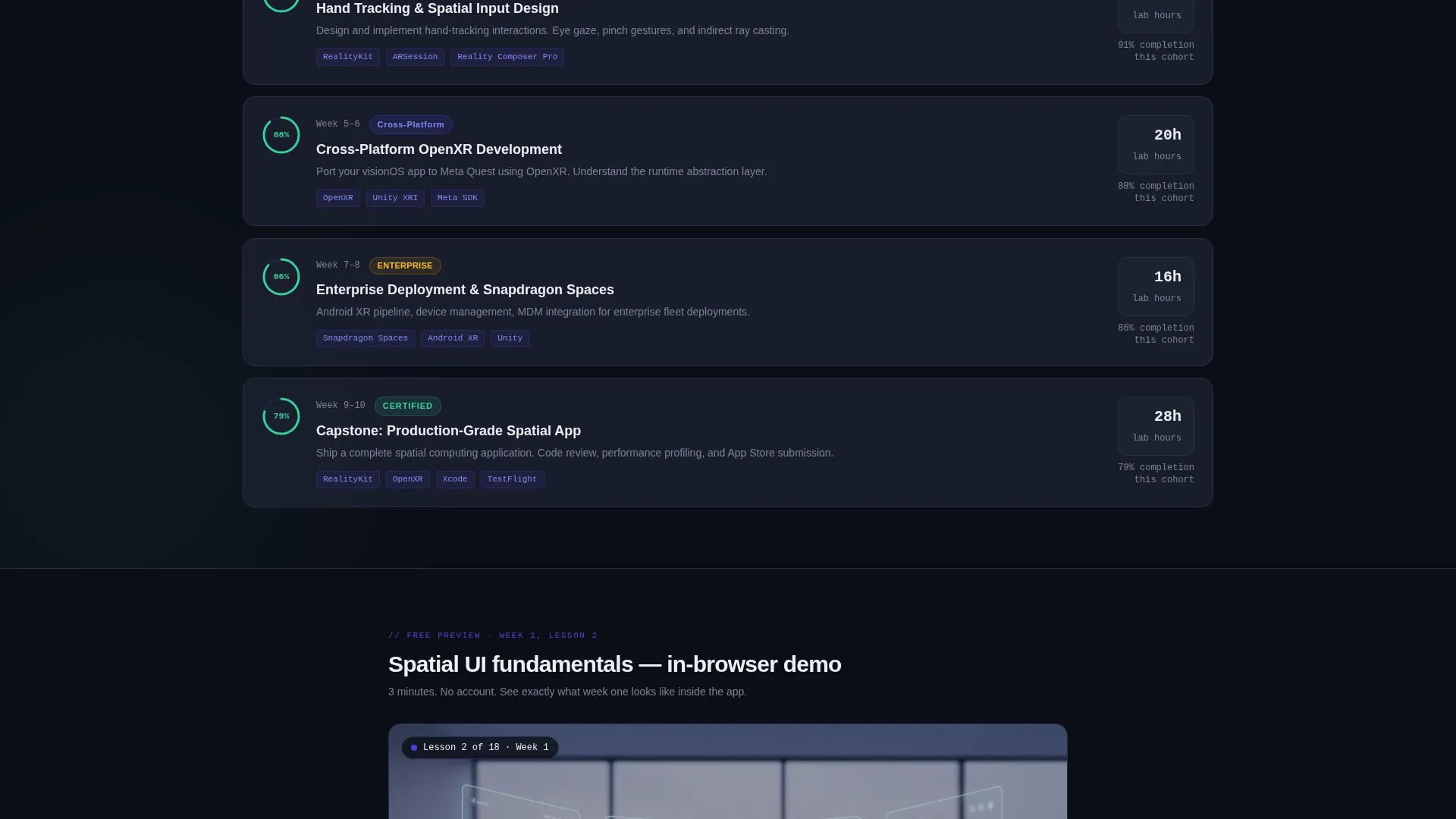
Curriculum modules unstack like a card deck, each showing estimated hours, covered tools, and a completion percentage ring drawn from current cohort data. Visitors can see exactly what week one of the program looks like before downloading anything.
Multi-Platform App Download call to action
The primary call to action drives visitors to download the training lab app. A platform selector offers iOS, Android, and Meta Quest options alongside a scannable QR code. A secondary path lets hesitant visitors preview a free three-minute spatial user interface lesson directly in the browser.
Page sections overview
| Section | Purpose |
|---|---|
| Career ROI Estimator | Personalized salary and timeline dashboard delivered before any sign-up ask |
| Market Size Ticker | Animates spatial computing job posting growth quarter over quarter |
| Competency Matrix | Reveals role-specific skill gaps row by row as the page scrolls |
| Curriculum Module Stack | Unstacks course cards showing hours, tools, and live cohort completion rings |
| Testimonial Blocks | Renders social proof as Slack-style messages with names, avatars, and timestamps |
| App Download call to action | Full-width module with platform selector, QR code, and persistent bottom bar |
| Free Module Preview | In-browser three-minute spatial user interface lesson reducing download commitment friction |
Design & branding system
The visual identity follows a Dashboard Pro theme built around an Electric Indigo color system. The palette is mission-critical and deliberate, deep void backgrounds, high-contrast signal colors, and mint accents that reward completion. Every color has a functional role, not a decorative one.
- Deep void black (#0B0E17) for backgrounds, cool slate (#1E2433) for card surfaces and data panels, electric indigo (#4F46E5) as the primary signal and interaction color
- Phosphor mint (#34D399) reserved for success states, progress bars, and completion badge indicators
- Hex white (#EDEEF2) for body text on dark grounds, ensuring readability at every scroll depth
Mobile & speed optimization
The template is structured for responsive display across the devices its audience actually uses. Mobile and headset-adjacent form factors are part of the design intent, not an afterthought.
- The platform selector and QR code component adapts for mobile tap flows as well as desktop scan behavior
- Scroll-reveal triggers are section-scoped so each progressive reveal fires cleanly at the correct viewport threshold on smaller screens
- The in-browser free module preview is embedded to play without requiring a separate app install, lowering the barrier on any device
How this template helps you convert
Calibrate is structured around the principle that proof converts better than persuasion. Every section removes one more reason to leave without acting.
- The Career ROI Estimator delivers immediate, personalized value before asking for anything, visitors see their own projected salary gap and certification path, which makes the download feel like a logical next step rather than a leap of faith.
- The progressive reveal sequence builds cumulative evidence through market data, skill gap visibility, and cohort-level curriculum detail, so by the time the app download call to action appears, visitors have already been shown exactly what they are downloading and why it matters for their specific role.
Other information about this template
This template is a strong fit for spatial computing training providers targeting technically experienced audiences who respond to data over design. It is built on a scroll-reveal (progressive) architecture that rewards curiosity and patience.
- The Industry Report creative direction means the page reads like a credible whitepaper, not a promotional brochure, which suits Fortune 500 procurement reviewers and skeptical solo developers alike
- The template is designed to support content featuring tools and platforms common to spatial computing development curricula, including those encountered in XR production environments
- The Dashboard Pro theme and Electric Indigo color system can be adapted to reflect a specific organization's brand while preserving the high-contrast, data-forward visual logic
- The dual call-to-action structure supports both high-intent visitors who are ready to download immediately and lower-intent visitors who need a low-commitment preview before deciding
Theme
Dashboard Pro
Creative direction
Industry Report
Color system
Electric Indigo
Style
Scroll Reveal (Progressive)
Direction
App Download
Page Sections
Career ROI Estimator with Dashboard Card
Progressive Scroll Reveal Architecture
Spatial Computing Market Size Ticker
Role-based Competency Matrix
Stacked Curriculum Module Cards
Multi-platform App Download with QR Code
Related questions
Who is this landing page template designed for?
What is the Career ROI Estimator and how does it work?
Can I use this template if I offer training for multiple spatial platforms?
What does the free module preview section do?
Is this template suitable for enterprise procurement audiences?



