Architecture Digital Presence Professional Website Template
Portal is a dynamic architecture client portal landing page template built for architecture firms that need to deliver blueprints, revision markups, and permit documents to clients without the chaos of email threads. It combines a live API code snippet hero, an animated three-tier comparison table, and a lead generation form into one focused, conversion-ready landing page with an Electric Indigo visual identity.
by Rocket studio
Quick summary
Portal is a single-page, lead generation landing page template designed for architecture firms and related service-based businesses that deliver documents to clients digitally. It opens with a live-styled code snippet, moves through a spring-physics animated comparison table, and closes with a compact pilot sign-up form. The Electric Indigo color system grounds every section in technical precision and visual clarity.
Who this template is for
This template speaks directly to the people managing client projects inside architecture and design firms. It is built for professionals who need a client portal that handles file delivery, revision tracking, and multi-stakeholder access without relying on scattered email threads.
- Principal architects and project managers at firms with 6 to 50 people who manage multiple clients and need structured client communication on every active project
- Commercial design teams coordinating with twelve or more stakeholders who require different access levels across client projects
- Residential architects who want to provide clients with easy access to the right drawing version every time, eliminating the "which version is this?" follow ups
What problem this template solves
Architecture firms lose hours every week to email attachments, outdated file links, and version confusion. Clients receive the wrong drawing set. Stakeholders request files that were already sent. Project managers spend time on follow ups instead of design work. A well-structured client portal landing page solves the visibility problem before it starts, giving clients and firms a centralized hub for every document and decision.
This landing page template addresses that gap by presenting a clear, professional case for why a dedicated client portal replaces email as the primary channel for document delivery and client management.
- Firms drowning in attachment threads can demonstrate a better path: one platform where clients access blueprints, revision markups, and permit documents with version numbers visible and permissions set per user
- Teams managing client onboarding across multiple projects need a landing page that converts visitors into pilot users quickly, without long contracts or complicated forms
- Commercial design teams need to show multiple clients and stakeholders that they offer a secure, organized system rather than a shared drive and a prayer
What you get with this template
This template gives you a complete, ready-to-customize landing page structured around lead generation for an architecture client portal product. Every section is purposefully sequenced to build technical credibility first, then reduce risk, then ask for the click.
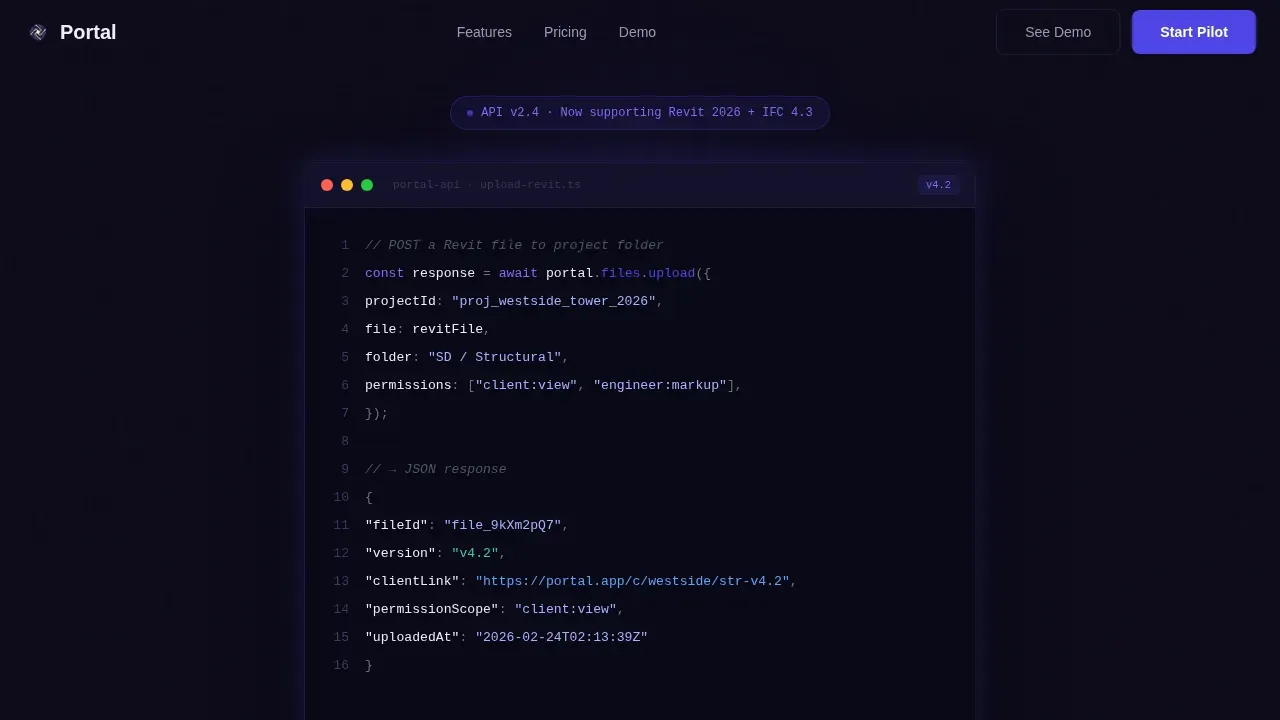
- A hero section with a live-styled API code snippet showing a real POST request pushing a file into a project folder, followed by a kinetic headline fade-in that captures the visitor's attention immediately
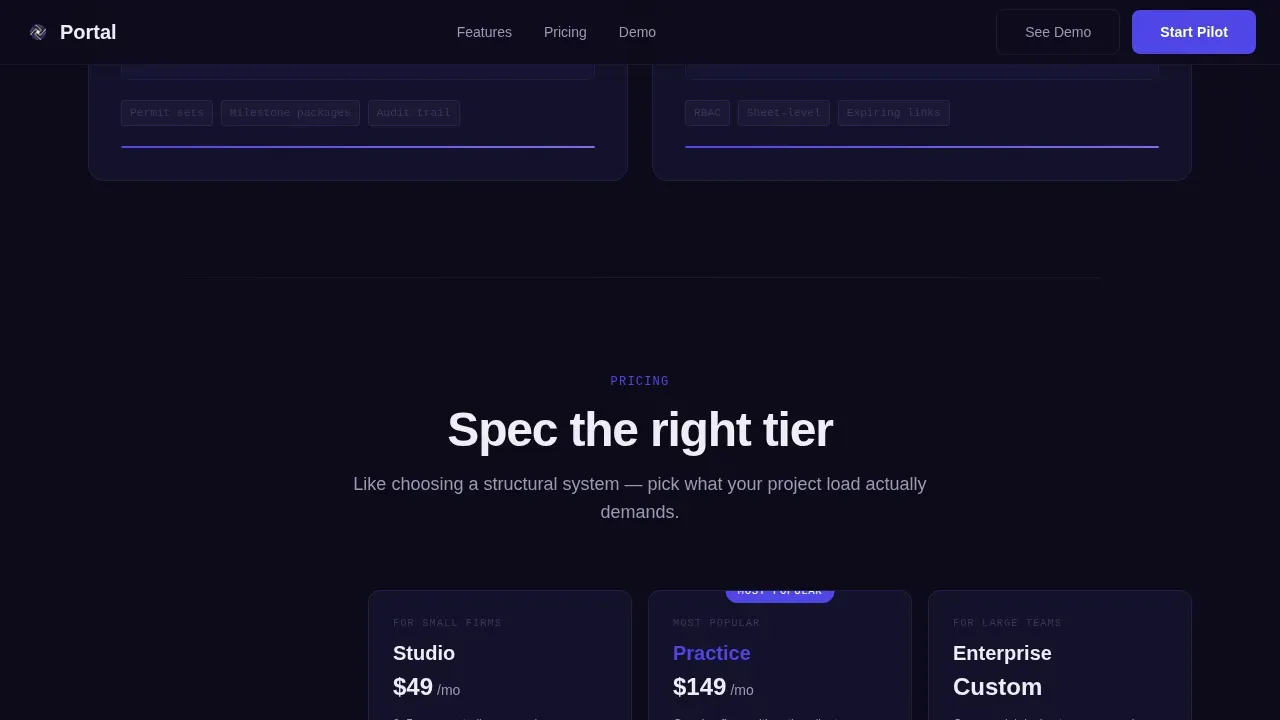
- A three-tier comparison table rendered as architectural columns, with feature rows that tick into place using spring-physics easing as the user scrolls, making it easy for customers to evaluate tiers and take next steps
- A lead generation section pinned after the comparison table, including a compact form with a firm name field, a team size dropdown (2 to 5, 6 to 20, 21 and above), and a work email field, plus a secondary "See the Demo Portal" path that requires only an email
Feature list
This template includes a focused set of built-in components. Each one is grounded in the source brief and designed to serve a specific conversion or communication goal on the landing page.
Live API Code Snippet Hero
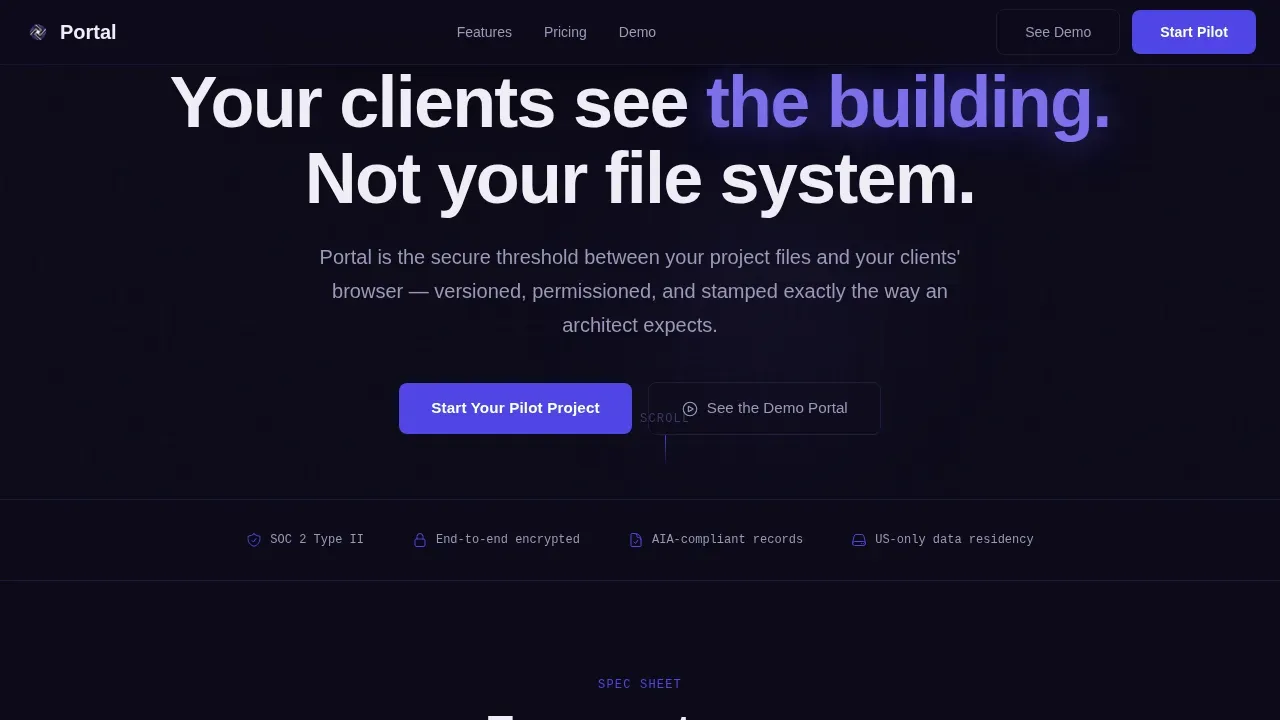
The hero section opens with a syntax-highlighted code block styled in JetBrains Mono. It shows a POST request pushing a file into a project folder, with the JSON response returning a shareable client link, version number, and permission scope. The indigo and violet syntax highlighting against the deep workspace black ground makes the code readable and technically credible. Below it, a single headline fades in with kinetic easing.
Animated Comparison Table
The centerpiece of the landing page is a three-tier comparison table styled as architectural columns. Feature rows reveal themselves one by one as the user scrolls, with checkmarks and usage limits appearing via spring-physics easing powered by GSAP ScrollTrigger. This makes the table feel like a live dashboard loading rather than a static grid. Customers can evaluate tiers, understand what each plan covers, and move toward the primary call to action with confidence.
Numbered Spec Card Feature Section
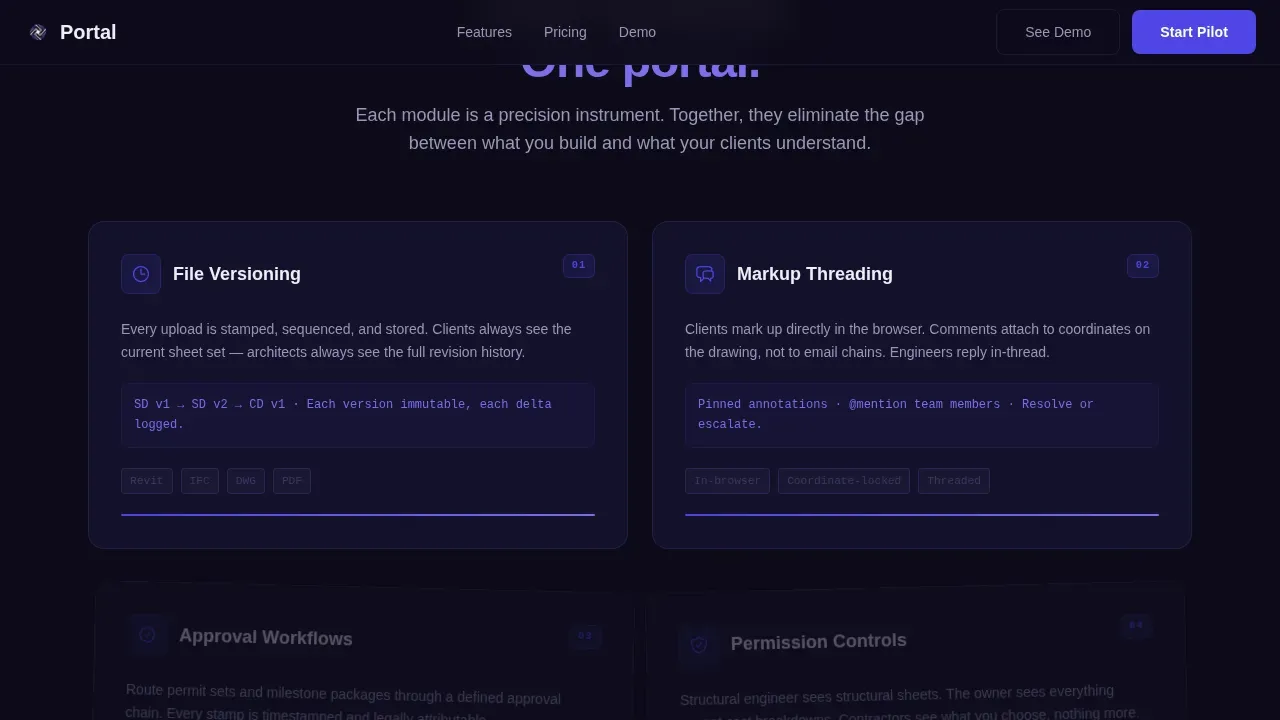
Below the comparison table, four numbered rotating spec cards present the portal's key features: file versioning, markup threading, approval workflows, and permission controls. Each card rotates slightly on scroll to reveal depth. Motion here is not decorative. It demonstrates how fluid the actual product feels, giving the user a sense of the interface before they sign up.
Lead Generation Pilot Form
The primary call to action reads "Start Your Pilot Project" and sits pinned after the comparison table. The form requests firm name, team size via a dropdown, and a work email. This short form reduces friction. A secondary conversion path labeled "See the Demo Portal" offers a guided interactive walkthrough with only an email required, giving cautious buyers a lower-commitment way to experience the product.
Social Proof Strip
A named testimonial from a principal architect and a firm logo strip provide social proof after the feature section. This section builds trust at the moment when visitors are deciding whether to fill out the form. The testimonial and logos speak directly to the target audience, reinforcing that peers in the architecture industry already use and trust the portal.
Dynamic Motion Scroll System
Every section of this landing page uses GSAP ScrollTrigger to animate content into frame. Sections slide in with staggered micro-animations. Data populates like a live dashboard. The scroll-linked rotation on the spec cards and the row-by-row reveal on the comparison table create a cohesive motion language across all pages of the scroll experience. Dynamic elements automatically adapt content presentation based on user interactions and data points, making the landing page feel responsive and alive without sacrificing clarity.
Page sections overview
| Section | Purpose |
|---|---|
| Hero Code Snippet | Open with a live API block and kinetic headline to capture attention and establish technical credibility |
| Comparison Table | Three-tier animated column table lets customers evaluate plans and understand access levels |
| Feature Spec Cards | Four numbered rotating cards cover versioning, markups, approvals, and permissions |
| Social Proof Strip | Named testimonial and firm logo strip build trust before the form |
| Lead Gen Form | Pilot sign-up form and demo path convert visitors into qualified leads |
| Footer Row | Single-row linear footer closes the page cleanly |
Design & branding system
The visual identity follows a Dynamic Motion theme built on the Electric Indigo color system. The palette is designed to feel like a monitor glowing in a dark studio: electric but focused, precise without being cold. Every color choice serves a functional purpose in the interface.
- Deep workspace black (#0D0B1A) grounds every section like a drafting table beneath the drawings; charged indigo (#4F46E5) dominates interactive states including hover glows, toggle switches, and progress bars; blueprint-line violet (#7C6FEB) provides accent detail on labels and code syntax; phosphor white (#EEEDF5) handles all body text and interface chrome
- Typography uses JetBrains Mono for code blocks, labels, and spec sheet details, and DM Sans for all body copy and headings, creating a clear hierarchy between technical data and readable prose
- Custom branding integration is built into the template structure: the professional layout accommodates your own logo, firm name, and brand messaging so that the landing page feels native to your business from the first scroll
Mobile & speed optimization
This template is built desktop-first, reflecting how architects work: large monitors, detailed drawings, precise interface interactions. The template is also fully responsive so that clients can access the portal and review project details on any device. This matters because over 60 percent of web traffic is now mobile, and clients increasingly check project updates outside the office.
- The GSAP animation system uses ScrollTrigger with Server Components handling static layout sections and Client Components managing animation state, keeping the interactive parts isolated and the static parts light
- The comparison table, spec cards, and lead generation form all reflow cleanly at smaller breakpoints so that the landing page remains readable and functional on smartphones and tablets without losing the core visual hierarchy
- The hero code snippet and kinetic headline are preserved at mobile sizes, maintaining the technical credibility of the page even when clients are viewing it on a phone between site visits
How this template helps you convert
Creating a high-converting landing page for a client portal requires balancing static clarity with dynamic architecture to personalize the user journey. This template earns the click by proving technical depth first, then reducing risk, then presenting a low-friction form. A polished, professional landing page can improve your conversion rates, and this template is structured to do exactly that.
- Technical credibility is established in the hero section before a single marketing claim is made. The live API code snippet shows a real interaction, which makes a technical founder lean in and gives a principal architect confidence that the product is real and production-ready.
- The three-tier comparison table uses spring-physics animation to guide the user's eye through feature rows one at a time, making the value difference between tiers clear and reducing decision fatigue. Dynamic elements adapt content presentation row by row to increase relevance and engagement as the visitor scrolls.
- The pilot framing on the call to action removes pricing pressure and contract anxiety. "Start Your Pilot Project" invites the visitor to push a real file through the system without commitment. The secondary demo path gives hesitant customers a way to engage with even lower stakes, boost conversions from both confident and cautious segments, and increase conversions overall across the page.
Other information about this template
This template is a versatile starting point for any business that needs to present a client portal product to a professional audience. It is especially well suited to service-based businesses in technical fields where document delivery, version control, and access management are central to the client experience.
- Teams that already use a notion client portal or a notion template for internal project management will recognize the value this landing page communicates. The template is designed to complement tools like a notion client portal template, making it easier to position a structured portal alongside existing tools that clients and teams already use in their notion account.
- The notion client portal is a centralized workspace for managing client interactions and data. Many teams use a notion template as a starting point before graduating to a more structured portal system. This landing page helps bridge that transition by showing clients what a dedicated client portal delivers beyond what a notion client portal template can offer on its own.
- No-code solutions allow users to build client portals quickly without traditional programming skills. This landing page template can support positioning for no-code portal products, including tools that integrate with existing applications to streamline workflows and manage user access and permissions.
- The notion client portal concept is familiar to many small teams and freelancers who want to provide clients with an organized, centralized view of their project. This template can be used to introduce a more capable solution to customers who have outgrown a basic notion template setup or who need granular access controls that a standard notion account does not provide natively.
- A dynamic architecture separates the user interface from the data layer, allowing the landing page to adapt based on the logged-in user. Creating a dynamic architecture for a client portal landing page requires a data-driven, modular approach that personalizes content based on user roles, behavior, and project status. Decoupled frontend architecture can be built using component-based frameworks to create modular, reusable user interface sections that serve different customers with different needs.
- Role-Based Content (RBAC) defines what users see based on their profile, allowing different roles to view relevant information. Backend integration connects the portal to systems like CRM, project management tools, or databases to ensure data updates in real-time. These are capabilities this template is designed to communicate clearly to a technical and semi-technical audience.
- This landing page is built for the architecture niche but its structure and motion system translate well to any industry that relies on document delivery and multi-stakeholder client management, from engineering consultancies to legal service providers.
- The detailed tutorial and video tutorials sections can be added as optional add ons to the template to support client onboarding flows. Detailed video tutorials help customers understand the portal quickly without requiring live support, which is especially valuable for firms managing multiple clients across different time zones.
- The social proof section is designed to capture grass roots credibility through named testimonials rather than generic reviews. This approach to social proof speaks directly to peer professionals who want to see that firms like theirs already rely on the platform as their trusted choice for client document delivery.
- This template is a strong fit for marketing campaigns targeting principal architects, project managers, and commercial design leads. The hero section is designed to match the message of a paid ad or email call to action, providing a seamless transition for the visitor from the ad to the landing page.
- Users can customize the home page layout, update the comparison table tiers, and add their own logo without needing advanced development skills. The branch furniture of the template (the structural elements, color tokens, and type scale) is designed to be adjusted quickly to fit your specific business needs.
- The template supports a one stop shop presentation model: clients arrive on the landing page, evaluate all tiers and key features, review social proof, and complete the form without needing to visit additional pages. This reduces drop-off and keeps customers focused on conversion.
- Instagram photos, firm portfolio imagery, and project photography can be added to the social proof and feature sections to provide detailed information that reinforces the professional branding of the firm presenting the portal.
- A/B testing is an essential tool for any landing page. The modular section structure of this template makes it straightforward to swap headlines, adjust the hero section, or test different call-to-action labels to discover what resonates best with your specific audience and improves your conversion rates.
- Pet owners and general consumer audiences are not the target market for this template. It is intentionally designed for the architecture, engineering, and construction sector and for similar professional services verticals where project management, client management, and document control are core business activities.
Theme
Dynamic Motion
Creative direction
Spec Sheet
Color system
Electric Indigo
Style
Comparison Table
Direction
Lead Generation
Page Sections
Live API Code Snippet Hero Section
Spring-physics Animated Comparison Table
Numbered Rotating Spec Cards
Lead Generation Pilot Form
Social Proof Testimonial and Logo Strip
Dynamic Motion Scroll System
Related questions
What sections are included in this landing page template?
Can I customize the comparison table tiers and feature rows?
Does this template support presenting multiple client access levels?
How does the dynamic motion system work?
Is this template suitable for small teams and solo architects?



