Sovereign Database CRM Landing Page Template
The Helm self hosted CRM data command landing page template is a dark, split-screen single-page layout built for CTOs and DevOps engineers who run their own infrastructure. It presents a clear value proposition around data sovereignty, zero per-seat pricing, and deploy-ready commands. The template uses a Void and Violet color system with high-interactivity sections designed to convert visitors through code, not forms.
by Rocket studio
Quick summary
This template delivers a terminal-aesthetic, split-screen landing page for a self-hosted CRM. It is built for infrastructure-minded buyers who trust a working deploy command over a sales calendar. Every section is interactive, every call to action is a one-click copy, and the entire visual system communicates control, sovereignty, and precision.
Who this template is for
This template is intended for founders, engineers, and technical teams who manage their own infrastructure and want a landing page that speaks their language directly.
- CTOs at growing SaaS companies frustrated by per-seat pricing on hosted CRM platforms
- Solo DevOps engineers running Docker Compose stacks who need a self-hosted data solution
- Agency founders and open-source project maintainers who prioritize data ownership over vendor convenience
What problem this template solves
Hosted CRM tools charge per user, change their application programming interface (API) terms without warning, and keep your contact data on their server. That is a risk many technical teams refuse to accept. This template gives those teams a landing page that makes the case for self-hosted infrastructure with interactive evidence, not paragraphs of persuasion.
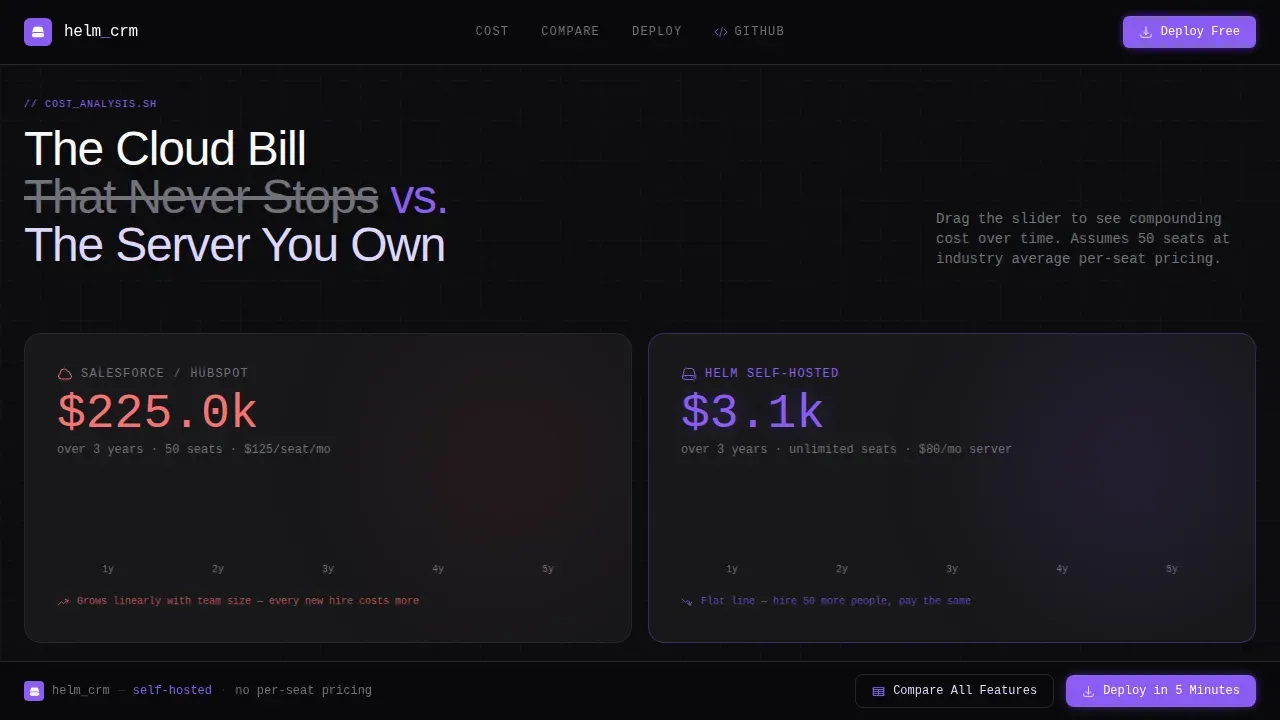
- Per-seat pricing compounds silently; this template exposes that cost with a live drag slider comparison
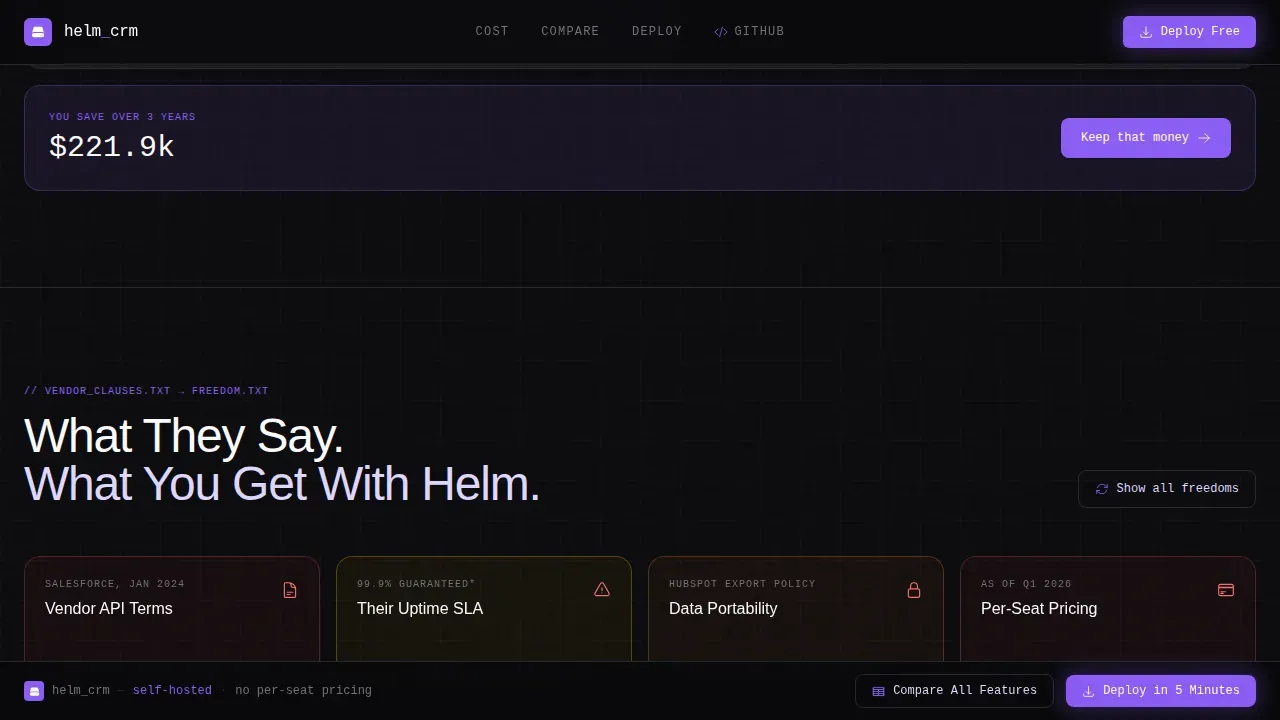
- Vendor lock-in clauses are buried in contracts; flip cards here surface those clauses against open-source freedom
- Most CRM landing pages push demo bookings; this one converts with a copy-ready deploy command
What you get with this template
You get a fully structured, single-page layout with six distinct interactive sections, a sticky comparison bar, and a deploy section that outputs ready-to-run code. The default visual system is dark and precise, designed to feel like a production dashboard at 2 AM.
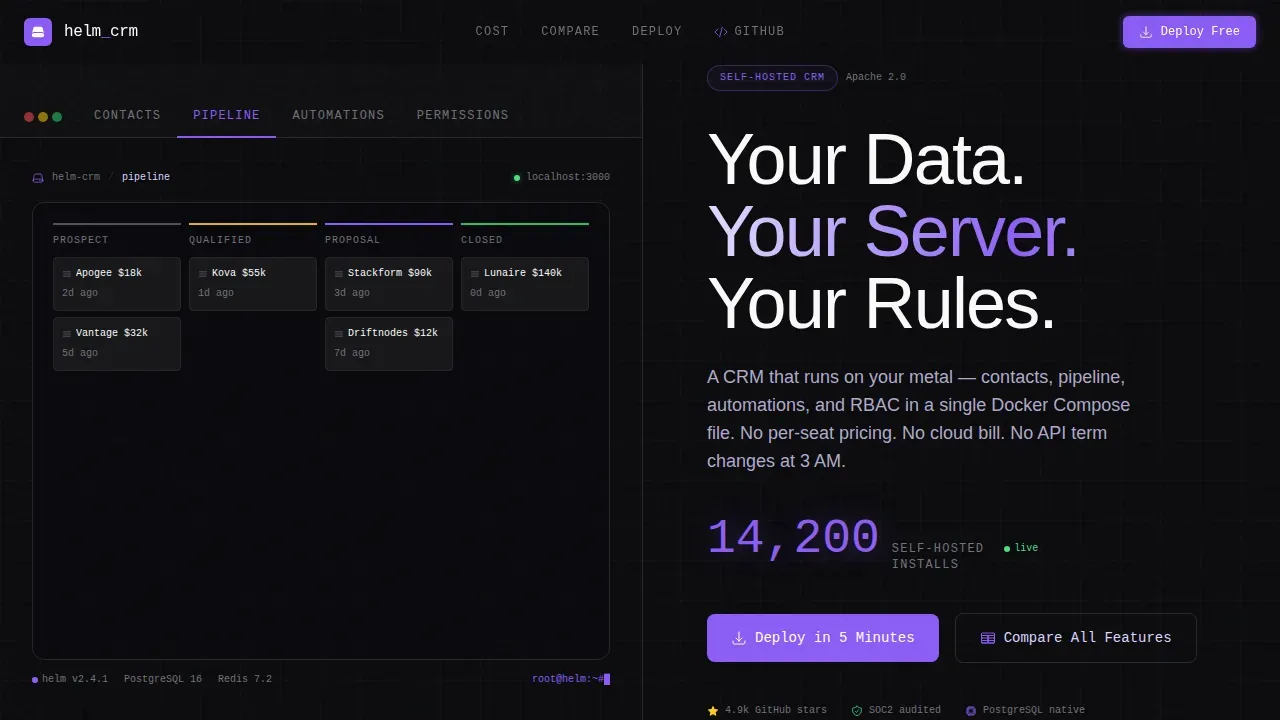
- A Feature Tab Switcher hero with live-style user interface previews across Contacts, Pipeline, Automations, and Permissions tabs
- A cost comparison drag slider, vendor lock-in flip cards, and a full-spec feature comparison table
- A deploy section with a Docker command, a curl script, and a chart-based install option with copy-to-clipboard
Feature list
This template comes with purpose-built interactive components that define how visitors experience and trust the product.
Feature Tab Switcher Hero
The hero section is a 50/50 split screen. The left side holds a row of tabs labeled Contacts, Pipeline, Automations, and Permissions. Each tab swaps in a live-styled user interface preview complete with sample deal stages, drag handles, and avatar stacks. The right side displays a benefit-driven headline and a stat counter showing community install numbers ticking upward. No stock photography appears anywhere; the product image is the hero.
Cost Comparison Drag Slider
A draggable slider lets visitors compare hosted CRM monthly costs compounding over three years against a flat self-hosted cost line. The output is visual and immediate. Users do not need to read a paragraph to understand the argument; they feel it by dragging.
Vendor Lock-in Flip Cards
Each flip card shows a vendor contract clause on the front. Flipping it reveals the equivalent open-source freedom on the back. This interactive pattern lets the data do the convincing. It is a clean way to address the most essential objection any self-hosted buyer has.
Full-Spec Comparison Table
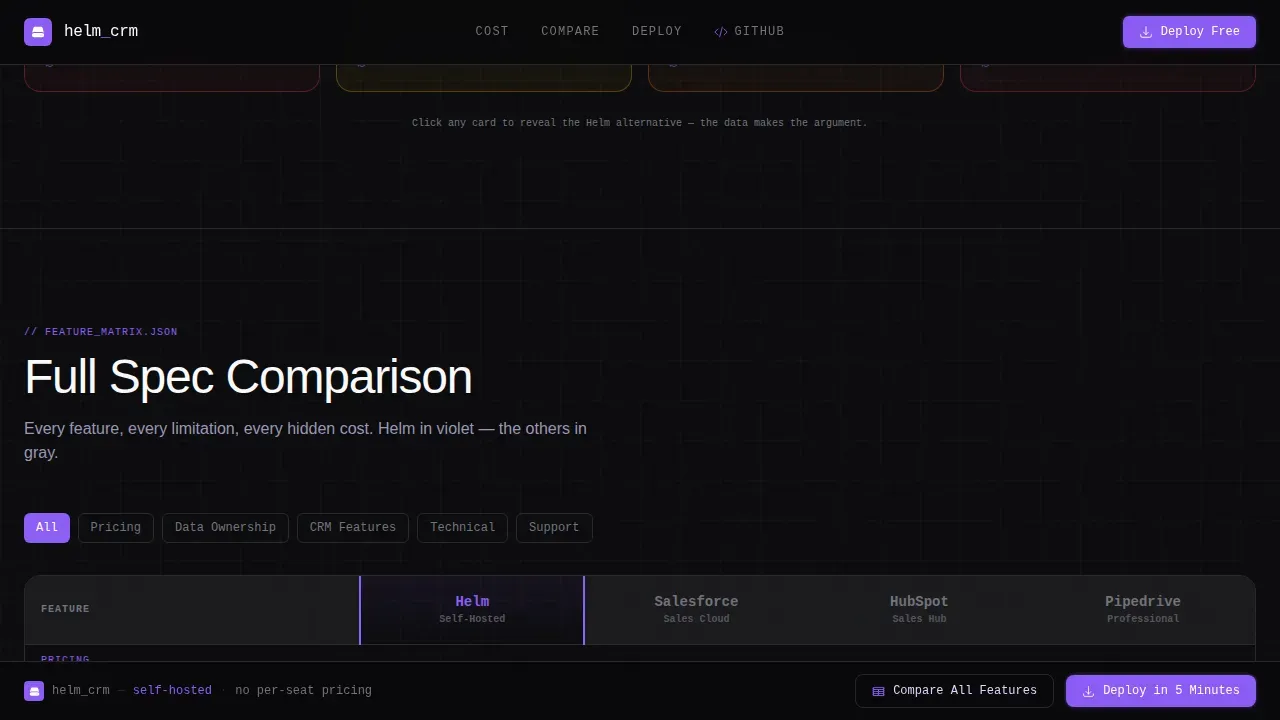
A sticky bar at the top of the page holds two buttons: one scrolls to a full-spec table with the CRM on the left in violet and three grayed-out competitor columns on the right. This section helps users reference every key capability side by side without leaving the page.
One-Command Deploy Section
The deploy section anchors to a block offering three install paths: a Docker command, a curl script, and a Helm chart option. Each string of code is copy-to-clipboard ready. The conversion goal is the install command itself, not an email form. This matches how technical users actually evaluate and adopt new tools.
Sticky Conversion Bar
A persistent sticky bar stays visible throughout the scroll. It holds two clearly labeled buttons so users can act at any point without scrolling back to the top. The bar reinforces the single conversion goal without interrupting the reading flow.
Page sections overview
| Section | Purpose |
|---|---|
| Hero Tab Switcher | Showcases live CRM user interface previews across four feature tabs with a stat counter |
| Cost Drag Slider | Lets visitors compare three-year hosted versus self-hosted cost interactively |
| Vendor Flip Cards | Surfaces lock-in clauses beside open-source alternatives through card interaction |
| Feature Comparison Table | Presents a full-spec grid with the CRM in violet against three competitor columns |
| Deploy Command Section | Delivers Docker, curl, and chart-based install commands with copy-to-clipboard |
| Sticky Action Bar | Keeps Compare and Deploy buttons accessible throughout the page scroll |
Design & branding system
The visual identity follows a Data Command theme built around the Void and Violet color system. The palette feels like a production dashboard after midnight: backgrounds stay in the void range, cards float on terminal gray, and violet elements draw the eye to every interactive surface.
- Void black (#09090B) and deep terminal gray (#18181B) form all background and card layers
- Electric violet (#8B5CF6) covers every interactive surface, hover state, and selected tab label
- Phosphor lilac (#DDD6FE) handles body text and secondary labels; JetBrains Mono is used for code and data labels, Manrope for headlines
Mobile & speed optimization
The template is desktop-first by design, reflecting how CTOs and DevOps engineers primarily work. The layout is also built to be responsive and accessible on smaller screens so the page remains usable across all device sizes.
- The split-screen layout collapses gracefully to a stacked single-column view on mobile
- Buttons in the sticky bar are sized to be thumb-friendly and remain visible throughout the scroll
- Interactive sections including the slider, flip cards, and tab switcher are built with client-side components to keep static sections fast
How this template helps you convert
This template is built around a single conversion goal: getting a technical visitor to copy a deploy command and install the CRM on their own cluster. Every section moves visitors closer to that action.
- The hero immediately states the value proposition with a benefit-driven headline and live product visuals, so visitors understand what they get within the first few seconds of arrival
- The interactive comparison sections replace persuasion copy with interactive evidence, letting users define the argument themselves through drag, toggle, and flip interactions
- The deploy section delivers the final step as a ready-to-run string of code with no friction, no email form, and no calendar booking required
Other information about this template
This template is well suited for teams deploying a self-hosted CRM using Helm, the package manager for Kubernetes that simplifies application deployment and upgrade management. Helm charts can be used to define, install, and upgrade even complex Kubernetes applications. Creating a self-hosted CRM using Helm involves deploying an existing CRM solution's chart to a Kubernetes cluster such as Minikube, EKS, GKE, or AKS.
The helm create command sets up the necessary directory structure for a new chart. Users can then customize the values.yaml file to inject new configuration at install-time. A yaml file in a Helm chart is where you define image tags, port settings, registry references, tls configuration, and resource limits. Using immutable tags in a production environment is one of the best practices recommended to prevent unexpected changes in kubernetes deployments.
Helm best practices also include using OCI-based registries, setting configurable image properties, adding proper labels for enterprise readiness, and documenting all template functions so other contributors understand each parameter. The helm template command lets teams debug and validate yaml output before any deployment reaches the cluster. Using include over template is preferred for better control over string output in Helm templates.
Additional annotations and deployment metadata help teams track the release name, version, and service details across multiple environments. Helm allows users to reference existing Kubernetes objects such as secrets or service accounts, which is a common pattern in enterprise chart design. Users who push images to a private registry need to update the registry and tag values inside the chart's configuration files. Persistent Volume Claims keep database data across deployments, and the security context should be configurable to address cluster-specific policies including non-root user defaults.
All practical data operations such as creating contacts and leads are performed through the CRM's web interface after the initial install. Accessing the packaged database, for example MariaDB, typically requires running kubectl exec into the database pod. This template is also referenced in developer blogs and community repositories as a starting point for organizations building a minimal internal tools page around their self-hosted stack. Google searches for self-hosted CRM deployment guides frequently index landing pages like this one as an entry point for new users.
- Supports multiple deployment paths: Docker, curl script, and Helm chart with copy-to-clipboard output
- The footer follows a GitHub Developer Minimal pattern, keeping the page focused and index-friendly
- Localization is set to English with USD and United States date format as the default
Theme
Data Command
Creative direction
Interactive Explorer
Color system
Void & Violet
Style
Split Screen (50/50)
Direction
Comparison/Versus
Page Sections
Feature Tab Switcher Hero Section
Interactive Cost Comparison Slider
Vendor Lock-in Flip Cards
Full-spec Feature Comparison Table
One-command Deploy Section
Persistent Sticky Conversion Bar
Related questions
Does this template include actual CRM functionality?
What deployment options does the deploy section include?
Do I need a Kubernetes cluster to use this template?
Can I customize the color system and typography?
Is this template suitable for open-source CRM projects?



