Actionable Wildlife Photography Landing Page Template
Shutter is a precision-built photography welcome email landing page. It uses a Data Command visual theme, an ROI calculator, and a three-tier comparison table to help wedding, commercial, and portrait photographers present their welcome sequence with authority. The Electric Indigo color system and dark glass panel design make the data feel as deliberate as a perfectly exposed frame.
by Rocket studio
Quick summary
Shutter is a single-page lead generation landing page built for photographers who need their welcome email sequence to do serious business work. It opens with an interactive ROI calculator, moves into a side-by-side comparison table, and closes with device mockups showing real email renders. The Data Command theme makes precision the selling point from the first scroll.
Who this template is for
This landing page is designed for professional photographers who book recurring clients and want their first email touchpoint to match the quality of their work. It speaks directly to photographers who compete on rate and reputation.
- Wedding photographers onboarding new couples after inquiry
- Commercial photographers confirming campaign briefs with brand clients
- Portrait studios welcoming families ahead of a session booking
What problem this template solves
Most photographers send a plain confirmation email after a booking. That first message either builds trust or quietly erodes it. This template solves the gap between a stunning portfolio and a forgettable inbox experience.
- Photographers lose perceived value when their welcome email feels generic
- Prospects who are not yet fully committed need a reason to stay excited
- There is no clear way to show the difference between email tiers without a structured comparison
What you get with this template
This template delivers a full comparison table landing page, not just a standalone email. Every section is designed to move a visitor from curiosity to commitment through logic, features, and visual proof.
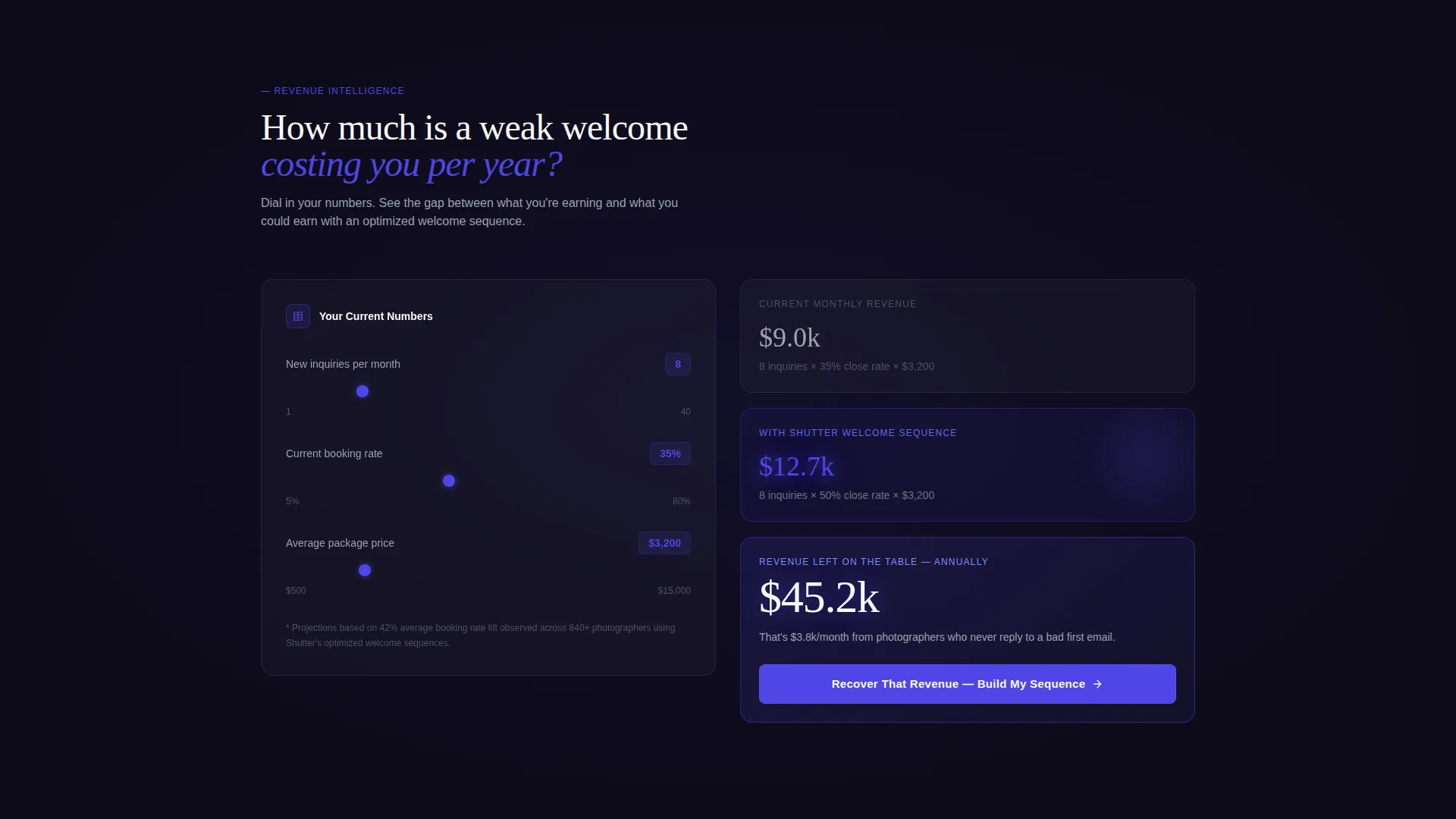
- An interactive ROI calculator that outputs projected revenue lift based on client volume and package price
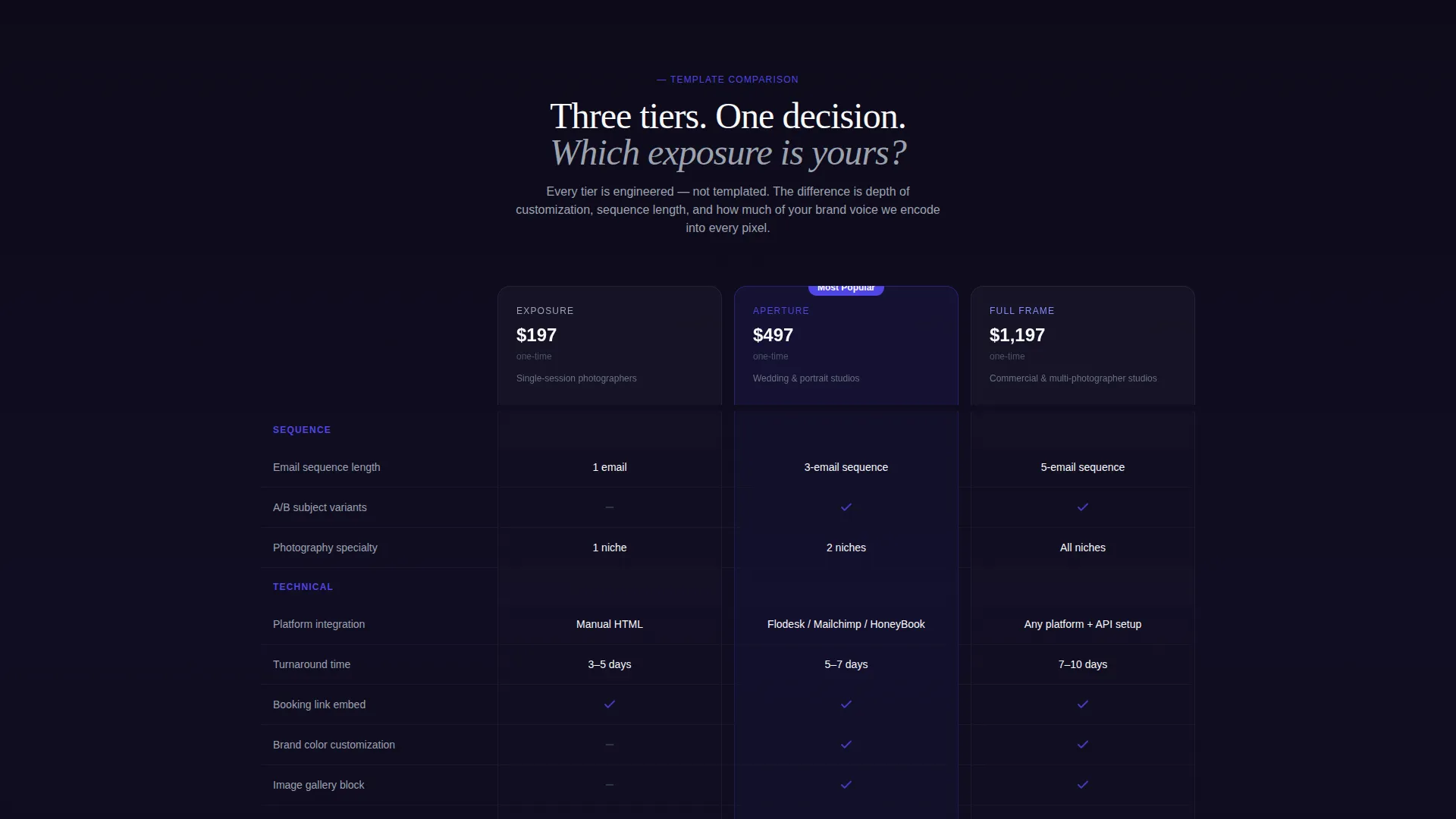
- A three-column comparison table across frosted glass cards showing sequence length, variants, integration type, and turnaround
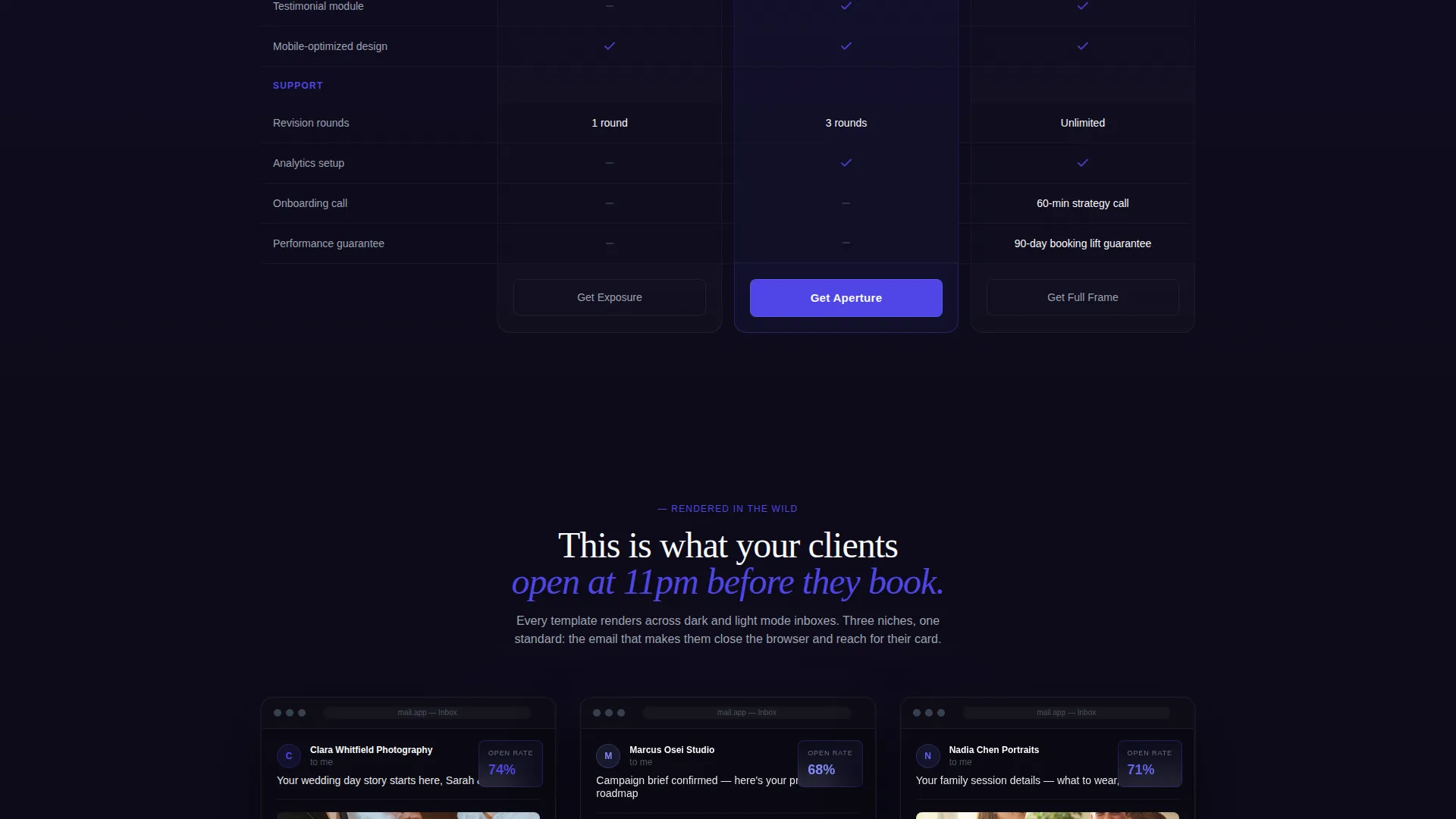
- Device mockups displaying real dark-themed inbox renders of the welcome email templates
- A dual-path lead capture form collecting email, photography specialty, platform preference, and monthly client volume
- A secondary conversion path offering a free personalized email audit
Feature list
This template brings together five purpose-built components. Each one is designed to earn attention and then convert it.
Interactive ROI Calculator
Before any copy loads, visitors answer three questions: clients per month, current booking rate, and average package price. The tool instantly renders projected revenue lift in glowing indigo numbers, creating urgency before a single feature is described.
Three-Tier Comparison Table
Three welcome email template tiers sit side by side on frosted glass cards. Each column lists deliverables clearly: sequence length, A/B variants, integration type, and turnaround time. Checkmarks pulse in electric indigo; absent features fade to titanium gray so the contrast is immediately readable.
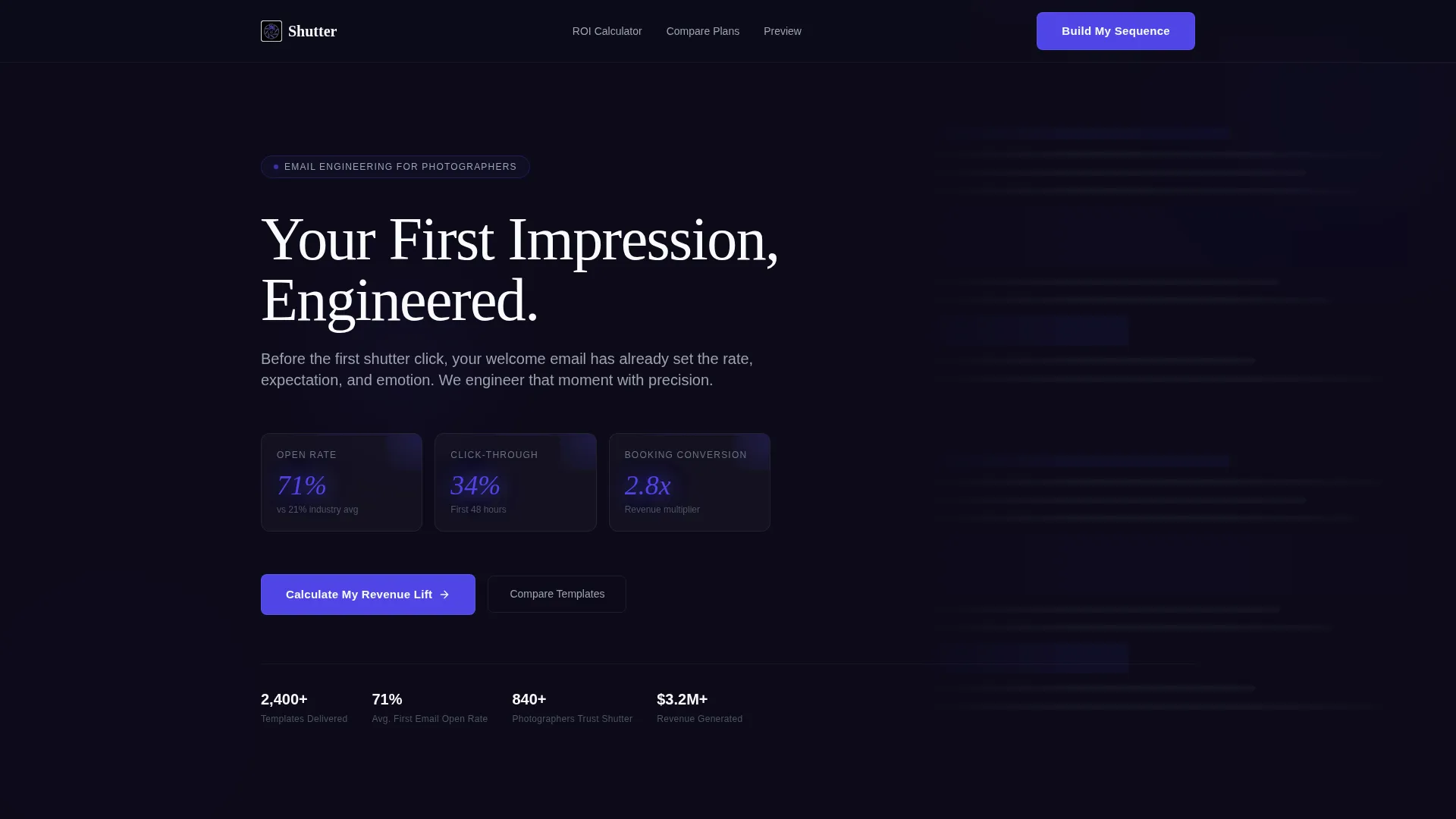
Dark Glass Panel Header
The header floats translucent frosted panels over a pure black field. Each panel displays a live email metric: open rate, click-through rate, and booking conversion. Numbers count upward in a subtle animation while a welcome email scrolls in slow parallax behind the glass.
Dual-Path Lead Capture
The primary call to action, labeled "Build My Welcome Sequence," captures email address, photography specialty, current email platform, and monthly client volume. A secondary path, "Send Me Your Current Welcome Email," routes visitors who want an audit before committing.
Device Mockup Email Previews
Real email screenshots sit inside dark-themed device mockups below the comparison table. Visitors see exactly how each template tier renders in an inbox, giving them visual proof that matches the performance claims made earlier in the page flow.
Page sections overview
| Section | Purpose |
|---|---|
| Dark Glass Header | Display key email metrics with count-up animation and parallax background |
| ROI Calculator | Capture client data and output projected revenue lift in real time |
| Comparison Table | Compare three template tiers side by side on frosted glass cards |
| Device Mockup Gallery | Show real inbox renders inside dark-themed device frames |
| Lead Capture Form | Convert visitors via primary sequence builder or free audit path |
Design & branding system
The visual identity follows a Data Command theme. Every design decision reinforces precision, control, and professional authority. The palette was built to feel like a retouching monitor calibrated at midnight.
- Deep void black (#0D0B1A) as the base canvas, dense rather than empty
- Charged indigo (#4F46E5) for interactive elements, glowing calls to action, and live data numbers
- Cool titanium gray (#9CA3AF) for secondary text, absent-feature indicators, and breathing space between data rows
- Signal white (#F9FAFB) for headline text and panel surfaces
Mobile & speed optimization
The layout is structured for clarity at every viewport. The comparison table, calculator, and mockup gallery are all designed to remain readable and functional on smaller screens.
- Frosted glass card columns reflow cleanly for single-column mobile reading
- Calculator inputs and form fields are sized for touch interaction
- Device mockups scale proportionally so inbox previews stay legible on phone screens
How this template helps you convert
This landing page is engineered around a scroll logic that moves from numbers to features to proof. The sequence is intentional and each step lowers resistance before the next ask.
- The ROI calculator creates a personal, financially specific reason to act before the visitor reads a single line of copy about the template itself.
- The comparison table gives rational buyers a clear framework to choose their tier, with visual hierarchy doing the heavy lifting instead of long paragraphs.
- The dual-path form removes the commitment barrier by offering a free audit as a lower-stakes entry point alongside the primary sign-up action.
Other information about this template
This template sits at the intersection of photography business tools and email marketing strategy. It is built for photographers who are already investing in their client experience and want their digital touchpoints to reflect that standard.
- The template style is a comparison table landing page, suited for photographers evaluating multiple service tiers
- The creative direction is Calculator/Tool First, meaning interactive data leads the visitor journey before any static copy appears
- The header concept, Dark Glass Panels, is a deliberate departure from typical photography landing pages that rely on hero imagery
- The theme, Data Command, positions the email metrics themselves as the most compelling visual element on the page
- This template can support photographers using various email platforms by capturing platform preference directly in the lead form
Theme
Data Command
Creative direction
Calculator/Tool First
Color system
Electric Indigo
Style
Comparison Table
Direction
Lead Generation
Page Sections
Interactive ROI Calculator
Three-tier Comparison Table
Dark Glass Panel Header
Dual-path Lead Capture Form
Dark-themed Device Mockups
Related questions
Who is this landing page template built for?
What does the ROI calculator actually do?
What is included in the comparison table?
What is the secondary conversion path on this landing page?
Can I customize the lead capture form fields?



