Premium Retail Software & SaaS Professional Website Template
Cartflow is a split-screen retail mobile app landing page built on a Data Command theme. It combines a live-code header, spec-sheet scroll sections, and near-zero-friction app download calls to action. Designed for direct-to-consumer brand founders, retail ops managers, and growth marketers, every layout choice pushes toward one outcome: the install.
by Rocket studio
Quick summary
Cartflow is a single-page retail mobile app landing page template built for high-stakes conversion. It pairs a 50/50 split-screen layout with a clinical, spec-sheet scroll rhythm. The Acid Digital color system makes every metric feel live. The entire page drives toward one action: downloading the app.
Who this template is for
This template is built for builders and operators who think in numbers. If your success depends on mobile commerce performance, this layout speaks your language.
- Direct-to-consumer brand founders who track store performance in real time
- Retail operations managers handling inventory across multiple locations
- Growth marketers who measure every step from first impression to purchase
What problem this template solves
Most app landing pages try to charm visitors with lifestyle imagery and vague promises. That approach fails with technical buyers who want proof before they commit.
- Visitors bounce when a page leads with hype instead of evidence
- Spec-driven audiences distrust soft copywriting and skip to the data
- Generic retail templates do not reflect the speed or precision of a mobile commerce product
What you get with this template
You get a complete, single-page landing page structure built to showcase a retail mobile app with clinical precision. The layout is fully organized around the spec-sheet creative direction so the page builds credibility section by section.
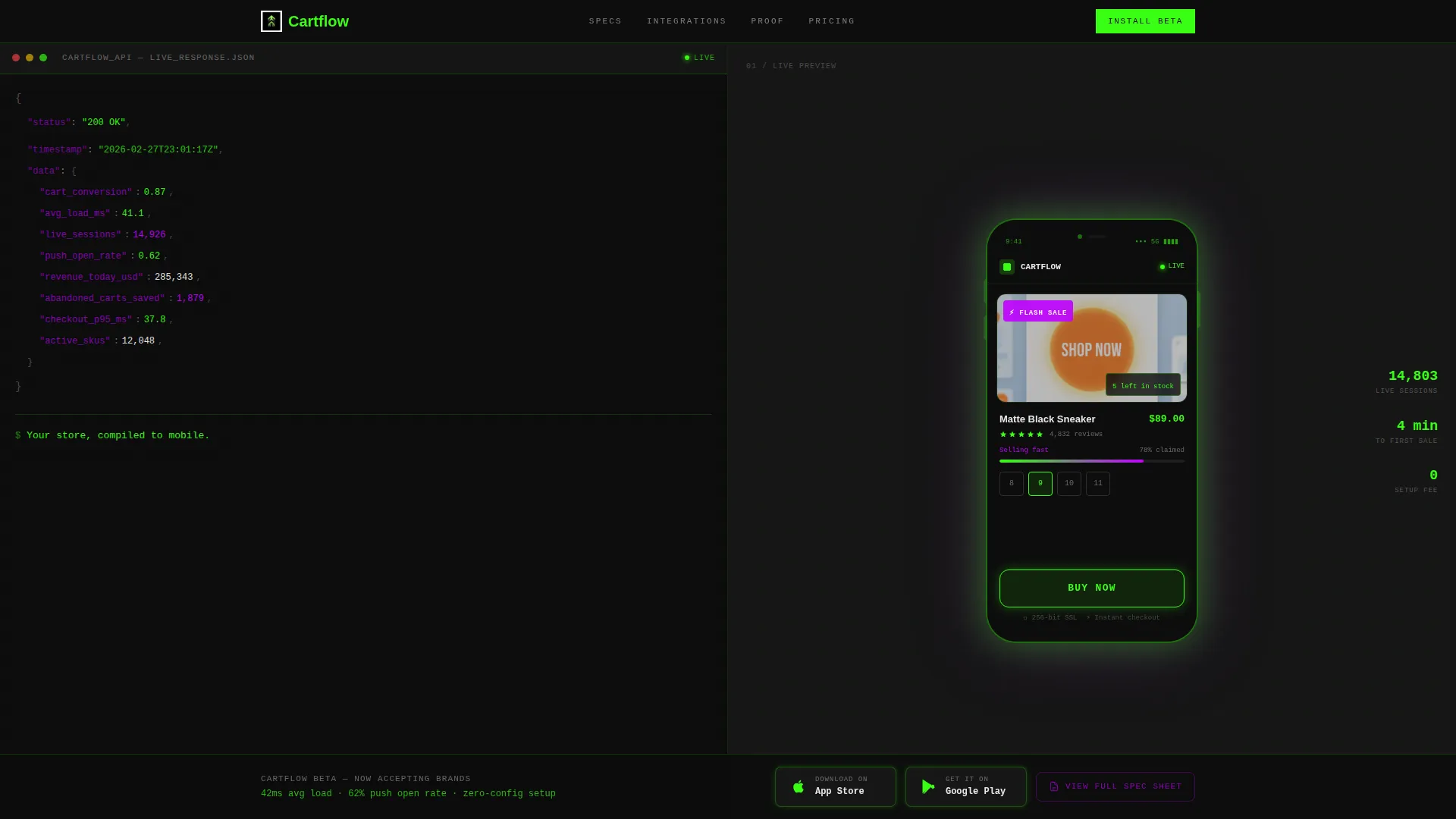
- A 50/50 split-screen header with a pseudo-API JSON code block on the left and a device mockup on the right
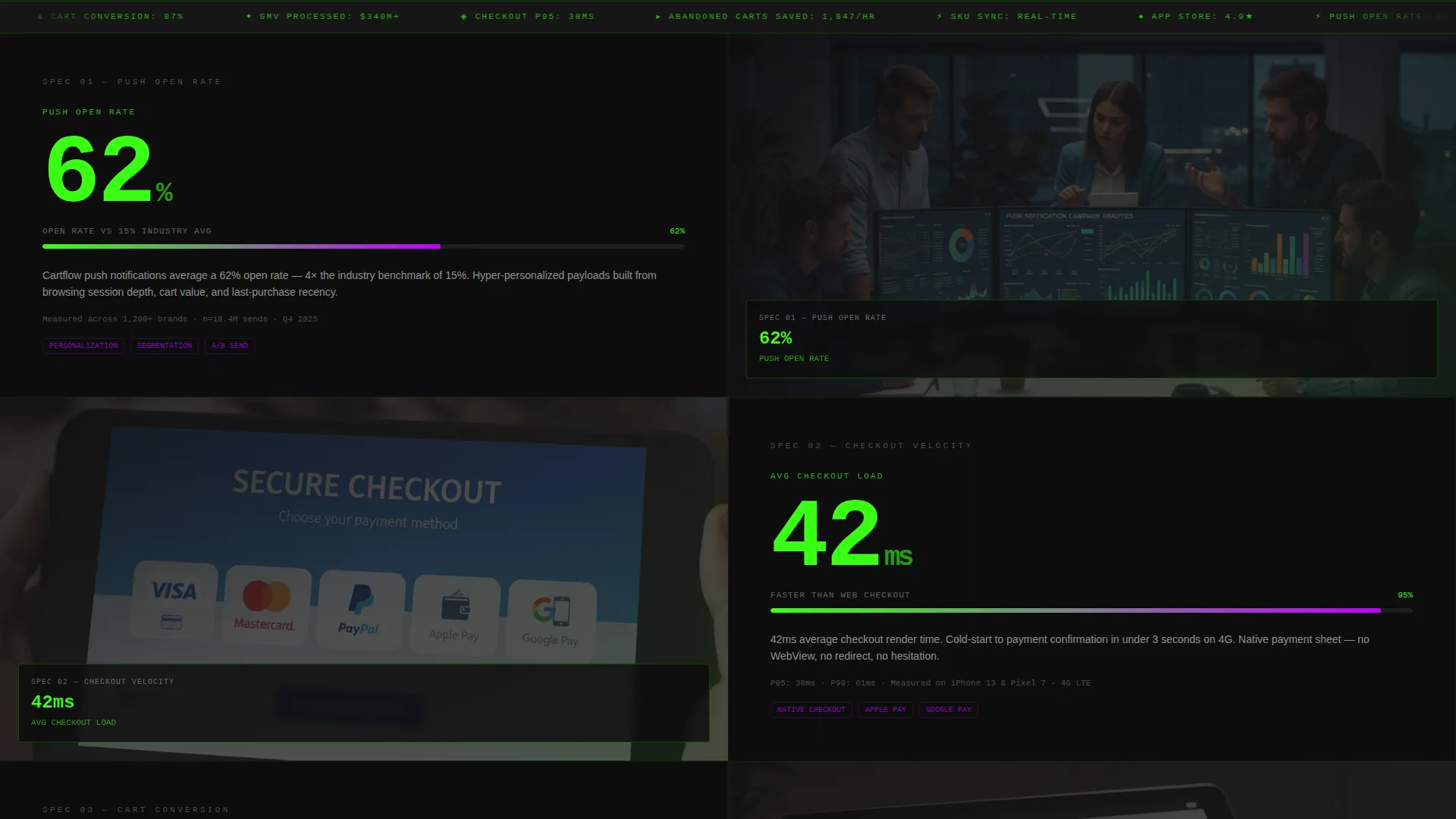
- Numbered specification blocks that pair oversized performance metrics with corresponding app screen visuals
- A sticky app download call-to-action section that pins to the viewport after the third spec block
Feature list
This template is built around six distinct capabilities, each drawn directly from the source brief.
Live-Code Header Block
The header splits into two equal panels. The left panel displays a styled pseudo-API JSON response with fields like live session counts and conversion rates, syntax-highlighted in phosphor green and ultraviolet violet. The right panel anchors a high-contrast device mockup showing a mid-transaction app screen. No hero headline appears immediately. A single monospaced line types itself in after the code loads.
Spec Sheet Scroll Sections
Each scroll section is a numbered specification block. The left side shows a single performance metric or feature label in oversized monospaced type. The right side shows the corresponding app screen or interaction demo. The cadence is deliberate: metric, then evidence, repeated until the visitor has absorbed enough proof to act.
Sticky App Download Call to Action
The primary call to action reads "Install the Beta" and includes paired app store badges rendered in phosphor green. It first appears after the third spec block. From that point forward it pins to the bottom of the viewport so the download option is always visible without interrupting the reading flow.
Gated Spec Sheet Secondary Path
A secondary conversion path offers a downloadable PDF spec sheet. It requires only a work email address to unlock. This gives analytically minded visitors a lower-commitment next step while still capturing a qualified lead contact.
Integration Diagram Section
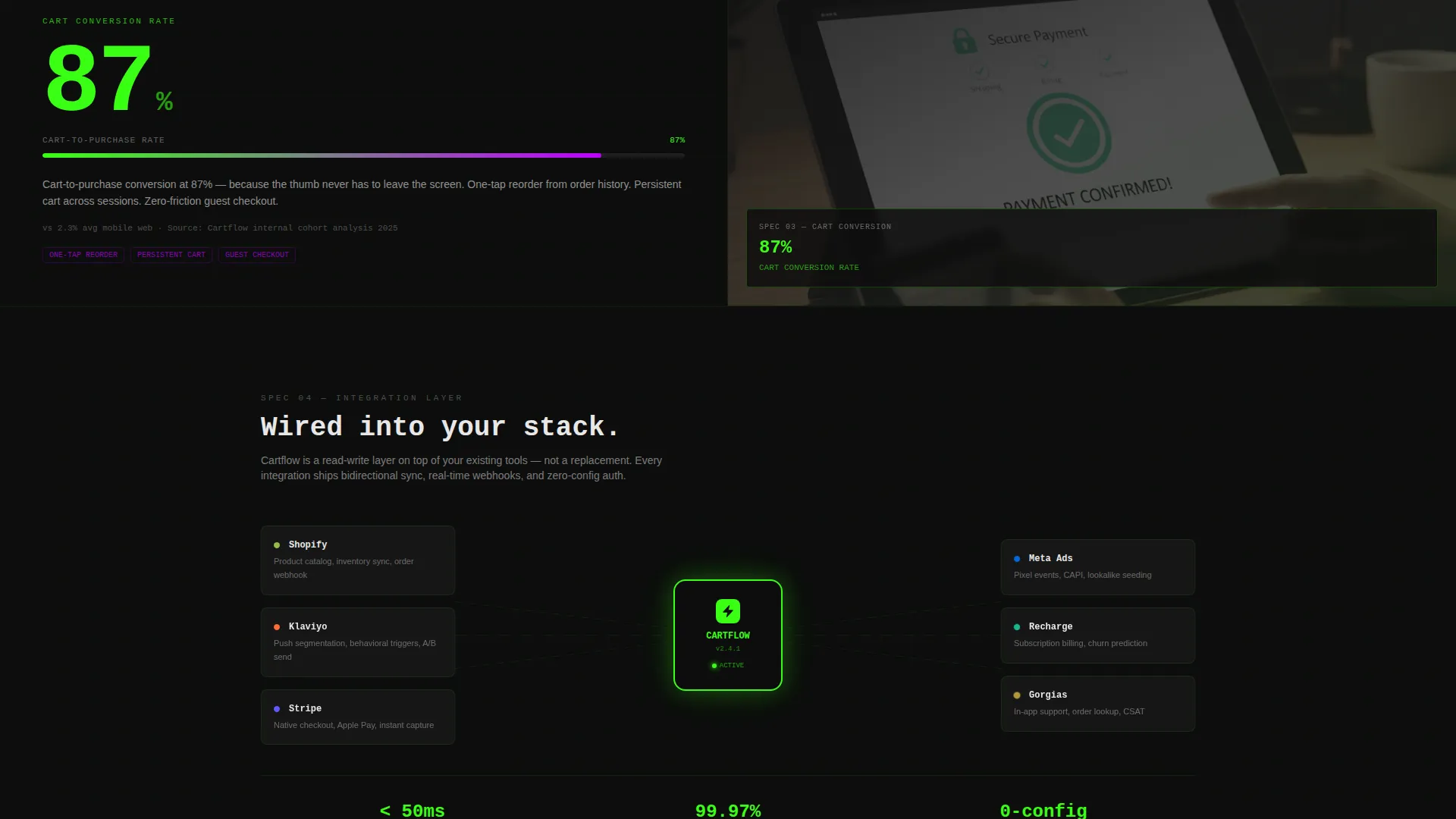
One dedicated scroll section displays a live integration diagram. It shows the app visually connected to commerce and marketing platforms. This section escalates the credibility arc from speed benchmarks and revenue attribution into a full system overview.
Acid Digital Color System
The entire template uses a four-tone palette: void black for all backgrounds, terminal phosphor green for live data indicators and call-to-action borders, ultraviolet violet for interactive hotspots and hover states, and status-bar white for body text. The result is a coherent visual identity that feels electric and intentional at every scroll depth.
Page sections overview
| Section | Purpose |
|---|---|
| Split Screen Header | Introduces the app with a code block and device mockup side by side |
| Typed Headline Line | Delivers the single brand statement after the code panel loads |
| Spec Block 01 | Pairs the first performance metric with its corresponding app visual |
| Spec Block 02 | Pairs the second performance metric with its corresponding app visual |
| Spec Block 03 | Pairs the third performance metric with its corresponding app visual |
| First call to action Placement | Introduces the "Install the Beta" and "View Full Spec Sheet" options |
| Integration Diagram | Shows the app wired into connected commerce and marketing platforms |
| Sticky Download Bar | Keeps app store badges pinned to the viewport through remaining scroll |
Design & branding system
The template uses a Data Command theme executed through an Acid Digital color system. Every design decision prioritizes legibility and perceived technical authority.
- Four-tone palette: void black (#0D0D0D), terminal phosphor green (#39FF14), ultraviolet violet (#BF00FF), and status-bar white (#E8E8E8)
- Monospaced typography used for spec labels, metrics, and the typed headline to reinforce a console-readout aesthetic
- Green reserved for live data pulses, progress bars, and call-to-action borders; violet marks all interactive and hover-state elements
Mobile & speed optimization
The template is designed to reflect a mobile-first product, and its layout structure supports fast rendering and clear thumb-zone navigation.
- Split-screen sections reflow gracefully for single-column display on smaller screens
- The sticky call-to-action bar is positioned within natural thumb reach on mobile viewports
- Lightweight visual treatments rely on color contrast and typography rather than heavy image assets
How this template helps you convert
Every layout and copy decision in this template is engineered to move a skeptical technical buyer toward a single low-friction action.
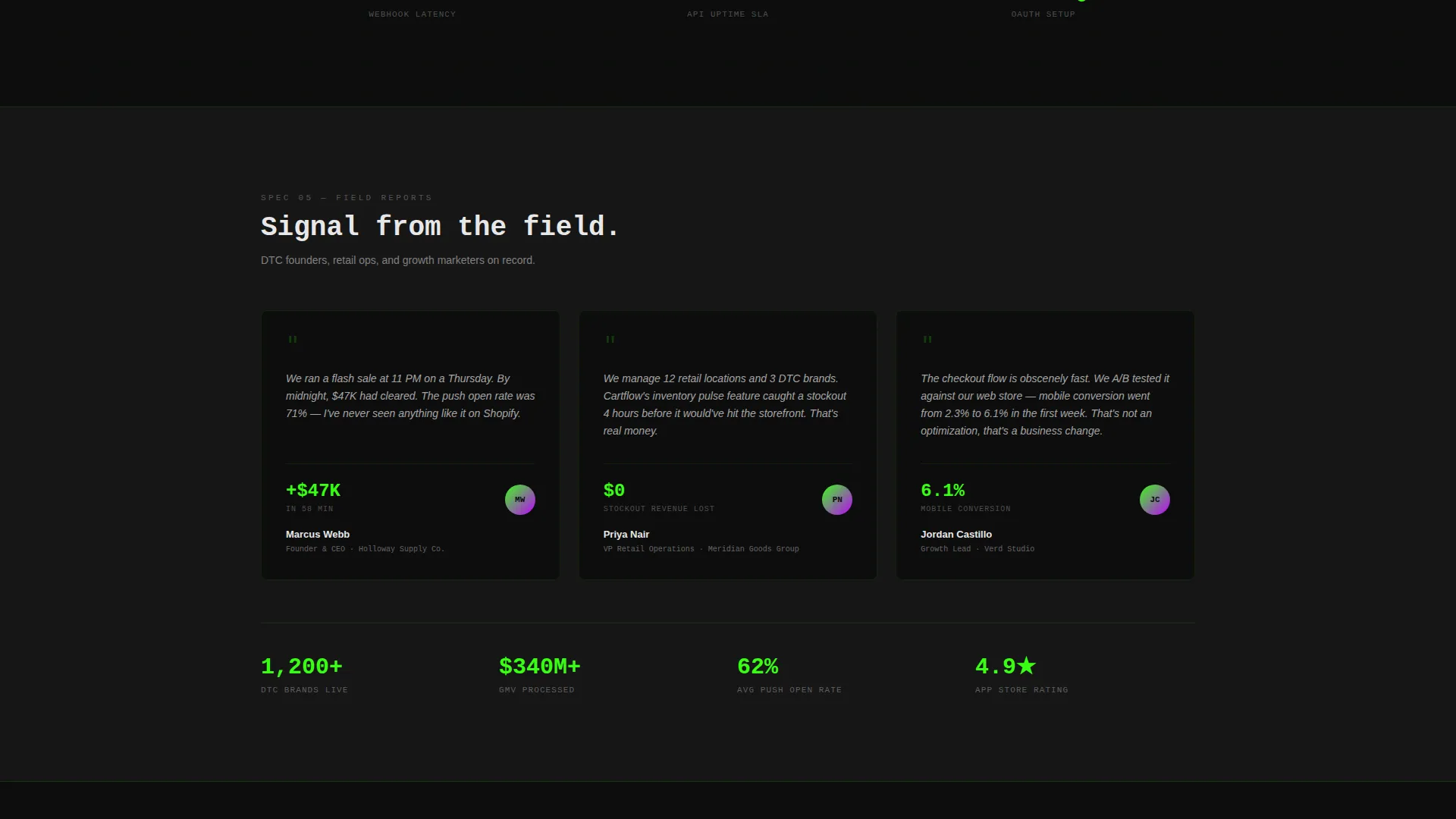
- The spec-sheet scroll rhythm builds trust incrementally. Each numbered block adds one more data point before the call to action appears, so visitors arrive at the download prompt already convinced.
- The sticky "Install the Beta" bar eliminates re-scrolling. Once the primary call to action pins to the viewport, the download option is always one tap away without disrupting the reading experience.
- The secondary "View Full Spec Sheet" path captures visitors who are not ready to install. A single work email unlocks the gated PDF, giving the funnel a qualified fallback with minimal added friction.
Other information about this template
This template was designed specifically for retail mobile app products where the buyer is technical, data-literate, and skeptical of soft marketing claims. A few additional details worth knowing:
- The template style is a strict 50/50 split screen, meaning left and right panels carry equal visual weight throughout the page
- The creative direction follows a Spec Sheet cadence, a format borrowed from technical product documentation rather than traditional marketing layouts
- The header concept is a Code Snippet, making it well suited to products that want to lead with performance data rather than brand storytelling
- The landing page direction is App Download, so the entire information architecture is organized to remove steps between arrival and install
- This template sits within the Retail Software and Software-as-a-Service subcategory of the Technology category, making it a strong fit for mobile commerce tools, retail operations platforms, and direct-to-consumer app products
Theme
Data Command
Creative direction
Spec Sheet
Color system
Acid Digital
Style
Split Screen (50/50)
Direction
App Download
Page Sections
Live-code Split Screen Header
Numbered Spec Sheet Sections
Sticky App Download Bar
Gated PDF Spec Sheet Path
Integration Diagram Section
Acid Digital Color System
Related questions
Who is this landing page template designed for?
What is the primary conversion goal of this template?
How does the sticky call-to-action bar work?
Can I adapt the spec blocks to show my own metrics?
Does this template include form fields or checkout functionality?



