Open-Source Enterprise Software Professional Website Template
Catalog is a dashboard-style landing page template built for a self-hosted digital asset management platform. It targets design leads, DevOps engineers, and marketing operations managers who need full control over their file infrastructure. The template uses a Monochrome Steel color system, Dynamic Motion animations, and a live interactive asset grid to show the product working before a visitor reads a single word.
by Rocket studio
Quick summary
Catalog is a single-page, dashboard-style template for a self-hosted digital asset management platform. It features a fully interactive asset grid header, animated comparison rows, and a deployment form that outputs a personalized configuration snippet on submit. The design runs on gunmetal, chrome, and a single electric mint accent that fires only on active states.
Who this template is for
This template is built for teams that manage large volumes of digital files and need a landing page that speaks to technically capable buyers. It is direct, data-forward, and skips the marketing fluff.
- Design leads at mid-size agencies who are outgrowing shared drives and need a credible product showcase
- DevOps engineers evaluating self-hosted infrastructure who want to see architecture and install commands before they commit
- Marketing operations managers who have been burned by per-seat pricing and want to understand the cost and control story upfront
What problem this template solves
Most digital asset management landing pages bury the product behind carousels and stock photography. Buyers who know what they want get frustrated fast. This template puts the actual product interface in the header and uses a structured comparison layout to answer the hardest objections before a visitor has to ask.
- Teams lose trust when a page cannot show the product working, only describing it
- Technical buyers skip pages that lead with benefits and hide architecture details
- Pricing-sensitive buyers abandon when they cannot compare self-hosted versus subscription costs at a glance
What you get with this template
You get a complete, section-led landing page that doubles as a product demonstration. Every major section is interactive and purposefully ordered to move a skeptical technical buyer from curiosity to deployment intent.
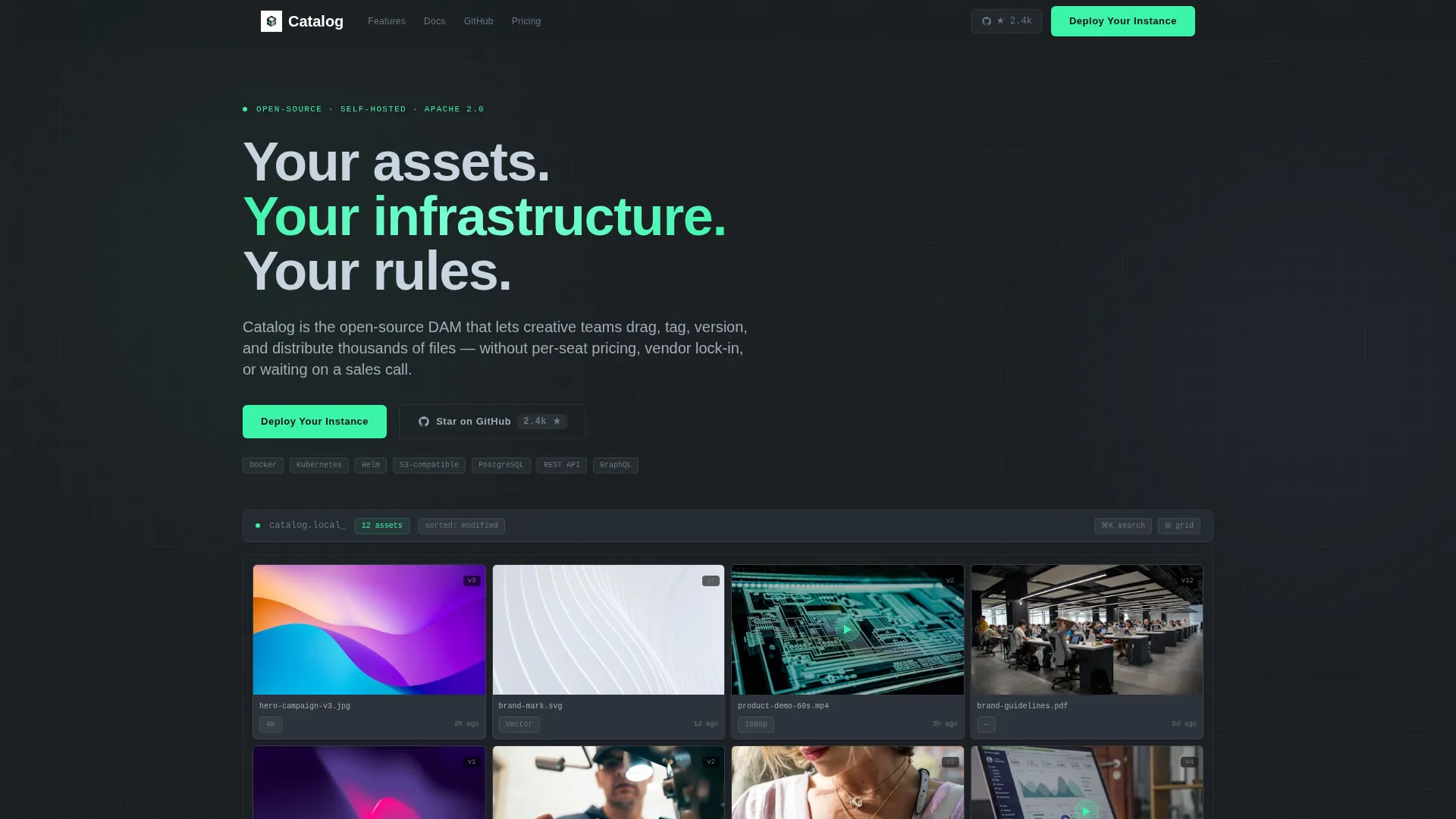
- A live 4x3 asset grid header with animated card expansion, metadata chips, and a sliding detail panel
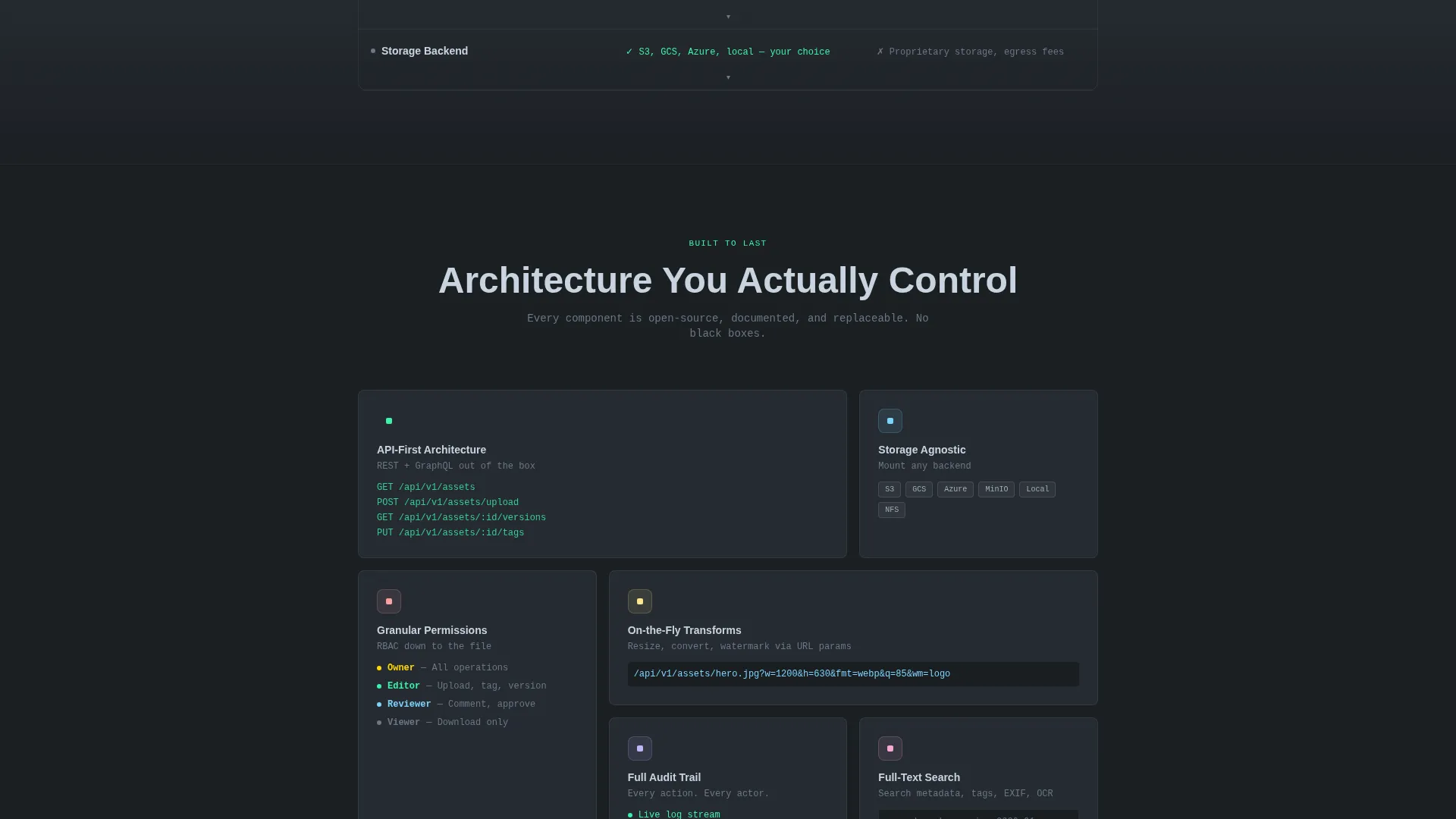
- A scrollable comparison section with interactive rows that expand to show benchmark data, architecture diagrams, or terminal snippets
- A three-field deployment form that generates a personalized Docker Compose or Helm chart snippet on submit, with no credit card required
Feature list
This template ships with purpose-built components tied directly to the open-source digital asset management use case. Each piece earns its place on the page.
Interactive Asset Grid Header
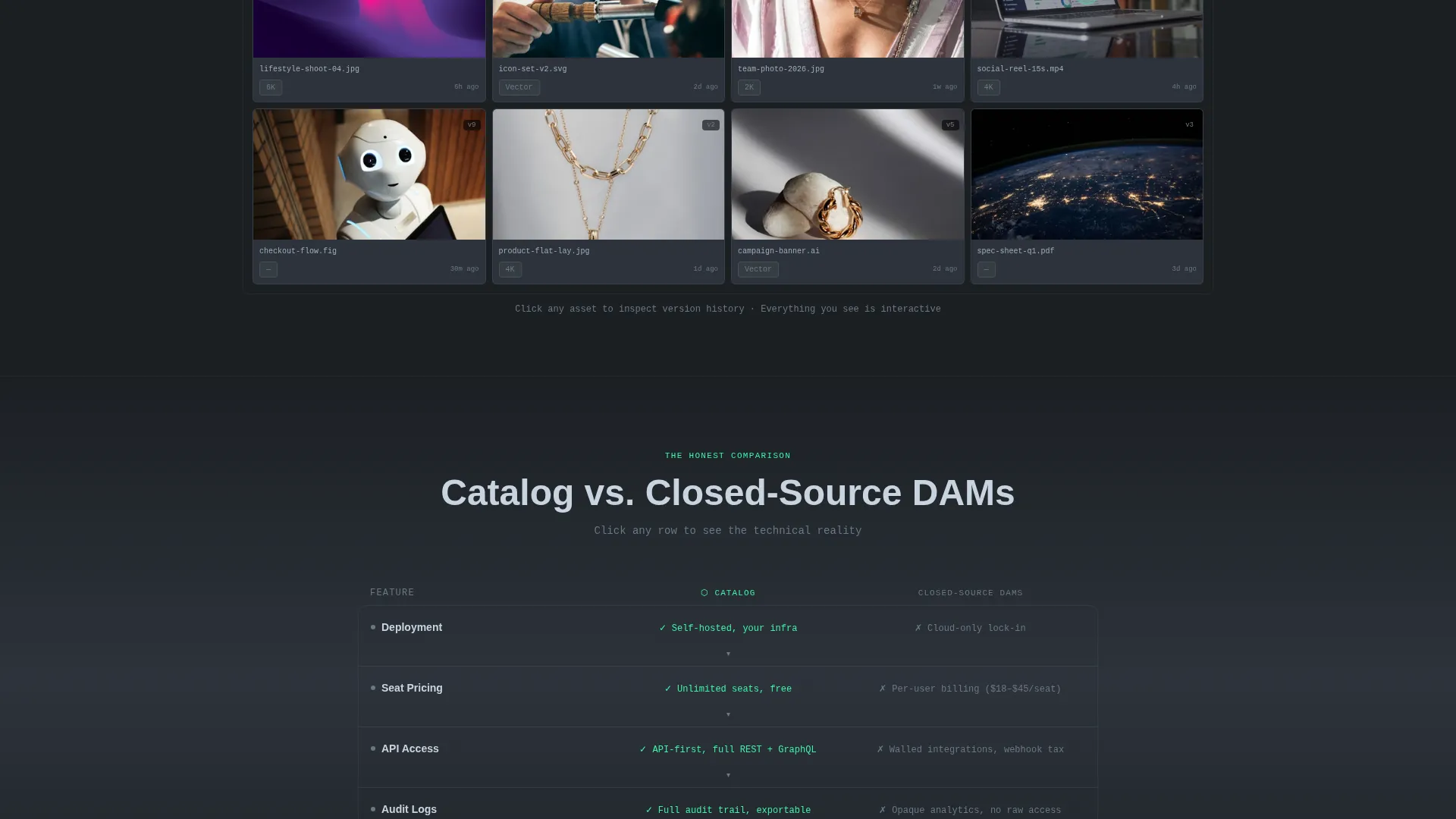
The header renders a functioning micro-instance of the asset grid directly in the viewport. Visitors see a 4x3 mosaic of thumbnails covering photos, vectors, video clips with animated previews, and a PDF spec sheet. Each tile shows metadata chips for file type, resolution, color profile, and last-modified timestamp. Hovering a tile triggers a card lift, sibling scatter, and a detail panel sliding in from the right with version history and a permission badge.
Animated Comparison Rows
The comparison section splits the viewport into two columns: the product on the left in mint, competing closed-source platforms on the right in muted chrome. Each row covers a specific point: self-hosted deployment versus cloud-only lock-in, unlimited seats versus per-user billing, API-first extensibility versus walled integrations, and full audit logs versus opaque analytics. Clicking any row expands a live data panel with supporting evidence.
Persistent Deploy call to action
The primary call to action reads "Deploy Your Instance" and appears as a persistent pill in the top navigation. It pulses mint at scroll milestones and reappears as a full-width block after the final comparison row. The placement ensures the action is always one click away regardless of where a visitor pauses.
Personalized Deployment Form
The form collects three fields: infrastructure preference (Docker, Kubernetes, or bare metal), estimated asset volume (10K, 100K, or 1M+), and a work email address. On submit, the form generates a personalized Docker Compose or Helm chart snippet, delivering immediate hands-on value before any sales conversation happens.
GitHub Star Counter Integration
A secondary call to action offers "Star on GitHub" with a live star counter pulling from the repository API. This path captures contributors and evaluators who are not yet ready to deploy but want to bookmark the project and follow its progress.
Dynamic Motion Design System
Every interaction uses purposeful motion: panels slide, counters tick, card siblings scatter on hover, and diffs highlight on row expansion. Motion rewards exploration rather than decorating the page. The result feels like operating a precision instrument, not browsing a brochure.
Page sections overview
| Section | Purpose |
|---|---|
| Interactive Grid Header | Show the asset grid working live in the viewport with metadata and hover detail panels |
| Top Navigation Bar | House the persistent "Deploy Your Instance" pill call to action that pulses on scroll milestones |
| Comparison Split Section | Present side-by-side rows contrasting self-hosted and closed-source DAM decisions |
| Expandable Data Panels | Surface benchmark numbers, architecture diagrams, or terminal snippets on row click |
| Full-Width Deploy Block | Reinforce the primary call to action after the final comparison row for high-intent visitors |
| Deployment Config Form | Collect three fields and return a personalized configuration snippet on submit |
| GitHub Star call to action | Offer a low-commitment secondary path for contributors not ready to deploy |
Design & branding system
The visual identity follows a Dynamic Motion theme built on a Monochrome Steel color system. Every surface feels machined and precise, with light catching only where it is intended to.
- Color palette: deep gunmetal (#1B1F23) for backgrounds, brushed chrome (#A0ADB8) for body text, panel-edge charcoal (#2D333B) for card surfaces, and electric mint (#3BF4A8) reserved strictly for interactive states, hover glows, and confirmation signals
- Motion philosophy: animations are purposeful and mechanical, reflecting the precision of a milled aluminum enclosure rather than decorative transitions
- Interactive feedback: mint fires like a status LED on hover, scroll milestones, form confirmation, and call to action pulse states, keeping the interface feeling alive and responsive
Mobile & speed optimization
The template is designed to preserve the interactive experience across viewport sizes without sacrificing the density of the dashboard layout.
- The 4x3 asset grid and comparison rows adapt to narrower viewports while keeping metadata chips and expand interactions accessible
- Motion behavior scales to device capability so that the Dynamic Motion theme does not overwhelm smaller screens
- The deployment form remains fully functional at mobile widths, with dropdown fields and submit logic intact
How this template helps you convert
This template is built around a Comparison/Versus conversion strategy. It removes the friction that typically kills technical buying decisions by showing the product, answering objections with data, and delivering value before asking for a commitment.
- The interactive header proves the product works before a visitor reads the headline, cutting skepticism at the entry point
- The comparison rows address the three most common objections (deployment model, pricing structure, and integration flexibility) with expandable evidence panels rather than bullet claims
- The deployment form closes the loop by outputting a usable configuration snippet on submit, turning a curious visitor into someone with a running container
Other information about this template
This template is designed for open-source enterprise software teams that need to communicate credibility and technical depth at the same time. It fits naturally into the broader open-source digital asset management category where buyers compare self-hosted options against established commercial platforms.
- The template style is Dashboard/Data Grid, making it well suited for products that benefit from showing a live data interface rather than a static screenshot
- The Interactive Explorer creative direction drives scroll engagement by turning each section into a structured decision point rather than passive reading
- The Interactive Preview header concept is a key differentiator, replacing the typical hero image with a functioning product demo that builds immediate trust with technical audiences
- This template works well for teams evaluating open-source DAM tools who need to communicate deployment flexibility, control, and total cost of ownership on a single page
Theme
Dynamic Motion
Creative direction
Interactive Explorer
Color system
Monochrome Steel
Style
Dashboard/Data Grid
Direction
Comparison/Versus
Page Sections
Interactive Asset Grid Header
Animated Comparison Rows
Persistent Deploy Call to Action
Personalized Deployment Form
Github Star Counter
Related questions
Does this template require coding knowledge to deploy?
Can I change the color palette to match my brand?
What makes this template different from a standard SaaS landing page?
Is the GitHub star counter connected to a real API?
Who is this template best suited for?



