Local Data & Analytics Professional Website Template
Catalog is a card grid landing page template built for data catalog platforms. It combines a dark glass panel header, an interactive asset explorer, and a filterable mock catalog to show visitors exactly what a modern data catalog feels like. The design uses a Midnight Blue palette with electric blue and signal-green accents for an information-dense, control-room aesthetic.
by Rocket studio
Quick summary
Catalog is a single-page template designed for data catalog platforms. It puts metadata discovery front and center with animated lineage maps, flippable asset cards, and a filterable catalog grid. The dark terminal aesthetic signals credibility to technical audiences immediately, while a freemium conversion path lets visitors interact before they ever fill out a form.
Who this template is for
This template speaks directly to the people who live inside data infrastructure every day. It is built for technically literate audiences who need to trust a product before they sign up.
- Analytics engineers who need to find reliable datasets quickly across a sprawling warehouse environment
- Data stewards and governance leads responsible for classifying columns, enforcing policies, and tracking ownership
- Platform leads and data team managers who need to demonstrate compliance and catalog coverage to security stakeholders
What problem this template solves
Data teams waste significant time searching for trustworthy datasets, tracing column origins, and proving that sensitive fields are properly classified. A generic landing page cannot communicate the depth of a data catalog product to a technical audience. This template solves that mismatch.
- Visitors can interact with real product mechanics like asset filtering and lineage animation before committing to a sign-up
- The design immediately signals that this is a serious, information-dense tool built for engineers and governance professionals
- The conversion flow earns trust through demonstration rather than asking for credentials upfront
What you get with this template
The template delivers a complete single-page layout with a modular card grid structure. Every section is built to show product depth rather than describe it abstractly.
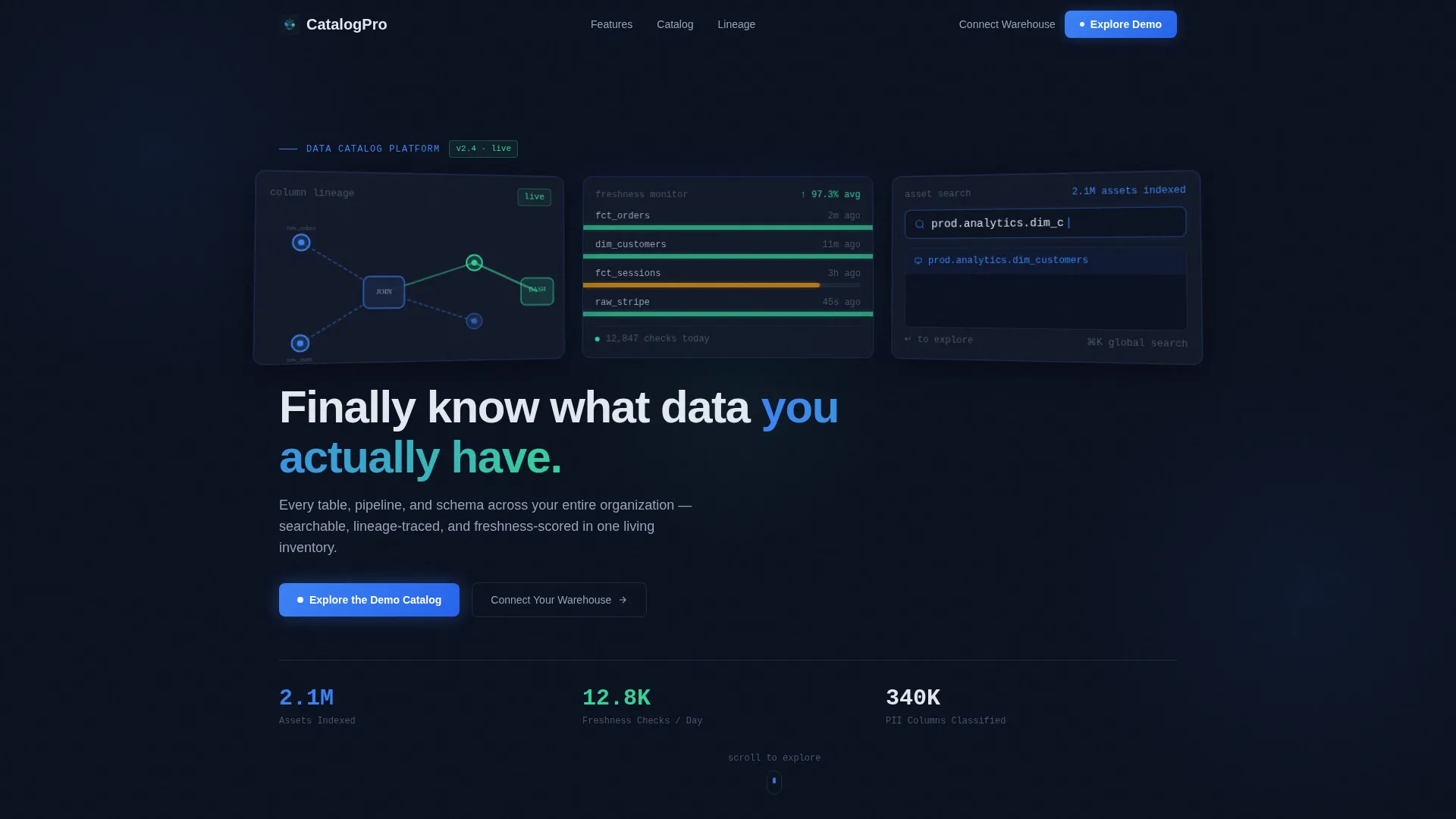
- A dark glass panel header featuring three translucent frosted-glass cards displaying a lineage graph, a freshness dashboard, and a live search interaction
- A scrollable interactive explorer with flippable asset-type cards, a domain-filterable mock catalog grid, and an animated lineage map that builds node by node on scroll
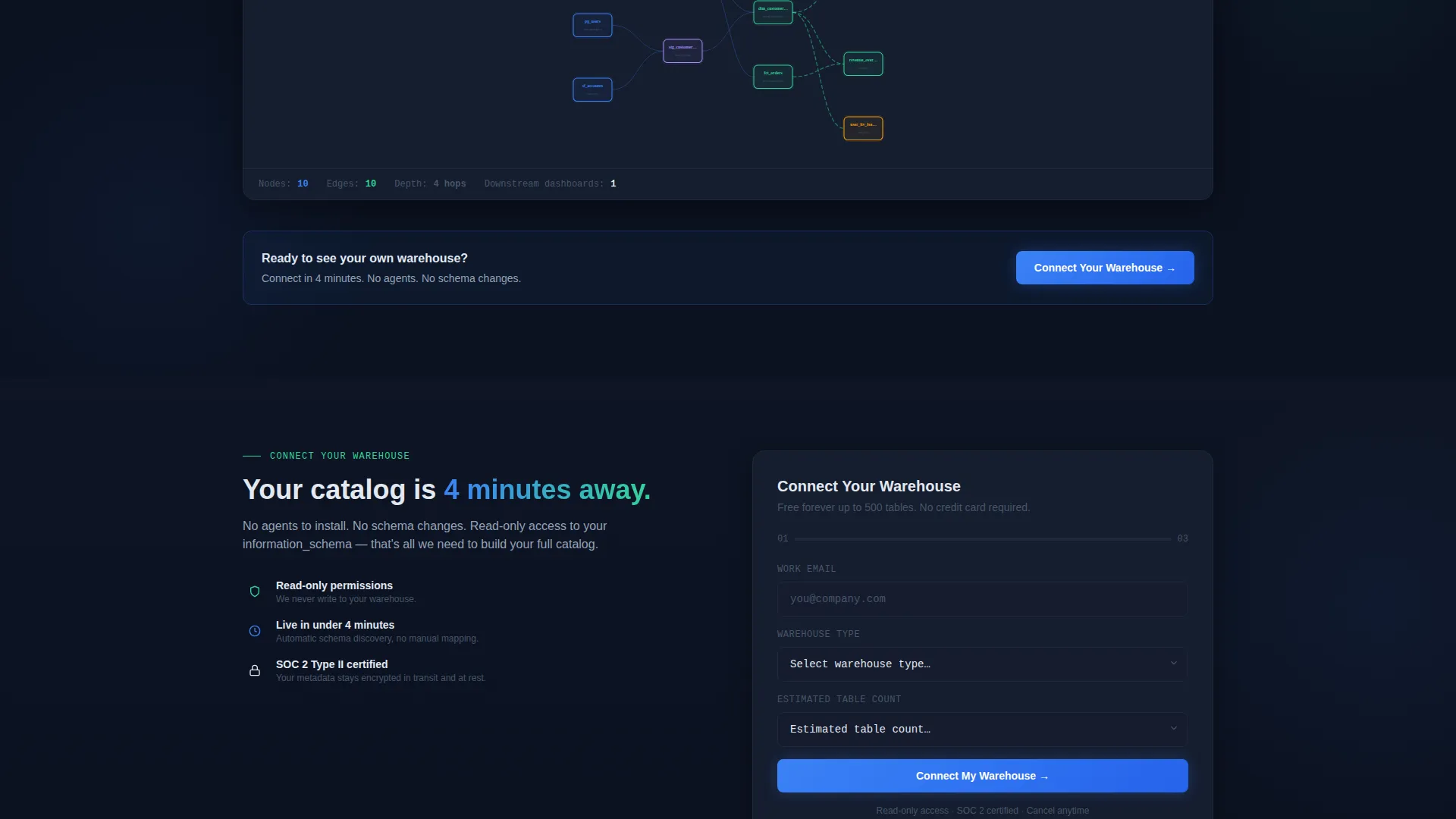
- A dual conversion path including a primary "Explore the Demo Catalog" call to action and a secondary "Connect Your Warehouse" three-field form
Feature list
This template is built around prompt-backed components and interaction patterns drawn directly from the source brief.
Dark Glass Panel Header
Three translucent frosted-glass cards sit angled in perspective against a deep navy background. Each panel displays a distinct real artifact: a column-level lineage graph with glowing node connections, a data freshness dashboard with green heartbeat pulses, and a search bar mid-query with autocomplete results like prod.analytics.dim_customers. A single headline fades in after the panels load.
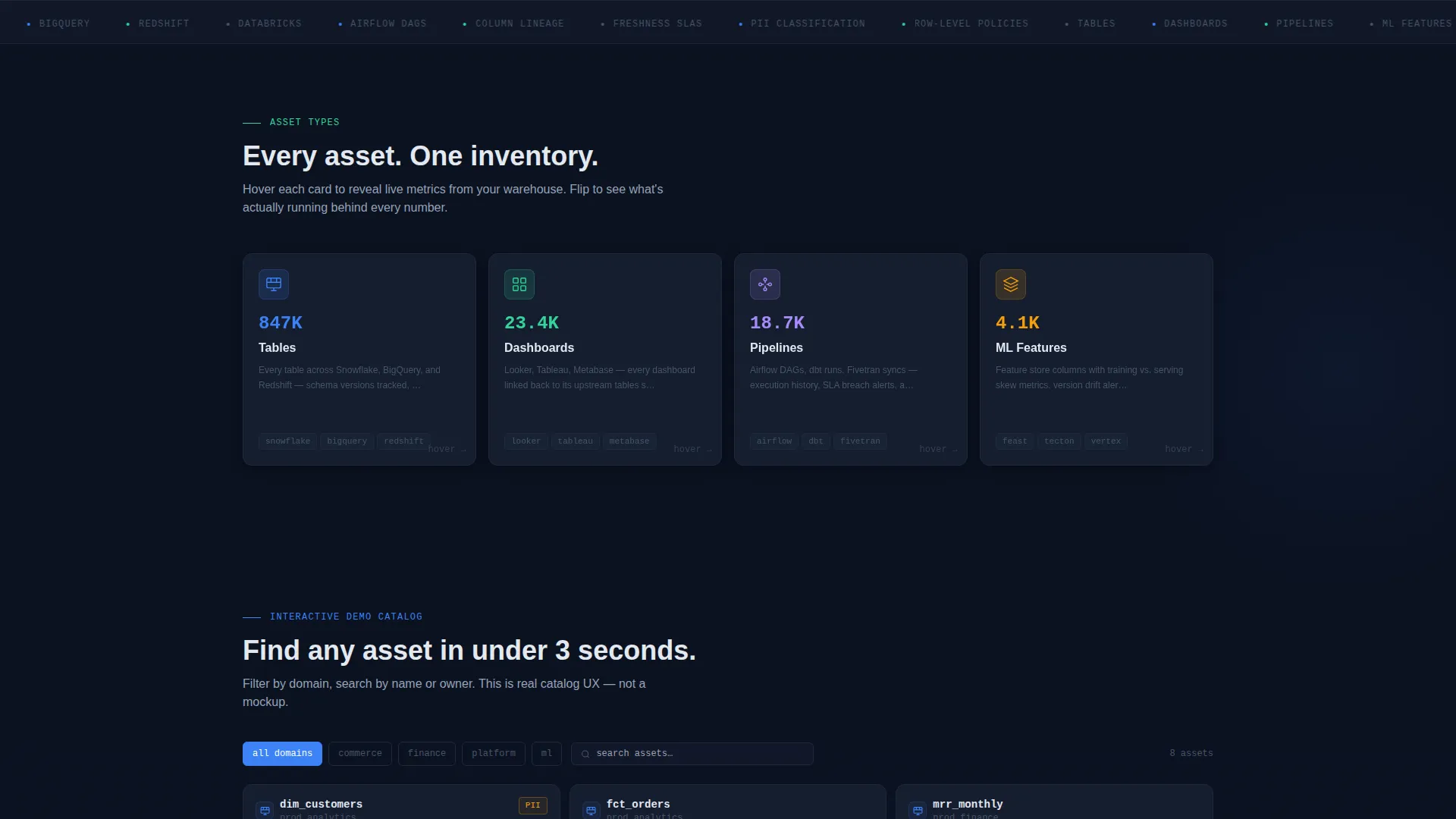
Flippable Asset-Type Card Grid
The first scroll section presents asset-type cards covering tables, dashboards, pipelines, and machine learning features. Each card flips on hover to reveal live stats, giving visitors a tactile sense of the catalog's depth before any form appears.
Filterable Mock Catalog Section
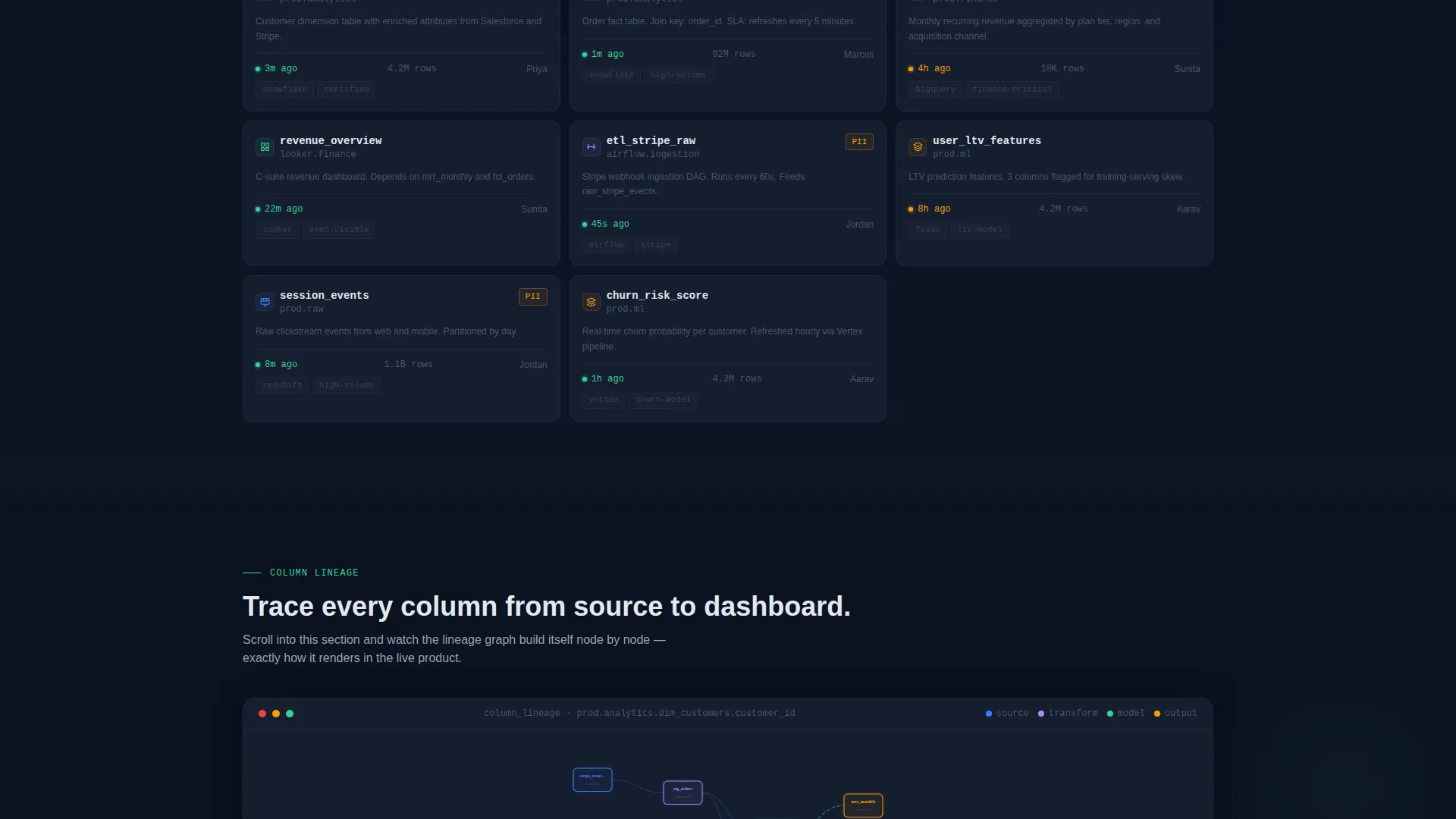
A domain-tag filter system lets visitors click category labels and watch the card grid shuffle and re-sort in real time. This section simulates the actual search and filter experience of the product, making the use case immediately tangible.
Animated Lineage Map
As the visitor scrolls, a lineage graph builds itself node by node, tracing a column from ingestion point through transformation layers to a final dashboard. The animation teaches the concept of data lineage through direct visual interaction rather than explanatory text.
Dual Conversion Path with Sticky Navigation
The primary call to action, "Explore the Demo Catalog," is placed in the sticky navigation bar and repeated after the lineage section. The secondary path offers a three-field form collecting work email, warehouse type via dropdown, and estimated table count. Both paths are timed to appear after the visitor has already engaged with the interactive sections.
Midnight Blue Branding System
The full color system uses deep terminal navy, panel-surface charcoal, electric blue for active states and hover glows, and signal-green for health indicators. Cards float on the charcoal surface with subtle slate borders that glow electric blue on hover, creating a live-data-asset feel throughout the page.
Page sections overview
| Section | Purpose |
|---|---|
| Dark Glass Header | Communicate product identity through three live artifact panels before any headline |
| Fade-In Headline | Deliver the single positioning line after panels have loaded |
| Asset Type Cards | Show catalog asset categories with flip-to-reveal live stats |
| Filterable Catalog Grid | Let visitors sort and filter mock assets by domain tag in real time |
| Animated Lineage Map | Build a column-level lineage graph node by node as the visitor scrolls |
| Demo Catalog call to action | Drive primary conversion to the live sandbox after interactive engagement |
| Connect Your Warehouse | Capture secondary leads with a three-field warehouse connection form |
| Sticky Navigation Bar | Keep the primary call to action accessible at every scroll depth |
Design & branding system
The visual identity is built on the Dashboard Pro theme using a Midnight Blue color system. The palette is designed to feel like a Bloomberg terminal crossed with a starfield: dark, information-dense, and immediately readable.
- Core colors: deep terminal navy (#0B1120) for the page background, panel-surface charcoal (#151D2E) for card backgrounds, electric blue (#3B82F6) for active nodes and hover glows, signal-green (#34D399) for freshness indicators and success states, and interface white (#E2E8F0) for primary text
- Cards use 1px borders in muted slate (#1E293B) that transition to an electric blue glow on hover, creating the impression that each module is a live, interactive data asset
- Ambient light reflections on glass panel edges and perspective-angled header cards reinforce the control-room aesthetic without adding visual clutter
Mobile & speed optimization
The modular card grid layout is structured to reflow cleanly across screen sizes. Interactive elements are scoped so the core experience remains coherent on smaller viewports.
- Card grid columns collapse progressively so asset cards, catalog filters, and the lineage section remain usable on tablet and mobile displays
- The sticky navigation bar retains the primary call-to-action button across all breakpoints, keeping the conversion path accessible regardless of device
How this template helps you convert
The conversion strategy is built on letting visitors experience the product before they are asked for anything. This approach is especially effective with technical audiences who distrust marketing claims.
- The interactive explorer sections, flippable asset cards, the filterable catalog grid, and the scrolling lineage map all demonstrate real product mechanics, so visitors arrive at the call-to-action already familiar with the interface.
- The dual conversion path meets visitors at two different intent levels: the "Explore the Demo Catalog" link targets high-intent visitors ready to explore immediately, while the "Connect Your Warehouse" form captures leads who are evaluating fit for their specific warehouse environment.
Other information about this template
This template is categorized under Technology, Data and Analytics, with a specific focus on the data catalog niche. It is designed to support freemium and free-trial acquisition models common in modern data infrastructure tooling.
- The template style is Card Grid (Modular), making it straightforward to extend or reorder sections as a product's feature set grows
- The Dashboard Pro theme and Interactive Explorer creative direction make this layout well suited for positioning alongside tools in the broader data observability and metadata management space
- The three-field warehouse connection form supports warehouse type options for Snowflake, BigQuery, Redshift, and Databricks as specified in the source brief
- This template is built as a single-page landing page, not a multi-page website, so all sections flow vertically within one continuous scroll experience
Theme
Dashboard Pro
Creative direction
Interactive Explorer
Color system
Midnight Blue
Style
Card Grid (Modular)
Direction
Freemium/Trial
Page Sections
Dark Glass Panel Header with Live Artifacts
Flippable Asset-type Card Grid
Real-time Filterable Catalog Grid
Scroll-triggered Animated Lineage Map
Dual Conversion Path with Sticky Navigation
Related questions
Who is this template designed for?
Can I customize the asset card categories shown in the grid?
Does the template include the interactive filtering and lineage animation?
What warehouse options are included in the connection form?
Is this a single page or a multi-page website?



